Overview

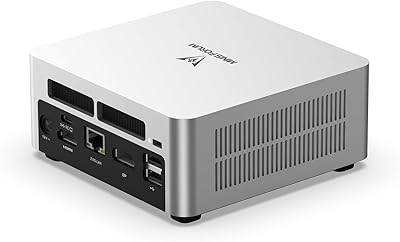
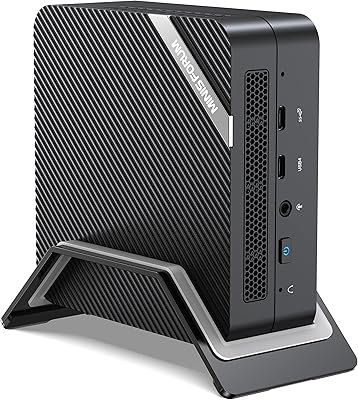
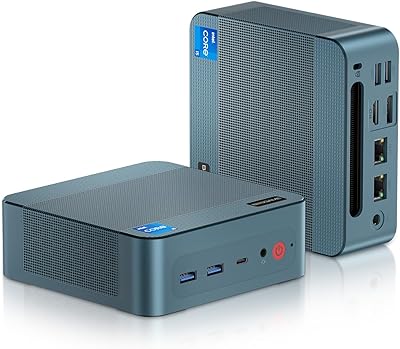
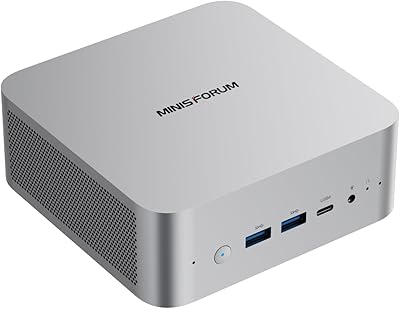
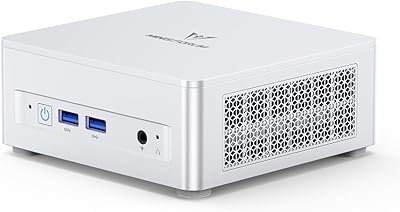
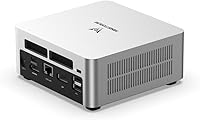
The MINISFORUM UN1290 (32GB/512GB) is a compact desktop that squeezes genuine workstation-class muscle into a chassis smaller than most hardcover books. At its core sits Intel's 12th Gen i9-12900HK — a chip engineered for high-end laptops, now repurposed to run a miniature form factor. At its price point, it competes credibly against similarly specced small-form-factor machines, often undercutting them on cost while matching on raw CPU horsepower. The silver chassis weighs barely over a pound and feels solid rather than cheap. One thing worth setting straight upfront: there is no discrete GPU here, so this is a productivity and multimedia machine, not a gaming rig.
Features & Benefits

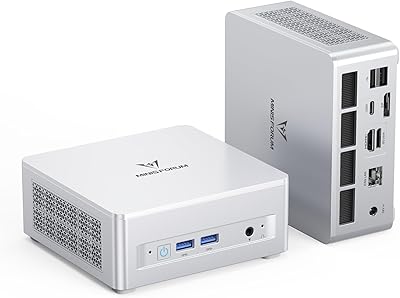
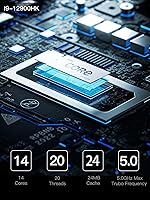
The i9-12900HK brings 14 cores and 20 threads to a box you can hide behind a monitor, and that core count shows when running multiple browser tabs, a Docker instance, and a code compiler simultaneously — tasks that would choke lesser mini PCs. Triple 4K display output via HDMI, DisplayPort, and USB-C lets this machine genuinely drive a three-monitor setup without adapters. The PCIe 4.0 SSD slot delivers noticeably faster read and write speeds compared to older Gen 3 drives, and the 32GB dual-channel DDR4 handles heavy multitasking without hesitation. The 2.5GbE network port is a real differentiator for home lab users who want to run OpenWRT or set up a local NAS.

Best For

This mini PC earns its keep on a home office desk where screen real estate matters — triple display support alone makes it compelling for anyone juggling spreadsheets, terminals, and video calls across monitors. Developers running resource-hungry IDEs or spinning up local servers will appreciate the RAM headroom and expansion options. It also fits neatly into a home theater cabinet or behind a screen for digital signage without drawing attention. Network tinkerers will find the 2.5GbE port opens up routing and firewall use cases most compact desktops skip entirely. Dedicated gamers or GPU-dependent video editors, however, should look elsewhere — Intel Iris Xe integrated graphics has a hard ceiling that no amount of RAM can overcome.

User Feedback

Early buyers of the UN1290 are generally positive about day-to-day responsiveness — web browsing, document work, and light video editing run without complaint. Setup draws mixed reactions; this compact desktop ships without a pre-installed OS, which experienced users treat as a clean slate but newcomers sometimes find frustrating. Fan noise under load is the most frequently raised concern: the cooling system audibly spins up during sustained CPU tasks, and a handful of users report throttling during long compile jobs or extended stress tests. Port placement earns occasional praise, though managing three display cables in a tight space can feel cramped. The review pool is still small given the recent launch date, so current trends are encouraging but warrant cautious interpretation.

Pros

  • The i9-12900HK delivers 14 cores of processing power in a chassis smaller than most routers.
  • Triple 4K display output — HDMI, DisplayPort, and USB-C — is rare and genuinely useful for multi-monitor productivity setups.
  • 32GB of dual-channel DDR4 handles heavy multitasking without breaking a sweat, and is user-upgradeable to 64GB.
  • PCIe 4.0 SSD slot provides noticeably faster storage speeds than the PCIe 3.0 drives found in competing mini PCs.
  • The 2.5GbE LAN port sets this mini PC apart for home lab, NAS, and network appliance use cases.
  • Wi-Fi 6E and Bluetooth 5.2 keep wireless connectivity current and future-ready.
  • A secondary 2.5-inch SATA bay allows bulk storage expansion without relying on external drives.
  • The solid silver chassis weighs barely over a pound and fits behind a monitor, in a media cabinet, or in a bag.
  • Competitive pricing relative to other i9-equipped small-form-factor desktops adds real value for the spec sheet offered.

Cons

  • Fan noise under sustained CPU load is a recurring complaint — it ramps up quickly and noticeably in quiet environments.
  • Thermal throttling has been reported during prolonged intensive tasks, limiting consistent peak performance.
  • No pre-installed OS means extra setup work that first-time mini PC buyers may not anticipate.
  • Linux driver support is inconsistent, with Wi-Fi and audio requiring manual configuration on some distributions.
  • The USB port count feels limited for power users — a hub becomes necessary sooner than expected.
  • HDMI 2.0 rather than 2.1 limits high-refresh-rate output options for users who want more than 60Hz at 4K.
  • Cable management with three display outputs attached becomes noticeably messy on a compact desk.
  • The secondary SATA storage slot uses the older SATA 3.0 interface, making it significantly slower than the primary SSD.
  • The included power adapter adds meaningful bulk when packing the unit for travel between locations.

Ratings

The MINISFORUM UN1290 (32GB/512GB) has been evaluated by our AI system after analyzing verified buyer reviews from global markets, with spam, incentivized, and bot-generated feedback actively filtered out. Scores reflect a balanced picture — where this compact desktop genuinely punches above its weight class and where real users have run into friction. Both the strong points and the frustrations are represented honestly below.

CPU Performance
89%
The i9-12900HK delivers a level of raw threading power that most buyers in this form factor simply do not expect. Developers running parallel build jobs, analysts working in Python with heavy datasets, and users juggling a dozen browser tabs alongside a video call all report that the machine keeps up without visible hesitation.
Sustained workloads — think long compile runs or extended video exports — can push the chip into thermal territory where clock speeds back off noticeably. Users doing truly continuous heavy work report that performance is not always consistent over time compared to a desktop-grade processor with proper cooling headroom.
Thermal Management
63%
37%
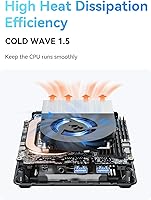
For light-to-moderate workloads like office applications, web browsing, and 4K video playback, the cooling system handles things quietly and the chassis stays comfortable to the touch. The thermal design is clearly optimized for the typical use patterns this machine is marketed toward.
Under sustained CPU stress, the fan ramps up to levels that are hard to ignore in a quiet room, and some buyers report thermal throttling during prolonged tasks. Fitting a 45W TDP mobile chip into a sub-1.2-pound chassis is inherently a tradeoff, and this is where that tradeoff shows up most clearly.
Multi-Monitor Support
91%
Having three independent 4K outputs — HDMI, DisplayPort, and USB-C — on a box this size is genuinely rare at this price point. Users building three-screen productivity setups report that all three outputs work reliably at 60Hz and that the experience mirrors what you would get from a much larger machine.
Managing three display cables on a compact chassis can make the desk situation messy, and the USB-C port doing double duty as display output and data transfer means you occasionally have to choose between functions. A few buyers also note that the HDMI version is 2.0 rather than 2.1, which limits future-proofing at very high refresh rates.
RAM & Expandability
86%
Shipping with 32GB of dual-channel DDR4 is a meaningful starting point — most productivity users will never hit a ceiling for typical workloads. The fact that both SODIMM slots are user-accessible and upgradeable to 64GB gives this machine real longevity compared to soldered alternatives.
DDR4 rather than DDR5 is a generational limitation worth noting for buyers comparing newer platforms. At 3200MT/s the memory is functional but not the fastest available, and users with memory-bandwidth-sensitive workflows like certain creative applications may notice the ceiling.
Storage Performance
84%
The PCIe 4.0 M.2 slot enables substantially faster sequential read and write speeds compared to PCIe 3.0 drives in competing mini PCs, and users doing large file transfers or working with fast storage notice the difference day-to-day. The addition of a 2.5-inch SATA bay is a practical bonus for bulk media storage.
The SATA expansion slot uses the older SATA 3.0 interface, so any secondary drive will be significantly slower than the primary SSD. Buyers wanting NVMe speeds across all their storage will find only one high-speed slot available, which may require prioritization decisions as storage needs grow.
Networking & Connectivity
88%
The combination of 2.5GbE wired LAN, Wi-Fi 6E, and Bluetooth 5.2 is above average for this product category and opens up use cases like running a local NAS, setting up a software router, or connecting to a multi-gigabit home network switch. Home lab users specifically flag the 2.5GbE port as a deciding factor in their purchase.
Wi-Fi 6E requires a compatible router to unlock its full potential, and buyers on older network hardware will not see any benefit over standard Wi-Fi 6. A small number of users also report that Bluetooth connectivity required manual driver attention on certain Linux configurations.
GPU & Graphics
58%
42%
Intel Iris Xe handles everyday tasks — including 4K video streaming, light photo editing, and driving three monitors simultaneously — without any issues. For users whose workload is not GPU-dependent, the integrated graphics is entirely sufficient and eliminates the cost and power draw of a discrete card.
Buyers who discover the graphics limitation after purchase are among the most disappointed reviewers. Modern games, GPU-accelerated video rendering, machine learning inference, and any serious creative work involving real-time effects will hit a hard wall that more RAM or faster storage simply cannot compensate for.
Build Quality & Design
78%
22%
The silver aluminum-finish chassis feels noticeably more substantial than plastic mini PC shells at comparable price points, and the overall footprint is genuinely small enough to mount behind a monitor or tuck into a media cabinet invisibly. At just over a pound, it is also easy to relocate or travel with.
Some buyers feel the internal layout makes DIY upgrades slightly fiddly, particularly accessing the SATA drive bay with cables attached. The exterior, while clean-looking, does show fingerprints easily and a handful of users note that the chassis flex under pressure is more noticeable than they expected.
Port Layout & Variety
74%
26%
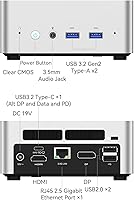
Having USB 3.2 Gen2 ports alongside the USB-C means that external SSDs, high-speed hubs, and modern peripherals all get the bandwidth they need. The 3.5mm combo audio jack and digital mic input cover basic audio needs without requiring an external adapter for most users.
With only two USB 2.0 ports rounding out the USB count, power users with multiple peripherals may find themselves reaching for a hub sooner than expected. The physical port placement on the front and rear has drawn some criticism for making simultaneous cable management awkward in tight desk setups.
Setup & Out-of-Box Experience
66%
34%
Experienced users appreciate receiving a machine with no OS pre-installed — it means a clean slate with no bloatware and full control over the software environment from the start. BIOS access is straightforward and the hardware is generally well-recognized by major operating systems.
For buyers who were not expecting a bare OS state, the initial setup experience can be jarring — there is no guided setup or recovery partition. Driver availability for non-Windows operating systems is inconsistent, and a few Linux users report needing extra steps to get full hardware functionality out of the box.
Noise Level
61%
39%
During idle and light tasks the UN1290 is quiet enough to sit comfortably on a desk without drawing attention. Users running it as a home theater PC or digital signage display in environments where the machine is rarely under load report a perfectly acceptable acoustic profile.
The fan behavior under sustained load is one of the more consistent buyer complaints — it ramps up quickly and reaches levels that are noticeable in a home office or bedroom environment. Users who need near-silent operation during intensive work should factor this in carefully before purchasing.
Value for Money
82%
18%
Relative to other mini PCs with comparable CPU specs, this compact desktop is priced competitively and the inclusion of 32GB RAM and a PCIe 4.0 slot out of the box means buyers are not immediately faced with upgrade costs. The networking stack alone — 2.5GbE plus Wi-Fi 6E — would cost extra to add to many competing units.
The value calculation shifts depending on use case. Buyers who later discover they need discrete graphics or better sustained performance under load may feel the money would have been better spent on a different platform entirely, making the pre-purchase research step particularly important here.
Size & Portability
87%
At roughly the size of a thick paperback book, the UN1290 fits behind monitors, inside AV racks, and inside laptop bags without issue. Users who move between workspaces — office and home, for instance — find it genuinely practical to pack and relocate, especially compared to traditional desktop towers.
The compact size is a direct reason why thermal limitations exist, so buyers should understand that portability and sustained peak performance are in tension here. The power adapter, while included, adds bulk to the travel package and is not as streamlined as notebook-style charging solutions.
Software & Driver Support
69%
31%
Windows 11 installation and driver recognition are generally smooth, with most hardware components identified automatically. MINISFORUM has a reasonably active support page and driver repository compared to some smaller mini PC brands, which gives buyers some confidence in long-term software support.
Linux support is workable but inconsistent — certain kernel versions handle the Wi-Fi and audio hardware better than others, and users on non-mainstream distributions report doing more manual configuration than they expected. Given the machine shipped without an OS, more comprehensive documentation would meaningfully improve the experience.

Suitable for:

The MINISFORUM UN1290 (32GB/512GB) is a strong fit for anyone who needs real computing muscle in a minimal footprint — particularly remote workers and home office professionals who want a clean, clutter-free desk without sacrificing the ability to run three monitors simultaneously. Developers will find the 14-core processor and 32GB of dual-channel RAM more than adequate for running local servers, Docker containers, and memory-hungry IDEs side by side. Network enthusiasts and home lab hobbyists are another natural audience: the 2.5GbE port opens up genuine use cases like running OpenWRT, setting up a software firewall, or connecting directly to a multi-gigabit NAS without a bottleneck. It also works well as a compact home theater PC or a digital signage driver, where its small size and triple display capability are genuine advantages over a bulky tower. Buyers who are comfortable installing their own OS and want a machine they can grow into — upgrading RAM to 64GB or swapping in a larger SSD down the road — will appreciate the flexibility this platform offers.
Not suitable for:

If gaming is anywhere on your priority list, the UN1290 is not the right machine — Intel Iris Xe integrated graphics has a hard ceiling that rules out modern titles and GPU-accelerated workloads regardless of how capable the CPU is. Video editors, 3D artists, or anyone relying on CUDA, OpenCL, or real-time GPU rendering will run into the same wall quickly. Users who need sustained peak CPU performance for hours at a time — long compile jobs, batch encoding, or scientific simulations — should also think carefully, as the compact chassis can lead to thermal throttling under continuous heavy load. Buyers who expect a fully configured, ready-to-use system out of the box may be caught off guard by the absence of a pre-installed operating system, which adds a setup step that not everyone anticipates. Finally, those who work in genuinely quiet environments and are sensitive to fan noise should be aware that this compact desktop can become audible under stress, which may be disruptive in a shared or silent workspace.

Specifications

  • CPU: Intel Core i9-12900HK with 14 cores and 20 threads, clocking up to 5.0 GHz on performance cores.
  • GPU: Intel Iris Xe integrated graphics running at up to 1.45 GHz — no discrete GPU is included.
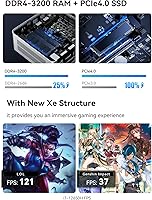
  • RAM: 32 GB DDR4 dual-channel memory installed across two SODIMM slots, upgradeable to a maximum of 64 GB at up to 3200 MT/s.
  • Primary Storage: One M.2 2280 PCIe 4.0 slot houses the included SSD, supporting drives up to 2 TB.
  • Secondary Storage: One internal 2.5-inch SATA 3.0 bay (6.0 Gb/s) supports HDDs or SSDs up to 2 TB, with a SATA cable included in the box.
  • Display Output: Three simultaneous 4K outputs are available: HDMI 2.0, DisplayPort 1.4, and USB-C, each capable of 4K at 60 Hz.
  • Wired Network: A single RJ45 port delivers 2.5 Gigabit Ethernet, compatible with software router setups including OpenWRT and DD-WRT.
  • Wireless: Wi-Fi 6E (802.11ax) with dual-band 2.4 GHz and 5 GHz support is provided via an M.2 2230 card slot.
  • Bluetooth: Bluetooth 5.2 is built in alongside the Wi-Fi module.
  • USB Ports: Four USB ports are provided: two USB 3.2 Gen2 Type-A, one USB 3.2 Type-C (supporting Alt DP, data, and PD), and two USB 2.0 Type-A.
  • Audio: Audio connections include a 3.5 mm combo headphone/microphone jack, HDMI audio output, and a built-in digital microphone.
  • Power: The unit is powered by a DC 19V adapter that is included in the package.
  • Dimensions: The chassis measures 7.6 × 5.1 × 2.9 inches, making it genuinely palm-sized and easy to mount or stow.
  • Weight: The unit weighs approximately 1.19 lbs, light enough to mount behind a monitor with a standard VESA bracket.
  • Chassis & Color: The outer shell is a silver-finish compact chassis with a Clear CMOS button on the rear panel.
  • Operating System: No operating system is pre-installed; buyers must supply and install their own OS.
  • Memory Type: System memory uses DDR4 SDRAM in a dual-channel configuration across two accessible SODIMM slots.
  • Storage Interface: The primary NVMe slot uses a PCIe 4.0 x4 interface, while the secondary bay uses SATA 3.0 at 6.0 Gb/s.
  • Package Contents: The box includes the mini PC unit, one HDMI cable, one US power adapter, one SATA cable for the 2.5-inch bay, and a user manual.
  • Availability Date: This product was first made available for purchase in April 2025.

Related Reviews

MINISFORUM UN1290 Mini PC Core i9-12900HK 32GB RAM 1TB SSD
88%
93%
Performance
88%
Build Quality
89%
Ease of Setup
91%
Multitasking Efficiency
67%
Cooling & Thermals
More
MINISFORUM UM773 Lite Mini PC, 32GB RAM, 1TB SSD
83%
88%
Performance
85%
Cooling System
92%
Value for Money
83%
Build Quality
89%
Connectivity Options
More
MeLE Overclock 4C Mini PC, 32GB RAM, 512GB Storage
89%
89%
Performance
91%
Build Quality
96%
Portability
90%
Display Support
88%
Connectivity
More
MINISFORUM MS-A1 Mini Workstation, 32GB RAM, 1TB SSD
87%
90%
Performance
93%
Multitasking Ability
85%
Build Quality
88%
Cooling Efficiency
91%
Display Support
More
KAMRUI E3B Mini PC (Ryzen 5 7430U, 32GB RAM, 512GB SSD)
86%
94%
Multitasking Performance
91%
Office Productivity
89%
Display Connectivity
93%
Value for Money
96%
Space Efficiency
More
BOSGAME P5 Mini PC with AMD Ryzen 7 6800H, 32GB RAM, 512GB SSD
86%
88%
Performance
85%
Value for Money
94%
Compactness & Size
90%
Multitasking Ability
86%
Cooling & Noise Control
More
BOSGAME P2 Mini PC (Intel Core i5-12600H, 32GB RAM, 512GB SSD)
79%
88%
Performance for Everyday Tasks
91%
Value for Money
74%
Build Quality & Design
76%
Thermal Management & Noise
86%
Display & Multi-Monitor Support
More
MINISFORUM UM880 Plus Mini PC AMD Ryzen 7 8845HS 32GB RAM 1TB SSD
83%
93%
Performance
89%
Connectivity Options
91%
Multitasking Capability
88%
Build Quality
84%
Graphics Performance
More
MINISFORUM UM870 Slim Mini PC AMD Ryzen 7 8745H 32GB RAM 1TB SSD
86%
89%
Performance
90%
Multitasking Capability
78%
Gaming Performance (Light Titles)
92%
Triple Display Support
94%
Compact Design/Size
More
MINISFORUM UM690L Slim Mini PC, AMD Ryzen 9 6900HX, 32GB RAM, 1TB SSD
87%
91%
Performance
87%
Value for Money
85%
Build Quality
88%
Cooling and Thermals
92%
Connectivity Options
More

FAQ

No, the MINISFORUM UN1290 (32GB/512GB) ships without any operating system installed. You will need to purchase a Windows license separately and install it yourself, or install a Linux distribution of your choice. MINISFORUM does provide driver downloads on their support site to help with the process.
Yes, all three outputs — HDMI, DisplayPort, and USB-C — can drive independent displays simultaneously, each at 4K and 60 Hz. This is a fully functional triple-display setup, not a marketing claim. Just keep in mind that the USB-C port handles display output, data transfer, and power delivery, so you may need to plan your cable situation if you want to use all three functions at once.

The RAM is not soldered — it uses two standard SODIMM slots, the same type you would find in a laptop. The machine ships with 32 GB installed, and you can upgrade it to 64 GB by swapping in compatible DDR4 SO-DIMMs. It is a fairly accessible upgrade for anyone comfortable opening a small PC.

At idle or during light tasks like browsing and document work, the fan is barely noticeable. Under sustained CPU load — compiling code, running a stress test, or doing extended video exports — the fan does ramp up and becomes audible. It is not disruptive in a busy office, but in a quiet bedroom or recording environment it would likely be noticeable. This is a known tradeoff when fitting a 45W TDP processor into a chassis this small.

Light or older titles may run acceptably, but this compact desktop is not built for gaming. The Intel Iris Xe integrated graphics has a hard performance ceiling, and modern games will either run poorly or not at all at meaningful settings. If gaming is a priority, you should look at mini PCs that include a discrete GPU, as more RAM or a faster SSD will not change the graphics situation here.

If you have a NAS, a managed switch, or a router that supports 2.5 Gigabit speeds, you can take full advantage of that bandwidth for fast local file transfers. It also makes this machine a capable candidate for running as a software router or firewall using platforms like OpenWRT or pfSense. For most people just browsing the web, a standard gigabit connection is more than enough — but for home lab users it is a meaningful differentiator.

Yes. There is a secondary 2.5-inch SATA bay inside the chassis, and a SATA cable is included in the box to connect it. You can install any standard 2.5-inch hard drive or SATA SSD up to 2 TB in that slot, giving you additional storage alongside the existing M.2 drive. Just note that SATA speeds are considerably slower than the PCIe 4.0 primary slot, so it is best used for bulk media or backup storage rather than your OS or active projects.

Major distributions like Ubuntu and Fedora install and run without significant issues on recent kernel versions. However, some users have reported that Wi-Fi and audio occasionally require manual driver steps depending on the distribution and kernel version in use. If you plan to run Linux, it is worth checking current community threads for your specific distribution before committing, as the experience can vary.

At its price point, the UN1290 is competitive — the combination of a 12th Gen i9, 32 GB RAM, PCIe 4.0 storage, 2.5GbE networking, and Wi-Fi 6E in a single package is difficult to match without spending noticeably more. Where some competing units have an edge is in sustained thermal performance or discrete GPU options, so the right choice really depends on whether your workload needs better graphics or just strong CPU and connectivity.

It works well for this purpose. The HDMI 2.0 output handles 4K at 60 Hz for streaming and locally stored video without any issues, and the compact chassis fits neatly in or behind an AV cabinet. Under typical home theater use the machine runs quietly. Just be aware that HDMI 2.0 does not support 4K at 120 Hz or higher refresh rates, which matters if you have a newer high-refresh-rate television.