Overview

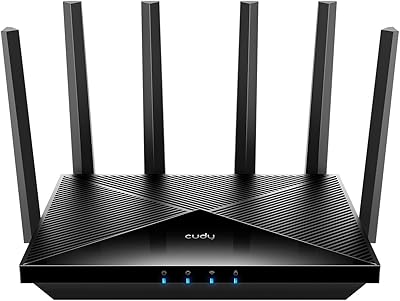
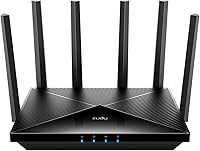
The Cudy WR6500 WiFi 7 Dual-Band Router arrived in late 2024 as one of the more accessible ways to step into the WiFi 7 generation without spending flagship money. It runs on a Broadcom quad-core CPU clocked at 2GHz — a notable hardware choice at this price point that helps handle simultaneous connections without bottlenecking. The flat, low-profile chassis is compact enough to sit on a shelf without dominating the room, and the box includes everything you need to get started right away. This is not a tri-band powerhouse or an enterprise-grade solution. But with 88 early reviews averaging 4.2 stars, real buyers seem reasonably happy with what they got.
Features & Benefits

The headline feature is WiFi 7 support, which means this dual-band router is capable of theoretical combined speeds that far exceed what most home networks have ever needed — though real-world throughput will always fall short of the advertised ceiling depending on your devices and environment. Practically speaking, the gigabit wired ports are just as valuable for anyone running a desktop, NAS, or gaming console over Ethernet. The built-in VPN functionality — both as a client and a server — is a genuine differentiator at this price, handling remote work and privacy needs without extra hardware. Cudy Mesh support, app-based management, QoS, and parental controls round out a feature set that punches above its weight class.

Best For

The Cudy WR6500 makes the most sense for gamers and streamers who want the latest wireless standard without committing to a tri-band or premium-tier setup. It works well in smaller homes or apartments where one well-placed router covers the whole space. Remote workers who need a router-level VPN — rather than juggling software clients on every device — will find that feature alone worth the price. If you are already using other Cudy hardware, the mesh compatibility makes this a natural upgrade path. And if you simply want to be ready when more WiFi 7 devices hit the market, this is a low-risk way to get there ahead of the curve.

User Feedback

Early buyers tend to praise the straightforward setup process and connection stability once the router is running. Several users note that real-world speeds are solid for everyday tasks — streaming, browsing, and gaming — even if they do not approach the theoretical maximum. On the critical side, a handful of reviewers mention that range in larger spaces can be limiting, and a few have flagged minor inconsistencies with the mobile app. Cudy is not a household name in the way that Netgear or TP-Link are, which gives some buyers pause around long-term support. That said, the overall sentiment leans positive, with most users feeling they received fair value for a WiFi 7 unit.

Pros

  • One of the most affordable routers to offer genuine WiFi 7 support out of the box.
  • The built-in Broadcom quad-core CPU handles multiple simultaneous connections without stuttering.
  • VPN client and server modes are fully functional and surprisingly easy to configure.
  • Gigabit wired ports deliver rock-solid performance for consoles, desktops, and NAS devices.
  • Initial setup is fast and approachable, even for users with no networking background.
  • Cudy Mesh compatibility gives a clear upgrade path if you eventually need wider coverage.
  • QoS settings help keep gaming and video calls stable even when others are downloading in the background.
  • Compact, low-profile design fits neatly on a shelf without drawing attention.
  • Early real-world reviews indicate stable daily connections that hold up well over time.

Cons

  • Coverage drops off noticeably in larger homes or across multiple floors.
  • The mobile app suffers from reliability issues, including occasional crashes and slow refresh times.
  • No 6GHz band means missing out on WiFi 7's most significant throughput improvements.
  • Cudy offers limited global support infrastructure compared to established networking brands.
  • Long-term firmware update commitments beyond the first year are not clearly guaranteed.
  • VPN speeds decrease meaningfully under heavy bandwidth load, frustrating power users.
  • Parental controls lack the granularity that families managing older kids actually need.
  • The unit runs noticeably warm during sustained use, raising durability questions over time.
  • No multi-gig Ethernet ports limits wired future-proofing as faster client hardware becomes common.
  • Mesh expansion is locked to the Cudy ecosystem, restricting flexibility if your needs change.

Ratings

The Cudy WR6500 WiFi 7 Dual-Band Router has been scored below using AI analysis of verified global user reviews, with spam, bot-generated, and incentivized feedback actively filtered out before scoring. Each category reflects the honest distribution of real buyer experiences — strengths and frustrations weighted equally. The result is a transparent picture of where this dual-band router genuinely delivers and where it falls short for everyday users.
Value for Money
88%
For buyers who want WiFi 7 capability without spending on a flagship model, the price-to-feature ratio stands out. Users consistently note that getting a Broadcom-powered router with VPN support and mesh compatibility at this tier feels like a genuine deal compared to similarly priced alternatives.
A small but vocal group of reviewers feel the savings come at the cost of software polish and long-term brand confidence. If you factor in potential support limitations from a lesser-known manufacturer, the value equation becomes slightly less clear-cut for risk-averse buyers.
Wireless Performance
76%
24%
Day-to-day wireless performance earns solid marks for streaming 4K content, low-latency gaming sessions, and handling a household full of connected devices simultaneously. Users with WiFi 7 capable devices report noticeably responsive connections, particularly in open-plan living spaces.
Real-world throughput falls well short of the theoretical ceiling, which is expected but still catches some buyers off guard. Those upgrading from a mid-range WiFi 6 router may find the tangible speed difference less dramatic than marketing language implies, especially without new WiFi 7 client devices.
Setup & Installation
84%
Getting the Cudy WR6500 up and running is one of its clearest strengths according to early adopters. The mobile app guides users through the initial configuration without requiring any command-line knowledge, and most reviewers report being online within ten minutes of unboxing.
A subset of users — particularly those on less common ISP configurations — hit friction during setup that the app did not adequately address. The in-app help documentation is thin, and reaching meaningful customer support when something goes wrong can take longer than expected.
Range & Coverage
67%
33%
In compact apartments and single-floor homes, coverage is reported as consistent and reliable. Beamforming technology helps focus signal toward active devices, and users in smaller spaces rarely report dead zones under normal conditions.
Range is a recurring pain point for buyers in larger homes or multi-story layouts. Signal degradation through walls and across floors is more noticeable than some users expected, and without a mesh node to extend coverage, this dual-band router can feel underpowered for bigger spaces.
Wired Connection Quality
91%
The full gigabit Ethernet ports perform exactly as advertised, with users reporting rock-solid latency for wired gaming rigs, NAS drives, and desktop workstations. Anyone who relies on a wired backbone for critical devices will find no complaints here.
The port count is adequate but not generous, and power users with multiple wired devices may find themselves reaching for an additional switch sooner than anticipated. There are no 2.5G or multi-gig ports, which limits future-proofing on the wired side.
VPN Functionality
82%
18%
Having both VPN client and server modes built into the router itself is a standout feature at this price point. Remote workers who want all their home devices tunneled through a VPN without installing software on each one find this genuinely useful and easy to configure.
VPN throughput is decent but not exceptional under load, and users running bandwidth-heavy tasks while the VPN is active report some speed reduction. Advanced users wanting fine-grained protocol control may find the options more limited than on higher-end firmware platforms like OpenWrt.
App & Software Experience
63%
37%
The Cudy mobile app makes basic management accessible to non-technical users, covering essentials like network monitoring, device management, and parental controls from a smartphone. For straightforward households, it handles day-to-day needs without requiring a browser-based admin panel.
App reliability draws the most consistent criticism in user reviews. Reports of the app losing connection to the router, sluggish refresh times, and occasional crashes on Android devices suggest the software side has not kept pace with the hardware. Updates have been infrequent since launch.
Mesh & Network Expansion
74%
26%
Cudy Mesh compatibility gives this router a meaningful upgrade path for users who start with a single unit and later need broader coverage. Adding a compatible Cudy node is reportedly straightforward, and the mesh handoff between units is described as smooth by users who have tested it.
The mesh ecosystem is limited to Cudy-branded hardware, which narrows your options compared to more open platforms. Buyers who might later want to mix in third-party nodes or move to a different brand entirely will find themselves starting from scratch.
Build Quality & Design
71%
29%
The flat, low-profile form factor is practical and unobtrusive — it sits neatly on a shelf or entertainment unit without demanding attention. The plastic casing feels solid enough for a stationary home device, and the matte black finish avoids looking cheap.
The chassis does not inspire the same confidence as routers from more established hardware brands at similar price points. A few users mention that the unit runs noticeably warm during extended use, which has raised durability questions among those planning long-term deployment.
Parental Controls
69%
31%
Basic parental controls are present and functional, allowing parents to schedule internet access and filter content by device. For households with younger children who primarily use tablets and smart TVs, the controls cover the most common use cases adequately.
The feature set does not match dedicated parental control platforms or even the more robust implementations found on premium routers. Granular filtering, per-app controls, and detailed usage reporting are absent, which limits usefulness for parents managing older teenagers with more varied device habits.
QoS & Traffic Management
72%
28%
QoS settings allow users to prioritize gaming or video conferencing traffic over background downloads, and users report that latency during online gaming sessions remains stable even when other household members are streaming simultaneously.
The QoS implementation is rule-based rather than intelligent, requiring manual configuration to get the most out of it. Users unfamiliar with network prioritization concepts may leave these settings untouched, effectively missing one of the router's more practical features.
Brand Trust & Support
58%
42%
Cudy has a growing presence in the budget networking space and does provide firmware updates, with some users reporting responsiveness to product feedback in community forums. For buyers comfortable with a newer brand, the hardware quality largely holds up to scrutiny.
Cudy lacks the established global support infrastructure of brands like TP-Link or Netgear, and warranty resolution experiences vary widely by region. Long-term firmware support beyond the first year is not guaranteed, which is a legitimate concern for buyers who keep routers for four or five years.
WiFi 7 Future-Proofing
78%
22%
For buyers investing in WiFi 7 client devices — newer laptops, gaming handhelds, and smartphones — this router provides a compatible foundation without the cost of a premium upgrade. It supports the 802.11be standard fully, ensuring compatibility as the device ecosystem matures.
As a dual-band-only WiFi 7 implementation, it misses the 6GHz band that tri-band WiFi 7 routers offer, which is where the standard's most significant throughput gains are realized. Buyers expecting WiFi 7 to transform their experience on current devices may find the upgrade more incremental than anticipated.
Package Contents & Accessories
80%
20%
The box includes a usable Ethernet cable and a proper power adapter, which means most buyers can be fully set up without a separate trip to the store. The inclusion of a printed installation guide is a small but appreciated touch for less technical users.
The bundled Ethernet cable is short enough that placement flexibility is limited if your modem and preferred router location are not close together. No wall-mount hardware is included, which is a minor omission for users who prefer to keep their networking equipment off surfaces.

Suitable for:

The Cudy WR6500 WiFi 7 Dual-Band Router is a strong fit for buyers who want to step into the WiFi 7 generation without committing to a premium price tag. It works particularly well in apartments, condos, or smaller single-story homes where one centrally placed router can realistically cover the entire space. Gamers and streamers who want lower-latency wireless performance and a capable processor handling traffic in the background will find the hardware holds up well for those demands. Remote workers and privacy-conscious users will appreciate having a fully functional VPN built into the router itself — no third-party subscriptions or per-device software required. If you are already invested in Cudy hardware, the mesh compatibility also makes this a logical and cost-effective upgrade rather than a full ecosystem switch.

Not suitable for:

Buyers with larger homes, multi-floor layouts, or thick concrete walls should think carefully before committing to the Cudy WR6500 WiFi 7 Dual-Band Router, as its coverage limitations are one of the most consistent criticisms from real users. Anyone expecting WiFi 7 to deliver dramatically faster real-world speeds compared to a good WiFi 6 setup may be disappointed — the gains are real but incremental, especially if your current devices do not yet support the newer standard. Power users who want a 6GHz band, multi-gig wired ports, or advanced firmware customization will quickly feel constrained by what this dual-band router offers. Households that rely heavily on a polished, reliable mobile app for network management may also find the current software experience frustrating. Finally, buyers who prioritize long-term manufacturer support and a globally established warranty process would be better served by a more established networking brand.

Specifications

  • WiFi Standard: Supports 802.11be (WiFi 7) and 802.11ax (WiFi 6), ensuring compatibility with both current and next-generation wireless devices.
  • Frequency Bands: Dual-band design operates across two separate frequency ranges, allowing devices to be distributed for optimal performance.
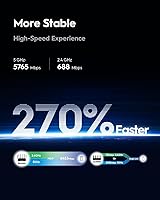
  • Max Throughput: Combined theoretical maximum throughput reaches 6500Mbps across both bands under ideal laboratory conditions.
  • Processor: Powered by a Broadcom quad-core CPU running at 2GHz, providing the processing headroom needed to manage multiple simultaneous connections without degradation.
  • Wired Ports: Equipped with full gigabit Ethernet ports suitable for connecting desktops, NAS devices, gaming consoles, and network switches.
  • VPN Support: Includes both VPN server and VPN client modes, enabling encrypted remote access and whole-network privacy routing without additional hardware.
  • Mesh Support: Compatible with the Cudy Mesh ecosystem, allowing additional Cudy nodes to be added for expanded whole-home coverage.
  • App Control: Managed via the Cudy mobile app, available for iOS and Android, covering setup, device management, and network monitoring.
  • Special Features: Includes beamforming, Quality of Service (QoS) prioritization, parental controls, LED indicator, and remote access functionality.
  • Compatible Devices: Works with personal computers, smart televisions, smartphones, tablets, and IP security cameras across both wired and wireless connections.
  • Dimensions: Measures 16.97 x 12.83 x 2.32 inches, giving it a flat, low-profile form factor suited for shelf or desk placement.
  • Weight: Weighs 11.8 ounces, making it lightweight enough to reposition easily during setup or rearrangement.
  • Color: Available in matte black, offering a neutral appearance that blends into most home or office environments.
  • In the Box: Package includes the router unit, one Ethernet cable, a power adapter, and a printed installation guide.
  • Manufacturer: Designed and produced by Shenzhen Cudy Technology Co., Ltd., a China-based networking hardware company.
  • Release Date: First made available in December 2024, positioning it as one of the earlier budget-accessible WiFi 7 routers to reach the consumer market.
  • User Rating: Holds an average rating of 4.2 out of 5 stars based on 88 verified ratings on Amazon as of the time of this review.
  • Wireless Security: Supports modern wireless encryption protocols standard to WiFi 7 and WiFi 6 implementations, including WPA3 for enhanced network security.

Related Reviews

Cudy WR11000 WiFi 7 Tri-Band Router
74%
88%
Value for Money
76%
Wireless Performance
91%
Wired Port Quality
84%
Setup & Ease of Use
79%
Mobile App Experience
More
ASUS ZenWiFi BD4 Dual-Band WiFi 7 Mesh Router
86%
93%
Wi-Fi Performance
89%
Setup & Installation
91%
Security Features
88%
Gaming & Streaming Performance
84%
Value for Money
More
NETGEAR WAX202 WiFi 6 Dual-Band Router
84%
88%
WiFi Performance
93%
Setup & Installation
85%
App Usability
89%
Speed & Coverage
90%
Device Connectivity
More
ASUS RT-AX5400 WiFi 6 Dual-Band Router
80%
84%
WiFi Speed & Throughput
71%
Coverage & Range
88%
Setup & Ease of Use
91%
Built-in Security (AiProtection)
83%
Parental Controls
More
ASUS RT-AX1800S
ASUS RT-AX1800S
79%
88%
Value for Money
79%
WiFi Speed & Performance
74%
Coverage & Range
83%
Setup & Ease of Use
67%
Router App Experience
More
NETGEAR Nighthawk RS280S WiFi 7 Tri-Band Router
80%
88%
Wireless Speed & Performance
71%
Wi-Fi Coverage & Range
83%
Setup & Ease of Use
62%
Modem Compatibility
86%
Wired Port Performance
More
ASUS RT-BE92U WiFi 7 Router
81%
88%
Wireless Performance
83%
Coverage & Range
84%
Setup & Initial Configuration
91%
Network Security (AiProtection)
86%
Latency & Gaming Performance
More
ASUS RT-ACRH13 AC1300 Dual Band WiFi Router
86%
88%
WiFi Performance
91%
Setup and Installation
90%
Value for Money
83%
Signal Coverage
89%
Ease of Use (Mobile App)
More
ASUS ZenWiFi BT6 Tri-Band WiFi 7 Mesh Router
83%
91%
WiFi Performance
88%
Security Features (AiProtection Pro)
84%
Mesh Network Expansion
75%
Setup and Installation
89%
Build Quality
More
TP-Link Archer A6 AC1200 WiFi Router
76%
74%
WiFi Speed & Performance
67%
WiFi Range & Coverage
88%
Setup & Ease of Use
71%
Build Quality & Design
91%
Wired Port Performance
More

FAQ

Not necessarily, but your gains will be limited without them. The router is fully backward compatible with WiFi 6, WiFi 5, and older devices, so everything in your home will still connect and work fine. The meaningful WiFi 7 speed improvements only kick in when your client devices — laptops, phones, or gaming handhelds — also support the 802.11be standard. Think of buying this as future-proofing rather than an immediate performance leap if your current devices are a few years old.

It is genuinely one of the easier routers to get running. The Cudy app walks you through the process step by step, and most users report being online within about ten minutes of opening the box. You do not need to touch any web-based admin panel unless you want to dig into advanced settings. Where some non-technical users hit a wall is if their ISP uses a less common configuration — in those cases, the in-app guidance is a bit thin.

Yes, and that is one of the more practical reasons to choose the Cudy WR6500 WiFi 7 Dual-Band Router over cheaper alternatives at this price. When you configure the VPN client mode in the router settings, all traffic from every connected device on your network routes through the VPN automatically. This is especially useful for smart TVs and other devices that do not support VPN apps natively. Just keep in mind that VPN throughput will be lower than your regular connection speed, so very bandwidth-intensive tasks may feel slightly slower.

Honestly, results vary. In smaller two-story homes with open layouts, several users report acceptable coverage throughout. But in larger spaces, or homes with thick walls and multiple rooms on each floor, signal degradation becomes noticeable. If you have a larger footprint, the safer bet is to pair this router with a Cudy mesh node rather than relying on a single unit. As a standalone device, it performs best in apartments or compact single-floor homes.

Cudy is a legitimate manufacturer with a growing product line, but they are not yet in the same tier as TP-Link or Netgear when it comes to global support infrastructure. For most buyers, the hardware holds up well day to day. Where it gets murkier is warranty resolution, which can be slower and less predictable depending on your region. If you purchase through Amazon, their return and replacement process adds a helpful safety net during the initial ownership period.

For most people with current devices, a well-tuned WiFi 6 router will feel nearly identical in everyday use. The real argument for this dual-band router is about timing: WiFi 7 device adoption is accelerating, and buying now means you will not need to upgrade again in a year or two. If you are replacing an aging WiFi 5 router, the jump will feel significant. If you are upgrading from a solid WiFi 6 unit, the day-one difference may be modest.

The app covers everything most households need — device management, parental controls, QoS settings, and basic monitoring. However, it has drawn criticism for occasional crashes and sluggish updates, particularly on some Android devices. The router does have a traditional web-based admin panel as a fallback, which is more stable and gives access to the full feature set. If you are comfortable with a browser interface, that is actually the more reliable daily management option for now.

Yes, but only within the Cudy ecosystem. This router supports Cudy Mesh, so you can add compatible Cudy nodes in the future to extend coverage to dead zones or additional floors. The mesh setup process is reported to be straightforward. The trade-off is that you are committing to Cudy hardware for any future expansion — you cannot mix in nodes from other brands the way you can with some more open mesh platforms.

Almost certainly not under normal home conditions, and that is true of every router on the market. That number represents the absolute theoretical maximum across both bands combined, measured in a controlled environment with zero interference and ideal hardware on both ends. Real-world speeds depend on your internet plan, your device capabilities, distance from the router, and how many other devices are active. That said, practical performance for gaming, 4K streaming, and video calls is strong for the price.

A number of users mention that the unit runs warmer than expected during sustained heavy use, which is worth noting for anyone planning to place it in an enclosed cabinet or media console. Running warm is not unusual for routers with capable processors, but adequate ventilation around the unit is a sensible precaution. There are no widespread reports of heat-related failures in the current review pool, though the router is still relatively new to market and long-term durability data is still accumulating.