Overview

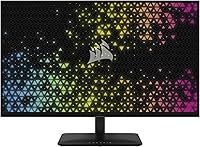
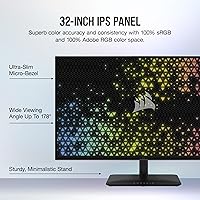
The Corsair XENEON 315QHD165 32-inch Gaming Monitor sits in a competitive mid-range space where buyers expect more than a generic panel but aren't ready to commit to 4K pricing. Corsair brings its PC hardware pedigree here, and it shows in the physical design — thin micro-bezel framing, a clean black finish, and a desk presence that feels considered rather than thrown together. The IPS panel choice is the defining decision: you get wider viewing angles and genuinely better color accuracy than TN alternatives, but deep blacks and contrast ratios aren't this display's strong suit. That's an acceptable trade-off for most buyers — just know it going in.
Features & Benefits

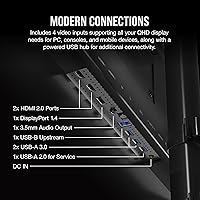
At 31.5 inches with a QHD resolution, this Corsair display is noticeably sharper than a 1080p panel of the same size — text is crisp, textures carry real detail, and you're not pixel-peeping at a normal viewing distance. The 165Hz refresh rate makes fast-paced games feel genuinely responsive, especially paired with the 1ms response time that keeps motion blur minimal. Both NVIDIA G-SYNC Compatible and AMD FreeSync Premium are supported, so adaptive sync works regardless of your GPU brand. Connectivity is practical: DisplayPort 1.4, HDMI 2.0, and three USB 3.0 ports for peripherals. On HDR — manage expectations. The panel carries the HDR-ready label, but the brightness ceiling and lack of local dimming mean the real-world impact is modest. The glossy surface delivers vibrant color indoors but throws reflections in sunlit rooms.

Best For

This QHD gaming monitor hits a sweet spot for people stepping up from 1080p who aren't ready to push a GPU hard enough for 4K. It's a natural fit for competitive PC gamers wanting fluid, high-refresh gameplay at a resolution where mid-range graphics cards still run comfortably. Photo and video editors on a tighter budget will appreciate the accurate IPS color reproduction for general creative work — though this isn't a color-critical professional display. The universal adaptive sync coverage makes it a smart pick for households that mix GPU brands across machines. If a clean, minimal desk aesthetic matters to you, the slim bezel design delivers that without demanding a premium price.

User Feedback

With a 4.3-star rating across nearly 400 reviews, the XENEON 32-inch earns its score — but not unconditionally. Buyers consistently praise out-of-box color quality and the fast, responsive feel during gaming sessions, with build quality drawing positive remarks for feeling sturdy and well-finished at this price tier. The recurring criticisms are worth taking seriously: glossy panel glare frustrates users in bright or window-facing setups, and the HDR experience leaves most buyers underwhelmed. Stand adjustability gets mixed marks — stable, but limited in range for taller users or non-standard desk heights. A handful of reviews flag dead pixels or panel uniformity concerns, pointing to some unit-to-unit variance that prospective buyers should keep in mind.

Pros

  • QHD resolution at 31.5 inches delivers genuinely crisp detail that makes a clear difference over 1080p displays.
  • The 165Hz refresh rate provides smooth, responsive gameplay that competitive gamers will notice immediately.
  • IPS panel offers wide viewing angles and solid color accuracy straight out of the box.
  • Supports both NVIDIA G-SYNC Compatible and AMD FreeSync Premium, covering virtually any GPU setup.
  • Three USB 3.0 ports on the monitor make peripheral management much tidier at the desk.
  • Slim micro-bezel design looks modern and works well in multi-monitor arrangements.
  • Build quality feels solid and premium relative to similarly priced competitors.
  • DisplayPort 1.4 and HDMI 2.0 provide flexible connectivity for both PC and console use.
  • Color vibrancy on the IPS panel is frequently praised by owners for everyday use and media consumption.
  • Mid-range pricing makes this Corsair display accessible without sacrificing core gaming performance features.

Cons

  • HDR performance is underwhelming in practice — the label overpromises what the panel actually delivers.
  • Glossy screen coating causes noticeable reflections in bright rooms or near windows.
  • Stand height and tilt adjustment range is limited, which can be frustrating for taller users.
  • Some buyers report unit-to-unit variance, including occasional dead pixel or panel uniformity issues.
  • Contrast ratio is average for an IPS panel, making dark scenes in games look noticeably washed out.
  • No factory calibration report is included, meaning out-of-box accuracy can vary between units.
  • HDMI 2.0 limits connected console devices to lower refresh rates than the panel is capable of.
  • The glossy finish attracts fingerprints and smudges more readily than matte-coated alternatives.

Ratings

Our AI rating system analyzed verified global user reviews for the Corsair XENEON 315QHD165 32-inch Gaming Monitor, actively filtering out incentivized, bot-generated, and outlier feedback to surface what real buyers consistently experience. The scores below reflect both the genuine strengths that keep this display competitive in its price tier and the recurring frustrations that prevent it from scoring higher across the board. Every category is scored transparently — the wins and the weak points are both represented fairly.

Image Clarity
88%
At QHD resolution on a 31.5-inch screen, sharpness is a standout quality that users coming from 1080p panels notice immediately. Text rendering is crisp for productivity work, and fine in-game textures carry real detail that holds up at typical desk viewing distances.
A handful of buyers note that panel uniformity isn't perfectly consistent across the screen, with slight brightness variation visible on solid-color backgrounds. This is more noticeable in some units than others, pointing to some production variance.
Color Accuracy
83%
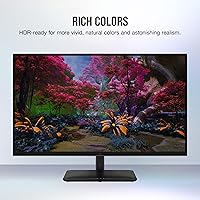
The IPS panel delivers vibrant, well-saturated colors that most users find impressive out of the box for both gaming and casual photo editing. Viewing angles remain consistent with minimal color shift, which makes collaborative viewing or working at off-axis positions comfortable.
Without factory calibration, color accuracy can vary between units, and users doing serious creative work may need to manually calibrate for tighter results. It does not cover a wide enough gamut for professional color-grading workflows.
Gaming Performance
91%
The combination of a high refresh rate and fast pixel response translates into fluid, low-blur motion during competitive play — users switching from 60Hz panels describe the difference as immediately and obviously better. Adaptive sync eliminates tearing effectively across both major GPU platforms.
To sustain the highest refresh rate, your GPU needs to consistently push high frame counts at QHD, which demands a reasonably powerful graphics card. Hitting the ceiling on older mid-range hardware means you may not always benefit fully from the refresh rate headroom.
HDR Performance
41%
59%
The panel can accept and display HDR signals from both PC and console sources, which at least gives users the option to enable HDR content in games and media without any compatibility issues.
In practice, the HDR experience is disappointing — the panel lacks local dimming and sufficient peak brightness to produce the contrast lift that makes HDR worthwhile. Buyers who purchased expecting meaningful HDR impact are consistently let down, and many switch HDR off entirely after testing it.
Build Quality
86%
The physical construction feels notably solid for this price tier, with a chassis that doesn't flex or creak during adjustment and a base that holds the monitor firmly in place even on busy desks. Corsair's attention to fit and finish shows in the micro-bezel design, which looks clean and refined in person.
While the overall build inspires confidence, some buyers report that the plastic used on the rear housing feels less premium than the front panel and stand base. It's a minor complaint but noticeable to detail-oriented users.
Stand & Ergonomics
62%
38%
The included stand is stable and keeps the monitor from wobbling during typing or desk activity. Assembly is tool-free and takes only a few minutes, which buyers consistently appreciate when first setting it up.
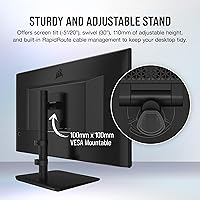
Ergonomic range is where this stand falls short — height adjustment travel is limited, and there is no portrait pivot option, which frustrates taller users or those who prefer a specific viewing angle. Many buyers end up purchasing a third-party arm to compensate.
Connectivity
84%
Having three USB 3.0 ports on the monitor itself turns it into a convenient desk hub, reducing cable clutter for users who connect keyboards, mice, and headset dongles. DisplayPort 1.4 ensures full bandwidth for high refresh rates from any modern discrete GPU.
The single HDMI 2.0 port is a limitation if you plan to connect multiple non-DisplayPort sources simultaneously. Console users connected via HDMI also cannot reach the panel's maximum refresh rate, which is a technical constraint of the HDMI version used.
Screen Finish
67%
33%
The glossy coating enhances color depth and vibrancy in controlled lighting environments, making the picture look richer and more saturated than a comparable matte-finished panel under the same conditions.
In brighter rooms or setups near windows, the reflections become a genuine distraction during both gaming and work sessions. This is one of the more polarizing aspects of the display, with some buyers wishing Corsair had offered a matte option.
Value for Money
82%
18%
At its price point, this Corsair display offers a combination of screen size, resolution, refresh rate, and dual adaptive sync that is hard to match without spending noticeably more. For buyers prioritizing gaming performance over niche professional features, the value proposition is strong.
Competing monitors in the same price range have begun matching or exceeding this panel on contrast and HDR implementation, which slightly erodes the value case. Buyers who later discover the HDR limitations often feel the feature influenced their purchase decision more than it should have.
Out-of-Box Setup
89%
The unboxing and assembly experience is smooth — the stand clicks into place without tools, and the OSD menu is logically organized and responsive to navigate. Most users report being up and running in under ten minutes from opening the box.
The included documentation is minimal, which can leave first-time monitor buyers uncertain about optimal display settings for gaming versus content creation. A short calibration guide or preset recommendation sheet would be a welcome addition.
Glare & Reflection
58%
42%
In dim or carefully controlled environments, glare is a non-issue and the glossy panel actually rewards you with richer contrast and deeper blacks than you'd get from a matte surface at this spec level.
For users with overhead lighting, bright home offices, or desks facing windows, reflected glare is a persistent problem that no OSD adjustment can fix. This is the single most common environmental complaint raised by buyers in their reviews.
Motion Clarity
87%
Fast pixel transitions keep ghosting minimal during high-speed gameplay, and the adaptive sync implementation means on-screen motion stays tear-free across a wide frame rate range. Action games and fast-scrolling content look noticeably cleaner than on slower IPS panels.
Some users running at frame rates near or below the minimum sync range notice occasional judder, which is a known behavior with FreeSync-class implementations rather than a panel defect. Enabling a consistent overdrive setting in the OSD mitigates this for most people.
Quality Consistency
71%
29%
The majority of buyers receive units that perform well and match expectations, with color performance and panel integrity that holds up over extended daily use without noticeable degradation.
A recurring thread in user reviews points to variance between units — some buyers encounter dead pixels, backlight bleed, or panel uniformity issues that require returns or exchanges. The rate isn't alarming, but it's consistent enough to suggest buyers should inspect their unit carefully within the return window.
Design Aesthetics
85%
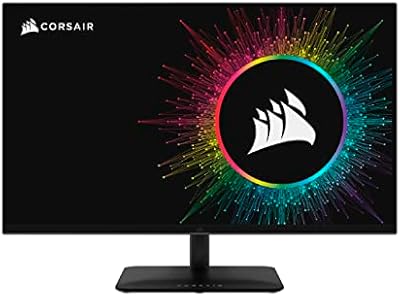
The slim bezels and clean black finish give this QHD gaming monitor a restrained, professional look that avoids the aggressive gamer aesthetic of many competitors. It fits equally well in a home office setup or a dedicated gaming station.
The rear of the monitor has a relatively plain design with no RGB lighting or distinctive styling, which may disappoint buyers who want a visually striking setup when viewed from behind. Purely subjective, but worth noting for setup aesthetics enthusiasts.

Suitable for:

The Corsair XENEON 315QHD165 32-inch Gaming Monitor is a strong fit for PC gamers who have outgrown 1080p and want a meaningful visual upgrade without the GPU demands or cost of a 4K setup. The QHD resolution at this screen size delivers a noticeable sharpness jump, and the high refresh rate keeps fast-paced games feeling fluid and responsive. Buyers who own either an NVIDIA or AMD graphics card will benefit from adaptive sync support without needing to worry about compatibility. It also suits hobbyist content creators — photo editors and video enthusiasts who need reasonably accurate IPS color but aren't working in a professionally color-managed environment. Anyone upgrading from a smaller screen will immediately appreciate the extra real estate, and the slim bezel design makes it a natural fit for clean, minimal desk builds.

Not suitable for:

Buyers with strict HDR expectations should look elsewhere — the Corsair XENEON 315QHD165 32-inch Gaming Monitor carries an HDR-ready label, but the practical result is underwhelming compared to monitors with dedicated HDR certification and local dimming. Users who work in bright, sunlit rooms or near large windows will likely find the glossy screen surface a persistent frustration, with reflections that can interfere with both work and gaming sessions. Professional colorists, photographers, or video editors who require factory-calibrated color accuracy and wide color gamut coverage for client-facing work should invest in a purpose-built professional display instead. Those who prioritize deep, inky contrast — particularly gamers who play dark atmospheric titles — will find that VA panel alternatives serve that need better. Finally, anyone who needs robust stand adjustability, including significant height range or portrait rotation, may find the included stand limiting.

Specifications

  • Panel Type: Uses an IPS (In-Plane Switching) panel, delivering wide viewing angles and accurate color reproduction across the full screen.
  • Screen Size: The active display area measures 31.5 inches diagonally, offering significantly more real estate than a typical 27-inch monitor.
  • Resolution: Native resolution is 2560x1440 (QHD), providing noticeably sharper detail than 1080p at this screen size with a pixel density of 93 PPI.
  • Refresh Rate: Supports a maximum refresh rate of 165Hz, enabling very smooth motion in fast-paced games when driven by a capable GPU.
  • Response Time: Rated at 1ms response time, which helps minimize motion blur and ghosting during rapid on-screen movement.
  • Adaptive Sync: Compatible with both NVIDIA G-SYNC and AMD FreeSync Premium, allowing tear-free gameplay regardless of GPU brand.
  • HDR Support: Carries an HDR-Ready designation, though it lacks local dimming and high peak brightness, limiting real-world HDR impact.
  • Aspect Ratio: Features a standard 16:9 widescreen aspect ratio, suitable for gaming, video playback, and general productivity workflows.
  • Screen Surface: The panel uses a glossy screen coating, which enhances color vibrancy but can produce reflections in brightly lit environments.
  • Video Inputs: Equipped with one DisplayPort 1.4 and one HDMI 2.0 port, supporting high-bandwidth connections from both PC and console sources.
  • USB Ports: Includes three USB 3.0 ports, functioning as a built-in hub for connecting peripherals like keyboards, mice, and headsets.
  • Dimensions: The monitor measures 10.64 x 28.2 x 21.68 inches (depth x width x height) with the stand attached.
  • Weight: Complete unit with stand weighs 17.86 pounds, which is typical for a monitor of this size and build quality.
  • Color Gamut: The IPS panel covers a wide color gamut suited to everyday content creation, though it is not factory-calibrated for professional color work.
  • Brand & Model: Manufactured by Corsair under the XENEON product line, with model number CM-9020007-NA for warranty and support reference.
  • Bezel Design: Features a micro-bezel design on three sides, reducing visual borders for a cleaner look and easier multi-monitor setups.
  • VESA Mounting: Supports standard VESA mount patterns, allowing users to replace the included stand with a third-party arm or wall mount.
  • Release Date: This monitor became available in November 2023, positioning it as a relatively recent addition to the mid-range gaming monitor market.

Related Reviews

Corsair XENEON 32UHD144-A 32-inch Gaming Monitor
82%
91%
Color Accuracy
88%
Refresh Rate Performance
67%
HDR Quality
93%
Connectivity & Port Selection
58%
Stand & Ergonomics
More
Corsair XENEON 27QHD240 27-inch OLED Gaming Monitor
84%
94%
Image Quality
96%
Motion Performance
97%
Contrast & Black Levels
88%
HDR Experience
91%
Color Accuracy
More
Gawfolk GF320D 32-inch Curved Gaming Monitor
72%
83%
Value for Money
76%
Image Quality
81%
Refresh Rate Performance
54%
Brightness & Visibility
79%
Contrast & Black Levels
More
KOORUI G3221SC 32″ Curved QHD Gaming Monitor
69%
83%
Picture Quality
81%
Gaming Performance
86%
Value for Money
41%
HDR Performance
67%
Color Accuracy
More
Gawfolk GF320C 32-Inch Curved Gaming Monitor
75%
88%
Refresh Rate Performance
83%
Image Quality
76%
Motion Clarity
86%
Curvature & Immersion
91%
Value for Money
More
Samsung 32-Inch S39C Curved Gaming Monitor
83%
88%
Display Quality
91%
Value for Money
86%
Eye Comfort
89%
Ease of Setup
85%
Build Quality
More
CUNPU 32-Inch Gaming Monitor QHD 165Hz
86%
93%
Display Quality
91%
Gaming Performance
85%
Build Quality
88%
Ergonomics and Adjustability
90%
Ease of Setup
More
MSI MAG321CUP 32-inch 4K Gaming Monitor
76%
88%
Image Quality
83%
Refresh Rate Performance
86%
Value for Money
91%
Console Compatibility
74%
Motion Clarity
More
AOC C32G2 32″ Curved Gaming Monitor
76%
91%
Value for Money
84%
Gaming Performance
73%
Image Quality
88%
Refresh Rate & Smoothness
83%
Curvature & Immersion
More
KTC H32S17C 32-inch Curved Gaming Monitor
72%
91%
Value for Money
84%
Gaming Performance
76%
Picture Quality
52%
HDR Experience
67%
Color Accuracy
More

FAQ

Yes, you can connect a PS5 or Xbox Series X via the HDMI 2.0 port. Keep in mind that HDMI 2.0 caps out at 144Hz at QHD, so you won't hit the full 165Hz through HDMI — for that, you need DisplayPort from a PC. For console use, though, it works perfectly well.

Honestly, not much. The HDR-ready label means it can accept an HDR signal, but without local dimming or high peak brightness, the difference versus SDR is subtle at best. If HDR performance is important to you, look for monitors with VESA DisplayHDR 600 or higher certification instead.

Absolutely. The Corsair XENEON 315QHD165 32-inch Gaming Monitor supports both G-SYNC Compatible and FreeSync Premium, so adaptive sync works whichever GPU you have connected. That makes it a practical choice if you swap graphics cards or share the monitor between two machines.
It depends heavily on your room. In a dim or controlled-lighting environment the glossy surface actually makes colors look richer and more vibrant. But if you have a window behind you or overhead lighting directly in front of the screen, reflections become a real distraction. A matte-finished monitor would be a better fit for bright rooms.

The included stand is stable and gets the job done, but the adjustment range is limited — height travel is modest and there is no portrait rotation. If you prefer a specific ergonomic position or want to free up desk space, a VESA-compatible monitor arm is a worthwhile upgrade and attaches easily.

You need a DisplayPort 1.4 cable connected to a GPU that supports DisplayPort output. HDMI 2.0 will get you close but not quite to the maximum refresh rate. Most modern discrete GPUs have DisplayPort, so this generally isn't an issue — just make sure you use the right cable.

It works well for that dual-purpose role. The extra screen size gives you comfortable room for documents and browser windows side by side, and the IPS panel is easy on the eyes during long work sessions. It's not a professionally calibrated display, but for everyday work tasks and gaming in the evenings, the balance is solid.

The jump is noticeable. At the same viewing distance, QHD on a 31.5-inch screen looks significantly sharper than 1080p — text is crisper, fine textures in games have more detail, and you get more usable workspace without needing to scale the interface. Most people who make that upgrade don't look back.

A small number of buyers have reported panel uniformity inconsistencies or dead pixels, which is not unusual across any monitor brand at this price tier. It's worth inspecting the display carefully within the return window. If you get a good unit — which the majority of buyers do — there are no widespread ongoing issues to worry about.

Corsair typically includes a DisplayPort cable in the box, so you should be able to connect and start using it right away. That said, it's worth confirming what's in the box when your unit arrives, as accessories can occasionally vary by region or production batch. The stand assembly is straightforward and requires no tools.

Where to Buy