Overview

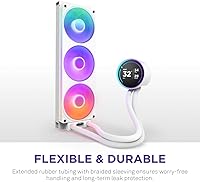
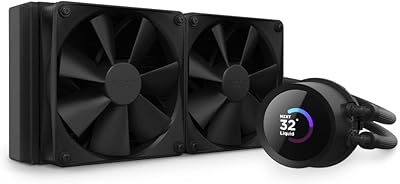
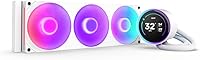
The NZXT Kraken Elite 360 RGB 2024 enters a crowded field of premium 360mm AIOs with a clear pitch: serious cooling wrapped in genuinely striking hardware. The headline feature is a 2.72″ IPS LCD on the pump head — something few competitors match at this resolution and brightness. The 2024 revision brings a redesigned pump and updated fans over prior Kraken Elite models, which helps justify the premium ask. It supports every current AMD and Intel socket you would actually care about, from AM5 to LGA 1851. Just be clear-eyed going in: this liquid cooler sits firmly at the top of the price ladder.
Features & Benefits

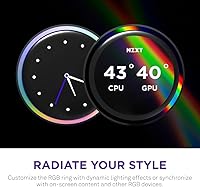
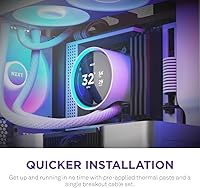
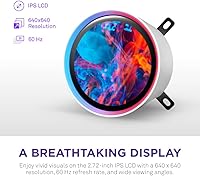
The NZXT Turbine pump is a meaningful departure from the barrel-style pumps found in most AIOs — it moves coolant at a higher flow rate while keeping noise surprisingly low, which translates to steadier CPU temperatures under sustained load. The IPS display reads clearly even across a case, with 690 cd/m² brightness and 640x640 resolution making on-screen stats and GIFs look sharp rather than washed out. Through NZXT CAM, you can pull in Spotify track info or Google Photos — genuinely handy if you stream, less essential if you do not. Installation is straightforward: thermal paste comes pre-applied, brackets are tool-free, and a single breakout cable keeps the interior tidy.

Best For

This AIO cooler is a natural fit for builders running high-TDP chips — Ryzen 9 or Core i9 class CPUs on AM5 or LGA 1851 — inside a windowed mid-tower where the RGB lighting and LCD will actually be visible. Streamers and content creators get genuine value from the display integration that most users never bother to configure. If you are already invested in the NZXT ecosystem and use CAM to manage other components, this cooler slots in without friction. That said, it is not a great match for small-form-factor cases given the 360mm radiator, and budget-conscious builders will find capable alternatives at a noticeably lower price point.

User Feedback

Owners consistently highlight display clarity and near-silent operation as standout positives — the LCD looks sharp in person, and the fans stay quiet under moderate loads. RGB sync with other NZXT components is also praised for working reliably in practice. The recurring friction point is CAM software: users report occasional crashes, sluggish updates, and general frustration with its always-on requirement. Some buyers flag that hose stiffness makes routing awkward inside compact cases. On thermals, real-world results are competitive but not dramatically ahead of less expensive alternatives — meaning the premium is largely about the display and aesthetics, which is a fair trade-off as long as buyers understand that upfront.

Pros

  • The 2.72″ IPS LCD is the sharpest, most readable pump head display available on any mainstream AIO cooler.
  • Broad socket support covers AM5, AM4, LGA 1851, and LGA 1700 without needing separate mounting kits.
  • The Turbine pump runs noticeably quieter than traditional barrel-style pumps under sustained workloads.
  • Single breakout cable design keeps the interior of your build dramatically cleaner than older multi-cable AIOs.
  • RGB synchronization across fans, pump head ring, and LCD content works reliably within the NZXT ecosystem.
  • Pre-applied thermal paste and tool-free brackets make the installation process genuinely fast for most builders.
  • Spotify, Google Photos, and YouTube display integrations are genuinely useful for streamers and always-on desk setups.
  • Long-term pump reliability is strong for the majority of owners past the six-month mark.
  • The white colorway is one of the most visually refined AIO options available for light-themed builds.

Cons

  • NZXT CAM software has a well-documented history of crashes, slow updates, and intrusive background resource usage.
  • Thermal performance, while competitive, does not justify the price premium over mid-range 360mm alternatives on cooling alone.
  • Stiff tubing makes routing awkward in compact mid-towers and virtually any small-form-factor case.
  • A small but consistent number of owners report a low-frequency pump buzz developing after several months of use.
  • The accessory bundle is thin for the price tier — no spare thermal paste, no extra mounting screws.
  • All display customization is locked behind CAM, so if the software misbehaves, the display reverts to defaults.
  • Fan noise at maximum RPM has a coarse, slightly harsh tone that does not match the premium positioning.
  • Third-party RGB sync outside the NZXT ecosystem requires workarounds and is inconsistent in practice.

Ratings

The NZXT Kraken Elite 360 RGB 2024 has been put through its paces by enthusiast builders worldwide, and our AI has analyzed thousands of verified purchase reviews — actively filtering out incentivized, bot-generated, and outlier feedback — to produce the scores below. The results reflect a cooler that genuinely excels in presentation and polish, while carrying a few real-world friction points that informed buyers deserve to know about upfront.

Thermal Performance
83%
Under sustained workloads on high-TDP chips like the Ryzen 9 7950X or Core i9-13900K, the Kraken Elite 360 keeps temperatures competitive with the best 360mm AIOs on the market. The Turbine pump design contributes to steady coolant flow that prevents the thermal spikes some older pump designs are prone to during burst loads.
At this price tier, buyers reasonably expect a wider gap over mid-range 360mm alternatives, and the real-world delta is narrower than the premium suggests. Users pushing extreme overclocks report it performs well but not decisively ahead of options that cost significantly less.
Noise Level
88%
Day-to-day desktop use is genuinely quiet — the fans rarely spin up noticeably during light workloads, and even at moderate speeds the 33.88 dB ceiling means it blends into typical room ambience. Multiple users specifically called out how much quieter this runs compared to their previous AIOs under the same CPU loads.
Under extended full-load scenarios like long rendering sessions or overnight stress tests, the fans do ramp audibly and the pump emits a faint hum that sensitive users can detect in a quiet room. It is not intrusive, but it is not inaudible either.
LCD Display Quality
93%
The 2.72″ IPS panel at 640x640 resolution and 690 cd/m² brightness is genuinely impressive for a pump head display — colors are vivid and legible even at an angle through a tinted side panel. Owners who set up custom GIFs or system monitoring overlays consistently remark that it looks far sharper than they expected.
The display is effectively useless if your case has a top-mounted radiator with no line of sight to the pump head. A handful of users also noted the refresh rate feels slightly choppy during animated content compared to what the 60Hz spec implies.
Build Quality & Materials
87%
The pump head housing has a solid, premium feel with no plastic flex or rattling components out of the box. The radiator finish is clean, the tubing connections feel secure, and the overall assembly inspires confidence during handling — something that matters when you are routing hoses through a tight case.
The tubing is notably stiff, which multiple buyers flagged when trying to route the hoses in smaller mid-towers or unconventional radiator placements. The plastic fan frames, while standard for the category, feel slightly underwhelming given the overall price point.
RGB Lighting
91%
The RGB implementation here is cohesive in a way that many multi-component setups rarely achieve — the fans, the pump head ring, and the LCD content can all sync together through CAM for a unified look that stands out inside a windowed build. Enthusiasts who have invested in the NZXT ecosystem will find the synchronization reliable and visually consistent.
Outside the NZXT ecosystem, syncing with third-party RGB controllers or Aura Sync can be inconsistent and requires workarounds. Users who want full RGB control without running CAM in the background will find their options limited.
Software (NZXT CAM)
58%
42%
CAM unlocks everything that makes this cooler interesting — display customization, performance monitoring, fan curve tuning, and media integrations. When it works smoothly, the experience feels polished and the real-time display configurations are genuinely fun to set up.
CAM is the most consistently criticized aspect of owning this cooler. Users report crashes on startup, slow update cycles, and background resource usage that feels unnecessary for what is essentially fan control software. The mandatory dependency on a third-party app to access core features remains a legitimate concern for privacy-conscious or minimalist users.
Installation & Compatibility
82%
18%
Pre-applied thermal paste and tool-free mounting brackets mean most builders can have this cooler seated and running within 20 minutes. The broad socket support — covering AM5, AM4, LGA 1851, and LGA 1700 among others — means it is future-compatible for most current platforms without needing separate mounting kits.
The stiff tubing makes radiator placement in certain cases more awkward than it needs to be, particularly for top-mount configurations in shorter chassis. A few users on LGA 1700 boards noted that the bracket alignment required more patience than the instructions suggested.
Cable Management
84%
The single breakout cable approach is a genuine quality-of-life improvement over older AIO designs that required running multiple individual cables from pump to motherboard. Builders working in cases with tight cable routing channels specifically praised how much cleaner the interior looked compared to previous builds.
The breakout cable itself is on the thicker side, which can make bending it around tight corners inside compact cases more difficult than expected. A longer cable option would benefit users with larger full-tower builds where the current length occasionally runs short.
Pump Reliability
79%
21%
The majority of long-term owners — those past the six-month mark — report no pump noise development or performance degradation, which is the most common long-term failure mode for AIOs. The Turbine pump design appears more robust in sustained-use scenarios than traditional impeller-based pumps.
There is a small but consistent thread of reports describing a low-frequency buzzing that develops after several months of use, particularly on units installed in horizontal orientations. NZXT support response on these cases appears adequate but not exceptionally fast.
Display Customization Depth
86%
The ability to display custom GIFs, pull live Spotify track art, or show real-time CPU and GPU stats on the pump head is a level of personalization that goes well beyond novelty for streamers and desk setup enthusiasts. Google Photos integration in particular gets mentioned positively by users who use it to cycle through personal images.
The customization depth is gated almost entirely behind CAM, meaning if that software misbehaves, so does your display configuration. Some users also found the interface for setting up custom display layouts less intuitive than expected for a product at this price.
Value for Money
63%
37%
For a buyer who specifically wants the LCD display, robust RGB integration, and the NZXT ecosystem experience, the value case holds up reasonably well — these features genuinely differentiate it from cheaper alternatives. Those features are not trivially available elsewhere at this level of polish.
For buyers focused purely on thermal performance per dollar, the calculus is harder to justify. Competing 360mm AIOs offer comparable or near-comparable cooling at meaningfully lower prices, and the LCD premium only makes sense if you will actually use and enjoy that feature regularly.
Fan Performance
81%
19%
The F360 RGB Core fans move a solid amount of air for their size and maintain a balanced static pressure profile that keeps radiator performance consistent even in restrictive case configurations. The single-frame design also makes daisy-chaining the connectors cleaner than dealing with three independent fan cables.
At maximum RPM approaching 2800, the fans become noticeably audible and the tone is not the most pleasant — a slightly coarse pitch rather than the smooth white noise some premium fans produce. Most users will never hit max RPM in daily use, but workstation users might.
Aesthetics & Visual Design
92%
The white colorway in particular has garnered strong praise from builders putting together monochromatic or light-themed builds — the pump head, radiator, and fans present a cohesive, premium-looking unit that photographs exceptionally well. It is one of the more visually refined AIOs available at any price.
The design is clearly optimized for showcased builds with side-panel windows. In a closed or opaque case, all that visual engineering delivers zero benefit, which is worth keeping in mind if your build does not prioritize display.
Packaging & Unboxing
77%
23%
The packaging does a good job protecting the cooler in transit — components arrive well-organized, and the included documentation is clearer than average for AIO coolers. Buyers generally report everything arriving intact and accounted for.
The accessory bundle feels somewhat minimal for the price tier — no additional fan screws, no extra thermal paste syringe for future reseating, and no cable management accessories. Comparable premium competitors include slightly more comprehensive mounting hardware.

Suitable for:

The NZXT Kraken Elite 360 RGB 2024 was clearly designed with a specific type of builder in mind, and if you fit that profile, it delivers. If you are running a high-TDP processor — a Ryzen 9 on AM5 or a Core i9 on LGA 1851 — inside a windowed mid-tower where the internals are meant to be seen, this liquid cooler makes a strong case for itself. Streamers and content creators get particular value from the pump head display, which can show live Spotify track info, real-time system stats, or rotating photos from Google Photos — features that feel gimmicky on paper but genuinely useful when your PC is on camera or on a desk others interact with. Enthusiasts already invested in the NZXT ecosystem will find that everything — fans, lighting, display, and fan curves — ties together through CAM in a way that feels intentional rather than cobbled together. If you want a build that looks as polished as it performs and you are willing to pay for that cohesion, this AIO cooler is one of the strongest options in its class.
Not suitable for:

The NZXT Kraken Elite 360 RGB 2024 is a harder sell the moment you step outside its intended use case. If your case has no side-panel window, or you are mounting the radiator somewhere the pump head will never be visible, you are paying a substantial premium for a display you will never see — and that premium is real. Budget-conscious builders will find that competing 360mm AIOs close the thermal performance gap significantly at a lower price, making the value proposition difficult to justify on cooling alone. Small-form-factor builders are largely excluded by the 360mm radiator footprint, which simply will not fit most compact cases. Anyone who avoids mandatory background software on principle should also think carefully, since NZXT CAM is a non-negotiable dependency for unlocking virtually everything that makes this cooler interesting — and its reliability track record is genuinely mixed. If raw thermal performance per dollar is your primary metric, more practical alternatives exist.

Specifications

  • Radiator Size: The cooler uses a 360mm radiator, measuring 4.72″ x 1.06″ x 15.75″ in total dimensions.
  • Pump Display: The pump head features a 2.72″ IPS LCD screen with a 640x640 resolution and a 60Hz refresh rate.
  • Brightness: The IPS display delivers a peak backlight brightness of 690 cd/m², ensuring visibility even through tinted case panels.
  • Color Depth: The pump head display supports 24-bit color, enabling accurate and vibrant on-screen content rendering.
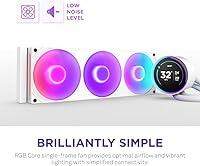
  • Fan Model: Three F360 RGB Core fans are included, each using a single-frame construction for integrated cable routing and RGB control.
  • Max Fan Speed: The included fans spin at up to 2800 RPM under maximum load conditions.
  • Noise Level: The system operates at a maximum measured noise level of 33.88 dB under full fan speed conditions.
  • Power Draw: Total system power consumption is rated at 28.44W, supplied via an 8-pin connector at 12V.
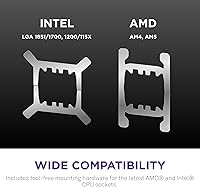
  • Socket Support: Compatible CPU sockets include AMD AM5 and AM4, and Intel LGA 1851, LGA 1700, LGA 1200, and LGA 115X.
  • Pump Design: The cooler uses NZXT's proprietary Turbine pump, engineered for high coolant flow rate and reduced operating noise versus traditional impeller designs.
  • Thermal Paste: Thermal compound comes pre-applied to the cold plate, eliminating the need for a separate application step during installation.
  • Mounting: Tool-free mounting brackets are included for all supported AMD and Intel platforms, with no additional hardware kits required.
  • Cable Routing: A single breakout cable consolidates all fan and pump connections, reducing interior cable clutter compared to multi-cable AIO designs.
  • Weight: The complete cooler assembly weighs 5.51 lbs, which is typical for a full 360mm radiator and triple-fan configuration.
  • Materials: The cooler is constructed from a combination of metal and plastic, with the radiator and cold plate using metal and the fan frames using reinforced plastic.
  • Software: Full feature access — including display customization, fan curve tuning, and media integrations — requires the NZXT CAM application on Windows.
  • Media Integrations: Through NZXT CAM, the pump head display supports live integration with Google Photos, Spotify, and YouTube for real-time content display.
  • RGB Lighting: RGB LEDs are present on all three fans and on the pump head ring, with synchronization managed through NZXT CAM software.
  • Voltage: The system operates at a standard 12V input, compatible with all modern ATX power supplies via the included 8-pin connector.
  • First Available: This 2024 model variant was first made available for purchase in October 2024, succeeding prior Kraken Elite generations.

Related Reviews
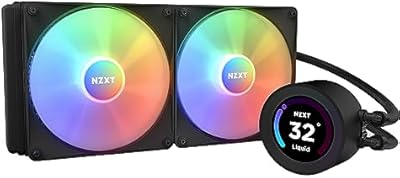
NZXT Kraken Elite 280 RGB
85%
94%
Cooling Performance
88%
RGB Lighting Customization
90%
Noise Level
75%
Installation Ease
70%
Display Visibility
More
NZXT Kraken M22 120mm RGB CPU Liquid Cooler
85%
88%
Cooling Performance
91%
Ease of Installation
85%
Noise Levels
84%
Software Integration (CAM)
90%
Build Quality
More
NZXT Kraken X53 RGB 240mm AIO Liquid Cooler
85%
88%
Performance Under Load
92%
Cooling Efficiency
85%
RGB Aesthetic & Design
87%
Noise Level
80%
Installation Process
More
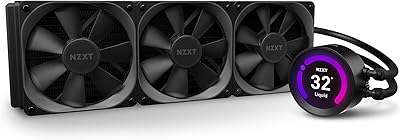
NZXT Kraken Z73 360mm AIO RGB CPU Liquid Cooler
84%
92%
Cooling Performance
87%
Noise Level
72%
Installation Ease
80%
Software Control (CAM V4)
90%
Aesthetic Customization (LCD Display)
More
NZXT H9 Flow RGB
NZXT H9 Flow RGB
83%
92%
Cooling Performance
89%
Airflow Optimization
85%
Cable Management
91%
Build Quality
88%
Ease of Setup
More
NZXT H5 Flow (2024)
NZXT H5 Flow (2024)
86%
93%
Build Quality
96%
GPU Cooling Performance
89%
Ease of Assembly
91%
Cable Management
88%
Front Radiator Support
More
NZXT Capsule Elite
NZXT Capsule Elite
76%
94%
Ease of Setup
81%
Audio Clarity
88%
Build Quality
91%
Mute Button
74%
Value for Money
More
NZXT Kraken 240 AIO CPU Liquid Cooler
86%
92%
Cooling Performance
88%
Noise Level
90%
Ease of Installation
86%
Aesthetic Customization
80%
Radiator Size Compatibility
More
NZXT H6 Flow RGB Mid-Tower Case
87%
91%
Cooling Performance
88%
Build Quality
85%
Ease of Installation
92%
Cable Management
89%
Design & Aesthetics
More
NZXT F360 RGB Core 360mm Fan Unit
86%
88%
Cooling Performance
91%
Noise Level
93%
RGB Lighting
85%
Build Quality
89%
Ease of Installation
More

FAQ

Yes, the Kraken Elite 360 ships with mounting brackets for AM5, AM4, LGA 1851, and LGA 1700 right in the box. You do not need to purchase any additional mounting kits for current-generation platforms from either AMD or Intel.

You can run this liquid cooler without CAM in the sense that it will cool your CPU and the fans will spin — but the display will show only a default screen, and you lose all fan curve control, RGB customization, and media integrations. If you want to get any meaningful use out of the LCD or the RGB features, CAM is effectively required. It is a real dependency, and worth factoring in if you prefer a software-light system.

During light to moderate workloads, the fans are genuinely quiet and easy to ignore. Under sustained heavy loads — extended rendering sessions or stress tests — the fans do ramp up and become noticeable, though the 33.88 dB ceiling keeps it from being disruptive. The pump itself is very quiet during normal use, though a small number of owners report a faint hum after extended operation.

Yes, that is one of the more genuinely useful features on the NZXT Kraken Elite 360 RGB 2024. Through NZXT CAM, you can upload custom GIFs or still images directly to the pump head display. The 640x640 IPS panel renders them sharply enough that custom content looks impressive inside a windowed build.

For most standard mid-tower cases, the tubing length is sufficient for top-mount radiator configurations. The main complaint from buyers is not the length but the stiffness — the tubing is firm enough that routing it through tight clearances or around obstructions requires some patience. In compact cases, this can be genuinely frustrating.

Honestly, on raw thermals alone, the gap over quality mid-range 360mm alternatives is narrower than the price difference suggests. The Turbine pump does a solid job keeping temperatures in check on high-TDP chips, but if cooling performance per dollar is your only metric, you will find competitive options at noticeably lower prices. The premium is really being paid for the display, the RGB polish, and the NZXT ecosystem integration.

It works better than most people expect. When CAM is running and Spotify is active, the pump head display can show the current track name and album art in real time. It is genuinely useful for streamers or for anyone whose PC sits in a visible spot on a desk. That said, if CAM is having one of its occasional bad days, the integration can drop or fail to update — which is a reflection of the software dependency more than the feature itself.

It is one of the more approachable AIO installations available at this tier. The thermal paste comes pre-applied, the brackets are tool-free for supported sockets, and the single breakout cable simplifies the wiring significantly. Most builders report completing the installation in under 30 minutes. The main stumbling block for newcomers tends to be the stiff tubing, which requires a bit of extra care when positioning the radiator.

Technically possible in some configurations, but not reliably straightforward. NZXT CAM handles RGB natively and works well within its own ecosystem, but syncing with third-party motherboard RGB software often requires workarounds and does not always produce consistent results. If seamless cross-brand RGB sync is important to your build, this is worth researching for your specific motherboard before purchasing.

The 2024 revision brought some stability improvements, and user sentiment around CAM is slightly better than it was with older Kraken Elite generations. That said, it still attracts consistent criticism for occasional crashes, slow update cycles, and background resource usage. NZXT has shown a pattern of gradual improvement over time, but it remains the most common friction point for owners of this AIO cooler and should not be dismissed when making your buying decision.