
Overview

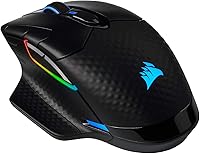
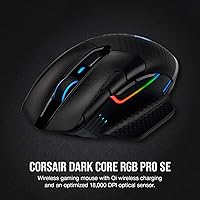
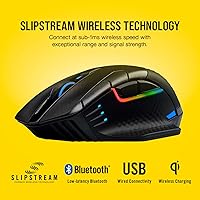
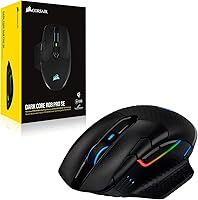
The Corsair Dark Core RGB Pro SE is a wireless gaming mouse that has held its ground since 2020, which says a lot in a category that moves fast. It connects three ways — SLIPSTREAM sub-1ms wireless, Bluetooth, and USB wired — giving real flexibility depending on your setup. The right-handed ergonomic shape with a textured grip fits medium-to-large hands well, and the build quality feels appropriately premium for its tier. What genuinely sets this wireless gaming mouse apart from most competitors is Qi wireless charging, a feature rarely seen on gaming peripherals. Corsair's iCUE software ties lighting and macro control together, though it carries a learning curve for new users.

Features & Benefits

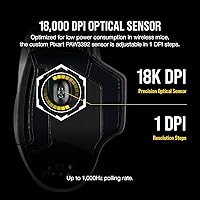
The PixArt PAW3392 sensor delivers up to 18,000 DPI with single-step increments, so you can dial in sensitivity precisely rather than jumping between preset values. The 2,000Hz hyper-polling rate is a genuine edge in fast-paced shooters — inputs register twice as fast as a standard gaming mouse, and you can feel the difference in tight engagements. Eight programmable buttons handle macro needs without crowding the shell, and the USB-C charging port is a small but appreciated upgrade over the micro-USB connectors that plagued older peripherals. Battery life hovers around 50 hours per charge, making weekend-long wireless sessions completely realistic.

Best For

Corsair's flagship wireless mouse is a strong pick for FPS and MOBA players who refuse to sacrifice latency but want the freedom of going cordless. If you already own a Qi-compatible charging pad — even a phone charger — you can drop it on overnight and never touch a cable. Console players on PS4, PS5, or Xbox will find real value here too, since wireless mouse options for consoles remain limited. It also fits naturally into an existing Corsair iCUE setup. If you are coming from a budget wireless mouse, the responsiveness jump will be immediately and noticeably apparent.

User Feedback

Across a wide range of buyer reviews, the SLIPSTREAM connection earns consistent praise — many describe it as feeling no different from wired, which is high praise in competitive circles. The battery longevity holds up well in practice too, with long-term users confirming the roughly 50-hour estimate is realistic rather than inflated. On the downside, weight is a recurring concern; this mouse is noticeably heavier than the ultralight options currently popular, which matters if you rely on low-effort flick shots. A subset of buyers have flagged iCUE software hiccups on certain Windows configurations, and a few note the side buttons lack the crisp feel of the primary clicks.

Pros

  • SLIPSTREAM wireless connection is consistently rated as indistinguishable from wired in real gameplay conditions.
  • Qi charging eliminates daily cable hunting — just drop it on any compatible pad overnight.
  • 2,000Hz polling rate gives a genuine responsiveness edge over standard gaming mice in fast-paced titles.
  • Battery life reliably hits around 50 hours, handling a full work week of wireless use without recharging.
  • Three connectivity modes — SLIPSTREAM, Bluetooth, and USB wired — cover virtually every use scenario.
  • Eight programmable buttons give MOBA and MMO players room for macros without cluttering the layout.
  • USB-C charging port is a practical upgrade that has aged much better than older micro-USB alternatives.
  • Compatible with PS4, PS5, and Xbox, making it a rare wireless option for console desk setups.
  • The PixArt PAW3392 sensor tracks accurately across both hard and soft surfaces at varied speeds.
  • Textured grip and contoured shell hold up well during extended sessions without feeling slippery.

Cons

  • At 5 ounces, this mouse is noticeably heavier than ultralight competitors popular in competitive FPS.
  • iCUE software has a documented learning curve and occasional connectivity issues on Windows 11.
  • Side buttons feel softer and less tactile than the crisp primary clicks, which bothers detail-oriented users.
  • Running RGB lighting at full brightness cuts battery life down to roughly 16 to 20 hours.
  • Qi charging is convenient for overnight use but too slow for a quick top-up between gaming sessions.
  • Full macro and DPI customization is locked to Windows via iCUE, limiting the Mac and console experience.
  • The matte finish shows fingerprints and oils quickly, requiring regular cleaning to stay presentable.
  • Bluetooth mode lags noticeably behind SLIPSTREAM, making it unsuitable for anything competitive.

Ratings

The scores below for the Corsair Dark Core RGB Pro SE were generated by AI after analyzing thousands of verified buyer reviews from global markets, with spam, bot-submitted, and incentivized feedback actively filtered out. Each category reflects the genuine consensus of real-world users across competitive gaming, casual desktop use, and console setups. Strengths and frustrations are weighted equally, so the numbers tell the full story.

Wireless Connectivity
93%
SLIPSTREAM sub-1ms wireless is the headline feature, and buyers consistently back up that claim. In fast-paced FPS sessions, the connection holds firm without detectable lag, and switching between wireless and wired mid-session is effortless. The triple-mode flexibility — SLIPSTREAM, Bluetooth, and USB — is a practical advantage few rivals match.
Bluetooth mode, while useful for casual browsing or cross-device use, noticeably lags behind SLIPSTREAM in responsiveness. A small number of users also reported occasional dropouts after firmware updates, requiring a USB dongle re-pair to resolve.
Sensor Performance
89%
The PixArt PAW3392 tracks with excellent consistency on both hard and soft surfaces. The ability to increment DPI in single steps is genuinely useful for fine-tuning sensitivity in games where a few counts per inch make a real difference. Tracking accuracy at high speeds holds up well in extended sessions.
At maximum DPI settings, a minority of users noticed minor prediction artifacts on certain cloth pads. The sensor is very good but falls slightly short of the absolute top-tier options available on newer flagship mice released after 2022.
Polling Rate
91%
Running at 2,000Hz is a tangible competitive edge, and players coming from standard 1,000Hz mice often comment that the cursor motion feels noticeably smoother and more immediate. In twitchy shooters, this translates to slightly more accurate registration of fast directional changes.
Realizing the full benefit of 2,000Hz demands a capable PC; on older systems, the increased USB polling can cause minor CPU overhead. A handful of users also noted that the difference versus 1,000Hz is subtle enough to be imperceptible outside competitive play.
Qi Wireless Charging
88%
Dropping this wireless gaming mouse onto any Qi pad overnight is genuinely convenient — no hunting for a cable in the dark, no wear on the charging port. Buyers who own a Qi phone charger discover they already have everything they need, which makes cable-free mornings a consistent reality rather than a niche perk.
Qi charging is slower than plugging in via USB-C, so it works best as an overnight habit rather than a quick top-up between sessions. Users without an existing Qi pad face an additional purchase, and not all Qi pads charge the mouse at consistent rates.
Battery Life
86%
Roughly 50 hours of real-world wireless use is well above average for this category, and long-term owners confirm the estimate holds up rather than inflating it. Weekend gaming marathons, office work with Bluetooth, and daily sessions across a working week are all achievable without anxiety about battery levels.
RGB lighting noticeably shortens battery life, and users who run full lighting effects report closer to 16 to 20 hours per charge. Those who want maximum runtime need to dim or disable the lighting, which somewhat undermines the aesthetic appeal.
Ergonomics & Comfort
82%
18%
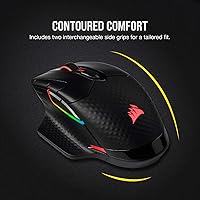
The right-handed contoured shell with textured grip panels feels secure during prolonged sessions, and medium-to-large hand sizes are well accommodated. The overall shape supports palm and claw grips comfortably, and the weight distribution does not cause noticeable fatigue over hours of use.
Left-handed users are completely excluded by the asymmetric design. Small-handed players also find the shell slightly oversized, which can strain the thumb and pinky during extended low-sensitivity sweeping movements common in FPS gameplay.
Build Quality
84%
The mouse feels dense and well-constructed with no creaking under pressure. Primary click buttons maintain consistent actuation feel, and the scroll wheel has a satisfying tactile resistance. The USB-C port is reinforced and shows no looseness even after months of daily plugging.
The side buttons draw repeated criticism for feeling softer and less precise than the main clicks. Some buyers also noticed that the matte finish attracts visible oils and smudging with regular use, requiring frequent wiping to maintain a clean look.
Software (iCUE)
67%
33%
For users already inside the Corsair ecosystem, iCUE provides deep macro customization, per-profile DPI settings, and multi-zone RGB control from a single interface. The integration with other Corsair peripherals for synchronized lighting is a genuine convenience for a fully coordinated desk setup.
iCUE has a well-documented learning curve that frustrates new users and occasionally conflicts with other peripheral management software. A subset of buyers specifically flagged connection drops and profile reset issues on Windows 11, with fixes requiring manual driver reinstalls.
Button Layout & Programmability
79%
21%
Eight buttons give MOBA and MMO players enough real estate to assign frequently used abilities or macros without reaching for a keyboard mid-fight. The placement of the two side buttons is accessible without an awkward thumb stretch, and profile switching on the fly works reliably.
The two side buttons feel physically underwhelming compared to the crisp main clicks, and repeated users describe them as slightly spongy. Those coming from mice with snappier auxiliary buttons may find the tactile feedback unsatisfying, especially under pressure.
RGB Lighting
77%
23%
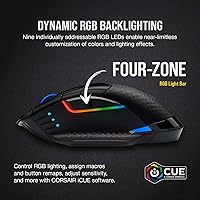
The multi-zone RGB looks polished and punchy on a dark desk, and per-zone control through iCUE allows a level of personalization that goes beyond simple color cycling. Buyers building a full Corsair RGB setup appreciate how well the mouse syncs with other iCUE devices.
RGB is entirely aesthetic, and the tradeoff in battery life is hard to ignore for wireless users. Brightness at maximum settings can also be distracting in dark rooms, and a few users noted that one lighting zone occasionally desyncs from the others after software updates.
Multi-Platform Compatibility
81%
19%
Support across PC, Mac, PS4, PS5, and Xbox significantly broadens the audience beyond PC-only gaming mice. Console players in particular value having a reliable wireless mouse option with low latency that connects without an adapter on supported platforms.
Full customization features require iCUE, which limits the experience on Mac and consoles to basic functionality. Users expecting the same depth of macro and DPI control outside of Windows will find the cross-platform story more limited than the spec sheet implies.
Value for Money
74%
26%
The combination of sub-1ms wireless, 2,000Hz polling, Qi charging, and a high-grade sensor in one package represents genuine feature density at this price tier. Buyers upgrading from budget wireless mice find the jump in responsiveness and convenience well worth the investment.
The market has grown significantly since 2020, and newer competitors now offer lighter builds with comparable wireless performance at similar or lower prices. Buyers who prioritize raw weight savings or the latest sensor generation may feel the value proposition has weakened over time.
Weight
58%
42%
The 5-ounce weight feels solid in hand and contributes to the premium, well-built impression. Users who prefer a heavier mouse for controlled, deliberate movements report it suits low-sensitivity, arm-aiming styles well.
This is the most polarizing physical characteristic in the entire review pool. Buyers accustomed to ultralight mice in the 60 to 70 gram range find this mouse tiring for extended play, and the weight disadvantage becomes more pronounced during high-speed flick-shot scenarios in competitive FPS.

Suitable for:

The Corsair Dark Core RGB Pro SE is purpose-built for gamers who want genuinely competitive wireless performance without accepting the typical compromises that come with cutting the cord. FPS and MOBA players will benefit most, particularly those who have grown tired of budget wireless mice and want a connection that holds up under real pressure. If you already own a Qi charging pad — even one you use for your phone — the overnight charging routine clicks into place immediately, removing cable management from your daily setup entirely. Console players on PS4, PS5, or Xbox also have a surprisingly strong case for this mouse, since quality wireless options for those platforms remain limited compared to PC. Users already running Corsair peripherals with iCUE will find that adding this wireless gaming mouse to their ecosystem pays off in synchronized customization that genuinely saves setup time. Medium-to-large hands in a palm or claw grip will feel at home with the ergonomic shell, and the textured sides hold up well during sweaty extended sessions.

Not suitable for:

Buyers who prioritize a lightweight build above everything else should look elsewhere before committing — at 5 ounces, this wireless gaming mouse is meaningfully heavier than the ultralight options that have dominated competitive recommendations in recent years, and that gap is noticeable during high-speed flick shots. Left-handed players have no viable path here, as the asymmetric ergonomic shell is designed exclusively for right-hand use with no mirrored variant available. Those new to Corsair's iCUE software should factor in a real learning curve; if you want plug-and-play simplicity with no software dependencies, this is not the right fit. Mac users and console players should also know that full customization — macros, DPI profiles, per-zone lighting — requires iCUE running on Windows, so the cross-platform story is more limited in practice than the compatibility list suggests. Finally, if you are a fingertip-grip player with smaller hands, the shell dimensions may feel oversized and uncomfortable over long sessions.

Specifications

  • Sensor: Uses a custom PixArt PAW3392 optical sensor optimized for low power consumption and precise tracking.
  • Max DPI: Sensitivity is adjustable from 100 up to 18,000 DPI in increments of 1 DPI for granular tuning.
  • Polling Rate: Supports hyper-polling at up to 2,000Hz, double the 1,000Hz standard found on most gaming mice.
  • Connectivity: Connects via SLIPSTREAM sub-1ms wireless, low-latency Bluetooth, or USB wired — all three modes are supported simultaneously.
  • Wireless Range: SLIPSTREAM wireless operates reliably within the standard desktop range using the included USB dongle receiver.
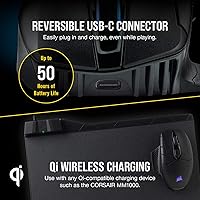
  • Charging: Charges via a reversible USB-C port or wirelessly through any Qi-compatible charging device.
  • Battery Life: Rated for approximately 50 hours of use per charge in wireless mode with lighting disabled.
  • Weight: The mouse weighs 5 ounces (approximately 142 grams) including the built-in battery.
  • Dimensions: Physical footprint measures 5 inches in length by 3.5 inches in width, suited to medium and large hands.
  • Buttons: Features 8 fully programmable buttons that support custom macros and remapping via iCUE software.
  • RGB Lighting: Multi-zone RGB lighting is customizable on a per-zone basis through Corsair iCUE software.
  • Software: Compatible with Corsair iCUE for Windows, enabling DPI profiles, macro assignment, and lighting synchronization.
  • Platform Support: Officially compatible with PC, Mac, PlayStation 4, PlayStation 5, and Xbox consoles.
  • Grip Style: Asymmetric right-handed ergonomic shell designed to accommodate palm and claw grip styles.
  • Battery Type: Powered by a built-in 1 Lithium Polymer rechargeable battery that is not user-replaceable.
  • USB Dongle: SLIPSTREAM wireless mode requires the included USB-A nano receiver, which stores in the underside compartment.
  • Switch Type: Primary left and right click buttons use Omron mechanical switches rated for tens of millions of actuations.
  • Cable: Includes a braided USB-C to USB-A cable for wired mode and charging.

Related Reviews
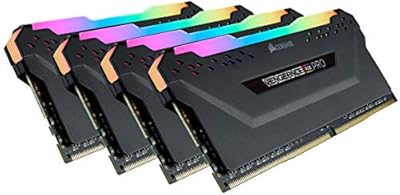
Corsair Vengeance RGB Pro 64GB (4x16GB) DDR4 3200MHz
87%
92%
Performance
85%
RGB Customization
93%
Installation Ease
89%
Compatibility
88%
Overclocking Potential
More
Corsair Vengeance RGB Pro DDR4 32GB (2x16GB) 3600MHz
87%
92%
Performance
89%
RGB Lighting Customization
90%
Overclocking Potential
85%
Ease of Installation
95%
System Compatibility
More
Corsair Vengeance RGB Pro 16GB (2x8GB) DDR4 3600MHz
89%
92%
Performance for Gaming
89%
RGB Customization
87%
Overclocking Stability
90%
Compatibility with Intel Systems
88%
Compatibility with AMD Systems
More
Corsair Vengeance RGB Pro DDR4 32GB 3200MHz
84%
93%
Installation & Setup
86%
Performance at Rated Speed
71%
Overclocking Headroom
91%
RGB Lighting Quality
76%
iCUE Software Integration
More
Corsair Vengeance RGB Pro DDR4 16GB (2x8GB) 3200MHz
86%
90%
Performance for Gaming
92%
RGB Lighting Customization
87%
Ease of Installation
89%
Platform Compatibility (Intel/AMD)
85%
Overclocking Potential
More
Corsair Vengeance RGB Pro 32GB (4x8GB) DDR4 3600 MHz
89%
91%
Performance
95%
RGB Lighting Customization
92%
Ease of Installation
89%
Overclocking Potential
93%
Compatibility (Intel & AMD)
More
Corsair Vengeance RGB Pro 16GB (2x8GB) DDR4 4000MHz C18 Memory
89%
94%
Performance in Gaming
92%
Ease of Installation
89%
RGB Lighting Customization
80%
Overclocking Stability
93%
Compatibility with Intel Systems
More
Corsair Vengeance RGB Pro 32GB (2x16GB) DDR4 3000 MHz Memory
87%
89%
Performance
94%
RGB Lighting Customization
88%
Ease of Installation
87%
Overclocking Potential
90%
Compatibility with Intel and AMD Systems
More
Corsair MP700 PRO SE 4TB M.2 PCIe Gen5 SSD
88%
94%
Performance
93%
Speed (Read/Write)
72%
Cooling/Heat Management
88%
Ease of Installation
91%
Compatibility
More
Corsair Vengeance RGB Pro 128GB (4x32GB) DDR4 3600MHz C18 Desktop Memory
89%
94%
Performance for Gaming
92%
Performance for Content Creation
88%
RGB Customization
91%
Ease of Installation
89%
Compatibility with Intel Systems
More

FAQ

It works immediately in wired mode and with SLIPSTREAM wireless using the included dongle — no software required to get started. iCUE is only needed if you want to customize DPI profiles, reprogram buttons, or adjust lighting. You can always install it later without missing any core functionality upfront.

Yes, as long as your phone charger or charging pad supports the Qi standard, it will charge this wireless gaming mouse. Most modern Qi pads work fine, though charging speed varies by pad wattage. It is worth noting that Qi charging is best used as an overnight routine rather than a fast top-up.

It is genuinely heavier than the ultralight options popular in competitive circles, sitting at 5 ounces. If you are coming from a mouse under 80 grams, the difference will be perceptible — especially during long FPS sessions involving frequent large arm movements. Players who prefer deliberate, controlled movements tend to find the weight less of an issue.

Yes, it connects to PS5 via the USB dongle or USB-C cable without needing a third-party adapter. Bluetooth connectivity is also an option on supported consoles. Keep in mind that iCUE customization is not available on console, so DPI and button settings will reflect whatever profile was last saved on a PC.

With full RGB effects enabled, real-world battery life drops significantly — expect somewhere between 16 and 20 hours rather than the advertised 50. The 50-hour figure applies with lighting completely off. Most users find a middle ground by running subdued lighting effects, which lands battery life in the 30-hour range depending on brightness.

There is a real learning curve involved. iCUE is feature-rich but not immediately intuitive, and new users often spend time navigating menus before finding what they need. If you are adding this mouse to an existing Corsair setup, the process is smoother. For first-time Corsair users, budgeting an hour to explore the software before your first session is a reasonable expectation.

You can switch between SLIPSTREAM wireless, Bluetooth, and USB wired as needed, but the mouse is active in only one mode at a time. Switching is done via a button on the underside. Many users keep SLIPSTREAM active for gaming and switch to Bluetooth when using the mouse with a secondary device like a laptop.

There is a small storage compartment on the underside of the mouse that holds the nano receiver when it is not plugged in. This is a practical touch that prevents the dongle from getting lost during travel or desk reorganization.

The two thumb buttons are positioned accessibly and do not require an unusual hand position to reach. However, several buyers note that the buttons feel softer and less precise than the main clicks — functional, but not particularly satisfying. If tactile button feedback matters to you, this is worth factoring in.

The mouse functions on Mac for basic cursor movement and clicking without any driver installation. However, iCUE is a Windows-only application, which means DPI switching, macro programming, and RGB customization are not available on macOS. Mac users are essentially limited to whatever settings were last configured on a Windows machine.