Overview

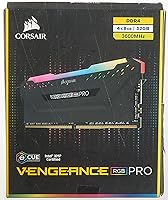
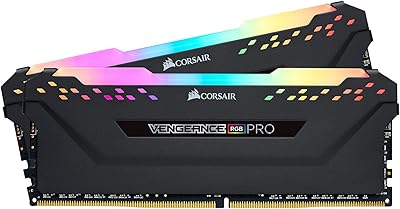
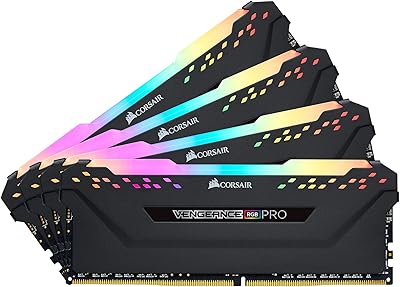
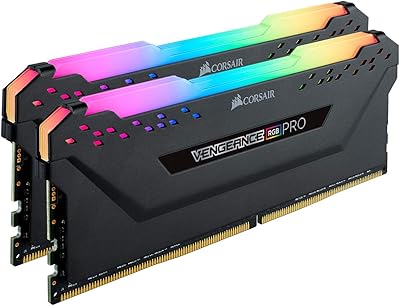
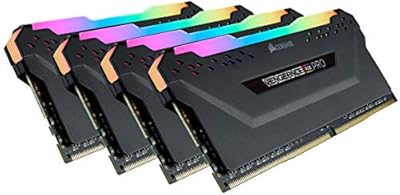
Corsair Vengeance RGB Pro 32GB DDR4 RAM has been a reliable go-to for enthusiast desktop builders since its mid-2019 release, and the fact that it still holds up says a lot. This is a 4x8GB quad-channel kit running at 3600MHz — a configuration that handles modern gaming, content creation, and heavy multitasking without much strain. What sets this Corsair RGB memory kit apart from generic alternatives is the iCUE ecosystem integration, which carries real weight if you are already running Corsair hardware. That said, it sits at a premium price point, so the value case depends heavily on how much cohesive RGB control and brand-matched software actually matter to your build.

Features & Benefits

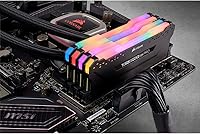
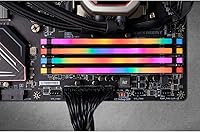
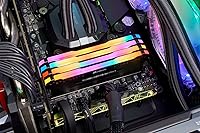
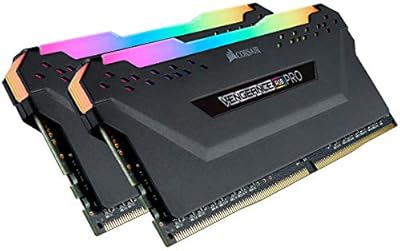
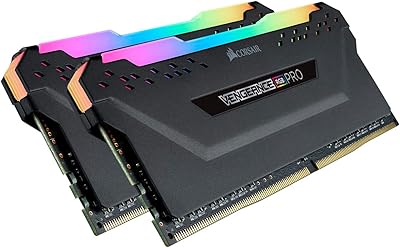
Each module carries ten individually addressable RGB LEDs, and the gap between that and a basic single-zone strip is obvious the moment you boot up — the animations are layered and fluid in a way that looks genuinely good inside a windowed case. The iCUE software ties lighting across coolers, fans, keyboards, and other Corsair hardware, though if you are not already invested in that ecosystem, it can feel bloated for what it offers. The custom PCB helps maintain signal integrity at rated speeds, and factory-screened ICs provide real overclocking headroom beyond the XMP profile. No extra cables or adapters needed — just install and go.

Best For

This DDR4 quad-channel set makes the most sense for builders putting together a mid-to-high-end gaming or creative workstation where the visual side of the build matters as much as raw internals. If you are already running a Corsair Hydro cooler, LL fans, or a K-series keyboard, the unified lighting sync across all of them is a genuine advantage. It covers both AMD Ryzen and Intel DDR4 platforms, which accounts for the vast majority of current builds. 32GB of capacity also hits the right mark for gaming while streaming, running a browser loaded with tabs alongside a game, or handling mid-sized video editing without hitting a wall.

User Feedback

Owners consistently praise how polished the lighting looks and how reliably the Vengeance RGB Pro kit syncs across iCUE devices — that part holds up. Where things get more nuanced is latency: CL18 is on the looser end for a 3600MHz kit, and buyers who have researched their options will notice that competing kits offer tighter timings at similar speeds. There are also isolated compatibility reports involving older AMD X370 boards and some legacy Intel platforms, so checking your motherboard QVL beforehand is a smart move. One thing that catches first-time builders off guard: XMP must be enabled in the BIOS manually, otherwise the kit defaults to 2133MHz. Once set up correctly, most users report long-term stability with no issues.

Pros

  • The per-module RGB lighting is genuinely high quality, with ten addressable LEDs producing smooth, layered animations that look impressive in a windowed build.
  • Quad-channel 32GB at 3600MHz covers virtually every modern gaming and multitasking scenario without becoming a bottleneck.
  • iCUE lighting sync works reliably across compatible Corsair components, making it one of the cleaner ecosystem integrations available for RGB builds.
  • Installation is straightforward — no adapter cables, no proprietary connectors, just standard DIMM slots.
  • Factory-screened ICs give real overclocking headroom for enthusiasts who want to push beyond the rated XMP profile.
  • The custom PCB contributes to stable signal integrity, which shows up in day-to-day reliability rather than just spec sheets.
  • With over five years on the market, this Corsair RGB memory kit has a deep reliability track record backed by a large pool of real-world user data.
  • Compatible with both AMD Ryzen and Intel DDR4 platforms, covering the majority of mainstream desktop builds.

Cons

  • CL18 latency is looser than several competing kits at the same 3600MHz speed, which matters if you are optimizing for raw responsiveness.
  • iCUE software can feel resource-heavy and is of limited value if you are not already embedded in the Corsair hardware ecosystem.
  • The price carries a noticeable RGB and branding premium that pure-performance buyers are effectively paying for without benefiting from.
  • XMP is not enabled by default — new builders who miss this BIOS step will see the kit running at 2133MHz and may wrongly assume it is defective.
  • Isolated compatibility issues have been reported with older AMD X370 and some legacy Intel motherboards, making QVL verification necessary before purchasing.
  • At this price tier, tighter-timed DDR4 alternatives exist that offer better latency for workloads sensitive to memory response times.
  • The tall heatspreader design may create clearance conflicts with large tower CPU coolers on tighter motherboard layouts.

Ratings

The scores below for the Corsair Vengeance RGB Pro 32GB DDR4 RAM were generated by our AI after analyzing thousands of verified buyer reviews from global marketplaces, with spam, bot-driven submissions, and incentivized feedback actively identified and filtered out. Each category reflects real patterns drawn from what actual desktop builders experienced — not manufacturer claims or promotional materials — so the high marks and the honest criticisms carry equal weight. Where this kit genuinely excels and where it falls short are both transparently represented in the breakdown below.

RGB Lighting Quality
93%
The per-module lighting stands out immediately once the system powers on. Ten individually addressable LEDs produce fluid, multi-zone animations that look noticeably more refined than single-zone competitors. Builders with windowed cases consistently describe the effect as one of the best-looking DDR4 kits they have used at this price tier.
RGB control is tied entirely to iCUE — there is no standalone hardware button or fallback option. Users who uninstall iCUE lose all customization and revert to a default cycling pattern, which can be frustrating for those who want lighting control without the software overhead.
Raw Performance
82%
18%
At 3600MHz, this kit handles demanding parallel workloads — gaming while streaming, running a DAW alongside a browser with dozens of tabs, or processing large Lightroom catalogs — without becoming the bottleneck. The 32GB total capacity gives memory-hungry applications like video editing software real headroom rather than just theoretical headroom.
The CL18 primary latency is where performance-focused buyers will raise an eyebrow — competing kits at the same 3600MHz speed are available with CL16 or even CL14 timings, which translates to tighter, more responsive memory access. For competitive gaming at very high framerates, that latency gap is worth weighing seriously before committing.
iCUE Software
71%
29%
For users already running Corsair peripherals — fans, coolers, keyboards — iCUE brings genuine value by synchronizing all lighting into a single unified profile. The cross-device control works reliably, and the customization depth for lighting patterns goes well beyond what most competing ecosystems offer at this price tier.
The software draws repeated criticism for running as a background process that consumes a noticeable share of system resources, particularly on machines with fewer CPU cores. If you are not using other Corsair devices, installing iCUE adds overhead without a meaningful payoff, and some users find it difficult to fully uninstall cleanly.
Value for Money
74%
26%
When purchased during promotional periods, this Corsair RGB memory kit offers a reasonable balance between 3600MHz performance, 32GB capacity, and premium aesthetics — three things that competing kits often sacrifice one of to hit a lower price. For Corsair iCUE ecosystem builders, the software integration adds value that purely generic kits simply cannot replicate.
At full retail pricing, the premium over non-RGB alternatives with tighter timings is significant enough that buyers focused purely on performance will find better-value options elsewhere. Shoppers not interested in RGB aesthetics or the iCUE ecosystem are effectively paying a brand and aesthetics surcharge they will never get practical use from.
Long-term Stability
89%
Having been on the market since 2019, this Corsair RGB memory kit has accumulated a substantial body of long-term owner feedback, and the consistent takeaway is that modules remain stable well beyond the initial build period. System crashes or memory degradation attributable to the kit itself are rarely reported, even in systems running continuously around the clock.
Occasional instability reports tend to correlate with specific motherboard and BIOS version combinations rather than the memory itself, but diagnosing the root cause can be time-consuming. Users who push overclocking aggressively without sufficient stability testing have also encountered issues that required rolling back to the standard XMP profile to resolve.
Installation Experience
88%
Most users report that physical installation is as clean as DDR4 gets — no extra cables, no adapters, no proprietary connectors needed. For anyone familiar with desktop builds, the process takes under five minutes, and the absence of supplemental wiring keeps cable management inside the case noticeably tidier.
A common friction point for first-time builders is that the kit defaults to base JEDEC speed after installation — usually 2133MHz — rather than the advertised 3600MHz. XMP must be manually enabled in the BIOS, and users who miss this step often spend considerable time troubleshooting what turns out to be a non-existent hardware problem.
Overclocking Headroom
79%
21%
Factory-screened ICs give the Vengeance RGB Pro kit a genuine advantage over lower-binned alternatives at similar price points. A solid subset of users report stable operation at frequencies well above 3600MHz with manual tuning, making this a reasonable choice for enthusiasts who want room to experiment without buying a premium binned kit at a higher cost.
Overclocking results are inconsistent and highly dependent on the silicon lottery and your specific CPU memory controller — what achieves stable 3800MHz on one Ryzen chip may be completely unreliable on another. Sub-timing tuning can also be constrained by the CL18 base profile, limiting how aggressively a custom configuration can be tightened.
Memory Latency
67%
33%
For everyday computing and most gaming scenarios, CL18 at 3600MHz delivers performance that the vast majority of users will never notice as a limitation. Everyday tasks — web browsing, application loading, multitasking across productivity tools — run smoothly without any detectable drag from the timing configuration.
Buyers researching memory specifications will quickly discover that CL16 and CL14 kits exist at 3600MHz — some at comparable or lower prices — and in latency-sensitive workloads or high-framerate gaming, the gap is measurable. This is the most consistently raised technical criticism in user reviews and the primary reason performance-focused buyers look at alternatives.
Platform Compatibility
83%
Broad support across AMD Ryzen and Intel DDR4 platforms means this DDR4 quad-channel set integrates cleanly into the majority of modern desktop builds. Most users on current-generation boards report reliable XMP compatibility without needing any BIOS adjustments beyond simply toggling the XMP profile on.
A consistent thread in negative reviews involves older platforms — AMD X370 boards and some legacy Intel 300-series motherboards — where users experienced instability or failure to reach rated speeds. Checking your specific motherboard's qualified vendor list before purchasing is essential, particularly if you are working with an older platform generation.
Module Build Quality
91%
The physical construction earns consistent praise across reviews — the heatspreader feels solid, each module seats with a confident, secure click, and there is none of the cheapness that sometimes surfaces on budget DDR4 alternatives. The custom PCB reinforces a perception of quality that holds up convincingly over years of daily use.
The tall heatspreader profile, while visually impressive, creates clearance conflicts with certain large tower CPU coolers that overhang DIMM slots — a practical issue that is easy to overlook during the ordering process. A few users also note that the LED diffuser cap can accumulate visible dust over time and is not simple to clean without disassembly.
Ecosystem Integration
86%
For builders already running Corsair fans, coolers, or keyboards, iCUE synchronization across all connected devices creates a polished and cohesive visual result that standalone RGB memory cannot replicate independently. The lighting transitions across components feel well-timed and intentional, which is noticeably satisfying in a display build or content creation setup.
The ecosystem value drops sharply when mixing Corsair memory with non-Corsair components — competing lighting platforms like ASUS Aura Sync or MSI Mystic Light do not communicate with iCUE, making cross-brand sync impossible. Buyers assembling a mixed-brand system will find the integration benefits largely irrelevant to their specific build.
Thermal Performance
84%
The aluminum heatspreader handles heat dissipation capably during typical gaming or productivity workloads, keeping operating temperatures well within safe ranges under normal conditions. Users running sustained 24/7 workloads report that the modules do not generate concerning heat levels even when chassis airflow is not directly targeted at the DIMM area.
When pushed beyond the XMP profile during aggressive overclocking, heat output increases noticeably, and users in poorly ventilated cases have reported stability issues linked to thermal stress at extreme frequencies. The heatspreader is entirely passive — there is no active cooling option — so case airflow planning becomes more important as clock speeds climb.
XMP Profile Reliability
77%
23%
On modern motherboards with current BIOS versions, enabling XMP is a straightforward single-toggle process and the kit boots reliably to 3600MHz on the first attempt in the majority of documented user cases. Corsair's track record for consistent XMP profiling means the advertised speeds are genuinely achievable without manual sub-timing intervention for most builders.
A recurring frustration — particularly among first-time builders — is that the kit ships defaulting to base JEDEC speed with XMP disabled, leading some users to incorrectly assume the memory is defective before discovering the BIOS setting. On certain older AMD platforms, reaching the full 3600MHz has proven unreliable even after enabling XMP correctly.

Suitable for:

The Corsair Vengeance RGB Pro 32GB DDR4 RAM is a strong fit for enthusiast desktop builders who want their system to look as good as it performs, particularly those already running other Corsair hardware like AIO coolers, case fans, or keyboards that can tie into the iCUE lighting ecosystem. At 32GB across four modules in a quad-channel configuration, this kit handles demanding workloads comfortably — think gaming while Discord, a browser with twenty tabs, and a stream encoding tool are all running at once. Content creators working with mid-sized video timelines or photo editing suites will also find the headroom genuinely useful rather than just theoretical. AMD Ryzen and Intel DDR4 platform users both get full compatibility, making it a versatile pick across a wide range of current builds. If RGB cohesion across your entire case is a priority, this DDR4 quad-channel set is one of the better-thought-out options on the market for achieving that without piecing together mismatched software solutions.

Not suitable for:

The Corsair Vengeance RGB Pro 32GB DDR4 RAM is a harder sell if you are building a purely performance-focused machine and have no interest in aesthetics or the Corsair software ecosystem. At CL18, the latency is on the looser end for a 3600MHz kit, and buyers chasing the best possible gaming responsiveness or benchmarking numbers will find tighter-timed alternatives at comparable or lower price points. If you are not already using Corsair peripherals or components, iCUE adds background overhead without delivering much practical value — the lighting sync only matters if there is something else to sync with. Builders on older platforms, particularly AMD X370 or early Intel 300-series boards, should verify their motherboard QVL before committing, since compatibility issues have surfaced with a small but notable number of those systems. Budget-conscious builders who simply need reliable, functional RAM without the premium attached to aesthetics and branding will almost certainly find better value elsewhere in the DDR4 market.

Specifications

  • Total Capacity: The kit provides 32GB of total memory across four individual 8GB DDR4 SDRAM modules in a quad-channel configuration.
  • Memory Type: DDR4 SDRAM, compatible with Intel and AMD motherboards that support the DDR4 standard.
  • Rated Speed: Each module is rated at 3600MHz (PC4-28800) when operating under the XMP profile.
  • Primary Latency: The kit runs at CL18 primary latency, which is on the looser end for this speed tier but stable for everyday and gaming workloads.
  • Operating Voltage: Standard operating voltage is 1.2V under the XMP 3600MHz profile, keeping power draw moderate for a high-speed kit.
  • RGB Lighting: Each module features ten individually addressable RGB LEDs capable of smooth, dynamic multi-zone lighting animations.
  • Software Support: Full compatibility with Corsair iCUE software, enabling lighting synchronization across other iCUE-compatible peripherals and components.
  • Form Factor: Standard DIMM form factor designed exclusively for desktop DDR4 platforms; not compatible with laptops or small-form-factor SO-DIMM slots.
  • Module Dimensions: Each module measures 5.44 x 0.3 x 2 inches, with a tall heatspreader profile that may affect clearance with large tower coolers.
  • Kit Weight: The complete four-module kit weighs approximately 10.6 ounces in total.
  • PCB Design: Corsair uses a custom performance PCB intended to improve signal integrity and sustain stability at rated speeds.
  • IC Screening: Memory ICs are factory-screened for quality, providing meaningful overclocking headroom beyond the rated XMP frequency.
  • Cable Requirement: No additional power cables or adapters are needed; the RGB lighting draws power directly from the motherboard headers.
  • Model Number: The exact model identifier for this kit is CMW32GX4M4D3600C18, useful for confirming compatibility against motherboard QVL lists.
  • Platform Support: Compatible with Intel and AMD DDR4 motherboards across a wide range of chipsets, including X570, B550, Z490, and Z590.
  • Release Date: This kit first became available in June 2019, giving it an established reliability track record across multiple platform generations.
  • Manufacturer: Designed and manufactured by Corsair, a well-established brand in PC memory and enthusiast components.
  • Warranty: Corsair covers this memory kit with a limited lifetime warranty against manufacturing defects under normal use conditions.

Related Reviews

Corsair Vengeance RGB Pro DDR4 32GB 3200MHz
84%
93%
Installation & Setup
86%
Performance at Rated Speed
71%
Overclocking Headroom
91%
RGB Lighting Quality
76%
iCUE Software Integration
More
Corsair Vengeance RGB Pro 32GB DDR4 RAM
85%
91%
Performance at Rated Speed
94%
Installation Experience
89%
RGB Lighting Quality
67%
iCUE Software Experience
83%
Compatibility Range
More
Corsair Vengeance RGB Pro 32GB (2x16GB) DDR4 3000 MHz Memory
87%
89%
Performance
94%
RGB Lighting Customization
88%
Ease of Installation
87%
Overclocking Potential
90%
Compatibility with Intel and AMD Systems
More
Corsair Vengeance RGB RT 32GB DDR4 RAM
79%
88%
AMD Ryzen Performance
91%
Installation & Setup
83%
RGB Lighting Quality
57%
iCUE Software Experience
74%
Value for Money
More
Corsair Vengeance RGB Pro 64GB (4x16GB) DDR4 3200MHz
87%
92%
Performance
85%
RGB Customization
93%
Installation Ease
89%
Compatibility
88%
Overclocking Potential
More
Corsair Vengeance RGB Pro 16GB DDR4 RAM
85%
88%
Performance at Rated Speed
83%
XMP Compatibility
91%
RGB Lighting Quality
71%
iCUE Software Experience
86%
Motherboard Compatibility
More
Corsair Vengeance RGB Pro 16GB DDR4 RAM
85%
93%
Performance Stability
91%
RGB Lighting Quality
88%
Ease of Installation
67%
iCUE Software Experience
74%
Value for Money
More
Corsair Vengeance RGB Pro 16GB DDR4 RAM
81%
88%
Memory Performance
71%
Compatibility
91%
RGB Lighting Quality
67%
iCUE Software Experience
93%
Installation Ease
More
Corsair Vengeance RGB Pro 128GB (4x32GB) DDR4 3600MHz C18 Desktop Memory
89%
94%
Performance for Gaming
92%
Performance for Content Creation
88%
RGB Customization
91%
Ease of Installation
89%
Compatibility with Intel Systems
More
Corsair Vengeance RGB PRO SL 64GB RAM
83%
92%
RGB Lighting Quality
78%
iCUE Software Integration
93%
Cooler Clearance
88%
XMP Stability
74%
Memory Performance
More

FAQ

Yes, and this trips up a surprising number of first-time builders. DDR4 memory defaults to a base JEDEC speed — usually 2133MHz or 2400MHz — when first installed. To run at the advertised 3600MHz, you need to enter your BIOS and enable the XMP profile manually. It is usually a one-click toggle, but if you skip it, the kit will run slower and you may wonder why performance feels underwhelming.

Yes, the Corsair Vengeance RGB Pro 32GB DDR4 RAM is compatible with AMD DDR4 platforms, including popular Ryzen chipsets like X570, B550, and X470. That said, AMD's memory controller can be pickier about running at higher speeds compared to Intel, so it is worth checking your specific motherboard's QVL — the qualified vendor list — to confirm 3600MHz support before buying.

Honestly, for most gaming scenarios the difference between CL16 and CL18 at 3600MHz is small enough that you are unlikely to feel it in practice. Where tighter timings matter more is in benchmarking or latency-sensitive competitive games at very high framerates. If raw performance numbers are your main priority, there are tighter-timed alternatives worth considering, but for typical gaming and general use, CL18 at this speed is perfectly solid.

Not with full control. Without iCUE, the modules will still light up using a default static or cycling rainbow pattern, but you lose the ability to customize animations, set static colors, or sync lighting across other components. If you are not planning to install iCUE, the RGB will still work — just not under your control. Keep in mind that iCUE runs as a background process, so if you are sensitive to software overhead, that is worth factoring in.

It depends on your cooler. The modules stand 2 inches tall, which is fairly typical for RGB DDR4 kits, but large tower coolers — particularly those with wide bases that overhang the first DIMM slot — can create clearance issues. Before buying, check your cooler's specifications or look up your specific cooler and motherboard combination in community build logs to confirm fit.

Mixing RAM kits is generally not recommended, even if the specs look identical on paper. Different manufacturers, die revisions, or even production batches can cause instability when paired together. If you need to expand beyond 32GB, a better approach is to sell your current kit and buy a single matched set at the capacity you need.

The factory-screened ICs give this Vengeance RGB Pro kit genuine overclocking potential, and many users have successfully pushed it beyond the XMP profile. That said, results vary depending on your CPU memory controller and motherboard, and overclocking always carries some stability risk. If you plan to overclock, take your time with testing tools and do not assume a specific frequency is guaranteed — your mileage will vary.

No. This is a full-size DIMM designed strictly for desktop motherboards. Laptops use SO-DIMM modules, which are physically smaller and electrically different. There is no adapter that makes desktop DDR4 work in a laptop slot.

First, reseat each module firmly and make sure they are in the correct slots — most motherboards require specific slot placement for quad-channel or dual-channel operation, usually slots two and four for a two-module setup or all four for a full kit. Consult your motherboard manual for the recommended slot configuration. If the issue persists, test modules individually to isolate whether the problem is a specific module or a motherboard slot.

iCUE runs as a background application on Windows and detects all connected compatible Corsair devices automatically. Once set up, you can assign lighting effects that play across your memory, fans, cooler, keyboard, and mouse simultaneously, all from a single interface. It works well when the ecosystem is in place, but if you only have this one Corsair product, the software adds overhead without much payoff — in that case, the default lighting patterns are probably good enough.

Where to Buy