Overview

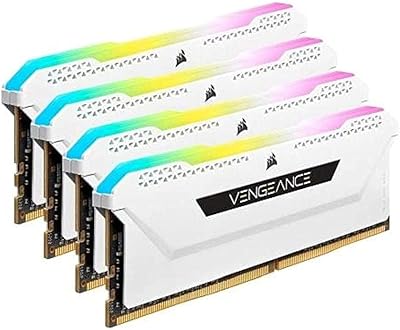
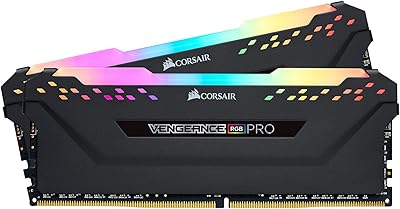
The Corsair Vengeance RGB Pro 16GB DDR4 RAM has been around long enough to prove itself — this isn't a kit riding early hype. Running at 3200MHz with CL16 timings, it hits a practical sweet spot for gaming and everyday desktop workloads without demanding aggressive manual tuning. The dual-channel configuration means your system handles multitasking more fluidly than a single-stick setup ever could. It works across Intel and AMD DDR4 motherboards, which removes one of the more frustrating compatibility headaches builders face. With over 43,000 user ratings sitting at 4.8 stars, the track record speaks clearly.
Features & Benefits

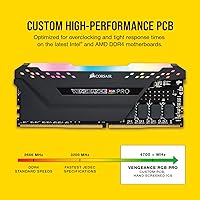
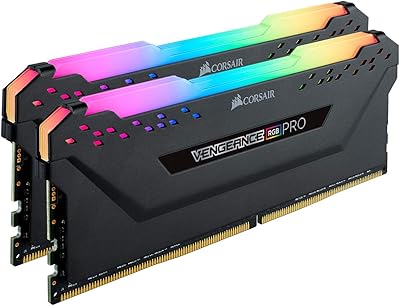
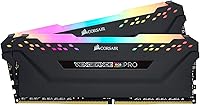
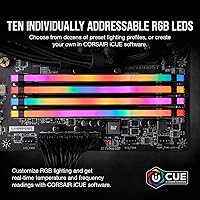
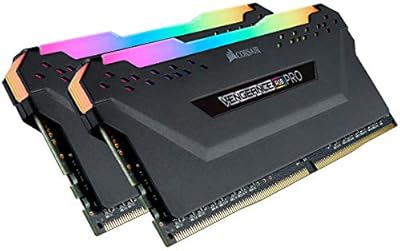
Each stick carries ten RGB LEDs set behind a frosted diffuser, which spreads light evenly across the top of the module rather than producing harsh, spotty glare — the result is a clean glow that holds up well under a side-panel window. Through iCUE software, lighting syncs across Corsair fans, coolers, and keyboards in the same ecosystem. The kit also runs at 1.35V, keeping thermals reasonable under sustained load. A custom PCB and carefully screened chips give it a solid foundation for XMP 2.0 profiles, letting you activate rated speeds with a single BIOS toggle. No cables required.

Best For

This Corsair RGB memory kit makes the most sense for builders already invested in the Corsair ecosystem or planning to be. If your case has fans, a liquid cooler, or a keyboard from the same brand, iCUE cross-device sync pays off noticeably. It suits first-time builders too — XMP activation is straightforward and platform support is broad. That said, the heatspreader is tall, so check CPU cooler clearance before ordering if you run a large tower cooler. For mid-range gaming builds and content creation rigs where looks and stability both count, the Vengeance RGB Pro sticks are a strong fit.

User Feedback

The Vengeance RGB Pro sticks have accumulated well over 43,000 ratings, and the 4.8-star average reflects long-term satisfaction rather than a surge of early reviews. Buyers consistently praise lighting consistency across both modules and how painlessly XMP profiles activate on first boot. The criticism worth taking seriously: iCUE is capable software, but it runs persistently in the background and some users find it noticeably resource-heavy on lower-spec systems. A smaller but real group has flagged heatspreader clearance conflicts with large air coolers — easy to overlook at purchase and frustrating to discover at install time.

Pros

  • XMP 2.0 activation takes a single BIOS toggle — no manual timing adjustments required.
  • Works reliably across both Intel and AMD DDR4 platforms, reducing compatibility guesswork.
  • The frosted diffuser spreads RGB light evenly across each stick with no obvious hot spots.
  • iCUE software enables synchronized lighting across Corsair peripherals, fans, and coolers.
  • Low 1.35V operating voltage keeps thermals reasonable during extended workloads.
  • Dual-channel configuration provides a tangible multitasking improvement over single-stick setups.
  • No extra cables or connectors needed, which helps keep the interior of a build tidy.
  • Over 43,000 verified ratings at 4.8 stars reflects sustained real-world reliability, not just early buzz.
  • Custom PCB and screened ICs give the Vengeance RGB Pro sticks solid overclocking headroom for enthusiasts who want it.

Cons

  • iCUE software runs persistently in the background and can feel heavy on lower-spec or RAM-limited systems.
  • The tall heatspreader may conflict with large air coolers that overhang the DIMM slots — always check clearance first.
  • Buyers indifferent to RGB aesthetics are paying a noticeable premium for a feature they will never use.
  • iCUE has a learning curve; new users sometimes find the interface more complex than expected for basic lighting control.
  • This DDR4 kit is a desktop-only solution and has no relevance for laptop or small form-factor NUC upgrades.
  • 16GB is adequate today but may feel limiting sooner than expected for heavy video editing or large virtual machine workloads.
  • The black heatspreader is the only finish option at this capacity, limiting customization for builders with specific color schemes.

Ratings

The scores below reflect an AI-driven analysis of verified global buyer reviews for the Corsair Vengeance RGB Pro 16GB DDR4 RAM, with spam, bot-submitted, and incentivized feedback actively filtered out before scoring. Ratings draw on tens of thousands of real-world install experiences across gaming rigs, content creation workstations, and first-time builds. Both the genuine strengths and the recurring frustrations are factored in — nothing is glossed over.

Performance Stability
93%
The vast majority of users report rock-solid stability after enabling XMP, with no crashes or instability even during extended gaming sessions or multi-hour rendering workloads. The screened ICs and custom PCB appear to deliver on their promise — buyers rarely mention needing to manually tighten timings to get consistent results.
A small but notable group reported needing a BIOS update before XMP would hold reliably, particularly on older AMD motherboards. These cases are the exception rather than the rule, but they do represent a real setup hurdle for less experienced builders.
RGB Lighting Quality
91%
Users consistently praise how evenly the frosted diffuser spreads light across the entire length of each stick — there are no harsh LED hotspots, which is a common complaint with cheaper RGB kits. The lighting holds up well in a windowed case, contributing noticeably to the overall build aesthetic without looking garish.
Without iCUE running, the default fallback animation is a basic color cycle that some users find underwhelming compared to the customized profiles. A few buyers also noted that matching the exact RGB shade to non-Corsair components proved tricky even with iCUE installed.
Ease of Installation
88%
The cable-free design means there is nothing to route or connect beyond seating the sticks in their slots, which makes installation genuinely clean and quick. First-time builders specifically called out how straightforward the physical install was, with the modules clicking in firmly and the XMP profile handling the rest at BIOS level.
The tall heatspreader has caused real problems for a meaningful number of buyers running large tower air coolers — some found the cooler base physically overlapping the first DIMM slot, forcing either a cooler swap or single-channel compromise. This is not a flaw in the RAM itself, but it is a compatibility surprise that catches people off guard.
iCUE Software Experience
67%
33%
For users already in the Corsair ecosystem with compatible fans, coolers, and keyboards, iCUE delivers a genuinely satisfying unified lighting control experience. The breadth of customization options — millions of color combinations, animated patterns, and per-device sync — is hard to match from a single interface.
iCUE is the most polarizing aspect of this Corsair RGB memory kit among verified buyers. It runs persistently in the background, consumes a noticeable slice of CPU and RAM on lighter systems, and some users report it causing occasional conflicts or crashes. Those who do not care about lighting customization find little reason to run it at all.
Value for Money
74%
26%
Buyers who wanted both strong DDR4 performance and integrated RGB lighting generally feel the kit justifies its mid-to-premium positioning — they are not paying separately for RAM and a lighting solution. The build quality and long-term stability reinforce the sense that the price reflects genuine engineering rather than just a brand premium.
Users who have no interest in RGB or ecosystem software openly acknowledge they are overpaying relative to equally fast non-RGB kits available for less. For a plain-case, no-window build, the value equation shifts noticeably against the Vengeance RGB Pro sticks.
Build Quality & Finish
89%
The black aluminum heatspreader feels solid and well-fitted, and buyers who have owned the kit for two or more years report no signs of degradation or finish peeling. The physical construction inspires confidence compared to budget DDR4 options, where loose or ill-fitting heatspreaders are more common.
The single heatspreader color option limits flexibility for builders working with a specific color scheme. A few users expressed disappointment that a premium kit at this price point does not offer white, silver, or gunmetal finish variants at the 16GB capacity level.
XMP Setup Experience
91%
Enabling XMP 2.0 is genuinely a one-step process on most modern motherboards — enter BIOS, toggle the XMP profile, save, and the kit runs at its rated 3200MHz on the next boot. This simplicity is frequently highlighted by first-time builders as one of the most stress-free parts of their entire build process.
On a minority of platforms, particularly budget B450 boards with older firmware, the XMP profile requires a prior BIOS update to register correctly. This is a platform limitation rather than a flaw in the DDR4 kit, but it can be confusing for buyers who expect a truly zero-effort activation.
Thermal Performance
86%
Operating at 1.35V keeps the modules running noticeably cooler than older higher-voltage DDR4 kits, and users running the sticks in warm cases or with limited airflow report no thermal throttling. The heatspreader does its job effectively at stock and even mild overclock settings.
Users pushing aggressive manual overclocks beyond XMP defaults may find the heatspreader insufficient for sustained heavy loads without additional case airflow. This is an edge case, but it is worth noting for enthusiasts who plan to push the sticks well past their rated profile.
Compatibility Range
87%
Intel and AMD DDR4 platform support is broad, and this DDR4 kit works across a wide range of chipsets from budget B450 and B560 boards up to high-end X570 and Z690 platforms. The large user base means real-world compatibility data is plentiful, making it easy to find confirmation before buying.
DDR4-only support is, by definition, a limitation as DDR5 platforms become more prevalent. Buyers building on newer Intel 700-series or AMD AM5 platforms cannot use this kit at all, which is worth flagging even though it is not a product defect.
Lighting Consistency Across Modules
88%
Matched-pair binning appears to result in highly consistent color output between both sticks, which buyers notice and appreciate when both modules are visible in a windowed build. Color matching between the two modules is rarely flagged as an issue, unlike some competing kits where slight tonal differences are common.
Matching the Vengeance RGB Pro sticks to non-Corsair RGB components — motherboard headers, third-party fans — requires extra configuration effort and still does not always produce a perfect color match. The ecosystem synchronization works best when the entire build uses Corsair hardware.
Overclocking Headroom
79%
21%
The custom PCB and screened ICs give enthusiasts a meaningful baseline for pushing past XMP defaults, and users who have manually tuned timings report reaching stable configurations beyond the rated profile on capable motherboards. For a mainstream DDR4 kit, the overclocking ceiling is respectable.
This is not a purpose-built overclocking kit, and buyers chasing extreme frequency targets will find it lacks the headroom of higher-binned enthusiast modules. The improvements available through manual tuning over a well-configured XMP profile are incremental rather than dramatic for most users.
Long-Term Reliability
94%
With 43,000-plus verified ratings accumulated over multiple years, the absence of widespread failure reports is itself meaningful data. Long-term owners across gaming and workstation contexts consistently report the modules performing identically after two or three years of daily use, which is the most credible reliability signal available.
A very small proportion of buyers have reported DOA or early-failure units, though this is statistically expected across any product sold at this volume. Corsair warranty support receives mixed feedback in these cases — resolution speed appears to vary by region.
Aesthetics & Visual Design
83%
The low-profile frosted top bar sits at a height that looks proportionate inside most mid-tower cases, and the black heatspreader provides a neutral base that suits dark-themed builds well. Buyers who prioritize a clean, unified look consistently rate the visual execution highly.
The design is fairly conservative compared to more aggressive-looking competitors with angular heatspreaders or dual-tone finishes. Builders going for a bold or colorful aesthetic may find the look a bit understated relative to what the RGB output suggests from the outside.

Suitable for:

The Corsair Vengeance RGB Pro 16GB DDR4 RAM is a natural fit for desktop builders who want dependable performance and a polished visual result in the same package. If you are already running Corsair fans, a Corsair cooler, or a Corsair keyboard, the iCUE lighting sync alone makes this kit a logical choice over alternatives with no ecosystem integration. Gamers and content creators who want 3200MHz speeds without spending time manually tuning timings in BIOS will appreciate how straightforward XMP activation is — enable it once, and you are done. First-time builders also benefit from the broad Intel and AMD motherboard compatibility, which significantly reduces the risk of a compatibility dead end. If your build sits behind a windowed panel and aesthetics genuinely matter to you, the evenly diffused RGB output on these sticks holds up well under scrutiny.

Not suitable for:

Buyers who have no interest in RGB lighting and are purely chasing performance-per-dollar will find that the Corsair Vengeance RGB Pro 16GB DDR4 RAM carries a price premium that simpler, non-RGB kits at the same speed do not. If your case is closed or opaque, the lighting goes entirely unseen, and that portion of what you are paying for delivers zero practical return. Users running large tower air coolers should measure heatspreader clearance carefully before ordering — the tall heatspreader on these sticks has caused real installation conflicts, particularly with coolers that overhang the DIMM slots. Anyone on a tight budget building a no-frills workstation or media PC will almost certainly be better served by a plainer kit that hits the same memory speeds for less. And if your system is already resource-constrained, the persistent background footprint of iCUE software is worth factoring in before committing.
Specifications

  • Capacity: This kit provides 16GB of total memory across two 8GB DDR4 modules configured for dual-channel operation.
  • Memory Type: Uses DDR4 SDRAM technology, compatible with DDR4-spec motherboard slots only.
  • Speed: Rated at 3200MHz, achievable out of the box when XMP 2.0 is enabled in BIOS.
  • Latency: Ships with CL16-18-18-36 primary timings, representing a well-balanced latency profile for gaming and general use.
  • Voltage: Operates at 1.35V, which is within standard DDR4 low-voltage range and produces less heat than higher-voltage kits.
  • RGB Lighting: Each module features 10 individually addressable RGB LEDs behind a frosted diffuser for uniform, even light output.
  • Software: Fully compatible with Corsair iCUE software for lighting customization and cross-device synchronization.
  • Platform Support: Supports Intel and AMD desktop motherboards with DDR4 memory slots; not compatible with DDR5 or laptop platforms.
  • XMP Profile: Includes an XMP 2.0 profile that allows one-step speed activation directly through the motherboard BIOS.
  • PCB: Built on a custom high-signal-quality PCB with individually screened ICs selected for stability and overclocking potential.
  • Form Factor: Standard DIMM format designed exclusively for desktop computer motherboards.
  • Dimensions: Each stick measures 5.44 x 0.3 x 2 inches, with a tall heatspreader profile that may affect CPU air cooler clearance.
  • Heatspreader Color: Comes with a black aluminum heatspreader; no alternative color options are available at this capacity tier.
  • Model Number: Corsair part number CMW16GX4M2C3200C16 identifies this specific 16GB 3200MHz CL16 dual-kit configuration.
  • Installation: Requires no extra cables or connectors; modules insert directly into DIMM slots for a clean, wire-free build interior.
  • Module Count: Sold as a matched pair of two 8GB sticks, optimized to run together in dual-channel mode for best performance.
  • Weight: Each module weighs approximately 4.3 ounces, typical for a full-size DIMM with an aluminum heatspreader.

Related Reviews
Corsair Vengeance RGB Pro 16GB (2x8GB) DDR4 3600MHz
89%
92%
Performance for Gaming
89%
RGB Customization
87%
Overclocking Stability
90%
Compatibility with Intel Systems
88%
Compatibility with AMD Systems
More
Corsair Vengeance RGB Pro 16GB (2x8GB) DDR4 4000MHz C18 Memory
89%
94%
Performance in Gaming
92%
Ease of Installation
89%
RGB Lighting Customization
80%
Overclocking Stability
93%
Compatibility with Intel Systems
More
Corsair Vengeance RGB RS 16GB DDR4 3200MHz
87%
92%
Performance
89%
RGB Lighting Customization
91%
Overclocking Stability
84%
Energy Efficiency
85%
Software Usability (iCUE)
More
Corsair Vengeance RGB Pro DDR4 32GB 3200MHz
84%
93%
Installation & Setup
86%
Performance at Rated Speed
71%
Overclocking Headroom
91%
RGB Lighting Quality
76%
iCUE Software Integration
More
Corsair Vengeance RGB Pro 64GB (4x16GB) DDR4 3200MHz
87%
92%
Performance
85%
RGB Customization
93%
Installation Ease
89%
Compatibility
88%
Overclocking Potential
More
Corsair Vengeance RGB Pro 32GB DDR4 RAM
85%
91%
Performance at Rated Speed
94%
Installation Experience
89%
RGB Lighting Quality
67%
iCUE Software Experience
83%
Compatibility Range
More
Corsair Vengeance RGB Pro 32GB (4x8GB) DDR4 3600 MHz
89%
91%
Performance
95%
RGB Lighting Customization
92%
Ease of Installation
89%
Overclocking Potential
93%
Compatibility (Intel & AMD)
More
Corsair Vengeance RGB Pro 32GB (2x16GB) DDR4 3000 MHz Memory
87%
89%
Performance
94%
RGB Lighting Customization
88%
Ease of Installation
87%
Overclocking Potential
90%
Compatibility with Intel and AMD Systems
More
Corsair Vengeance RGB PRO SL 64GB RAM
83%
92%
RGB Lighting Quality
78%
iCUE Software Integration
93%
Cooler Clearance
88%
XMP Stability
74%
Memory Performance
More
Corsair Vengeance RGB Pro 128GB (4x32GB) DDR4 3600MHz C18 Desktop Memory
89%
94%
Performance for Gaming
92%
Performance for Content Creation
88%
RGB Customization
91%
Ease of Installation
89%
Compatibility with Intel Systems
More

FAQ

No, the Vengeance RGB Pro sticks will work perfectly fine without iCUE installed. The modules will still light up with a default rainbow cycle right out of the box. iCUE is only necessary if you want to customize lighting patterns, sync colors with other Corsair devices, or create your own profiles.

Yes, the sticks function and light up on any compatible DDR4 motherboard regardless of brand. However, if you want lighting sync with motherboard RGB headers or software like ASUS Aura or MSI Mystic Light, you will need iCUE installed and some motherboards offer partial integration. The core performance is unaffected either way.

Most motherboards default to a lower base frequency when you first install new RAM. To hit 3200MHz, go into your BIOS after installing the sticks and enable the XMP 2.0 profile — it is usually a single toggle in the memory settings. Save and reboot, and the kit will run at its rated speed automatically.

Yes, it supports AMD DDR4 platforms including Ryzen. Most users report stable XMP operation at 3200MHz on Ryzen builds, though some older Ryzen 1000 and 2000 series motherboards may require a BIOS update for the best results. Check your motherboard's QVL list if you want absolute confirmation.

This is a legitimate concern worth checking before you buy. These modules have a tall heatspreader, and if your air cooler has a wide base that overhangs the first DIMM slot, you may have a clearance conflict. Measure the gap between your cooler and the nearest DIMM slot and compare it to the 2-inch module height. Low-profile RAM kits exist specifically for tight cooler situations.

You can use a single stick, but you would be running in single-channel mode which is noticeably slower than dual-channel. For gaming and most workloads, using both sticks together in the correct paired slots gives you meaningfully better bandwidth. The kit is sold and binned as a matched pair, so it is worth using them together.

It can, depending on your system. iCUE runs as a background process and consumes a modest but real amount of CPU and RAM. On a high-end build you are unlikely to notice it, but on a system already tight on resources some users have reported it adds unwanted overhead. If performance is the priority and you do not care about lighting control, simply leaving iCUE uninstalled is a reasonable choice.

Yes, in principle you can add a second matched pair to reach 32GB if your motherboard has four DIMM slots. For best results, buy an identical kit rather than mixing with a different batch, since matched kits are binned together for compatibility. Running four sticks can occasionally require slightly relaxed timings to maintain stability, depending on your motherboard.

The sticks fall back to a default lighting animation stored on the module itself — typically a color cycle. It looks fine, just not customized. iCUE needs to be running to maintain any saved lighting profiles, so if it closes unexpectedly, the default pattern kicks in until the software restarts.

For most gaming at 1080p and 1440p, 16GB remains a comfortable amount today. Some newer open-world titles and games with large asset streaming can push past 12GB under heavy load, so 16GB gives you a reasonable buffer. If you plan to run games alongside a browser, Discord, and streaming software simultaneously, you will rarely hit a wall. For heavy video editing or large virtual machines, 32GB is worth considering instead.

Where to Buy