Overview

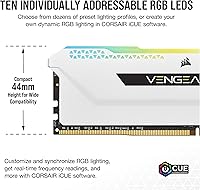
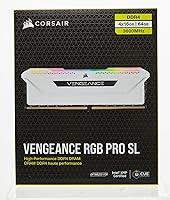
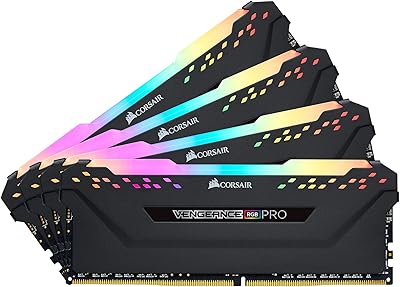
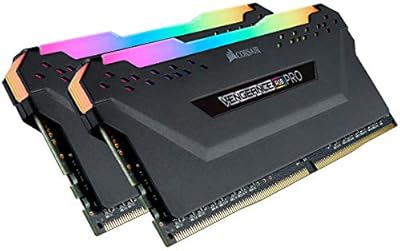
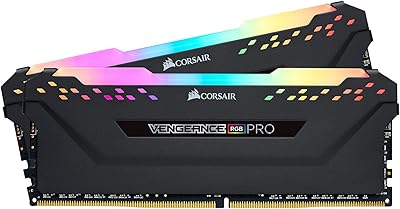
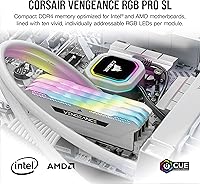
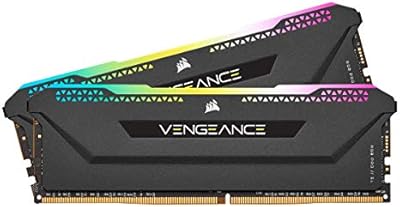
The Corsair Vengeance RGB PRO SL 64GB RAM is a desktop memory kit aimed at builders who want high capacity and strong aesthetics without sacrificing real-world compatibility. At 64GB spread across four modules, this isn't a configuration most gamers will need — it's built for workloads like video editing, 3D rendering, or heavy multitasking where memory headroom genuinely matters. What sets this Corsair kit apart physically is its 44mm low-profile height, keeping it clear of larger air coolers that would normally clash with taller RGB sticks. Running at DDR4 3600MHz with CL18 timings, it sits comfortably in the mainstream performance tier — solid and stable, but not tuned for enthusiasts chasing aggressively tight latency numbers.

Features & Benefits

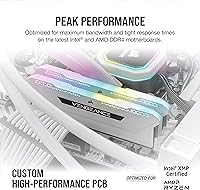
Each module in this 64GB DDR4 set carries ten individually addressable RGB LEDs, giving you per-LED lighting control through Corsair's iCUE software rather than the static zone lighting typical of budget alternatives. The custom performance PCB contributes to consistent signal quality when all four slots are populated — a real consideration since four-DIMM configurations can be finicky on some boards. At 1.35V, the modules run efficiently and offer modest overclocking headroom, though CL18 isn't a strong starting point for aggressive timing tightening. The iCUE ecosystem integration is genuinely practical for anyone already running Corsair fans, coolers, or keyboards, letting you unify your build's lighting without juggling third-party software workarounds.

Best For

The Vengeance RGB PRO SL makes the most sense for content creators and editors running Premiere Pro, DaVinci Resolve, or similar memory-hungry applications — not because it's faster than a 32GB kit at equivalent speeds, but because running out of memory mid-render is a real productivity killer. Builders pairing large tower coolers with a fully populated motherboard will especially appreciate the slim 44mm profile, since standard-height RGB kits often simply don't clear without fan removal. Deep Corsair iCUE users get lighting sync as a genuine convenience rather than a gimmick. That said, pure gamers should think twice — 64GB is overkill for virtually any gaming workload available today.

User Feedback

Among verified buyers, consistent praise centers on how vivid and crisp the RGB looks in person, along with smooth XMP profile activation on both Intel and AMD platforms straight out of the box. The low-profile clearance benefit gets mentioned frequently by builders who previously struggled fitting standard-height sticks under large coolers. On the downside, iCUE's resource footprint draws recurring complaints — it can feel heavy on modest systems, and RGB sync reliability occasionally stumbles across firmware updates. CL18 latency also earns mild criticism from spec-focused buyers who feel competing kits offer tighter timings at the same speed. Overall satisfaction remains strong, reflected clearly in the kit's rating across a substantial number of reviews.

Pros

  • The 44mm low-profile height clears virtually all large tower air coolers without modification or fan removal.
  • Ten individually addressable RGB LEDs per module produce noticeably richer lighting than single-zone competitors.
  • XMP profiles activate reliably on most Intel and AMD DDR4 motherboards with minimal manual tuning required.
  • DDR4 3600MHz is a proven sweet spot for Ryzen platforms, balancing bandwidth and Infinity Fabric synchronization well.
  • The custom PCB design contributes to stable four-DIMM operation, which can otherwise be hit-or-miss on some motherboards.
  • iCUE lighting sync works cleanly across Corsair fans, coolers, and keyboards for a unified build aesthetic.
  • Tightly binned memory chips provide reasonable headroom for users who want to experiment with modest overclocking.
  • A 64GB capacity means heavy multitasking, large Premiere Pro projects, and virtual machines run without memory pressure.
  • The white colorway is relatively rare among RGB RAM kits and pairs well with white-themed or monochrome builds.
  • Strong long-term reliability reputation from a brand with widely available customer support.

Cons

  • CL18 latency is not competitive with tighter-timed kits available at the same DDR4 3600MHz speed.
  • iCUE software carries a meaningful background resource footprint, which feels disproportionate on less powerful systems.
  • RGB sync through iCUE can become inconsistent after software or firmware updates, requiring occasional manual reconfiguration.
  • Paying for a 64GB kit when your workload only uses 20–30GB means a significant portion of your investment sits idle.
  • Four-DIMM configurations inherently require more careful motherboard QVL checking than simpler two-stick setups.
  • The premium pricing reflects both capacity and aesthetics — users who don't care about RGB are paying for features they won't use.
  • No DDR5 compatibility means this kit has a limited upgrade runway as newer platforms phase out DDR4 support.
  • White heatspreader finish can show fingerprints and dust more visibly than darker alternatives during installation.

Ratings

The scores below reflect AI-driven analysis of verified global buyer reviews for the Corsair Vengeance RGB PRO SL 64GB RAM, with spam, incentivized, and bot-generated feedback actively filtered out before scoring. Every category is weighted against real-world usage patterns reported by actual builders, editors, and system integrators — not marketing claims. Both the kit's genuine strengths and its recurring friction points are transparently represented in each score.

RGB Lighting Quality
92%
Buyers consistently describe the per-LED lighting as noticeably richer and more vivid than competing kits at similar price points. The individually addressable LEDs allow animation effects that look polished inside a windowed case, and the diffuser bar distributes light evenly without harsh hotspots.
A small but recurring group of users reports that RGB sync through iCUE can drift or desync after software updates, requiring a manual reset of lighting profiles. The white housing also means color accuracy on warmer tones can look slightly washed out compared to black-heatspreader alternatives.
iCUE Software Integration
78%
22%
For builders already running Corsair fans, coolers, or keyboards, iCUE delivers genuine convenience — a single dashboard controls the entire ecosystem's lighting without juggling separate utilities. Profile creation is flexible enough for both simple static colors and complex animated sequences.
iCUE carries real background resource overhead that some users on modest secondary systems find intrusive, even when the RAM itself is installed in a high-spec rig. Update reliability is a recurring complaint; several buyers note that major iCUE version jumps have temporarily broken their lighting configurations.
Cooler Clearance
93%
The 44mm SL profile is the single most praised practical feature in verified reviews — builders pairing this kit with large tower coolers like the Noctua NH-D15 or Be Quiet Dark Rock Pro report zero clearance issues where standard-height RGB sticks had previously forced compromises. It's a real, tangible installation benefit.
A small number of users on boards with DIMM slots positioned unusually close to the CPU socket still experienced minor interference, suggesting that cooler clearance is motherboard-dependent and not universally guaranteed by height alone.
XMP Stability
88%
The large majority of buyers report that enabling the XMP 2.0 profile in BIOS is straightforward and that the kit runs at rated 3600MHz without manual intervention on both Intel and AMD platforms. Four-DIMM stability — historically a pain point — is generally solid with this kit.
A subset of users on older B450 motherboards or with aging BIOS revisions report needing to manually loosen timings or drop to 3200MHz to achieve stable operation. Corsair's QVL list covers most mainstream boards, but edge cases exist and are worth verifying before purchase.
Memory Performance
74%
26%
At DDR4 3600MHz, this 64GB DDR4 set delivers bandwidth that satisfies workstation-level tasks — large Premiere Pro projects, multi-track audio sessions, and virtualization workloads run without memory bottlenecks for the vast majority of buyers who need this capacity tier.
CL18 is the honest weak point here: competing kits at the same speed with CL14 or CL16 timings offer measurably tighter latency, and enthusiasts running memory-latency-sensitive benchmarks or games will notice the gap. This is not a kit for users who intend to fine-tune sub-timings aggressively.
Build & Physical Quality
89%
The heatspreader feels substantial and well-fitted, with no loose diffuser panels or sharp edges reported by reviewers. The white finish is clean and consistent across all four modules, which matters when the sticks are visible through a glass panel.
White surfaces show fingerprints and handling marks more readily than darker finishes, which a handful of buyers flagged as a minor annoyance during installation. The finish is not especially scratch-resistant, so careless handling during a build can leave visible marks on the housing.
Overclocking Headroom
63%
37%
Corsair's chip screening means some users do find headroom beyond rated specs — a portion of buyers report successfully tightening to CL16 or pushing frequencies slightly above 3600MHz with stable results after BIOS tuning.
CL18 starting timings give this kit a narrower overclocking ceiling than dedicated enthusiast options, and results vary significantly by chip lottery. Users expecting consistent, dramatic gains beyond XMP will likely be disappointed compared to kits purpose-built for overclocking.
Capacity Value
81%
19%
For users who genuinely need 64GB — video editors, 3D artists, or developers running virtual machines — the cost per gigabyte at this capacity tier is reasonable relative to competing DDR4 64GB kits with comparable aesthetics and platform compatibility.
For anyone whose workload peaks below 32GB, the capacity premium is wasted money. Buyers who purchased for gaming specifically have left notably lukewarm value assessments, acknowledging they are paying for headroom their workloads never actually touch.
Installation Experience
86%
Most buyers describe installation as straightforward — the modules seat firmly, BIOS detection is immediate on first boot, and Corsair's documentation covers XMP activation clearly enough that even less experienced builders find the process approachable.
Four-DIMM installations inherently require more attention to slot pairing and BIOS memory training time on first boot, which can alarm inexperienced builders who see extended POST screens and mistake them for errors.
Ecosystem Compatibility
84%
The Vengeance RGB PRO SL integrates cleanly into Corsair's wider iCUE ecosystem — lighting sync with Corsair fans, AIO coolers, and keyboards works as advertised for users who have built out a Corsair-centric system.
Users running mixed-brand builds find that iCUE's sync advantage disappears entirely, and the software becomes an overhead-only proposition. OpenRGB offers partial support as an alternative, but it is neither officially supported nor consistently reliable across iCUE updates.
Long-Term Reliability
91%
Corsair's lifetime warranty backing, combined with a relatively low field failure rate reported in long-term ownership reviews, gives buyers reasonable confidence in the kit's durability under sustained workloads over multiple years.
A small number of users report single-module failures appearing after 12–18 months of use, with the RMA process described as functional but occasionally slow. Module failures in four-DIMM configurations are particularly disruptive since replacing one stick from a matched kit can introduce instability.
Aesthetic Cohesion
87%
The white colorway is genuinely uncommon in the 64GB DDR4 kit market and pairs cleanly with white-themed builds using white cases, fans, and coolers. Reviewers building monochrome rigs specifically called out this kit as one of few options that doesn't compromise on capacity to achieve a clean look.
The diffuser bar's plastic texture, while acceptable, doesn't feel quite as premium as the heatspreader metal, and close-up photos in reviews show a slight material quality gap between the two components that matters to detail-oriented builders.
Software Learning Curve
72%
28%
iCUE's feature set is genuinely broad once mastered, and users already familiar with it from other Corsair products find adding the RAM to their existing profile a matter of minutes. The preset lighting modes cover most users' needs without requiring custom profile work.
New Corsair users frequently report a steep initial learning curve with iCUE's interface, describing it as unintuitive for first-time setup. The sheer number of options across multiple connected devices can make lighting management feel more complex than it should be for a straightforward RGB RAM setup.

Suitable for:

The Corsair Vengeance RGB PRO SL 64GB RAM is built for desktop users whose workloads genuinely demand large memory pools — think video editors juggling multi-track 4K timelines, 3D artists running complex scene files, or developers spinning up multiple virtual machines simultaneously. If you're building a high-capacity workstation that also needs to look good inside a windowed case, this Corsair kit hits both targets without requiring you to choose between aesthetics and function. Builders using large air coolers like the Noctua NH-D15 or Corsair's own A500 will find the 44mm slim profile a practical relief, since standard-height RGB sticks frequently cause clearance headaches when all four DIMM slots are populated. AMD Ryzen users in particular will appreciate DDR4 3600MHz as a well-documented sweet spot for the Infinity Fabric, making this 64GB DDR4 set a logical choice for Ryzen-based content creation builds. Anyone already invested in the Corsair iCUE ecosystem — fans, coolers, keyboards — gets genuine value from unified lighting control without cobbling together workarounds.
Not suitable for:

The Corsair Vengeance RGB PRO SL 64GB RAM is a poor match for anyone building a pure gaming rig, where 64GB of DDR4 offers zero tangible benefit over a well-tuned 32GB kit and the extra cost is simply wasted. Enthusiasts chasing the tightest possible memory timings should also look elsewhere — CL18 at 3600MHz is respectable but leaves meaningful latency on the table compared to CL14 or CL16 kits running at the same frequency. If you're budget-conscious and the RGB lighting holds no appeal, you're paying a visible premium for aesthetics that plain-heatspreader alternatives don't charge for. Users on systems with limited resources may also find iCUE's background overhead more of a nuisance than a convenience, especially if they aren't running other Corsair hardware to justify the software's presence. Laptop users and small-form-factor builders using SO-DIMM or compact ITX boards with only two slots should obviously look at entirely different product categories.
Specifications

  • Capacity: This kit provides 64GB of total memory across four 16GB DDR4 DIMM modules.
  • Memory Type: Modules use DDR4 SDRAM technology, compatible exclusively with DDR4-supported desktop motherboards.
  • Speed: Rated at 3600MHz (PC4-28800), activated via XMP 2.0 profile in the motherboard BIOS.
  • Latency: CAS latency is CL18, with full primary timings of 18-22-22-42.
  • Voltage: Modules operate at 1.35V under XMP profile, within standard DDR4 voltage safety margins.
  • Module Height: Each stick measures 44mm tall, qualifying as low-profile for improved air cooler clearance.
  • Dimensions: Individual module dimensions are 5.44″ x 0.30″ x 1.76″ (length x width x height).
  • Kit Weight: The complete four-module kit weighs 8.7 ounces in total.
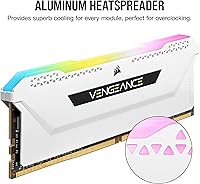
  • RGB Lighting: Each module features ten individually addressable RGB LEDs mounted along the top diffuser bar.
  • RGB Software: Lighting is fully controlled and animated through Corsair iCUE software on Windows.
  • Form Factor: Standard unbuffered DIMM form factor, designed solely for desktop PC motherboards.
  • Platform Support: Compatible with Intel and AMD DDR4 motherboards that support XMP 2.0 memory profiles.
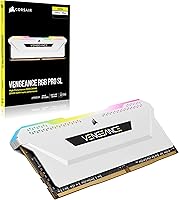
  • Color: Heatspreader and diffuser housing are finished in white, suitable for light-themed builds.
  • PCB Design: Modules use a custom performance PCB intended to maintain signal integrity across all four populated slots.
  • Model Number: The official Corsair model number for this specific kit is CMH64GX4M4D3600C18W.
  • Warranty: Corsair covers this kit under a limited lifetime warranty against manufacturing defects.
  • Release Date: This kit was first made available for purchase in July 2021.
  • BSR Ranking: Currently ranked #928 in the Computer Memory category on Amazon, reflecting consistent long-term sales volume.

Related Reviews
Corsair Vengeance RGB PRO SL 64GB (2x32GB) DDR4 3200MHz C16 Desktop Memory
87%
91%
Performance
88%
Ease of Installation
93%
RGB Customization
86%
Value for Money
84%
Compatibility
More
Corsair Vengeance RGB PRO SL 64GB (2x32GB) DDR4 3600MHz C18 Memory Kit
87%
92%
Performance
87%
RGB Lighting Customization
94%
Compatibility with Intel & AMD
90%
Speed (3600MHz)
88%
Build Quality
More
Corsair Vengeance RGB Pro 64GB (4x16GB) DDR4 3200MHz
87%
92%
Performance
85%
RGB Customization
93%
Installation Ease
89%
Compatibility
88%
Overclocking Potential
More
Corsair Vengeance RGB DDR5 64GB (4x16GB) 5600MHz
86%
94%
Performance at 5600MHz
88%
RGB Customization
91%
Setup & Installation
92%
Compatibility with Intel & AMD Systems
89%
Stability During Overclocking
More
Corsair Vengeance DDR5 64GB (4x16GB) 6000MHz RAM
88%
94%
Performance in Demanding Tasks
89%
Ease of Setup and Installation
91%
Multitasking Efficiency
86%
Overclocking Capability
93%
Compatibility with Intel Systems
More
Corsair Vengeance RGB Pro 16GB DDR4 RAM
85%
93%
Performance Stability
91%
RGB Lighting Quality
88%
Ease of Installation
67%
iCUE Software Experience
74%
Value for Money
More
Corsair Vengeance RGB Pro DDR4 32GB 3200MHz
84%
93%
Installation & Setup
86%
Performance at Rated Speed
71%
Overclocking Headroom
91%
RGB Lighting Quality
76%
iCUE Software Integration
More
Corsair Vengeance RGB RS 64GB (2x32GB) DDR4 3200MHz
89%
92%
Performance
89%
RGB Lighting Customization
94%
Ease of Installation
88%
Compatibility
85%
Cooling Efficiency
More
Corsair Vengeance RGB Pro 32GB DDR4 RAM
85%
91%
Performance at Rated Speed
94%
Installation Experience
89%
RGB Lighting Quality
67%
iCUE Software Experience
83%
Compatibility Range
More
Corsair Vengeance RGB RS 64GB (2x32GB) DDR4 3600MHz
86%
91%
Performance
89%
RGB Lighting Customization
82%
Ease of Installation
87%
Overclocking Stability
88%
Compatibility with Intel & AMD
More

FAQ

In most cases, yes. The 44mm module height is specifically why Corsair added the SL (slim-light) designation to this line. Standard Vengeance RGB PRO sticks sit around 51mm tall and commonly clip the fan on large tower coolers, whereas this kit clears the majority of them without any modification. That said, always double-check your specific cooler's clearance spec against your motherboard's DIMM slot position, since a few coolers with very wide heatsink bases can still be tight.

You'll need to enable XMP manually in your BIOS — this is normal for any kit rated above the DDR4 base spec of 2133MHz. Just enter BIOS after installation, find the memory or XMP settings, and select the XMP 2.0 profile. Most modern Intel and AMD boards handle this without any issues, and the kit is generally stable at rated speed right after that single change.

Honestly, for pure gaming it's more than you'll realistically use — most titles don't push past 16GB even with background apps running. If your content creation work involves occasional photo editing or short video clips, 32GB would serve you just as well at a lower cost. Where 64GB starts earning its place is in sustained video editing at 4K, large Premiere Pro or DaVinci Resolve projects, 3D rendering, or running multiple virtual machines simultaneously.

The RGB on each module operates independently of how many sticks you install, so two modules will light up just fine if you're running a dual-channel configuration. Keep in mind that running two sticks from a four-stick kit means you should use the correct DIMM slots for dual-channel — typically slots 2 and 4 on most boards, but check your motherboard manual to be sure.

iCUE is not a lightweight application — it runs background processes to manage lighting and monitor hardware, and on older or lower-spec systems it can consume a noticeable chunk of CPU and RAM at idle. For a high-end workstation build where you're already running 64GB, the overhead is negligible. If you're running a mid-range system or simply don't care about RGB sync with other Corsair gear, you can run the modules without iCUE installed and they'll still display a default rainbow lighting pattern.

Mixing RAM kits is generally not recommended, even from the same brand and product line, because subtle differences in chip binning and PCB revision can cause instability. If you anticipate needing more than 64GB down the line, your cleaner path is to replace the kit entirely rather than stack mismatched modules. That said, if your motherboard supports eight DIMM slots and you source an identical second kit, success is possible but not guaranteed.

Yes, it's compatible with Ryzen 5000 series platforms on X570 and B550 motherboards. DDR4 3600MHz is particularly well-suited to Ryzen 5000 because it keeps the Infinity Fabric running at 1800MHz in a 1:1 ratio, which is the recommended operating point for that architecture. Enable EXPO or XMP in BIOS and you should be good to go.

Without iCUE, the modules default to a built-in rainbow cycle effect — the LEDs will still be active and look good, you just won't have any control over colors, patterns, or syncing with other devices. If you want static colors or custom animations, iCUE is required. For users who want simpler lighting without the software overhead, some third-party tools like OpenRGB may offer limited compatibility, though support isn't officially guaranteed by Corsair.

CL18 at 3600MHz puts this Corsair kit firmly in the mainstream tier rather than the enthusiast tier. It's perfectly capable for productivity and creation workloads, and most users will never notice the difference in day-to-day use. Enthusiasts who care about absolute latency and plan to spend time dialing in sub-timings will want to look at CL14 or CL16 alternatives, which typically use better-binned Samsung B-die or Hynix CJR chips and offer more tuning headroom.

Corsair backs this kit with a limited lifetime warranty, which covers manufacturing defects for the original purchaser. If a module fails under normal use, you'd contact Corsair support directly with proof of purchase and they'll typically arrange a replacement. It's worth registering your kit on Corsair's website after purchase, as this can simplify the RMA process if you ever need it.