Coolpie CR220 Dual-Bay M.2 NVMe SSD Cloner
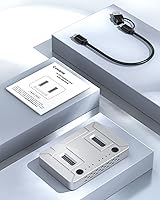
Overview
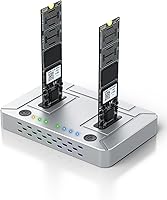
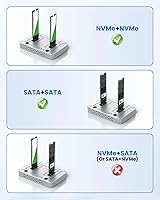
The Coolpie CR220 Dual-Bay M.2 NVMe SSD Cloner is a compact docking station that handles both offline drive cloning and USB-attached storage access, switching between the two with a single physical toggle. It sits comfortably in the mid-range of its category, competing against familiar names like ORICO and Inateck, but brings a cleaner switching mechanism to the table. One important caveat worth knowing before you buy: protocol mixing is impossible — NVMe clones to NVMe, SATA to SATA, full stop. That constraint rules out certain buyers entirely, but for everyone else, this dual-bay dock launched in mid-2025 and has already cracked the top 20 in its Amazon category, which is a respectable start.
Features & Benefits
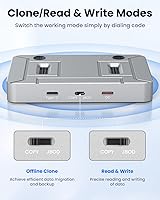
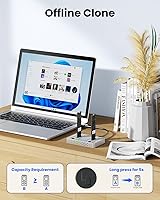
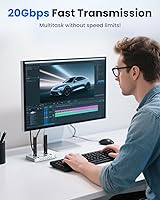
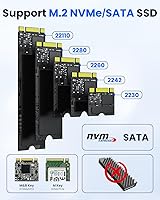
The CR220's defining feature is its physical mode switch — flip it to COPY and the dock clones your drives independently, no host computer involved. Flip it the other way, connect via USB-C, and you get JBOD storage access over USB 3.2 Gen2×2. That 20Gbps figure is a theoretical ceiling; real-world NVMe speeds will land lower depending on your drives and host controller, but it still outpaces older USB 3.0 solutions by a wide margin. Drive installation is fully tool-free, it handles all mainstream M.2 form factors from 2230 up to 22110, and each slot supports up to 8TB. Windows, macOS, and Linux all work without any driver installation.
Best For
This M.2 cloner makes the most sense for people who clone drives regularly. IT technicians rolling out identical system images will appreciate being able to run the process without tying up a workstation. It is also a solid pick for anyone doing a one-time laptop upgrade — moving from an older NVMe to something faster or larger without needing third-party software. Video editors with dense NVMe libraries, gamers relocating large installs, and anyone archiving an old drive before disposal will all find it practical. If you need to clone an NVMe to a SATA drive or vice versa, however, look elsewhere — cross-protocol cloning is simply not supported.
User Feedback
With roughly 90 ratings and a 4.4-star average, the CR220 shows a promising early track record, though the sample size is still too small to draw firm conclusions. Buyers consistently highlight ease of use as the standout quality — the physical switch in particular removes any guesswork about operating modes. Where criticism surfaces, it tends to focus on real-world transfer speeds falling short of the advertised ceiling and occasional questions around SATA drive compatibility. A few reviewers also flag heat buildup during extended cloning sessions as something to watch. Professional users generally report solid offline cloning reliability, but with a limited review pool, checking back as more feedback accumulates is advisable.
Pros
- Offline cloning requires no host PC — just drives, a power source, and one switch flip.
- Covers every common M.2 form factor from 2230 through 22110 without adapters or hardware swaps.
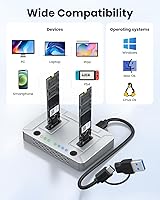
- Zero driver or software installation needed on Windows, macOS, and Linux.
- USB 3.2 Gen2×2 interface delivers meaningfully faster NVMe transfers than older USB 3.0 docks.
- Tool-free drive installation makes repeated insertions and removals quick and hassle-free.
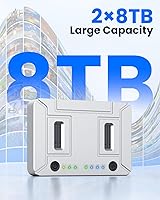
- Each slot supports up to 8TB, keeping the dock viable for large modern drives.
- JBOD mode doubles as a high-speed external enclosure when cloning is not needed.
- Physical mode switch eliminates software menus and reduces user error during cloning jobs.
- Compact and light enough to carry in a laptop bag for on-site IT work.
- Early buyer feedback from professionals validates the cloning reliability for real deployment use.
Cons
- NVMe-to-SATA cross-protocol cloning is entirely unsupported — a hard limitation, not a workaround.
- Real-world transfer speeds often fall short of the 20Gbps ceiling depending on drives and host port.
- No clone verification output or error reporting beyond a basic status LED.
- Chassis runs noticeably warm during long or consecutive cloning sessions with no active cooling.
- The included USB-C cable performs adequately but may limit peak throughput versus a higher-grade cable.
- No USB-A adapter in the box, which is an issue for systems without a native USB-C port.
- The screwless retention mechanism feels less confident with shorter 2230 drives than with standard 2280 sticks.
- No RAID or spanning support in JBOD mode — drives always appear as two separate independent volumes.
- Review sample size is still under 100 ratings, so long-term reliability data remains limited.
- Buyers needing selective partition cloning or scheduled backups will need a separate software solution.
Ratings
The ratings below for the Coolpie CR220 Dual-Bay M.2 NVMe SSD Cloner were generated by our AI system after processing verified purchase reviews from buyers worldwide, with spam, bot-submitted, and incentivized feedback actively filtered out. Scores reflect the full picture — where this dual-bay dock genuinely earns its place and where real users have run into friction. Both the strengths and the legitimate frustrations are represented here without sugarcoating.
Ease of Use
Offline Cloning Reliability
Transfer Speed (NVMe)
Protocol Compatibility
Form Factor Support
Build Quality
Thermal Management
JBOD / USB Storage Performance
Software Independence
Capacity Support
Cable & Accessory Inclusion
Value for Money
Cross-Platform Compatibility
Setup & Installation Speed
Suitable for:
The Coolpie CR220 Dual-Bay M.2 NVMe SSD Cloner is a strong match for anyone who clones drives with any regularity and wants to do it without babysitting a computer. IT technicians handling multi-unit system deployments will find the offline cloning mode particularly useful — slot in the source and target NVMe drives, flip the switch, walk away. Gamers or video editors moving a full library to a faster or larger NVMe will appreciate the USB 3.2 Gen2×2 throughput, which keeps transfer windows short compared to older dock solutions. Home users doing a one-time laptop SSD upgrade are also well-served here, since there is no software to install and no technical configuration required. If you regularly deal with large M.2 drives across multiple form factors — from the compact 2230 sticks in Surface and Steam Deck upgrades to full-length 22110 units — the broad physical compatibility removes a common headache. Content creators archiving NVMe drives packed with raw 4K or 8K footage will find the capacity ceiling of 8TB per slot keeps pace with modern storage demands.
Not suitable for:
The single most important limitation of the Coolpie CR220 Dual-Bay M.2 NVMe SSD Cloner is one that has already surprised a number of buyers: it cannot clone across protocols. If you need to migrate data from an NVMe drive to an M.2 SATA drive, or the reverse, this dock will not do it — both drives in the operation must use the same interface standard. Buyers with mixed drive inventories who assumed any two M.2 drives would work together should look at software-based cloning solutions paired with a universal dock instead. Anyone expecting the advertised 20Gbps throughput as a consistent real-world figure will also be disappointed — actual speeds depend heavily on drive quality and host controller capability, and in practice many users see considerably less. People who want granular control over the cloning process — selective partition copying, verification reports, or incremental backup scheduling — will find the single-switch design too blunt an instrument. Finally, buyers who run intensive back-to-back cloning sessions should be aware that the chassis can run warm without any active cooling, which may give pause in thermally constrained environments.
Specifications
- Brand & Model: Manufactured by Coolpie under the model designation CR220.
- Interface: Connects to a host computer via USB-C using the USB 3.2 Gen2×2 standard, with a theoretical maximum throughput of 20Gbps.
- NVMe Speed: NVMe SSD transfers can reach up to 20Gbps under ideal conditions, though real-world speeds vary depending on drive model and host port capability.
- SATA Speed: M.2 SATA drives are limited by their protocol to a maximum of 6Gbps regardless of the USB interface speed.
- Supported Protocols: Accepts M.2 NVMe drives using the M Key edge connector and M.2 SATA drives using the B+M Key edge connector.
- Form Factors: Compatible with M.2 SSD lengths 2230, 2242, 2260, 2280, and 22110, covering virtually all standard M.2 sizes on the market.
- Capacity Per Slot: Each of the two drive bays supports a single M.2 SSD with a maximum capacity of up to 8TB.
- Total Capacity: With both bays populated, the dock can address a combined maximum of 16TB across the two drives simultaneously.
- Operating Modes: A physical toggle switch selects between COPY mode for standalone offline cloning and JBOD mode for USB-attached dual-drive storage access.
- Clone Requirement: Offline cloning requires both drives to use the same protocol — NVMe-to-NVMe or SATA-to-SATA only; cross-protocol cloning is not supported.
- OS Compatibility: Operates as a plug-and-play device on Windows, macOS, and Linux without requiring driver installation or companion software.
- Software Required: No software or drivers are needed for either cloning or JBOD storage operation on any supported operating system.
- Installation: Drives are inserted and secured without screws or tools using a screwless retention mechanism built into each bay.
- Host Connector: The dock side uses a USB-C port; a USB-C cable is included in the package for immediate use.
- Dimensions: The unit measures 5.75 × 3.39 × 1.46 inches, making it compact enough to fit in a laptop bag or a desk drawer.
- Weight: The dock weighs approximately 5.9 oz (0.17 kg), light enough for portable or on-site IT use.
- Color & Finish: Available in silver with a mixed aluminum and plastic construction.
- Cooling: The dock relies entirely on passive cooling with no fan or active ventilation; heat dissipates through the chassis shell during operation.
Related Reviews

WAVLINK Dual-Bay NVMe M.2 SSD Cloner
AOKO 4-in-1 M.2 NVMe Hard Drive Duplicator
MAIWO M.2 NVMe 4-Bay SSD Cloner Dock
ORICO Dual M.2 NVMe SSD Enclosure

IO CREST SY-ENC50127 USB 3.2 Type-C Dual Bay HDD + M.2 NVMe External Enclosure
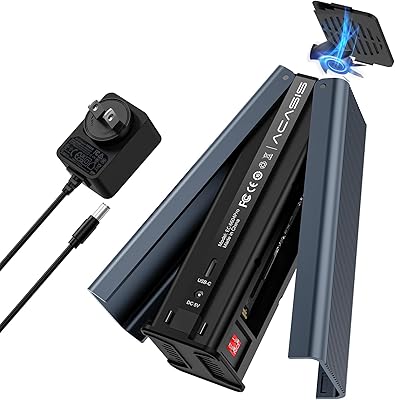
ACASIS EC-6604 M.2 NVMe SSD Duplicator

dockteck DH0002 M.2 NVMe/SATA SSD Enclosure

SanDisk 2TB SSD Plus M.2 NVMe SSD

ineo C2605-NVMe M.2 NVMe SSD Enclosure

Cable Matters USB4 40Gbps M.2 NVMe Enclosure
