Overview

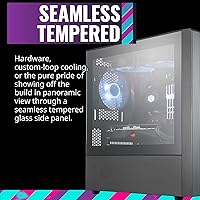
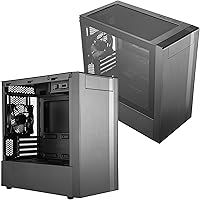
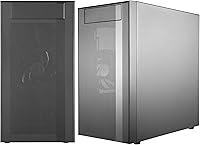
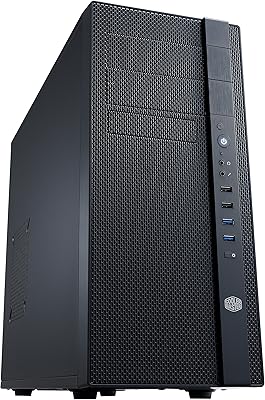
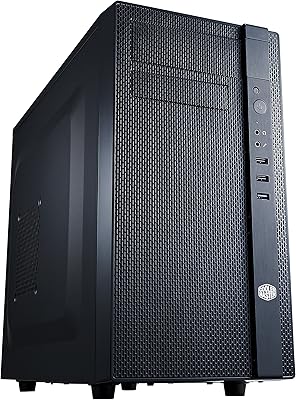
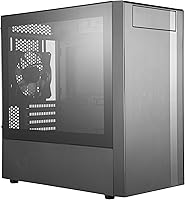
The Cooler Master MasterBox NR400 Micro-ATX Tower offers a sleek, minimalist design that caters to users looking for a compact yet functional PC case. This micro-ATX tower boasts a full mesh front panel for optimal airflow and cooling. The tempered glass side panel is flush-mounted for a clean, unobstructed view of the interior. With generous clearance for modern graphics cards (up to 346mm), this case supports high-performance components while maintaining a streamlined, professional appearance. Whether you're building a gaming rig or a work system, this case offers a balanced blend of aesthetics and practicality.
Features & Benefits

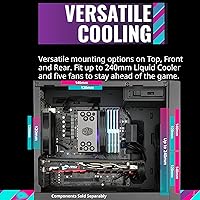
One of the standout features of this micro-ATX tower is its excellent airflow, thanks to the mesh design and well-ventilated top panel. This ensures your components stay cool during extended gaming or work sessions. The case offers easy cable management with 22mm of space behind the motherboard for routing cables and rubber grommets to keep things tidy. Additionally, the tempered glass side panel is easy to remove with thumbscrews, making assembly and upgrades quick and simple. The inclusion of a single headset jack for both audio and mic functionality adds to the convenience for users with limited I/O ports.

Best For

The Cooler Master MasterBox NR400 Micro-ATX Tower is an excellent choice for gamers and PC enthusiasts who need a compact case that doesn’t compromise on performance. It’s ideal for those building a high-performance micro-ATX system, thanks to its generous GPU clearance and efficient cooling capabilities. This case is also well-suited for anyone looking for a clean, minimalist build with enough space for modern components. If you’re aiming to minimize cable clutter and optimize airflow, this case offers the perfect balance of form and function.

User Feedback

Users generally appreciate the sleek design and premium feel of the tempered glass side panel, which gives the case a polished, high-end look. The airflow is frequently praised, with many noting that the mesh front and top panel significantly improve cooling performance. Some users mention that cable management can be a bit tight, but with careful planning, it’s manageable. One feature that stands out in reviews is the single headset jack, which is especially appreciated by those with limited I/O options. However, a few users have expressed concerns about the case’s compactness, which could make it difficult to fit larger components.

Pros

  • The full mesh front panel ensures excellent airflow, keeping internal components cool during extended use.
  • Cable management is made easy with rubber grommets and 22mm of space behind the motherboard.
  • The minimalist design, coupled with the sleek tempered glass side panel, gives this case a premium feel.
  • Generous GPU clearance (up to 346mm) allows for easy installation of modern graphics cards without space constraints.
  • The compact size of this case is ideal for users with limited space on their desk or in smaller builds.
  • Tool-free assembly with thumbscrew-fastened glass panel simplifies the setup process, saving time and effort.

Cons

  • Some users find the cable management space a bit tight, especially when working with bulky power supplies or multiple cables.
  • The lack of advanced I/O ports, such as USB-C, may be a limitation for those with modern peripherals.
  • There is minimal support for advanced cooling solutions, making it less suitable for users needing extensive liquid cooling setups.
  • The single headset jack feature is convenient but may not meet the needs of users who require separate audio and mic inputs.
  • The compact design may be restrictive for users looking to build systems with multiple storage devices or additional hardware.
  • The absence of RGB lighting or other flashy aesthetics may be a drawback for those seeking more customizable visual effects.

Ratings

The Cooler Master MasterBox NR400 Micro-ATX Tower has received a wide range of feedback from verified users worldwide across various platforms. After filtering out low-quality, incentivized, and duplicate reviews, we've compiled these scores based on genuine user experiences. While the case excels in terms of airflow and design, some users have pointed out the challenges of cable management in a compact space. Overall, the product’s strengths and pain points are reflected in the following ratings, which offer a clear picture of its performance across key aspects.
Thermal Performance
91%
Many users praise the excellent cooling capabilities of this micro-ATX tower. The full mesh front panel and ventilated top work together to promote airflow, keeping the internal components cool even during extended gaming sessions. The optimized airflow ensures minimal heat buildup, which is crucial for maintaining peak performance in high-powered builds.
A few users mention that, despite the good airflow, certain high-performance components may still run hot if additional cooling solutions aren't considered. While the overall design supports air cooling well, there’s limited space for larger aftermarket cooling systems in this compact case.
Build Quality
88%
The build quality of this Cooler Master case is generally praised for its sturdy construction and premium feel. The tempered glass side panel gives it a sleek, high-end appearance, while the overall frame feels solid and well-made. Users appreciate the robust materials that contribute to its durability, ensuring it can withstand daily use without damage.
However, some buyers report concerns about the tempered glass panel, noting it can be a bit fragile when handling or during installation. A few users also pointed out that the overall weight of the case feels a bit heavier than expected for its size.
Design and Aesthetics
85%
This PC chassis is lauded for its clean, minimalist design. The flush, unobstructed tempered glass side panel gives the case an elegant, modern look. Additionally, the full mesh front panel adds a sleek touch while providing functionality by improving airflow, making it an attractive choice for users who value both aesthetics and performance.
Some users feel that while the case looks great, the minimalistic design might be too simple for those looking for more dynamic, flashy aesthetics. Additionally, the lack of RGB lighting, which has become popular in many gaming cases, may be a downside for users who prefer that feature.
Ease of Assembly
89%
Assembly is straightforward and hassle-free, with the tool-free tempered glass panel being a standout feature. Users appreciate the thumbscrew design, which makes opening and closing the case quick and easy. The ample space behind the motherboard for cable management also helps to streamline the build process, especially for those new to PC building.
A small number of users find that while the assembly process is easy, managing cables in the tight space can be tricky. The case could benefit from a bit more room or additional cable management options for those with complex setups or large power supplies.
Cable Management
75%
25%
Several users highlight the cable management options, noting that the 22mm clearance behind the motherboard is adequate for managing most cables. The rubber grommets make routing the cables clean and easy, improving the overall aesthetics of the build. The case allows users to create a tidy setup, which is essential for both airflow and visual appeal.
However, the tight space behind the motherboard is a recurring issue for some, making it difficult to manage cables in larger or more complex builds. While it's manageable for basic setups, those with extra components or larger cables may find it a bit challenging to maintain a clean look.
GPU Clearance
90%
Users are satisfied with the generous GPU clearance, which can accommodate up to 346mm, allowing for compatibility with most modern graphics cards. This makes the case a great choice for users planning to build a high-performance PC that requires a powerful GPU. The roomy design helps ensure there's no interference with other components, even in compact builds.
Some users with larger custom cooling solutions or oversized GPUs note that while the clearance is ample, it may still not be enough for very specific, high-end graphics cards. Additionally, the positioning of some internal components could cause minor compatibility issues with certain setups.
Airflow and Ventilation
94%
This case excels in airflow, thanks to the full mesh front panel and ventilated top. The design encourages effective air circulation, which keeps internal temperatures low even during intensive gaming or high-performance tasks. The overall airflow structure makes it an excellent choice for users looking to ensure proper cooling for their PC components.
While the airflow is impressive, a few users mention that the case could benefit from additional airflow fans or options for liquid cooling. Some high-performance setups may require more robust cooling solutions that go beyond the case’s default options.
Value for Money
92%
Many buyers feel that this Cooler Master case offers excellent value for its price. It combines solid construction, great cooling, and ample space in a compact form factor, making it ideal for users building high-performance systems without spending excessively. Its affordable price point is a big draw for budget-conscious builders who still want a quality product.
A small number of users feel that the price could be a bit lower, considering the relatively simple design and the lack of advanced features like RGB lighting. While the case is functional and well-priced for most, some may look for more flashy features at a similar price point.
Noise Levels
80%
20%
The case generally performs well in terms of noise control, with the mesh front panel allowing for a more quiet operation compared to cases with solid panels. Users mention that the airflow design helps to keep noise levels manageable even when the system is under load.
However, a few users note that the overall noise levels can still be noticeable in quieter environments, especially if the system includes louder components like high-RPM fans or a large GPU. Some additional sound dampening would be a good improvement for those sensitive to noise.
Port Connectivity
83%
The front I/O ports include two USB 3.0 and two USB 2.0 ports, which are sufficient for most users. The addition of a 4-pole headset jack for combined audio and microphone functionality is a welcome feature, particularly for users with limited ports on their PC.
Some users report that while the ports are functional, the lack of additional USB ports or features like Type-C is a bit limiting for modern setups. The I/O panel could be more versatile to accommodate a wider variety of peripheral setups.
Compactness and Size
87%
The compact size of this case is appreciated by users looking for a space-saving solution. Despite its small form factor, it still offers good compatibility with modern components, making it a great choice for users with limited desk or floor space.
However, a few users feel that the small size can make certain builds cramped, especially when attempting to install multiple storage devices or bulky cooling solutions. The compactness may not be ideal for those needing a large amount of internal space.
Headset Jack Functionality
78%
22%
The integrated 4-pole headset jack is a convenient feature for users with limited I/O ports on their system. It offers both audio and microphone functionality, reducing the need for separate jacks, which is particularly useful for users with a compact setup.
Some users find the single headset jack a bit restrictive, especially if they prefer to use separate audio and mic jacks. This could be a limitation for those with more complex audio setups or multiple peripherals that require different connections.

Suitable for:

The Cooler Master MasterBox NR400 Micro-ATX Tower is a great choice for users building compact, high-performance PCs, especially for gamers who need a small but powerful case. Its excellent airflow, easy cable management, and ample GPU clearance make it perfect for those working with modern graphics cards. The case's minimalist design and tempered glass panel also appeal to users looking for a sleek and clean aesthetic. Additionally, individuals with limited desk space or those looking to streamline their setups will appreciate its compact size and efficient design, which still offers plenty of room for essential components.

Not suitable for:

While this case is highly functional, it may not be the best option for users with extremely large or custom cooling setups. Some buyers have noted that the limited space behind the motherboard can make cable management difficult, especially for those with multiple large components or bulky power supplies. Additionally, those looking for flashy aesthetics, such as RGB lighting or more advanced I/O options, might find this case a bit too minimalist. Users who require extensive customization or additional cooling options may also find the compact nature of this case to be restrictive.

Specifications

  • Form Factor: Micro-ATX tower case, designed for compact PC builds.
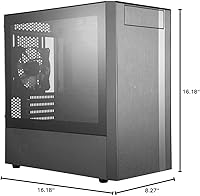
  • Dimensions: Measures 16.18 x 8.27 x 16.18 inches, providing a compact footprint.
  • Weight: Weighs approximately 14.52 pounds, making it moderately heavy for a compact case.
  • GPU Clearance: Supports graphics cards up to 346mm in length, accommodating modern GPUs.
  • Cooling Support: Supports air cooling with mesh front panel and ventilated top for optimized airflow.
  • Front Panel: Full mesh design to maximize airflow and enhance cooling performance.
  • Side Panel: Tempered glass side panel for a clean, unobstructed view of internal components.
  • Cable Management: Includes 22mm of space behind the motherboard tray for cable routing.
  • Assembly: Tool-free assembly with thumbscrews for easy installation and access to internal components.
  • Headset Jack: Features a single 4-pole headset jack that combines audio and microphone functionality.
  • USB Ports: Offers two USB 3.0 ports and two USB 2.0 ports for external device connectivity.
  • Cooling Fan Support: Supports multiple fan configurations for enhanced cooling, including one 120mm fan at the rear.
  • Expansion Slots: Provides seven expansion slots for additional components like graphics cards and expansion cards.
  • Drive Bays: Supports two 3.5-inch and two 2.5-inch drive bays for hard drives and SSDs.
  • Top Panel: Ventilated top panel design for improved airflow and cooling performance.
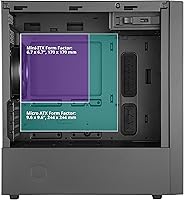
  • Compatibility: Compatible with micro-ATX motherboards, not supporting larger ATX or E-ATX sizes.
  • Material: Constructed from steel for durability, with tempered glass for the side panel.
  • Power Supply: Supports standard ATX power supplies with ample space for cable management.
  • Front I/O Panel: Includes a front I/O panel with USB ports and a combined audio/microphone jack.

FAQ

This micro-ATX tower is designed for compact builds without compromising airflow. Its full mesh front panel and ventilated top ensure excellent cooling, while the flush, tempered glass side panel gives it a sleek, premium look. With ample GPU clearance (up to 346mm), it’s well-suited for modern graphics cards.

The assembly is quite straightforward, especially thanks to the tool-free design. The tempered glass side panel is secured with thumbscrews, and there are rubber grommets for cable management, making the process easier. There’s also 22mm of space behind the motherboard for clean cable routing.

Yes, this micro-ATX tower offers generous GPU clearance of up to 346mm, which is more than enough for most modern graphics cards. It's a great option for high-performance builds requiring powerful GPUs.

This case is optimized for air cooling with a full mesh front and ventilated top. It allows for efficient airflow, but it doesn't support liquid cooling systems, so if you're planning to use advanced water-cooling setups, you may need a different case.

Yes, cable management is made easy with rubber grommets and 22mm of space behind the motherboard tray. While it’s a compact case, users report that with some careful routing, cables can be kept neat and tidy.

Yes, the case’s compact size makes it ideal for gamers who need powerful hardware but have limited space. The excellent airflow ensures that your system stays cool during long gaming sessions, and the ample GPU clearance supports high-end graphics cards for smooth gameplay.

The single 4-pole headset jack combines both audio and microphone functionality into one port. This is especially useful for users with limited I/O ports, but those who need separate audio and mic inputs may find this limiting.

This case is specifically designed for micro-ATX motherboards. It may not support larger ATX or E-ATX motherboards, so be sure to check your motherboard size before purchasing. However, it can accommodate smaller builds, making it a great choice for compact systems.

While the case features a sleek tempered glass side panel, it does not come with built-in RGB lighting or other customizable visual effects. If you’re looking for a more visually dynamic case, you might need to consider additional accessories.

Some users have noted that the cable management space is tight, especially when using a large power supply. Additionally, the single headset jack may not meet the needs of users who want separate audio and microphone connections for more advanced setups.