Overview

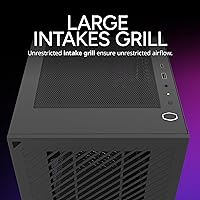
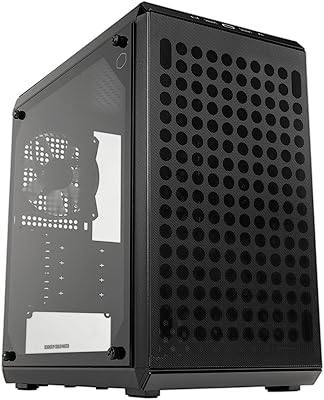
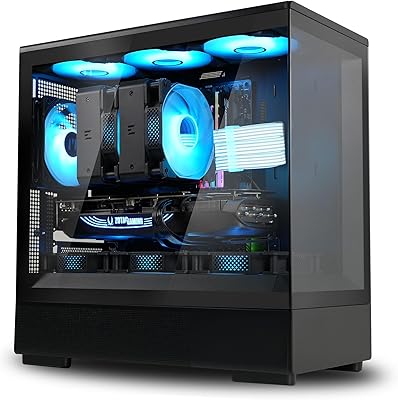
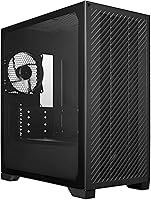
The Cooler Master Elite 301 Lite Micro-ATX Case is a compact mid-tower that punches well above its price class, offering a clean minimalist aesthetic without skimping on the internals that actually matter. It supports both Micro-ATX and Mini-ITX motherboards, giving builders flexibility in a footprint that won't dominate a desk. The tempered glass side panel shows off your build without adding unnecessary bulk, and the front intake grill is genuinely open — not a decorative mesh that chokes airflow. For anyone tired of paying a premium just for a windowed panel, this case makes a compelling argument.
Features & Benefits

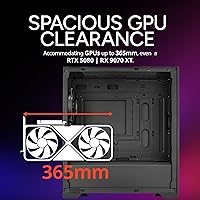
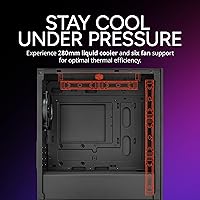
The 365mm GPU clearance is the headline spec here, and it's a genuine selling point — it can accommodate some of the longest cards on the market, including modern flagships. Cooling support is solid too: the case fits a 280mm AIO at the top and has room for up to six fans total. A USB Type-C port on the front panel is a thoughtful touch that most builds will put to daily use. The included 120mm PWM fan gets things started, though most builders will want to populate the remaining fan slots to take full advantage of the open intake design.

Best For

This case is a natural fit for budget-conscious builders who want a clean, windowed build without a lot of unnecessary frills. It's particularly well suited to small form factor gaming rigs or compact home office machines where desk space is limited but GPU power is non-negotiable. The Micro-ATX format also makes it attractive to anyone upgrading from a larger mid-tower and looking to downsize without compromising on component compatibility. If you're planning a build around a high-end GPU but don't want to spend heavily on the enclosure itself, this case hits a practical sweet spot.

User Feedback

Buyers consistently praise the build quality for the price, noting that the tempered glass feels sturdier than expected and the cable management options are better than average for this tier. The open intake grill earns specific mentions for keeping temperatures in check during extended gaming sessions. On the downside, a few users point out that fan noise can be noticeable under load, and the single included fan means you'll likely need to budget for additional cooling. Some also wish the interior finish were a bit more polished. Overall sentiment sits firmly positive, with most buyers rating it highly for value.

Pros

  • Fits GPUs up to 365mm, covering virtually every modern consumer card on the market.
  • Supports 280mm AIOs, giving liquid cooling fans a real option in a compact case.
  • The tempered glass panel feels solid and shows off builds well at this price point.
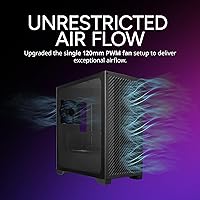
  • Genuinely open intake grill delivers real airflow benefits rather than just looking good.
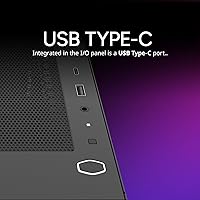
  • Front-panel USB Type-C port is a practical addition most builders will use daily.
  • Accommodates both Micro-ATX and Mini-ITX boards, offering solid platform flexibility.
  • PWM fan included out of the box — a small but welcome starting point.
  • Compact footprint makes it easy to fit on a desk without dominating the workspace.
  • Strong value for the price, with build quality that punches above its tier.

Cons

  • Only one fan included — populating the remaining slots adds to the total cost.
  • Fan noise can become noticeable under sustained load with the default configuration.
  • Interior finishing is functional but lacks the polish found on pricier alternatives.
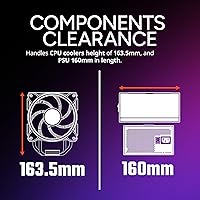
  • PSU length is capped at 160mm, which rules out some longer power supply units.
  • Cable management options are decent but not exceptional for complex or tidy builds.
  • No dust filters are mentioned, which could mean more frequent interior cleaning.
  • Limited to Micro-ATX and Mini-ITX boards — full ATX builders need to look elsewhere.
  • Side panel thumbscrews can feel loose on some units, according to a few buyers.
  • Relatively few online build logs or community resources compared to more popular cases.

Ratings

The Cooler Master Elite 301 Lite Micro-ATX Case has been scored by our AI after analyzing verified global buyer reviews, with spam, incentivized posts, and bot activity actively filtered out to ensure only genuine feedback shapes the numbers. Scores reflect the full picture — where this compact build excels and where real-world users ran into friction. Both strengths and honest shortcomings are transparently represented across every category below.

Value for Money
91%
This is consistently the most praised aspect across buyer reviews. Builders on tight budgets repeatedly note that the case delivers tempered glass, solid airflow, and generous GPU clearance at a price where most competitors cut corners visibly. First-time PC builders in particular feel they got far more than they paid for.
A small number of buyers feel the single included fan and the need to purchase additional cooling components quietly erode the headline value. Once you factor in two or three extra fans to fill the available slots, the total spend climbs meaningfully above the base price.
Airflow Performance
84%
The open intake grill design earns genuine praise from builders who've tested temperatures under load. Users running mid-range and even high-end GPUs report that the case keeps things cooler than similarly priced alternatives with restrictive front panels, particularly during long gaming sessions.
With only one fan installed out of the box, airflow performance is underwhelming until you add more. Builders who don't immediately populate the remaining fan slots report noticeably higher idle and load temperatures, suggesting the case's full potential is locked behind additional purchases.
GPU Clearance
93%
The 365mm GPU clearance is a standout feature that buyers shopping for compact cases rarely find at this price tier. Users fitting long triple-fan cards — including some of the largest current-generation models — report a comfortable fit with room to spare for cables along the side.
A handful of builders with particularly bulky GPU shrouds note that while the length clearance is excellent, width and height near the PCIe slot area can feel tighter than expected with certain card designs. This is an edge case, but worth measuring carefully before buying.
Build Quality
78%
22%
The steel chassis feels more rigid than buyers typically expect at this price point, and the tempered glass panel sits flush without obvious flex or rattle during normal desk use. Several reviewers coming from cheaper all-plastic cases specifically call out how much more substantial this feels in person.
Some buyers report that the plastic front panel trim feels noticeably cheaper than the metal body, with minor flex when pressed. A few units arrived with slightly misaligned panel clips or loose thumbscrews, which points to some inconsistency in manufacturing tolerances at scale.
Tempered Glass Panel
82%
18%
The glass itself is clear, scratch-resistant, and provides an unobstructed view of the interior — useful for showing off RGB fans or a well-managed build. Buyers appreciate that it's a proper tempered glass panel rather than acrylic, which many competing cases in this price range still use.
Removal requires unscrewing rather than tool-free pop-off, which slows down builds and component swaps. A small number of users also found the glass panel arrived with minor surface scratches from transit, suggesting the packaging protection could be improved.
Cable Management
67%
33%
The case includes a dedicated routing channel behind the motherboard tray with a few cutouts and Velcro tie-down points, which is more than some similarly priced competitors offer. Builders with tidy habits and modular power supplies report being able to get a fairly clean result with patience.
The cable management area behind the tray is on the thinner side, making it hard to stuff thicker cable bundles without the side panel bowing slightly. Less experienced builders consistently flag this as a frustration, and the limited number of routing cutouts forces some awkward paths for longer cables.
Fan Noise
63%
37%
At low to moderate loads, the included 120mm PWM fan operates quietly enough that most users don't notice it over typical ambient room noise. The PWM control means the fan ramps down effectively during light tasks like web browsing or office work.
Under sustained gaming or rendering loads, buyers report that the fan — and any additional case fans — become audible in a way that bothers users in quieter environments. The open intake grill that helps with airflow also allows more fan noise to escape forward, making it less suitable for noise-sensitive setups.
Interior Space
76%
24%
For a Micro-ATX mini-tower, the interior feels surprisingly roomy, particularly around the GPU and AIO areas. Builders working with mid-range components and a modest cable setup typically report having enough room to work comfortably without feeling cramped during the build process.
Fitting a 280mm AIO, a long GPU, and a full set of case fans simultaneously leaves the interior feeling tight, especially when you factor in power supply cables near the bottom. Builders with larger hands or those doing their first build find it awkward to reach certain mounting points without removing components first.
Front Panel I/O
81%
19%
The inclusion of a USB Type-C port is a genuine quality-of-life addition that many cases at this price skip entirely. Having two USB 3.0 ports alongside it means most users can handle daily device connections — phones, headsets, USB drives — without reaching around to the back of the system.
There is no dedicated headphone or microphone jack on the front panel, which some buyers find frustrating, particularly for gaming setups where quick headset access is expected. The USB 2.0 ports also feel redundant given how few current peripherals actually need them.
PSU Compatibility
71%
29%
The bottom-mount PSU design keeps the power supply isolated from the main cooling zone, which helps with both thermal performance and visual tidiness. Most standard ATX power supplies fit comfortably within the 160mm length limit, covering the majority of popular units on the market.
The 160mm maximum PSU length is restrictive enough to exclude some popular high-wattage or fully modular units that stretch to 180mm or beyond. Builders planning future upgrades to more powerful PSUs may find themselves boxed in by this limitation sooner than expected.
Assembly Experience
73%
27%
Standoffs come pre-installed for Micro-ATX boards, which removes one of the more error-prone steps for newer builders. The layout is logical and the included manual, while brief, covers the basics clearly enough that most people can complete a straightforward build without referencing outside guides.
Tool-free installation is limited — most panel removals and fan installations require a screwdriver, which slows down the process compared to cases with quick-release mechanisms. Builders used to higher-end cases will notice the absence of features like hinged glass panels or magnetic dust filters.
AIO Compatibility
79%
21%
Fitting a 240mm or 280mm AIO at the top of the case is straightforward, and users who have done so report solid cooling results for mid-to-high-end CPUs. The top mounting position works well thermally since hot air rises naturally toward the radiator and exhausts out of the case.
Fitting a 280mm AIO alongside a tall CPU cooler alternative at the top can conflict with certain motherboard component placements near the top edge of the board. Some users also note that tube routing with a top-mounted AIO is tight depending on the cooler brand, requiring planning before committing.
Dust Management
54%
46%
The open intake grill does allow reasonable airflow, and in positive-pressure fan configurations — where intake fans outnumber exhaust — dust accumulation inside the case can be partially managed without dedicated filters in place.
There are no dust filters included with the case, which is a genuine omission at any price point. Several buyers report that the open grill at the front accumulates visible dust relatively quickly in homes with pets or carpets, requiring more frequent interior cleaning than cases with filtered intakes.
Aesthetic Design
83%
The minimalist exterior design holds up well on a desk without looking cheap or toy-like. Buyers frequently mention that the clean black facade with the tempered glass panel looks more expensive than the price suggests, which is exactly what budget-conscious builders are hoping for.
The all-black plastic front panel is plain to the point of being bland, and there is no option for color variants at launch. Builders who want a more distinctive or premium-looking exterior finish will find the case feels visually generic next to boutique alternatives.

Suitable for:

The Cooler Master Elite 301 Lite Micro-ATX Case is a strong pick for builders who want a capable, good-looking enclosure without overspending on the chassis itself. It works especially well for compact gaming rigs where a high-end GPU needs to fit inside a smaller footprint — the generous 365mm GPU clearance means you won't have to downgrade your card to make it fit. Home office users who want a tidy, windowed build that looks clean on a desk will appreciate the minimalist design. Budget-focused first-time builders also stand to gain a lot here, since the case handles the fundamentals well and leaves more money in the budget for CPU, GPU, or RAM. Anyone building around a Micro-ATX or Mini-ITX board and planning to add liquid cooling will find the 280mm AIO support genuinely useful rather than just a spec-sheet checkbox.
Not suitable for:

Builders who need a full ATX or E-ATX motherboard should look elsewhere — the Cooler Master Elite 301 Lite Micro-ATX Case simply does not support those form factors, and no amount of creative mounting will change that. If you're planning a high-core-count workstation with multiple storage drives, the drive bay situation may feel limiting. Enthusiasts who care deeply about acoustics will likely find the airflow-first design trades noise control for thermal performance, which isn't ideal for quiet home theater PC builds or library workspaces. Those wanting a heavily customized interior with complex cable routing or a hardline water cooling loop may also find the space constraining. If premium finishing details and a tool-free build experience are priorities, spending more on a higher-tier case is probably the smarter call.
Specifications

  • Form Factor: Supports Micro-ATX and Mini-ITX motherboard form factors only; full ATX is not compatible.
  • Dimensions: The case measures 15.35″ (L) x 8.01″ (W) x 16.92″ (H), making it a compact mini-tower footprint.
  • Weight: The unit weighs approximately 9.8 lbs, which is typical for a steel-and-glass chassis of this size.
  • Materials: Constructed from a combination of steel, plastic, and tempered glass for the side panel window.
  • GPU Clearance: Accommodates graphics cards up to 365mm in length, covering the vast majority of current consumer GPUs.
  • CPU Cooler Height: Supports CPU air coolers up to 163.5mm tall, which covers most mid-to-high-profile tower coolers.
  • AIO Support: Fits liquid coolers up to 280mm, mountable at the top of the chassis for optimal heat dissipation.
  • Fan Support: Supports up to six 120mm fans in total across all mounting positions.
  • Included Fans: Ships with one 120mm PWM fan pre-installed; additional fans must be purchased separately.
  • PSU Clearance: Accommodates power supply units up to 160mm in length with a bottom-mount configuration.
  • Front I/O Ports: Features two USB 2.0 ports, two USB 3.0 ports, and one USB Type-C port on the front panel.
  • Power Supply Mount: Uses a bottom-mount PSU layout, which helps lower the center of gravity and improves internal cable management.
  • Side Panel: Left side panel is tempered glass, providing a clear view of internal components and lighting.
  • Cooling Methods: Compatible with both air cooling and liquid/AIO cooling configurations.
  • Color: Available in black; exterior finish combines matte metal panels with a dark plastic front facade.
  • Model Number: Official model identifier is E301L-KGNN-S00, used for warranty and support reference.
  • ASIN: Amazon Standard Identification Number for this product is B0D7N5WPF3.
  • Availability Date: This model was first made available for purchase on August 13, 2024.

Related Reviews
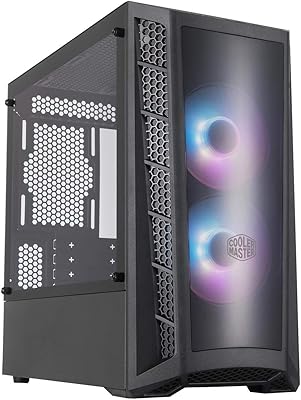
Cooler Master MasterBox MB320L ARGB Micro-ATX Case
82%
89%
Cooling Performance
87%
Build Quality
91%
Ease of Installation
85%
ARGB Lighting Customization
65%
Space for Larger GPUs
More
Cooler Master Q300L V2 Micro-ATX Tower Case
77%
91%
Value for Money
83%
Airflow Performance
77%
Build Quality
81%
Tempered Glass Panel
72%
Cable Management
More
Cooler Master MasterBox NR400 Micro-ATX Tower
86%
91%
Thermal Performance
88%
Build Quality
85%
Design and Aesthetics
89%
Ease of Assembly
75%
Cable Management
More
Cooler Master TD500 Mesh V2 ATX Mid-Tower Case
84%
91%
Cooling Performance
88%
Ease of Installation
84%
Build Quality
67%
Cable Management
92%
ARGB Lighting Customizability
More
Cooler Master 240 Elite Liquid White CPU Liquid Cooler
85%
91%
Cooling Performance
84%
Noise Levels
92%
Ease of Installation
89%
Build Quality
88%
aRGB Lighting Effect
More
Cooler Master CMP510 Case
87%
91%
Cooling Performance
88%
Build Quality
85%
Cable Management
89%
Modularity & Customization
93%
Airflow & Ventilation
More
Antec VSK10 Micro-ATX Case
82%
88%
Cooling Performance
85%
Build Quality
70%
Cable Management
90%
Airflow Support
78%
Ease of Installation
More
Zalman P10 Micro ATX Case
84%
86%
Build Quality
90%
Cooling Performance
87%
Ease of Cable Management
91%
Aesthetic Design
83%
Compatibility with Components
More
AsiaHorse Pegasus Micro ATX PC Case
85%
91%
Build Quality
88%
Cooling Performance
89%
Interior Space & Cable Management
85%
Aesthetics & Design
83%
USB Type-C Port
More
ASUS Prime AP201 Micro ATX Case
86%
91%
Cooling Performance
89%
Ease of Assembly
88%
Cable Management
86%
Build Quality
87%
Thermal Management
More

FAQ

No, it won't. This case is built specifically for Micro-ATX and Mini-ITX boards. If you're planning a build around a standard ATX motherboard, you'll need to look at a larger mid-tower chassis.

In most cases, yes. The case supports GPUs up to 365mm in length, which covers many high-end cards including most RTX 40-series and RX 7000-series models. That said, always double-check your specific card's dimensions before purchasing, since some triple-fan variants can be exceptionally long.

No — the maximum radiator size supported is 280mm. You can mount it at the top of the case for the best thermal performance. If a 360mm AIO is a must-have, this case won't be the right fit.

The case supports up to six 120mm fans across all available mount points. One 120mm PWM fan is included in the box, so you'll need to purchase additional fans separately if you want to fill all the slots.

The front intake grill is genuinely open, not a decorative mesh that restricts airflow. This is one of the case's real strengths — air can move through the front relatively freely, which helps keep temperatures down when you have fans installed.

The PSU bay supports units up to 160mm in length. Most standard ATX power supplies fall within this range, but some high-end or modular units can be longer, so it's worth measuring yours before buying.

Most users report that the tempered glass feels more solid than you might expect for a case at this price point. It's not tool-free removal — you'll need to unscrew it — but it sits securely and doesn't rattle during normal use.

The case itself doesn't have built-in RGB lighting, but if you add ARGB fans, they will be visible through the tempered glass panel. You'll need a motherboard with ARGB headers or a separate controller to manage any lighting effects.

There's a dedicated cable routing area behind the motherboard tray, and the overall layout is reasonably well thought out for a compact build. It's not the most spacious cable management zone, but with a bit of patience and some zip ties, you can get a fairly clean result.

The case accommodates CPU air coolers up to 163.5mm tall, which includes most popular mid-to-high-profile tower coolers like the Cooler Master Hyper 212 series or Noctua NH-U12S. Taller coolers used in more extreme air-cooling setups may not clear the side panel, so always check the cooler's listed height beforehand.

Where to Buy