Cooler Master GM34-CWQA 34″ Curved Ultrawide Monitor

Cooler Master GM34-CWQA 34″ Curved Ultrawide Monitor — image 1

Cooler Master GM34-CWQA 34″ Curved Ultrawide Monitor — image 2
Cooler Master GM34-CWQA 34″ Curved Ultrawide Monitor — image 3

Cooler Master GM34-CWQA 34″ Curved Ultrawide Monitor — image 4

Cooler Master GM34-CWQA 34″ Curved Ultrawide Monitor — image 5

Cooler Master GM34-CWQA 34″ Curved Ultrawide Monitor — image 6
Cooler Master GM34-CWQA 34″ Curved Ultrawide Monitor — image 7
Cooler Master GM34-CWQA 34″ Curved Ultrawide Monitor — image 8
Cooler Master GM34-CWQA 34″ Curved Ultrawide Monitor — image 9
Cooler Master GM34-CWQA 34″ Curved Ultrawide Monitor — image 10
Cooler Master GM34-CWQA 34″ Curved Ultrawide Monitor — image 11
Cooler Master GM34-CWQA 34″ Curved Ultrawide Monitor — image 12
Cooler Master GM34-CWQA 34″ Curved Ultrawide Monitor — image 13
Cooler Master GM34-CWQA 34″ Curved Ultrawide Monitor — image 14
Cooler Master GM34-CWQA 34″ Curved Ultrawide Monitor — image 15
Cooler Master GM34-CWQA 34″ Curved Ultrawide Monitor — image 16
63%
37%

Overview

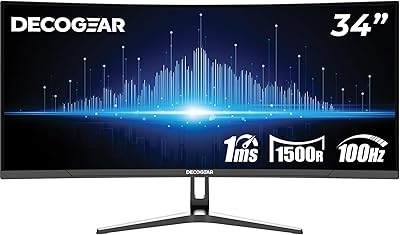
The Cooler Master GM34-CWQA 34″ Curved Ultrawide Monitor is an interesting entry from a brand that built its reputation on CPU coolers and PC cases rather than displays. Priced in the mid-range, it targets buyers who want a large, immersive screen without spending flagship money. The real draw is the VA panel with Quantum Dot technology — a combination that genuinely punches above its price tier in color depth. Add a 1500R curve and ARGB lighting, and the design ambitions are clear. That said, a 3.1 out of 5 average rating from over 100 buyers is hard to ignore, so it is worth looking carefully at what you are actually getting.

Features & Benefits

The GM34-CWQA runs at 3440x1440 UWQHD across a 34-inch VA panel, delivering noticeably richer color than a standard IPS ultrawide at this price — Quantum Dot coverage reaching 98% DCI-P3 is largely why. At 144Hz with FreeSync Premium, motion stays controlled and tear-free during fast gameplay. One important clarification: the advertised 0.5ms figure is MPRT, not GtG — these measure different things, and real-world pixel transition times will be slower. HDR400 is included, but treat it as entry-level HDR rather than a headline feature. Connectivity covers one DisplayPort, two HDMI 2.0 ports, and a USB-C input. The cast-aluminum stand offers 100mm of height adjustment and full VESA compatibility.

Best For

This curved gaming display makes the most sense for someone stepping up from a standard 16:9 monitor for the first time — the jump to 21:9 is genuinely impactful for gaming and wide-format productivity like spreadsheets, coding, or video editing. Budget-conscious gamers who want FreeSync Premium without paying top-tier prices will find it competitive. Cooler Master ecosystem users also benefit from unified ARGB control through MasterPlus+. It is less suited to competitive FPS players who demand precise response times, or anyone expecting meaningful HDR performance. Think of it as a capable everyday ultrawide that handles gaming well, rather than a dedicated performance display.

User Feedback

The 3.1-star average deserves honest context. Satisfied buyers of this ultrawide monitor tend to highlight color vibrancy and sheer screen presence — the Quantum Dot palette does impress casual users and productivity-focused buyers at this price point. Critical reviews cluster around quality control: backlight bleed, inconsistent panel uniformity, and recurring frustrations with the MasterPlus+ software. Some of these appear unit-specific rather than universal, but the frequency is hard to dismiss. Stand stability has also drawn mixed reactions. The realistic takeaway is that this monitor can be genuinely impressive out of the box, but there is a notable consistency problem across units — buyers with a flexible return window are in a far safer position than those without one.

Pros

  • Quantum Dot VA panel delivers genuinely rich, punchy colors that outperform most non-QD displays at this price.
  • 144Hz refresh rate keeps gameplay fluid and competitive without requiring a top-tier GPU.
  • FreeSync Premium support eliminates screen tearing across a wide frame rate range.
  • The 34-inch 21:9 format offers serious multitasking real estate that smaller monitors simply cannot replicate.
  • USB-C input alongside dual HDMI 2.0 and DisplayPort covers most modern PC and laptop setups.
  • Cast-aluminum stand feels premium for the price tier and includes a useful 100mm height adjustment range.
  • VESA mount compatibility gives buyers the option to move to a third-party arm easily.
  • 98% DCI-P3 color coverage makes movies and creative work genuinely enjoyable on this ultrawide monitor.
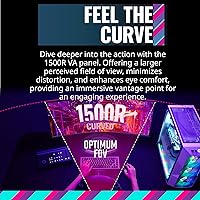
  • The 1500R curve reduces edge distortion and feels natural at typical desk viewing distances.

Cons

  • Quality control inconsistency means panel uniformity and backlight bleed can vary significantly between units.
  • MPRT response time marketing overstates real-world pixel transition performance — actual GtG times are slower.
  • HDR400 certification provides only marginal HDR improvement and should not be a purchase decision driver.
  • The MasterPlus+ software has drawn recurring complaints around stability and reliability from verified buyers.
  • At 21.8 pounds, repositioning or mounting the display solo is awkward and requires a second pair of hands.
  • Stand tilt range is limited to 15 degrees with no swivel, which restricts ergonomic flexibility.
  • The 3.1-star average rating signals a higher-than-average risk of receiving a below-expectations unit.
  • Cooler Master lacks the monitor-specific support infrastructure of dedicated display brands if issues arise post-purchase.

Ratings

The scores below reflect AI-powered analysis of verified global user reviews for the Cooler Master GM34-CWQA 34″ Curved Ultrawide Monitor, with spam, bot activity, and incentivized feedback actively filtered out before scoring. Every category captures both what buyers genuinely praised and the recurring frustrations that pulled ratings down — nothing has been softened or omitted. The result is an honest, data-grounded picture of where this curved gaming display delivers and where it falls short.

Color Performance
81%
19%
Buyers consistently called out the color richness as a genuine high point, especially in gaming and media consumption. The Quantum Dot layer produces vivid, saturated hues that feel punchy and alive compared to standard VA panels at a similar price — several reviewers noted the difference was immediately visible switching from a non-QD display.
While the wide gamut impresses, some users noted that out-of-box calibration leans slightly warm, requiring manual adjustment to neutral. Color accuracy at the extreme panel edges also suffers slightly due to VA viewing angle limitations, which becomes noticeable in wide spreadsheet or video editing workflows.
Panel Consistency
44%
56%
When buyers received a well-binned unit, they described solid center-screen uniformity and acceptable brightness distribution across the wide panel. A subset of satisfied reviewers reported minimal backlight bleed even in dark room gaming, suggesting the panel is capable of good results when quality control cooperates.
This is the most damaging category in the feedback dataset. A significant portion of buyers reported visible backlight bleed, clouding in corners, and uneven brightness across the panel — issues that are particularly noticeable on dark content or in dimly lit rooms. The inconsistency appears unit-dependent rather than universal, but the frequency is high enough to represent a real purchase risk.
Gaming Performance
73%
27%
At 144Hz with FreeSync Premium active, gameplay feels fluid and tear-free — buyers running mid-range GPUs in titles like RPGs, open-world games, and racing simulators reported a noticeably smoother experience than on their previous 60Hz or 75Hz displays. The 1500R curve also adds genuine depth to wide-environment games.
Competitive FPS players were the most critical group, flagging that the MPRT response time figure does not translate to the snappy pixel transitions they expected. Fast-moving objects showed residual ghosting that would be unacceptable in titles where reaction time is paramount, placing this display firmly in the casual-to-mid-tier gaming bracket rather than the esports tier.
Build Quality
62%
38%
The cast-aluminum Halo stand is a genuine design bright spot — it feels more substantial than the flimsy plastic bases common at this price range, and the overall monitor chassis has a clean, purposeful aesthetic that sits well on a desk. Several buyers appreciated that it did not look cheap despite the accessible price.
Fit and finish inconsistencies appeared in multiple reviews, ranging from minor plastic seam gaps to reported wobble in the stand at its maximum height extension. The stand's limited range of motion — no swivel, no pivot, only 15 degrees of tilt — drew complaints from buyers who expected more ergonomic flexibility from a monitor at this tier.
Value for Money
67%
33%
For buyers who received a well-built unit, the combination of a 34-inch UWQHD Quantum Dot panel, 144Hz refresh, and FreeSync Premium at this price felt like a genuine deal. First-time ultrawide buyers in particular rated value highly, often comparing the feature list favorably against pricier alternatives from more established monitor brands.
The value proposition weakens considerably when quality control problems are factored in. Buyers who dealt with panel issues, software problems, or needed to arrange a return felt the effective cost — in time and hassle — made the deal significantly less attractive. A lower per-unit price means less margin for disappointment.
HDR Quality
38%
62%
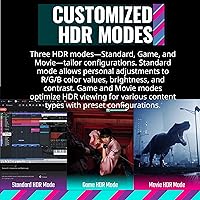
FreeSync Premium and HDR400 working together do produce a visible improvement in bright highlight rendering during HDR-enabled gaming and streaming content. Buyers who had never used HDR before found the effect noticeable and appreciated the option to toggle it on for compatible titles.
HDR400 is the floor of the HDR certification spectrum, and experienced buyers were blunt about it: peak brightness is insufficient to create the compelling contrast that defines a true HDR experience. Dark scenes still lack the depth to impress, and compared to HDR600 or HDR1000 displays, the difference is underwhelming — treating it as a meaningful feature sets buyers up for disappointment.
Ergonomics
53%
47%
The 100mm height adjustment range gives buyers meaningful vertical positioning flexibility, which is more than some competitors offer at this price. The aluminum stand base is stable enough under normal use, and VESA compatibility means buyers are not locked into the included stand if they want a more adjustable third-party arm.
The absence of swivel adjustment is a recurring frustration, particularly for buyers who share the monitor or work in multi-input setups where slight repositioning is useful. At maximum height, some users noted perceptible wobble when typing or adjusting position. Anyone with specific ergonomic requirements should plan on budgeting for a VESA arm rather than relying on the stock stand.
Connectivity
78%
22%
The port selection covers most real-world use cases well — having two HDMI 2.0 inputs means buyers can connect a PC and a console simultaneously, and the USB-C input handles modern laptop users cleanly without needing a separate adapter. Several buyers specifically called out the USB-C as a deciding factor.
There is no USB hub functionality built into the monitor, which is a missed opportunity at this size and price tier. Buyers who expected to daisy-chain peripherals through the display were disappointed. DisplayPort is limited to one port, which restricts multi-signal flexibility compared to some competing ultrawide monitors.
Software Experience
41%
59%
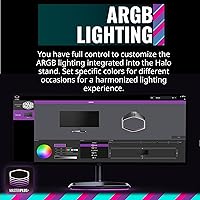
When MasterPlus+ works as intended, the ARGB synchronization between the monitor and other Cooler Master peripherals is a satisfying feature for buyers invested in the ecosystem. The ambient lighting mirror effect — where the rear LEDs reflect the dominant colors on screen — received genuine praise from users who set it up successfully.
Software reliability was one of the most consistently flagged issues across negative reviews. Buyers reported crashes, failure to detect the monitor, and ARGB settings not persisting after reboots. For a feature that is presented as a selling point, the execution fell short often enough that many users gave up on the app entirely and accepted static lighting or none at all.
Image Sharpness
76%
24%
At 3440x1440 spread across 34 inches, pixel density lands at roughly 109 pixels per inch — sharp enough that text renders cleanly and game textures appear detailed without obvious pixelation. Buyers upgrading from 1080p displays consistently noted a meaningful clarity improvement, especially for text-heavy productivity work.
Buyers coming from high-density displays like 4K 27-inch monitors may find the pixel density slightly below their expectations. VA panel pixel response characteristics can also cause faint trailing on fine text during rapid scrolling, which was occasionally flagged by buyers doing extended reading or document work.
Curve & Immersion
79%
21%
The 1500R curve is tight enough to meaningfully reduce edge distortion at typical desk distances of 60–80cm, and buyers who primarily used the monitor for gaming described the wraparound effect as genuinely immersive in open-world and racing titles. The curve also helps the wide panel feel cohesive rather than flat and distant.
At desk distances closer than 60cm, the curve becomes slightly disorienting for productivity work — straight lines near the panel edges appear visibly bowed, which bothered some buyers using the monitor for document editing or spreadsheet work. Buyers with a preference for straighter panels for mixed use should factor this in.
Out-of-Box Setup
71%
29%
Most buyers reported that physical assembly was quick and required no tools, with the stand clicking into place intuitively. The on-screen display menu, navigated via a rear joystick button, was described as more user-friendly than older button-array systems, and basic display calibration was accessible without consulting the manual.
A portion of buyers encountered issues on first power-on — from no-signal problems with specific cable types to ARGB lighting not functioning out of the box. While these were not universal, first-boot problems compound the quality-control concerns buyers already have with this model and set a frustrating first impression.
Viewing Angles
58%
42%
For a VA panel, center-screen viewing angles are adequate for single-viewer use at a standard desk setup. Colors hold reasonably well within a roughly 30-degree horizontal range, and the curved design naturally keeps the viewer's line of sight closer to perpendicular across more of the panel than a flat ultrawide would.
VA panels have inherent viewing angle limitations compared to IPS, and at the extreme edges of a 34-inch ultrawide, color shift and brightness drop become noticeable. Buyers who sit off-axis — for instance, in a shared workspace or when others watch alongside them — found the image quality degraded more than expected.

Suitable for:

The Cooler Master GM34-CWQA 34″ Curved Ultrawide Monitor is a strong candidate for first-time ultrawide buyers who want a meaningful upgrade from a standard 16:9 screen without committing to a flagship-tier budget. The 21:9 format paired with UWQHD resolution pays real dividends for productivity work — having a spreadsheet, a browser, and a chat window open side by side without virtual desktops is genuinely useful. Gamers running mid-range GPUs who want FreeSync Premium and 144Hz at a reasonable price point will also find it competitive. Cooler Master ecosystem builders who already manage ARGB peripherals through MasterPlus+ get the bonus of a unified lighting setup. Casual gamers who prioritize screen size and color richness over cutting-edge response times are squarely in the target audience here.

Not suitable for:

Competitive FPS or esports-focused gamers should think carefully before committing to this curved gaming display — the 0.5ms figure is MPRT-based, which measures motion blur reduction rather than actual pixel transition speed, and real-world response may disappoint players accustomed to fast IPS or TN panels. Anyone expecting meaningful HDR performance should also recalibrate: HDR400 is the entry threshold of the HDR ecosystem, and the contrast and peak brightness improvements are modest rather than dramatic. Buyers who have experienced backlight bleed on VA panels before and found it intolerable are at notable risk here, given the quality-control concerns raised in user feedback. If you require rock-solid unit consistency and cannot easily return the monitor, the GM34-CWQA is a riskier bet than competitors with stronger quality-control track records. Creative professionals who need color-accurate output verified against strict industry standards would be better served by a display with hardware calibration support.

Specifications

  • Panel Type: The display uses a VA panel enhanced with Quantum Dot technology for deeper blacks and a wider color gamut than standard VA or IPS alternatives at this price tier.
  • Screen Size: The viewable screen area measures 34 inches diagonally, formatted in a 21:9 ultrawide aspect ratio.
  • Resolution: Native resolution is 3440x1440 UWQHD, delivering noticeably more horizontal workspace than a standard 2560x1440 QHD display.
  • Refresh Rate: The panel supports a maximum refresh rate of 144Hz, suitable for fluid gaming and smooth general desktop use.
  • Response Time: Advertised response time is 0.5ms MPRT, which measures motion blur reduction rather than actual pixel-to-pixel transition speed (GtG).
  • Color Coverage: Quantum Dot technology enables 98% DCI-P3 and 125% sRGB color coverage, producing vivid, saturated colors across gaming and media content.
  • HDR Support: The monitor carries an HDR400 certification, representing entry-level HDR with a 400-nit peak brightness threshold.
  • Adaptive Sync: FreeSync Premium is supported, enabling variable refresh rate over DisplayPort and HDMI to eliminate screen tearing and stuttering.
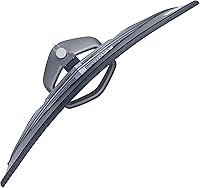
  • Curve Radius: The screen uses a 1500R curve, which is among the tighter curves available and is designed to reduce peripheral distortion at close desk distances.
  • Connectivity: Input options include one DisplayPort, two HDMI 2.0 ports, and one USB-C, covering most modern desktop and laptop configurations.
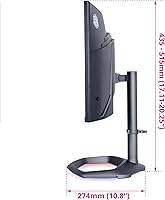
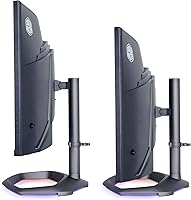
  • Stand Adjustment: The included cast-aluminum Halo stand supports 100mm of height adjustment and up to 15 degrees of tilt, but does not offer swivel or pivot.
  • VESA Compatibility: The monitor is VESA mount compatible, allowing buyers to swap the included stand for a third-party monitor arm if needed.
  • Lighting: ARGB lighting is built into the rear of the monitor and can be synchronized with on-screen content via the MasterPlus+ desktop application.
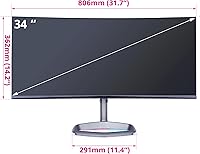
  • Dimensions: With the stand attached, the monitor measures approximately 52.76 inches wide, 27.6 inches tall, and 3.54 inches deep.
  • Weight: The full assembly including the stand weighs 21.8 pounds, which is typical for a 34-inch curved ultrawide monitor.
  • Surface Finish: The screen uses a matte anti-glare coating, which reduces reflections in bright environments without the haze of some heavier matte treatments.
  • Aspect Ratio: The 21:9 aspect ratio provides substantially more horizontal screen space than a 16:9 monitor at the same diagonal size.

Related Reviews
XUNDEFINED X34U180A 34-inch Curved Ultrawide Gaming Monitor
71%
83%
Gaming Performance
88%
Image Contrast & Blacks
81%
Resolution & Sharpness
69%
Color Accuracy & Vibrancy
51%
HDR Experience
More
Gawfolk GF340A 34″ Ultrawide Curved Monitor
87%
94%
Display Quality
91%
Color Accuracy
92%
Refresh Rate Performance
89%
Build Quality
88%
Eye Comfort
More
Raywego Q34DB45-1 34-inch Curved Gaming Monitor
72%
88%
Value for Money
84%
Gaming Performance
74%
Image Quality
51%
HDR Performance
67%
Build Quality
More
Westinghouse 34-Inch Curved Ultrawide Gaming Monitor

72%
84%
Value for Money
78%
Image Quality
81%
Refresh Rate & Motion
82%
Adaptive Sync
83%
Curve & Immersion
More
Deco Gear DGLUX340 34″ Curved Ultrawide Monitor
75%
88%
Value for Money
91%
Screen Real Estate
58%
Brightness & Visibility
89%
Connectivity & Inputs
83%
Ergonomics & Stand
More
Sceptre 34-inch Curved UltraWide Monitor C345W-2560UN
82%
89%
Value for Money
84%
Gaming Performance
87%
Display Quality
80%
Ergonomics & Comfort
75%
Build Quality
More
LG 34BL85C-B 34-inch UltraWide Curved Monitor
86%
92%
Display Quality
87%
Build Quality
88%
Ease of Setup
85%
Gaming Performance
90%
Multitasking Experience
More
LG 34WQ73A-B 34-Inch UltraWide QHD Monitor
79%
91%
Color Accuracy
93%
Productivity & Multitasking
88%
KVM & Multi-Device Setup
89%
USB-C Connectivity & Cable Management
61%
Refresh Rate & Gaming Performance
More
Sealan Q34P4D-1 34-inch Ultrawide Curved Gaming Monitor

69%
83%
Value for Money
79%
Gaming Performance
71%
Picture Quality
58%
Build Quality
72%
Color Accuracy
More
Alienware AW3425DWM 34-inch Curved Gaming Monitor
82%
91%
Image Clarity & Sharpness
89%
Refresh Rate & Motion Performance
93%
Ultrawide Immersion
84%
Color Accuracy & Vibrancy
62%
HDR Performance
More

FAQ

It will connect via HDMI 2.0, but there are limitations to keep in mind. Consoles typically output at 16:9, so you may see black bars on the sides in ultrawide mode. Neither console currently supports 21:9 natively, and 144Hz is only available over HDMI 2.0 at lower resolutions on consoles, not at full UWQHD.

UWQHD at high refresh rates is genuinely demanding. For smooth 144Hz gaming in modern titles, you are realistically looking at an RTX 3080 or RX 6800 XT class card or better. Mid-range GPUs like a 3060 Ti or RX 6700 XT can handle it well at medium settings or in less demanding games.

It is worth understanding the distinction. The 0.5ms figure refers to MPRT, which measures how long a pixel appears to be in motion during a frame — it is essentially a motion blur metric tied to backlight strobing. Actual GtG pixel transition time, which governs ghosting, is almost certainly higher. For competitive gaming, look for the GtG spec rather than relying on the MPRT number.

This is one of the more common complaints in user feedback. VA panels in general are prone to some degree of backlight bleed or glow in dark scenes, and quality control appears inconsistent on this model specifically. Some buyers report minimal bleed, others describe it as distracting. If uniformity matters to you and your return window is short, that is a real risk to factor in.

Yes, the USB-C port supports display input and should work with modern MacBooks that output video over USB-C or Thunderbolt. You will get the full resolution, though the 144Hz refresh rate over USB-C depends on the bandwidth capabilities of your specific MacBook model and cable.

The Quantum Dot panel and 98% DCI-P3 coverage make it a genuinely capable display for casual creative work. That said, it does not include hardware calibration support, and the matte coating can slightly soften color accuracy compared to glossy professional panels. For hobbyists and semi-pros it works well; for studio-grade color work you would want a dedicated professional display.

Assembly is fairly standard — the stand attaches to the panel with a few screws and should take under ten minutes. The on-screen menu is accessible through a joystick-style button on the rear, which is more intuitive than traditional button arrays. ARGB lighting setup requires installing the MasterPlus+ app, which has received mixed reviews for stability.

No, the stand does not support pivot or rotation to portrait orientation. You get height adjustment and tilt only. A 34-inch ultrawide in portrait mode would be impractical in most setups anyway, but if you want full ergonomic flexibility, a VESA-compatible third-party arm is the better route.

Honestly, keep expectations measured. HDR400 is the lowest rung of the HDR certification ladder, and while it does provide some improvement in bright highlights, the effect is subtle rather than dramatic. If you are coming from a high-end OLED or Mini-LED display, the HDR on this curved gaming display will feel underwhelming. For buyers new to HDR, it is a pleasant addition rather than a defining feature.

The monitor functions completely without MasterPlus+ installed — all core display settings are handled through the on-screen display menu. The app is only needed if you want to control or sync the ARGB lighting effects. Given the mixed feedback on the software, most users who are not invested in RGB customization can safely skip it.