



Overview

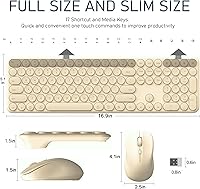
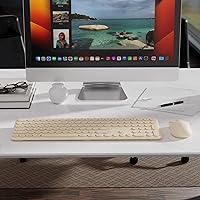
The Cloud-W Wireless Keyboard Mouse Combo is a retro-inspired peripheral set that leans hard into aesthetics without demanding a premium price. The khaki colorway gives it a warm, vintage desk appeal that feels more considered than most budget combos. At just 0.15 inch thick and around 300 grams, it is genuinely lightweight — easy to toss in a bag or slide under a monitor stand when not in use. What makes it a bit more compelling at this price point is the inclusion of a silicone dust cover and a cleaning brush straight out of the box. Those are not afterthoughts; for anyone who keeps a tidy desk, they are actually useful from day one.

Features & Benefits

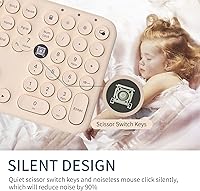
The wireless side of things works through a 2.4GHz nano-receiver that handles a range of up to 30 feet, and a USB-C adapter is included for newer laptops — a thoughtful touch. The 108 keys use a scissor-switch mechanism, which means travel is short and the sound is noticeably softer than a standard membrane board. Paired with a silent-click mouse, this retro wireless set becomes a genuinely low-noise option for shared spaces. The auto-sleep feature kicks in after just 10 seconds of idle time, helping stretch battery life considerably. The spill-resistant surface adds quiet reassurance for desk workers who keep drinks nearby.

Best For

This keyboard combo makes the most sense for students and remote workers who care about how their desk looks but are not ready to spend big on peripherals. It handles both Mac and Windows without any driver fuss, which is handy for anyone jumping between systems. The full-size layout is a real plus for laptop users who find their built-in keyboard cramped but still want something portable enough to carry around. Libraries, coffee shops, open-plan offices — anywhere that quiet typing matters, this retro wireless set fits in well. The included dust cover alone appeals to anyone who dreads cleaning crumbs out of keycaps.

User Feedback

With a 4.3-star average across nearly 1,000 reviews, the Cloud-W combo earns its rating mostly through aesthetics and ease of use. Buyers consistently say it looks exactly like the product photos — that is not always guaranteed at this price. Battery longevity gets positive mentions too, with several users reporting extended use before needing a swap. That said, typists accustomed to deeper-travel mechanical keyboards often find the low-profile keys too shallow for long sessions, and that divide in opinion shows up repeatedly. A smaller number of reviewers have flagged occasional lag in environments with heavy wireless interference. Neither issue is a dealbreaker for the likely audience, but both are worth factoring in.

Pros

  • Retro aesthetic stands out on a desk and closely matches product photos, which is not always a given at this price.
  • Plug-and-play setup requires zero software — just insert the receiver and both devices work immediately.
  • USB-C adapter is included, saving newer laptop users from needing a separate hub or dongle.
  • Scissor-switch keys and a silent-click mouse make this combo noticeably quieter than most budget alternatives.
  • Auto-sleep mode helps extend battery life meaningfully during typical workdays with regular pauses.
  • The silicone dust cover is a practical inclusion that genuinely protects the keyboard between sessions.
  • Full-size 108-key layout gives laptop users a proper number pad and function row without much extra bulk.
  • Works consistently across Windows and Mac OS without any configuration needed.
  • At roughly 300 grams and 0.15 inch thick, this retro wireless set is easy to carry between home and the office.
  • The overall bundle — combo, cover, cleaning brush, and adapter — offers solid value for the price tier.

Cons

  • No rechargeable battery option means keeping spare AAAs on hand or risking a mid-session power cut.
  • Key travel is shallow enough that heavy typists often find long sessions uncomfortable or fatiguing.
  • Mouse DPI is fixed, which limits usability for anyone working across multiple monitor setups or needing precise cursor control.
  • No keyboard backlighting makes the shortcut labels hard to read in dim or evening lighting conditions.
  • Wireless performance can degrade in RF-congested environments, with some users reporting intermittent lag.
  • The nano-receiver has no storage slot on the keyboard, making it easy to lose during transport.
  • No multi-device pairing means switching between two computers requires physically moving the USB receiver each time.
  • Plastic construction feels hollow under firm handling, and the chassis flexes slightly under pressure.
  • Bluetooth is not supported, so devices without a USB-A or USB-C port cannot use this combo at all.
  • No battery level indicator means the first sign of low power is usually degraded performance rather than an advance warning.

Ratings

The Cloud-W Wireless Keyboard Mouse Combo has been scored by our AI system after analyzing verified global buyer reviews, with spam, bot activity, and incentivized feedback actively filtered out. The results reflect a balanced picture — where this retro wireless set genuinely delivers and where it falls short — so you can make a confident, informed decision before buying.

Aesthetic Design
91%
This is where the combo earns its most enthusiastic praise. Buyers repeatedly comment that the khaki colorway looks exactly as pictured, with a warm retro character that stands out from the sea of black and grey peripherals. For anyone building a styled desk setup, it hits the mark without requiring a big investment.
Color options are currently limited to just two variants, which narrows the appeal for buyers with cooler-toned or more minimal desk themes. A small number of users also noted that the keycap legends can look slightly misaligned under close inspection, which matters to detail-oriented buyers.
Typing Experience
67%
33%
The scissor-switch keys are noticeably quieter than typical membrane boards, and the low-profile layout feels snappy for light daily tasks like emails, browsing, and note-taking. Users who prefer a soft, whisper-quiet typing session tend to enjoy it straight out of the box.
Buyers coming from mechanical keyboards consistently find the key travel too shallow and the feedback too soft for extended writing sessions. This is not a flaw so much as a design trade-off, but it is a real dividing line — heavy typists who need tactile confirmation often feel fatigued after longer use.
Mouse Performance
73%
27%
The silent-click mechanism is genuinely useful in quiet office or library settings, and most users find the mouse comfortable enough for standard workday tasks. Tracking feels responsive on common surfaces, and the size suits a range of hand types without feeling cramped.
The mouse lacks adjustable DPI settings, which frustrates users who switch between high-resolution displays and standard monitors. A handful of reviewers also noted that the scroll wheel feels slightly loose compared to what they expected at this price tier.
Wireless Connectivity
74%
26%
Plug-and-play setup through the nano-receiver works reliably for the vast majority of users, with no drivers or software needed. The included USB-C adapter is a thoughtful addition that saves newer laptop owners from needing a separate hub just to connect.
In RF-dense environments — shared offices, apartment buildings with many networks, or busy co-working spaces — a minority of users report intermittent lag or brief cursor stuttering. The 30-foot range claim holds up well in open spaces but degrades noticeably through walls or heavy interference.
Battery Life
83%
The auto-sleep feature, which activates after just 10 seconds of idle time, does real work here. Most buyers report going a long stretch between battery changes under typical daily use, which reduces the frustration of mid-workday power interruptions.
The combo runs on AAA batteries rather than a rechargeable built-in cell, which is a recurring mild complaint for eco-conscious users or those who dislike keeping spare batteries on hand. There is no battery level indicator, so low power warnings come only when performance starts to degrade.
Build Quality
66%
34%
For a budget-tier wireless set, the overall construction feels lighter than expected in a good way — nothing rattles, and the keyboard maintains a flat, stable footprint on a desk surface. The spill-resistant finish provides some peace of mind for everyday desk use.
The plastic chassis flexes under firm pressure, and the mouse in particular feels hollow when gripped tightly. Buyers who prioritize durability over portability will likely find the materials underwhelming compared to mid-range alternatives that cost only a little more.
Key Layout & Shortcuts
78%
22%
The full-size 108-key layout is a genuine benefit for laptop users who miss having a number pad and dedicated function row. The 17 shortcut keys cover media controls and common system functions that most office workers reach for daily.
A few users found the shortcut key labeling small and hard to read in dim lighting, and there is no backlit option at any level. The key size and spacing is slightly condensed compared to a standard desktop keyboard, which requires a brief adjustment period for fast typists.
Value for Money
86%
The bundle punches above its weight when you factor in the USB-C adapter, silicone dust cover, and cleaning brush — none of which are standard inclusions at this price tier. For buyers who just need a reliable, good-looking wireless combo for everyday tasks, the overall package is hard to argue with.
Buyers expecting performance comparable to mid-range brands will feel the gap, particularly in mouse precision and keyboard depth. If your primary use goes beyond light office work or casual browsing, the value proposition starts to weaken as the compromises become more noticeable.
Noise Level
88%
Both the keyboard and mouse operate quietly enough that nearby colleagues in an open office rarely notice them. The scissor switches produce a soft, muted thock rather than a sharp click, and the silent mouse button is one of the better implementations at this price.
The noise reduction is meaningful but not total silence — the space bar and enter key produce a slightly louder sound than the alphanumeric keys, which some users find inconsistent. In very quiet environments, the difference is audible enough to occasionally draw attention.
Portability
84%
At roughly 300 grams and just 0.15 inch thick, the keyboard slips easily into a bag alongside a laptop without adding meaningful bulk. Students and hybrid workers who carry their setup between home and campus or office report that the slim profile genuinely makes a difference.
The mouse does not fold or compress, so it takes up the same pocket space as any standard wireless mouse. The nano-receiver is small enough to misplace easily during transit, and there is no onboard storage slot on the keyboard to keep it safe when not in use.
Ease of Setup
93%
There is nothing to configure — plug the receiver in, and both devices connect immediately. The inclusion of a USB-C adapter means users with modern laptops do not need a workaround, which removes a friction point that comparable sets often overlook.
Because there is no software or app, users cannot remap keys, adjust mouse sensitivity, or customize any behavior beyond what the hardware defaults to. For power users who like to fine-tune their peripherals, the lack of any configuration options is a real limitation.
Compatibility
89%
Windows 7 through 10 and Mac OS all work without issue, and buyers using the combo across a work laptop and a home desktop report consistent behavior on both. Smart TV compatibility is an added bonus that gets occasional positive mentions from living-room users.
There is no Bluetooth option, meaning devices that lack a USB-A or USB-C port entirely — such as some tablets or newer iPads — cannot use this combo at all. Multi-device pairing is also absent, so switching between two computers requires physically moving the receiver.
Silicone Cover & Accessories
81%
19%
The silicone cover is not just a marketing add-on — it fits the keyboard snugly and does a solid job keeping dust and debris off the keys between sessions. The cleaning brush is compact but functional, and both accessories feel like they were included with genuine intent.
The silicone cover is not designed for typing through, so it needs to be removed during use rather than left on as a protective film. Some users find the cover slightly tricky to align perfectly, and it can shift out of place if not seated carefully.

Suitable for:

The Cloud-W Wireless Keyboard Mouse Combo is a natural fit for students, hybrid workers, and anyone who spends real time thinking about how their desk looks — not just how their gear performs. If you work in a shared or noise-sensitive environment like a dorm room, open-plan office, or library, the quiet keys and silent-click mouse make a genuine difference in day-to-day courtesy. Laptop users who miss having a full-size layout will appreciate the number pad and dedicated function row without being saddled with a bulky peripheral to carry around. The plug-and-play setup suits less tech-savvy users too — there are no drivers, no pairing sequences, just plug in the receiver and start working. Mac and Windows users who switch between systems will find the broad OS compatibility genuinely useful rather than just a spec-sheet checkbox. The included silicone cover is a practical bonus for anyone who keeps a clean desk or wants low-maintenance protection between sessions.

Not suitable for:

The Cloud-W Wireless Keyboard Mouse Combo is likely to disappoint buyers who prioritize typing performance above all else. Anyone who has grown accustomed to the tactile feedback and deeper key travel of a mechanical keyboard will find the scissor-switch feel underwhelming — it is a real trade-off, not just a minor preference difference. Writers, coders, or data-entry professionals who spend four or more hours a day at the keyboard may find the low-profile keys fatiguing over longer sessions. The mouse offers no adjustable DPI, which makes it a poor match for graphic designers, video editors, or gamers who need precision control across different screen setups. Users in densely wireless environments — busy co-working spaces, apartment buildings with heavy network traffic — may run into occasional lag that disrupts focused work. Finally, anyone hoping to avoid disposable batteries entirely will find the AAA-powered design a step backward compared to the rechargeable options available at similar or only slightly higher price points.

Specifications

  • Connectivity: Uses 2.4GHz RF wireless technology via a USB nano-receiver with no drivers or software required.
  • Wireless Range: Operates reliably at distances of up to 30 feet between the receiver and the keyboard or mouse.
  • Key Count: The keyboard includes 108 standard keys plus 17 dedicated shortcut keys for a full-size layout.
  • Key Switch Type: Scissor-switch mechanism provides low-profile actuation with reduced noise compared to standard membrane keys.
  • Keyboard Thickness: The keyboard body measures just 0.15 inch at its thinnest point, making it one of the slimmer options in its category.
  • Keyboard Weight: The keyboard weighs approximately 300 grams, light enough to carry in a laptop bag without noticeable added bulk.
  • Mouse Design: The included mouse uses a silent-click mechanism on both primary buttons to minimize audible click noise during use.
  • Power Source: Both the keyboard and mouse are powered by AAA batteries, with three AAA batteries required in total across the set.
  • Auto-Sleep: The keyboard and mouse enter a low-power sleep state automatically after 10 seconds of inactivity to conserve battery.
  • Receiver Adapter: A USB-C adapter is included alongside the standard USB-A nano-receiver to support laptops and devices without a full-size USB port.
  • Spill Resistance: The keyboard surface features a spill-resistant coating that provides basic protection against minor liquid exposure during everyday use.
  • OS Compatibility: Compatible with Windows 7, 8, and 10, as well as Mac OS, without requiring any additional software installation.
  • Device Compatibility: Works with laptops, desktop PCs, notebooks, and smart TVs that support standard USB HID input devices.
  • Included Accessories: The package includes a soft silicone keyboard cover and a high-density cleaning brush for dust removal from keys and crevices.
  • Color Options: Available in two colorways: Khaki and Pink, both featuring rounded vintage-style keycaps.
  • Package Dimensions: The retail packaging measures 17.72 x 5.43 x 2.24 inches, sized to accommodate the full-length keyboard and mouse together.
  • Package Weight: The complete packaged unit weighs 1.61 pounds including all accessories and the receiver.
  • Warranty: The set comes with a one-year free replacement warranty backed by 24-hour customer service support.
  • Brand: Manufactured by YUNSHAN-US and sold under the Cloud-W brand, with the product first available in March 2023.
  • Model Number: The official model number for this keyboard and mouse set is 98S165.

Related Reviews

Arteck HW192 Wireless Keyboard and Mouse Combo

78%
78%
Build Quality
72%
Typing Experience
63%
Mouse Comfort & Ergonomics
81%
Battery Life
69%
Wireless Connectivity
More
TKVPJYYI Wireless Retro Typewriter Keyboard and Mouse Combo
76%
88%
Design & Aesthetics
71%
Typing Experience
62%
Mouse Performance
58%
Build Quality
83%
Wireless Connectivity
More
SABLUTE Wireless Keyboard and Mouse Combo
84%
88%
Typing Comfort
92%
Battery Life
85%
Ergonomics
73%
Connectivity Stability
80%
Backlighting Performance
More
Tayderley Wireless Keyboard and Mouse Combo
86%
88%
Typing Comfort
85%
Mouse Performance
94%
Battery Life
83%
Build Quality
92%
Ease of Setup
More
FOPETT Wireless Keyboard and Mouse Combo
85%
91%
Typing Experience
87%
Battery Life
94%
Design & Aesthetics
88%
Ergonomics
85%
Build Quality
More
MARVO Wireless Keyboard and Mouse Combo
76%
91%
Value for Money
88%
Wireless Connectivity
79%
Mouse Performance
63%
Keyboard Typing Feel
67%
Ergonomics & Comfort
More
QUASIO Wireless Keyboard and Mouse Combo

77%
88%
Value for Money
93%
Setup & Ease of Use
79%
Typing Comfort
84%
Wireless Connectivity & Range
72%
Mouse Performance
More
UBOTIE Wireless Keyboard and Mouse Combo
79%
88%
Value for Money
74%
Typing Experience
83%
Keycap Design & Aesthetics
67%
Mouse Performance
81%
Wireless Connectivity & Range
More
MOWUX Wireless Keyboard and Mouse Combo
88%
91%
Typing Comfort
89%
Mouse Responsiveness
94%
Wireless Connectivity
85%
Build Quality
88%
Keycap Durability
More
Hayyiesh KG659-01 Wireless Keyboard and Mouse Combo
75%
88%
Value for Money
79%
Keyboard Comfort & Ergonomics
74%
Key Feel & Typing Experience
58%
Mouse Build Quality
86%
Noise Level
More

FAQ

No, nothing at all. Just plug the nano-receiver into a USB port and both the keyboard and mouse connect automatically. If your laptop only has USB-C ports, use the included adapter — it works the same way.

It works on both. The Cloud-W Wireless Keyboard Mouse Combo is compatible with Mac OS and Windows 7, 8, and 10 without any additional setup. Just be aware that some shortcut keys are mapped for Windows and may behave differently on Mac.

They share a single USB receiver, so both devices connect through the same dongle. You can technically use one without the other, but you cannot pair each to a separate receiver — both are tied to the one included.

Battery life varies depending on how much you use the auto-sleep feature and how often you type or click, but many users report going a considerable stretch before needing a replacement. The auto-sleep mode, which activates after just 10 seconds of inactivity, genuinely helps extend things. That said, there is no battery indicator, so you will not get advance warning before they run low.

It is genuinely quieter than most standard keyboards — the scissor switches produce a soft, muted sound rather than a sharp click. The mouse is also noticeably quieter than a conventional clicker. That said, it is not completely silent, and the space bar and enter key are a touch louder than the other keys.

Yes, as long as your TV has a USB port that supports standard input devices, this retro wireless set should work without any extra setup. It is handy for navigating a browser or media interface from the couch, though the mouse may behave differently depending on the TV's input handling.

It needs to come off during use — it is designed as a cover to protect the keyboard when you are not typing, not as a transparent film you type through. It fits snugly and does a solid job keeping dust and debris off the keys when the keyboard is not in use.

No, there is no multi-device pairing on this combo. It connects to one device at a time through the nano-receiver, so switching between two computers means physically moving the receiver from one machine to the other.

That is a fair concern, and one a few buyers have mentioned. There is no storage slot built into the keyboard to keep the receiver safe when traveling, so it is worth keeping a designated spot for it. If the receiver is lost, you would need to contact the manufacturer, as the keyboard and mouse are paired specifically to that receiver.

Honestly, it depends on your preferences. If you are used to mechanical keyboards with deep travel and strong tactile feedback, the low-profile scissor switches here will likely feel too soft for long sessions. It is better suited for lighter daily tasks — emails, browsing, note-taking — than marathon writing or coding sprints. Heavy typists tend to find it fatiguing over time.






