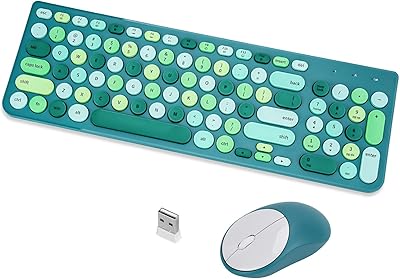
CITLLA M9300 Wireless Keyboard and Mouse Combo
Overview
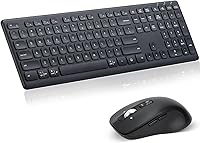
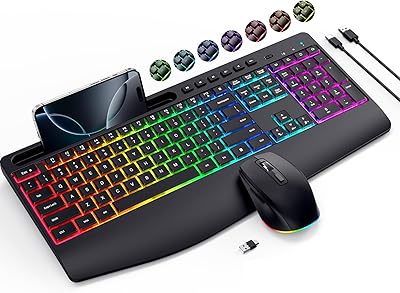
The CITLLA M9300 Wireless Keyboard and Mouse Combo enters a crowded mid-range market with a practical pitch: one set that connects to three devices without the cable clutter. CITLLA isn't a household name — you won't find decades of brand heritage here — but the M9300 makes a reasonable case for itself through its dual-connection approach, pairing a single USB dongle with two Bluetooth channels. The scissor-switch keys and silent mouse buttons shape the everyday feel considerably. If you're a student, home-office worker, or light multitasker bouncing between a laptop and a tablet, this wireless set is worth a closer look.
Features & Benefits
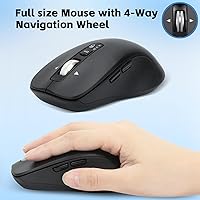
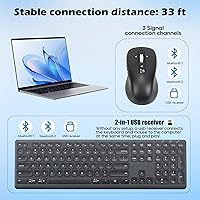
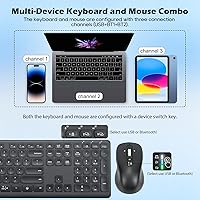
The standout feature is the single USB receiver that handles both the keyboard and mouse simultaneously, saving a port compared to traditional two-dongle setups. Two additional Bluetooth channels push total device pairings to three, with a dedicated switch button to hop between them quickly. The scissor-switch keys feel noticeably more stable than typical rubber-dome membranes, and the silence is genuine rather than just marketing language. The mouse adds four-way scrolling, genuinely useful for wide spreadsheets or panoramic canvases. The keyboard's three-angle tilt stand is a small but practical touch for wrist comfort. On battery life, the claimed two-year figure is a realistic best-case tied to light, intermittent use.
Best For
This keyboard-mouse combo suits anyone managing multiple devices daily — a remote worker cycling through a desktop, laptop, and iPad, for instance. It's equally practical for quiet environments: the genuinely low-noise keys and mouse buttons make it a reasonable pick for shared offices or library sessions where sound carries. ChromeBook and iPad users will appreciate the straightforward Bluetooth pairing that requires no driver hunting. Buyers seeking multi-device flexibility without crossing into premium peripheral pricing will find the M9300 hits a sensible middle ground, as long as expectations are calibrated to its mid-range construction rather than flagship-grade build quality.
User Feedback
With roughly 120 ratings and a 4.0-star average since its August 2024 launch, early impressions of this wireless set are cautiously positive — though the pool is still small enough that consensus may shift. Buyers who are happy tend to highlight effortless plug-and-play setup and how genuinely quiet daily typing feels. Critical voices point to a plasticky hand-feel and occasional Bluetooth reconnection hiccups on certain devices. Mouse tracking also surfaces as adequate for everyday office tasks but underwhelming for anything requiring precise cursor control. Taken together, this reads as a dependable functional pick with a few rough edges rather than a polished, refined experience.
Pros
- One USB dongle connects both the keyboard and mouse simultaneously, saving a valuable port.
- Three total device slots — one USB and two Bluetooth — cover most multi-device setups with ease.
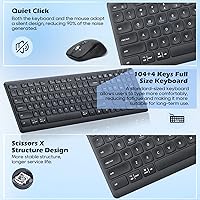
- The scissor-switch keys are noticeably quieter and more stable than standard membrane keyboards.
- Silent mouse buttons make the M9300 genuinely usable in noise-sensitive environments like libraries or shared offices.
- Four-way scroll wheel on the mouse adds real utility for spreadsheet navigation and wide-canvas work.
- Plug-and-play setup requires zero driver installation, making it accessible for non-technical users.
- Batteries are included out of the box, so the combo is ready to use immediately.
- The three-angle keyboard tilt stand adds a small but practical ergonomic adjustment for longer sessions.
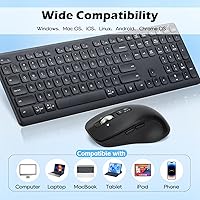
- Compatible with a wide range of devices including iPads, ChromeBooks, smartphones, and standard PCs.
Cons
- The plastic build feels lightweight in a way that suggests cost-cutting rather than portability-conscious design.
- Bluetooth connectivity can be inconsistent on some devices, requiring occasional manual reconnection.
- Mouse tracking precision is adequate for office use but frustrating for anything requiring fine cursor control.
- The two-year battery claim is a best-case marketing figure; real-world longevity will vary significantly with usage patterns.
- CITLLA has minimal brand presence, making warranty support and long-term customer service harder to evaluate.
- The review pool is still small at around 120 ratings, so long-term reliability data is limited.
- No dedicated software or customization options are available for remapping keys or adjusting mouse sensitivity.
- The keyboard layout is US-only, which rules out international buyers needing localized key arrangements.
Ratings
The scores below reflect an AI-driven analysis of verified buyer reviews for the CITLLA M9300 Wireless Keyboard and Mouse Combo, sourced globally and filtered to exclude incentivized, bot-generated, and spam submissions. Each category is scored independently to give you an honest, granular picture of where this wireless set genuinely delivers and where it falls short. Both the praise and the frustrations of real users are represented here without softening either side.
Multi-Device Connectivity
Keyboard Typing Feel
Noise Level
Setup & Ease of Use
Mouse Performance
Build Quality
Battery Life
Ergonomics & Comfort
Bluetooth Stability
Value for Money
Device Compatibility
Portability
Brand Trust & Support
Suitable for:
The CITLLA M9300 Wireless Keyboard and Mouse Combo is a practical choice for anyone who regularly works across multiple devices without wanting to invest in a premium-tier peripheral setup. Students who split their time between a personal laptop and a shared family desktop will get genuine value from the three-device pairing and quick-switch button. Remote workers in open-plan or shared home environments will appreciate the quiet scissor-switch keys and silent mouse clicks, which keep noise to a minimum during calls or focused work sessions. iPad and ChromeBook owners who struggle to find Bluetooth-compatible full-size keyboards at a reasonable price will also find this wireless set covers the basics well. If plug-and-play simplicity and low-friction device switching are your priorities, this combo delivers both without demanding much in return.
Not suitable for:
Buyers expecting flagship build quality or a premium typing experience should look elsewhere before committing to the CITLLA M9300 Wireless Keyboard and Mouse Combo. The plastic construction, while functional, is unlikely to satisfy users accustomed to aluminum-chassis keyboards or mice with weighted, high-precision sensors. Gamers should skip this entirely — the mouse tracking and response characteristics are tuned for office tasks, not fast-paced or precision-dependent gameplay. Anyone who relies heavily on Bluetooth stability across demanding workloads, or switches devices in rapid succession throughout a workday, may find occasional reconnection hiccups more disruptive than acceptable. Power users who want dedicated software, macro keys, or RGB customization will also find this combo too bare-bones for their needs.
Specifications
- Brand: Manufactured by CITLLA, a relatively new entrant in the wireless peripheral market.
- Model: The unit carries the model designation M9300, CITLLA's multi-device keyboard and mouse combo.
- Connectivity: Supports three connection modes: one 2.4G USB receiver (shared by keyboard and mouse) and two independent Bluetooth channels.
- Switch Type: The keyboard uses scissor-switch mechanisms beneath each key, providing greater lateral stability than standard rubber-dome membranes.
- Keyboard Layout: US QWERTY layout designed for the North American market; no regional language variants are offered in this model.
- Mouse Design: The mouse features silent click buttons and a four-way scroll wheel that supports both vertical and horizontal navigation.
- Hand Orientation: The mouse is ambidextrous in shape, making it usable by both left- and right-handed users without adjustment.
- Keyboard Tilt: A built-in three-level adjustable stand lets users choose their preferred keyboard elevation angle for wrist comfort.
- Power Source: Both the keyboard and mouse are powered by AAA batteries, which are included in the box at purchase.
- Battery Life: CITLLA claims over two years of battery life under typical use conditions, supported by an automatic sleep mode that activates during inactivity.
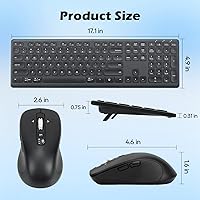
- Dimensions: The keyboard measures 17.1 x 5.18 x 0.8 inches, making it a full-size layout suitable for standard desktop or laptop-side placement.
- Weight: The combined unit weight is 2.18 pounds, which is typical for a full-size wireless keyboard and mouse set.
- Compatible Devices: Works with laptops, desktop PCs, tablets, smartphones, iPads, and ChromeBooks that support USB or Bluetooth connectivity.
- Device Switching: A dedicated device switch button on both the keyboard and mouse allows quick toggling between up to three paired devices.
- Setup Requirements: The USB receiver is plug-and-play with no driver installation required; Bluetooth pairing follows standard OS-level connection procedures.
- Noise Level: Both the keyboard keys and mouse buttons are engineered for silent operation, reducing audible click noise during typing and clicking.
- Availability: The M9300 has been available for purchase since August 2024, placing it among CITLLA's more recently released peripheral products.
- Market Ranking: The combo holds a Best Sellers Rank of approximately #615 in the Computer Keyboard and Mouse Combos category on Amazon.
Related Reviews

Arteck HW192 Wireless Keyboard and Mouse Combo

QUASIO Wireless Keyboard and Mouse Combo

UBOTIE Wireless Keyboard and Mouse Combo

Vssoplor Wireless Keyboard and Mouse Combo

TKVPJYYI Wireless Retro Typewriter Keyboard and Mouse Combo

HP 18H24AA Wireless Keyboard and Mouse Combo

SABLUTE Wireless Backlit Keyboard and Mouse Combo

CHESONA Multi-Device Wireless Keyboard and Mouse Combo
VEILZOR UK418 Wireless Keyboard and Mouse Combo