cimetech KF10 Wireless Keyboard and Mouse Combo






Overview
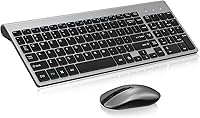
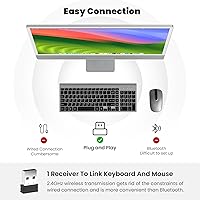
The cimetech KF10 Wireless Keyboard and Mouse Combo is a no-fuss, budget-conscious peripheral set aimed at anyone who wants to cut the cord without spending much. It sports a slim, grey profile that looks clean on any desk, and the scissor-switch keys keep noise to a minimum — a genuine consideration if you share a workspace. Setup takes about thirty seconds: plug in the nano receiver, and both devices come to life. No software downloads, no pairing codes. For its price tier, the KF10 punches reasonably well, offering a polished aesthetic that you wouldn't typically expect at this level.
Features & Benefits
The scissor-switch mechanism is probably the standout here. Keys travel just far enough to feel responsive without producing that clacky noise associated with many budget boards. The 2.4GHz connection holds up well within a normal room distance — rated at 10 meters, though real-world performance in a typical home office is reliably strong within half that range. Both devices run off a single nano receiver, which tucks neatly into the mouse's battery compartment when you're on the move. At just over a pound combined and under a quarter-inch thick, this keyboard-and-mouse set is genuinely easy to live with day to day.
Best For
This wireless combo fits best in low-demand typing environments. If you work from home in a shared apartment, handle light document work, or browse for hours at a stretch, it covers those bases comfortably. Students setting up a dorm workstation on a strict budget will find it a satisfying step up from whatever came bundled with an older PC. It also works well as a secondary desk setup — guest room, media center, or a kids' computer. Mac and Windows users alike can use it without hunting down any drivers. Where it falls short is for heavy-duty typists or gamers who need precision under sustained pressure.
User Feedback
With over 21,000 ratings and a 4.2-star average, the KF10 has earned its reputation among mainstream buyers. People consistently praise the quiet key action and the refreshingly simple setup experience. The slim, clean look gets mentioned often too. On the critical side, some users flag that the mouse scroll wheel can feel flimsy over time, and heavy typists occasionally find the key resistance a bit too light for extended sessions. A handful of reviewers note that battery life is adequate but not exceptional. Wireless dropout appears to be uncommon, though a few Mac users mention minor compatibility quirks. Overall, the feedback reflects solid everyday value rather than standout performance.
Pros
- Plug-in setup takes under a minute with no drivers or software required on Windows or macOS.
- Scissor-switch keys keep noise low enough to type comfortably during calls or in shared spaces.
- Single nano USB receiver handles both devices, leaving your other ports free.
- The slim, grey design looks noticeably more polished than most combos at this price tier.
- At just over a pound combined, the KF10 is light enough to pack into a laptop bag without thought.
- The nano receiver tucks into the mouse body for travel, so it is unlikely to get lost.
- Over 21,000 buyer ratings with a 4.2-star average reflects genuinely broad user satisfaction.
- Works across Windows and macOS without any configuration, making it flexible for mixed-device households.
- Flat keyboard profile keeps wrists in a neutral position for casual to moderate typing sessions.
Cons
- The mouse scroll wheel feels cheap and can develop a rattly, loose quality after months of regular use.
- No low-battery warning on either device means power cuts out without any notice mid-task.
- Practical wireless range falls well short of the rated 10 meters in typical home conditions.
- Key action is too light and shallow for heavy typists who need clear tactile feedback.
- Mac users occasionally experience reconnection delays after the computer wakes from sleep.
- No wrist rest or tilt adjustment makes extended typing sessions uncomfortable over time.
- Only one color option available, limiting desk customization for users with styled setups.
- Mouse tracking precision is too inconsistent for anything beyond basic office navigation.
- Build quality on the mouse body feels noticeably thinner and less solid than the keyboard.
Ratings
The cimetech KF10 Wireless Keyboard and Mouse Combo has accumulated over 21,000 verified ratings worldwide, giving us a substantial data set to work with. The scores below are generated by AI after analyzing genuine buyer feedback, actively filtering out incentivized reviews and bot activity, so what you see reflects real patterns from real users. Both the strengths that keep buyers satisfied and the friction points that lead to criticism are honestly represented here.
Value for Money
Keyboard Typing Experience
Noise Level
Setup & Ease of Use
Wireless Reliability
Mouse Performance
Build Quality
Portability
Key Durability
Battery Life
Aesthetic & Desk Presence
Mac Compatibility
Ergonomics
Suitable for:
The cimetech KF10 Wireless Keyboard and Mouse Combo is a natural fit for anyone who wants a clean, clutter-free desk setup without spending much to get there. Home office workers sharing a space with family or roommates will appreciate how quietly the scissor-switch keys operate — it is the kind of keyboard you can use during a video call without anyone wincing in the background. Students furnishing a dorm room or a first apartment workstation get a complete, functional peripheral pair without the usual compromise of tangled cables. If you are setting up a guest room PC, a media center computer, or a secondary workstation that sees occasional use, this keyboard-and-mouse set ticks every practical box at a price that is hard to challenge. It also works well for laptop users who find their built-in keyboard uncomfortable for extended typing but do not want to sacrifice a second USB port to a full-size wired setup.
Not suitable for:
The cimetech KF10 Wireless Keyboard and Mouse Combo is genuinely not built for demanding or power users, and buying it with those expectations will lead to disappointment. If you spend six or more hours a day typing intensively — whether you are a developer, a writer on deadline, or a data entry professional — the light scissor-switch action and absence of any wrist elevation will likely cause fatigue and frustration before long. Gamers should look elsewhere entirely; the mouse lacks the precision tracking and responsiveness that even casual gaming requires, and the wireless latency is not tuned for fast-reaction scenarios. Mac power users who depend on native shortcut keys or need reliable wake-from-sleep reconnection may find the experience inconsistent enough to be genuinely disruptive. Those expecting the mouse to match the keyboard in durability and feel will also be let down, as the scroll wheel and click buttons have a reputation for degrading noticeably with heavy daily use over several months.
Specifications
- Brand: Manufactured by cntorich and sold under the cimetech brand.
- Model Number: The exact model identifier for this combo is KF10.
- Wireless Technology: Both devices connect via 2.4GHz RF using a single unified nano USB receiver.
- Rated Range: The manufacturer rates the wireless range at up to 10 meters under ideal conditions.
- Keyboard Dimensions: The keyboard measures 14.37 x 5.51 x 0.24 inches, making it an ultra-slim full-size layout.
- Combined Weight: The keyboard and mouse together weigh approximately 1.32 pounds.
- Switch Type: The keyboard uses scissor-switch keys designed for short travel distance and even force distribution.
- Receiver Storage: The nano USB receiver can be stored inside the mouse's battery compartment when not in use.
- USB Ports Required: Only one USB-A port is needed to operate both the keyboard and mouse simultaneously.
- Driver Requirement: No driver installation or software download is required; the combo is plug-and-play out of the box.
- Compatible OS: The combo is compatible with Windows and macOS operating systems without additional configuration.
- Compatible Devices: Designed for use with desktop PCs and laptops that have an available USB-A port.
- Color Option: Currently available in a single grey colorway with a neutral, minimalist finish.
- Key Layout: The keyboard features a standard full-size layout with dedicated function and navigation keys.
- First Available: This product was first listed for sale in May 2020 and has since accumulated a large user base.
- Market Rank: The KF10 holds a ranking of number 68 in the Computer Keyboard and Mouse Combos category on Amazon.
- User Rating: Based on over 21,000 global ratings, the combo holds an average score of 4.2 out of 5 stars.
Related Reviews

cimetech Wireless Keyboard and Mouse Combo

Arteck HW192 Wireless Keyboard and Mouse Combo

TKVPJYYI Wireless Retro Typewriter Keyboard and Mouse Combo

Atelus Wireless Keyboard and Mouse Combo

SABLUTE Wireless Backlit Keyboard and Mouse Combo

UBOTIE Wireless Keyboard and Mouse Combo

MPTOG S801AG Wireless Keyboard and Mouse Combo

HP 18H24AA Wireless Keyboard and Mouse Combo

Vssoplor Wireless Keyboard and Mouse Combo