
Overview

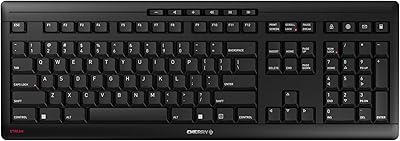
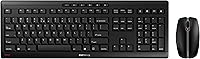
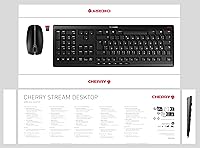
The Cherry Stream Desktop is Cherry's take on the quiet, no-fuss wireless office combo — built with the brand's long-standing keyboard engineering DNA and aimed squarely at the practical desk worker. This wireless combo sports a full-size QWERTY layout with a slim, flat profile that sits neatly on most desks without overwhelming the workspace. Connectivity is simple: one USB dongle handles both devices, cutting out Bluetooth pairing frustrations entirely. Launched in early 2021, it also carries the Blauer Engel ecolabel, a recognized German eco-certification that signals responsible production — a genuine differentiator in a market crowded with disposable peripherals.

Features & Benefits

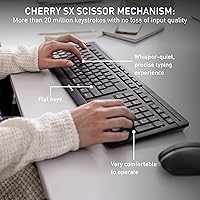
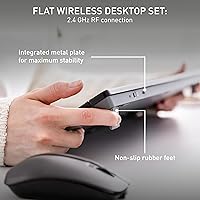
The CHERRY SX scissor mechanism is the standout here. It produces a notably quiet keystroke with enough tactile feedback to type confidently for hours — exactly what you want in a shared office or home where noise matters. The keyboard also uses AES-128 encryption on the wireless signal, a thoughtful inclusion that most budget combos skip entirely. Battery life is impressive in practice: the keyboard can run well over a year on a single set of AAs under typical daily use, though the mouse will need fresh batteries closer to the annual mark. An integrated metal plate keeps the keyboard surprisingly rigid, and status LEDs on both devices remove the guesswork around battery levels and lock key states.

Best For

This office peripheral duo makes most sense for remote workers and professionals who share a space with others — the quiet key action is genuinely considerate of people nearby. If you have been burned by constantly swapping batteries in cheaper sets, the multi-month keyboard runtime is a compelling reason to look here. Data-conscious buyers will also appreciate the encrypted wireless transmission, which adds a layer of protection that is easy to overlook but worth having. That said, if you need Bluetooth to switch between devices regularly, or if you are a power user chasing higher DPI, this combo may feel limiting. It is best matched to traditional full-size typing on a single machine.

User Feedback

Buyers who pick up the Cherry keyboard and mouse set tend to praise the quiet key feel most consistently — it holds up well to day-to-day expectations, and the solid build rarely draws complaints for this tier. Keyboard rigidity gets positive mentions too, with few reports of flex during heavy use. Where opinions split is around the mouse: some find the buttons and scroll wheel perfectly adequate, while others feel the mouse quality does not quite match the keyboard. The dongle-only setup is a sticking point for users who switch between devices, since there is no Bluetooth fallback. Still, the overall satisfaction is strong, and most buyers recommend it as a reliable daily driver for standard office work.

Pros

  • Scissor-switch keys are genuinely quiet — comfortable for open offices and late-night work sessions alike.
  • Keyboard battery life holds up impressively in real daily use, often lasting well over a year.
  • AES-128 encryption protects wireless keystrokes, a meaningful security feature rarely found at this price tier.
  • The integrated metal plate keeps the keyboard rigid and flex-free during heavy typing.
  • Single USB dongle setup is plug-and-play — no drivers, no pairing screens, no fuss.
  • Rubberized feet keep the keyboard firmly planted even on smooth or glass desk surfaces.
  • The coordinated all-black design looks clean and professional without drawing attention to itself.
  • Status LEDs for battery level and lock keys remove all guesswork during daily use.
  • Build quality on the keyboard consistently exceeds buyer expectations for the price point.
  • Blauer Engel ecolabel certification signals a more responsible manufacturing standard than most budget rivals.

Cons

  • The mouse feels noticeably cheaper than the keyboard — an obvious mismatch within the same set.
  • No Bluetooth support makes this a single-device combo with zero flexibility for multi-device users.
  • Mouse button feedback is soft and underwhelming compared to dedicated office mice in the same price range.
  • 2400 DPI maximum is limiting for anyone doing precision creative or technical work.
  • No keyboard backlight makes low-light use genuinely difficult.
  • Function and multimedia keys can misbehave on Mac without manual remapping.
  • The mouse scroll wheel feels plasticky and does not inspire confidence over extended daily use.
  • Losing the USB dongle effectively disables both devices with no backup connectivity option.
  • Mouse ergonomics are generic and may cause discomfort for larger hands during long sessions.
  • No quick-switch feature means physically moving the dongle every time you change machines.

Ratings

The Cherry Stream Desktop earned its scores through AI analysis of verified global buyer reviews, with spam, bot activity, and incentivized feedback actively filtered out before scoring. What you see below reflects the honest range of real user experiences — the genuine strengths that keep buyers satisfied and the recurring frustrations that surface across markets. Scores are designed to help you make an informed decision, not to sell you on anything.

Typing Experience
88%
The scissor-switch mechanism gets consistent praise from buyers who type for hours daily. The keystrokes are notably quiet without feeling mushy — users in open-plan offices particularly appreciate that colleagues rarely notice the sound, even during fast typing sessions.
Some users coming from mechanical keyboards find the feedback a touch too shallow for comfort over very long writing sessions. A small number of buyers report a slightly plasticky rattle on a few specific keys after extended use.
Mouse Performance
63%
37%
For standard office tasks — navigating spreadsheets, browsing, clicking through documents — the mouse holds up well. The three DPI levels give enough flexibility for users switching between detailed work and general desktop use throughout the day.
The mouse is where this combo draws the most criticism. Buyers accustomed to gaming or precision design work find the 2400 DPI ceiling limiting, and the button click feedback feels softer than expected. Several users note the scroll wheel feels cheap relative to the keyboard.
Build Quality
82%
18%
The integrated metal plate in the keyboard base is a genuine differentiator at this price point — buyers frequently comment that the keyboard feels far more rigid than comparably priced alternatives. The rubberized feet keep everything planted firmly, even on glass or laminate desks.
The mouse does not inspire the same confidence as the keyboard. Its casing feels lighter and less premium, which creates a noticeable mismatch in perceived quality between the two devices in the set.
Battery Life
86%
Real-world reports back up the long keyboard battery runtime impressively well. Many buyers say they have gone through an entire year of daily office use without touching the keyboard batteries, which removes a small but genuine friction from the workday.
The mouse battery life is more ordinary — most users replace the batteries well before a year is up, especially with heavier daily use. The advertised figures reflect ideal conditions, and buyers should calibrate expectations for realistic workloads.
Wireless Reliability
84%
Connection stability over the USB dongle is one of this combo's quieter strengths. Buyers rarely report dropouts or lag during normal desk use, and the single dongle handling both devices keeps setup straightforward across laptops and desktops.
The dongle range has limits, and buyers using the combo more than a few meters from the receiver in cluttered environments occasionally experience momentary signal drops. Storing the dongle safely is also a concern — losing it means losing wireless function for both devices.
Security & Encryption
91%
AES-128 encryption on the keyboard is a feature that most competitors at this tier simply skip. For buyers working with sensitive documents in shared spaces or open offices, knowing keystrokes are encrypted over wireless adds meaningful peace of mind.
The encryption applies only to the keyboard, not the mouse — which is expected, but worth noting. Buyers should not assume end-to-end protection beyond keystroke data.
Connectivity Flexibility
51%
49%
Plug-and-play setup via a single USB dongle is genuinely effortless. Buyers who work on a fixed single machine appreciate the no-configuration approach — you plug it in and it works immediately, every time.
There is no Bluetooth support whatsoever. For users who switch regularly between a laptop, tablet, and desktop, or who want to pair with a device lacking USB ports, this is a hard limitation. It is the most frequently cited structural complaint in buyer reviews.
Noise Level
93%
Quiet operation is the single most praised attribute across buyer feedback. The scissor mechanism keeps both typing and mouse clicks subdued enough that users confidently use this combo during video calls, in libraries, and beside sleeping partners or colleagues.
A handful of buyers notice slightly more key-travel noise on the function row compared to the main alphanumeric keys. It is a minor inconsistency, but detectable for sensitive users in very quiet environments.
Ergonomics & Comfort
71%
29%
The flat, slim profile suits users who prefer a low-angle typing position. The keyboard footprint is substantial enough to accommodate all keys without cramping, and the adjustable tilt feet let buyers dial in a comfortable wrist angle.
The mouse shape is fairly generic and does not favor larger hands well over extended use. There is no palm rest included, and buyers logging many hours of consecutive typing may find wrist fatigue sets in sooner than with ergonomic-focused alternatives.
Software & Compatibility
77%
23%
No driver software is required, which buyers consistently mention as a relief. It works out of the box on Windows and is broadly compatible across laptops, desktops, and tablets with a USB port — no setup headaches.
The multimedia shortcut keys do not always map correctly on non-Windows operating systems without manual configuration. Mac users in particular report that some function key behaviors do not translate as expected without additional workarounds.
Design & Aesthetics
79%
21%
The all-black colorway and low-profile design create a clean, professional desk presence. Both devices share a visually coordinated look, and the slim keyboard in particular draws compliments for looking more considered than typical budget combos.
Design is strictly conservative — there is no backlight, no color option variety, and nothing that stands out visually. Buyers wanting any personality or LED customization will find this combo entirely neutral, which may feel flat for home setups.
Value for Money
83%
Buyers consistently express satisfaction with what this combo delivers relative to its asking price. The keyboard quality, encryption feature, and long battery life feel like meaningful inclusions that justify the spend compared to lower-tier wireless sets.
The mouse quality pulls the overall value perception down somewhat. A few buyers suggest that pairing the Cherry keyboard with a separately purchased mouse would be a smarter approach for anyone who plans heavy mouse usage.
Setup & Ease of Use
92%
Virtually every buyer mentions how simple the initial setup is. One dongle, two devices, no software, no pairing codes — it is genuinely plug-and-play, which matters especially for less technical users or those setting up a new workstation quickly.
There is no quick-switch capability between machines, which means users who occasionally move the combo between a work laptop and a personal desktop must physically replug the dongle each time. A minor inconvenience, but one that surfaces repeatedly.

Suitable for:

The Cherry Stream Desktop is a strong pick for anyone who spends the bulk of their day typing in a shared environment — think open-plan offices, co-working spaces, or home setups where a partner or family member is nearby. Remote professionals who handle sensitive documents will appreciate the AES-128 keyboard encryption, a feature that most competitors at this price point quietly omit. If battery anxiety has ever disrupted your workday, the keyboard's real-world runtime (often well beyond a year of daily use) removes that friction almost entirely. It also suits buyers who want a tidy single-machine setup: one dongle, no pairing menus, no app to install. People who prefer a traditional full-size layout — number pad included — over compact or tenkeyless alternatives will feel immediately at home here. Eco-conscious buyers will notice the Blauer Engel certification, a credible environmental standard that signals this is not a throwaway product.

Not suitable for:

If you regularly switch between multiple devices — say, a work laptop, a personal desktop, and an occasional tablet — this office peripheral duo will frustrate you quickly. There is no Bluetooth mode and no multi-device pairing; the USB dongle connects to one machine, and changing that means physically swapping the dongle each time. Power users or creative professionals who rely on precise cursor control will likely find the 2400 DPI ceiling and basic mouse feel underwhelming for their workflows. Buyers who want a backlit keyboard for low-light use should also look elsewhere, as the Cherry Stream Desktop offers no illumination whatsoever. Mac users may encounter shortcut mapping quirks that require manual workarounds, particularly with the function and multimedia keys. And if mouse quality matters as much as keyboard quality to you, be aware that the two devices in this set are not evenly matched — the keyboard punches above its weight, but the mouse is decidedly average.

Specifications

  • Connectivity: Both keyboard and mouse connect wirelessly to a single USB dongle receiver, requiring no Bluetooth pairing or additional software.
  • Switch Type: The keyboard uses a CHERRY SX scissor mechanism, a low-profile switch design known for quiet actuation and stable key travel.
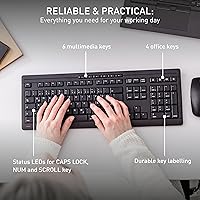
  • Keyboard Layout: Full-size QWERTY US layout with a numeric keypad, 10 dedicated office and multimedia shortcut keys, and standard function row.
  • Keyboard Dimensions: The keyboard measures 18.2 x 6.39 x 0.9 inches, providing a slim and flat profile suitable for most standard desk setups.
  • Weight: The combined package weighs approximately 2.29 pounds, making the set lightweight enough to reposition or travel with easily.
  • Keyboard Battery: The keyboard is powered by AA batteries with an advertised battery life of up to 36 months under typical office usage conditions.
  • Mouse Battery: The mouse runs on AA batteries with an advertised battery life of up to 12 months, though real-world usage may reduce this figure.
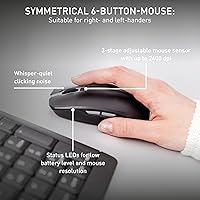
  • Mouse DPI: The mouse offers three adjustable sensitivity levels with a maximum resolution of 2400 DPI, suitable for standard office and document work.
  • Mouse Buttons: The mouse features 6 buttons including left, right, and middle click, plus additional side or function buttons, and a scroll wheel.
  • Encryption: The keyboard transmits keystrokes using AES-128 encryption to protect wireless data from interception in shared or public environments.
  • Frame Construction: An integrated metal plate inside the keyboard base provides torsional rigidity, reducing flex during firm or fast typing sessions.
  • Grip & Stability: Rubberized feet on the underside of the keyboard prevent sliding on smooth, laminate, or glass desk surfaces during use.
  • Status Indicators: The keyboard includes status LEDs for Caps Lock, Num Lock, and Scroll Lock keys, as well as indicators for low battery and mouse DPI level.
  • Certifications: The set carries the Blauer Engel ecolabel for environmentally responsible manufacturing and GS safety certification for the full-size keyboard layout.
  • Compatibility: The wireless combo is compatible with laptops, desktop PCs, and tablets that have a standard USB-A port and a Windows operating system.
  • Color & Finish: Available in a uniform matte black colorway with no backlighting, offering a clean and understated aesthetic suited to professional environments.
  • Included Batteries: Three AA batteries are included in the box, covering the initial power requirements for both the keyboard and mouse out of the box.
  • Model Number: The set carries the manufacturer model number JD-8500EU-2, which can be used to verify compatibility or locate accessories and replacements.

Related Reviews
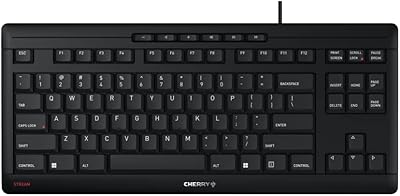
Cherry Stream Wireless Keyboard
88%
88%
Typing Comfort
92%
Wireless Performance
78%
Build Quality
85%
Ergonomics
95%
Setup and Installation
More
CHERRY Stream Keyboard TKL
86%
90%
Typing Experience
87%
Build Quality
85%
Ergonomics
92%
Durability
88%
Noise Level
More
TiVo Stream 4K
TiVo Stream 4K
76%
88%
Content Discovery & Unified Search
84%
Picture Quality
63%
Performance & Responsiveness
81%
Remote Control & Voice Features
86%
App Ecosystem & Google Play Access
More
Razer Stream Controller
82%
75%
Ease of Setup
91%
Customization Options
89%
Software Compatibility
88%
Build Quality
83%
Ergonomics
More
Logitech USB Desktop Microphone
82%
91%
Ease of Setup
76%
Audio Quality
85%
Noise Cancellation
78%
Build Quality
83%
Design & Ergonomics
More
Eversolo Play Standard Edition
81%
91%
Sound Quality
74%
Amplifier Power & Speaker Compatibility
88%
DAC Performance
83%
Touchscreen & Interface
77%
Room Correction Effectiveness
More
Logitech BRIO Stream Webcam
87%
94%
Video Quality
91%
Low Light Performance
72%
Field of View
95%
Ease of Setup
85%
Audio Quality
More
Victrola Stream Onyx
70%
86%
Sonos Integration
78%
Sound Quality
54%
Build Quality
61%
Wi-Fi & App Stability
57%
Value for Money
More
Seagate 1TB Desktop SSHD
83%
92%
Performance
87%
Value for Money
90%
Ease of Installation
89%
Data Access Speed
83%
Noise Level
More
Seagate Desktop Drive 8TB
86%
94%
Storage Capacity
88%
Performance (Speed)
92%
Ease of Use (Setup)
90%
Compatibility (Windows/Mac)
85%
Build Quality
More

FAQ

No, there is nothing to install. Just plug the USB dongle into an available port on your computer and both devices connect automatically. It is recognized as a standard HID device, so Windows handles everything natively.

Basic keyboard and mouse functions will work on Mac and Linux since the dongle is recognized as a standard input device. However, the multimedia and shortcut keys may not map correctly without manual configuration, and some function key behaviors differ from what Mac users expect natively.

The keyboard genuinely uses AES-128 encryption on its wireless transmission, which is a well-established security standard — the same class used in enterprise applications. It means your keystrokes are protected from being intercepted by nearby wireless snoopers. The mouse does not carry the same encryption, which is standard practice since mouse movement data carries far less sensitive information.

The 36-month figure reflects ideal, low-intensity usage conditions. In a typical office day of several hours of active typing, most users report replacing keyboard batteries somewhere between one and two years in. It is still impressively long compared to most wireless keyboards, but treat the advertised figure as an optimistic ceiling rather than a guarantee.

Unfortunately, losing the dongle means losing wireless functionality for both the keyboard and the mouse, since there is no Bluetooth fallback. Cherry does sell replacement dongles separately in some markets, but availability varies by region. It is worth keeping the dongle stored safely — if you move between machines, a small labeled case can save you a lot of trouble.

Not simultaneously, and not without physically moving the dongle. There is no multi-device pairing or quick-switch button. If you need to use the combo across two machines, you will need to unplug the dongle from one and replug it into the other each time. For anyone who hot-desks or switches between a laptop and desktop regularly, that friction adds up quickly.

Yes, the keyboard is genuinely well-suited for heavy daily typing. The CHERRY SX scissor mechanism is quiet and stable, and the integrated metal plate prevents the flex that cheaper keyboards develop over time. Writers, coders, and administrative staff who type for most of the workday consistently rate the key feel positively. Just keep in mind there is no wrist rest included.

Both devices have built-in status LEDs that flash or illuminate to signal low battery charge. The keyboard also has dedicated LEDs for Caps Lock, Num Lock, and Scroll Lock, so you always have a visual reference for key states without relying on on-screen indicators.

The mouse is functional and adequate for standard office tasks, but it has a fairly generic shape that does not cater especially well to larger hands or users with specific ergonomic needs. For a few hours of daily use, most people find it acceptable. If you spend most of your workday using the mouse rather than the keyboard, you may eventually want to pair the keyboard with a more ergonomic standalone mouse.

This is one area where this office peripheral duo genuinely stands out. The integrated metal plate inside the keyboard base adds real structural rigidity that you can feel immediately when typing with any force. Buyers who previously used budget keyboards often specifically mention the absence of flex as a pleasant surprise. It contributes meaningfully to the overall typing experience, especially during fast or firm keystrokes.