Overview

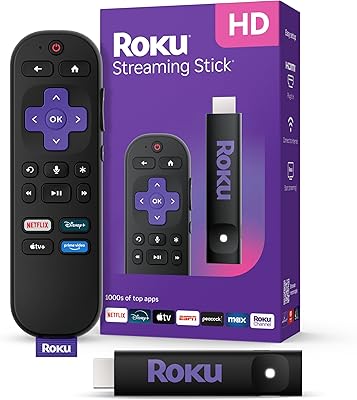
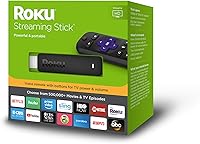
The Roku Streaming Stick 2018 Streaming Device is a compact HDMI plug-in streamer built for cord-cutters who want to breathe new life into an older HD television without a complicated setup. Sitting between the budget-friendly Express and the more capable Stick+, it occupies a practical middle ground. What set it apart from earlier Roku sticks was the voice remote with TV controls — you can adjust volume and power your television without hunting for a separate remote. The library stretches beyond 500,000 titles across free and paid channels. Worth noting upfront: this Roku stick tops out at 1080p and runs on single-band Wi-Fi, so if 4K is on your wishlist, the Stick+ is the better call.
Features & Benefits

The most immediately useful thing about this Roku device is the unified voice remote — it handles TV power and volume, so your old TV remote can finally stay in the drawer. Plug it into any HDMI port, connect to Wi-Fi, and you are watching Netflix or Hulu in under five minutes. The Roku mobile app is worth downloading too; it unlocks private listening through your headphones and offers voice search without saying a word out loud. For most living rooms with an HD television, 1080p playback looks sharp and consistent. Alexa and Google Assistant users can also issue commands through their smart speakers to control playback completely hands-free.

Best For

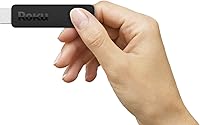
This streaming stick is a natural fit for a bedroom or guest-room TV that deserves better than a smart TV's sluggish built-in apps. If you constantly juggle a TV remote and a separate streaming remote, the consolidated controls here feel like a genuine relief. Renters and travelers appreciate the portability — it weighs under an ounce and slides into a bag without a second thought. Roku's clean, icon-based interface also makes this Roku device one of the friendlier options for parents or grandparents who find other platforms confusing. That said, if your television is 4K-capable and you want to use it fully, this stick is not the right match.

User Feedback

With well over 170,000 ratings, the overall picture is strongly positive but not without honest caveats. Most buyers highlight quick, painless setup and the intuitive channel grid as the standout wins, and the voice remote with TV controls draws consistent praise from people who were previously juggling multiple remotes. On the flip side, users in larger homes sometimes encounter Wi-Fi signal drops — a fair knock against single-band wireless when walls and distance are involved. A handful of reviewers also note the stick runs noticeably warm after extended sessions. Long-term owners tend to appreciate that Roku delivers regular software updates, which keeps the interface feeling current rather than forgotten.

Pros

  • Voice remote controls TV power and volume, eliminating the need to keep a separate TV remote on hand.
  • Setup takes under five minutes — plug in, connect to Wi-Fi, and start watching almost immediately.
  • Access to over 500,000 titles across free and paid channels covers just about every mainstream streaming need.
  • The Roku mobile app adds private listening through headphones, which is genuinely useful late at night.
  • Compatible with both Alexa and Google Assistant for hands-free playback control via smart speakers.
  • 1080p picture quality looks clean and consistent on most HD televisions without any noticeable compression.
  • Lightweight and compact enough to slip into a travel bag and set up in a hotel room with ease.
  • Roku delivers regular software updates, so the interface stays functional and current over time.
  • The icon-based home screen is approachable for all ages, including users who are not comfortable with technology.

Cons

  • Single-band Wi-Fi struggles in larger homes or when walls and distance separate the stick from the router.
  • No 4K or HDR support means owners of newer televisions cannot use their screen to its full potential.
  • The stick runs noticeably warm during extended streaming sessions, which may concern some users over the long term.
  • No lost-remote finder feature, so if the remote slides between couch cushions you are searching manually.
  • Private listening requires downloading the Roku mobile app, which adds a small but real friction point.
  • No headphone jack on the remote itself — private listening only works through the phone app.
  • Processing speed is adequate but not quick; heavy channel-switchers may notice occasional sluggishness.
  • Single-band wireless means less bandwidth headroom compared to dual-band competitors at a similar price point.

Ratings

The scores below for the Roku Streaming Stick 2018 Streaming Device were produced by our AI rating engine after processing thousands of verified global buyer reviews, with spam, bot activity, and incentivized feedback actively filtered out. Every category reflects the full spectrum of real user experience — from the aspects that consistently win people over to the pain points that come up repeatedly in honest long-term ownership. The goal is a transparent, balanced picture so you can make a confident purchase decision.
Ease of Setup
93%
An overwhelming share of buyers describe the initial setup as genuinely painless — plug into HDMI, follow a handful of on-screen steps, and you are streaming within minutes. Even users who describe themselves as not tech-savvy consistently report getting up and running without needing to call for help.
A small number of users encountered hiccups during the Wi-Fi pairing step, particularly those with dual-band routers that broadcast both frequencies under the same network name. These cases are the exception, not the rule, but they do show up in the feedback with enough regularity to mention.
Remote Usability
88%
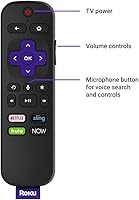
The voice remote with integrated TV power and volume controls is one of the most praised aspects of this streaming stick. Being able to ditch the original TV remote entirely and control everything from one device is a daily quality-of-life improvement that buyers notice immediately and consistently appreciate.
The remote does not include a headphone jack or a lost-remote finder, both of which appear on higher-tier Roku models. A handful of users also report that the TV control buttons do not work with every television brand, requiring a brief IR setup process that is not always intuitive.
Streaming Performance
81%
19%
For typical HD content — nightly Netflix watching, weekend Hulu binges, or YouTube rabbit holes — the streaming stick handles playback smoothly and with minimal buffering when Wi-Fi conditions are good. Channel load times are quick enough that most users do not find themselves waiting around impatiently.
The single-band wireless connection is the most commonly cited performance limiter. Users in larger homes or apartments with the router in a different room report more frequent buffering and occasional stream drops than they would get from a dual-band device at a similar price point.
Picture Quality
79%
21%
On a 1080p HD television, content looks sharp and well-rendered, and the upscaling from 720p source material is handled cleanly without obvious artifacts. For the majority of buyers who own HD televisions, the visual output meets expectations and rarely draws complaints.
The hard ceiling of 1080p is a genuine limitation for anyone with a 4K television, and there is no HDR support of any kind. Buyers who purchased this stick hoping to improve the picture quality on a 4K panel quickly discovered it does not unlock any of their screen's advanced capabilities.
Wi-Fi Reliability
67%
33%
In compact living spaces — studio apartments, hotel rooms, or bedrooms close to the router — the 802.11ac single-band connection holds up well and delivers consistent speeds for HD streaming. Travelers who use this stick on the road report that it connects to new networks quickly and without fuss.
Single-band wireless simply cannot match the range or stability of dual-band alternatives, and real-world feedback reflects that clearly. Users in two-story homes or with the router on the opposite side of the apartment are the most likely to experience the intermittent drops that make up the bulk of negative reviews.
Content Library
94%
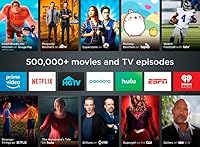
With access to over 500,000 titles spanning Netflix, Hulu, Amazon Video, YouTube, Vudu, and a wide catalog of free ad-supported channels, the content breadth is one of the strongest arguments for choosing Roku over competing platforms. Free services like The Roku Channel and Tubi mean there is always something to watch at no additional cost.
The sheer number of channels can make discovery feel cluttered, and some users find Roku's channel store harder to navigate than they expected. A few niche or regional streaming services are missing from the lineup, which matters to a small but vocal portion of the buyer base.
Voice Search
76%
24%
Voice search works reliably for finding titles across multiple channels simultaneously, which saves the time of searching each app individually. Users who adopt it regularly say it genuinely speeds up the process of deciding what to watch, especially when they only have a rough idea of what they are looking for.
The voice recognition occasionally struggles with names that are hard to spell or pronounce, returning off-target results that require a manual correction. It also cannot execute more complex commands like browsing by genre or filtering by release year the way some competing voice platforms can.
Smart Speaker Integration
77%
23%
Alexa and Google Assistant compatibility works as advertised for basic commands — play, pause, resume, and launch specific apps. Users who already have a smart speaker in their living room find it a convenient add-on that rarely requires much configuration after the initial linking.
The integration is functional but not deep; more nuanced commands like browsing recommendations or navigating within an app do not always land correctly. Users who expected a rich voice-controlled experience comparable to native smart TV systems may find the results underwhelming.
Portability
91%
At under an ounce and barely the length of a USB thumb drive, this streaming device is genuinely easy to travel with. Hotel and vacation rental users in particular praise how quickly they can replicate their home streaming setup in a new environment with no tools and no extra bags.
The power adapter adds a little bulk to the travel package, and not every hotel room has a USB port on the TV that supplies enough power to run the stick reliably. A short power cable would occasionally be a tighter fit behind wall-mounted hotel televisions.
Mobile App
74%
26%
The Roku mobile app is a solid companion that adds genuine functionality beyond what the physical remote provides, most notably private listening through your phone. Voice search through the app also works quickly, and the touch-based navigation is responsive enough for daily use as a backup remote.
The private listening feature requires the app to stay open and your phone to stay nearby, which is less convenient than a dedicated headphone jack on the remote itself. Some Android users report occasional Bluetooth connectivity hiccups that interrupt the private listening session.
Build Quality
72%
28%
The stick feels solid enough for something that spends its life plugged into the back of a TV and rarely gets handled. The remote has a clean, lightweight construction that holds up well under daily use, and the button feedback is firm without feeling cheap.
The plastic casing of the stick can feel a little lightweight compared to premium streaming devices, and the remote does not inspire the kind of confidence you get from higher-end electronics. A portion of long-term users report that the remote buttons became less responsive after a year or two of regular use.
Value for Money
83%
Relative to what it delivers — a genuinely easy streaming experience, a strong content library, and a voice remote that replaces your TV remote — the price sits in a reasonable range for an HD-only household. Buyers who do not need 4K tend to feel they got a fair deal.
Those who do own a 4K television or who wanted dual-band Wi-Fi performance may feel they should have spent a bit more on the Stick+ from the outset. The value proposition weakens noticeably if your television has already outpaced what this streaming stick can output.
Long-Term Software Support
82%
18%
Roku has a strong track record of delivering regular firmware updates to older hardware, and many owners of this model confirm that the interface still feels current and functional years after purchase. New channel additions and UI improvements continue to roll out without requiring a hardware upgrade.
As Roku pushes newer and more capable hardware generations, there is an inevitable point at which older models stop receiving the latest features first. Some long-term owners have already noticed that certain newer Roku interface features arrived on their stick later — or not at all.
Heat Management
61%
39%
Under normal viewing conditions — a couple of hours of streaming in the evening — the stick stays warm but not alarmingly so. Most users who are aware of the heat output simply leave a gap around the stick for airflow and report no issues with stability or performance as a result.
Extended binge sessions, particularly in warm rooms or with the stick tucked tightly behind a TV, cause it to run noticeably hot to the touch. A subset of reviewers links sustained heat to occasional freezing or rebooting during long viewing sessions, which becomes a frustration for heavy users.

Suitable for:

The Roku Streaming Stick 2018 Streaming Device is a smart pick for anyone who wants to turn a basic HD television into a capable streaming hub without dealing with a complicated installation or a steep learning curve. It works especially well as a second-room solution — think bedroom, guest room, or a TV in the kitchen — where a full-sized media player would feel like overkill. Cord-cutters who have recently dropped cable and need quick access to Netflix, Hulu, YouTube, and dozens of free channels will find the content library more than sufficient. The consolidated voice remote, which handles TV power and volume, makes it a particularly good match for older adults or less tech-savvy users who want one simple remote instead of two. Frequent travelers and renters will also appreciate how easy it is to pack and set up in a hotel or new apartment. If your television tops out at 1080p and your home Wi-Fi router is reasonably close to where you watch, this Roku device will handle day-to-day streaming reliably.
Not suitable for:

Buyers with a 4K television who want to take full advantage of their screen resolution should look elsewhere — the Roku Streaming Stick 2018 Streaming Device is capped at 1080p and does not support HDR, so a 4K panel will never show its best picture through this stick. Households with larger floor plans or thick walls between the router and the TV may find the single-band wireless connection less reliable than they would like, particularly during peak usage hours. Power users who want the fastest possible interface response or who plan to run multiple heavy streaming apps in quick succession may notice that the processor, while adequate for casual viewing, is not the snappiest option available. Anyone who spends a significant amount of time in a room far from their router would be better served by the Roku Streaming Stick+ with its long-range wireless antenna. If Dolby Vision or advanced HDR formats are priorities, this streaming stick simply does not support them.
Specifications

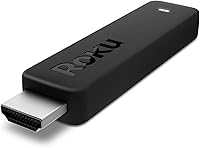
  • Form Factor: The device is a compact HDMI TV stick measuring 3.7 x 0.8 x 0.4 inches, designed to plug directly into a television's HDMI port.
  • Weight: The stick weighs 0.8 ounces, making it light enough to carry in a pocket or travel bag without adding noticeable bulk.
  • Max Resolution: Playback tops out at 1080p Full HD (1920 x 1080), with upscaling applied to content that is natively 720p.
  • Wireless: Connectivity relies on 802.11ac single-band Wi-Fi, which performs well in average-sized rooms with a nearby router.
  • Connector: The stick uses an HDMI connector and requires the television's HDMI input to support HDCP 2.2 for protected content playback.
  • Remote Type: The included voice remote features dedicated buttons for TV power and volume control, reducing the need for a separate TV remote.
  • Batteries: The remote is powered by two AAA batteries, which are included in the box at purchase.
  • Audio Support: Supported audio formats include Dolby Audio, DTS Digital Surround, and digital stereo, all delivered over the HDMI connection.
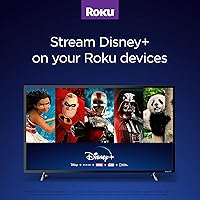
  • Streaming Services: Out of the box, the stick supports Netflix, Hulu, Amazon Instant Video, YouTube, and Vudu, along with thousands of additional free and paid channels.
  • Voice Assistants: The device is compatible with Amazon Alexa and Google Assistant, allowing hands-free playback control through a paired smart speaker.
  • Mobile App: The free Roku app for iOS and Android functions as a second remote and enables private listening by routing audio through the phone's headphone jack.
  • Color: The stick ships in black and the remote follows the same color scheme, with no alternative color options available for this model.
  • Model Number: The official model number is 3800R, which can be used to identify firmware updates and confirm compatibility with Roku accessories.
  • Power Source: The stick draws power via a USB cable and power adapter included in the box, and can also be powered through a TV's USB port if it supplies sufficient wattage.
  • TV Compatibility: The stick is compatible with HD televisions that have an HDMI input; 4K televisions will work but will not output beyond 1080p resolution.

Related Reviews

Roku Streaming Stick 4K
82%
93%
Ease of Setup
88%
Picture Quality
79%
Wi-Fi Performance
84%
Remote Usability
91%
App & Content Library
More
Roku Streaming Stick Plus 2025
84%
94%
Ease of Setup
88%
Picture Quality
91%
Remote Usability
58%
Audio Support
93%
Portability & Travel Use
More
Roku Streaming Stick HD 2025
84%
94%
Ease of Setup
91%
Interface & Navigation
86%
Streaming Performance
88%
Remote Quality
78%
Picture Quality
More
Roku Express HD Streaming Media Player
83%
94%
Ease of Setup
91%
Interface & Navigation
93%
Channel Selection
88%
Free Content Value
62%
Remote Usability
More
Roku Streambar 9102MX Spanish Edition
82%
93%
Bilingual Interface & Language Support
78%
Audio Quality
82%
4K & HDR Picture Performance
86%
Value for Money
91%
Ease of Setup
More
Roku 3903 SE Streaming Media Player
79%
93%
Ease of Setup
88%
Interface & Navigation
82%
Streaming Performance
77%
Picture Quality
58%
Remote Control
More
Roku Ultra 4K Streaming Player
82%
88%
Streaming Performance
84%
Picture Quality
91%
Remote Quality
89%
Private Listening
93%
Connectivity Options
More
ONN Android TV 4K UHD Streaming Device
86%
91%
4K Streaming Performance
88%
Voice Control (Google Assistant)
94%
Setup Process
89%
Chromecast Functionality
72%
Wi-Fi Connectivity
More
ClearClick Video2USB
79%
91%
Ease of Setup
78%
Analog Capture Quality
74%
HDMI Capture Performance
67%
Software Usability
93%
Input Versatility
More
Roku Express 2022
Roku Express 2022
89%
96%
Ease of Setup
91%
Streaming Performance
89%
Remote Usability
93%
Content Access Variety
88%
Smart Home Compatibility
More

FAQ

It works with any television that has an HDMI input, as long as that input supports HDCP 2.2 for protected content. Most TVs made after 2013 meet this requirement. If you are unsure, check your TV's manual or look up the model number online.

No. The Roku Streaming Stick 2018 Streaming Device is capped at 1080p and does not support 4K or HDR output. If you have a 4K television and want to use it to its full potential, the Roku Streaming Stick+ is the model you should be looking at instead.
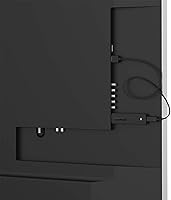
It is about as simple as streaming devices get. Plug it into an HDMI port, connect the power cable, follow the on-screen prompts to join your Wi-Fi network, and create or log in to a free Roku account. Most people are watching within five to ten minutes of opening the box.

It does both. The remote has dedicated buttons for TV power and volume, so you can turn your television on and off and adjust the sound without touching your original TV remote. It is not a full universal remote, but it handles the functions you reach for most.

It depends on the distance and what is in between. The single-band wireless works reliably in small to medium-sized spaces when the router is reasonably close. In larger homes or through several walls, some users experience occasional buffering or drops. If that is a concern for your setup, consider the Stick+ which has a stronger long-range antenna.

Yes, but you need the free Roku mobile app on your phone to do it. Once connected, you can plug headphones into your phone and audio routes there instead of through the TV speakers. It works well, though it does mean your phone needs to be nearby and the app needs to stay open.

Yes, both are supported. You will need a separate Alexa or Google Assistant device like an Echo or Nest speaker already set up in your home. Once linked through the respective app, you can ask your smart speaker to play shows, pause content, or switch inputs.

It does run warm after extended streaming sessions, which is normal for a device this small running continuously. It should not feel dangerously hot to the touch, but it is worth making sure it has a little airflow around it and is not tucked tightly behind the TV where heat can build up.

The big ones are all there — Netflix, Hulu, Amazon Video, YouTube, and Vudu are available right away, and the Roku Channel Store gives you access to thousands of additional free and paid channels. Free ad-supported services like The Roku Channel, Pluto TV, and Tubi are also available without any subscription.

Roku has a strong track record of supporting older hardware with software updates for several years, and many owners of this model report that their interface still feels current. That said, as newer hardware generations release, there is always a point where older models may stop receiving the latest features, so it is worth factoring that into a long-term purchase decision.