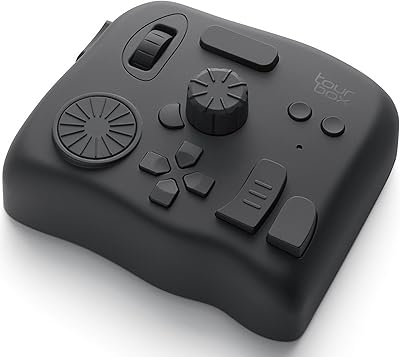
Overview

The Razer Stream Controller Streaming Keypad is Razer's answer to the growing demand for a single, capable control surface that handles everything from scene switching to audio management without cluttering your desk with multiple devices. It packs haptic keys, tactile analog dials, and programmable buttons into a footprint smaller than a paperback book. Sitting in a mid-to-high price range, it goes head-to-head with Elgato's Stream Deck lineup — but brings a more hardware-rich feature set to the table. It connects via USB and works on both Windows and Mac. Just know upfront: real configuration time is required to get full value from it.
Features & Benefits

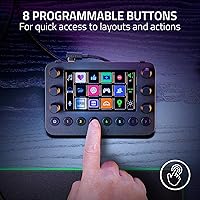
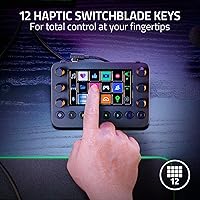
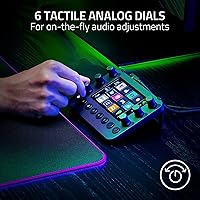
The heart of this stream controller is its 12 haptic Switchblade keys, each capable of displaying custom icons and delivering adjustable tactile feedback — so you always know by feel which command you're pressing, even mid-stream. The six analog dials are genuinely satisfying to use; twist one to fade your mic, another to adjust game audio, all while watching levels update on the built-in LCD touchscreen in real time. Eight dedicated buttons let you jump between up to eight different key layouts instantly. And with Dynamic Mode, the device detects your active app and switches profiles automatically, which becomes second nature surprisingly fast.

Best For

This control surface is built for people who run complex setups — streamers toggling between OBS scenes, Discord, and Spotify simultaneously, or creative professionals who want tactile shortcut control over Adobe Premiere or Lightroom without reaching for a mouse. Mac users will find solid compatibility, though it's worth noting that not every software integration is as fully fleshed out on Mac as it is on Windows. If you're ready to spend an afternoon building out layouts, the payoff is a genuinely personalized workflow hub. If you want something that works well straight out of the box with minimal tinkering, this is not your device.

User Feedback

Among buyers, the physical build draws consistent praise — the dials feel substantial and the haptic key response has a satisfying quality that cheaper competitors can't match. The sticking point for many is Razer's companion software, which has a learning curve that some users describe as steep, especially when setting up dynamic profiles for the first time. The LCD touchscreen earns mentions as genuinely useful rather than just decorative. At its price point, a handful of reviewers felt the cost was hard to justify against Elgato alternatives, though those who committed to the setup process generally came away satisfied. The 4.0-star average from close to 400 ratings tells a fair story: strong upside, but not without friction.

Pros

  • The six analog dials make real-time audio adjustments fast, physical, and precise during live streams.
  • Haptic feedback on the keys is adjustable and genuinely helps reduce accidental command mis-presses.
  • Dynamic Mode automatically switches profiles when you change apps, cutting down on manual interruptions.
  • The built-in LCD touchscreen displays live readouts that are actually useful, not just decorative.
  • Eight programmable buttons let you jump between up to eight key layouts without navigating software menus.
  • Native integration covers the most important streaming and creative tools out of the box.
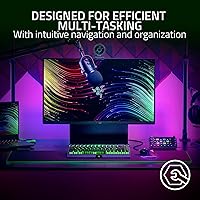
  • The compact build fits into tight desk setups without requiring a major reorganization of your workspace.
  • For Windows users, the full feature set performs reliably once the initial configuration is complete.
  • Buyers who replace multiple single-purpose controllers report a net improvement in desk organization and workflow clarity.

Cons

  • Razer's companion software has a steep learning curve that can take hours to work through before layouts feel functional.
  • Profile configurations have been wiped or broken by software updates, forcing some users to rebuild from scratch.
  • Mac compatibility is uneven — several Adobe integrations work better on Windows and the gap is noticeable.
  • The analog dials lack physical detents, making precise micro-adjustments harder than expected during fast sessions.
  • Occasional haptic inconsistency between individual keys on the same unit undermines the premium feel.
  • At its price tier, buyers who primarily need macro keys are paying for dial and haptic hardware they may never fully use.
  • The corded USB cable is stiff and short, which can complicate positioning on larger or unconventional desk setups.
  • Dynamic profile switching can misfire early on, switching layouts at the wrong moment until finely tuned.
  • Customer support and firmware update cadence from Razer have drawn criticism for being slow to address recurring software issues.

Ratings

The Razer Stream Controller Streaming Keypad has been put through its paces by our AI rating system, which analyzed verified buyer reviews from across global markets while actively filtering out incentivized, bot-generated, and spam feedback. Scores reflect the honest consensus of real streamers, content creators, and power users — strengths and frustrations alike. Where this control surface genuinely delivers, the numbers show it; where it falls short of its premium positioning, we call that out too.
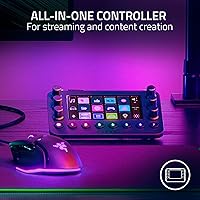
Hardware Build Quality
88%
The physical construction is one of the most consistently praised aspects across buyer feedback. The analog dials have a weighted, precise feel that makes fine-tuning audio levels during a live stream genuinely satisfying rather than fiddly. Most users note the unit feels planted on the desk and doesn't wobble or flex under use.
A small number of buyers reported key wobble or inconsistent haptic response after extended use, suggesting durability over months of daily streaming is not guaranteed. For a device at this price point, that uncertainty is worth keeping in mind before committing.
Haptic Key Performance
84%
The adjustable haptic feedback on the Switchblade keys is a real differentiator — users can tune the tactile response to their preference, which makes it easier to press commands confidently without looking away from a stream. Streamers who assign scene switches and macro commands appreciate the distinct physical confirmation each keypress delivers.
Some buyers found the haptic calibration options in the software confusing, and a few noted that at lower haptic settings the keys feel underwhelming compared to standard mechanical alternatives. The feedback also varies noticeably between individual keys on some units.
Analog Dial Usability
91%
Consistently singled out as the standout feature, the six tactile dials make adjusting mic gain, game audio, and music volume mid-stream feel intuitive and immediate. Users who previously relied on software sliders or keyboard shortcuts describe the dials as transforming their workflow in a tangible way.
The dials lack physical detents or end-stops, which can make precise incremental adjustments harder than expected during fast-paced sessions. A handful of users also noted that the dials occasionally register unintended movement when bumped, which is a real concern on a crowded streaming desk.
LCD Touchscreen Utility
79%
21%
The dynamic LCD touchscreen is more than cosmetic — it displays live level readouts and active layout indicators, giving users at-a-glance confirmation of what each dial and key is currently doing. Streamers managing multiple audio channels especially found this genuinely useful during broadcasts.
The screen is small enough that detailed icons can be hard to distinguish at a glance under bright studio lighting. A few Mac users also reported that the touchscreen feed was less responsive or updated more slowly compared to the Windows experience.
Software & Companion App
58%
42%
When fully configured, Razer's companion software unlocks a level of customization that few competing devices can match — multi-app profile switching, per-key icon design, and granular haptic control are all accessible once you know where to look. Power users who invested the setup time reported high satisfaction.
The software is widely cited as the biggest pain point. New users frequently describe the interface as unintuitive, with a learning curve that can take several hours before basic profiles feel right. Crashes and sync delays between the app and hardware were also reported by a notable portion of buyers, which is a serious issue for a premium-priced peripheral.
Dynamic Profile Switching
73%
27%
When it works well, the automatic profile switching based on the active application feels genuinely intelligent — switching from an OBS layout to an Adobe Premiere layout as you alt-tab is the kind of friction-reducing feature that power users will appreciate after a few days of use.
Getting Dynamic Mode configured correctly requires a meaningful time investment, and early on it can misfire or lag, switching profiles at the wrong moment mid-stream. Some buyers gave up on the feature entirely and opted for manual switching instead, which undercuts one of the device's key selling points.
Software Integration Breadth
82%
18%
The native support list is genuinely broad — OBS Studio, Streamlabs, Twitch, Discord, Spotify, the full Adobe Creative Suite, and Final Cut Pro cover the majority of tools a working streamer or creator would run daily. Having pre-built integration templates saves significant initial configuration time.
Mac users should be aware that not every integration is equally mature across platforms. Final Cut Pro support is solid, but some Adobe integrations and Twitch-specific features are more reliably implemented on Windows, which is a gap that Razer has been slow to close.
Ease of Setup
54%
46%
For users who enjoy customizing peripherals and don't mind a configuration-heavy onboarding process, the initial setup is a one-time investment that pays off across a personalized workflow. Detailed community guides and YouTube walkthroughs help bridge gaps in the official documentation.
Out of the box, this control surface is not ready for a live stream in minutes. Multiple buyers described spending several hours before their layouts felt functional, and the lack of intuitive onboarding within the app makes the experience particularly rough for those who are new to hardware controllers.
Value for Money
67%
33%
For streamers who fully exploit the haptic keys, dials, and dynamic profiles, the hardware-to-price ratio is defensible — no single competitor combines analog dials and haptic keys at this level of integration. Buyers who replaced two or three separate devices reported feeling the purchase was justified.
Those who cross-shopped with the Elgato Stream Deck line frequently noted that comparable macro functionality can be achieved at a meaningfully lower cost. If you are not going to use the dials or haptic customization heavily, the premium over alternatives is difficult to rationalize.
Compatibility — Windows
89%
On Windows 10 and above, the device performs at its intended capability with stable driver support and responsive software sync. The full integration list functions as advertised, and most Windows users reported a reliable day-to-day experience once past the initial setup phase.
Even on Windows, driver updates from Razer have occasionally introduced temporary instability, requiring reinstallation or rollback. This is a known pattern with Razer's software ecosystem and is worth factoring in if you rely on the device for professional live work.
Compatibility — Mac
71%
29%
Mac support has improved noticeably since launch, and for Final Cut Pro and basic OBS use cases, the experience is solid. Mac-based creators who do not depend on the full Adobe integration suite will find the device largely functional on macOS 10.14 and later.
Several Mac-specific integrations remain thinner than their Windows counterparts, and some buyers on Apple Silicon Macs noted occasional connectivity hiccups. Razer's Mac software support historically lags behind its Windows development cycle, so prospective Mac buyers should verify current compatibility before purchasing.
Physical Footprint & Desk Integration
86%
At just under 6 by 4.3 inches, this control surface fits naturally into even a compact streaming setup without dominating desk real estate. Users with multi-monitor rigs or small desks appreciated that it could be positioned at the edge of the keyboard without interfering with other peripherals.
The corded USB connection, while reliable, means cable management is a consideration — the cable is not braided or particularly flexible, which some users found awkward when positioning the unit at an angle relative to their PC. A longer cable option would help.
Key Customization Depth
83%
The ability to assign custom icons, macros, and commands to each of the 12 haptic keys — and then replicate that across eight switchable profiles — gives this device a customization ceiling that most streamers will never fully reach. For complex multi-scene productions, the depth is a genuine asset.
Accessing deeper customization layers requires navigating several menu levels in the companion app, which discourages experimentation for less technically inclined users. Some buyers noted that importing icon packs or syncing custom icon designs was more cumbersome than it should be.
Tactile Feedback Consistency
76%
24%
At higher haptic settings, the keys deliver a consistent, satisfying response that helps with fast command input during a live broadcast. Users who stream action-heavy games or run rapid scene transitions found the tactile confirmation reduced accidental mis-presses noticeably.
Consistency is not perfect across all units — a portion of buyers reported that one or two keys felt noticeably different from the rest, either too firm or too soft, which stands out on a device where tactile uniformity is central to the experience.
Long-Term Reliability
69%
31%
Many buyers who have used the device for six months or more report that the core hardware — dials, buttons, and haptic keys — holds up well under regular streaming use. The build does not show the kind of wear that cheaper accessories exhibit after intensive use.
Software reliability over time is a weaker story. Razer's update cadence has occasionally broken existing profiles or required users to reconfigure layouts from scratch after an app update, which is a frustrating tax on what should be a set-and-forget workflow tool.

Suitable for:

The Razer Stream Controller Streaming Keypad is built for streamers and content creators who are already running complex, multi-software setups and want a single piece of hardware to tie it all together. If you're managing OBS scenes, Discord audio, Spotify playback, and chat alerts simultaneously during a live broadcast, having physical dials and haptic keys dedicated to each function genuinely changes how in-control you feel on stream. Adobe Creative Cloud users — particularly those working in Premiere Pro, Lightroom, or After Effects — will also find real value in binding tactile shortcuts to the keys rather than hunting through menus or memorizing keyboard combinations. This control surface rewards patience: buyers who are willing to spend a focused setup session building out their layouts tend to end up with a workflow tool they rely on every single day. It fits naturally on a busy desk without dominating space, and for Windows users especially, the depth of software integration on offer is hard to match from a single device.
Not suitable for:

If you're new to streaming hardware and hoping to unbox this and be up and running within twenty minutes, the Razer Stream Controller Streaming Keypad will likely frustrate you. The companion software has a genuine learning curve, and without investing real time in configuration, the device sits underutilized — and at this price point, underutilization stings. Casual streamers who only need basic scene switching and don't require analog volume control would be better served by a simpler, more affordable option like one of Elgato's entry-level Stream Deck models, which offer a more guided setup experience. Mac users should go in with measured expectations: while the hardware works on macOS, several integrations — particularly within the Adobe suite — are noticeably more polished on Windows, and some features may behave inconsistently depending on your macOS version. If tactile dials are not a part of your workflow and you're primarily looking for macro keys, there are less expensive alternatives that cover that use case without the added complexity.
Specifications

  • Brand: Manufactured by Razer, a well-established peripheral brand focused on gaming and content creation hardware.
  • Model Name: Stream Controller, model number RZ20-04350100-R3U1.
  • Dimensions: The unit measures 5.91″ x 4.33″ x 1.18″, making it compact enough for tight desk setups.
  • Weight: The device weighs 8.2 ounces, light enough to reposition easily without anchoring hardware.
  • Haptic Keys: Includes 12 Haptic Switchblade Keys with customizable icons and user-adjustable tactile feedback intensity.
  • Analog Dials: Features 6 tactile analog dials designed for real-time control of audio levels, media playback, and other assignable channels.
  • Programmable Buttons: Equipped with 8 dedicated programmable buttons for layout switching or direct command execution.
  • Display: Integrated dynamic LCD touchscreen provides live readouts of dial assignments and active layout states.
  • Connectivity: Connects via corded USB; no wireless or Bluetooth option is available.
  • Power Source: Powered entirely through the USB connection; no external power supply or batteries are required.
  • Compatible OS: Officially supports Windows 10 and macOS 10.14 (Mojave) and later versions.
  • Compatible Devices: Designed for use with PC and Mac systems; not compatible with consoles or mobile devices.
  • Software Support: Natively integrates with OBS Studio, Streamlabs, Twitch, Discord, Spotify, Adobe Lightroom Classic, Photoshop, Premiere Pro, After Effects, Illustrator, and Final Cut Pro.
  • Profile Layouts: Supports up to 8 distinct haptic key layouts that can be switched via the programmable buttons.
  • Dynamic Mode: Dynamic Mode automatically detects the active application on the host system and switches to the corresponding preset profile.
  • Controller Type: Classified as a keypad-style stream controller, combining keys, dials, and buttons in a single surface.
  • Release Date: First made available on August 4, 2022.
  • Key Icon Support: Each of the 12 haptic keys supports fully custom icon uploads for visual command identification.
  • Series: Part of Razer's Stream Controller product series, positioned as an all-in-one broadcast control solution.
  • Language: Device interface and companion software are available in English.

Related Reviews
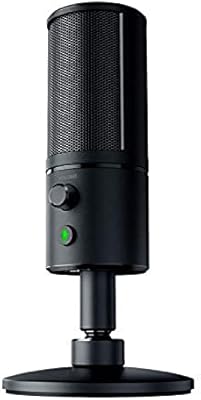
Razer Seiren X USB Streaming Microphone
87%
88%
Sound Quality
90%
Noise Reduction
95%
Ease of Setup
85%
Build Quality
78%
Microphone Sensitivity
More
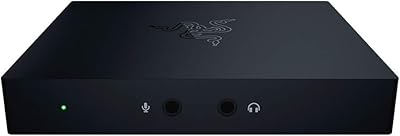
Razer Ripsaw HD Game Streaming Capture Card
84%
88%
Performance
92%
Setup & Installation
89%
Latency
91%
Video Quality
77%
Audio Mixing Features
More
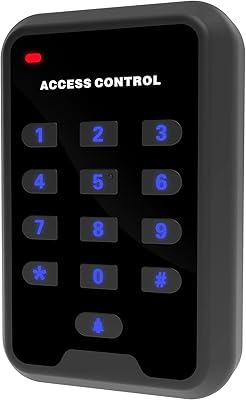
UHPPOTE HBK-A02 125KHz RFID Access Control Keypad
70%
78%
Ease of Setup
61%
Build Quality
34%
Weatherproofing
84%
Value for Money
81%
Card Read Reliability
More
Seco-Larm SK-1011-SDQ Access Control Keypad
76%
91%
Build Quality
51%
Ease of Programming
73%
Weatherproofing
84%
Code Management
82%
Backlight & Visibility
More
YUHANUS Door Access Control System RFID Keypad with 600LBS Lock
84%
89%
Ease of Installation
94%
Security Performance
67%
Remote Control Range
85%
Visitor Management Features
88%
Build Quality
More
Seco-Larm SK-1323-SDQ Outdoor Access Control Keypad
81%
92%
Build Quality
89%
Weatherproofing
74%
Ease of Installation
83%
Keypad Responsiveness
86%
Tamper Protection
More
MENGQI-CONTROL Metal RFID Keypad Door Entry System
76%
88%
Build Quality
84%
Weather Resistance
76%
Magnetic Lock Strength
71%
Ease of Installation
62%
Programming & Setup
More
AC Infinity Controller 2 Fan Speed Controller
80%
88%
Temperature Accuracy
83%
Ease of Setup
91%
Fan Speed Control
74%
Build Quality
86%
Noise Reduction
More
TiVo Stream 4K
TiVo Stream 4K
76%
88%
Content Discovery & Unified Search
84%
Picture Quality
63%
Performance & Responsiveness
81%
Remote Control & Voice Features
86%
App Ecosystem & Google Play Access
More
Razer Kiyo Pro Webcam
75%
93%
Low-Light Performance
88%
Image Sharpness
76%
HDR Quality
67%
Autofocus Reliability
84%
Build Quality
More

FAQ

Realistically, expect to spend at least one to two hours before your layouts feel functional and comfortable. If you want Dynamic Mode working correctly across multiple apps, budget a full afternoon. The hardware is ready quickly, but the companion software requires patience to configure well.

It does work on macOS 10.14 and later, and core features like the haptic keys and dials function normally. That said, some software integrations — particularly within the Adobe Creative Suite — are more fully developed on Windows. Final Cut Pro and basic OBS support on Mac are solid, but if your whole workflow lives in Adobe apps, Windows will give you a better experience.

The main differentiator is the six analog dials, which the Stream Deck line does not offer at all. If you need tactile, physical volume and channel control alongside macro keys, this control surface has a clear hardware advantage. If you just need reliable macro buttons and want a simpler setup, the Elgato Stream Deck is less complex and generally easier to get running quickly.

Basic USB recognition may occur without the software, but you will not be able to configure keys, assign commands, set icons, or use Dynamic Mode without the companion app installed. The software is essentially required to unlock anything beyond the most basic functionality.

It is adjustable — you can tune the intensity of each key's haptic response individually through the companion software. Some users prefer a firmer, more pronounced feel during fast-paced streaming, while others dial it back for quieter sessions. It is one of the more thoughtfully implemented features on the device.

It has happened to a portion of users. Razer's software updates have occasionally caused existing profiles to reset or stop syncing correctly with the hardware. It is worth exporting and backing up your profile configurations manually after you have set them up, just as a precaution.

Yes, both OBS Studio and Streamlabs are supported natively. The integration covers scene switching, source control, and other common broadcast functions within both platforms.

The dials spin freely without hard end-stops or detents, which means they do not click between fixed increments. Most users find this fine for smooth level adjustments, but if you prefer the precision of a stepped dial, the free-spinning feel may take some adjustment.

Most buyers report that the keys hold up well under regular use over several months. A smaller number of users have noted that haptic consistency can drift slightly in individual keys over time. For professional daily streaming use, the build quality is generally adequate, though it may not match the longevity of more industrial-grade hardware.

Yes, each of the 12 haptic keys supports fully custom icon uploads. You design or source your icons, import them through the companion software, and assign them to individual keys per layout. The process is functional but not particularly quick — users with many layouts to customize report that icon management is one of the more time-consuming parts of the setup.

Where to Buy