Overview

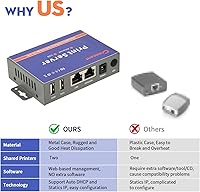
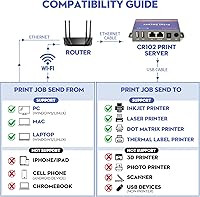
The CHEECENT CR102 2-Port Ethernet USB Print Server is a focused piece of networking hardware built for one specific job: giving older USB printers a home on your local wired network. Before anything else, know what it is not — there is no Wi-Fi, no plug-and-play convenience, and no support for mobile devices, Chromebooks, scanners, or 3D printers. If your household runs entirely on smartphones and tablets, this is not your answer. But if you have a Windows, Mac, or Linux computer and a USB printer collecting dust because it lacks network capability, the CR102 makes a compelling case. Its metal shell construction and compact footprint set it apart from the flimsy plastic enclosures common in this category.
Features & Benefits

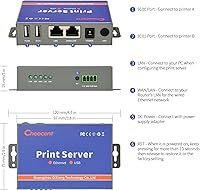
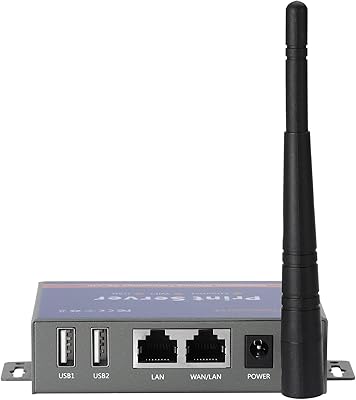
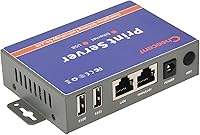
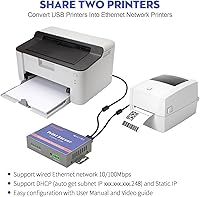
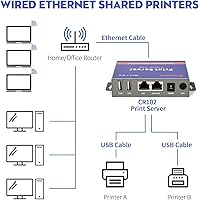
The CR102 carries two USB 2.0 ports, so you can attach a pair of printers and share both across your network simultaneously — handy if you run an inkjet for everyday documents and a thermal label printer for shipping. The wired RJ45 connection runs at up to 100Mbps, which keeps print jobs moving without the dropout issues that can plague Wi-Fi setups. Under the hood, a 560MHz processor backed by 128MB of RAM handles multi-user print queuing without choking. Power input accepts anything from 7.5V to 32V DC, giving you genuine flexibility in placement. The enclosure has a mounting hole built in, so wall or desk installation just needs cables run to it.

Best For

This Ethernet print server hits a sweet spot for small offices and home setups where sharing one or two USB printers across several computers is the whole goal. It is particularly well-suited to anyone still running a reliable old laser or dot matrix printer that predates built-in networking — buying a replacement just to get wireless print capability often costs far more than a dedicated print server. Schools, small government offices, and similar environments that rely on wired Ethernet infrastructure are natural fits. It also works on Linux, which puts it ahead of plenty of competitors. The one requirement: you need to be comfortable installing printer drivers on each networked computer and working through a short, manual-guided configuration process.

User Feedback

Users who read the included manual and watched the companion setup video before diving in tend to come away satisfied — the process is methodical, not impossible. The dual-port feature earns consistent praise from home office users who previously had two printers each tethered to a separate host computer. That said, Mac users report the configuration steps are noticeably more involved than on Windows, so factor in extra time if you are on macOS. Compatibility is solid across most common printer types, though CHEECENT is transparent that no universal guarantee exists — a small number of models simply will not cooperate. On the support side, the brand's customer service responsiveness is frequently cited as a genuine positive, which is reassuring for a product that requires hands-on setup.

Pros

  • Supports two USB printers simultaneously, so you can consolidate two devices onto one shared network connection.
  • Wired Ethernet connection keeps print jobs stable and consistent, without the dropouts common on Wi-Fi print servers.
  • Compatible with Windows, Mac, and Linux, which is broader OS support than many rivals offer.
  • Works with a wide range of printer types including inkjet, laser, dot matrix, thermal label, and barcode printers.
  • Metal shell construction feels noticeably more durable than the plastic enclosures typical of budget print servers.
  • Mounting hole allows clean wall or desk installation rather than leaving a loose box sitting behind equipment.
  • Broad power input range means you are not locked into one specific adapter if yours goes missing.
  • Customer support is responsive and reachable, which matters when manual configuration hits an unexpected snag.
  • Eliminates the need to keep a dedicated host PC running just to make a printer available on the network.

Cons

  • Setup is not plug-and-play — expect to spend time reading the manual and configuring each computer individually.
  • Mac users consistently report a more involved and time-consuming configuration process compared to Windows.
  • Printer compatibility is not guaranteed across all models, so there is a real chance your specific printer may not work.
  • No Wi-Fi support means you must physically run an Ethernet cable from your router to the unit.
  • No support for mobile devices or Chromebooks limits usefulness in households that have moved away from traditional computers.
  • Scanners and multifunction devices that also scan will not work through this print server at all.
  • The setup video and manual are necessary reading, but non-English speakers may find localization support thin.
  • At roughly the size of a thick paperback, it adds another small device to an already crowded desk or server shelf.

Ratings

The scores below for the CHEECENT CR102 2-Port Ethernet USB Print Server were generated by our AI engine after parsing verified purchase reviews from buyers worldwide, with spam, bot activity, and incentivized feedback actively filtered out before any score was calculated. Both the genuine strengths and the recurring frustrations are reflected here — nothing has been softened to favor the brand. If a category scores low, real users felt it, and you will see exactly why.
Setup Experience
62%
38%
Users who committed to reading the manual and watching the companion video before starting generally got through configuration without major drama. Windows users in particular found the step-by-step process logical once they understood that each computer needs the printer driver installed independently before the network printer can be added.
The non-plug-and-play nature catches a meaningful number of buyers off guard, especially those expecting something closer to a USB hub experience. Mac users consistently report that the configuration sequence is more involved and less intuitive than on Windows, with some needing multiple attempts before printing worked reliably.
Connection Stability
89%
Once configured, the wired Ethernet connection delivers exactly what it promises: consistent, interference-free printing across the local network. Users in busy office environments with congested Wi-Fi report that switching to this print server eliminated the random dropout issues they had with wireless alternatives.
Stability is contingent on having a clean Ethernet run from the router to wherever the unit is installed, which is not always convenient in every home or office layout. A small number of users reported occasional disconnections after router firmware updates, requiring a quick power cycle to restore the connection.
Printer Compatibility
71%
29%
The range of supported printer types is genuinely broad — inkjet, laser, dot matrix, thermal label, and barcode printers all have solid representation in positive reviews. Users running older laser or dot matrix workhorses that predate built-in networking tend to find the CR102 works reliably with their hardware.
CHEECENT itself acknowledges that compatibility is not guaranteed across every model, and real-world feedback bears that out — a subset of users find their specific printer simply does not cooperate without explanation. Owners of niche or older multifunction devices are the most likely to hit an incompatibility wall.
Dual-Port Utility
84%
Home office and small business users who run two different printers — say, a laser printer for documents and a label printer for shipping — consistently call the dual-port design one of the most practical things about this device. It eliminates the need to unplug and re-plug USB cables when switching between printers.
If you only own one printer, the second port adds no value and the price may feel harder to justify against single-port alternatives. There is also no indication light or status display per port, so diagnosing which printer is active or idle requires checking from the computer rather than glancing at the unit.
Build Quality
81%
19%
The metal shell stands out in a product category where most competitors ship plastic enclosures that flex and creak. Users who have owned cheaper print servers note that the CR102 feels noticeably more substantial, and the build holds up well in warm environments like server closets or enclosed desk spaces.
The unit is compact, which is largely a positive, but the small footprint means cables can feel crowded at the back when both USB ports and the Ethernet port are occupied simultaneously. The finish is functional rather than refined, so it is not something you would want sitting prominently on a visible desk.
Value for Money
73%
27%
For users with a quality USB printer they want to keep using, the cost of this print server is a fraction of what a new network-capable printer would run. Schools and small offices on tight budgets consistently highlight this as a practical way to extend the life of existing hardware without a significant outlay.
Buyers who encounter compatibility issues or a difficult Mac setup may feel the value proposition erodes quickly when time and frustration are factored in. Compared to single-port print servers in the same category, the dual-port design commands a premium that only makes sense if you actually need to share two printers.
OS Compatibility
78%
22%
Supporting Windows, Mac, and Linux from a single device is a genuine advantage over competitors that quietly drop one OS from their compatibility list. Linux users in particular appreciate having a working option, as print server support for Linux is inconsistent across the broader market.
Mobile devices, Chromebooks, and Android systems are completely unsupported, which is a hard stop for any buyer whose workflow leans on those platforms. The Mac experience, while functional, requires more configuration effort than Windows and involves a steeper learning curve that some users find disproportionate to what should be a simple task.
Documentation Quality
67%
33%
The included manual covers the core setup steps adequately, and the existence of a companion video tutorial gives buyers a second resource when text instructions feel unclear. Users who engage with both resources before starting report significantly fewer setup headaches than those who try to figure it out cold.
The manual is functional but not polished — some users note that the English phrasing is occasionally awkward, which can make a specific step harder to parse than it should be. Advanced troubleshooting guidance is thin, leaving users who hit unusual configuration problems reliant on contacting support directly.
Customer Support
82%
18%
Responsiveness from CHEECENT's support team comes up repeatedly as a genuine positive in user discussions, which is not something you can take for granted in this product category. Buyers who hit compatibility or configuration issues and reached out by email generally report getting a substantive reply rather than a canned response.
Support interaction is primarily email-based, so users hoping for real-time chat or phone assistance will need to adjust their expectations. Response times can vary, and users in non-English-speaking regions occasionally note that communication requires a bit of back-and-forth to fully resolve a technical issue.
Physical Footprint
83%
At under four inches long and less than an inch thick, this print server disappears easily behind a router, under a desk, or inside a server cabinet without demanding dedicated shelf space. The built-in mounting hole is a practical touch that allows clean cable management when the unit is screwed to a surface.
The small size means the port cluster at the rear is tightly spaced, and bulkier USB connectors or right-angle adapters can create an awkward fit. There is no LED status display beyond basic power indication, so you cannot tell at a glance whether the device is actively handling a print job.
Print Speed Impact
74%
26%
Users printing standard documents across a local network report no perceptible delay compared to printing directly from a connected PC. The 100Mbps Ethernet throughput and onboard processor handle typical office print queues without creating a bottleneck during normal workloads.
High-volume print jobs or simultaneous requests from multiple users can introduce modest queuing delays, particularly with graphics-heavy files. The hardware is sized for typical small-office use rather than demanding production environments, so power users printing large batches regularly may notice limitations.
Multi-User Sharing
77%
23%
The core promise — letting multiple computers on the same network send jobs to a shared printer without a host PC acting as middleman — works reliably in day-to-day use once the initial setup is complete. Home offices with three or four computers printing to the same device report this works exactly as advertised.
Each computer that joins the network still needs the printer driver installed locally, which becomes a minor administrative chore in environments where new machines are added frequently. There is no centralized management interface beyond the basic configuration page, so monitoring print activity across users requires checking each machine individually.
Power Flexibility
86%
The wide DC input range from 7.5V to 32V means the device is unusually tolerant of different power environments, and the included adapter works reliably in standard setups. Users who have installed the unit in non-standard locations — inside equipment racks or alongside other DC-powered gear — appreciate not needing a bespoke power solution.
The power cable and adapter are functional but not particularly elegant, and the connector is not a universal standard that you would easily replace from a local electronics shop if the original is lost or damaged. A few users noted the adapter runs slightly warm during extended use, though this has not been linked to any reliability problems.

Suitable for:

The CHEECENT CR102 2-Port Ethernet USB Print Server is an ideal pick for anyone who owns a capable USB printer that simply lacks built-in network connectivity and wants to avoid replacing it just to gain shared printing. Small home offices where two or three computers need access to the same printer without routing jobs through a host PC will find this setup genuinely practical. It also suits IT coordinators managing shared printing in schools, small government offices, or light commercial environments where a stable wired connection is preferred over Wi-Fi. Linux users in particular will appreciate that this print server supports their OS, since many competing options quietly drop Linux compatibility. Anyone comfortable following a manual and installing printer drivers on each machine — roughly the same skill level as setting up a new router — should have no serious trouble getting it running.
Not suitable for:

If your household or office runs primarily on smartphones, tablets, or Chromebooks, the CR102 is not built for you — it works exclusively with Windows, Mac, and Linux computers, full stop. Users expecting plug-and-play installation will likely be frustrated: this Ethernet print server requires you to follow a configuration guide, install printer drivers on every computer that will use it, and add the printer manually through your OS settings. People who need to scan documents or print from a 3D printer or photo printer should also look elsewhere, as those device types are explicitly unsupported. If your printer is already network-capable or your router has a USB print server port built in, there is little reason to add another device to the mix. Finally, anyone without a wired Ethernet infrastructure at home will need to run a cable from their router to wherever the unit sits, which may not be practical in every space.

Specifications

  • USB Ports: The unit provides two USB 2.0 ports, allowing two separate printers to be connected and shared across the network simultaneously.
  • Network Interface: Connectivity is handled by a single RJ45 Ethernet port supporting 10/100Mbps wired LAN connections only — there is no wireless capability.
  • Processor: An onboard 560MHz CPU manages print job routing and multi-user queuing without noticeable lag under normal office workloads.
  • Memory: The device is equipped with 16MB of Flash storage and 128MB of RAM, providing stable headroom for concurrent print operations.
  • Power Input: Accepted DC input ranges from 7.5V to 32V, with a standard 12V/1A adapter included in the box.
  • Enclosure: The shell is constructed from metal rather than plastic, contributing to better heat dissipation and long-term durability in desk or wall-mounted use.
  • Dimensions: The unit measures 3.86 x 2.68 x 0.98 inches, making it compact enough to tuck behind a router or mount flat against a wall.
  • Weight: The device weighs approximately 185g, light enough to mount without heavy-duty hardware using the built-in mounting hole.
  • Compatible OS: Works with Windows (including Windows 10 and 11), Mac OS, and Linux desktop environments, provided the appropriate printer driver is installed on each computer.
  • Printer Types: Supports inkjet, laser, dot matrix, thermal label, and barcode printers connected via USB — photo printers, 3D printers, and scanners are not supported.
  • Unsupported Devices: Does not work with smartphones, tablets, Chromebooks, or any Android-based device regardless of the app or workaround attempted.
  • Setup Method: Configuration is manual and requires the user to follow the included guide: the device is not plug-and-play and will not self-configure on connection.
  • Driver Requirement: Each computer that needs to print must have the correct printer driver installed locally before the network printer can be added and used.
  • Mounting: A built-in mounting hole on the enclosure allows the device to be secured to a wall, desk underside, or rack surface using a standard screw.
  • Brand & Model: Manufactured by CHEECENT under the model designation CR102, first made available in April 2025.

Related Reviews

CHEECENT CR202 2-Port Wireless USB Print Server
71%
62%
Setup Experience
71%
Printer Compatibility
53%
Mac Compatibility
78%
Network Stability
83%
Build Quality
More
Monoprice 5342 USB 2.0 Print Server
62%
71%
Ease of Setup
38%
OS Compatibility
52%
Connection Reliability
67%
Value for Money
61%
Build Quality
More
X-MEDIA XM-PS110P 1-Port Ethernet Print Server
83%
91%
Ease of Setup
87%
Compatibility with Printers
92%
Value for Money
85%
Reliability
82%
Network Performance
More
X-MEDIA XM-PS110U USB Print Server
71%
73%
Ease of Setup
81%
Network Reliability
68%
Printer Compatibility
66%
OS Compatibility
84%
Value for Money
More
ienRon 6-Port 2.5Gb PoE Switch with 2-Port 10Gb SFP+
85%
86%
Performance
91%
Ease of Setup
88%
PoE Power Delivery
84%
Build Quality
93%
Fanless Operation
More
Goalake 8-Port 2.5G Ethernet Switch
80%
91%
Port Count & Configuration
88%
Throughput & Switching Performance
93%
Ease of Setup
79%
Build Quality & Materials
96%
Fanless & Noise Level
More
JideTech 2-Port USB VGA KVM Switch
83%
88%
Ease of Use
90%
Video and Audio Performance
92%
Setup and Installation
85%
Build Quality
89%
Compatibility
More
BrosTrend 8-Port 2.5G Unmanaged Switch
83%
93%
Port Speed Consistency
96%
Ease of Setup
61%
Build Quality
74%
Thermal Performance
91%
Value for Money
More
VIMIN 10-Port 2.5G Unmanaged Switch
79%
96%
Ease of Setup
89%
Port Performance
84%
Build Quality
67%
Thermal Management
71%
SFP Uplink Usability
More
IOGEAR 2-Port USB VGA KVM Switch
85%
89%
Ease of Use
72%
Video Quality
85%
Build Quality
92%
Value for Money
95%
Setup/Installation
More

FAQ

No, and that is one of the main reasons people buy it. Once the print server is configured and connected to your router via Ethernet cable, it operates independently. Any computer on the same network can send a print job without a host PC needing to be awake or running.

It is not complicated, but it is also not plug-and-play. You will need to follow the included manual — and watching the companion setup video helps considerably. The general process involves connecting the device to your router, accessing its configuration interface from a browser, and then adding the printer on each computer manually. Budget around 20 to 40 minutes the first time through.

No. The CHEECENT CR102 2-Port Ethernet USB Print Server only works with Windows, Mac, and Linux computers. Mobile devices, tablets, and Chromebooks are not supported, and no workaround currently changes that.
Most likely yes, but with a caveat. This print server supports a broad range of printer types including laser, inkjet, dot matrix, and thermal label printers. That said, CHEECENT itself acknowledges that compatibility is not 100% guaranteed across every model, so if you have a very old or obscure printer, it is worth contacting their support before purchasing.

Yes. The two USB ports are independent, so one colleague can print to the laser printer while another sends a job to the label printer simultaneously. The onboard processor handles the queuing between users on the same network.

No, this is a wired-only device. It connects to your router or network switch via a standard Ethernet cable. If you need wireless print sharing, you would need a different product category entirely.

The manufacturer supports most mainstream inkjet, laser, dot matrix, and thermal printers, but cannot guarantee every model will work. If your printer is unusual or a niche brand, reaching out to CHEECENT support before buying is the safest move — they are reportedly responsive and can give you a clearer answer.

Based on user reports, yes. Windows users generally find the configuration process more guided and forgiving. Mac users tend to encounter a few extra steps around driver management and printer discovery. It is doable, but set aside a bit more time if you are on macOS.

Yes. The metal enclosure has a built-in mounting hole, so you can screw it to a wall or attach it to the underside of a desk to keep cables tidy. Its small footprint makes it easy to tuck out of sight entirely.

The unit comes with the print server itself, a power adapter, an Ethernet cable, and a printed user manual. A setup video is also available from CHEECENT to supplement the written instructions, which most users find helpful to watch before starting configuration.