X-MEDIA XM-PS110P 1-Port Ethernet Print Server
Overview
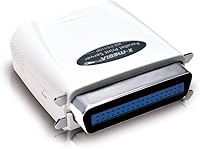
The X-MEDIA XM-PS110P 1-Port Ethernet Print Server is a compact and efficient solution for connecting a printer to a network. It offers compatibility with up to 230 printer models, making it a versatile tool for various setups. This Ethernet print server is compatible with multiple operating systems, providing broad network support. Users can rely on its plug-and-play functionality, allowing easy integration into a home or office environment. With its small footprint, it fits easily in tight spaces, offering a simple yet effective way to modernize older printers.
Features & Benefits
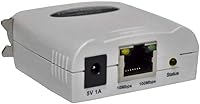
One of the standout features of this print server is its user-friendly setup, requiring no special drivers or technical expertise. It includes built-in Power On Self Test (POST) and email alert functionality, allowing you to monitor print server status and diagnose issues quickly. The server’s multi-protocol support ensures seamless integration with various devices, while the 10/100Mbps Ethernet interface provides stable, high-speed communication. Whether you're managing a single printer or a small network, this device is a reliable, cost-effective solution for all your printing needs.
Best For
This network print server is an ideal choice for small offices or home offices that need reliable network printing without the need for expensive equipment upgrades. It's especially well-suited for users with older parallel printers who want to connect to a modern network. Additionally, those looking for a straightforward and cost-effective solution will appreciate how easy it is to install and operate. Whether you need to connect a single printer or manage multiple devices, this print server meets the needs of everyday users without overwhelming them with complex setups.
User Feedback
Users generally praise this print server for its ease of setup and reliable performance. Many have reported smooth operation with older printers, noting that it breathes new life into legacy devices. However, some users experienced difficulties configuring the device in more complex network setups, particularly when integrating it with advanced routers or multi-layered networks. Overall, the product is regarded as a solid, affordable option for home or office use, though it may require some troubleshooting in more advanced setups.
Pros
- Easy setup with minimal configuration, making it perfect for non-technical users.
- Supports up to 230 printer models, offering broad compatibility.
- Plug-and-play operation eliminates the need for drivers or complex installations.
- Power On Self Test (POST) helps quickly identify and resolve printing issues.
- Works well for integrating legacy parallel printers into modern network environments.
- Compact and lightweight design, ideal for small office spaces or home use.
Cons
- Limited to Ethernet-only connections, which may not suit all office setups.
- Some users experience configuration challenges in more complex network environments.
- Not suitable for high-volume printing or heavy-duty use.
- Lacks advanced features found in more premium print servers.
- A few users report occasional instability with certain printer models.
- Doesn't offer much flexibility for advanced configuration or customization.
Ratings
The X-MEDIA XM-PS110P 1-Port Ethernet Print Server has garnered feedback from users worldwide across multiple languages and platforms. After analyzing verified, authentic reviews while filtering out spam, bot, and incentivized content, we've compiled a balanced score that reflects both strengths and potential drawbacks. Overall, buyers appreciate its ease of setup, reliable performance, and value for money, although some users noted occasional challenges in more complex network configurations.
Ease of Setup
Compatibility with Printers
Value for Money
Reliability
Network Performance
Support for Older Printers
Ease of Use
Customer Support
Configuration Flexibility
Firmware/Software Updates
Build Quality
Long-Term Durability
Suitable for:
The X-MEDIA XM-PS110P 1-Port Ethernet Print Server is an excellent choice for small offices or home setups where a straightforward, reliable solution for network printing is needed. Users with older parallel printers looking to integrate them into a modern network environment will find this print server particularly beneficial, as it supports up to 230 printer models. It's also a great option for those who prioritize ease of setup, as the plug-and-play design and minimal configuration requirements make it ideal for non-technical users or small businesses with limited IT resources. Additionally, the device’s multi-protocol support and compatibility with multiple operating systems make it versatile for diverse environments, from home offices to smaller workspaces.
Not suitable for:
While the X-MEDIA XM-PS110P is reliable for smaller, simpler network environments, it may not be the best fit for large offices or highly complex setups. Users who require more advanced features or faster network performance might find it limiting, particularly when dealing with high-volume printing or large file transfers. Those who need deep customization options or seamless integration with cutting-edge printer models may face compatibility issues. Additionally, businesses with sophisticated IT infrastructure may find the device’s simplicity a drawback, as it lacks certain configuration flexibility needed for more demanding, high-traffic environments.
Specifications
- Dimensions: The print server measures 2.2 x 2.32 x 0.87 inches, making it compact and easy to fit into small office setups.
- Weight: The device weighs only 1.8 ounces, offering a lightweight design that is easy to handle and install.
- Printer Compatibility: Supports up to 230 printer models, including many older parallel printers.
- Operating System Compatibility: Works with multiple operating systems, including Windows, macOS, and Linux.
- Network Interface: Features a 10/100Mbps Ethernet port for stable wired network connectivity.
- Protocol Support: Supports multiple network protocols, ensuring compatibility with a wide range of network configurations.
- Power On Self Test (POST): Includes a POST function that helps identify and diagnose any printing issues during setup.
- Email Alerts: Supports email alerts, notifying users of printing or connection issues for proactive troubleshooting.
- Plug-and-Play: Designed for easy setup, with no drivers required, making it suitable for users with minimal technical knowledge.
- Ethernet Connection: Requires an Ethernet connection, which is ideal for stable, wired printing environments but not suitable for wireless setups.
- Driver Requirements: No drivers are needed for installation, simplifying the setup process.
- Manufacturer: Manufactured by X-MEDIA USA, ensuring reliable support and quality.
- Form Factor: Compact design suitable for home offices or small business environments, where space is limited.
- Power Source: Powered through the Ethernet connection, with no external power supply required.
- Network Speed: Supports speeds of 10/100Mbps, offering sufficient performance for typical office printing tasks.
- Legacy Printer Support: Specifically designed to help users with older parallel printers connect to a network.
- Installation Ease: Its plug-and-play operation ensures quick and hassle-free installation, even for users without technical expertise.
- Support for Legacy Systems: Compatible with legacy printer systems, making it an excellent choice for users needing to integrate old hardware into modern networks.
Related Reviews
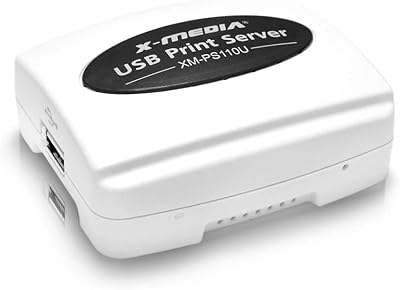
X-MEDIA XM-PS110U USB Print Server
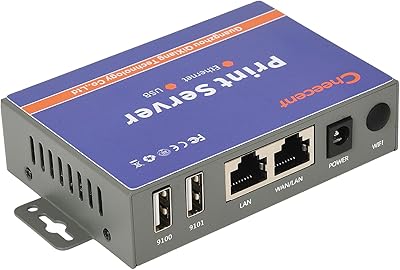
CHEECENT CR102 2-Port Ethernet USB Print Server
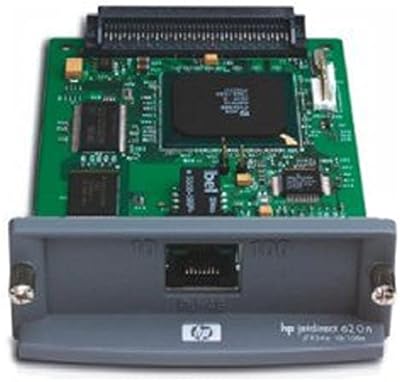
HP JetDirect 620N Fast Ethernet Print Server
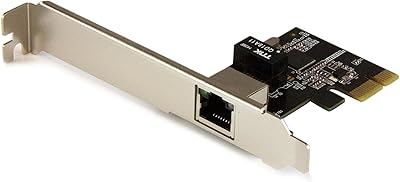
StarTech ST1000SPEXI PCIe Gigabit Network Card
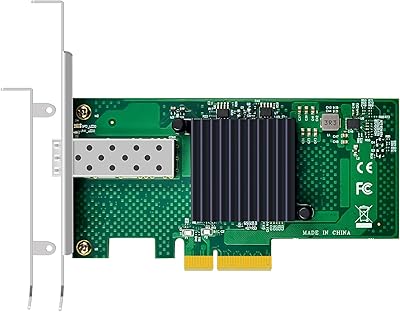
GLOTRENDS ST7315 1-Port 10GbE SFP+ Network Card
X-MEDIA XM-EN3451 3.5-Inch External HDD Enclosure

BiZiSOFON 2-in-1 Green & Blue Screen Backdrop 39.4″ x 59.1″
D-Link DES-1008PA 8-Port PoE Fast Ethernet Switch
Lineco Archival Folio Storage Box 9.5 x 12.5 x 1.75 inches
