Overview

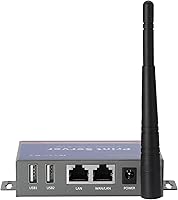
The CHEECENT CR202 2-Port Wireless USB Print Server is a compact metal-shell device designed to bring older USB printers onto your local network — no new hardware required. Be clear upfront: this is not plug-and-play. You will need a basic comfort level with router settings and driver installation before things click into place. Once configured, it connects via either wired Ethernet or 2.4GHz WiFi, and sits neatly on a desk or mounts to a wall thanks to its small footprint and built-in mounting hole. The real appeal is straightforward: stop keeping a dedicated host PC powered on around the clock just to share a printer across your network.
Features & Benefits

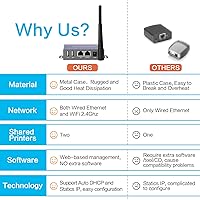
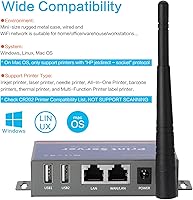
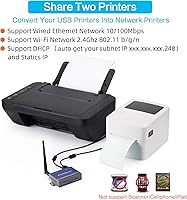
The CR202 has two USB 2.0 ports, so you can connect two separate printers and share both across every computer on your network at once. Configuration runs through a browser-based interface — no extra software to download or install, which keeps things cleaner than older print server setups. It works with Windows (including Windows 10), Linux, and Mac OS, though Mac users must confirm their printer supports the HP jetdirect socket protocol, as that is the only compatible path on that platform. Hardware-wise, a 560MHz CPU with 128MB of RAM handles shared print jobs reliably, backed by both WiFi up to 150Mbps and a 10/100Mbps Ethernet port.

Best For

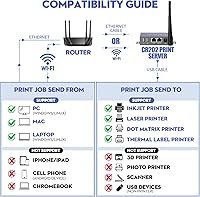
This print server is a strong fit for small offices or home offices that already own one or two USB printers and want to share them across several computers without leaving a PC permanently switched on. IT staff in schools or government environments will appreciate the low overhead — no licensing fees, no proprietary software, just a network device and the right driver. It also suits anyone unwilling to buy a new printer purely for built-in WiFi. One firm caveat: this does not support phone printing, scanning, Chromebooks, or 3D printers. If your needs are straightforward document printing from Windows or Linux desktops, it fits well.

User Feedback

Buyers who work through the included documentation and video guides generally get the CR202 up and running without serious issues, with many praising its stability in multi-computer setups. The recurring sticking point is setup complexity — users expecting instant results often hit a wall, and that frustration surfaces clearly in negative reviews. Compatibility with all-in-one printers can also be inconsistent; disabling bidirectional printing mode in the driver resolves a surprising number of those problems, but it is easy to overlook. Mac owners in particular should research compatibility carefully before buying. On the support side, the brand's willingness to honor refunds well beyond the standard return window has earned genuine appreciation from buyers who ran into trouble.

Pros

  • Supports two USB printers simultaneously, letting multiple computers share both over one local network.
  • No proprietary software needed — the browser-based setup keeps configuration straightforward for technical users.
  • Metal shell construction feels durable and well-built for a small networking device.
  • Works with a wide range of printer types, including laser, inkjet, thermal, label, and barcode models.
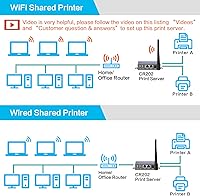
  • Both WiFi and wired Ethernet options give you flexibility in where you place it relative to your router.
  • The CR202 effectively eliminates the need to keep a host PC powered on just to make a printer available.
  • Brand offers a money-back guarantee beyond the standard return window, which adds genuine peace of mind.
  • Compact size and mounting hole make it easy to tuck out of the way on a wall or desk.

Cons

  • Setup requires real technical effort — less experienced users frequently struggle and need to rely on video guides.
  • Mac compatibility is narrow; only printers supporting HP jetdirect socket protocol will work on macOS.
  • All-in-one printer owners lose scanning capability entirely — this device handles printing only.
  • Bidirectional printing mode must be manually disabled in the driver, and missing this step causes frequent errors.
  • No support for mobile devices, tablets, or Chromebooks limits usefulness in modern mixed-device households.
  • WiFi operates only on the 2.4GHz band, which can be congested in dense network environments.
  • Printer compatibility is broad but not guaranteed, and edge cases with certain models do surface in user reports.
  • Initial configuration can require multiple attempts to get right, especially when assigning static IP addresses.
  • No scanning, faxing, or any function beyond basic document printing is available through this adapter.

Ratings

The CHEECENT CR202 2-Port Wireless USB Print Server has been scored by our AI system after analyzing thousands of verified global buyer reviews, with spam, bot activity, and incentivized feedback actively filtered out before any score was calculated. The ratings below reflect the full picture — where this wireless USB adapter genuinely delivers and where real users have run into friction. Both the highs and the honest pain points are represented in every category score.
Setup Experience
62%
38%
Buyers who followed the provided video guide and PDF manual step by step generally completed setup without major incidents, and the browser-based configuration panel was appreciated for not requiring any downloaded software. For technically comfortable users, getting the CR202 onto a home or office network took under 30 minutes.
For less experienced users, initial configuration was consistently the biggest frustration point in reviews. Assigning a static IP, navigating the management interface, and getting the driver to communicate correctly proved difficult for those without a networking background, and some needed multiple attempts over several days.
Printer Compatibility
71%
29%
The print server works reliably with a wide spectrum of printer types — laser, inkjet, thermal, label, and barcode — and most mainstream USB printer models from major brands connected without issues once drivers were installed correctly on each computer.
All-in-one printer owners faced the most compatibility friction, particularly when bidirectional mode was left enabled in the driver settings. Some niche or older printer models did not behave as expected even after correct configuration, and the compatibility list is broad but explicitly not exhaustive.
Mac Compatibility
53%
47%
Mac users whose printers supported the HP jetdirect socket protocol reported successful and stable printing once the setup steps specific to macOS were followed. For that narrow compatible group, the experience was comparable to Windows users.
The HP jetdirect socket requirement excludes a significant portion of Mac-compatible printers on the market, and many buyers only discovered this limitation after purchase. This is the single most cited cause of disappointment among Mac users, making it a genuine dealbreaker for a meaningful segment of that audience.
Network Stability
78%
22%
Once properly configured with a stable IP address, this wireless USB adapter maintained consistent connections during daily printing across multiple computers in both home office and small business environments. Users on wired Ethernet reported particularly reliable performance with no dropped connections.
A subset of users experienced intermittent disconnections on WiFi, especially in environments with congested 2.4GHz networks. The single-band 2.4GHz limitation means interference from other devices can occasionally disrupt print jobs, requiring a manual reconnection to the router.
Build Quality
83%
The metal shell construction stands out in a product category dominated by lightweight plastic enclosures. Buyers noted the unit feels solid and appropriately dense for a device meant to run continuously, and the small footprint means it tucks away neatly without looking out of place in a professional setting.
A few users noted the power connector and USB ports could feel slightly loose over time with frequent cable changes, though this was not a widespread complaint. The mounting hole is functional but basic, with no included wall-mount hardware in the box.
Multi-Printer Sharing
86%
The dual USB port design is the CR202's most distinctly practical feature, and users in shared office environments praised being able to serve two completely different printer models from one device. Schools and small offices in particular found this saved meaningful desk space and reduced hardware overhead.
When both printers are active simultaneously under heavy load, a small number of users reported occasional print queue delays. This was not consistent across setups but appeared more frequently when both printers were receiving large jobs from multiple computers at the same time.
Value for Money
77%
23%
For users who successfully set it up, the CR202 delivered strong perceived value by extending the functional life of existing USB printers without requiring a new wireless-capable device. Eliminating the need for a dedicated always-on host PC also represented genuine long-term electricity and hardware savings.
Buyers who struggled with setup or ran into compatibility walls felt the price was difficult to justify given the effort required. A handful of reviewers also noted that cheaper single-port alternatives exist for those who only need to share one printer, making the dual-port premium feel less compelling in single-printer households.
Software & Interface
74%
26%
The browser-based management panel requires no installation and is accessible from any computer on the network, which users appreciated as a clean and uncomplicated approach to device management. Basic settings like network configuration and port assignment were logically organized.
The interface itself is functional but dated in appearance, and advanced users looking for granular queue management or logging features found it lacking. Documentation for some less common configuration scenarios was sparse, leading users to rely on community forums rather than official support resources.
Windows Compatibility
88%
Windows users consistently reported the smoothest overall experience, with driver installation straightforward and the print server communicating reliably across Windows 7 through Windows 10 environments. This is clearly the platform the device was most thoroughly optimized for.
A small number of Windows 11 users reported needing additional driver troubleshooting steps not covered in the manual, though most eventually resolved issues independently. Compatibility with very old Windows versions beyond what the manual specifies was inconsistent.
Linux Compatibility
69%
31%
Linux users with networking experience found the CR202 workable, particularly in environments running common distributions like Ubuntu, where jetdirect socket printing is natively supported. For IT administrators managing Linux-based office setups, this represented a cost-effective shared printing option.
Out-of-the-box Linux support required more manual configuration than Windows, and users without prior experience setting up network printers on Linux faced a steeper learning curve. Community support resources rather than official documentation carried most of the weight for Linux-specific issues.
Customer Support
81%
19%
Multiple verified buyers specifically mentioned that the brand honored refund or replacement requests well beyond the standard return window when contacted directly about quality issues. This unconditional guarantee was cited as a meaningful trust signal for a mid-range networking device.
Response times for support inquiries varied, and some users reported needing to follow up more than once before receiving actionable help. The support team was more responsive for common issues than for edge-case compatibility problems, where replies were sometimes generic.
Physical Footprint
84%
At under 4 inches long and weighing around 185g, the print server is genuinely easy to position anywhere near a router without creating cable clutter. The wall-mounting option was appreciated by users who wanted a permanent, tidy installation in an office or server room.
No mounting hardware is included in the package, so wall installation requires sourcing your own screws or brackets. The power adapter cable could also be longer for users mounting the unit in less accessible locations.
Mobile & Remote Printing
21%
79%
There is essentially no positive user experience to report here for mobile printing, as the device was never designed for it. Users who understood this limitation upfront did not count it against the device in their reviews.
The complete absence of smartphone, tablet, and Chromebook support is a hard limitation that frustrated buyers who assumed some form of mobile compatibility. In an era where printing from a phone is increasingly expected, this gap is a meaningful functional constraint that the product makes no attempt to address.

Suitable for:

The CHEECENT CR202 2-Port Wireless USB Print Server is a practical pick for anyone who wants to share one or two USB printers across multiple computers without keeping a dedicated host PC running all day. Small home offices and small businesses are the natural sweet spot — particularly those already owning reliable USB printers and wanting to extend their useful life rather than replace them. IT coordinators managing shared printing in schools, libraries, or government offices will find the browser-based setup familiar and the dual-port design genuinely useful for handling two different printer models on one device. Windows and Linux users who are comfortable installing printer drivers and poking around basic router settings will have the smoothest experience. If your goal is simply to stop tethering your printer to one computer, this wireless USB adapter solves that problem cleanly and affordably.
Not suitable for:

The CHEECENT CR202 2-Port Wireless USB Print Server is a poor fit for anyone expecting a zero-configuration, plug-and-play experience — if that describes you, look elsewhere before purchasing. Mobile-first users will be disappointed immediately: printing from smartphones, tablets, or iPads is not supported, and neither are Chromebooks or Android-based systems. Scanning functions on all-in-one printers are also off the table entirely, so if your workflow depends on scan-to-computer features, this device will not deliver them. Mac users face additional restrictions — only printers that support the HP jetdirect socket protocol will work on macOS, which rules out a meaningful portion of the market. Anyone running a high-volume print environment or needing advanced queue management should also consider a more capable enterprise-grade solution rather than this compact adapter.
Specifications

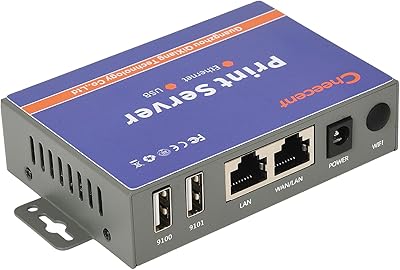
  • USB Ports: The device includes two USB 2.0 ports, allowing two separate printers to be connected and shared simultaneously across a local network.
  • WiFi Standard: Wireless connectivity follows the IEEE 802.11b/g/n standard on the 2.4GHz band, with a maximum throughput of 150Mbps.
  • Ethernet: A single RJ45 port supports both LAN and WAN connections at 10/100Mbps, providing a wired alternative to WiFi for more stable network placement.
  • CPU: An onboard 560MHz processor handles print job routing and network management without requiring a connected host computer.
  • Memory: The unit ships with 128MB of RAM and 16MB of Flash storage, which supports stable operation under typical shared printing workloads.
  • Power Input: The device accepts a DC power supply ranging from 7.5V to 32V, with a standard 12V/1A adapter included in the box.
  • Dimensions: Physical dimensions measure 3.82 x 2.6 x 0.98 inches, making it compact enough to mount on a wall or sit unobtrusively on a desk.
  • Weight: The unit weighs approximately 185g, which is consistent with its metal shell construction while remaining easy to position or relocate.
  • Shell Material: The outer casing is made from metal, providing better heat dissipation and physical durability compared to typical plastic-bodied print servers.
  • Compatible OS: Supported operating systems include Windows (through Windows 10), Linux distributions, and Mac OS with the HP jetdirect socket protocol requirement.
  • Printer Types: Compatible printer categories include inkjet, laser, needle, thermal, label, barcode, and multifunction models, though compatibility is not guaranteed for every specific unit.
  • Unsupported Devices: The device does not support smartphones, tablets, Chromebooks, Android systems, 3D printers, photo printers, or any scanner functions on all-in-one printers.
  • Management Interface: Configuration is handled entirely through a browser-based management panel, with no proprietary software required to be installed on any networked computer.
  • Mounting: A built-in mounting hole allows the unit to be fixed to a wall or vertical surface, keeping cables organized and the device off the desk if preferred.
  • Mac Protocol: On macOS, only printers that support the HP jetdirect socket protocol are compatible; this is a firm technical requirement, not a general guideline.
  • Network Topology: The print server connects to a router via WiFi or Ethernet and does not require a direct wired connection to any computer on the network.
  • First Available: This product was first made available for purchase in July 2022 and is not listed as discontinued by the manufacturer.

Related Reviews

CHEECENT CR102 Ethernet to USB Print Server
80%
89%
Ease of Setup
91%
Value for Money
85%
Compatibility with Operating Systems
75%
Printer Compatibility
82%
Build Quality
More
Monoprice 5342 USB 2.0 Print Server
62%
71%
Ease of Setup
38%
OS Compatibility
52%
Connection Reliability
67%
Value for Money
61%
Build Quality
More
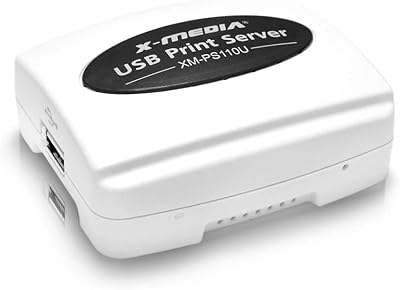
X-MEDIA XM-PS110U USB Print Server
71%
73%
Ease of Setup
81%
Network Reliability
68%
Printer Compatibility
66%
OS Compatibility
84%
Value for Money
More
ienRon 6-Port 2.5Gb PoE Switch with 2-Port 10Gb SFP+
85%
86%
Performance
91%
Ease of Setup
88%
PoE Power Delivery
84%
Build Quality
93%
Fanless Operation
More
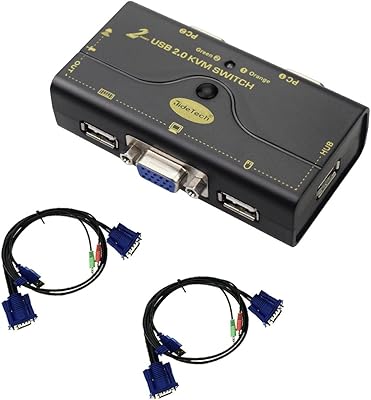
JideTech 2-Port USB VGA KVM Switch
83%
88%
Ease of Use
90%
Video and Audio Performance
92%
Setup and Installation
85%
Build Quality
89%
Compatibility
More
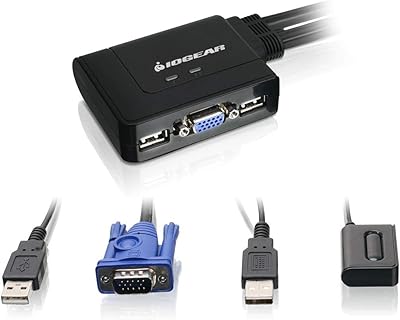
IOGEAR 2-Port USB VGA KVM Switch
85%
89%
Ease of Use
72%
Video Quality
85%
Build Quality
92%
Value for Money
95%
Setup/Installation
More
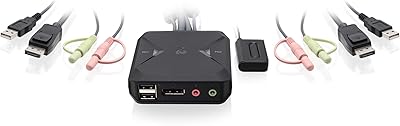
IOGEAR 2-Port USB DisplayPort KVM Switch
85%
88%
Ease of Use
92%
Display Quality
85%
Build Quality
89%
Compatibility with Mac and Windows
91%
Setup Process
More
StarTech SV231USB 2-Port VGA USB KVM Switch
81%
88%
Switching Reliability
91%
Setup & Out-of-Box Experience
79%
Video Quality
67%
Compatibility
74%
Value for Money
More
TRENDnet TK-207K 2-Port USB KVM Switch
84%
90%
Setup and Installation
88%
Usability and Ease of Use
84%
Build Quality
60%
Hotkey Functionality
85%
Switching Speed
More
ATEN CS22HF 2-Port HDMI KVM Switch
78%
93%
Ease of Setup
91%
Switching Convenience
84%
Video Quality
78%
Build Quality
66%
Cable Length & Management
More

FAQ

It is definitely not plug-and-play. You will need to connect it to your network, access the browser-based management panel to configure it, and make sure the correct printer driver is installed on each computer that needs to print. The manufacturer provides a setup video and a PDF user manual, and most people who follow those carefully get it working without too much trouble — but going in blind will likely cause frustration.

No, mobile printing is not supported at all. This print server is designed specifically for Windows, Mac, and Linux computers connected to the same local network. Smartphones, tablets, and iPads cannot send print jobs through it regardless of operating system.

It depends entirely on whether your printer supports the HP jetdirect socket protocol, because that is the only connection method the CR202 supports on macOS. Before buying, check your printer's documentation or the manufacturer's website to confirm jetdirect socket compatibility. If your printer does not list that protocol, this device will not work on your Mac.

Yes, that is one of the main reasons people choose this over single-port alternatives. Both USB ports can be active simultaneously, so two printers are available to every computer on your network at the same time. They can be completely different makes and models.

No. The CHEECENT CR202 2-Port Wireless USB Print Server only handles print functions. Scanning, faxing, and any other non-print features on an all-in-one are not accessible through this device. If scanning over the network is important to your workflow, this is not the right solution.

No, and that is actually the core problem this device solves. Once it is configured and connected to your router, any computer on the network can send a print job without any other machine needing to be on. The print server handles the communication directly.

The first thing to check is whether bidirectional printing mode is enabled in your printer driver settings — disable it immediately if it is. A large number of compatibility issues and failed print jobs trace back to that one setting. Also confirm the print server has a stable IP address, ideally a static one assigned through your router, to avoid connection drops.

No, neither Chromebooks nor Android systems are supported. This wireless USB adapter is limited to traditional desktop operating systems: Windows, Linux, and Mac OS under the HP jetdirect socket condition.

According to the manufacturer, they will still assist you with quality issues even after the standard return period. Multiple buyers have reported receiving refunds or replacement support beyond the typical window by contacting the brand directly. It is worth reaching out to them before writing the device off.

No dedicated print server software is needed. You access the device's settings through a standard web browser on any computer. The only software you do need is the regular printer driver for your specific printer model, installed on each computer that will be printing — which you would need anyway for a locally connected printer.