Overview
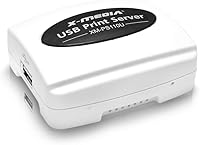
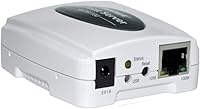
The X-MEDIA XM-PS110U USB Print Server is a compact device that solves a surprisingly common problem: you have a perfectly good USB printer but no easy way to share it across multiple computers on your network. A print server acts as a middleman, connecting your printer to the network so any authorized machine can send jobs without a direct cable. This networking adapter sits in the budget-friendly tier and has earned a spot in the top 10 of its Amazon category — a reasonable trust signal for a niche accessory. Just know going in that it is a wired-only, single-port device running at Fast Ethernet speeds, not a Wi-Fi or gigabit solution.
Features & Benefits
The XM-PS110U connects one USB 2.0 printer to a standard 10/100Mbps Ethernet network, and its multi-protocol support means it slots into most home or office network setups without requiring you to reconfigure your router. OS compatibility spans Windows, Mac, and Linux, which is genuinely useful in mixed-device households or small offices. X-MEDIA claims support for over 320 printer models, but you should verify your specific printer against their PDF compatibility guide before purchasing — that list has gaps worth checking. The onboard processor handles job routing efficiently enough that queues do not pile up under normal usage. At under two ounces, this print server is remarkably compact and easy to tuck out of sight near your router.
Best For
This networking adapter is a natural fit for anyone with a USB-only printer they want to share among a few wired computers — a small home office, a workshop, or a compact business setup where three or four desktops are involved. It is also a practical fix for people tired of swapping a USB cable between machines every time they need to print. That said, wired Ethernet only is a real limitation: if your setup depends on Wi-Fi, look elsewhere. The single USB port also means only one printer at a time. Anyone managing a high-volume print queue or needing faster throughput will want a more capable device. For modest, reliable sharing on a tight budget, it does the job.
User Feedback
Buyers who report positive experiences generally cite easy initial configuration and consistent day-to-day performance — particularly those running Windows with common printer brands. The overall value at this price tier is well regarded. On the flip side, a recurring theme in critical reviews involves trouble on newer operating systems, especially recent macOS versions, where some users found themselves navigating manual port settings rather than a smooth plug-and-play process. There are also lingering concerns about long-term firmware support, with some buyers noting that driver updates from X-MEDIA are infrequent. The included documentation gets mixed reactions — the PDF compatibility guide is helpful once you locate it, but the initial setup instructions leave room for improvement, especially for less technical users.
Pros
- Adds shared network printing to any USB printer without buying a new networked model.
- Broad compatibility across Windows, Mac, and Linux makes it workable in mixed-OS households.
- Wired Ethernet connection delivers consistent, stable performance compared to wireless alternatives.
- The compact, lightweight build means it tucks away neatly next to your printer or router.
- Multi-protocol support helps it fit into a variety of existing home and small-office network setups.
- Holds a top-10 ranking in its Amazon category, suggesting a solid track record among buyers.
- A detailed PDF compatibility guide is available, helping buyers verify printer support before committing.
- Setup is generally straightforward for users on mainstream Windows versions with common printer brands.
- Priced accessibly enough that it makes financial sense over replacing a functioning USB-only printer.
Cons
- No Wi-Fi support means a physical Ethernet cable to your router is always required.
- Limited to a single USB port — you cannot share more than one printer at a time.
- Compatibility issues on newer macOS versions have been reported by multiple users.
- Firmware updates from the manufacturer are infrequent, raising concerns about long-term software support.
- Manual network configuration is sometimes needed, which can trip up less technical users.
- The printed setup documentation is considered thin, and finding the PDF compatibility guide takes extra effort.
- Fast Ethernet speeds may bottleneck performance when printing large files or graphics-heavy documents.
- Some niche or newer printer models fall outside the supported list despite the 320+ compatibility claim.
- No dedicated customer support channel has been widely praised, leaving users to rely on community troubleshooting.
Ratings
The X-MEDIA XM-PS110U USB Print Server scores below reflect AI-synthesized analysis of verified buyer reviews collected globally, with spam, bot-generated, and incentivized feedback actively filtered out. Ratings cover everything from day-to-day reliability to the frustrations real users hit when setting up this networking adapter on modern operating systems. Both the genuine strengths and the honest pain points are represented here — nothing is glossed over.
Ease of Setup
Network Reliability
Printer Compatibility
OS Compatibility
Value for Money
Build Quality
Documentation Quality
Print Speed Performance
Multi-User Sharing
Firmware & Updates
Physical Footprint
Web Management Interface
Long-Term Reliability
Suitable for:
The X-MEDIA XM-PS110U USB Print Server is a practical pick for home users and small-office setups where a single USB printer needs to be accessible from several wired computers without the hassle of cable-swapping. If you have an older laser or inkjet printer that does its job perfectly well but was built before network printing became standard, this networking adapter gives it a second life on your LAN at a modest cost. Small businesses running a tight network of desktops — think a two- or three-person accounting office, a freelance studio, or a home workshop — will find it covers the basics without overcomplicating the setup. IT hobbyists managing a local area network on a budget will also appreciate how little space it takes up and how cleanly it integrates with standard TCP/IP environments. Users who prioritize wired connection stability over the convenience of wireless are squarely in this device's wheelhouse.
Not suitable for:
The X-MEDIA XM-PS110U USB Print Server will frustrate anyone whose network is entirely Wi-Fi-based, since it offers no wireless connectivity whatsoever — an Ethernet cable to your router is non-negotiable. If you rely on a newer macOS version or a less common Linux distribution, be prepared for a potentially rough setup experience; driver compatibility on modern operating systems is a known weak point, and the manufacturer is not known for frequent firmware updates. Households juggling two or more printers are also out of luck, as the single USB port means only one device can be connected at a time. Anyone running a high-volume print environment — a busy office, a print-on-demand workflow, or a graphics studio sending large files — will likely hit the ceiling of what Fast Ethernet speeds can comfortably handle. If wireless convenience or future-proofing is a priority, investing in a more capable or Wi-Fi-enabled print server would be the smarter long-term move.
Specifications
- Brand: Manufactured by X-MEDIA USA, a networking accessories brand based in the United States.
- Model Number: This unit carries the model designation XM-PS110U.
- Network Speed: Supports 10/100Mbps Fast Ethernet, compatible with standard wired home and office routers.
- USB Port: Equipped with a single USB 2.0 port for connecting one printer directly to the network.
- Connection Type: Wired Ethernet only; no wireless or Wi-Fi connectivity is supported.
- Protocol Support: Supports multiple network protocols including TCP/IP, enabling integration across diverse network environments.
- OS Compatibility: Compatible with Windows, macOS, and Linux operating systems, though users on newer OS versions should verify driver support.
- Printer Support: Claimed compatible with over 320 printer models; buyers should cross-reference the official PDF compatibility guide before purchasing.
- Processor: Features a high-speed onboard microprocessor to manage print job routing and reduce processing delays.
- Dimensions: Measures 2.86 x 2.47 x 1.15 inches, making it one of the more compact print servers in its category.
- Weight: Weighs just 1.9 oz, light enough to mount or tuck behind a printer or router without any structural support.
- Category Rank: Holds a top-10 position in the Computer Networking Print Servers category on Amazon as of the time of review.
- Release Date: First made available in May 2019 and remains an active, non-discontinued product in X-MEDIA's lineup.
- Ports Total: Contains exactly one USB port; only a single printer can be connected and shared at any given time.
- Power Source: Powered via a standard DC power adapter; no USB bus power or PoE (Power over Ethernet) is used.
- Manufacturer Status: The product has not been discontinued and continues to be sold and supported by X-MEDIA USA.
Related Reviews
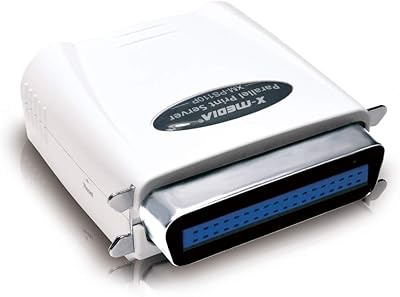
X-MEDIA XM-PS110P 1-Port Ethernet Print Server
X-MEDIA XM-EN3451 3.5-Inch External HDD Enclosure
CHEECENT CR102 2-Port Ethernet USB Print Server
CHEECENT CR202 2-Port Wireless USB Print Server
Monoprice 5342 USB 2.0 Print Server
Dilter Large Print Wired USB Keyboard
Razer Seiren X USB Streaming Microphone
Razer Seiren V2 X
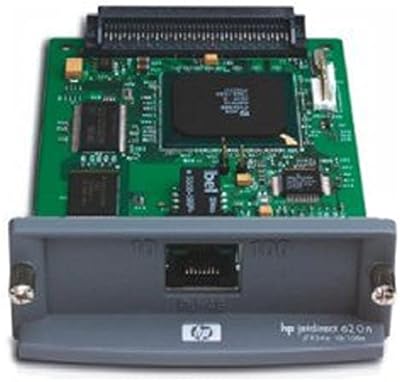
HP JetDirect 620N Fast Ethernet Print Server