Canon PIXMA TS9520 Wireless All-in-One Printer
Overview
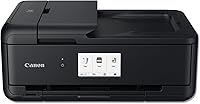
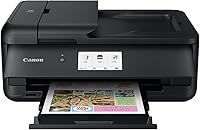
The Canon PIXMA TS9520 Wireless All-in-One Printer sits in a practical sweet spot where home convenience meets genuine office capability — a wide-format machine that handles everything from standard documents to tabloid-sized prints without requiring a dedicated professional device. What separates it from cheaper all-in-ones is the 5-color individual ink system, which keeps pigment black text crisp while dye-based colors handle photos with real vibrancy. A 4.3-inch LCD touchscreen makes navigation feel modern rather than fiddly, and Alexa voice control adds hands-free convenience for routine jobs. Fair warning: at 21 pounds and nearly 19 inches wide, this Canon all-in-one demands a dedicated spot on your desk.
Features & Benefits
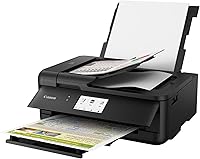
The TS9520's individual ink tanks mean you replace only the color that runs out — a small thing that adds up over time, especially for high-volume black text printing. Wide-format support up to 11x17 inches is the real headline here; most home all-in-ones cap at letter size, so this opens the door for posters, detailed spreadsheets, and booklet layouts. The Auto Document Feeder handles multi-page scan and copy jobs without babysitting, covering originals up to legal size. Automatic duplex printing works reliably for double-sided reports. With Wi-Fi, Ethernet, Bluetooth, AirPrint, and Mopria all on board, connecting virtually any device takes minutes rather than troubleshooting sessions.
Best For
This wide-format inkjet makes the most sense for home office users who need one machine to cover professional documents during the week and photo projects on weekends. Freelancers and small teams who occasionally need tabloid-size output — think event flyers, architectural sketches, or multi-column spreadsheets — get real value from the 11x17 print capability without investing in a separate large-format device. Creative households also benefit: 12x12 borderless printing works directly for scrapbooking and crafts. If your home runs a mix of Apple, Android, and Windows devices, the TS9520's broad wireless compatibility means nobody gets left out. It is less ideal for dedicated photo enthusiasts who would be better served by a purpose-built photo printer.
User Feedback
The 4.1-star average tells a fair story: most owners are genuinely satisfied with print quality, particularly for photos, which come out with solid color accuracy for a home inkjet. Setup and app connectivity draw consistent praise — people get it running quickly without much friction. But the criticisms are worth taking seriously. Ink running costs surface repeatedly; this machine consumes ink at a noticeable rate under heavier use, and replacement cartridges are not budget-friendly. A portion of owners have reported ADF feed reliability issues over time, with occasional misfeeds during multi-page jobs. Some buyers also mention the physical footprint feels larger in person than expected. Capable and well-rounded, but not without real ownership trade-offs.
Pros
- Wide-format printing up to 11x17 inches is a rare capability at this price tier for a home machine.
- Individual ink tanks mean you replace only what runs out, reducing waste on lopsided print jobs.
- Photo prints look vibrant and color-accurate for a home inkjet — good enough to skip the print shop for casual use.
- Automatic duplex printing works reliably and quickly becomes essential for anyone printing multi-page reports.
- Connects to virtually any device: Wi-Fi, Ethernet, Bluetooth, AirPrint, and Mopria all covered out of the box.
- The 4.3-inch touchscreen makes navigating settings noticeably easier than the tiny panels on budget alternatives.
- ADF handles legal-size originals, making it practical for digitizing contracts, forms, and longer documents.
- 12x12 borderless printing opens up creative uses like scrapbooking that most standard all-in-ones simply cannot do.
- Setup is straightforward and the Canon PRINT app works reliably across both iOS and Android platforms.
Cons
- Ink running costs are high — frequent users report cartridge expenses adding up fast after purchase.
- ADF misfeed and paper jam issues surface consistently in long-term ownership reviews, undermining confidence for batch scanning.
- At over 21 pounds and nearly 19 inches wide, the physical footprint catches many first-time buyers off guard.
- Print and scan speeds are modest — large or wide-format jobs feel slow compared to office-grade equipment.
- The Google Cloud Print feature listed in specs is now defunct, making that connectivity option obsolete.
- The touchscreen response is adequate but noticeably sluggish compared to modern device standards.
- Wireless connection drops after sleep mode are reported often enough to be a recurring annoyance for some households.
- Heavy glossy photo prints can show slight graininess under close inspection, revealing the limits of a general-purpose inkjet.
- Exterior plastic scuffs easily, and the build feels less premium than the price point might lead buyers to expect.
Ratings
The Canon PIXMA TS9520 Wireless All-in-One Printer earns a solid reputation among home office users and creative households, and these scores reflect what real buyers consistently report after extended ownership. Our AI has analyzed thousands of verified global reviews, actively filtering out incentivized submissions and bot activity, to surface an honest picture of where this wide-format inkjet excels and where it falls short. Both the genuine strengths and the recurring frustrations are reflected here without sugarcoating.
Print Quality (Documents)
Print Quality (Photos)
Wide-Format Capability
Ink System & Running Costs
Auto Document Feeder (ADF)
Wireless Connectivity & Setup
Mobile & Cloud Printing
Scanning Performance
Auto Duplex Printing
Touchscreen & Interface
Build Quality & Durability
Noise Level During Operation
Physical Footprint & Weight
Value for Money
Alexa & Voice Control
Suitable for:
The Canon PIXMA TS9520 Wireless All-in-One Printer is built for people who genuinely need more than what a basic home printer offers, without stepping up to commercial equipment. Home office workers who switch between printing crisp client-facing documents and weekend photo projects will find the 5-color ink system earns its place, delivering sharp text on Monday and respectable photo prints on Saturday from the same machine. Freelancers, small business owners, and remote workers who occasionally need tabloid-size output — event programs, detailed floor plans, oversized spreadsheets — get a real practical advantage here since wide-format capability at this tier is uncommon. Creative households that print 12x12 scrapbook pages or borderless craft projects will especially appreciate what the TS9520 handles without a specialty machine. Mixed-device households running a combination of iPhones, Android phones, Windows PCs, and Macs will also find the broad wireless compatibility genuinely useful rather than a marketing checkbox.
Not suitable for:
The Canon PIXMA TS9520 Wireless All-in-One Printer is a harder sell for buyers whose primary concern is keeping long-term running costs low. If your household prints heavily — daily documents, school assignments, work reports — the ink consumption rate will frustrate you, and the recurring cartridge expense can significantly outpace the initial hardware investment over a year. Dedicated photography enthusiasts who expect fine art-level output, wide color gamut accuracy, or archival-quality prints should look at purpose-built photo printers instead, as this wide-format inkjet is a capable generalist rather than a specialist. Anyone working in a compact space — a studio apartment desk, a small office cubicle, or a shared workspace — should measure carefully before buying, since 21 pounds and nearly 19 inches of width is a genuine footprint commitment. Finally, buyers who rely heavily on multi-page ADF scanning for mission-critical document workflows should factor in the reported feed reliability concerns before committing.
Specifications
- Print Functions: Handles printing, copying, and scanning in a single unit, covering the core needs of a home or small office environment.
- Ink System: Uses a 5-color individual ink tank setup combining one pigment black cartridge and four dye-based color cartridges (cyan, magenta, yellow, and a separate dye black).
- Max Print Size: Supports wide-format output up to 11x17 inches (tabloid) and borderless printing up to 12x12 inches for square media.
- Color Print Speed: Delivers approximately 10 pages per minute for color documents under ISO ESAT standard test conditions.
- Mono Print Speed: Reaches approximately 15 pages per minute for black-and-white documents under ISO ESAT standard test conditions.
- Print Resolution: Achieves a maximum color print resolution of 4800x1200 dpi and a maximum black-and-white resolution of 1200 dpi.
- Scanner Type: Combines a flatbed scanner with an Auto Document Feeder, supporting both single-page and multi-page scan and copy jobs.
- Flatbed Scan Size: The flatbed glass accommodates originals up to 8.5x11.7 inches, covering standard letter and A4 document sizes.
- ADF Scan Size: The Auto Document Feeder handles originals up to 8.5x14 inches, including legal-size documents.
- Duplex Printing: Supports fully automatic two-sided printing without manual page flipping, reducing paper usage on longer documents.
- Display: Features a 4.3-inch color LCD touchscreen for navigating print settings, scan options, and copy functions directly on the unit.
- Connectivity: Connects via Wi-Fi, Ethernet, Bluetooth, and USB, and supports AirPrint, Mopria Print Service, and the Canon PRINT app for mobile devices.
- Voice Control: Compatible with Amazon Alexa for hands-free command of basic print functions using an existing Alexa-enabled device.
- Input Capacity: Holds up to 100 sheets of standard paper across its three-tray paper handling system.
- Number of Trays: Includes three paper trays to support different paper types and sizes simultaneously without manual media swapping.
- Dimensions: Measures 18.5″ in length, 14.5″ in width, and 7.6″ in height when closed and in its standard operating position.
- Weight: Weighs 21.3 pounds, which requires a stable, dedicated surface and should be factored into any workspace planning before purchase.
- Compatible Devices: Works with laptops, desktop PCs, smartphones, and tablets running iOS, Android, Windows, and macOS operating systems.
- Ink Type: Uses both pigment-based ink for sharp monochrome text and dye-based ink for vivid color and photo output within the same 5-tank system.
- Warranty: Backed by a limited warranty from Canon USA Inc.; buyers should confirm current warranty terms directly with Canon at the time of purchase.
Related Reviews
Canon PIXMA TS3720 Wireless All-in-One Printer
Canon PIXMA TR160 Portable Inkjet Printer
Canon PIXMA TR4527 All-in-One Inkjet Printer
Canon MAXIFY MB2120 All-in-One Inkjet Printer
Epson Stylus CX9400Fax All-in-One Printer
Kodak ESP 7250 All-in-One Inkjet Printer
Canon SELPHY CP1500 Compact Photo Printer
nwm ONE
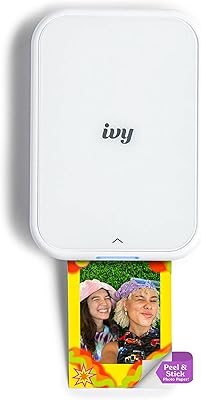
Canon IVY 2 Mini Photo Printer