Overview

The Calibrite Display 123 Colorimeter is Calibrite's answer to a frustration most people don't even realize they have: monitors that ship poorly calibrated and stay that way. Calibrite itself grew out of X-Rite, one of the most credible names in color science, so there's genuine pedigree behind the hardware. The setup follows a simplified three-step workflow that anyone can get through without reading a manual twice. And unlike many tools in this category that cap out at one screen, this calibration tool supports up to two displays — a genuinely useful inclusion at this price point that most comparable options simply don't offer.
Features & Benefits

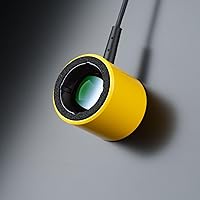
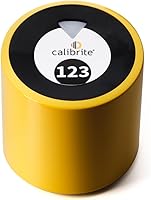
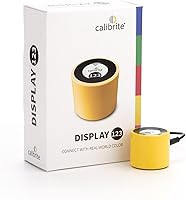
The two brightness modes serve distinct, practical purposes. Native mode calibrates your screen to its own natural output, which suits everyday use and gaming well. Photo mode targets a standardized luminance level, helping photographers judge exposure more accurately during editing. The device itself is tiny — roughly the size of a large ice cube — so it tucks into any bag without fuss. The guided software walks you through each step with no prior knowledge required, turning recurring calibration from something you defer indefinitely into a quick routine. For dual-monitor users, getting both screens matched to a consistent profile is a practical win most tools at this tier don't deliver.

Best For

This colorimeter hits its stride with hobbyist photographers and content creators who want their screen colors to reflect reality without spending hours on calibration theory. If you run two monitors and constantly notice one looks warmer or cooler than the other, this is a straightforward fix. It also quietly serves people who shop online for color-sensitive items — paint, fabric, furniture — and want to trust what they're actually seeing on screen. Gamers who prefer accurate, fuss-free color rendering will find real value here too. That said, if you need print-grade precision or ICC profiles validated to professional production standards, this tool simply isn't designed for that level of demand.

User Feedback

A 3.8-star average across 155 ratings puts the Display 123 in genuinely mixed territory, and it's worth unpacking honestly. The clearest praise focuses on ease of first use — buyers who had never calibrated a monitor before report noticeable screen improvement within minutes. The recurring criticism is more pointed: some users find the software limited compared to Calibrite's higher-tier offerings, and a few flag concerns about long-term accuracy as the device ages. A fair portion of lower ratings also appear to come from buyers expecting studio-level results from an entry-level device — an expectations gap the marketing doesn't do enough to close. Dual-display support generally holds up, though some users noted friction pairing it with certain monitor configurations.

Pros

  • First-time calibration setup takes under ten minutes with no prior technical knowledge required.
  • Produces a clearly visible color improvement on most factory-default consumer monitors.
  • Dual-display support at this price tier is a rare and practical inclusion for home office users.
  • The compact size makes it easy to store in a drawer or tuck into a laptop bag between uses.
  • Backed by Calibrite's X-Rite lineage, which gives the underlying measurement approach real credibility.
  • Photo brightness mode gives hobbyist photographers a more reliable reference point during editing sessions.
  • The guided software removes the guesswork that has historically made monitor calibration feel intimidating.
  • Works reliably across the most common Windows and Mac configurations without manual driver setup.

Cons

  • Software depth is limited — users who want to customize calibration targets or review raw measurement data will hit a wall quickly.
  • Some users reported color drift returning faster than expected, particularly on budget display panels.
  • No protective pouch or sleeve is included, leaving the optical sensor surface vulnerable to scratching.
  • Compatibility issues have surfaced on ARM-based Mac setups and older operating systems with no clear resolution path.
  • The plastic housing feels noticeably lightweight, raising questions about durability under regular long-term use.
  • The in-app guidance around choosing between Native and Photo modes is thin, leaving many users defaulting to one without understanding the difference.
  • A modest increase in budget opens access to significantly more capable hardware, which narrows the value case for informed buyers.
  • Dual-display calibration occasionally required re-running on the second monitor to produce a stable, matched profile.

Ratings

The scores below reflect our AI-driven analysis of verified global user reviews for the Calibrite Display 123 Colorimeter, with spam, bot-generated, and incentivized feedback actively filtered out before any scoring was applied. We weighted both enthusiastic praise and recurring frustrations equally, so the numbers you see reflect the honest middle ground of real buyer experience — not a polished marketing average. Strengths and pain points are represented transparently across every category.

Ease of Setup
88%
The guided software workflow is consistently praised as one of the most beginner-friendly in the category. Users who had never calibrated a monitor before report getting through the full process in under ten minutes without consulting any external guides or tutorials.
A small but vocal subset of users ran into driver recognition issues on certain Windows configurations, requiring restarts or manual USB troubleshooting before the software detected the device. This is infrequent but frustrating when it happens.
Color Accuracy Improvement
76%
24%
For monitors that shipped with factory defaults — which tend to run cool, oversaturated, or with crushed shadows — the calibration produces a visible and often striking improvement. Hobbyist photographers editing JPEGs for social media found the difference meaningful and immediate.
The accuracy ceiling is real. Users coming from higher-end colorimeters or professional workflows noticed the profiles are competent but not tight enough for critical color grading or print-matching work. The improvement is clear on bad screens but modest on already-decent panels.
Software Quality
61%
39%
The core calibration flow is clean and approachable, with plain-language prompts that don't assume any prior knowledge. For users who just want to run a calibration and be done with it, the software gets out of the way effectively.
Beyond the basic workflow, the software feels thin. Users wanting to adjust targets, review detailed measurement data, or fine-tune profiles quickly hit a wall compared to what Calibrite's own higher-tier software offers. Several reviewers described it as functional but limiting after the first few uses.
Dual-Display Support
79%
21%
Supporting two monitors at this price tier is a genuine differentiator, and most dual-screen home office users found it worked reliably. Getting two mismatched screens — one from a laptop, one external — to render similar white points is exactly where this tool earns its place.
A recurring thread in user reviews flagged inconsistencies when pairing it with certain monitor combinations, particularly mixed-refresh-rate setups or older displays. The second profile occasionally needed re-running to hold, which undermines the convenience the feature is meant to provide.
Value for Money
73%
27%
For a first-time buyer who has never used a colorimeter, the entry price represents a fair exchange for the improvement it delivers on a typical uncalibrated home monitor. It costs considerably less than moving up to a professional-grade device while still producing a tangible result.
Users who research the category even briefly discover that a modest budget increase opens up significantly more capable hardware. Some feel the software limitations in particular make the value proposition weaker than the hardware price alone would suggest.
Build Quality & Design
71%
29%
The compact puck form factor is genuinely practical — it weighs under 5 ounces and fits in a coat pocket. Users who move between a home office and a secondary workspace appreciated not needing a dedicated carrying case for it.
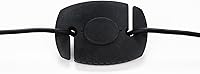
The plastic housing feels lightweight in a way that reads as cost-cutting rather than intentional design. A few users mentioned the suction cup or cable connection point felt flimsy after repeated use, which raises questions about longevity over months of regular calibration cycles.
Brightness Mode Usefulness
77%
23%
The distinction between Native and Photo modes is a thoughtful inclusion that many competing entry-level tools skip entirely. Photographers appreciated Photo mode for locking brightness to a standardized level, which makes exposure judgments more consistent across different sessions.
Casual users frequently reported confusion about which mode to select and why. The software guidance around this choice is minimal, and without clearer in-app explanation, some users defaulted to one mode without understanding the trade-off they were making.
Long-Term Accuracy Retention
58%
42%
In the short term — the first few weeks after calibration — most users reported their screens held the calibrated profile well. For occasional home use, running a calibration every month or two appeared to keep results stable enough for the target audience.
Several users who tracked their displays over a longer period noted drift creeping back in faster than expected, particularly on budget panels. Questions about whether the device itself degrades in sensitivity over time came up in multiple reviews, with no clear answer from the manufacturer.
Compatibility
69%
31%
The device worked without issue on the majority of modern Windows and Mac setups users tested it on. Plug-and-play behavior was the norm for most, with no manual driver installation needed in standard configurations.
Compatibility friction surfaced specifically around older operating systems, certain ARM-based Mac configurations, and some Linux users who found no official support path at all. These are edge cases but represent a genuine gap for a segment of the technical audience.
Portability
84%
The physical size puts it among the most portable colorimeters available at any price. It tucks into a laptop bag without any footprint sacrifice, which makes it realistic to carry as part of a regular kit rather than leaving it on a desk indefinitely.
There is no included carrying pouch or protective sleeve, which feels like an oversight for a device with a glossy sensor surface. Users who toss it loose in a bag expressed mild concern about scratching the optical element over time.
Suitability for Beginners
83%
The entire product is oriented around reducing friction for first-timers. Users with zero background in color management consistently reported feeling guided rather than lost, which is a harder outcome to achieve than it sounds in this category.
The simplicity that helps beginners also means there is no room to grow with the tool. Users who develop even a basic interest in calibration theory quickly find themselves bumping against what the software will and won't let them control.
Gaming Color Improvement
66%
34%
Gamers with monitors that shipped with aggressive factory saturation — common in budget gaming displays — noticed a more balanced, natural look after calibration. Colors stopped blowing out on bright scenes, and shadow detail became more readable.
Hardcore gamers accustomed to custom in-game color profiles found the calibrated output sometimes clashed with those settings, requiring trade-offs. The tool does not offer gaming-specific profile options, which limits its precision for this use case.
Online Shopping Color Trust
72%
28%
Users who buy clothing, paint, or home furnishings online and have been burned by color mismatches found real practical value here. A calibrated screen reduces — though cannot eliminate — the gap between what you see and what arrives at your door.
The limitation is that online stores also display products on uncalibrated photography and with their own color processing. Calibrating your screen helps your end, but does not fix upstream inconsistencies in product imagery, which some buyers misunderstood.
Brand Credibility
81%
19%
Calibrite's lineage from X-Rite gives it a foundation of trust that generic or no-name colorimeters cannot claim. For buyers doing research, discovering that pedigree provides real reassurance that the underlying measurement science is sound.
Some informed buyers noted that being a spin-off brand means Calibrite occupies a middle ground — it carries the X-Rite name recognition but not the full depth of X-Rite's professional ecosystem, which can feel like a compromise depending on buyer expectations.

Suitable for:

The Calibrite Display 123 Colorimeter is a strong fit for anyone who works or creates in an environment where screen color accuracy matters but professional-grade precision isn't the requirement. Hobbyist photographers who edit portraits, landscapes, or product shots at home will immediately benefit — most consumer monitors ship with colors that skew noticeably warm, cool, or oversaturated, and this tool corrects that in one short session. Content creators who publish to social media or YouTube and want their footage to look consistent across viewings will find the calibration produces a meaningful, visible improvement. Home office workers running two monitors who are tired of one screen looking markedly different from the other will appreciate the dual-display support, which is genuinely rare at this price tier. Even online shoppers who regularly order clothing, paint samples, or home furnishings and want to trust what they see on screen before clicking buy will find this calibration tool earns its keep quickly.
Not suitable for:

The Calibrite Display 123 Colorimeter is not the right tool for professionals who need color accuracy they can stake their reputation on. Print production specialists, retouchers preparing files for commercial offset printing, and studio colorists working in certified color-managed pipelines will find the software too limited and the measurement ceiling too low for their standards. If you need ICC profiles validated against industry references, or you require granular control over calibration targets and measurement data, this device simply does not offer those capabilities. Users who have already owned a mid-range or professional colorimeter and are considering this as a replacement — rather than a first device — will almost certainly feel they are stepping backward in both features and depth. It also isn't built for users who need ongoing support for more than two displays, multi-room studio setups, or specialized display types like HDR reference monitors.
Specifications

  • Brand: Manufactured by Calibrite, a color science brand spun off from X-Rite, a longstanding authority in professional color measurement.
  • Model Number: The device carries the official model designation CCDIS123.
  • Dimensions: The unit measures 1.5 x 1.5 x 1.4 inches, making it one of the most compact colorimeters available at any price tier.
  • Weight: At 4.8 ounces, the device is light enough to carry daily without any meaningful impact on a laptop bag or kit.
  • Display Support: Supports calibration of up to 2 monitors, allowing users to build and apply separate ICC profiles for each connected display.
  • Brightness Modes: Offers two calibration brightness targets: Native mode, which calibrates to the screen's own output, and Photo mode, which targets a standardized luminance level suited to photographic review.
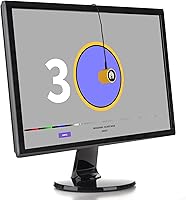
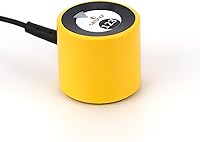
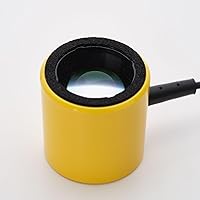
  • Form Factor: Puck-style colorimeter designed to rest against the screen surface during measurement, held in place by the weight of its own cable.
  • Connectivity: Connects to the host computer via USB, with plug-and-play recognition on most current Windows and macOS operating systems.
  • Software Included: Ships with Calibrite's dedicated calibration software, which guides users through the full measurement and profile-building process in a step-by-step interface.
  • Use Cases: Designed for monitor color correction across photo editing, gaming, home office use, and color-sensitive online shopping scenarios.
  • Category Rank: Ranked #6 in the Photographic Light Meter Color Calibration Charts category on Amazon as of the time of review.
  • Average Rating: Holds a 3.8 out of 5-star average based on 155 verified ratings across the Amazon platform.
  • Launch Date: The product was first made available for purchase in March 2024.
  • Price Tier: Positioned in the entry-level to mid-range segment of the colorimeter market, targeting first-time buyers and casual home users.
  • Profile Output: Generates ICC color profiles that are applied at the operating system level, affecting color rendering across all compatible applications.
  • Language Support: The software interface and supporting documentation are available in English.

Related Reviews

Calibrite Display Plus HL
88%
93%
Calibration Accuracy
89%
Ease of Setup
88%
Software Functionality
91%
Portability & Size
87%
Build Quality
More
Calibrite ColorChecker Display Pro Colorimeter
78%
91%
Calibration Accuracy
88%
Cross-Panel Consistency
67%
Software Experience
84%
Projector Profiling
82%
Ambient Light Measurement
More
ASUS ProArt Display PA169CDV 15.6” 4K Pen Display
87%
94%
Color Accuracy
89%
Portability
90%
Touchscreen Responsiveness
85%
Build Quality
92%
Wacom Pen Precision
More
Calibrite ColorChecker Classic Color Calibration Chart
80%
94%
Color Accuracy
83%
Build Quality
78%
Ease of Use
81%
Software Compatibility
74%
Value for Money
More
Calibrite ColorChecker Video Color Calibration Chart
78%
93%
Color Accuracy
91%
Gray Scale Precision
89%
White Balance Reliability
67%
Build Quality
84%
Usability On Set
More
Calibrite ColorChecker Studio Color Calibrator
78%
93%
Display Profiling Accuracy
86%
Printer & Paper Profiling
81%
Camera Calibration Workflow
54%
Software Setup Experience
88%
Ambient Light Measurement
More
Calibrite ColorChecker Classic XL Color Calibration Chart
81%
94%
Color Accuracy
92%
Size & Coverage
78%
Portability
71%
Build & Durability
67%
Value for Money
More
KAOLALI A401 GPS+OBD2 Car Head-Up Display
72%
91%
Ease of Installation
67%
GPS Mode Accuracy
83%
OBD2 Data Accuracy
71%
Display Readability
58%
Build Quality
More
Calibrite ColorChecker Digital SG Calibration Chart
72%
94%
Color Accuracy
92%
Patch Range & Variety
78%
Build & Surface Quality
71%
Size & Usability
67%
Software Compatibility
More
Wiiyii C500 OBD2 Car HUD Speedometer
79%
93%
Ease of Installation
74%
Display Clarity
88%
Data Range
81%
Alert System
57%
Build Quality
More

FAQ

Not at all. The Calibrite Display 123 Colorimeter is specifically built around a guided workflow that walks you through every step. If you can follow on-screen prompts, you can complete a calibration — most first-timers finish in under ten minutes without consulting any outside help.
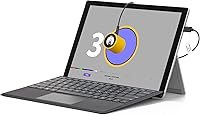
It works on both Windows and macOS in most standard configurations. A small number of users have reported friction on ARM-based Macs and older operating system versions, so if you're running an older setup, it's worth checking Calibrite's current compatibility list before purchasing.

Yes, and this is actually one of the strongest use cases for this calibration tool. It supports up to two displays, and you can build individual profiles for each one, which goes a long way toward matching their white points and overall tone. That said, if the two panels use fundamentally different display technologies, you can improve consistency but may not achieve a perfect match.

For most home users, recalibrating once a month is a reasonable habit. Display output drifts gradually over time due to backlight aging and temperature changes, so occasional recalibration keeps things consistent. The process takes just a few minutes once you've done it the first time.

Native mode calibrates your screen to whatever brightness it naturally produces — good for everyday use, gaming, and general viewing. Photo mode targets a specific standardized luminance level used as a reference in photography, which helps when you need to judge image exposure or color more critically. If you mostly edit photos, Photo mode is the more useful starting point.

Honestly, no — and it's worth being upfront about that. This device is aimed at hobbyists and home users, not professional colorists or print-production workflows. If you need profiles validated against press standards or tight ICC targets for commercial output, you'll want to look at a more advanced colorimeter with deeper software control.

The ICC profile generated by this calibration tool is applied at the operating system level, which means it affects color rendering across all applications that honor system color management — including most photo editors, browsers, and design tools. Some applications that bypass system color management may not reflect the calibration.

From plugging in the device to having a finished profile, most users report the process takes between five and fifteen minutes per display. The software does the heavy lifting while the colorimeter takes its measurements, so you're mostly just waiting and following a couple of on-screen steps.

It works on laptop screens as well. The device rests against the display surface using the weight of the cable to hold it in position, which works on both flat external monitors and the slightly angled screens of most laptops. Results on higher-quality laptop panels are typically quite good.

It is worth understanding what drives that score before writing the device off. A meaningful portion of the lower ratings come from users who expected professional-grade accuracy from an entry-level device — an expectations mismatch rather than a product defect. The most consistent criticisms from informed buyers center on software depth limitations and some questions about long-term drift. If you go in knowing what it is — a solid beginner tool, not a pro instrument — the majority of users in that target group report satisfaction with the results.

Where to Buy

B&H Photo-Video-Audio
In stock $119.00
Green Mountain Camera
In stock $119.00
Hunt's Photo & Video
In stock $119.00
Stewarts Photo
In stock $119.00
The Photo Pros
In stock $119.00
Kenmore Camera
In stock $119.00