Overview

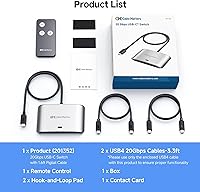
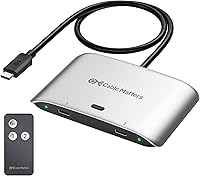
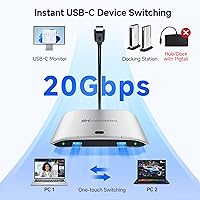
The Cable Matters 20Gbps USB-C Switch 201352 solves a specific and genuinely frustrating problem: sharing one USB-C monitor or Thunderbolt 4 dock between two computers without crawling under your desk to swap cables. It sits in the mid-range of the KVM switch market, using USB4 20Gbps bandwidth and an RF remote to handle switching entirely in hardware. Setup is straightforward — a pigtail cable connects to your monitor or dock, and two included 3.3ft USB4 cables run to your two host machines. One critical warning worth stating upfront: only the included USB4 cables work here. Reaching for a Thunderbolt 3 or 4 cable will cause failures, and that misunderstanding alone accounts for a large share of frustrated reviews.
Features & Benefits

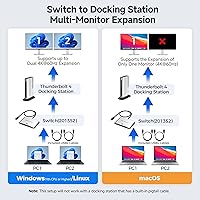
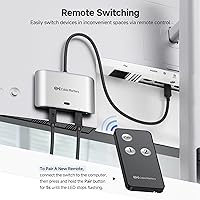
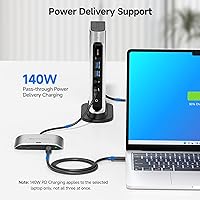
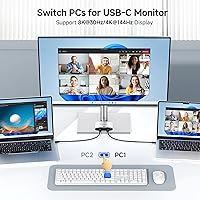
On Windows, the Cable Matters switcher pushes up to 8K at 30Hz or 4K at 144Hz through a single USB-C display — capable numbers for a device in this price range. Mac users should temper expectations; 4K at 60Hz is the practical ceiling on macOS, a platform limitation rather than a product flaw. The 140W power delivery pass-through is a legitimate highlight, charging whichever computer is currently active without needing a separate power brick. The included RF remote lets you switch hosts from across the room with no drivers involved. Worth noting: this switcher runs at 20Gbps, half the 40Gbps typical of most TB4 docks, so multi-monitor setups or bandwidth-heavy configurations may hit a ceiling compared to a direct dock connection.

Best For

This USB-C switch is a strong fit for home office workers where two laptops — a personal machine and a work-issued one — need to share a single USB-C monitor or a detachable-cable TB4 dock like a CalDigit TS4 or Anker 777. Windows users chasing high-refresh or high-resolution output will get real value here. It also suits anyone who wants hardware-only switching with zero software to install or maintain. On the flip side, it is a poor match for macOS users who need dual monitors, or for anyone whose dock has a built-in captive cable — that combination simply will not work, and no amount of troubleshooting will change that hard limitation.

User Feedback

With 505 ratings averaging 3.9 out of 5, the reception for this two-computer sharing device is genuinely mixed — and the split is telling. Satisfied buyers, often dual-laptop home office users, praise the reliable switching and clean RF remote experience, along with solid video output quality for the price tier. The frustration side is equally consistent: buyers who used Thunderbolt cables instead of the included USB4 ones ran into failures and blamed the hardware. Others found the 20Gbps bandwidth ceiling caused unexpected drops in resolution or refresh rate compared to plugging directly into their dock. It is a capable and honest product — one that rewards buyers who take five minutes to read the compatibility notes before ordering.

Pros

  • Instantly share a single USB-C monitor or TB4 dock between two computers with no cable unplugging.
  • The RF remote switches hosts reliably from across the room with no software or drivers required.
  • 140W power delivery charges your active laptop through the switch, eliminating a separate power brick.
  • Windows users can achieve 4K@144Hz or even 8K@30Hz from a single compatible USB-C display.
  • Works well with popular TB4 docks including CalDigit TS4, Anker 777, and Lenovo ThinkPad Universal TB4.
  • Compact, solid build sits cleanly on a desk without adding visual clutter to a tidy workspace.
  • All necessary cables are included in the box — no additional purchases needed to get started.
  • Hardware-only design means zero background processes, no update prompts, and no login requirements.

Cons

  • Only the included USB4 cables work — using Thunderbolt 3 or 4 cables causes silent failures with no clear error.
  • Docks with built-in captive cables are completely unsupported, ruling out a wide range of popular USB-C hubs.
  • The 20Gbps bandwidth ceiling limits multi-monitor and high-refresh configurations through a connected dock.
  • macOS users are restricted to one display at 4K@60Hz — the headline 8K spec does not apply to Mac setups.
  • Only the currently active computer receives power delivery — the idle machine gets nothing while switched away.
  • Included host cables are just 3.3ft long, which can fall short for standing desks or tower PC setups.
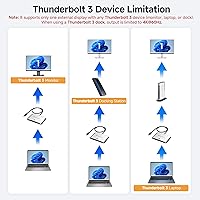
  • Thunderbolt 3 docks face an additional restriction of only one display at a maximum of 4K@60Hz.
  • The RF remote is small, easy to misplace, and not sold separately as a standalone replacement.

Ratings

The Cable Matters 20Gbps USB-C Switch 201352 has been evaluated by our AI rating system after analyzing hundreds of verified global buyer reviews, with spam, bot activity, and incentivized feedback actively filtered out. The scores below reflect honest patterns from real-world use — where this USB-C switch genuinely delivers and where it falls short for certain setups. Both the strengths and the frustrations are represented transparently so you can make a confident buying decision.
Compatibility & Setup
62%
38%
When buyers follow the included instructions and use the bundled USB4 cables, setup is generally quick and trouble-free. Users with detachable-cable TB4 docks like the CalDigit TS4 or Anker 777 report connecting everything within minutes and having it work on the first try.
A significant share of negative reviews trace directly to buyers swapping in their own Thunderbolt 3 or 4 cables, which causes silent failures or degraded output. The compatibility wall with captive-cable docks is also a recurring source of frustration for buyers who did not read the fine print before purchasing.
Video Output Quality
78%
22%
Windows users connecting to a single high-end USB-C display — such as a Dell UltraSharp or LG 32UN880-B — report clean, sharp output at 4K@144Hz with no visible artifacts or signal instability. For a hardware switch at this price tier, that is a genuinely strong result.
The 20Gbps bandwidth ceiling means multi-monitor Windows configurations and anything beyond a single display can hit limits unexpectedly. macOS users are capped at 4K@60Hz on a single screen regardless of their monitor's capabilities, which disappoints buyers who assumed the headline 8K spec applied to them.
Switching Reliability
83%
The RF remote switch is one of the most consistently praised aspects across reviews. Users running dual-laptop home office setups describe switching as instant and dependable throughout full workdays, with no dropped connections or need to replug cables after toggling hosts.
A smaller subset of users reports occasional switching lag or the need to press the remote twice in rare instances. A few reviewers noted the switch defaulting to an unexpected host after a power cycle, requiring a manual re-toggle to restore their preferred configuration.
Power Delivery Performance
86%
The 140W pass-through power delivery is a genuine differentiator. Users with power-hungry 16-inch laptops — including certain Dell XPS and MacBook Pro models — confirm that their machines charge at full speed through the switch when connected to a compatible USB-C monitor or dock.
Power delivery only flows to the currently active host, so the secondary computer receives nothing while switched away. Buyers expecting background charging for both machines simultaneously will be disappointed, and that behavior is not obvious from the product listing alone.
macOS Support
54%
46%
macOS users with a single USB-C monitor and straightforward needs — such as a MacBook Pro connected to a 4K display for video calls and document work — report stable, consistent performance at 4K@60Hz without needing to install anything.
The platform ceiling of 4K@60Hz on macOS leaves users wanting more, especially those upgrading from a direct TB4 dock connection. Multi-monitor output is not supported on macOS at all through this device, making it a hard pass for creative professionals who rely on extended display setups.
Build Quality & Design
77%
23%
The silver aluminum housing feels solid and looks professional on a desk. At just over 8 ounces with compact dimensions, it sits unobtrusively between a monitor and two host machines without adding visual clutter to a tidy workspace.
The pigtail cable on the monitor side is fixed and non-removable, which limits placement flexibility slightly. A few users noted that the device runs warm during sustained high-bandwidth use, though no one reported overheating or performance throttling as a result.
RF Remote Control
88%
The pre-paired RF remote is a practical touch that buyers genuinely appreciate. It works reliably from across a room without line-of-sight requirements, which is useful for anyone whose switch is tucked behind a monitor stand or in a cable-managed desk setup.
The remote is small and easy to misplace, and a replacement is not readily available as a standalone purchase. The pairing process for a new remote — holding a button for five seconds — is straightforward but not well-documented in the printed materials included in the box.
Cable Inclusion & Quality
74%
26%
Including two 3.3ft USB4 cables in the box is a practical decision that most buyers appreciate — it means the switch works out of the box without a separate cable purchase. The cables themselves are reported as well-built and hold their connectors firmly.
3.3ft is short for some desk configurations, particularly standing desks where the computer sits on a lower shelf or tower position. Buyers needing longer runs have to source compatible USB4 cables carefully, since using the wrong spec cables breaks functionality entirely.
Bandwidth & Multi-Monitor Support
58%
42%
For single-monitor use cases — which represent the majority of buyers — the 20Gbps USB4 bandwidth is more than sufficient for 4K high-refresh output alongside data transfer and charging simultaneously. It handles the core job without issue for this audience.
At half the bandwidth of a standard 40Gbps TB4 dock, users attempting to drive two or more monitors through a connected dock will frequently find themselves unable to match their previous setup. This is a real-world limitation that catches buyers off guard when they assume the switch performs identically to a direct dock connection.
Dock Compatibility Range
71%
29%
The list of supported TB4 docks is broad and covers many popular models. Users with a Plugable TBT4-UDZ, Lenovo ThinkPad Universal TB4, or OWC Thunderbolt Go dock report solid compatibility as long as the dock uses a detachable host cable.
Docks with built-in captive cables — a common design in budget and mid-range USB-C hubs — are entirely incompatible, with no workaround. Buyers who own a Thunderbolt 3 dock also face a hard limit of one display at 4K@60Hz, which represents a significant step down from a native TB3 connection.
Value for Money
73%
27%
For buyers who fit the target use case — two laptops, one USB-C monitor or detachable-cable TB4 dock, Windows-primary workflow — the pricing feels fair relative to the functionality delivered. It removes the need to buy a second dock, which alone justifies the cost for many users.
Buyers who hit compatibility issues, especially those with captive-cable docks or macOS multi-monitor needs, feel the price is hard to justify given how narrow the supported configurations are. The value equation tilts sharply based on how well a buyer's existing hardware matches the supported spec list.
Documentation & Out-of-Box Experience
61%
39%
The physical packaging is tidy and the device arrives ready to use with all necessary cables included. Buyers who read through the compatibility notes before setup report a smooth first-time experience with no guesswork involved.
The cable-type restriction — using only included USB4 cables, not Thunderbolt cables — is not prominently communicated in the printed quick-start guide. Multiple reviewers describe discovering this limitation only after a failed setup attempt, which contributes meaningfully to the mixed overall rating.
Data Transfer Performance
79%
21%
Users transferring large files between an external SSD connected through a TB4 dock and their laptop report speeds consistent with 20Gbps USB4 expectations. For everyday tasks like moving large video files or syncing project folders, the throughput feels fast and responsive.
The 20Gbps ceiling becomes a constraint when users try to run high-bandwidth peripherals — such as fast external NVMe drives alongside a high-resolution display — simultaneously through a connected dock. The shared bandwidth means something always has to give in bandwidth-intensive configurations.

Suitable for:

The Cable Matters 20Gbps USB-C Switch 201352 is built for a very specific type of buyer — and for that buyer, it delivers real value. If you are a hybrid worker juggling a personal laptop and a company-issued machine on the same desk, this USB-C switch removes the daily annoyance of manually swapping cables at your monitor or dock. Windows users with a single high-resolution USB-C display will get the most out of it, particularly those targeting 4K at high refresh rates or experimenting with 8K output. It also makes strong sense for anyone who already owns a detachable-cable TB4 dock — like a CalDigit TS4 or Plugable TBT4-UDZ — and wants to share it between two computers without purchasing a second unit. The hardware-only RF remote switching is a genuine draw for minimalists who want nothing to do with software utilities, drivers, or background apps cluttering their system.
Not suitable for:

The Cable Matters 20Gbps USB-C Switch 201352 has a narrower compatibility window than its marketing might suggest, and certain buyers will consistently run into walls. If your dock has a built-in captive cable — common in many mid-range USB-C hubs — this two-computer sharing device simply will not work with it, full stop. macOS users who rely on multi-monitor setups should look elsewhere entirely, as the switcher supports only a single display on macOS, capped at 4K@60Hz due to platform constraints rather than any fixable firmware issue. Anyone expecting it to perform identically to a direct 40Gbps TB4 dock connection will be disappointed — the 20Gbps bandwidth ceiling is a real constraint when running bandwidth-heavy peripherals alongside a high-resolution display through a connected dock. Buyers who do not plan to use the included USB4 cables — whether because they are too short for their desk layout or because they already have Thunderbolt cables on hand — will also face compatibility failures that feel baffling without context.

Specifications

  • Brand: Manufactured by Cable Matters, a brand specializing in connectivity accessories for professional and home office use.
  • Model Number: This device carries the official model designation 201352.
  • Bandwidth: Operates at USB4 20Gbps, sufficient for single high-resolution display output alongside simultaneous data transfer and power delivery.
  • Windows Resolution: Supports up to 8K at 30Hz or 4K at 144Hz when connected to a single compatible USB-C display on a Windows host.
  • macOS Resolution: Limited to a maximum of 4K at 60Hz on a single display when used with a macOS host, due to platform-level constraints.
  • Power Delivery: Passes through up to 140W of USB-C power delivery to charge the currently active host computer.
  • Hosts Supported: Connects to exactly two host computers simultaneously, switching the active output between them via RF remote.
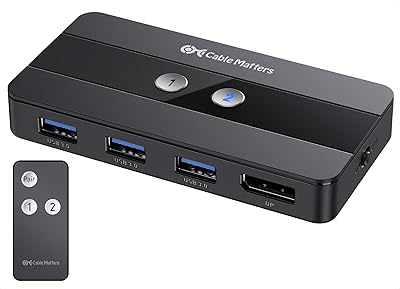
  • Switching Method: Uses an included pre-paired RF remote control for host switching — no software installation or drivers required.
  • Connector Type: Features USB-C connectors rated for USB4 and Thunderbolt 4 signal compatibility on both host and device sides.
  • Included Cables: Ships with two 3.3ft (1m) USB4-rated USB-C host cables; only these included cables should be used for host connections.
  • Cable Restriction: Thunderbolt 3, Thunderbolt 4, and Thunderbolt 5 cables are not compatible and will cause failures or degraded performance if substituted.
  • Dock Compatibility: Works with USB-C and Thunderbolt 4 docks that use a detachable host cable, including models from CalDigit, Anker, Plugable, OWC, and Lenovo.
  • Captive Cable Docks: Docks and hubs with a built-in (captive) pigtail cable are not supported and should not be connected to this device.
  • Thunderbolt 3 Docks: When connected to a Thunderbolt 3 dock specifically, output is limited to a single display at a maximum of 4K at 60Hz.
  • Dimensions: The unit measures 7.01 x 5.55 x 1.69 inches, making it compact enough to sit flat on a desk without occupying significant space.
  • Weight: Weighs 8.1 ounces, light enough to remain stationary on a desk without additional mounting or adhesive.
  • Display Support: Designed for connection to a single USB-C input monitor; multi-monitor output requires a compatible docking station in the signal chain.
  • Remote Pairing: The RF remote arrives pre-paired; a replacement remote can be paired by holding the Pair button for 5 seconds until the LED stops flashing.

Related Reviews
Cable Matters 4 Port USB 3.0 Switch
85%
92%
Ease of Use
88%
Build Quality
90%
Data Transfer Speed
84%
Compatibility with Devices
85%
Setup and Installation
More
Cable Matters USB 3.0 KVM Switch DisplayPort 1.4
85%
87%
Value for Money
94%
Video Performance (Resolution/Clarity)
88%
Ease of Use
82%
Build Quality
91%
Compatibility (Operating Systems)
More
MLEEDA USB C Switch
MLEEDA USB C Switch
87%
94%
Video Quality
90%
Ease of Use
85%
Compatibility with Devices
88%
Charging Capability
92%
Design & Build Quality
More
Alxum USB C Switch D1078A
83%
94%
Video Quality
85%
Ease of Setup
77%
Power Efficiency
83%
Device Compatibility
89%
Build Quality
More
ZIYUETEK USB C & A Switch 2 in 1
83%
88%
Ease of Use
91%
Data Transfer Speed
85%
Build Quality
65%
Power Requirements
92%
Setup & Installation
More
Anker 554 USB-C Docking Station KVM Switch
84%
87%
Performance
91%
Ease of Use
88%
Display Quality
78%
Compatibility
90%
Charging Speed (100W)
More
AILVLVNG USB C KVM Switch 2 Ports 4K@60Hz
84%
91%
Ease of Use
89%
Display Quality
75%
Charging Performance
84%
Build Quality
68%
Compatibility with Devices
More
CMSTEDCD USB C KVM Docking Station Switch 3 Monitors 2 Computers
86%
88%
Performance
91%
Ease of Setup
85%
Port Versatility
92%
Power Delivery
78%
Compatibility with Thunderbolt
More
Sabrent Rocket RGB USB-C 20Gbps M.2 SATA/NVMe SSD Enclosure
85%
88%
Performance
94%
Ease of Setup
75%
Build Quality
85%
Heat Management
90%
Compatibility with M.2 SSDs
More
Symphonized NRG C USB-C Earphones
81%
90%
Sound Quality
85%
Build Quality
75%
Comfort & Fit
80%
Noise Isolation
92%
USB-C Connectivity
More

FAQ

No — and this is the most important thing to know before setting up the Cable Matters 20Gbps USB-C Switch 201352. Despite the physical connector looking identical, Thunderbolt 3, 4, and 5 cables are not compatible with this switch and will cause connection failures or degraded output. You need to use only the included USB4 cables for the host connections.

Yes, the CalDigit TS4 is explicitly supported because it uses a detachable host cable. Connect the switch between your two laptops and the TS4, and you can toggle which machine has full access to the dock using the RF remote. Just keep in mind the 20Gbps bandwidth ceiling may limit your configuration compared to a direct connection.

Unfortunately, no. Multi-monitor output is not supported on macOS through this device. macOS users are limited to a single display at 4K and 60Hz regardless of the monitor or dock connected. If dual-monitor output on macOS is a requirement, this USB-C switch is not the right tool for that setup.

No — the 140W power delivery only flows to whichever computer is currently active. When you switch to the other machine, power delivery transfers with it, and the idle laptop stops receiving charge through the switch. You would need a separate charger if you want both machines to stay powered simultaneously.

It will not. Hubs and docks with a built-in captive cable are specifically incompatible with the Cable Matters switcher. This is a hard limitation with no workaround. You need a dock or hub that uses a detachable, removable host cable for this device to function correctly.

Most users report switching feels close to instant in normal use. There is a brief moment while the display re-establishes signal with the new host — similar to plugging in a cable — but it generally completes in a few seconds. The RF remote works reliably without needing line of sight to the switch.

You can, but you need to source USB4-rated cables specifically — not Thunderbolt cables, which look the same but will break functionality. USB4 cables rated for 20Gbps and available in longer lengths do exist, but always verify the spec before purchasing since the cable type is critical to reliable operation.

None at all. The two-computer sharing device operates entirely in hardware using the included RF remote. There is nothing to install, no background service running, and no account required. This is one of the features buyers consistently appreciate, particularly those on managed work laptops where installing third-party software is restricted.

There is no physical button on the unit itself for switching, so the remote is the primary switching method. Cable Matters does not currently sell the remote as a standalone replacement part through major retailers, which is a genuine gap. If you lose it, contacting Cable Matters support directly is the most reliable path to sourcing a replacement and re-pairing it.

The 4K at 144Hz ceiling applies when the switch connects directly to a USB-C monitor. When routing through a TB4 dock, available bandwidth is shared across all the dock peripherals, which can reduce the maximum achievable resolution or refresh rate. Whether you hit that ceiling depends on your specific dock, its MST support, and what else is connected to it.