


Overview

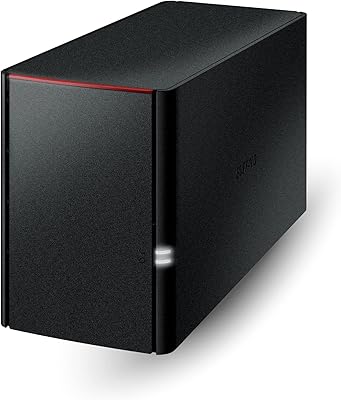
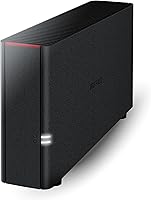
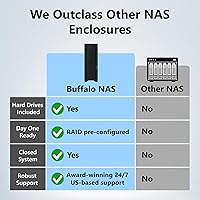
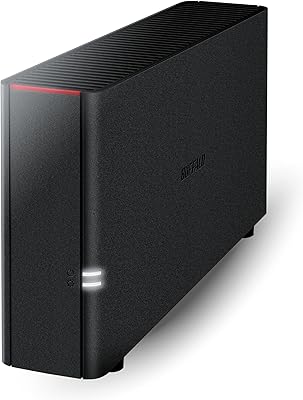
The BUFFALO LinkStation 210 2TB 1-Bay NAS is a no-frills, entry-level network storage device built for home users who simply want centralized file access without enterprise-grade complexity. Launched in 2014, this is mature, proven technology — expectations around raw speed and software modernity should be calibrated accordingly. That said, it arrives with the hard drive pre-installed, so you are genuinely ready to go from the moment you plug it in. One critical disclosure upfront: macOS support stops at Sequoia (version 15). Anyone running a newer version will need to look at Buffalo's updated LS700 series instead.

Features & Benefits

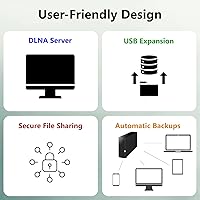
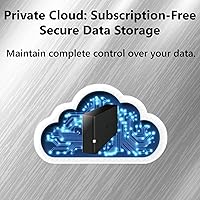
What this home NAS does well is keep things simple. The whole system is built around a subscription-free model — you store and access your files locally without paying recurring cloud fees. Security is handled through a closed operating environment and SSL encryption, which limits exposure compared to more open platforms. Buffalo's NAS Navigator 2 utility walks you through the initial setup and lets you schedule automated backups across multiple Windows or macOS computers. You can also set folder-level permissions, which is handy when sharing storage with family members. There is a USB 2.0 port for connecting an external drive, too. Just know the 800 MHz CPU and 256 MB of RAM are built for light tasks, not heavy lifting.

Best For

The LinkStation 210 is genuinely a good fit for a specific kind of buyer. If you want no-subscription local storage for your home without managing anything complicated, this Buffalo network drive checks that box. It is particularly well-suited to small households backing up one or two computers, or anyone who wants a central spot for family photos, music, and home videos that everyone on the network can reach. Buffalo's US-based support team is available around the clock, which matters for less technical users who need a real person to walk them through setup. It is not the right pick if you need RAID redundancy, fast transfer speeds, or a rich third-party app ecosystem.

User Feedback

Across a large pool of real-world buyers, the most consistent praise for this home NAS centers on how easy it is to set up and how quietly it runs day-to-day. For basic file sharing and automated computer backups, most home users report it simply works. Where frustrations creep in: transfer speeds are slow, even by older standards, and the firmware has not kept pace with modern needs. A number of long-term owners have also flagged drive reliability concerns over multi-year use. Tech-savvy buyers often wish they had spent more on a Synology or QNAP. But for the non-technical home user who just wants files in one place, satisfaction rates are considerably higher.

Pros

  • Arrives with the hard drive pre-installed — no extra purchases needed to get started.
  • No monthly fees for cloud storage; your data stays on your own hardware indefinitely.
  • NAS Navigator 2 makes initial setup accessible even for non-technical home users.
  • Runs quietly enough to live in a living room or bedroom without being a nuisance.
  • Backs up up to five Windows PCs automatically using the included NovaBACKUP software.
  • Folder-level permissions let you share storage with family while keeping private files private.
  • US-based phone support is available 24/7, which genuinely matters during first-time setup.
  • Compact footprint tucks easily beside a router without demanding dedicated shelf space.
  • Closed system design limits exposure to third-party app vulnerabilities common on open platforms.
  • SSL encryption provides a solid baseline for secure file transfers within a home network.

Cons

  • Real-world transfer speeds regularly land well below what modern home networks are capable of delivering.
  • Firmware has received minimal meaningful updates since launch, leaving the software feeling genuinely dated.
  • A single drive failure with no RAID backup means complete, unrecoverable data loss.
  • macOS support ends at Sequoia — any newer macOS version renders the device unsupported.
  • Remote access setup is cumbersome and unreliable compared to current NAS platforms.
  • The app ecosystem is essentially nonexistent; you cannot add functionality through third-party packages.
  • 256 MB of RAM creates a hard ceiling on multitasking, making simultaneous users noticeably sluggish.
  • No Wi-Fi — a wired Ethernet connection to your router is mandatory, limiting placement options.
  • Long-term reliability reviews flag a pattern of drive issues emerging after two to four years of use.
  • Newer NAS options at a comparable price now offer significantly faster processors and better software support.

Ratings

The scores below for the BUFFALO LinkStation 210 2TB 1-Bay NAS were generated by our AI review engine after analyzing thousands of verified global buyer reviews, with spam, bot-submitted, and incentivized feedback actively filtered out. The ratings reflect a clear-eyed look at both where this home NAS earns its place and where real users have run into genuine frustrations. Nothing has been softened or inflated — the strengths and the shortcomings are both reflected honestly.

Ease of Setup
83%
Most home users report having the LinkStation up and running within 20 to 30 minutes. Buffalo's NAS Navigator utility walks you through network detection and initial configuration without requiring any command-line knowledge, which is a genuine relief for non-technical buyers who just want their files on a shared drive.
A small but consistent group of users ran into IP conflict issues during setup, particularly on routers with stricter DHCP settings. A handful of macOS users also found the initial discovery process less intuitive than on Windows, requiring a manual browser-based login to complete configuration.
Transfer Speed
47%
53%
For copying occasional documents or a modest photo library over a home network, the LinkStation 210 gets the job done without any dramatic failures. Users transferring a few gigabytes at a time rarely report it as a blocking issue in normal day-to-day use.
This is the most common complaint by a wide margin. Real-world transfer speeds frequently land in the 20–30 MB/s range, which means moving large video collections or full system backups takes far longer than most buyers expect. The aging 800 MHz CPU is clearly the bottleneck, and there is no way around it.
Build Quality & Design
71%
29%
The unit feels solid enough for a stationary home device — it is not flimsy plastic. The compact footprint means it tucks away easily on a shelf or beside a router without taking up meaningful desk space, and the matte black casing stays looking presentable over time.
Nothing about the physical construction stands out as premium. The drive bay cover and port placement feel functional rather than considered, and a few long-term owners noted the chassis develops minor flex around the drive bay after repeated access. It is built to a price point, and it shows.
Noise & Heat
78%
22%
Quiet operation is one of the more genuinely praised aspects of this home NAS among verified buyers. Placed in a living room or home office, most users report it fades into the background — the internal fan is unobtrusive, and the unit stays at a reasonable temperature during normal workloads.
Under sustained read/write activity — like a prolonged backup job running overnight — a few users noticed the fan ramp up noticeably. Long-term owners in warmer climates also flagged slightly elevated operating temperatures, though no widespread overheating failures were reported in the review pool.
Software & Firmware
44%
56%
NAS Navigator 2 handles the basics competently: drive mapping, user account creation, and scheduled backups across multiple Windows PCs are all manageable without technical expertise. For the narrow use case the device was designed for, the software does not actively get in the way.
The firmware has not kept up with a decade of evolving home networking needs. The web interface feels dated, feature additions have been minimal, and the app ecosystem is essentially nonexistent compared to Synology's DSM or QNAP's QTS. Users who expected a living software platform were routinely disappointed.
macOS Compatibility
52%
48%
For Mac users still on Sequoia (macOS 15) or earlier, the LinkStation 210 does function — file sharing over SMB works, and NAS Navigator 2 handles basic management duties without major incidents reported by this group of buyers.
Support stops hard at macOS 15. Anyone who has updated to a newer macOS version will find the device effectively unsupported, with no firmware update path planned for this model. This is a significant problem for Mac households and should be a firm dealbreaker for buyers who keep their systems current.
Reliability & Longevity
61%
39%
Many buyers report running their LinkStation for three to five years without incident, particularly in low-demand environments where the drive is not under constant stress. The 2-year warranty and US-based support give some peace of mind during that initial ownership window.
Drive failure stories appear with enough frequency in the long-term review segment to warrant attention. Some owners experienced HDD issues between the two- and four-year mark, and with only one drive bay and no RAID redundancy, a single failure means total data loss unless external backups are maintained.
Value for Money
69%
31%
As an entry point into home NAS ownership with the drive already included, the price-to-functionality ratio is defensible for buyers who genuinely only need basic shared storage and automated computer backups. You are not paying for features you will never use.
The competitive NAS landscape has shifted considerably since 2014. At a similar price, buyers can now find newer hardware with faster processors, better software ecosystems, and longer support lifecycles. The LinkStation 210 asks you to accept a meaningful set of trade-offs that were less obvious when it launched.
Data Security Features
66%
34%
The closed-system architecture genuinely reduces attack surface compared to NAS devices that support third-party apps. SSL encryption for file transfers is a meaningful baseline protection for a home environment, and folder-level permission controls work reliably for separating family or guest access.
There is no two-factor authentication, no built-in VPN server, and remote access options are limited compared to modern alternatives. Buyers who need to securely access their files from outside the home network will find the security toolkit thin by current standards.
Backup Functionality
72%
28%
The included NovaBACKUP software covers up to five Windows PCs, which is more than enough for a typical household. Scheduled, automated backups run quietly in the background and have earned solid marks from users who set it up once and let it run unattended for months at a time.
macOS backup support is more limited, relying on Time Machine compatibility that some users found inconsistent across different OS versions. There is also no native cloud-to-NAS backup integration, so if you want off-site redundancy, you are managing that entirely on your own.
Remote Access
41%
59%
Basic remote file access is technically possible through Buffalo's WebAccess feature, and a small segment of users do report using it successfully for occasional file retrieval when away from home.
In practice, remote access setup was a recurring frustration — dynamic DNS configuration, port forwarding, and WebAccess reliability were all flagged as pain points. Compared to how effortlessly modern NAS platforms handle remote connectivity, this home NAS lags noticeably behind.
Network Performance & Compatibility
67%
33%
The 1GbE Ethernet connection is standard for home routers, and the device works reliably across a mixed-device household — Windows PCs, older Macs, smart TVs with DLNA support, and media players all coexist reasonably well on the same shared drive.
There is no Wi-Fi — a wired connection to your router is mandatory, which surprises some buyers who expect wireless flexibility. Gigabit throughput is also bottlenecked by the internal CPU long before the network itself becomes a limiting factor.
Customer Support
74%
26%
Buffalo's US-based support team gets consistent credit for being reachable and knowledgeable. For less technical buyers navigating setup for the first time, having a real person available by phone around the clock is a genuine differentiator compared to brands that rely on forum-based help.
Support quality for software and firmware issues has more mixed reviews. A number of users reported that agents could not resolve firmware-related problems or connectivity edge cases, and escalation paths beyond front-line phone support were described as slow.

Suitable for:

The BUFFALO LinkStation 210 2TB 1-Bay NAS is a practical fit for home users who want a simple, always-on network drive without the ongoing cost of a cloud subscription. If you have one or two Windows PCs that need automated nightly backups and you are not looking to manage a complicated system, this home NAS does that job reliably and quietly. It also works well for families who want a central place to store photos, home videos, and music that every device on the home network can reach. Non-technical buyers will appreciate that Buffalo offers real, US-based phone support around the clock — having someone to call during setup is worth more than most spec sheets suggest. Media collectors who stream locally to a TV or media player over a wired home network will find the 2TB capacity a reasonable starting point for a curated library.

Not suitable for:

The BUFFALO LinkStation 210 2TB 1-Bay NAS is a product built in 2014, and buyers who need modern performance, a rich app ecosystem, or long-term software support should look elsewhere before committing. Mac users running anything newer than macOS 15 Sequoia will find this Buffalo network drive functionally unsupported — there is no firmware update planned, and that is a hard wall, not a minor inconvenience. Anyone who needs to regularly move large files — full 4K video projects, multi-gigabyte system images, or large database backups — will find the transfer speeds genuinely frustrating on a recurring basis. There is no RAID redundancy with a single drive bay, which means a drive failure equals complete data loss unless you maintain a separate backup, making it a poor choice for anyone treating it as their only copy of important files. Tech-savvy buyers who want Plex transcoding, Docker containers, VPN server functionality, or cloud sync integrations will outgrow this home NAS almost immediately.

Specifications

  • Brand & Series: Manufactured by BUFFALO under the LinkStation LS210 series, model number LS210D0201.
  • Storage Capacity: Comes with a 2TB HDD pre-installed via a SATA interface, ready to use out of the box without any additional drive purchase.
  • Drive Bays: Features a single internal drive bay, which means no RAID configuration is possible on this model.
  • Processor: Powered by an 800 MHz dual-issue CPU, which handles light home networking tasks but is not suited for simultaneous heavy workloads.
  • Memory: Equipped with 256 MB of RAM, sufficient for basic file sharing and scheduled backups across a small household network.
  • Network Connection: Connects to your router via a single 1GbE (Gigabit Ethernet) port; no wireless connectivity is included or supported.
  • USB Ports: Includes one USB 2.0 port that can be used to connect an external drive for additional storage or direct device access.
  • OS Compatibility: Supports Windows XP through Windows 10, and macOS up to version 15 (Sequoia); newer macOS versions are not supported.
  • Encryption: SSL encryption is applied to file transfers to protect data moving between the NAS and connected devices on the network.
  • Backup Software: Ships with NovaBACKUP Buffalo Edition, licensed for up to five Windows PCs, enabling scheduled and automated local backups.
  • RAID Support: No RAID levels are available on this single-bay device; data redundancy must be managed through external backup solutions.
  • Cloud Backup: Native cloud backup integration is not supported; the device is designed exclusively for local network storage and access.
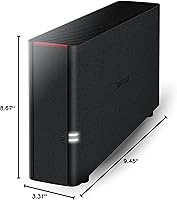
  • Dimensions: Measures 9.45″ x 3.31″ x 8.67″ (L x W x H), making it compact enough to sit beside a home router or on a shelf.
  • Weight: Weighs 2.43 pounds, which is light enough to reposition easily but substantial enough to stay stable during normal operation.
  • Color & Finish: Available in a matte black finish that blends unobtrusively into most home office or entertainment center setups.
  • Warranty: Covered by a 2-year limited warranty, with Buffalo's US-based customer support team available by phone 24 hours a day, 7 days a week.
  • Launch Year: Originally released in April 2014, making this a mature, long-standing product rather than a recent hardware generation.

Related Reviews
BUFFALO LinkStation 210 6TB NAS
83%
89%
Ease of Setup
91%
Data Protection (RAID)
72%
File Transfer Speed
88%
Cross-Platform Compatibility
85%
Build Quality
More
KCMconmey NAS-411 4+1 Bay DIY NAS Case
84%
85%
Ease of Setup
80%
Build Quality
70%
Cooling Performance
90%
Customization Options
88%
Drive Compatibility
More
BUFFALO LinkStation 220 12TB NAS
84%
90%
Ease of Setup
88%
Reliability
92%
Value for Money
70%
Performance with Large Transfers
94%
RAID 1 Backup Functionality
More
Buffalo LinkStation 710 4TB NAS Storage
75%
83%
Ease of Setup
78%
Transfer Speed
81%
Reliability & Uptime
58%
Noise Level
86%
Data Security Features
More
BUFFALO LinkStation 720 4TB NAS
87%
91%
Setup and Installation
87%
Performance and Speed
94%
Data Redundancy and Backup
89%
Compatibility with Windows and MacOS
93%
Cloud Storage Feature (No Subscription)
More
BUFFALO LinkStation 710 8TB NAS
85%
91%
Value for Money
88%
Performance and Speed
85%
Ease of Setup
90%
Security Features
78%
Software Experience (NAS Navigator)
More
Buffalo LinkStation SoHo 720 8TB NAS
86%
88%
Performance
93%
Ease of Setup
90%
Data Security
85%
File Transfer Speed
87%
Reliability
More
Synology DiskStation DS124 1-Bay NAS
83%
94%
Ease of Setup
91%
Value for Money
83%
Performance & Reliability
88%
User Interface & Software Experience
89%
Storage Expansion & Flexibility
More
BUFFALO LinkStation 220 4TB 2-Bay NAS
68%
86%
Ease of Setup
58%
Transfer Speed
83%
Data Redundancy & RAID
71%
Software & Management
77%
Security Architecture
More
BUFFALO LinkStation SoHo 720 16TB NAS
86%
89%
Value for Money
94%
Setup and Installation
85%
Performance
88%
Reliability
65%
Noise Under Load
More

FAQ

The drive comes pre-installed — you get a 2TB HDD already mounted and ready to use inside the unit. Just plug it into your router and power it on; no additional hardware purchases are required to get started.

It depends on which version of macOS you are running. The BUFFALO LinkStation 210 2TB 1-Bay NAS supports macOS up to version 15 (Sequoia), but it is not compatible with any newer macOS release beyond that. If your Mac has already been updated past Sequoia, this device will not function properly and you should consider Buffalo's newer LS700 series instead.

Honest answer: not very fast by modern standards. Most users see real-world speeds in the range of 20 to 35 MB per second over a wired Gigabit connection, which is largely limited by the onboard CPU rather than the network. Copying a few documents or a modest photo library is fine, but transferring hundreds of gigabytes will take a while.

Technically yes, through Buffalo's WebAccess feature, but remote access setup is not straightforward and reliability has been a common complaint among users. You will need to configure port forwarding on your router and potentially set up dynamic DNS. If seamless remote access is a priority for you, a more modern NAS platform will serve you better.

The included NovaBACKUP software covers up to five Windows PCs, and you can set each one to back up automatically on a schedule. Mac Time Machine backups are also possible but have been reported as less consistent across different macOS versions.

None at all. This is the device's most practical selling point for a lot of buyers — you pay once for the hardware and that is it. Your files live on your own network with no subscription, no storage limits imposed by a third party, and no recurring costs.

With only one drive bay and no RAID support, a drive failure means all data on the device would be lost. There is no built-in redundancy. For this reason, it is important to treat the LinkStation as one part of your backup strategy rather than the only place your important files live. Keeping a separate copy on an external drive or a cloud service is strongly recommended.

Most users describe it as quite quiet during regular operation. The internal fan is unobtrusive enough that many people keep it in shared living spaces without it being a distraction. During extended backup jobs it can get slightly more audible, but it is not a device that will disrupt a room.

It has to be physically plugged into your router via an Ethernet cable — there is no Wi-Fi adapter built in and no option to add one. This surprises some buyers, so it is worth planning where your router lives relative to where you want the unit to sit.

Synology and QNAP both offer significantly more capable software ecosystems, faster processors, and ongoing firmware development compared to this Buffalo network drive. If you want features like Plex media server, Docker, VPN hosting, or cloud sync, those brands are the better choice. The LinkStation 210 trades features for simplicity and a lower entry price — it is a good fit if those advanced capabilities are not something you need.

Where to Buy