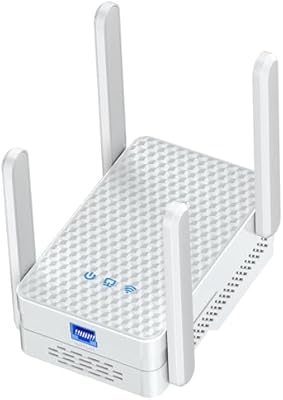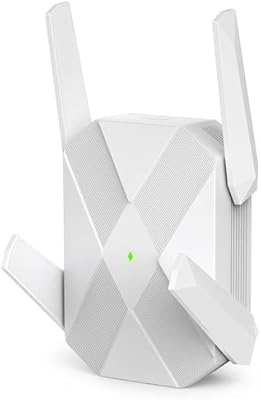
Overview

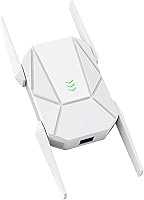
The ZMISDRI M-AX05 AX1800 WiFi 6 Extender enters the mid-range market squarely aimed at anyone who has resigned themselves to dead zones in a back bedroom, garage, or basement. ZMISDRI is a newer name in networking gear, but the M-AX05 has already gathered over 850 ratings — respectable traction for a brand still building its reputation. The plug-in form factor keeps things practical: no mounting, no separate power cable, and no companion app required. Before buying, though, be clear on what an extender actually does — it rebroadcasts your existing router's signal. If the primary router is the problem, this range booster will not fix it.

Features & Benefits

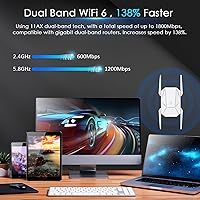
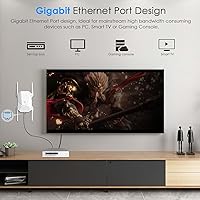
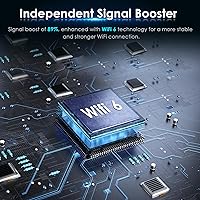
Running on 802.11ax, this WiFi 6 extender operates across both bands simultaneously — 2.4 GHz topping out at 600 Mbps and 5 GHz reaching 1200 Mbps for a combined theoretical ceiling of 1800 Mbps. Real-world speeds will land lower, as they always do, but the WiFi 6 engine handles congestion more gracefully than older AC standards, especially when many devices compete at once. The built-in gigabit Ethernet port is a genuine differentiator here; plugging in a smart TV or console directly bypasses wireless congestion entirely. Band steering automatically routes devices to whichever frequency offers a better connection, and WPA2 encryption handles security without extra configuration.

Best For

This range booster makes the most sense for homeowners who already have a solid router but struggle with dead zones in detached garages, basements, or far corners of a larger floor plan. Renters get a particularly clean solution here — no drilling, no Ethernet runs through walls, just plug in and configure via a browser. The gigabit port makes it worth considering for anyone who wants to hardwire a streaming device or gaming console without physically relocating their router. Small workshops and open-plan offices are also reasonable candidates. Where it fits less neatly is when the entire home Wi-Fi underperforms — in those cases, a better router or mesh system would be money better spent.

User Feedback

With a 4.3-star average across more than 850 ratings, the M-AX05 sits comfortably in positive territory. Buyers consistently highlight quick, hassle-free setup — the WPS pairing process takes minutes, and the browser interface handles more advanced configurations without fuss. The wired Ethernet port earns genuine praise, with several users noting it resolved lag on streaming sticks and older consoles. On the critical side, a recurring complaint is that the claimed coverage area is optimistic; in homes with multiple walls or concrete floors, effective range drops noticeably. A handful of buyers have also raised questions about long-term firmware support from a brand this new, which is worth keeping in mind if longevity is a priority.

Pros

  • Setup takes only minutes using the WPS button or a straightforward browser interface — no app download needed.
  • The built-in gigabit Ethernet port delivers a genuinely useful wired connection for TVs, consoles, or desktop PCs.
  • WiFi 6 technology handles congested, multi-device households more efficiently than older AC-standard extenders.
  • Automatic band steering removes the hassle of manually switching between 2.4 GHz and 5 GHz networks.
  • The plug-in wall unit design is compact and requires no separate power cable or mounting hardware.
  • Over 850 ratings at 4.3 stars suggests consistent real-world satisfaction across a wide range of buyers.
  • WPA2 encryption is included out of the box with no extra configuration required.
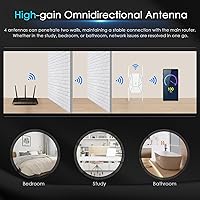
  • The 360-degree antenna design provides broader signal spread compared to fixed directional antennas.
  • Supports legacy WiFi standards, so older devices connect without any compatibility issues.

Cons

  • Real-world coverage in homes with thick walls or multiple floors falls noticeably short of the advertised range.
  • WiFi 6 speed gains are only meaningful when the primary router and client devices also support the standard.
  • ZMISDRI has a limited track record, and long-term firmware support remains uncertain for this newer brand.
  • As a single-unit extender, it creates a separate network segment that can cause roaming issues between zones.
  • Theoretical throughput of 1800 Mbps is rarely achievable in typical home environments with interference.
  • No dedicated mobile app means users who prefer app-based management will find the browser interface less convenient.
  • Heavy-wall or concrete construction significantly reduces effective range, limiting usefulness in older homes.
  • No tri-band option means the extender cannot use a separate band exclusively for backhaul traffic.
  • Limited publicly available documentation makes advanced troubleshooting harder for less experienced users.

Ratings

The scores below reflect an AI-driven analysis of verified global buyer reviews for the ZMISDRI M-AX05 AX1800 WiFi 6 Extender, with spam, bot activity, and incentivized feedback actively filtered out to surface genuine user sentiment. Each category is scored independently to give you an honest picture of where this range booster genuinely delivers and where it falls short. Both the consistent praise and the recurring frustrations are weighted equally so you can make a confident, informed decision.

Ease of Setup
91%
The WPS pairing process is the most consistently praised aspect across the entire review base — buyers report going from box to connected in under three minutes without reading a single instruction. The browser-based interface is clean enough that less tech-savvy users, including older adults setting this up solo, rarely report needing outside help.
A small portion of users with ISP-provided combo modem-routers found WPS disabled by default on their gateway, forcing them into the browser setup, which adds a few extra steps. Occasionally the browser login page takes a moment to load, causing some buyers to assume the unit is defective before it has fully initialized.
Coverage Range
63%
37%
In open-plan homes and single-story layouts with standard drywall construction, the M-AX05 noticeably pushes usable signal into previously dead zones — a detached garage or a back bedroom that previously had one bar now holds a stable connection for streaming and video calls.
The advertised 12,999 sq ft figure is a significant stretch in any real-world home with brick, concrete, or multiple floors. Buyers in older construction report effective useful range closer to two or three rooms beyond the extender, and multi-story coverage is inconsistent enough that several users placed the unit on a staircase landing as a workaround.
WiFi Speed Performance
74%
26%
Users with WiFi 6 routers and compatible devices report a meaningful jump in throughput compared to older AC extenders at the same price point, particularly on the 5 GHz band for 4K streaming and large file transfers. The band steering function works quietly in the background, preventing devices from camping on the slower 2.4 GHz band unnecessarily.
As with all extenders, there is an inherent throughput penalty because the unit relays traffic over the same radio it receives on — expect real-world speeds to be roughly half of what you get standing next to the primary router. Users whose main router is AC or older see less dramatic improvement since the WiFi 6 advantages do not cascade backward through the chain.
Gigabit Ethernet Port
88%
The wired port earns genuine praise rather than being treated as a throwaway feature — buyers who plugged in a Fire TV Stick via an Ethernet adapter or connected a gaming console directly report noticeably lower latency and eliminated buffering compared to purely wireless operation. For anyone with a device anchored in a dead zone, this port alone justifies the purchase.
Only one Ethernet port is available, so users with both a smart TV and a console near the extender will need a small switch to take advantage. The cable is not included in the box, which is a minor but recurring complaint from buyers who expected at least a short patch cable.
Latency & Gaming
69%
31%
Casual and mid-tier gamers using the 5 GHz band report acceptable ping levels for online multiplayer titles, and video call quality on platforms like Zoom and Teams is described as stable by remote workers who positioned the extender near their home office.
Competitive gamers note that extender-introduced latency — even on the faster band — creates occasional inconsistency compared to a direct router connection. The wired port mitigates this considerably, but purely wireless gaming through this range booster is not recommended for latency-critical titles.
Multi-Device Handling
78%
22%
Households running 20 to 40 smart-home devices report stable simultaneous connections without the cascading disconnections that plagued older N or AC extenders under similar load. The WiFi 6 OFDMA and MU-MIMO capabilities genuinely help distribute channel resources more efficiently across competing devices.
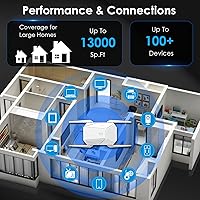
The 100+ device claim appears optimistic at full load — buyers with very large smart-home deployments closer to 60 or 70 devices report some instability during peak usage periods. The extender handles moderate multi-device households comfortably, but it is not a substitute for a properly segmented network in a high-density environment.
Build & Design
77%
23%
The compact plug-in form factor keeps things tidy without dominating an outlet or requiring shelf space, and the matte white finish blends into most home interiors without drawing attention. At 10.8 oz it holds its position in a wall outlet firmly without any wobble.
The physical footprint is wide enough to block an adjacent outlet on many standard dual-outlet wall plates, which irritates buyers in rooms where every socket is in use. A few users also noted the plastic housing feels slightly hollow, though no one reported cracking or structural issues during normal use.
Signal Stability
72%
28%
The majority of buyers report the connection holds consistently over days and weeks without requiring reboots, and the LED indicator makes it easy to spot when the unit needs repositioning. The onboard signal-optimization chip appears to do meaningful work maintaining a consistent relay even as other devices cycle on and off the network.
A recurring minority complaint involves the extender dropping its connection to the primary router after several days of uptime, requiring a manual power cycle to recover. This does not appear universal, but it surfaces often enough in the review base that buyers should factor in occasional maintenance restarts.
Wall & Floor Penetration
61%
39%
Through standard interior drywall partitions the M-AX05 maintains a workable signal across two or three room spans, which is adequate for most single-story layouts where the dead zone is simply too far from the router rather than behind heavy materials.
Concrete block, brick, and poured-concrete floors absorb significant signal, and buyers in older masonry homes or split-level layouts report coverage dropping off sharply. The 360-degree antenna design helps in open spaces but does not overcome the physics of dense building materials at longer distances.
Security Features
81%
19%
WPA2 encryption activates during initial setup with no manual configuration needed, and the browser interface allows password changes and network name customization without any technical background required. Buyers appreciate that security is handled competently out of the box rather than being left as an afterthought.
The unit does not support the newer WPA3 standard, which is becoming a baseline expectation at this price tier as more routers and devices adopt it. There is no guest network isolation feature, which would be a useful addition for households that extend coverage to areas used by visitors or IoT devices.
Value for Money
82%
18%
Relative to other WiFi 6 extenders with a gigabit Ethernet port at a comparable price, the M-AX05 lands in a competitive spot — buyers who needed a simple dead-zone fix without spending significantly more on a full mesh node consistently express satisfaction with the cost-to-performance ratio.
Buyers who purchased expecting whole-home coverage transformation feel the price was not fully justified once real-world range limitations became apparent. If the use case is narrower than initially assumed — say, covering one additional room rather than an entire large property — the value calculation still holds up well.
Brand Reliability
58%
42%
The hardware itself has performed consistently for most buyers in the short-to-medium term, and the review volume of over 850 ratings provides reasonable confidence that the unit works as described at time of purchase. Out-of-box defect rates appear low based on the proportion of one-star reviews attributable to hardware failure.
ZMISDRI has not established a track record for firmware updates or post-sale customer support, and several buyers raise legitimate questions about what happens if an issue emerges after the return window closes. For buyers who prioritize long-term brand accountability, this uncertainty is a real consideration that more established networking brands do not carry.
LED Indicator Usefulness
76%
24%
The LED gives clear at-a-glance feedback on whether the extender is connected and how strong the relay signal is, which is genuinely helpful when finding the optimal placement position — buyers describe walking it to different outlets until the indicator confirms a strong upstream link.
In bedrooms or open-plan living areas, some buyers find the LED too bright during nighttime hours and note there is no brightness control or scheduled off option in the interface. Covering it with tape is the workaround most commonly cited, which points to a small but solvable design oversight.

Suitable for:

The ZMISDRI M-AX05 AX1800 WiFi 6 Extender is a strong match for homeowners who already have a reliable primary router but deal with frustrating dead zones in distant rooms, garages, or basements. Renters are a particularly good fit — there is no drilling, no cable routing, and no complicated app to manage; just plug it into a wall outlet and complete setup through a browser or WPS button. Anyone who needs to hardwire a streaming device or gaming console without physically moving their router will find the gigabit Ethernet port a practical bonus. Households juggling a large number of smart-home gadgets will also appreciate that this range booster can handle over 100 simultaneous connections, reducing the load on the main router. Small open-plan offices or workshops where running a cable is impractical are reasonable candidates as well.

Not suitable for:

If your core problem is a weak or aging router rather than a coverage gap, the ZMISDRI M-AX05 AX1800 WiFi 6 Extender will not fix the underlying issue — an extender only rebroadcasts the signal it receives, so a poor source means a poor extension. Buyers expecting whole-home coverage in large, densely built properties with concrete walls or multiple floors should temper expectations significantly; the real-world range consistently falls short of the headline 12,999 sq ft figure in those environments. Users who prioritize long-term brand support and regular firmware updates may also want to pause — ZMISDRI is a relatively new player, and its track record for sustained software maintenance is still unproven. Those already running a modern mesh network will find little reason to add this extender, as mesh systems handle roaming and dead-zone coverage more elegantly. Power users who need advanced controls like VLAN support, detailed QoS, or dedicated backhaul channels should look at purpose-built mesh nodes or higher-tier access points instead.

Specifications

  • WiFi Standard: Supports 802.11ax (WiFi 6) along with backward-compatible 802.11a/b/g/n/ac devices.
  • Frequency Bands: Dual-band operation covers both 2.4 GHz and 5 GHz simultaneously for flexible device distribution.
  • Max Throughput: Combined theoretical throughput reaches 1800 Mbps — 600 Mbps on 2.4 GHz and 1200 Mbps on 5 GHz.
  • Claimed Coverage: Manufacturer rates coverage at up to 12,999 sq ft, though real-world results vary based on construction and interference.
  • Device Capacity: Designed to handle connections from more than 100 devices simultaneously across both bands.
  • Ethernet Port: Includes one gigabit Ethernet port (1000 Mbps) for wired connections to TVs, consoles, or desktop computers.
  • Security: WPA2 encryption is enabled by default to protect the extended network from unauthorized access.
  • Setup Method: Can be configured via WPS button pairing or a browser-based web interface; no companion app is required.
  • Antenna Design: Uses a 360-degree omnidirectional internal antenna layout intended to distribute signal in all directions evenly.
  • Form Factor: Plug-in wall unit that draws power directly from a standard electrical outlet with no external power cable.
  • Dimensions: Unit measures 5.12 x 4.92 x 4.37 inches, making it compact enough to avoid blocking adjacent outlets on most strips.
  • Weight: Weighs 10.8 ounces, light enough that wall outlet grip holds it securely without sagging.
  • Band Steering: Automatic band steering intelligently routes connected devices to whichever frequency band offers the stronger signal.
  • LED Indicator: An onboard LED provides visual status feedback for signal strength and connection state during and after setup.
  • Model Number: Official model designation is M-AX05, as listed by manufacturer ZMISDRI.
  • Compatibility: Works with any WiFi router or gateway regardless of brand, extending the existing network under the same or a new SSID.

Related Reviews
WAVLINK WN573HX1 AX1800 Outdoor WiFi 6 Access Point
80%
92%
Weather Resistance & Durability
84%
WiFi Range & Signal Strength
81%
Installation & Setup
61%
Configuration Interface (UI/UX)
86%
WiFi 6 Performance & Speed
More
NETGEAR EAX15 AX1800 WiFi 6 Mesh Extender
79%
91%
Ease of Setup
74%
WiFi Coverage
77%
Wireless Speed
68%
Roaming Performance
83%
Ethernet Port Utility
More
TP-Link RE615X
TP-Link RE615X
77%
91%
Ease of Setup
76%
WiFi Coverage
63%
Throughput Performance
93%
Ethernet Port Utility
71%
Signal Stability
More
WAVLINK WN588HX3 WiFi 6 Outdoor Access Point
75%
83%
Outdoor Signal Range
91%
Build Quality & Weatherproofing
78%
Installation & Mounting
61%
Setup & Configuration Experience
86%
WiFi 6 Performance
More
Zelikovitz WiFi Extender M-97A
87%
94%
Setup & Installation
88%
Signal Strength
92%
Value for Money
90%
Compatibility with Routers
86%
Performance in Large Spaces
More
Techtex WiFi 6 Dual-Band Range Extender
79%
83%
Coverage Range
91%
Setup Experience
67%
Real-World Speed
88%
Outdoor Durability
79%
Multi-Device Handling
More
Eboous AX3000 WiFi 6 Range Extender
77%
78%
Signal Range & Coverage
91%
Setup & Installation
83%
WiFi 6 Performance
74%
Mesh Integration
88%
Ethernet Port Utility
More
BrosTrend AX1500 WiFi 6 Extender
77%
72%
WiFi Coverage
78%
Wireless Speed
89%
Wired Connectivity
86%
Ease of Setup
81%
Build Quality
More
Linksys RE7310 WiFi 6 Range Extender
84%
89%
Performance
91%
Ease of Setup
88%
Coverage Area
84%
Speed Stability
92%
Compatibility
More
TP-Link RE600X WiFi 6 Extender
87%
87%
Performance
93%
Ease of Setup
85%
WiFi Coverage
89%
Dual-Band Speed
84%
Reliability
More

FAQ

No app is required at all. You can pair the extender to your existing router in seconds using the WPS button, or log into its browser-based interface by typing its default IP address into any web browser. Most buyers find the WPS route fast enough that they never need the browser panel.

It works with any router, regardless of age or brand. The M-AX05 supports legacy standards going back to 802.11b, so even an older router will connect without issues. That said, the WiFi 6 speed improvements are most noticeable when both the router and the connecting devices also support the standard — older setups will still benefit from extended range, just not the full AX throughput.

That figure reflects an open, unobstructed environment — think empty warehouse conditions rather than a real home. In a typical house with drywall, wood framing, and furniture, expect meaningful coverage across perhaps a few rooms or one additional floor. Concrete walls, brick, or metal structures will reduce range further. Positioning the extender halfway between your router and the dead zone gives the best practical results.

It lets you run a physical cable from the extender directly to a device — a smart TV, gaming console, desktop PC, or NAS drive. Wired connections are faster and more stable than wireless ones, so this port is genuinely useful if you have a device near the extender that supports a cable. Several buyers specifically bought this range booster for this feature alone.

For casual gaming and HD video calls, the 5 GHz band generally delivers low enough latency to work well. For competitive gaming where every millisecond counts, using the gigabit Ethernet port instead of relying on the wireless connection is strongly recommended, as all wireless extenders introduce some additional latency compared to a direct router connection.

The automatic band steering helps direct devices to the better band, but seamless roaming between the router and the extender depends on your device. Extenders typically broadcast a separate network name, and most phones will cling to the original router signal until it drops very low. If you want truly transparent roaming, a mesh system handles that more reliably.

It works in a power strip outlet just fine electrically, but the physical size means it may block one or two neighboring sockets depending on the strip's spacing. A wall outlet gives the most clearance. Wherever you plug it in, make sure it sits roughly halfway between your router and the dead zone for the best signal relay.

The onboard LED indicator changes color or pattern to show connection status — a solid light typically means it is connected and functioning, while blinking or a different color signals a problem. The specific LED behavior is outlined in the setup guide included in the box.

By default, this WiFi 6 extender creates a new network name with a suffix like _EXT added to your existing SSID. You can rename it to match your main network exactly during setup through the browser interface, which makes transitions between the two less noticeable for most devices, though true seamless handoff still depends on the client device.

ZMISDRI is a relatively recent entrant in the networking accessories space, so it does not have years of post-sale firmware updates on record the way established brands do. The current review data suggests the hardware performs reliably out of the box, but if long-term software support and a proven warranty track record are important to you, that is a fair consideration to weigh against the price advantage this extender offers.