Overview

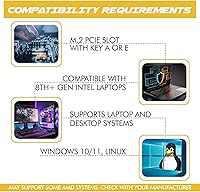
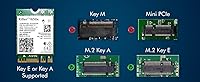
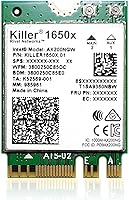
The HighZer0 AX1650x WiFi 6 M.2 Card is a budget-tier internal wireless upgrade built around Intel's Killer AX1650x chipset — HighZer0 is the card integrator here, not the chip designer. It sits a clear step above older Intel networking cards like the AC 9260 or AX200, bringing dual-band coverage across 2.4 GHz and 5 GHz alongside Bluetooth 5.2 in a compact M.2 module. Before ordering, one check is non-negotiable: your motherboard must have an M.2 Key A+E slot. Not all M.2 slots share the same keying, so pulling up your motherboard specs first will save a frustrating return.
Features & Benefits

Running on the 802.11ax standard, the Killer AX1650x adapter theoretically reaches 2.4 Gbps — a ceiling, not a guarantee, since real-world speeds hinge on your router and environment. What genuinely sets it apart at this price is the Killer Prioritization Engine, which automatically pushes gaming and streaming packets ahead of background traffic like software updates or cloud syncs. The Killer Intelligence Center app extends that control, letting you manually assign bandwidth limits per application. Rounding things out: 2x2 MU-MIMO across both bands, 160 MHz channel support, and Bluetooth 5.2 built in — no separate adapter needed for your peripherals.

Best For

This M.2 wireless upgrade suits PC builders stepping off older WiFi 5 or aging Intel adapters, especially those who can't realistically run an ethernet cable. Apartment-based gamers will appreciate the traffic prioritization when network congestion peaks. Linux users get a notable bonus — documented driver support at this price tier is genuinely rare, though some terminal familiarity may be required depending on your kernel version. Home streamers managing upload-heavy workloads will find the dual-band connection dependable. For the budget-conscious upgrader who wants real Killer Series features without paying OEM laptop markups, this card makes a compelling case.

User Feedback

Across roughly 270 ratings, this Killer WiFi 6 card holds a 4.6-star average, and the reviews broadly support it. Most buyers praise the easy installation and a noticeable performance jump over whatever card they replaced. The recurring sore point, however, is worth flagging upfront: no antennas or screws come in the box, which catches some buyers off guard — budget for those separately. Desktop users also report needing a standalone M.2-to-PCIe adapter kit, adding friction to the install. Driver stability on Windows 11 is generally solid, though a minority mention occasional issues following major OS updates. Long-term reliability feedback leans positive.

Pros

  • WiFi 6 brings a tangible speed and stability improvement over older WiFi 5 or legacy Intel networking cards.
  • The Killer Prioritization Engine automatically deprioritizes background traffic, keeping gaming and streaming responsive.
  • Killer Intelligence Center gives per-app bandwidth control for users who want hands-on network management.
  • Bluetooth 5.2 is built in, replacing the need for a separate dongle for keyboards, headsets, or controllers.
  • 160 MHz channel support on the 5 GHz band helps squeeze more real-world throughput in clean RF environments.
  • Installation on compatible laptops is straightforward — drop it into the M.2 slot and it is largely ready to go.
  • Linux driver support is documented and functional, which is genuinely rare at this price point.
  • The AX1650x adapter sits well above entry-level Intel cards in features while staying in a budget-friendly range.
  • Compact M.2 form factor means no PCIe slot is consumed and no external adapter occupies a USB port.
  • Buyer sentiment across hundreds of reviews skews strongly positive, with reliability holding up well over time for most users.

Cons

  • No antennas or mounting screws included — these must be purchased separately, which many buyers only discover after opening the box.
  • Desktop installs require an additional M.2-to-PCIe adapter kit, adding cost and steps that the listing does not make obvious.
  • The 2.4 Gbps speed rating is a theoretical maximum; real-world performance depends heavily on your router and interference levels.
  • Compatibility is limited to M.2 Key A+E slots specifically — standard NVMe M.2 slots will not work with this card.
  • A minority of users on Linux have reported kernel version dependencies that require manual driver resolution.
  • Some Windows 11 users note occasional driver instability following major OS updates, requiring reinstallation.
  • The Killer Intelligence Center software, while functional, has a mixed reputation for its interface and update reliability.
  • No 6 GHz band support — buyers with WiFi 6E routers cannot take advantage of the newer spectrum with this card.
  • HighZer0 is a third-party integrator, so manufacturer support and warranty service may be less straightforward than with OEM cards.
  • Buyers in dense urban environments with heavy 5 GHz congestion may not see the full benefit of the 160 MHz channel width.

Ratings

The HighZer0 AX1650x WiFi 6 M.2 Card has been scored by our AI rating engine after analyzing verified purchase reviews from buyers worldwide, with spam, bot-submitted, and incentivized feedback actively filtered out before scoring. Each category below reflects the honest distribution of praise and frustration found across real user experiences — nothing has been smoothed over to make the product look better than it is. Strengths in wireless performance and installation ease are balanced transparently against recurring pain points around missing accessories and desktop compatibility friction.
Wireless Performance
84%
Buyers upgrading from WiFi 5 or older Intel cards consistently describe the jump as meaningful — lower ping in competitive games, fewer dropped frames during streams, and noticeably more stable connections in congested apartment buildings. The 5 GHz band with 160 MHz channel support holds up well when the router supports it.
Users with mid-tier WiFi 6 routers that cap at 80 MHz channels see more modest gains, and the 2.4 Gbps theoretical ceiling rarely translates to anything close in real home environments. A handful of reviewers noted inconsistent throughput during heavy network congestion even with prioritization enabled.
Installation Ease
78%
22%
Laptop upgraders with an existing M.2 WiFi slot — and antenna leads already routed — report a near-painless swap: pull the old card, seat this one, attach leads, and boot. Windows 10 and 11 detect the card quickly, with drivers often loading automatically through Windows Update.
Desktop users face a noticeably rougher experience, needing a separate M.2-to-PCIe adapter bracket that does not come in the box. Add in the missing antennas and screws, and what looks like a simple upgrade turns into a multi-part sourcing exercise before anything works.
Accessory Completeness
41%
59%
The card itself is physically complete and ships undamaged in the vast majority of cases. Buyers who already had spare MHF4 antenna leads from a previous card swap — or who were upgrading a laptop with built-in antenna routing — reported no inconvenience from the omissions.
No antennas, no mounting screws, and no adapter kit for desktop installs — this is the single most consistent complaint across the review pool. Many buyers only discovered these omissions after opening the box, leading to frustration and, in some cases, returns. At this price tier, including at minimum a basic antenna pair would significantly improve the out-of-box experience.
Gaming Traffic Prioritization
88%
The Intel Killer Prioritization Engine performs well in shared-network scenarios — buyers living with roommates or family members regularly streaming and downloading note a real difference in gaming latency when background traffic would otherwise compete for bandwidth. It works without any configuration out of the box.
The automatic detection does not always correctly classify every application, and some users report that less mainstream game clients are occasionally deprioritized alongside background traffic rather than elevated. Correcting this requires manually adjusting priorities in the Killer Intelligence Center, which adds a learning curve.
Killer Intelligence Center Software
63%
37%
For users who engage with it, the per-application bandwidth controls and real-time traffic visualization are genuinely useful — particularly for streamers who want to cap upload speeds for background cloud backups without affecting their main stream.
The software has a reputation for a clunky interface and occasionally aggressive auto-update behavior that some users find intrusive. A minority report that it conflicts with other network monitoring utilities, and a few Windows 11 users noted it required a clean reinstall after a major OS feature update.
Bluetooth Performance
81%
19%
Having Bluetooth 5.2 onboard means one less USB port occupied by a dongle, and buyers pairing wireless headsets, controllers, or keyboards report clean pairing and stable connections at typical desktop-to-peripheral distances. The Bluetooth and WiFi radios coexist without noticeable interference in most setups.
A small number of users report occasional Bluetooth dropout when both the WiFi radio and Bluetooth are under simultaneous heavy load — typically during large file transfers while streaming audio. This is not unique to this card but is worth noting for users who rely on both radios simultaneously.
Linux Compatibility
74%
26%
Among the M.2 WiFi cards available at this price point, the AX1650x adapter has above-average Linux support — users on Ubuntu 22.04 LTS and Fedora 38 and later report functional out-of-the-box detection with no manual driver compilation required on those kernel versions.
Users on older LTS distributions or less mainstream distros have hit kernel dependency walls that require sourcing and compiling the iwlwifi driver manually — a task that is approachable for experienced Linux users but a real barrier for newcomers. Documentation from HighZer0 on Linux setup is minimal.
Windows 11 Stability
76%
24%
The majority of Windows 11 users report stable daily operation with no connectivity drops under normal workloads — gaming sessions, video calls, and streaming all run reliably once the drivers are installed and settled. Most buyers do not encounter issues after initial setup.
A recurring pattern in the review pool involves driver instability following major Windows 11 feature updates, with some users needing to uninstall and reinstall the Killer driver stack to restore full functionality. This is an inconvenience rather than a fatal flaw, but it happens often enough to be worth flagging.
Desktop Compatibility
58%
42%
Desktop motherboards that expose their M.2 Key A+E slot via a standard CNVi or PCIe pathway — common on mid-range and higher Intel and AMD boards from the last four years — do work with this card once the correct adapter bracket is sourced. Buyers with CNVi-free slots confirm full functionality.
The requirement for a separate adapter kit, combined with the M.2 Key A+E slot being absent or CNVi-locked on many desktop boards, means desktop compatibility is far from guaranteed. A meaningful portion of desktop buyers find they cannot use the card at all without returning it.
Value for Money
86%
At its price point, accessing genuine Intel Killer Series silicon with WiFi 6, 160 MHz support, and Bluetooth 5.2 is a strong proposition — OEM laptops charge a premium for the same chipset baked in. Buyers who confirm compatibility in advance consistently rate the value as excellent relative to what they paid.
The value calculation changes once you factor in the additional cost of antennas, screws, and potentially a desktop adapter kit. For some buyers, these extras add 30–50% to the effective purchase cost, which shifts the value perception considerably.
Dual-Band Coverage
82%
18%
Both the 2.4 GHz and 5 GHz bands are well-implemented, with 2x2 MU-MIMO delivering reliable coverage across typical home environments. Users in single-story homes report strong 5 GHz performance at moderate distances, and the 2.4 GHz band holds up as a fallback for longer-range connections.
With no 6 GHz band support, buyers who have already invested in a WiFi 6E router cannot use this card to access their router's newest spectrum. It is a deliberate spec limitation rather than a defect, but buyers comparing it to newer 6E cards will feel the gap.
Long-Term Reliability
79%
21%
The review pool includes buyers who have been using the AX1650x adapter for over a year with no hardware failures, which is encouraging given the budget price tier. The Intel chipset itself has a strong track record for longevity across multiple form factors and OEM deployments.
HighZer0 as a third-party integrator does not have the same after-sales infrastructure as a major brand, so users who do encounter hardware defects after the initial return window report a less than straightforward resolution process. Long-term firmware or driver support from HighZer0 specifically is an open question.
MU-MIMO Efficiency
77%
23%
In multi-device households with a compatible WiFi 6 router, MU-MIMO allows the AX1650x to maintain more consistent throughput even when competing for airtime with other devices. Buyers who upgraded their router at the same time as this card tend to report the most pronounced improvement.
MU-MIMO benefits are only realized when the router also supports it and the network is genuinely congested — buyers on older routers or low-traffic home networks will notice little to no difference compared to a standard 2x2 configuration. The gains are real but heavily environment-dependent.

Suitable for:

The HighZer0 AX1650x WiFi 6 M.2 Card is a strong fit for PC builders and upgraders who have an M.2 Key A+E slot available and want to step up from an older WiFi 5 or legacy Intel networking card without spending a lot. Gamers in apartments or shared living situations — where running a dedicated ethernet cable simply is not realistic — will get real value from the Killer Prioritization Engine routing their game traffic ahead of background noise on the network. Home streamers and content creators who regularly push upload-heavy workloads will also find the 5 GHz band with 160 MHz channel support more consistent than what older adapters can deliver. Linux users are a genuinely underserved group at this price tier, and this card's documented driver support makes it one of the more practical wireless options available to them, though some comfort with driver setup is still advisable. Anyone who wants Bluetooth 5.2 bundled in without buying a separate dongle will appreciate that it comes standard here.

Not suitable for:

Buyers who do not have a free M.2 Key A+E slot on their motherboard should stop before adding this to their cart — a standard M.2 NVMe slot used for storage will not work, and mixing up the key types is one of the most common return reasons for this type of card. Desktop PC users who plan a straightforward install should also know upfront that this card does not come with antennas or mounting screws, and a separate M.2-to-PCIe adapter kit is required for most desktop motherboard setups, adding extra parts and cost to what initially looks like a simple upgrade. Users who expect real-world speeds anywhere near the 2.4 Gbps theoretical ceiling will likely be disappointed — that figure is a ceiling under ideal lab conditions, not a practical benchmark for home networks. Those running older Windows versions or niche Linux distributions with limited kernel support may hit driver friction. Finally, buyers prioritizing plug-and-play simplicity with zero extra hardware sourcing should probably look at a USB WiFi 6 adapter instead.

Specifications

  • WiFi Standard: The card operates on the 802.11ax (WiFi 6) standard, with backward compatibility across 802.11a/b/g/n/ac networks.
  • Max Throughput: Theoretical maximum data transfer rate reaches 2.4 Gbps under ideal conditions using 160 MHz channel width.
  • Frequency Bands: Dual-band operation covers both 2.4 GHz and 5 GHz frequencies for flexible network compatibility.
  • Channel Width: Supports 160 MHz channel width on the 5 GHz band, enabling higher throughput when paired with a compatible WiFi 6 router.
  • MIMO Config: Uses a 2x2 MU-MIMO antenna configuration with simultaneous TX and RX streams on both frequency bands.
  • Bluetooth: Integrated Bluetooth 5.2 module supports low-energy peripheral connections without requiring a separate adapter.
  • Form Factor: M.2 NGFF module keyed for Key A+E slots; not compatible with M.2 Key M or Key B slots used for NVMe or SATA storage.
  • Interface: Connects to the host system via a PCIe x1 interface through the M.2 slot on the motherboard.
  • OS Support: Officially supported on Windows 10 and Windows 11 (64-bit), with documented Linux driver availability for compatible kernel versions.
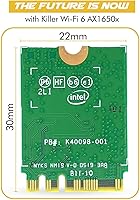
  • Dimensions: The card measures 1.18″ in length, 0.87″ in width, and 0.1″ in thickness, consistent with the standard M.2 2230 form factor.
  • Weight: The bare card weighs approximately 0.006 ounces, reflecting its minimal component footprint without antennas attached.
  • Antennas: No antennas are included in the package; buyers must source compatible external antennas separately before the card can transmit or receive wirelessly.
  • Mounting Hardware: No mounting screws are included; a compatible M.2 retention screw must be sourced separately for secure installation.
  • Software: Compatible with the Intel Killer Intelligence Center application, which provides per-application bandwidth prioritization and traffic monitoring on Windows.
  • Prioritization Engine: The Intel Killer Prioritization Engine automatically identifies and elevates latency-sensitive traffic such as gaming and video streaming above background data transfers.
  • Security Standards: The card complies with FIPS and FISMA security standards, as well as the WiFi 6 802.11ax certification requirements.
  • Chipset Origin: The core wireless chipset is Intel Killer AX1650x silicon; HighZer0 Electronics serves as the card integrator and retail seller, not the chipset manufacturer.
  • Release Date: First made available for retail purchase on September 24, 2022.
  • Desktop Install: Desktop motherboard installation requires a separately purchased M.2-to-PCIe adapter bracket kit, as the card is not a standard full-height PCIe add-in card.
  • Market Rank: Ranked #262 in the Internal Computer Networking Cards category on Amazon at the time of this review, reflecting strong sustained sales volume.

Related Reviews

Asustor FLASHSTOR 6 Gen2 FS6806X 6-Bay M.2 SSD NAS
88%
94%
Performance
89%
Ease of Setup
92%
Build Quality
93%
Data Transfer Speed
88%
Storage Flexibility
More
TEROW ROW076 WiFi 6 PCIe Network Card
85%
87%
Performance
90%
Installation Ease
89%
WiFi Speed & Reliability
85%
Bluetooth Connectivity
91%
Gaming Experience
More
Cudy WE3000 WiFi 6 PCIe Card
80%
83%
WiFi Performance
88%
Installation Ease
81%
Signal Range
74%
Bluetooth Quality
69%
Driver Stability
More
TP-Link Archer TX20E WiFi 6 PCIe Card
79%
91%
Value for Money
83%
Installation Ease
86%
WiFi Signal Stability
84%
Gaming Performance
77%
Bluetooth Performance
More
Linksys Atlas MX2000 2-Pack Mesh Router
82%
88%
WiFi Coverage & Range
91%
Setup & Ease of Use
83%
Network Speed & Throughput
86%
Device Load Handling
77%
Latency & Gaming Performance
More
TP-Link Archer TX55E
87%
93%
Throughput Speed
89%
Gaming Latency
86%
Signal Stability
82%
Bluetooth Connectivity
91%
Thermal Management
More
GL.iNet GL-MT6000 Flint 2
82%
93%
VPN Performance
81%
Wireless Speed & WiFi 6
92%
Wired Connectivity
88%
Firmware & Software
89%
AdGuard Home Integration
More
Wielio 269D Native 1080P Mini Projector
77%
88%
Ease of Setup
79%
Picture Quality
72%
Smart App Performance
84%
Portability & Design
86%
120-Degree Adjustable Stand
More
Slevnyen Q3 2.5K Dash Cam with WiFi and 64GB SD Card
82%
88%
Video Quality
93%
Ease of Installation
85%
Night Vision Performance
77%
App Functionality
72%
Parking Monitor
More
Beelink ME Mini PC, 12GB RAM, 2TB SSD, 6 x M.2 Slots
85%
87%
Performance
93%
Storage Expansion Capability
90%
Network Speed and Reliability
88%
Noise Level
85%
Build Quality
More

FAQ

You need a free M.2 slot keyed for Key A+E — this is different from the M.2 Key M slots most motherboards use for NVMe SSDs. Pull up your motherboard manual or manufacturer spec page and look specifically for an M.2 Key A or Key E slot, sometimes labeled as a WiFi or CNVi slot. If your board only has M.2 Key M slots, this card will not physically fit.

It works in desktops too, but there is a catch: most desktop motherboards route the M.2 Key A+E slot to a small connector near the top of the board, and you will need a separate M.2-to-PCIe adapter bracket to mount the card properly in a standard case. That adapter is not included, so budget for it separately before you order.

Almost certainly not in practice, and that is not unique to this card. The 2.4 Gbps figure is a theoretical maximum under perfect lab conditions using 160 MHz channels. Real-world speeds depend on your router's capabilities, distance from the access point, interference, and how many devices are sharing the network. Think of it as the ceiling, not the floor — most users will see speeds well below that in everyday use.

Yes, and this is important to know before you order. The HighZer0 AX1650x WiFi 6 M.2 Card does not come with antennas or mounting screws in the box. Without antennas attached, the card cannot establish a wireless signal. You will need to source a compatible pair of MHF4 or IPX antennas that match your system's connector type — check your case or laptop chassis for existing antenna leads if upgrading an existing system.
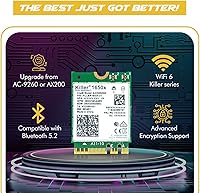
It is genuinely useful if you care about network prioritization, but it has a polarizing reputation. The traffic prioritization works well for gamers and streamers who want to keep background downloads from eating into their bandwidth during a session. That said, some users find the interface clunky and the auto-update behavior annoying. If you just want the card to work as a standard WiFi 6 adapter without the software layer, it will do that fine without the app installed.

This card supports WiFi 6 (802.11ax) only, operating on the 2.4 GHz and 5 GHz bands. It does not support WiFi 6E, which adds the 6 GHz band. If you have a WiFi 6E router and want to use the 6 GHz spectrum, you would need a different card — this one will still connect to your router, just not on the 6 GHz band.

Yes, Linux is supported, and it is one of the things that makes this card stand out at its price. That said, the experience is not quite as hands-off as on Windows. Most users on mainstream distributions like Ubuntu or Fedora report a smooth setup, but a minority have encountered kernel version dependencies that require a bit of manual driver work. If you are comfortable in a terminal and know how to check your kernel version, you should be fine.

Yes. The Bluetooth 5.2 module operates independently of the WiFi radio, so you can connect peripherals like a wireless keyboard, headset, or game controller through Bluetooth even if you are not using the card for WiFi at that moment. It shows up as a standard Bluetooth adapter in your device manager once the drivers are installed.

The chipset inside is genuine Intel Killer AX1650x silicon — that part is authentic. HighZer0 Electronics is a third-party card integrator that builds the M.2 module around that chip and sells it at retail. This is a common practice in the networking card market, similar to how third-party vendors sell graphics cards built on AMD or Nvidia GPUs. The Killer features and compatibility are real; just understand that warranty support goes through HighZer0, not Intel directly.

Possibly, but there are two things to check first. Your laptop's M.2 WiFi slot needs to be Key A+E, which is standard for most wireless slots in laptops — so that part is usually fine. The more important variable is whether your laptop uses Intel CNVi technology, which hardwires the wireless card to the CPU and will only accept specific Intel CNVi-compatible cards. If your current card is CNVi-locked, a third-party M.2 card like this one will not be recognized. Check your laptop model's specs or forums before purchasing.

Where to Buy