Overview

The BrosTrend AC3L AC1200 Linux USB WiFi Adapter tackles one of the most frustrating problems in the Linux world: finding a wireless adapter that actually works with your distro. Most adapters are built for Windows and treated as an afterthought everywhere else. This one takes the opposite approach, targeting Linux users directly. It runs on the Realtek RTL8812BU chipset, which matters because chipset choice determines whether a working driver even exists for your kernel. Priced in the mid-range, it sits above the cheap throwaway adapters while stopping short of overkill territory. Windows setup is plug-and-play; Linux requires a few terminal commands, so some basic comfort with the command line helps.
Features & Benefits

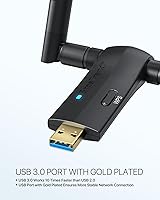
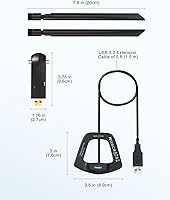
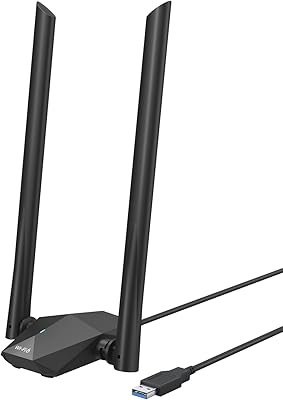
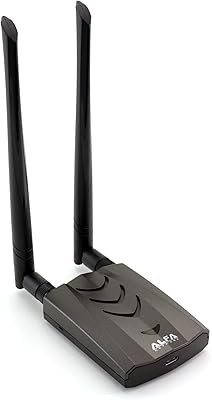
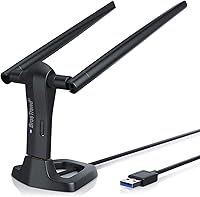
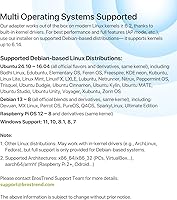
On the hardware side, the AC3L adapter delivers up to 867Mbps on the 5GHz band and 300Mbps on 2.4GHz — solid numbers for streaming or low-latency work. The USB 3.0 connection keeps throughput from being the bottleneck, and the included 5-foot extension cable lets you position the adapter where reception is actually good rather than wherever your port happens to be. The two detachable 5dBi antennas can be rotated a full 360 degrees, which makes a real difference in concrete-walled spaces. Distro compatibility spans everything running Linux kernel 6.2 or newer, covering Ubuntu, Debian, Mint, Kali, and Raspberry Pi OS. WPA3-SAE support is a welcome addition for anyone on a modern secured network.

Best For

This USB wireless adapter is squarely aimed at people who live in the Linux ecosystem. If your desktop motherboard's onboard Wi-Fi refuses to cooperate with your chosen distro, this is a straightforward fix. Raspberry Pi and ARM users get proper aarch64 and armhf support, which is not a given with cheaper adapters. Security researchers running Kali will appreciate the monitor mode and packet injection capabilities that come with the Realtek chipset. Home lab builders can use the AP mode to spin up a lightweight access point. For Windows-only users, there are cheaper options that do the same job — the value here is specifically the Linux driver support, not raw specs alone.

User Feedback

Across nearly 1,750 ratings, the AC3L adapter holds a 4.2-star average, which feels accurate given the split experience users report. Praise clusters around range and 5GHz stability once everything is configured, with several Raspberry Pi users specifically calling out how reliably it handles aarch64 builds. The recurring frustration is the setup process on older or less common kernels — some users expected a plug-and-play experience and were caught off guard by the driver installation steps. Windows users occasionally leave lukewarm reviews, noting they could have spent less for similar results. Not compatible with RHEL or CentOS, which has tripped up a handful of enterprise-adjacent users who missed that detail before purchasing.

Pros

  • Realtek RTL8812BU chipset has well-maintained community drivers, reducing the risk of being stranded after kernel updates.
  • Reliable aarch64 and armhf support makes the AC3L adapter a standout choice for Raspberry Pi projects.
  • 5GHz band holds steady for streaming and low-latency work once the adapter is properly configured.
  • Detachable 5dBi antennas with 360-degree rotation genuinely extend usable range compared to compact adapters.
  • Included 5-foot USB extension cable lets you position the adapter for best reception rather than best port access.
  • Monitor mode and packet injection work on Kali Linux, covering a critical need for wireless security testing.
  • WPA3-SAE support keeps the adapter current with modern router security standards.
  • AP mode and P2P operating modes open up home lab use cases beyond simple client connectivity.
  • BrosTrend offers support tickets for installation guidance, which is more hands-on than most hardware vendors provide.
  • Broad distro coverage across Ubuntu, Debian, Mint, Kali, and more reduces compatibility guesswork significantly.

Cons

  • Linux driver installation requires terminal commands and basic build tools — not remotely plug-and-play.
  • Rolling-release distro users may need to recompile the driver after major kernel updates, adding ongoing maintenance.
  • RHEL, CentOS, and several enterprise distros are explicitly unsupported, with no workaround from the vendor.
  • The large dual-antenna body blocks adjacent USB ports when plugged directly into a laptop without the extension cable.
  • Windows-only buyers are overpaying for Linux driver support they will never use.
  • Out-of-box printed documentation is minimal; most setup guidance is locked behind a vendor support ticket request.
  • AP mode configuration requires hostapd knowledge and is poorly documented for less experienced networking users.
  • Glossy plastic housing scratches easily and antenna bases can develop looseness after repeated adjustment over time.
  • Shared USB controller bandwidth on some machines causes speed dips when other high-throughput peripherals are connected.
  • Users on older Linux kernels below 6.2 have no supported path to compatibility, regardless of distro.

Ratings

The BrosTrend AC3L AC1200 Linux USB WiFi Adapter has been scored below by our AI system after analyzing thousands of verified global buyer reviews, with spam, bot-generated, and incentivized feedback actively filtered out. The scores reflect a candid picture of where this adapter genuinely excels and where real users have hit walls — both sides are represented without softening.
Linux Compatibility
88%
Users running Ubuntu, Debian, Mint, and Kali consistently report that the Realtek RTL8812BU chipset has solid community driver support, meaning help is available if something goes sideways. Raspberry Pi users on aarch64 builds specifically call this out as one of the few adapters that actually works without heavy workarounds.
Compatibility hits a wall on distributions using older kernels — RHEL, CentOS, and some niche distros are explicitly unsupported. A handful of users discovered this only after purchase, which stings when the whole point was Linux support.
Driver Installation Experience
63%
37%
For users comfortable in a terminal, the installation process is manageable and BrosTrend provides support ticket access to guide the steps. Several reviewers noted the documentation was clearer than expected for a niche Linux peripheral.
This is not plug-and-play on Linux — full stop. Users who expected the same effortless setup as on Windows were frequently frustrated. The process requires cloning a repository, running make commands, and rebooting, which is a real barrier for less experienced Linux users.
5GHz Signal Stability
83%
Once configured, the 5GHz band holds up well for sustained tasks like 4K streaming and video calls. Users in apartments with crowded 2.4GHz airspace found the 5GHz band noticeably cleaner and more consistent than onboard chipsets they had been limping along with.
A minority of users reported occasional drops on 5GHz specifically when the adapter was plugged directly into a rear USB port without the extension cable, suggesting positioning sensitivity that not everyone anticipated.
Antenna Range & Performance
81%
19%
The two 5dBi antennas make a tangible difference compared to compact nano adapters. Users in larger homes report holding a usable connection one or two rooms further than they could with previous adapters, and the 360-degree rotation helps dial in the sweet spot.
The physical size is a trade-off — the adapter is bulky enough that plugging it directly into a laptop port feels awkward and blocks adjacent ports. The extension cable helps, but it adds cable management to the setup.
Windows Plug-and-Play
71%
29%
On Windows 10 and 11 the adapter installs without any manual driver work, and most users were online within minutes of plugging in. It covers Windows 7 through 11, which is useful for anyone running a mixed-OS household.
Windows-only users consistently note that cheaper adapters do the same job for less money. The AC3L is priced for its Linux value — buying it purely for Windows is difficult to justify when comparable hardware costs significantly less.
Build Quality & Materials
74%
26%
The plastic housing feels reasonably solid for a mid-range peripheral, and the SMA connectors on the detachable antennas have a satisfying click that inspires more confidence than cheaper push-fit designs. At around 60 grams, it has some weight to it without feeling cheap.
The glossy black finish picks up fingerprints and scratches easily, and a few long-term users noted the antenna bases develop a slight wobble after months of repeated adjustment. Nothing that affects function, but noticeable for the price.
USB 3.0 Throughput
79%
21%
The USB 3.0 interface keeps the connection from being the bottleneck, particularly when pushing the 5GHz band near its upper limits. Users running the adapter on USB 3.0 ports consistently reported cleaner speed test results than those using USB 2.0 ports.
On machines where USB 3.0 ports share bandwidth with other high-throughput devices — external drives, webcams — users occasionally saw speed dips. This is an architectural limitation of shared USB controllers rather than the adapter itself, but it does come up.
Monitor Mode & Packet Injection
77%
23%
Security researchers and Kali Linux users specifically praised the RTL8812BU chipset for supporting monitor mode and packet injection, which is a non-negotiable requirement for wireless auditing work. It performed reliably in hands-on wireless testing scenarios described by several technically detailed reviewers.
Monitor mode requires the correct driver version, and a few Kali users reported that certain rolling-release kernel updates temporarily broke injection until the driver was recompiled. Staying current with driver updates is an ongoing responsibility rather than a one-time setup.
Value for Money
68%
32%
For a Linux user who has burned through two or three incompatible cheap adapters already, the mid-range price feels justified as a reliable, chipset-backed solution with vendor support. The inclusion of the extension cable and dual antennas adds tangible hardware value.
If your use case is purely Windows or you only need 2.4GHz connectivity, the pricing feels hard to defend. The value calculation is almost entirely dependent on how much you need that Linux driver support — without that need, there are better-priced alternatives.
AP Mode Functionality
72%
28%
Home lab users who tested the AP mode for creating a software access point reported it worked as expected on Ubuntu and Debian after configuration. It is a genuine capability that extends the adapter beyond pure client use, which is uncommon at this price tier.
Setting up AP mode is not trivial and requires hostapd configuration knowledge. Users without networking background found this mode largely inaccessible, and documentation from BrosTrend on this specific use case is sparse.
Raspberry Pi Integration
84%
ARM architecture support — specifically aarch64 and armhf — is well-regarded by the Pi community. Users running Raspberry Pi OS on Pi 4 and Pi 5 boards consistently reported clean detection and stable operation, with a few home automation builders calling it their go-to recommendation.
Pi users on very old board revisions or running stripped-down Raspberry Pi OS Lite builds occasionally needed extra steps to get the kernel headers in place before compilation. Minor, but worth knowing if you are working with a minimal image.
Setup Documentation
61%
39%
BrosTrend provides a support ticket system that gives buyers a direct line to installation guidance, which is more than most hardware vendors offer for Linux peripherals. Users who engaged with support generally found their issues resolved.
The out-of-box printed documentation is thin, and the reliance on a support ticket for something as fundamental as driver installation frustrates users who just want clear written steps upfront. Comparable open-source projects often have better community wikis.
Physical Size & Port Impact
58%
42%
The large dual-antenna form factor is the reason range performance is as good as it is, and users who used the extension cable had no complaints about desk placement or port blocking.
Without the extension cable, the adapter blocks one or two neighboring USB ports on most laptops and slim desktop cases. Several laptop users flagged this as a daily annoyance, and a portable setup where the cable is not practical becomes genuinely inconvenient.
Security Protocol Support
87%
WPA3-SAE support is a meaningful upgrade for users on modern routers, offering stronger handshake protection compared to WPA2. Coverage of older protocols down to WEP also keeps it functional in legacy network environments without requiring workarounds.
A small number of users on enterprise networks using 802.1x authentication reported configuration complexity that went beyond typical home use. Nothing broken, but not a frictionless experience for those scenarios.
Long-Term Reliability
73%
27%
Many reviewers with six-plus months of ownership report no hardware failures and consistent performance, which is reassuring for a USB peripheral that stays plugged in continuously. The detachable antenna design also means a damaged antenna can be swapped rather than scrapping the whole unit.
Kernel updates on rolling-release distros like Arch or Kali can occasionally require driver recompilation, introducing a maintenance burden over time. Users who want a truly set-and-forget experience may find this recurring friction a genuine long-term drawback.

Suitable for:

The BrosTrend AC3L AC1200 Linux USB WiFi Adapter was built with a very specific type of buyer in mind, and for that buyer it delivers real value. If you run Ubuntu, Debian, Kali, Linux Mint, or Raspberry Pi OS and have burned through cheaper adapters that either lacked drivers entirely or dropped off after a kernel update, this is the adapter to consider. The Realtek RTL8812BU chipset has strong community driver support, which means when something breaks after an OS update, there is an active ecosystem of fixes to draw from. Raspberry Pi enthusiasts working on aarch64 or armhf builds will find reliable detection without the usual ARM compatibility guesswork. Security researchers who need monitor mode and packet injection on Kali will appreciate that the chipset supports both without needing exotic workarounds. Home lab users who want to run a lightweight software access point or experiment with P2P networking modes also get genuine utility here beyond basic client use. If you are comfortable opening a terminal and running a handful of commands during setup, this adapter rewards that small investment with stable, long-range dual-band wireless.
Not suitable for:

The BrosTrend AC3L AC1200 Linux USB WiFi Adapter is a poor fit for anyone whose primary or only operating system is Windows. The hardware works on Windows, but you are paying a mid-range premium for Linux driver support that you would not be using, and cheaper alternatives handle Windows equally well for less money. Users on enterprise Linux distributions like RHEL or CentOS should look elsewhere entirely, as those distros are explicitly unsupported due to older kernel versions. If you are new to Linux and not yet comfortable with the command line, the driver installation process will likely feel like a frustrating obstacle rather than a minor step — this is not a device that configures itself. Anyone who needs a physically compact or low-profile adapter for travel will also find the dual-antenna form factor awkward, especially on a laptop where it blocks neighboring ports without the extension cable. Finally, users running bleeding-edge rolling-release distros who prefer a zero-maintenance setup should be aware that kernel updates can occasionally require recompiling the driver, which is a recurring responsibility rather than a one-time task.
Specifications

  • Brand & Model: Manufactured by BrosTrend Technology LLC under the model designation AC3L.
  • Chipset: Uses a Realtek RTL8812BU or RTL8822BU chipset, which determines driver availability across Linux distributions.
  • Wi-Fi Standard: Supports 802.11ac (Wi-Fi 5) dual-band operation across both 5GHz and 2.4GHz frequency bands.
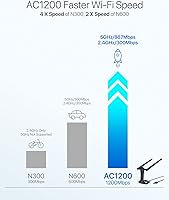
  • 5GHz Speed: Delivers a maximum theoretical throughput of 867Mbps on the 5GHz band under optimal conditions.
  • 2.4GHz Speed: Delivers a maximum theoretical throughput of 300Mbps on the 2.4GHz band for longer-range connectivity.
  • USB Interface: Connects via USB 3.0 and includes a 5-foot USB extension cable for flexible physical placement.
  • Antennas: Equipped with two detachable 5dBi high-gain antennas using SMA connectors, adjustable 360 degrees.
  • Dimensions: Measures 3.7″ long by 3.9″ wide by 7″ tall including antennas in upright position.
  • Weight: Weighs approximately 60 grams, or roughly 2.12 ounces, excluding packaging and cable.
  • Color: Available in a single gloss black finish.
  • Architectures: Compatible with x86_64, x86_32, aarch64, and armhf processor architectures covering standard PCs and ARM boards.
  • Kernel Requirement: Requires Linux kernel version 6.2 or newer, corresponding to distributions released from February 2023 onward.
  • Windows Support: Functions as a plug-and-play adapter on Windows 7, 8, 8.1, 10, and 11 without manual driver installation.
  • Security Protocols: Supports WPA3-SAE, WPA2, WPA, WEP, AES, PSK, TKIP, and 802.1x authentication for broad network compatibility.
  • Operating Modes: Supports Managed, AP, IBSS, P2P-client, and P2P-GO modes for both client and host network configurations.
  • Unsupported Distros: Explicitly incompatible with RHEL, CentOS, and openSUSE Leap due to their older Linux kernel versions.
  • Voltage: Operates at 5 volts, drawing power directly from the host USB port with no external power supply required.
  • First Available: Originally listed on the market in July 2018, with ongoing driver and compatibility updates since release.

Related Reviews

BrosTrend AX1800 WiFi 6 USB Adapter
70%
88%
Ease of Setup
74%
Wireless Speed Performance
79%
Range & Signal Penetration
63%
Driver Stability
41%
OS Compatibility
More
WAVLINK AX1800 USB WiFi Adapter
81%
88%
Performance
92%
Ease of Setup
85%
WiFi Speed & Stability
78%
Build Quality
82%
Compatibility
More
BrosTrend AC1200 Outdoor WiFi Extender
88%
90%
WiFi Coverage
88%
Ease of Installation
93%
Weatherproof Durability
85%
Signal Stability
91%
Performance in Large Spaces
More
WAVLINK AX5400 WiFi 6E USB Adapter
71%
88%
Ease of Setup
71%
Wireless Speed Performance
83%
6GHz Band Access
67%
Build Quality & Antenna Design
74%
Network Stability
More
NEWFAST BE6500 USB WiFi 7 Adapter
86%
92%
Speed & Performance
89%
Ease of Setup
90%
Signal Strength & Coverage
85%
Compatibility with Windows 11
94%
Gaming Performance
More
ALFA AWUS036ACH Dual-Band AC1200 Wireless USB Adapter
82%
88%
Performance & Speed
91%
Range & Signal Stability
85%
Ease of Setup
80%
Build Quality
87%
Compatibility Across Devices
More
TP-Link Archer T4U V3 USB WiFi Adapter
83%
91%
Wi-Fi Performance
78%
Setup and Installation
85%
Build Quality
75%
Range and Coverage
89%
Portability
More
BrosTrend 5KM WiFi Bridge
86%
91%
Ease of Setup
88%
Build Quality & Durability
94%
WiFi Range
87%
Outdoor Performance
78%
Signal Stability
More
rockspace AC1200 WiFi Range Extender
83%
85%
Performance
92%
Ease of Setup
88%
Range Coverage
75%
Signal Stability
83%
Ethernet Port Functionality
More
TODAAIR AC1200 WiFi Range Extender
82%
88%
Wireless Coverage
85%
Dual-Band Performance
90%
Setup & Installation
82%
Device Capacity
80%
Speed Consistency
More

FAQ

On Linux, you will need to install the driver manually — it does not auto-configure the way it does on Windows. The process involves cloning the driver repository, running a make install command, and rebooting. It takes about 10 to 15 minutes if you are comfortable in a terminal, and BrosTrend offers a support ticket for step-by-step guidance if you get stuck.

Yes, the AC3L adapter supports aarch64 and armhf architectures, which covers Raspberry Pi 2 and later boards running Raspberry Pi OS 8 through 12. It is one of the more consistently praised use cases in user reviews, with most Pi users reporting clean detection after driver setup.

It does. The Realtek RTL8812BU chipset supports both monitor mode and packet injection, which makes the AC3L adapter a practical choice for wireless auditing and penetration testing on Kali. Keep in mind that after major Kali kernel updates, you may occasionally need to recompile the driver to restore full functionality.

Ubuntu 22.04 ships with Linux kernel 5.15 by default, which falls below the required kernel 6.2 threshold. However, Ubuntu 22.04 users can upgrade to a higher kernel version through the mainline kernel updater, after which the driver installation should work. Ubuntu 24.04 and later are fully supported without any kernel upgrades needed.

On Linux, Wi-Fi adapters only work if a driver exists for the specific chipset inside them. Many cheap adapters use obscure chipsets with no Linux driver whatsoever, which is why they fail completely on Linux regardless of what the packaging claims. The BrosTrend AC3L AC1200 Linux USB WiFi Adapter uses a Realtek RTL8812BU chipset that has an actively maintained open-source driver, which is the key reason it works reliably across so many distributions.

Yes, the adapter supports AP mode, which means you can use it to create a wireless access point from a Linux machine using hostapd. It is not a one-click setup — you will need to configure hostapd and a DHCP server manually — but it is a fully supported capability that home lab users take advantage of.

After a kernel update on rolling-release distros like Kali or Arch, the driver may stop working because it was compiled against the previous kernel version. The fix is to recompile the driver against the new kernel, which involves rerunning the same installation steps from the repository. It is a known quirk of out-of-tree drivers on Linux and takes a few minutes once you have done it once.

Use the included 5-foot USB extension cable. It is specifically included for this reason — the dual-antenna body is wide enough to obstruct adjacent ports when plugged directly into a laptop. Running the cable a few inches away from the machine also tends to improve reception since the adapter is not sitting flush against a metal chassis.

Honestly, probably not. The adapter works perfectly well on Windows 10 and 11, but the mid-range price reflects the cost of Linux driver development and support infrastructure. If Windows is your only OS, there are cheaper dual-band adapters that will do the same job for noticeably less money. The value here is specifically the Linux compatibility.

Yes, x86_64 and x86_32 architectures are explicitly listed as supported, and the adapter can be passed through to a VirtualBox guest OS using USB passthrough. You will still need to install the driver inside the virtual machine, and the performance will be limited by USB passthrough overhead, but for testing or light use it functions as expected.