Overview

The BOYI TD31Pro Mechanical Numpad arrived in late 2024 and wasted little time climbing into the top 15 of its Amazon category — which tells you something about how well it fills a real gap in the market. Most numpads are either bare-bones membrane slabs or expensive enthusiast pieces. This wireless numpad lands comfortably in between: a gasket-mounted build with tri-mode connectivity, hot-swap support, and a compact footprint that won't eat your desk. It punches above its price point without pretending to be something it isn't. For anyone who has been running a tenkeyless board and quietly missing dedicated number keys, this is worth a serious look.
Features & Benefits

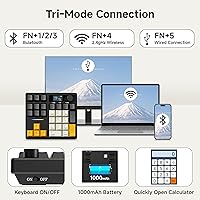
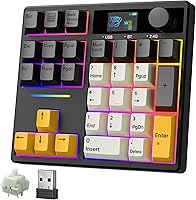
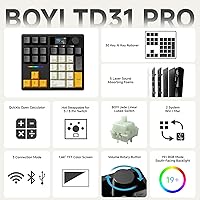
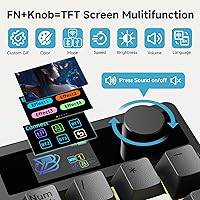
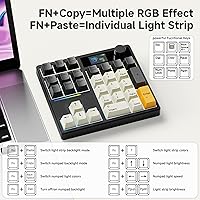
Three connection modes — Bluetooth 5.0, a 2.4GHz dongle, and USB-C wired — let you pair up to three devices and flip between them without re-pairing every session. The TFT color display earns its keep showing battery level and connection status at a glance; the custom GIF upload is a fun extra, though more novelty than daily utility. The metal rotary knob handles volume by default, with a single press to mute — but pressing FN plus the knob switches it to screen-control mode, where mute no longer works. That trips people up at first, so it's worth knowing upfront. The pre-lubed linear switches feel smooth immediately, and the hot-swap PCB means changing switches is entirely tool-free.

Best For

This mechanical number pad makes the most sense for people who live in spreadsheets — accountants, data-entry staff, financial analysts — but it's equally practical for programmers running a tenkeyless board who just want numbers close at hand. Multi-device workers will appreciate staying connected to a laptop, desktop, and tablet at once with no re-pairing involved. Keyboard hobbyists get a low-risk canvas to try different switch weights, since the PCB accepts most 3-pin and 5-pin options. Travelers and home-office setups benefit from the rechargeable wireless design. That said, if you only ever use one device and prefer a simple wired connection, the TD31Pro's extra features may feel like overkill. Know what you need — this is built for flexibility first.

User Feedback

Most owners are quick to highlight the wireless reliability — the 2.4GHz dongle in particular draws consistent praise for lag-free performance during both work and gaming sessions. The typing feel earns positive marks too, with buyers noting the linear switches hold up well after extended use. On the flip side, a recurring frustration is the RGB driver software: it requires a separate install, and some users find it clunky or unnecessary if they just want a fixed color. A few reviewers note the FN shortcut combinations take a day or two to internalize. Battery life generally meets expectations for moderate use, though heavy Bluetooth users report recharging more often than anticipated. Build quality feedback is largely solid, with very few complaints about flex or keycap legend durability.

Pros

  • The 2.4GHz dongle connection is rock-solid — virtually no lag during extended data-entry or gaming sessions.
  • Pre-lubed linear switches feel refined and consistent straight out of the box, no break-in needed.
  • Tri-mode wireless lets you stay connected to up to three devices without re-pairing every time you switch.
  • Hot-swap PCB accepts both 3-pin and 5-pin switches, making future upgrades entirely tool-free.
  • Gasket-mounted structure noticeably softens typing feel and reduces desk noise compared to rigid-mount alternatives.
  • The TFT display gives you battery level and connection mode at a glance — genuinely useful, not just decorative.
  • PBT keycaps feel durable with crisp legends that show no signs of shine or wear in early use.
  • The metal volume knob adds a tactile, premium touch and the single-press mute is quick during video calls.
  • At its price point, the combination of wireless flexibility and mechanical build quality is hard to match in this category.
  • Compact enough to travel with comfortably — fits a laptop bag side pocket without adding noticeable bulk.

Cons

  • Bluetooth performance can be inconsistent in wireless-heavy environments, making the 2.4GHz dongle the more reliable daily choice.
  • The driver software feels dated, has a clunky interface, and the macOS version is noticeably less capable than Windows.
  • RGB customization requires a separate software install — buyers who prefer a no-software setup will find this frustrating.
  • The FN-based shortcut system has a real learning curve; mute only works in volume knob mode, not screen-control mode, which confuses new users.
  • Battery life under full-feature use (display on, RGB active) falls short of what the marketing implies — plan on charging every one to two days.
  • The bottom shell feels hollow when tapped and the numpad can slide during fast input if the desk surface is not clean and flat.
  • Initial Bluetooth pairing requires a non-obvious FN key combination, and the included quick-start card is easy to miss or discard.
  • No dedicated physical button for device switching — it is handled via shortcuts, which adds mental overhead until muscle memory kicks in.

Ratings

The BOYI TD31Pro Mechanical Numpad has been put through its paces by buyers across North America, Europe, and Asia — and our AI has analyzed that verified purchase data, actively filtering out incentivized reviews and bot-pattern feedback to surface what real daily users actually think. Scores reflect a balanced picture: where the TD31Pro genuinely punches above its class, you will see it, and where it falls short of expectations, that is reflected too. Both the strengths and the friction points are baked into every number below.
Wireless Reliability
88%
The 2.4GHz dongle connection is where this numpad consistently earns praise — users working across long desk setups or through minor obstructions report stable, near-zero-latency input during both spreadsheet work and casual gaming. Switching between saved Bluetooth devices is quick enough that multi-device workers rarely feel friction in their routine.
Bluetooth 5.0 performance is more variable; a handful of users note occasional micro-stutters when the numpad is more than a meter from their laptop, particularly on busy wireless channels. It is not a dealbreaker, but if your workspace is already crowded with Bluetooth devices, the 2.4GHz dongle is the safer daily driver.
Typing Feel & Switch Quality
91%
The pre-lubed POM linear switches deliver a genuinely smooth stroke right out of the box — no break-in period needed, which matters when you are punching numbers for hours at a time. Users who have tried other budget linears consistently note that these feel more refined, with consistent actuation weight from the first key to the last.
Linear switches will not satisfy everyone; buyers who prefer tactile or clicky feedback will want to swap immediately, which is entirely possible thanks to the hot-swap PCB but does add cost. A small number of users also report that two or three keys out of thirty feel very slightly inconsistent in travel depth, likely a QC variance rather than a design flaw.
Build Quality & Materials
84%
The gasket-mounted structure gives the TD31Pro a noticeably softer, more cushioned typing experience compared to the rigid tray-mount designs that dominate this price range. PBT keycaps feel solid underhand, legends are crisp, and the overall chassis has minimal flex when pressed firmly at the corners.
The bottom shell feels slightly hollow when tapped, suggesting the internal weight distribution leans light — it can shift during fast data entry unless the rubber feet are gripping a clean desk surface. A few users feel the plastic housing does not quite match the premium impression set by the metal knob and display module.
TFT Display Utility
73%
27%
At a glance, the display genuinely earns its place — knowing your battery level and active connection mode without fumbling through LED blink codes is a quiet but real convenience during a busy workday. The custom GIF feature is a crowd-pleaser and a legitimate differentiator for buyers who enjoy personalizing their setup.
Once the novelty of custom GIFs settles, many users find the display becomes background furniture rather than an active tool. The screen is small enough that information density is limited, and there is no ambient brightness adjustment, which means it can feel distractingly bright in dim evening work sessions.
Multi-Device Switching
82%
18%
Pairing three devices at once and toggling between them with a dedicated shortcut is a practical workflow feature — users who split time between a work laptop, personal PC, and a tablet specifically call this out as one of the main reasons they chose the TD31Pro over simpler alternatives. Re-pairing after a restart is generally reliable.
The switching shortcut requires remembering an FN key combination rather than a dedicated physical button, which adds a small mental overhead until muscle memory sets in. A couple of users also note that the Bluetooth connection occasionally needs to be manually re-established after the numpad sits idle for an extended period.
Volume Knob & Controls
79%
21%
The metal rotary encoder feels premium and satisfying to turn, with smooth detents that make volume adjustments feel deliberate rather than accidental. In its default volume mode, a single press to mute is fast and intuitive — useful during quick video calls when you need silence immediately.
Switching the knob to screen-control mode via FN disables the press-to-mute function, which catches users off guard repeatedly until they internalize the mode logic. The Amazon product description handles this poorly, so new buyers should know upfront: mute only works in volume mode, not screen mode.
Hot-Swap Experience
87%
The PCB accepts both 3-pin and 5-pin switches without adapters, which opens up a wide range of aftermarket options for enthusiasts who want to fine-tune the feel. The switch puller included in the box works cleanly, and the sockets grip firmly without feeling like they will wear out after a few swap cycles.
Casual buyers who have never swapped switches before may find the process slightly intimidating without a guide, and BOYI does not include detailed written instructions in the box. There is also a small risk of bent pins on 5-pin switches if you do not align carefully — nothing catastrophic, but worth a slow, steady hand.
RGB Lighting
76%
24%
South-facing LEDs produce even, attractive backlighting that does not create harsh hotspots on the keycap surface. The built-in lighting presets cover enough variety that most users find something they like without ever touching the software, and the RGB music-sync mode is a fun addition for desktop setups.
Full customization requires downloading a separate driver application, which a meaningful portion of buyers find intrusive or simply unnecessary. The software itself draws mixed feedback — functional but not particularly polished, and macOS support feels like an afterthought compared to the Windows experience.
Battery Life
74%
26%
For moderate wireless use — a few hours of data entry per day with the display and RGB on a mid-brightness setting — most users report getting through several days before reaching for the charging cable. Turning the display and RGB off extends runtime noticeably, which is a straightforward trade-off for battery-conscious users.
The 1000mAh cell is adequate but not generous for a device with an active TFT display and RGB LEDs running simultaneously. Heavy users who keep all features on consistently report charging every one to two days, which is more frequent than the marketing copy implies and slightly below the category average.
Software & Driver
61%
39%
When it works, the driver software unlocks fully programmable key remapping and custom RGB profiles — useful for power users who want a numpad configured precisely for a specific workflow like accounting shortcuts or media control. Key remap options are broader than most competing software at this price tier.
The software is where the TD31Pro stumbles most visibly — installation is not always clean on Windows 11, and Mac users report limited functionality compared to the Windows version. Several buyers note the UI feels dated and the documentation is thin, making it harder to discover features without trial and error.
Portability & Size
86%
At 5.9 by 5.1 inches and just over a pound, this mechanical number pad slips easily into a laptop bag side pocket without adding noticeable weight. Travelers and hybrid workers specifically appreciate not having to sacrifice the wireless numpad when switching between home and office environments.
The 30-key count is leaner than a traditional numpad — function-heavy users who rely on dedicated math operator keys in specific positions may find the layout slightly cramped during the first week. The learning curve is short, but it exists.
Mac Compatibility
68%
32%
Basic functionality works on macOS without any driver install — plug in the dongle or pair via Bluetooth and the numpad operates correctly for standard number input. The TFT display correctly identifies and shows Mac mode, which is a small but appreciated detail for Mac-primary users.
Full feature parity with the Windows experience is not there yet — RGB customization via software is noticeably limited on Mac, and some key remapping options simply do not expose themselves in the macOS driver version. Buyers who exclusively use Apple hardware should temper their expectations for the advanced configuration side.
Value for Money
83%
Stacking up what you actually get — gasket mount, hot-swap PCB, tri-mode wireless, TFT display, metal knob, and pre-lubed linears — against comparable products at a similar price, the TD31Pro offers a genuinely strong feature-to-dollar ratio. Most buyers feel they received more than they expected when the box arrived.
The value proposition is strongest for users who will actually use the wireless modes and customization options; if you only ever plug in via USB-C and leave RGB off, you are paying for features you will never touch. A stripped-down wired version would likely satisfy a segment of buyers at a lower cost.
Setup & Out-of-Box Experience
78%
22%
Pairing via 2.4GHz is plug-and-play — dongle in, numpad on, working in under thirty seconds. The display immediately communicates connection status, which removes the guesswork that often accompanies first-time wireless peripheral setup. Most users are typing within a minute of opening the box.
Bluetooth initial pairing is less intuitive; the process requires pressing a specific FN combination that is not immediately obvious without consulting the manual, and the manual itself is a small folded card that some buyers accidentally discard. A brief quick-start guide printed on the box itself would smooth this considerably.

Suitable for:

The BOYI TD31Pro Mechanical Numpad is a strong match for anyone who spends a meaningful chunk of their workday entering numbers — accountants, financial analysts, data-entry staff, and programmers who run a tenkeyless board and miss having dedicated number keys within easy reach. The tri-mode wireless setup makes it especially practical for people who regularly switch between multiple devices: connecting your work laptop, personal desktop, and a tablet to a single numpad without the hassle of re-pairing is a genuine quality-of-life improvement, not just a spec on a box. Mechanical keyboard enthusiasts on a budget will also appreciate the hot-swappable PCB, which turns this into a low-risk platform for experimenting with different switch types without committing to a full custom board. Travelers and home-office workers benefit from the rechargeable wireless design — it packs neatly into a bag and the 2.4GHz dongle delivers the kind of stable, reliable connection you want when you are on deadline. If you care about a clean desk and want a numpad that earns its spot rather than just sitting there, this is the category to be shopping in.
Not suitable for:

The BOYI TD31Pro Mechanical Numpad will likely disappoint buyers who want something they can unbox, plug in via USB, and forget about — the feature set here assumes a degree of engagement with wireless modes, software, and shortcut combinations that purely utilitarian users will find unnecessary friction. Mac-primary users in particular should approach with realistic expectations: basic input works fine, but the RGB customization software offers a noticeably thinner experience on macOS compared to Windows, and some advanced remapping features simply do not surface on Apple hardware. Anyone who strongly prefers tactile or clicky switches will need to budget for a swap upfront, since the pre-installed linears are smooth but polarizing for those used to tactile feedback. The 1000mAh battery, while adequate for moderate use, will feel limiting if you keep the TFT display and RGB running simultaneously all day — heavy users may find themselves charging every couple of nights, which undercuts the wireless convenience. And if your desk setup is already saturated with Bluetooth devices, occasional connectivity hiccups on that band are a real possibility; the 2.4GHz dongle is the more dependable path in crowded wireless environments.
Specifications

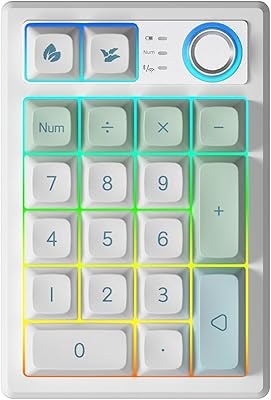
  • Key Count: The numpad features a 30-key layout covering numerals, math operators, NumLock, ESC, Delete, Copy, Paste, Page Up, Page Down, and a direct calculator shortcut key.
  • Connectivity: Supports three connection modes: Bluetooth 5.0, a 2.4GHz wireless dongle, and USB-C wired — with simultaneous pairing for up to three devices.
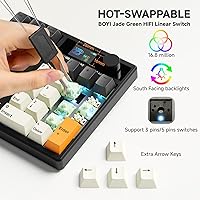
  • Switch Type: Equipped with Full POM Jadeite Green HIFI Linear switches, factory pre-lubed for consistent, smooth actuation from the first keystroke.
  • Hot-Swap: The PCB is hot-swappable and compatible with both 3-pin and 5-pin mechanical switches, requiring no soldering for replacements.
  • Keycaps: Double-shot PBT keycaps are included, offering durability and resistance to shine or legend fading over extended daily use.
  • Display: A TFT color screen displays battery level, active connection mode, RGB lighting mode, OS selection (Windows or Mac), and supports user-uploaded custom GIF images.
  • Rotary Knob: A metal rotary encoder handles volume adjustment by default, with single-press mute in volume mode; FN plus the knob switches it to screen-display control mode.
  • RGB Lighting: South-facing LEDs support 16.8 million colors with multiple preset lighting modes and music-sync effects accessible via the optional driver software.
  • Mount Type: Gasket-mounted internal structure absorbs typing shock and reduces sound transmission compared to standard tray-mount or top-mount designs.
  • Battery: A 1000mAh lithium-ion battery is built in and included; it is rechargeable via the USB-C port and does not need to be replaced or purchased separately.
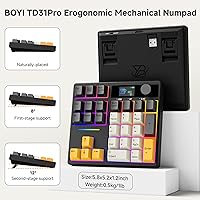
  • Dimensions: The numpad measures 5.9″ in length by 5.1″ in width by 1.5″ in height, keeping the footprint minimal on crowded desks or inside laptop bags.
  • Weight: The unit weighs 1.1 pounds, balancing portability for travel use with enough heft to stay reasonably stable on a desk surface during typing.
  • OS Support: Compatible with both Windows and macOS; the TFT display detects and indicates the active operating system mode automatically upon connection.
  • Tilt Angles: Two adjustable typing angles are available via built-in feet, allowing users to find a more ergonomic wrist position for extended typing or data-entry sessions.
  • LED Orientation: LEDs are positioned on the south-facing side of each switch, which produces more even light diffusion through the keycap legends with reduced glare.
  • Software: An optional driver application is available for Windows and Mac that enables full key remapping, custom RGB profiles, and GIF uploads to the onboard display.
  • Device Support: Compatible with PCs, laptops, tablets, smartphones, and gaming consoles that support standard HID input over Bluetooth or USB.
  • Model Number: The official model identifier is TD31Pro, manufactured by BOYI, first made available in September 2024.

Related Reviews

TISHLED K19 Wireless Mechanical Numpad
78%
88%
Typing Feel & Acoustics
82%
Wireless Connectivity
79%
Build Quality & Materials
71%
Battery Life
63%
Programmability & Driver Software
More
BOYI K104Pro Retro Mechanical Keyboard
78%
88%
Typing Feel
84%
Switch Performance
71%
Wireless Reliability
79%
Battery Life
86%
Keycap Quality
More
BOYI TD21 Mechanical Numeric Keypad
76%
83%
Wireless Reliability
89%
Hot-Swap Experience
86%
Keycap Quality
72%
Build & Construction
58%
Software & Customization
More
Keychron Q0 Max Wireless Mechanical Numpad
79%
94%
Build Quality
91%
Typing Sound & Feel
86%
Wireless Performance
83%
Customization & Firmware
89%
Switch Hot-Swap
More
BOYI GMK67 65% Aluminum Alloy Mechanical Keyboard Kit
86%
89%
Build Quality
91%
Typing Experience
87%
Customization Flexibility
85%
Connectivity Options
75%
Ease of Assembly
More
8Bitdo Retro Mechanical Numpad N Edition
78%
88%
Build Quality
84%
Switch Feel & Typing Experience
82%
Keycap Quality
86%
Dual Mode Functionality
79%
Wireless Connectivity
More
Satechi SM3 Full-Size Mechanical Keyboard
79%
91%
Build Quality
88%
Typing Experience
86%
Multi-Device Connectivity
89%
Mac Compatibility
83%
Battery Life
More
Merdia Wireless Mechanical Keyboard
83%
90%
Connectivity Options
88%
Typing Experience
86%
RGB Customization
84%
Build Quality
91%
Battery Life
More
Popular Mechanics Battery Recharger
84%
90%
Ease of Use
93%
Safety Features
88%
Charging Versatility
85%
Build Quality
92%
Value for Money
More
Womier SK71 75% Mechanical Keyboard
87%
88%
Performance
93%
Build Quality
90%
Ergonomics/Typing Comfort
85%
Battery Life
91%
Connectivity (Wired/Bluetooth/2.4GHz)
More

FAQ

It works immediately without any software for basic input — plug in the 2.4GHz dongle or pair via Bluetooth and you are typing numbers right away. The driver software is only needed if you want to remap keys, create custom RGB profiles, or upload a GIF to the display. If you never touch those features, you can skip the install entirely.

There is no standalone device-switch button; instead, you use FN key combinations to toggle between the three paired slots. It takes a day or two to internalize, but once it is in muscle memory it is quick enough. Just keep the quick-start card nearby for the first week.

Yes — Bluetooth pairing works with tablets and smartphones that support standard keyboard input, including iPads and Android devices. The 2.4GHz dongle mode is USB-A based, so you would need a USB-C or Lightning adapter for tablets that lack a full-size USB port. Basic number input works fine; advanced remapping features are only available on Windows and Mac via the driver software.

By default the knob controls system volume, and pressing it once mutes your audio — that is the volume mode. When you press FN plus the knob, it switches into screen-control mode, where turning the knob cycles through what the TFT display shows. In that mode, the press-to-mute function is intentionally disabled because the press now controls screen navigation instead. Switch back to volume mode and mute works again. The BOYI TD31Pro Mechanical Numpad documentation does not explain this clearly, which trips up a lot of new users.
With the display and RGB both active, most users get one to two days of moderate use before needing a recharge. If you turn off the display and lower RGB brightness, you can stretch that to several days. For light users who only run the numpad for a few hours a day, a full week between charges is realistic. The 1000mAh cell is not huge by modern standards, so managing the display and lighting settings pays off.

Absolutely — the PCB is hot-swappable, meaning you just pull out a switch with the included switch puller and press a new one in. No soldering, no tools beyond the puller. Both 3-pin and 5-pin mechanical switches are compatible, which covers the vast majority of aftermarket options. Just be careful to align 5-pin switches straight before pressing down to avoid bending pins.

For most users in typical home or office environments, Bluetooth 5.0 works fine for typing tasks. That said, if your desk already has several Bluetooth devices competing on the same band, or if your laptop is across the room, you may notice occasional micro-pauses. The 2.4GHz dongle is the more consistent choice for mission-critical work — it behaves more like a wired connection in practice.

The display does not have an automatic ambient brightness sensor. You can adjust screen brightness manually through the driver software or via FN shortcuts, but it will not adapt on its own. In a dim evening work environment, the default brightness level can feel intrusive, so it is worth lowering it manually once you find your preferred setting.

Core functionality — number input, wireless connectivity, and display features — works well on macOS. The numpad correctly identifies Mac mode and the layout adjusts accordingly. Where Mac falls short is in the driver software: RGB customization options are more limited compared to Windows, and some key remapping functions do not appear in the macOS version. If you are a Mac-only user who does not care about RGB customization, you will barely notice the difference.

You need the driver software installed to upload a custom GIF — it is not something you can do natively. Within the software, there is a display settings section where you can import a GIF file and push it to the numpad. The process works, though the software interface is not the most intuitive, so expect a few minutes of trial and error on your first attempt. The GIF resolution is limited by the small display size, so simpler, high-contrast animations tend to look better than detailed ones.

Where to Buy