Overview

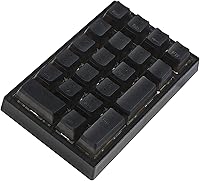
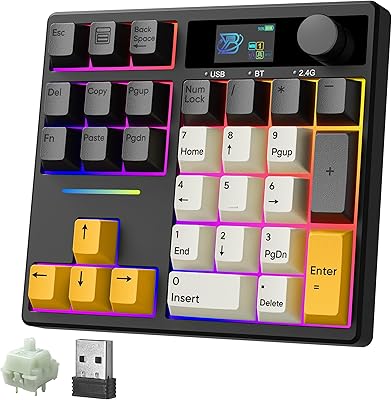
The BOYI TD21 Mechanical Numeric Keypad is a compact 21-key numpad that fills a genuine gap for laptop users who need dedicated number input without committing to a full-size keyboard. At its price point, tri-mode connectivity — Bluetooth 5.0, 2.4GHz wireless, and wired USB-C — is genuinely rare. Tack on hot-swap switch support and you have a peripheral that punches well above its category. It's not a boutique enthusiast board with premium gasket mounting or aircraft-grade aluminum, but it doesn't pretend to be. Think of it as a capable, flexible daily driver that rewards a little customization effort without demanding it.

Features & Benefits

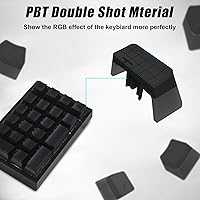
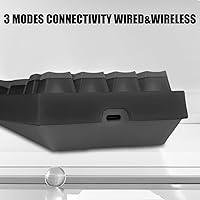
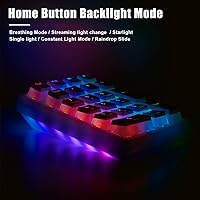
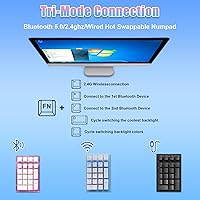
The standout feature here is the hot-swappable PCB. In plain terms, that means you can pull out any switch and snap a different one in — no soldering iron, no technical know-how required. It supports both 3-pin and 5-pin switches, which covers the vast majority of what's on the market. Connectivity runs through Bluetooth 5.0, a 2.4GHz USB dongle, or a detachable USB-C cable. Notably, if the battery dies mid-session on Bluetooth, plugging in keeps things running without skipping a beat. The PBT pudding keycaps resist the greasy shine that plagues cheaper ABS sets over time. RGB brightness and speed are adjustable via FN shortcuts, and the Boyi software handles key remapping and custom lighting profiles.

Best For

This wireless numpad makes the most sense for a specific set of users. If you work in finance, accounting, or data entry and rely on a slim laptop that skips the numpad entirely, this fills that gap without cluttering your desk. Multi-device users will appreciate being able to pair it to two machines simultaneously and flip between them. Gamers sometimes mount a numpad to the left of a compact board as a dedicated macro pad — the TD21 numpad handles that role well. Keyboard hobbyists curious about switch swapping will also find it a low-stakes way to experiment. It's less compelling if you need occasional number input and wireless freedom simply isn't a priority.

User Feedback

With a 4.4-star average across more than 100 ratings, the BOYI keypad earns solid marks — though not without some caveats. Buyers frequently cite build quality and wireless reliability in 2.4GHz mode as genuine strengths, and the PBT keycaps earn praise from users who've suffered through cheaper alternatives. On the other side, the Boyi software gets a mixed reception; some find it adequate, while others flag a clunky interface and occasional hiccups during initial Bluetooth pairing with a second device. Compared to similarly priced competitors, most buyers consider this wireless numpad a strong value, though users who have no interest in customization may feel the feature set slightly overshoots their actual needs.

Pros

  • Hot-swap support for both 3-pin and 5-pin switches means you can change the entire feel of the pad without tools or soldering.
  • Tri-mode connectivity — Bluetooth 5.0, 2.4GHz dongle, and wired USB-C — covers virtually every desk setup.
  • PBT pudding keycaps resist shine and wear far better than the ABS alternatives common at this price.
  • Pairing to two devices simultaneously is a genuine convenience for anyone who bounces between a laptop and desktop.
  • USB-C wired fallback means a dead battery never actually stops your work mid-session.
  • At its price tier, the feature-to-cost ratio is hard to argue with for a wireless mechanical numpad.
  • The 2.4GHz wireless mode offers a more stable, lower-latency connection than Bluetooth for users who prioritize reliability.
  • Full key remapping via Boyi software adds real flexibility for macro-heavy workflows or gaming use.
  • RGB presets are plentiful and adjustable, satisfying users who care about desk aesthetics without being the main selling point.

Cons

  • The Boyi software interface feels dated and can be frustrating to navigate, especially during first-time setup.
  • Initial Bluetooth pairing with a second device has a learning curve that some users find unexpectedly fiddly.
  • Battery life information is not clearly published, making it hard to know what to expect before buying.
  • The polycarbonate case feels noticeably light, which some users interpret as cheap rather than portable.
  • Only two simultaneous device pairings are supported — a limitation if your workflow spans three or more machines.
  • RGB lighting, while a selling point for some, adds no practical value and may feel unnecessary to buyers who just want a clean, functional numpad.
  • The 2.4GHz USB dongle occupies a port permanently if you prefer wireless, which can be an issue on slim laptops with limited USB-A availability.
  • No dedicated volume knob, media controls, or calculator shortcut key — the 21-key layout is purely numeric with no bonus functionality.

Ratings

The scores below were generated by our AI engine after analyzing verified global buyer reviews for the BOYI TD21 Mechanical Numeric Keypad, with spam, bot-submitted, and incentivized feedback actively filtered out before scoring. Each category reflects the honest distribution of real user sentiment — strengths are credited where earned, and recurring frustrations are weighted just as transparently. Whether this pad suits your workflow or falls short depends heavily on a few key factors, and the scorecards below are designed to surface exactly that.

Wireless Reliability
83%
Users running the TD21 numpad in 2.4GHz dongle mode consistently report stable, drop-free connections during extended data entry sessions and gaming. The low-latency feel in this mode is noticeably better than Bluetooth, and most buyers treating it as their primary wireless method are genuinely satisfied.
Bluetooth mode draws more complaints — some users report the pad dropping connection briefly when switching between paired devices, and initial pairing on a second device can require a few attempts. It is not a dealbreaker, but it does require some patience during first-time setup.
Hot-Swap Experience
89%
For buyers exploring switch customization for the first time, the no-solder hot-swap PCB is a revelation. The socket retention feels firm without being so tight that switches risk being damaged on removal, and the 3-pin and 5-pin compatibility means almost any switch you want to try will fit without modification.
A small number of users noted that socket quality can vary across units — a few reported a switch or two feeling slightly loose after multiple swap cycles. It is an uncommon issue, but worth knowing if you plan to swap frequently over a long period.
Keycap Quality
86%
The PBT pudding keycaps age noticeably better than the ABS caps found on most competing numpads at this price. Buyers who previously used cheaper pads appreciate that these do not develop a greasy shine after a few months of daily use, and the legends remain crisp under heavy RGB lighting.
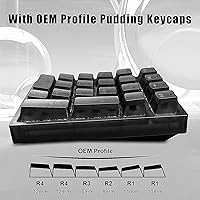
The OEM profile is comfortable but not universally loved — users accustomed to Cherry or SA profiles sometimes find the angle slightly awkward during long typing sessions. The pudding styling is also polarizing aesthetically; some buyers specifically dislike the translucent sides.
Build & Construction
72%
28%
For a lightweight polycarbonate pad, the TD21 numpad holds up better than its price might suggest. There is no noticeable flex in the PCB area during normal use, and the overall assembly feels reasonably tight out of the box.
The light weight that makes it portable also makes it feel insubstantial to users who expect a solid, planted feel on the desk. It can shift position slightly during aggressive typing without a rubber base pad underneath, and the polycarbonate housing does not project durability the way aluminum-cased competitors do.
Software & Customization
58%
42%
The Boyi companion app does deliver on its core promises — key remapping works, and custom RGB profiles can be created and saved to the pad. For users willing to invest thirty minutes in the initial setup, the level of control over both lighting and key functions is genuinely useful.
The software interface feels several years behind modern peripheral apps in terms of usability. New users frequently report confusion navigating the layout, and some encounter connectivity issues between the app and the pad on first launch. On macOS, the software is entirely unavailable, locking those users out of any remapping functionality.
RGB Lighting
77%
23%
The pudding keycaps make the most of the RGB implementation — the light diffusion through the translucent sides creates a glow effect that looks especially good in dim environments. Buyers who care about desk aesthetics consistently mention that the lighting output exceeds expectations for the price.
Users who prefer subtle or productivity-focused setups find little use for the feature and note there is no way to save an off state across power cycles without the software. A few buyers also flagged that enabling RGB in wireless mode has a meaningful impact on battery endurance.
Battery Life
63%
37%
With RGB lighting disabled, most users get through multiple workdays on a single charge using Bluetooth mode, which is adequate for typical home office use. The USB-C fallback is a genuine safety net — running out of battery mid-session does not mean stopping work.
BOYI does not publish a rated battery life figure, which frustrates buyers trying to evaluate it against competitors. With RGB enabled in Bluetooth mode, real-world battery life drops substantially and some users find themselves charging more frequently than expected.
Connectivity Setup
69%
31%
Wired USB-C mode is genuinely plug-and-play — plug it in and it works on any OS immediately. The 2.4GHz dongle mode is nearly as effortless and is the preferred method for most desk-bound users who want wireless freedom without pairing fuss.
Multi-device Bluetooth switching requires memorizing FN key combinations that are not printed on the pad, which creates a friction point for new users. The two-device pairing ceiling is also limiting for anyone with a three-machine desk setup, and there is no quick-switch button to simplify the process.
Typing Feel
81%
19%
The mechanical switch feedback on data entry tasks is satisfying in a way that membrane numpads simply cannot match. Users transitioning from membrane pads specifically mention the tactile clarity of each keypress as a meaningful productivity improvement, particularly during high-volume numeric input.
The sound and feel depend entirely on which switches ship with the unit, and BOYI offers different switch variants — meaning not all buyers get the same experience. Some users who receive linear switches wish they had received tactile ones, and the default switch choice is not always clearly communicated before purchase.
Portability
88%
At just over ten ounces and smaller than a paperback book, this wireless numpad slides easily into a laptop bag without adding noticeable bulk. Professionals who move between a home office and a workplace use it daily without any complaint about size or transport.
There is no included carrying case or travel pouch, so the keycaps and USB dongle are exposed during transport. A small minority of users reported scuffing or minor key damage after carrying it loose in a bag, suggesting a sleeve or pouch is worth sourcing separately.
Value for Money
84%
When measured against competing wireless mechanical numpads at a comparable price point, the BOYI keypad consistently comes out ahead on feature count. Tri-mode connectivity, hot-swap PCB, and PBT keycaps would typically demand a higher price from other brands, making this pad a compelling option for budget-conscious buyers.
The value proposition weakens for users who have no interest in hot-swap or wireless features, since stripped-down wired numpads are available for considerably less. Buyers paying primarily for the wireless convenience and finding the Bluetooth experience inconsistent may also feel the trade-off is less favorable.
Compatibility
74%
26%
As a standard HID device, the TD21 numpad connects to Windows, macOS, Linux, Android, and iPadOS without any driver installation in basic wired or Bluetooth modes. The broad OS support makes it a flexible choice for mixed-platform households.
Full functionality — especially key remapping — requires the Windows-only Boyi software, which effectively makes Mac and Linux users second-class citizens. Users on those platforms get a functional numpad but none of the customization features that justify part of the price.
Documentation & Setup
61%
39%
The physical setup is straightforward enough that most users get the pad working within a few minutes of unboxing, particularly in wired or 2.4GHz modes. The included quick-start materials cover the basics adequately for first-time users.
The documentation does not go deep enough to cover multi-device Bluetooth configuration clearly, and several users report resorting to third-party YouTube tutorials to understand the full FN key command set. The software download and installation process is also not well-documented inside the box.

Suitable for:

The BOYI TD21 Mechanical Numeric Keypad is a strong match for anyone who regularly works with numbers but uses a laptop or compact keyboard that lacks a dedicated numpad. Finance professionals, accountants, and data entry workers will feel the productivity difference immediately — having physical number keys beats hunting across a top row every time. Multi-device users also have real reason to consider it, since the ability to stay paired to two machines and switch between them is a practical perk in home office or hybrid work setups. Gamers who run 60% or 75% boards and want a left-side macro pad will find the hot-swap capability especially useful, since it means the switches can be tuned to personal preference without any technical risk. Keyboard hobbyists on a budget who have been curious about switch swapping but haven't wanted to commit to a full board will find this a smart, low-cost way to experiment.

Not suitable for:

The BOYI TD21 Mechanical Numeric Keypad is unlikely to satisfy buyers who need plug-and-play simplicity above everything else. The Boyi companion software, while functional, is not known for a polished user experience — if you have no patience for driver setup or occasional Bluetooth pairing friction, that could get old fast. Users who only need to enter numbers occasionally and have no interest in wireless freedom, RGB lighting, or switch customization are essentially paying for features they will never use; a simpler wired numpad would serve them better at a lower cost. The polycarbonate build, though decent, will not impress anyone coming from a premium aluminum numpad expecting solid, weighty construction. Finally, buyers who need to connect to three or more devices and switch among them freely will hit a wall here, as the two-device simultaneous pairing limit is a hard ceiling.

Specifications

  • Key Count: The numpad features 21 fully programmable mechanical keys arranged in a standard numeric layout.
  • Switch Type: The PCB is hot-swappable and compatible with both 3-pin and 5-pin mechanical switches from most major manufacturers.
  • Connectivity: Three connection modes are supported: Bluetooth 5.0, 2.4GHz wireless via USB dongle, and wired USB-C.
  • Device Pairing: Up to two devices can be paired simultaneously, with mode switching handled via dedicated key combinations.
  • Keycap Material: Keycaps are double-shot PBT with a pudding-style design and OEM height profile for a standard typing feel.
  • Backlighting: Per-key RGB lighting is included with multiple preset effects; brightness and animation speed are adjustable via FN key shortcuts.
  • Battery: A built-in rechargeable lithium-ion battery is included; the pad reverts to wired USB-C operation when the battery is depleted.
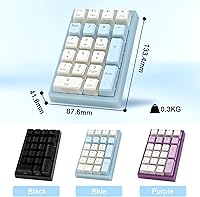
  • Dimensions: The unit measures 5.67 x 5.08 x 1.81 inches, making it compact enough to fit beside most laptop keyboards.
  • Weight: The pad weighs 10.2 ounces, reflecting a lightweight polycarbonate construction suited for portability.
  • Case Material: The outer housing is made from polycarbonate, which contributes to the light overall weight and allows RGB light diffusion.
  • Cable: A detachable USB-C cable is included in the box for wired use or charging.
  • Wireless Dongle: A 2.4GHz USB-A receiver dongle is included for low-latency wireless connectivity without Bluetooth pairing.
  • Software: The Boyi companion app for Windows enables full key remapping and custom RGB lighting profile creation.
  • N-Key Rollover: Full N-key rollover (NKRO) is supported in wired mode, ensuring every simultaneous keypress is accurately registered.
  • Compatibility: The pad is compatible with Windows and standard HID-compliant operating systems; full software support is Windows-focused.

Related Reviews
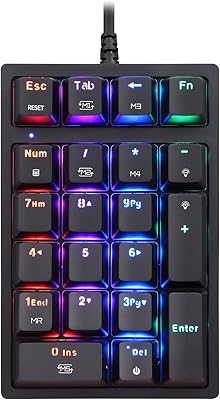
MOTOSPEED MSK24 21-Key Mechanical Numpad
78%
88%
Typing Feel
91%
Value for Money
67%
Build Quality
83%
RGB Lighting
54%
Software & Programmability
More
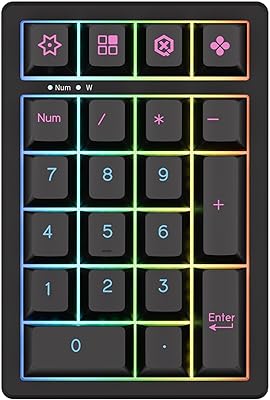
KEYCOOL K21 Wireless Mechanical Numeric Keypad
80%
88%
Build Quality
91%
Typing Experience
79%
Wireless Connectivity
93%
Hot-Swap Switch Support
82%
Battery Life
More
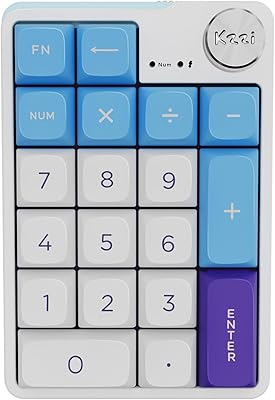
KZZI K20 Mechanical Wireless Numeric Keypad
80%
83%
Build Quality
88%
Typing Feel
79%
Wireless Connectivity
91%
Hot-Swap Feature
77%
Battery Life
More
BOYI TD31Pro Mechanical Numpad
79%
88%
Wireless Reliability
91%
Typing Feel & Switch Quality
84%
Build Quality & Materials
73%
TFT Display Utility
82%
Multi-Device Switching
More
BOYI K104Pro Retro Mechanical Keyboard
78%
88%
Typing Feel
84%
Switch Performance
71%
Wireless Reliability
79%
Battery Life
86%
Keycap Quality
More
ProtoArc EK04 Wireless Ergonomic Keyboard
74%
83%
Ergonomic Design
61%
Wrist Rest Comfort
78%
Build Quality
81%
Wireless Reliability
87%
Battery Life
More
BOYI GMK67 65% Aluminum Alloy Mechanical Keyboard Kit
86%
89%
Build Quality
91%
Typing Experience
87%
Customization Flexibility
85%
Connectivity Options
75%
Ease of Assembly
More
Popular Mechanics Battery Recharger
84%
90%
Ease of Use
93%
Safety Features
88%
Charging Versatility
85%
Build Quality
92%
Value for Money
More
Merdia Wireless Mechanical Keyboard
83%
90%
Connectivity Options
88%
Typing Experience
86%
RGB Customization
84%
Build Quality
91%
Battery Life
More
LiftMaster KPW250 Wireless Access Control Keypad
76%
88%
Ease of Installation
91%
PIN Management
84%
Wireless Range & Reliability
79%
Build Quality
86%
Backlit Keypad
More

FAQ

The TD21 numpad functions as a standard HID device, so it will work with macOS and iPadOS over Bluetooth or wired USB-C without any driver installation. The Boyi remapping software, however, is Windows-only, so Mac users won't have access to key remapping or custom lighting profiles through the app.

Switching is handled through FN key combinations on the pad itself — each paired Bluetooth slot has its own shortcut, and switching to 2.4GHz or wired mode is done the same way. It takes a second or two for the new device to recognize the pad, which is typical for Bluetooth peripherals at this level.

Hot-swappable means the switches — the mechanical components under each keycap that register your keypresses — can be pulled out and replaced without soldering. You just use a small switch puller (sometimes included, otherwise inexpensive to buy) to remove a switch and press a new one in. No heat gun, no technical skills required.

The PCB accepts both 3-pin and 5-pin switches, which covers the vast majority of popular options including Cherry MX, Gateron, Akko, and Kailh variants. If you are buying 5-pin switches for a 3-pin board, you would normally need to clip two pins — but this pad handles both natively, so no modification is needed.

BOYI does not publicly specify a rated battery life for the BOYI TD21 Mechanical Numeric Keypad, which is a common omission among budget peripheral brands. In practice, user reports suggest multiple days of moderate use on Bluetooth before needing a charge, but your experience will vary depending on whether RGB lighting is active. Turning off the backlight significantly extends runtime.

For productivity tasks like data entry or accounting, Bluetooth 5.0 is generally stable enough. That said, if you need absolute reliability with zero drop risk — say, during a time-sensitive data entry session — the 2.4GHz dongle mode is noticeably more consistent and lower latency than Bluetooth. Most users default to 2.4GHz at their desk for that reason.

Yes, you can cycle through lighting modes using the FN key shortcuts until the backlight is off entirely. The pudding-style keycaps are designed to show off RGB, but there is no requirement to keep lighting enabled, and disabling it will also help conserve battery life in wireless mode.

The 21-key layout includes all the standard numpad keys you would expect: digits 0 through 9, decimal point, plus, minus, multiply, divide, Enter, Num Lock, and navigation cluster keys. It mirrors the numpad section of a full-size keyboard, so the transition from a built-in numpad is straightforward.

The software is not mandatory — the BOYI keypad works plug-and-play out of the box in all three connection modes without installing anything. You only need the Boyi app if you want to remap keys or create custom lighting effects. Some users find the software interface unintuitive, so it is worth going in with modest expectations, but it gets the job done.

The polycarbonate case is noticeably light, which some buyers initially read as flimsy, but it does not flex or creak under normal use. The PBT keycaps feel solid and have a matte texture that holds up better than the glossy ABS caps common on cheaper pads. For the price, the overall construction is competitive — just do not expect the heft of an aluminum-bodied peripheral.