Overview

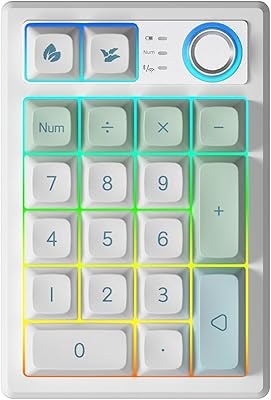
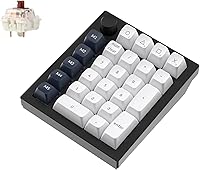
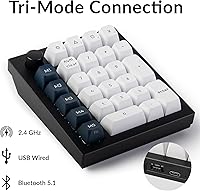
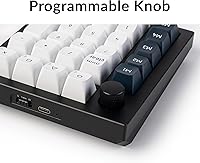
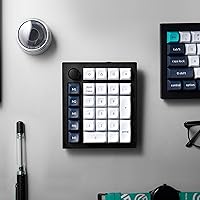
The Keychron Q0 Max Wireless Mechanical Numpad is one of the few numpads that genuinely earns its premium price — not through marketing, but through construction. Pick it up and the first thing you notice is the weight: 684 grams of CNC-machined aluminum that feels nothing like the flimsy plastic pads most people tolerate. Beyond the build, it adds a macro column and rotary encoder to the left side, pushing it well past basic numpad territory. Triple connectivity — 2.4 GHz, Bluetooth 5.1, and USB-C wired — makes it a rare wireless numpad that does not force you to compromise on responsiveness or compatibility.

Features & Benefits

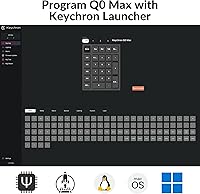
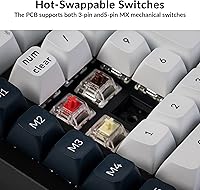
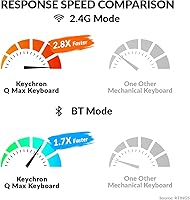
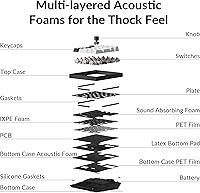
What sets the Q0 Max apart technically starts with its 2.4 GHz polling rate — running at 1000 Hz, which is unusually high for a standalone numpad and matters if you do rapid data entry all day. The Gateron Jupiter Brown switches are hot-swappable, so you can drop in almost any MX-compatible switch without a soldering iron. Layers of IXPE, PET, and Latex foam work alongside a double-gasket design to give each keystroke a deep, satisfying sound rather than hollow clatter. The KSA profile PBT keycaps feel textured and durable. With QMK and VIA support, every key — including the rotary encoder — can be remapped or assigned a macro through open-source firmware.

Best For

This wireless numpad makes the most sense for people who spend real time with numbers — accountants, analysts, finance teams running complex spreadsheets — and want a pad that keeps up with fast data entry rather than lag behind. The macro column and encoder knob also appeal to anyone wanting shortcut access without giving up desk space to a full-size keyboard. Multi-device users will appreciate connecting up to three devices via Bluetooth and switching between them, while USB-C and 2.4 GHz cover situations where latency matters. That said, this aluminum numpad is probably overkill if you only need a numpad occasionally — its customization depth rewards people who will actually explore QMK.

User Feedback

Owner sentiment on the Q0 Max is largely positive, with build quality drawing consistent praise — people genuinely notice the difference between this and lighter plastic alternatives. The sound profile holds up too: most users confirm the layered foam construction delivers the deep keystroke feel Keychron advertises. On the downside, some buyers flag that the Bluetooth polling rate drops to 90 Hz versus 1000 Hz over 2.4 GHz, a real trade-off for precision wireless input. QMK newcomers occasionally find the firmware setup steep. Battery life reports are mixed — some reach near the 50-hour claim at low brightness, others fall short. The rotary encoder and macro column earn positive mentions but are noted as underused without proper QMK configuration.

Pros

  • Solid CNC-machined aluminum build feels genuinely premium and outlasts typical plastic numpad construction.
  • Triple connectivity covers 2.4 GHz, Bluetooth 5.1, and USB-C wired without needing adapters or dongles.
  • 1000 Hz polling rate over 2.4 GHz is unusually responsive for a wireless numpad in this category.
  • Hot-swappable switches let you change the typing feel completely without soldering equipment.
  • Multi-layer foam dampening and a double-gasket design produce a deep, satisfying keystroke sound.
  • QMK and VIA support allow complete key remapping and macro programming through open-source firmware.
  • KSA profile double-shot PBT keycaps resist shine and legend fading over long-term daily use.
  • Rotary encoder and dedicated macro column add genuine shortcut utility beyond standard numpad layouts.
  • Up to 50 hours of battery life at lower brightness means less frequent charging during the workweek.
  • Compatible with macOS, Windows, and Linux out of the box with no driver installation required.

Cons

  • Bluetooth polling drops to 90 Hz, a noticeable step down for users expecting full wireless responsiveness.
  • QMK firmware has a real learning curve and may frustrate buyers who want simple plug-and-play setup.
  • Battery life claims are brightness-dependent — real-world figures with RGB enabled fall considerably shorter.
  • At 684 grams, this aluminum numpad is too heavy to toss in a bag as a lightweight travel accessory.
  • The premium price makes it hard to justify for casual or infrequent number-entry use cases.
  • Rotary encoder and macro column require QMK configuration to unlock their full potential — not automatic.
  • No dedicated software app for Windows or macOS means configuration happens entirely through QMK Toolbox.
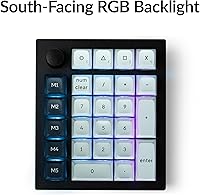
  • South-facing RGB means backlight glow is less visible on keycaps compared to north-facing LED setups.

Ratings

The Keychron Q0 Max Wireless Mechanical Numpad scores here reflect an AI-driven analysis of verified global buyer reviews, with spam, incentivized posts, and bot activity actively filtered out before scoring. Ratings are drawn from real-world usage patterns across professional data-entry workers, keyboard enthusiasts, and multi-device desk setups. Both the standout strengths and the honest frustrations buyers encounter are factored into every score below.

Build Quality
94%
Reviewers consistently describe picking up the Q0 Max as a moment of genuine surprise — the CNC-machined aluminum body feels more like a precision instrument than a peripheral. On a desk, the weight keeps it anchored during fast spreadsheet work without any flex or wobble under sustained typing.
A small number of users noted minor surface finishing inconsistencies on corners and edges, particularly on lighter colorways. At this price tier, those details stand out more than they would on a budget product.
Typing Sound & Feel
91%
The layered foam dampening — combining IXPE, PET, and Latex — alongside the double-gasket design produces a deep, cushioned thock that most buyers say holds up to Keychron's marketing. Accountants and data-entry professionals report that extended typing sessions feel noticeably less fatiguing compared to harder, hollow numpads.
A handful of reviewers found the sound profile slightly too muted for their taste, preferring a crisper feedback. Stock Gateron Jupiter Browns also divide opinion — tactile bump enthusiasts tend to be satisfied, but clicky or linear switch fans will want to swap immediately.
Wireless Performance
86%
Over 2.4 GHz, the 1000 Hz polling rate makes this one of the most responsive wireless numpads available, and daily users report zero perceptible lag during rapid number entry. The USB dongle connection is rock-solid even across a cluttered desk with competing wireless devices nearby.
Bluetooth mode's 90 Hz polling rate is a real step down, and users doing precision or high-speed entry over Bluetooth do occasionally report a slightly sluggish feel compared to 2.4 GHz. This is not a dealbreaker for casual use, but it is worth understanding before committing to Bluetooth as your primary mode.
Customization & Firmware
83%
QMK and VIA support opens up a level of per-key remapping that most numpads simply do not offer — being able to assign complex macros, layer toggles, or application shortcuts to the dedicated macro column is a genuine productivity advantage for power users. VIA in particular lowers the barrier significantly since it runs in a browser without compiling firmware.
QMK from scratch is legitimately complex for newcomers, and several buyers report spending an hour or more just getting their environment configured correctly. Users who want a simple, app-based remapping experience similar to mainstream gaming peripherals will find the process frustrating.
Switch Hot-Swap
89%
The hot-swap PCB supports both 3-pin and 5-pin MX switches, giving enthusiasts the freedom to drop in almost any popular switch without a soldering station. Buyers who swapped to linear or heavier tactile switches report that the process took under 20 minutes and immediately transformed the typing character of the pad.
The switch puller included is functional but basic, and a few users found pin alignment on 5-pin switches required patience to avoid bending. There is also no north-facing hot-swap variant for those who want shine-through lighting with aftermarket keycaps.
Battery Life
71%
29%
Under moderate use with RGB brightness dialed down, many buyers report comfortably getting through a full workweek between charges, which removes the daily charging ritual that plagues smaller wireless peripherals. The 1800 mAh cell is a reasonable size for the pad's footprint.
The advertised 50-hour figure requires near-minimum brightness, and real-world usage with typical RGB settings lands noticeably shorter — some users report closer to 15 to 20 hours. A few buyers felt the marketing overstated practical battery life, especially compared to competitors with less RGB draw.
Multi-Device Connectivity
82%
18%
Pairing three devices over Bluetooth and switching between them works reliably for users who keep a Mac at the office and a Windows machine at home. The combination of Bluetooth plus 2.4 GHz covers almost every realistic multi-device scenario without needing extra hardware.
Switching between Bluetooth profiles is not instantaneous, and users who swap devices frequently during the day find the reconnection delay mildly disruptive. The 2.4 GHz dongle also occupies a USB-A port, which can be an issue on laptops with limited ports.
Keycap Quality
88%
The KSA profile double-shot PBT keycaps hold up exceptionally well over months of daily use — legends stay sharp and the slightly textured surface resists the finger-shine that eventually plagues ABS keycaps. Users upgrading from membrane numpads frequently call out the keycap quality as one of the first noticeable differences.
The KSA profile is not universally loved; buyers accustomed to standard OEM or Cherry profile keycaps may find the spherical top adjustment takes a few days. Replacement keycap sets in KSA profile are also less widely available than Cherry or OEM equivalents.
Rotary Encoder Usability
76%
24%
Once configured through VIA, the rotary encoder becomes a surprisingly useful addition — volume adjustment, zoom control, and scroll are the most popular assignments, and users with video editing or spreadsheet workflows particularly appreciate having a physical knob on the desk.
Out of the box, the encoder's default mapping is not always intuitive for every workflow, and realizing its potential requires VIA or QMK setup time. Users who skip firmware configuration often report underusing the encoder entirely, treating it as a volume knob and nothing more.
Macro Column Utility
74%
26%
For users who invest the time in QMK configuration, the dedicated macro column becomes a genuine workflow accelerator — application launchers, one-touch paste commands, and layer switching are common uses that regular numpad users simply do not have access to.
Like the encoder, the macro column requires firmware work to shine, and buyers who expected plug-and-play macro recording were disappointed to find no onboard macro recording feature. Its value is entirely proportional to how much time a user is willing to spend in VIA or QMK.
Value for Money
69%
31%
For enthusiasts who will fully engage with the hot-swap capability, QMK firmware, and wireless features, the price-to-feature ratio holds up reasonably well against custom keyboard group buys that often cost more for less functionality. The aluminum construction alone outlasts multiple generations of plastic alternatives.
For buyers who need only a wireless numpad to enter numbers, the premium is difficult to justify against far cheaper alternatives that do the basic job well. The value proposition is narrow — it makes sense for a specific type of buyer and represents poor value for everyone else.
RGB Lighting
66%
34%
Per-key south-facing RGB produces a clean ambient glow around the base of each keycap, which looks polished in low-light office environments. QMK allows full per-key color and animation control for users who want a tailored lighting setup rather than preset effects.
Because the keycaps are not shine-through, the RGB effect is subtle rather than vivid — users expecting bright, legible backlit legends in the dark will be underwhelmed. South-facing placement means the light visible from a normal viewing angle is mostly underglow rather than direct legend illumination.
Portability
58%
42%
The compact 118.2 x 137 mm footprint fits comfortably on a laptop bag side pocket, and the wireless connectivity means there is no cable to manage when moving between desks or meeting rooms.
At 684 grams, this aluminum numpad is noticeably heavy to carry daily compared to lightweight plastic alternatives — some users found it impractical as a regular travel companion after the novelty wore off. It is better described as a portable desk accessory than a true on-the-go solution.

Suitable for:

The Keychron Q0 Max Wireless Mechanical Numpad is purpose-built for people who treat number entry as serious daily work, not an afterthought. Accountants, financial analysts, and anyone living in spreadsheets will genuinely benefit from the 1000 Hz polling rate over 2.4 GHz — it keeps up with fast, sustained input in a way most wireless numpads cannot. The triple connectivity setup is a real advantage for multi-device workers who bounce between a MacBook, a Windows desktop, and a third machine without wanting to replug cables throughout the day. Keyboard enthusiasts who want to swap switches or remap every key through QMK will find this aluminum numpad unusually accommodating for its form factor. The rotary encoder and macro column also make it a smart pick for anyone who wants quick-access shortcuts for volume, zoom, or custom commands without buying a full-size keyboard.

Not suitable for:

The Keychron Q0 Max Wireless Mechanical Numpad is a hard sell if you just need a basic numpad to occasionally punch in a few numbers. The premium price tier is only justified when you will actually use the wireless connectivity, the macro column, the hot-swap capability, or the QMK firmware — if those features mean nothing to you, far cheaper options will do the same job. Buyers expecting a true wireless experience at full responsiveness should also know that Bluetooth mode runs at 90 Hz polling, a significant drop from the 1000 Hz available over 2.4 GHz or USB-C. QMK is powerful but not plug-and-play, so users with no interest in firmware configuration may find the software side frustrating rather than rewarding. If desk space or portability is a major concern, the 684-gram aluminum body is noticeably heavier than typical travel-friendly pads.

Specifications

  • Dimensions: The numpad measures 118.2 x 137 mm (4.65 x 5.39 in), making it compact enough to sit beside a tenkeyless keyboard without crowding a standard desk.
  • Weight: At 684 g (approximately 1.51 lbs), the aluminum body is noticeably heavier than plastic numpads, contributing to its stability during fast data entry.
  • Body Material: The enclosure is machined from 6063 aluminum and passes through CNC machining, anodizing, sandblasting, and additional finishing stages for a consistent, durable surface.
  • Plate Material: The internal switch plate is made from steel, which adds rigidity to the typing surface and influences the firm, direct feel of each keystroke.
  • Switches: Ships with Gateron Jupiter Brown hot-swappable switches, compatible with most 3-pin and 5-pin MX-style mechanical switches from brands such as Cherry, Kailh, and Gateron.
  • Keycaps: KSA profile double-shot PBT keycaps are included; they are not shine-through, offer strong oil and fade resistance, and have a slightly textured surface finish.
  • Connectivity: Supports three connection modes: 2.4 GHz wireless via USB dongle, Bluetooth 5.1 (up to 3 paired devices), and USB-C wired.
  • Polling Rate: Operates at 1000 Hz in both 2.4 GHz and wired modes; Bluetooth mode runs at 90 Hz, which is a meaningful difference for latency-sensitive users.
  • Battery: Contains a built-in 1800 mAh rechargeable lithium-polymer battery with an advertised wireless runtime of up to 50 hours at minimum backlight brightness.
  • Backlight: South-facing RGB LEDs are installed under each switch, providing per-key lighting that is visible around the keycap edges rather than directly through the keycap legends.
  • Firmware: Fully compatible with QMK and VIA open-source firmware, allowing complete key remapping, macro assignment, and layer configuration without proprietary software.
  • N-Key Rollover: Full N-Key Rollover (NKRO) is active in both wired and wireless modes, registering every simultaneous keypress accurately.
  • Processor: Powered by an ARM Cortex-M4 32-bit STM32F402 microcontroller with 256 KB of flash memory for storing firmware and layout configurations.
  • Stabilizers: Screw-in PCB stabilizers are used on larger keys, providing a more stable and rattle-free keystroke compared to standard clip-in stabilizers.
  • OS Compatibility: Works natively with macOS, Windows, and Linux without requiring additional drivers, and includes keycap legends suited for both Mac and Windows layouts.
  • Extras: Includes a left-side rotary encoder knob and a dedicated macro column, both fully programmable through QMK or VIA firmware.
  • Package Dimensions: The retail box measures 6.81 x 6.69 x 3.11 inches, and the total package weight including packaging is approximately 2.35 lbs.

Related Reviews
Keychron K8
Keychron K8
80%
91%
Typing Feel & Switch Quality
88%
Noise Level
86%
Multi-Device Connectivity
67%
Build Quality & Materials
72%
Battery Life
More
Keychron K2 V2 Wireless Mechanical Keyboard
87%
88%
Overall Performance
85%
Typing Experience
90%
Battery Life
92%
Build Quality
80%
Portability
More
Keychron K4 Bluetooth Wireless Mechanical Keyboard
86%
91%
Build Quality
88%
Battery Life
85%
Typing Experience
90%
Connectivity & Versatility
82%
RGB Backlighting
More
Keychron K10 Full Size Wireless Mechanical Keyboard
83%
91%
Typing Experience
89%
Build Quality
87%
Bluetooth Connectivity
85%
Battery Life
82%
Ergonomics
More
TISHLED K19 Wireless Mechanical Numpad

78%
88%
Typing Feel & Acoustics
82%
Wireless Connectivity
79%
Build Quality & Materials
71%
Battery Life
63%
Programmability & Driver Software
More
Merdia Wireless Mechanical Keyboard
83%
90%
Connectivity Options
88%
Typing Experience
86%
RGB Customization
84%
Build Quality
91%
Battery Life
More
Logitech MX Mechanical
81%
88%
Typing Feel & Switch Quality
91%
Noise Level
86%
Build Quality & Materials
93%
Battery Life
87%
Multi-Device Connectivity
More
Keychron B6 Pro
Keychron B6 Pro
80%
93%
Battery Life
88%
Wireless Connectivity
71%
Typing Experience
91%
Mac Compatibility
67%
Build Quality
More
Keychron C2 Full-Size Hot-Swap Mechanical Keyboard
75%
83%
Build Quality
81%
Switch Feel & Performance
88%
Hot-Swap Functionality
79%
Mac Compatibility
62%
Keycap Quality
More
Pauroty 60% Wireless Mechanical Keyboard
86%
88%
Connectivity Options
75%
Battery Life
93%
Portability
84%
Ergonomics
91%
RGB Customization
More

FAQ

Over 2.4 GHz, the Q0 Max runs at a 1000 Hz polling rate, which is on par with wired performance for most users. In practice, the vast majority of data-entry and general use cases will feel indistinguishable from a wired connection. Bluetooth mode polls at 90 Hz, which is fine for casual use but not ideal if you are doing rapid, precision input.

Yes, the PCB is hot-swappable and works with most MX-compatible 3-pin and 5-pin switches, so you can pull out the Gateron Jupiter Browns and drop in Cherry MX, Kailh, or other Gateron variants without any soldering. A switch puller is recommended to avoid bending pins.

You can pair up to three devices via Bluetooth 5.1 and switch between them using dedicated key combinations. The 2.4 GHz connection is single-device via the included USB dongle, and USB-C wired is always available as a third option.

QMK has a real learning curve if you start from scratch, but VIA — which is also supported — is much more approachable since it runs in a browser and lets you remap keys visually without compiling firmware. Most users find VIA sufficient for everyday remapping and macro setup.

Yes, it is plug-and-play on macOS, Windows, and Linux with no drivers needed. The keycaps include legends for both Mac and Windows layouts, and you can remap modifier keys through VIA if you need to adjust the default behavior for your OS.

The 50-hour figure is measured at the lowest brightness setting with RGB lighting minimized, so real-world usage with normal RGB on will be considerably shorter. Users report anywhere from roughly 15 to 35 hours depending on brightness and usage patterns, so weekly charging is a reasonable expectation for most people.

The encoder has a default function assigned at the factory, typically volume control, but you will need to use QMK or VIA to reassign it to something custom like scroll, zoom, or media playback. Without configuration it still works, just with whatever Keychron ships as its default mapping.

The keycaps are not shine-through, so light does not glow through the legends the way it does on ABS gaming keycaps. The RGB is south-facing, meaning the glow comes from beneath and around the keycap base, creating a underglow-style effect. It looks clean and subtle rather than bright and direct.

The aluminum body weighs 684 grams, so it stays put during normal use without needing aggressive rubber feet. The bottom has rubberized feet that grip most desk surfaces reasonably well. Users who type very forcefully on smooth glass desks may want a thin mat underneath, but sliding is rarely reported as an issue.

For most people pairing it with a full-size keyboard it would be redundant, but the macro column and rotary encoder make this aluminum numpad genuinely useful even if your keyboard already has number keys. Many users mount it to the left side of their keyboard specifically to use the macro column and encoder for application shortcuts, layer switching, or media control.