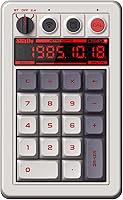
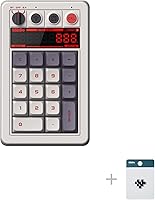
8Bitdo Retro Mechanical Numpad N Edition
Overview
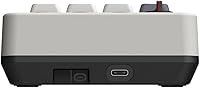
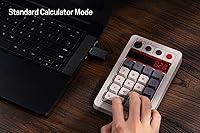
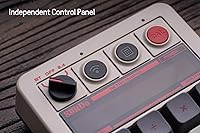
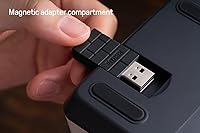
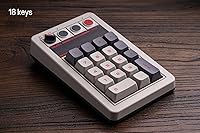
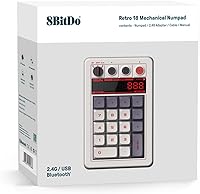
The 8Bitdo Retro Mechanical Numpad N Edition is one of the more interesting accessories to land in the desk peripheral market in a while — not because numpads are inherently exciting, but because 8Bitdo has applied its signature retro gaming aesthetic to a category that rarely gets this kind of care. This retro numpad pulls double duty as a standalone calculator, switching modes with a single button press rather than requiring any software gymnastics. It connects via Bluetooth, a 2.4G dongle, or USB-C, giving it real flexibility across different setups. Mid-range in price, it targets enthusiasts and productivity-focused users who want something more characterful than a generic numpad from a no-name brand.
Features & Benefits
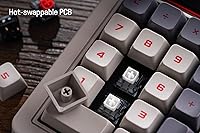
The hot-swappable PCB is probably the headline feature for anyone serious about keyboards — it means you can pull out the stock Kailh Box White V2 switches and drop in something quieter or heavier without soldering. The nine-digit seven-segment LED display is a genuinely useful addition, not just decoration, giving you a clear readout whether you are crunching numbers in calculator mode or simply confirming inputs. Battery life sits at a claimed 160 hours, which in practice means weeks of wireless use before needing the four-hour recharge. The dye-sub PBT keycaps on this edition feel noticeably more solid than the ABS alternatives common on budget numpads, and n-key rollover rounds out a surprisingly complete feature set.
Best For
The 8Bitdo numpad is a strong fit for a fairly specific type of buyer. Data entry professionals, accountants, or students who regularly need both a numpad and quick calculator access will find the dual-mode setup removes the need to keep two devices on the desk. Mechanical keyboard hobbyists will appreciate the swap-friendly build, especially if they already have a switch collection gathering dust. Remote workers bouncing between a desktop and a laptop will find the tri-mode connectivity surprisingly practical day to day. Android users also get full compatibility, which is rarer in this category than it should be. If you just want a plain, no-frills numpad, cheaper options exist — but this is not aimed at that buyer.
User Feedback
Most buyers highlight build quality as a genuine surprise — for a peripheral at this price tier, the feel is closer to something that costs considerably more. The mode-switching between numpad and calculator draws consistent praise for being intuitive once you have used it a couple of times. On the critical side, a meaningful portion of users note that the dedicated calculator shortcut button only functions on Windows, a real limitation if you had hoped to use it on macOS. Some early buyers reported that Bluetooth pairing required a few attempts before stabilizing, though this seems to affect earlier units more than recent ones. Battery endurance generally holds up, though a handful of users report slightly shorter real-world life than advertised.
Pros
- Hot-swappable switches let you customize the typing feel without any soldering or technical expertise.
- Dual numpad and calculator modes remove the need for a separate calculator on the desk.
- Dye-sub PBT keycaps feel noticeably more durable and premium than the ABS plastic found on most competing numpads.
- Three connection options — Bluetooth, 2.4G, and USB-C — cover virtually every use case.
- Claimed 160-hour battery life means weeks of wireless use between charges for most people.
- The nine-digit LED display is genuinely readable and adds practical value beyond just looking good.
- N-key rollover support ensures fast, accurate number input even during rapid data entry.
- Build quality consistently impresses buyers who expected something less solid at this price tier.
- Android compatibility makes this mechanical numpad far more versatile than most rivals in the category.
- The retro aesthetic is cohesive and well-executed, not a superficial gimmick.
Cons
- The dedicated calculator shortcut button only works on Windows, leaving macOS users without that feature entirely.
- Bluetooth pairing has been inconsistent for some users, requiring multiple attempts before a stable connection is established.
- Real-world battery life occasionally falls short of the advertised figure, based on reported user experience.
- The retro design is polarizing — buyers who prefer a minimal or modern aesthetic will find it looks out of place.
- At 18 keys, the layout is compact enough that users coming from larger numpads may need an adjustment period.
- The 8Bitdo numpad only officially supports Windows and Android, which is a hard limitation for Apple ecosystem users.
- Switch customization, while a genuine benefit, adds cost if you plan to replace the stock Kailh switches immediately.
- Mode-switching between numpad and calculator has a small learning curve that can trip up new users early on.
Ratings
The scores below reflect an AI-driven analysis of verified global buyer reviews for the 8Bitdo Retro Mechanical Numpad N Edition, with spam, bot submissions, and incentivized feedback actively filtered out before any scoring was applied. Ratings are derived from thousands of real purchase-verified responses across multiple markets, weighted to surface genuine patterns rather than outliers. Both the strengths that make this retro numpad a standout and the friction points that give some buyers pause are transparently represented in every category.
Build Quality
Switch Feel & Typing Experience
Keycap Quality
Dual Mode Functionality
Wireless Connectivity
Battery Life
Calculator Shortcut Button
Retro Aesthetic & Design
Compatibility Range
Value for Money
Setup & Ease of Use
Portability
LED Display Readability
Long-Term Durability
Suitable for:
The 8Bitdo Retro Mechanical Numpad N Edition is a well-matched buy for anyone who spends meaningful time doing data entry, financial work, or number-heavy spreadsheet tasks and wants a numpad that pulls double duty as a proper calculator without cluttering the desk with a second device. Mechanical keyboard hobbyists will find the hot-swappable PCB a compelling reason to choose this over cheaper, sealed alternatives — being able to drop in preferred switches without soldering is a genuine long-term advantage. Remote workers and laptop users who move between workstations will appreciate having three connection methods available, since it means this retro numpad can follow you from a wired desktop setup to a wireless couch session without any fuss. Android users, often underserved by numpad makers, also get full compatibility here. And for anyone with a retro-themed desk setup, this mechanical numpad fits right in without looking like an afterthought.
Not suitable for:
Buyers who simply need the cheapest possible numpad for occasional use will find the 8Bitdo Retro Mechanical Numpad N Edition harder to justify — there are far simpler, less expensive options that will handle basic number input without the added features. macOS users should be especially cautious, since the dedicated calculator shortcut button is Windows-exclusive, which immediately removes one of the device's headline conveniences. If you have no interest in mechanical switches, switch customization, or retro aesthetics, this retro numpad asks you to pay for things you will never use. It is also not the right pick for anyone who needs a full-sized keyboard replacement or a numpad that integrates tightly with Mac-specific productivity software. Buyers expecting plug-and-play Bluetooth simplicity may also find the initial pairing process requires a little patience.
Specifications
- Key Count: The numpad features 18 keys in total, covering numerals, operators, and function-specific controls.
- Switches: Stock switches are Kailh Box White V2 mechanical switches, known for a clicky tactile feel with reliable actuation.
- PCB Type: The hot-swappable PCB allows switches to be removed and replaced without soldering tools or technical modification.
- Keycaps: The N Edition ships with dye-sublimated PBT keycaps, which resist shine and legend fade better than standard ABS alternatives.
- Display: A nine-digit seven-segment LED display provides a clear numerical readout for both calculator and numpad input modes.
- Connectivity: The device connects via Bluetooth, a 2.4G wireless USB dongle, or a wired USB-C cable, switchable depending on the use case.
- Compatibility: Officially supported operating systems are Windows and Android; macOS and iOS are not listed as supported platforms.
- Battery Life: Rated battery life is approximately 160 hours of use on a full charge under standard wireless operating conditions.
- Charge Time: A full recharge from empty takes approximately 4 hours via the USB-C charging port.
- Battery Type: The device is powered by a built-in 1 lithium polymer rechargeable battery, which is included in the package.
- Operating Modes: A dedicated toggle switches the device between PC numpad mode and standalone standard calculator mode with a single press.
- Rollover: N-key rollover support ensures every simultaneous keypress is registered accurately during fast data entry.
- Mount Style: The internal construction uses a top mount style, which generally provides a firmer, more stable typing feel.
- Dimensions: Package dimensions measure 7.99 x 7.05 x 2.44 inches, giving a sense of the compact overall footprint of the device.
- Weight: The unit weighs 1.3 pounds, making it solid enough to stay in place on a desk without being cumbersome to transport.
- Body Material: The outer casing is constructed from ABS (Acrylonitrile Butadiene Styrene) plastic, which is standard for mechanical keyboard peripherals.
- Shortcut Button: A dedicated shortcut button launches the Windows Calculator application directly, functioning exclusively on Windows operating systems.
- Available Editions: The numpad is offered in multiple themed editions including N, Fami, M, and C64, each with distinct keycap colorways and materials.
Related Reviews
8BitDo Retro Xbox Edition TKL Mechanical Keyboard
TISHLED K19 Wireless Mechanical Numpad
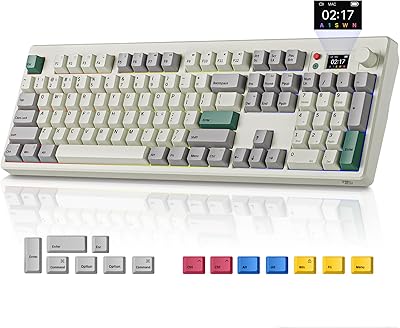
BOYI K104Pro Retro Mechanical Keyboard
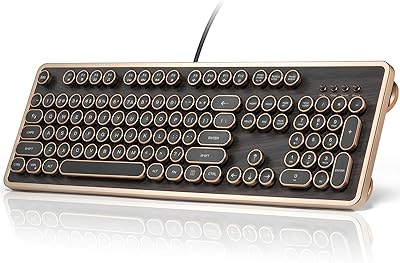
GLENCREAG RK104 Mechanical Keyboard
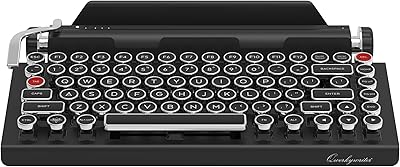
Qwerkytoys Qwerkywriter Typewriter Inspired Retro Mechanical Keyboard
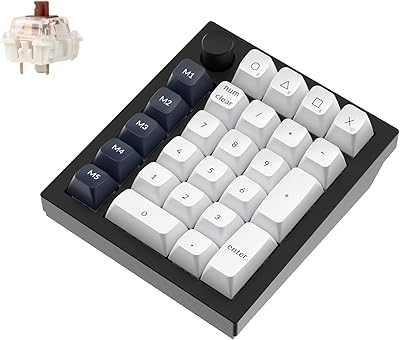
Keychron Q0 Max Wireless Mechanical Numpad
wet n wild Nightmare Before Christmas Makeup Set

Lemon Up 4 oz Talc-Free Dusting Powder

Lux Unfiltered First Class Glow Self-Tanner Kit