Overview

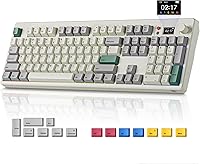
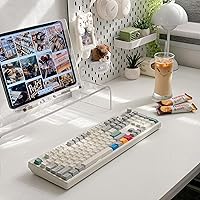
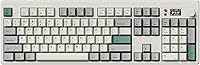
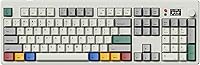
The BOYI K104Pro Retro Mechanical Keyboard sits in an interesting spot — it targets typists and gamers who want something that looks like it came out of a 1980s office but performs like modern hardware. At its mid-range price, you don't usually expect a gasket-mounted full-size board, so that alone makes it worth a closer look. Triple connectivity — Bluetooth 5.0, 2.4GHz, and USB-C wired — means you're rarely locked into one device or workflow. The TFT screen and knob are harder to categorize; they're genuinely novel touches that set this retro mechanical keyboard apart visually, though whether they add day-to-day value depends on how you actually use the board.

Features & Benefits

The gasket-mounted structure is where this board quietly earns its keep. Rather than the rigid plate-mounted feel common on cheaper boards, the gasket absorbs keystroke impact, producing a noticeably softer, cushioned sound profile that office neighbors will appreciate. The BOYI Jadeite Green linear switches use a POM housing that gives each keystroke a smooth, consistent glide without the scratchy wobble you find on budget linears. Hot-swap support means swapping them out takes seconds, not a soldering iron. The dye-sub PBT keycaps in a Cherry profile feel solid and won't fade with heavy use. The TFT display is handy for monitoring battery or connection status, but treat it more as a convenience indicator than a must-have productivity tool. NKRO ensures no keypress gets dropped during fast gaming bursts.

Best For

This full-size wireless board makes the most sense for people who genuinely need a numpad — accountants, data entry workers, spreadsheet-heavy users — but also want the freedom to go cable-free on a second monitor or tablet. Keyboard hobbyists who enjoy tweaking will appreciate the hot-swap socket without needing any technical setup. If you switch between Mac and Windows regularly, the bundled Mac keycaps and easy toggle make that transition painless. Gamers looking for fast linear switches in a board that doesn't sound like a typewriter will find the gasket structure a noticeable upgrade over typical entry-level options. It's less ideal for minimalists or those who specifically want a compact or tenkeyless layout.

User Feedback

Buyers tend to come away pleased with how the K104Pro looks in person — the retro colorway photographs well but holds up even better on a desk. Build quality draws consistent compliments given what you pay. Where opinions split is around the companion software: some users find the driver setup straightforward, while others report that time sync and deeper RGB customization require patience and occasional restarts. Bluetooth performance is generally solid for single-device use, but a handful of reviewers note occasional dropout when paired across multiple devices simultaneously. Out-of-the-box switch sound earns positive marks for pre-lubed linears at this price. Overall, the value-for-money consensus is strong, with most buyers feeling the feature set punches above what competing boards typically offer in this range.

Pros

  • Gasket-mounted structure provides noticeably softer keystroke feel rare at this price point.
  • Full-size layout with numpad covers every key most office and power users actually need.
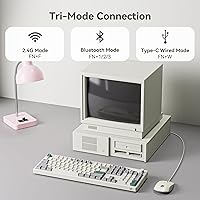
  • Triple connectivity — Bluetooth 5.0, 2.4GHz, and USB-C — covers virtually any workflow setup.
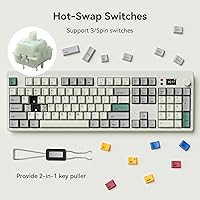
  • Hot-swap sockets support both 3-pin and 5-pin switches, making future customization genuinely easy.
  • Pre-lubed linear switches feel smooth out of the box with no immediate maintenance required.
  • Dye-sub PBT keycaps resist fading and feel solid even after extended daily use.
  • 4000mAh battery offers strong wireless endurance for full workdays between charges.
  • Bundled Mac keycaps and easy OS toggle make cross-platform switching painless.
  • NKRO and anti-ghosting ensure no missed inputs during fast or complex gaming sequences.
  • Retro colorway and overall build quality consistently exceed buyer expectations for the price paid.

Cons

  • Companion software is required for RGB customization and TFT clock sync, adding unwanted setup friction.
  • Bluetooth can drop or hesitate when simultaneously paired across multiple devices.
  • The TFT screen is more of a visual novelty than a genuinely useful daily tool for most users.
  • Full 14-inch footprint will feel oversized on smaller desks or in tight workspace setups.
  • Driver software reliability has drawn mixed feedback, with some users reporting occasional crashes.
  • No tactile or clicky switch variant is offered out of the box, limiting options for those who prefer bump feedback.
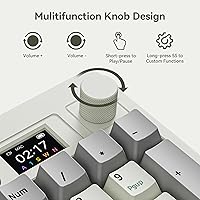
  • The knob control for screen settings has a learning curve and is not immediately intuitive.
  • At roughly one pound, the K104Pro feels lighter than some buyers expect from a gasket-mounted board.
  • Custom GIF functionality on the TFT display requires software setup and is not straightforward for casual users.
  • Limited brand recognition compared to established keyboard makers may give cautious buyers pause.

Ratings

The scores below reflect an AI-driven analysis of verified global user reviews for the BOYI K104Pro Retro Mechanical Keyboard, with spam, bot-submitted, and incentivized feedback actively filtered out before scoring. Each category is weighted against real buyer experiences — both the highlights and the friction points — so the numbers you see here represent an honest composite, not a curated best-of. Where this board earns its praise and where it falls short are both reflected transparently in the ratings that follow.

Typing Feel
88%
The gasket-mounted structure genuinely changes how the board feels under prolonged use — keystrokes land with a cushioned, slightly springy quality that reduces finger fatigue during long writing sessions. Users switching from budget plate-mounted boards consistently describe the difference as immediately noticeable, not subtle.
A small portion of users find the gasket flex slightly too pronounced, particularly during fast gaming inputs where they prefer a firmer, more planted sensation. The flex can also feel inconsistent across different areas of the board depending on where keys are struck.
Switch Performance
84%
The Jadeite Green linears arrive pre-lubed with a smooth, even actuation that most users find satisfying straight out of the box — no immediate re-lubing required for the majority. The POM housing contributes a slightly muted, pleasant sound signature that pairs well with the gasket structure.
Enthusiasts who prefer a more refined lube job often report inconsistency between individual switches, with some feeling slightly scratchy compared to others. Users who prefer tactile or clicky feedback will need to budget for aftermarket switches on top of the board cost.
Wireless Reliability
71%
29%
In single-device Bluetooth or 2.4GHz mode, the connection holds up well for office typing tasks and casual gaming at reasonable distances from the receiver. The 2.4GHz dongle in particular earns consistent praise for low-latency performance that feels close to wired.
Multi-device Bluetooth switching is where users run into real problems — pairing drops, reconnection delays, and occasional input lag are reported with enough frequency to be a genuine concern. Those who regularly hop between a laptop, tablet, and desktop in the same workflow should temper their expectations.
Battery Life
79%
21%
With RGB turned off or set to a low-brightness static color, the 4000mAh battery comfortably supports multiple days of eight-hour workday use, and the hibernation button makes it easy to stop passive drain during breaks. Users who primarily type in wired mode can ignore battery management entirely.
Running RGB at full brightness significantly cuts endurance, with some users reporting the need to recharge every day or two in that configuration. The board does not display a precise battery percentage warning before shutdown, which a few users found caught them off guard mid-session.
Keycap Quality
86%
Dye-sublimated PBT keycaps hold up well to heavy daily use — legends stay crisp and the surface does not develop the glossy shine that plagues ABS keycaps within weeks. The Cherry profile feels comfortable across long typing sessions, and users with larger hands specifically appreciate the sculpted height.
A few users note that the retro colorway, while visually appealing at first glance, can look slightly faded or muted on certain monitors under bright overhead lighting. Keycap legends on some specialty keys use smaller fonts that a handful of users found harder to read quickly.
Build Quality
83%
At this price point, the overall construction impresses most buyers — the case feels solid, key wobble is minimal, and nothing creaks or flexes in ways that suggest cheap manufacturing. First impressions in user reviews consistently describe the board as feeling more expensive than it is.
The board is noticeably lighter than some buyers expect from a gasket-mounted board, which for some users translates to a feeling of less heft or premium solidity than the specs suggest. A small number of users have reported a slight rattle from stabilizers on larger keys like the spacebar.
TFT Screen Utility
62%
38%
For at-a-glance status checks — battery level, active connection mode, current OS toggle — the TFT screen is genuinely convenient and saves users from guessing. The ability to display custom GIFs is a fun personalization touch that stands out on a desk.
Beyond status display, the screen adds limited functional value in day-to-day use, and several users describe it as more of a novelty after the initial setup curiosity fades. Clock synchronization requires the companion driver to be running, which is an ongoing dependency that not all users want.
Software Experience
57%
43%
When it works smoothly, the driver software unlocks meaningful customization — per-key RGB control, macro assignment, and TFT content management are all accessible without deep technical knowledge. Basic keyboard functions work completely driver-free, so casual users can ignore software entirely.
Reliability complaints are the most consistent negative theme across user feedback — crashes, failed installations, and settings not saving between sessions are reported regularly enough to be a pattern rather than isolated incidents. Users on macOS in particular report a noticeably rougher software experience than Windows users.
Hot-Swap Experience
91%
Tool-free switch swapping works exactly as advertised — pull, press, done. The sockets support both 3-pin and 5-pin switches without adapters, which opens the door to a wide range of aftermarket options from budget tactiles to premium linears without any compatibility anxiety.
The included switch puller is functional but basic, and users doing frequent swaps find it slightly awkward compared to dedicated tools. A very small number of users report that socket contacts loosen slightly after many repeated swap cycles, though this appears uncommon.
RGB Lighting
76%
24%
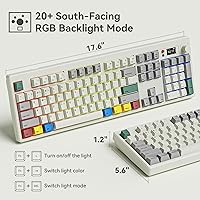
South-facing LEDs produce a clean underglow-style light bleed that looks sharp on a desk without creating direct glare in a dark room. Out-of-box RGB effects cycle through well and the knob makes brightness adjustment intuitive without touching software.
Per-key customization requires the driver, and some users find the default cycling modes limited for their taste without diving into software. A few users note that LED brightness is not perfectly even across all keys, with slight variation visible at certain angles.
Mac Compatibility
78%
22%
Bundled Mac keycaps and a dedicated toggle make switching operating systems straightforward, and function key behavior correctly adapts to macOS conventions once toggled. Users in mixed Mac-Windows households find this genuinely saves time compared to boards that require workarounds.
Software support on macOS lags noticeably behind the Windows experience, with fewer driver features available and occasional compatibility gaps on newer macOS versions. Some Mac-specific shortcut keys require manual remapping to work as expected.
Sound Profile
82%
18%
The combination of gasket mounting, pre-lubed linears, and PBT keycaps produces a sound that most users describe as muted, thocky, and office-appropriate — meaningfully quieter than a bare plate-mounted board without being silent. Colleagues in shared workspaces rarely complain.
Stabilizer rattle on the spacebar and shift keys is noticeable for some units fresh out of the box, requiring a small amount of lubing or tuning to bring in line with the rest of the board. Clicky switch fans will obviously find the linear sound profile underwhelming by default.
Value for Money
87%
Stacking gasket mount, hot-swap, triple connectivity, PBT keycaps, and NKRO into one mid-range package is genuinely difficult to match among competing boards at this tier. The K104Pro delivers a feature set that buyers typically associate with spending significantly more.
Software limitations and Bluetooth inconsistency chip away at the overall value perception for users who specifically need those features to work reliably. If the driver experience were cleaner and wireless multi-device pairing more dependable, this score would be meaningfully higher.
Ergonomics
74%
26%
Two-position adjustable feet cover the most common typing angle preferences, and the Cherry profile keycaps reduce the strain associated with flat, uniform-height layouts during extended use. Most users find a comfortable position quickly without needing an external wrist rest.
There is no wrist rest included, and the full 14-inch width means users with smaller desks may find positioning the board alongside a mouse awkward. The board does not offer a third, steeper tilt angle that some users with specific ergonomic needs prefer.

Suitable for:

The BOYI K104Pro Retro Mechanical Keyboard is a strong fit for anyone who needs a full-size layout with a numpad but refuses to give up wireless freedom — think accountants, data entry professionals, or spreadsheet-heavy remote workers who also want a cleaner desk setup. Keyboard hobbyists who like to tinker will find the tool-free hot-swap sockets a genuine draw, since swapping switches takes seconds and supports both 3-pin and 5-pin options without any technical commitment. People who bounce between Mac and Windows machines daily will also appreciate the bundled Mac keycaps and the quick toggle built into the TFT knob interface. Gamers who prefer fast, smooth linears and need reliable NKRO for competitive play can get that here without paying premium-tier prices. If you have an eye for retro desk aesthetics but still want modern connectivity options, this board delivers that balance in a way few competitors at this price actually manage.

Not suitable for:

The BOYI K104Pro Retro Mechanical Keyboard is not the right call for anyone who prefers a compact or tenkeyless setup — the full 104-key footprint is non-negotiable, and it will feel large on a smaller desk. Buyers who are sensitive to software ecosystems should know upfront that features like RGB customization and TFT time sync depend on a companion driver, which some users find finicky; if you want plug-and-play simplicity with zero software, this board may frustrate you. Those who need rock-solid Bluetooth across three or more simultaneously paired devices may encounter occasional dropout issues that other dedicated wireless boards handle more cleanly. The TFT screen, while visually interesting, adds complexity without being genuinely essential, so buyers hoping it will function as a real productivity display will likely be underwhelmed. Typists with a strict preference for tactile or clicky switches will also need to factor in the cost and effort of sourcing and swapping their preferred switches after purchase.

Specifications

  • Layout: Full-size 104-key layout includes a dedicated numpad, function row, and all standard modifier keys.
  • Dimensions: The keyboard measures 14″ long by 5″ wide by 1″ tall, placing it in the standard full-size footprint category.
  • Weight: Approximate weight is 1 pound, which is lighter than many gasket-mounted boards in its class.
  • Mount Type: Gasket-mounted structure cushions the switch plate between layers of silicone or foam-like gaskets, softening sound and keystroke impact.
  • Switches: Equipped with BOYI Jadeite Green HIFI Linear switches built with a POM housing and pre-applied lubrication for smooth, consistent actuation.
  • Hot-Swap: All switch sockets are hot-swappable and compatible with both 3-pin and 5-pin mechanical switches without soldering.
  • Keycaps: Dye-sublimation PBT keycaps in Cherry profile provide durable, fade-resistant legends and a slightly textured typing surface.
  • Connectivity: Supports three connection modes: Bluetooth 5.0, 2.4GHz wireless via USB dongle, and wired via USB-C cable.
  • Battery: Built-in 4000mAh lithium-ion battery is included and rechargeable via the USB-C port.
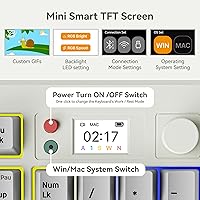
  • Display: A TFT multimedia screen paired with a rotary knob shows battery level, connection mode, RGB settings, and supports custom GIF images via software.
  • Backlighting: South-facing RGB LEDs provide per-key lighting with multiple customizable effects and color modes accessible through the companion driver.
  • Rollover: Full N-Key Rollover (NKRO) with anti-ghosting ensures every simultaneous keypress registers accurately, even during fast gaming inputs.
  • OS Support: Compatible with both Windows and macOS, and includes a set of extra Mac-specific keycaps in the box.
  • Tilt Adjustment: Two-position adjustable rear feet allow users to choose between a low or elevated typing angle based on ergonomic preference.
  • Hibernation: A dedicated red button next to the TFT screen triggers instant hibernation mode to conserve battery during breaks.
  • Software: A companion driver application is required for full RGB customization, TFT clock synchronization, and advanced macro configuration.
  • Switch Pins: Hot-swap sockets accept both 3-pin and 5-pin switches, giving users flexibility when selecting aftermarket or enthusiast-grade switches.
  • Keycap Profile: Cherry profile keycaps feature a sculpted, low-to-mid height design commonly favored for long typing sessions and gaming alike.

Related Reviews
GLENCREAG RK104 Mechanical Keyboard
75%
91%
Aesthetic Design
83%
Typing Feel
76%
Build Quality
72%
Keycap Quality
79%
Switch Performance
More
8BitDo Retro Xbox Edition TKL Mechanical Keyboard
78%
83%
Build Quality
88%
Switch Performance
91%
Hot-Swap Functionality
76%
Wireless Performance
86%
Battery Life
More
Qwerkytoys Qwerkywriter Typewriter Inspired Retro Mechanical Keyboard
84%
89%
Typing Experience
93%
Design & Aesthetic
92%
Battery Life
88%
Build Quality
77%
Ergonomics & Comfort
More
BOYI GMK67 65% Aluminum Alloy Mechanical Keyboard Kit
86%
89%
Build Quality
91%
Typing Experience
87%
Customization Flexibility
85%
Connectivity Options
75%
Ease of Assembly
More
Azio Retro Compact Keyboard
82%
91%
Design & Aesthetics
88%
Build Quality & Durability
85%
Typing Experience
83%
Connectivity (Bluetooth & USB)
80%
Ergonomics & Comfort
More
Merdia Wireless Mechanical Keyboard
83%
90%
Connectivity Options
88%
Typing Experience
86%
RGB Customization
84%
Build Quality
91%
Battery Life
More
Satechi SM3 Full-Size Mechanical Keyboard
79%
91%
Build Quality
88%
Typing Experience
86%
Multi-Device Connectivity
89%
Mac Compatibility
83%
Battery Life
More
MOWUX Retro Typewriter Keyboard
87%
91%
Typing Experience
85%
Build Quality
89%
Ergonomics and Comfort
94%
Design and Aesthetics
88%
Key Switch Feel (Tactile Response)
More
MageGee Typewriter Mechanical Keyboard
77%
93%
Aesthetic & Visual Design
81%
Build Quality
78%
Typing Feel & Switch Performance
61%
Sound Level
83%
Keycap Quality & Durability
More
Akko 5075B Plus Mechanical Keyboard
87%
91%
Performance
94%
Build Quality
75%
Connectivity
89%
Battery Life
88%
Usability & Ergonomics
More

FAQ

Yes, the Bluetooth 5.0 mode works with most modern tablets including iPad and Android devices. Keep in mind that some special function keys may behave differently depending on the operating system, but basic typing and navigation work fine across platforms.

With the RGB backlight off or dimmed, a full charge on the 4000mAh battery should comfortably last several days of regular office use. With RGB lighting active at full brightness, expect noticeably shorter runtime. The hibernation button is handy for stretching battery life during longer breaks.

Core functionality — typing, switching connection modes, and basic RGB cycling — works without any software installed. However, if you want to customize RGB effects in detail, sync the TFT clock to your computer, or remap keys, you will need to install the companion driver. It adds a step to setup, but it is not required just to get started.

No tools required — the hot-swap sockets let you pull switches out with a standard switch puller (often included) and press new ones in by hand. Both 3-pin and 5-pin switches are compatible, so you have a wide range of aftermarket options to choose from.

For single-device pairing, most users find the Bluetooth connection reliable for everyday typing and general use. Where it gets less consistent is when you have the board paired to multiple devices and are switching between them frequently — a handful of users report occasional lag or dropout in that scenario. If rock-solid multi-device switching is critical for you, using the 2.4GHz dongle is the safer bet.

Honestly, it sits somewhere in between. At a glance, it shows useful information like battery percentage and which connection mode is active, which is genuinely helpful. The ability to display custom GIFs is fun but mostly decorative. Think of it as a nice-to-have status display rather than a functional productivity tool.

The legends are dye-sublimated directly into the PBT plastic rather than printed on top, which means they cannot wear off no matter how much you type. PBT plastic also tends to stay matte and smooth-feeling longer than ABS keycaps, which can get shiny over time. For a board in this price range, the keycap quality is a genuine strong point.

There are two ways to do it: you can press the dedicated green button on the board for a quick toggle, or navigate through the TFT screen settings using the knob. The box also includes a set of Mac-specific keycaps if you want the legends to match your operating system correctly.

It is, especially if you are coming from a standard plate-mounted or tray-mounted board. The typing sound is softer and less sharp, and there is a slight give to each keystroke that reduces the impact traveling to your fingertips. It is not dramatically cushioned, but it is a real and consistent difference that most typists notice within a few minutes of use.

Yes, you can plug in the USB-C cable and continue typing while the board charges. It essentially functions as a wired keyboard in that state, so there is no need to pause your work during a charge cycle.