KZZI K20 Mechanical Wireless Numeric Keypad
Overview
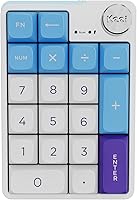
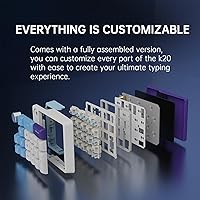
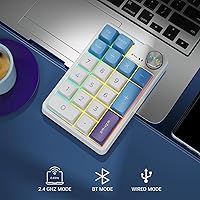
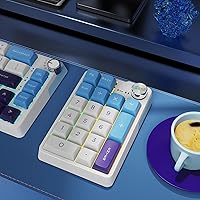
The KZZI K20 Mechanical Wireless Numeric Keypad is a compact 19-key peripheral that punches above its price point in ways that aren't immediately obvious. It supports tri-mode connectivity — Bluetooth 5.0, a 2.4GHz USB dongle, or wired USB-C — covering nearly every workflow scenario imaginable. What separates it from cheaper alternatives is the build: the case uses a gasket mount with Poron foam inside, which cushions each keypress and reduces vibration in a way standard plate-mounted pads simply don't. There's also a solid aluminum alloy knob on the board. Since its mid-2024 launch, this wireless numpad has already climbed into the top 120 of its Amazon category — a quick rise for a relatively new entry.
Features & Benefits
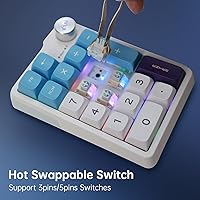
The K20 numpad's most practical feature is its hot-swappable switches — you can pull out individual switches and drop in different ones without any soldering, which is genuinely uncommon in this price range. The built-in 2000mAh battery is rated for up to 250 hours, and real-world use suggests it holds up reasonably well; recharging via USB-C keeps things convenient. The Bluetooth side supports three paired devices simultaneously, so switching from a MacBook to an iPad is a quick button press, not a re-pairing headache. At just 0.6 lb, the mechanical number pad slips easily into a laptop bag, and its compact footprint means it won't crowd even a tight desk.
Best For
This wireless numpad is an obvious pick for anyone in finance or accounting — fields where dedicated number entry matters and a laptop's compact keyboard just doesn't cut it. MacBook users, in particular, tend to gravitate toward this type of pad since Apple dropped the numpad layout years ago. It also suits multi-device users well: a freelancer hopping between a laptop, tablet, and desktop will appreciate the quick Bluetooth device switching. Keyboard hobbyists on a budget get the added bonus of hot-swap functionality to try different switch types. Even students doing heavy spreadsheet work will find the K20 numpad a meaningful upgrade over inexpensive membrane alternatives.
User Feedback
Early reception for this mechanical number pad is genuinely positive — a 4.6-star average across 76 ratings is a solid signal, though the review count is still modest enough that the picture could shift over time. Buyers tend to praise the typing feel and build quality, especially relative to the price, and multi-device switching gets frequent mentions as a practical daily win. The aluminum knob draws curiosity: most users discover it controls volume or media playback out of the box, useful but not always clearly documented. On the critical side, some flag occasional Bluetooth pairing delays on first connection, and a handful mention the keycap legends could be sharper.
Pros
- Hot-swappable switches let you change the typing feel without soldering — genuinely uncommon at this price point.
- Gasket mounting with Poron foam absorbs vibration and reduces noise compared to standard rigid-plate numpads.
- Three-device Bluetooth pairing means switching between a laptop, tablet, and phone is fast and frustration-free.
- The aluminum knob adds a satisfying tactile control point for volume or media, and it feels premium in hand.
- A 2000mAh battery rated up to 250 hours means you are not hunting for a cable every few days.
- At just 0.6 lb, this wireless numpad disappears into any laptop bag without adding noticeable weight.
- USB-C charging is a practical modern standard — no proprietary cables to track down.
- Works across macOS, iOS, Windows, Linux, and Android, so device compatibility is rarely a concern.
- Early user ratings skew strongly positive, with consistent praise for build quality relative to the asking price.
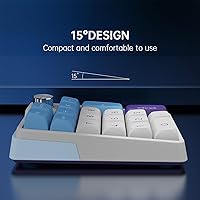
- The compact footprint keeps desk clutter low without sacrificing a full 19-key number pad layout.
Cons
- Bluetooth pairing can lag or require a retry on first connection with some devices.
- The knob function is not clearly documented out of the box, leaving some buyers guessing what it controls.
- With only 76 reviews at the time of writing, the long-term reliability picture is still forming.
- Keycap legends on some units have been reported as less crisp than the product images suggest.
- No dedicated software or app means remapping keys or reprogramming the knob requires manual workarounds.
- The ABS plastic portions of the case can attract fingerprints and feel slightly hollow compared to the aluminum knob.
- The 2.4GHz USB dongle adds a small adapter to manage — easy to lose during travel.
- No backlight is included in this colorway configuration, which limits usability in dim environments.
Ratings
The KZZI K20 Mechanical Wireless Numeric Keypad scores below are generated by AI after systematically analyzing verified global user reviews, with spam, bot activity, and incentivized feedback actively filtered out. Based on that process, both genuine strengths and recurring pain points are reflected honestly in every category score. This wireless numpad earns high marks in several areas but shows room for improvement in a few others — and that full picture is exactly what these ratings are designed to capture.
Build Quality
Typing Feel
Wireless Connectivity
Hot-Swap Feature
Battery Life
Multi-Device Switching
Portability
OS Compatibility
Knob Usability
Value for Money
Noise Level
Keycap Quality
Setup & Out-of-Box Experience
Aesthetics
Suitable for:
The KZZI K20 Mechanical Wireless Numeric Keypad is a strong match for anyone who regularly works with numbers and finds their current keyboard setup falling short. Accountants, finance professionals, and spreadsheet-heavy users will get the most immediate value — having a dedicated numpad within arm's reach genuinely speeds up data entry over time. MacBook and iPad users are an especially natural fit, since Apple's compact keyboards omit a numpad entirely, and this wireless numpad fills that gap without requiring a full keyboard swap. Remote workers and freelancers who bounce between multiple devices will also appreciate the ability to pair up to three Bluetooth devices and switch between them quickly. Mechanical keyboard hobbyists on a tighter budget get a rare bonus here: hot-swappable switches mean you can experiment with different switch feels without committing to a more expensive board.
Not suitable for:
The KZZI K20 Mechanical Wireless Numeric Keypad is not the right tool for everyone, and it helps to be clear-eyed about where it falls short. Buyers expecting a fully plug-and-play experience may run into a learning curve with the multi-device Bluetooth setup, particularly if initial pairing proves finicky on their specific device. The knob, while a nice physical touch, is not a programmable macro dial out of the box — if you are expecting deep customization or dedicated software control, you may come away disappointed. Users who need a full-size keyboard replacement or a numpad with more than 19 keys for specialized input tasks will find the key count limiting. Finally, anyone shopping for a completely silent typing experience should know that mechanical switches, even with foam dampening, still produce more sound than a membrane alternative.
Specifications
- Brand & Model: Manufactured by KZZI under the model designation K20, released in July 2024.
- Key Count: The numpad features 19 keys covering the standard numeric layout plus function controls.
- Switch Type: Uses mechanical hot-swappable switches, allowing individual switch replacement without soldering tools.
- Connectivity: Supports three connection modes: Bluetooth 5.0, 2.4GHz USB wireless dongle, and wired USB-C.
- Bluetooth Pairing: Bluetooth mode allows up to three devices to be paired simultaneously with quick switching between them.
- Battery: Built-in 2000mAh rechargeable lithium battery rated for up to 250 hours of continuous wireless use.
- Charging: Recharged via USB-C cable, which is included in the box.
- Dimensions: The unit measures 5.19″ long by 3.5″ wide by 1.49″ tall.
- Weight: Weighs 11.7 oz (approximately 0.6 lb), making it light enough for daily bag carry.
- Mount Type: Uses a gasket mount construction, which suspends the internal plate to absorb keystroke impact and vibration.
- Dampening: Poron foam is layered inside the case to further reduce typing noise and resonance.
- Knob Material: The rotary knob is machined from aluminum alloy, providing a solid and precise feel during use.
- Case Materials: The outer shell combines ABS plastic and aluminum elements for a balance of light weight and rigidity.
- OS Compatibility: Compatible with macOS, iOS, Windows, Linux, and Android operating systems.
- Color Option: Available in a Blue-White colorway as the primary listed variant at launch.
- Item Weight: Officially listed item weight including packaging is 11.7 oz per Amazon product data.
- Market Rank: Ranked #119 in the Amazon Numeric Keypads category as of the most recent available data.
- Availability: First listed on Amazon on July 12, 2024, making it a relatively recent market entry.
Related Reviews
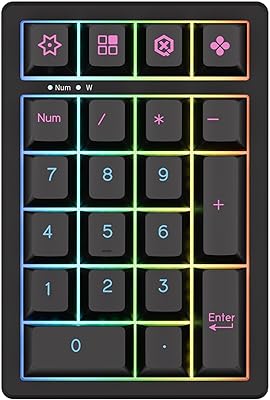
KEYCOOL K21 Wireless Mechanical Numeric Keypad
MOTOSPEED MSK24 21-Key Mechanical Numpad
BOYI TD21 Mechanical Numeric Keypad
ProtoArc EK04 Wireless Ergonomic Keyboard

Merdia Triple Mode 100-Key Wireless Mechanical Keyboard
LiftMaster KPW250 Wireless Access Control Keypad
Pauroty 60% Wireless Mechanical Keyboard

Logitech MX Mechanical
Keychron K8