Overview

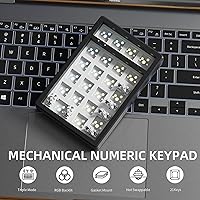
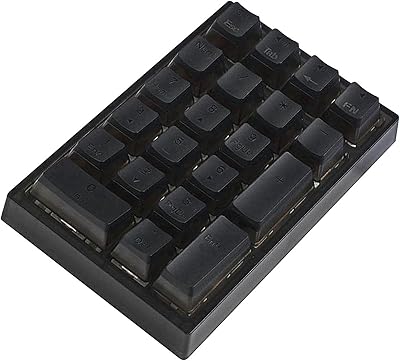
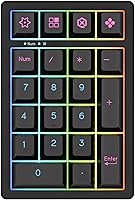
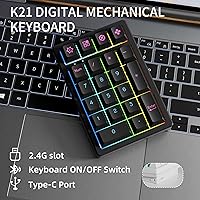
The KEYCOOL K21 Wireless Mechanical Numeric Keypad is a compact 21-key numpad aimed squarely at laptop users, accountants, and anyone in data entry who needs dedicated number input close at hand. KEYCOOL is a niche brand with clear enthusiast leanings, and this wireless numpad reflects that philosophy. It sits in the budget-to-mid-range tier yet brings construction choices you'd normally associate with pricier boards: a gasket-mount design, hot-swappable sockets, and triple connectivity options covering wired USB-C, Bluetooth 5.0, and a 2.4GHz wireless dongle. For a standalone numpad, that combination is genuinely uncommon.
Features & Benefits

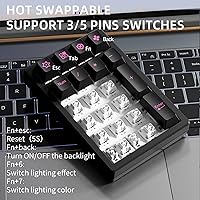
What makes the K21 stand out starts beneath the keycaps. The hot-swap sockets support both 3-pin and 5-pin switches, meaning you can pull out a switch and drop in a different one without a soldering iron — a meaningful upgrade path for anyone curious about switch feel. The gasket-mount structure, cushioned with PORON foam, absorbs impact on each keystroke, giving the board a softer, quieter bounce compared to a typical rigid-plate numpad. The PBT dye-sublimated keycaps resist the greasy shine that cheaper ABS caps develop over time. A volume roller adds quick media control without extra keypresses, and the 1500mAh battery handles extended wireless sessions without constant recharging. RGB lighting is fully customizable onboard or through software.

Best For

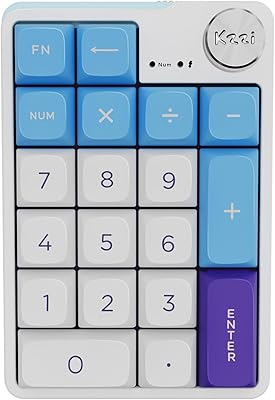
This mechanical numpad is a strong match for finance professionals, spreadsheet-heavy workers, and remote employees using slim laptops that lack a built-in number row. It pairs well with Macs and iPads over Bluetooth, and the multi-device switching capability makes it practical for users who jump between a PC and a phone or tablet throughout the day. Keyboard hobbyists looking to experiment with switch types will appreciate the hot-swap freedom without committing to a full build. That said, this isn't a board for silent-typing environments — the gasket dampens noise, but it's not whisper-quiet. And if your workflow depends on a traditional full 10-key layout with a dedicated Enter cluster, the 21-key form factor may feel limiting.

User Feedback

Buyers consistently praise the build quality as a standout at this price tier — the gasket feel in particular draws comments from people who weren't expecting that kind of cushioned response from a numpad. The retro keycap aesthetic also gets positive mentions, with several users calling the legends crisp and the overall look distinctive. On the less positive side, some users report that the companion software for RGB customization is basic at best, and a few mention occasional Bluetooth pairing hiccups on first setup. Battery life feedback is generally positive, with most reporting days of use on a single charge. Competing alternatives like offerings from Epomaker come up in comparisons, though buyers tend to favor the K21's gasket construction as a clear differentiator.

Pros

  • Gasket-mount construction delivers a cushioned, fatigue-reducing typing feel rare at this price point.
  • Hot-swappable 3-pin and 5-pin sockets let you change switches in minutes without any tools.
  • Triple connectivity — USB-C, Bluetooth 5.0, and 2.4GHz dongle — covers virtually any device scenario.
  • PBT dye-sublimated keycaps resist fading and surface shine even after months of heavy use.
  • The 2.4GHz wireless mode is consistently lag-free, ideal for sustained number-crunching sessions.
  • Battery lasts several days of regular Bluetooth use on a single charge.
  • A built-in volume roller adds quick media control that a standard numpad simply does not offer.
  • The compact footprint fits easily into a laptop bag, making it practical for daily commuters.
  • Compatible with Windows, Mac, Linux, iOS, and Android without requiring any driver installation.
  • Retro keycap aesthetic stands out on a desk compared to generic black office peripherals.

Cons

  • Bluetooth pairing is unreliable on first setup, especially on Windows 11, and occasional sleep-wake reconnection failures are a known issue.
  • The companion software for RGB customization is poorly designed, prone to crashing, and does not save custom profiles reliably.
  • No battery percentage indicator means you may be caught off guard by a sudden power-off mid-session.
  • RGB lighting significantly drains the battery faster than the base wireless usage figures suggest.
  • Linux users may need manual key mapping configuration that is not documented in the included materials.
  • The sparse manual makes troubleshooting any setup issue feel like trial and error for less technical buyers.
  • Multi-device Bluetooth profile switching between different operating systems occasionally requires a full re-pair rather than a seamless switch.
  • Included factory switches are unremarkable and unlikely to impress anyone with existing switch preferences.
  • Plastic housing shows minor flex under lateral pressure, which may concern buyers expecting a rigid full-metal feel.

Ratings

The KEYCOOL K21 Wireless Mechanical Numeric Keypad earns a notably well-rounded profile across our AI-driven analysis, which processed verified buyer feedback from global markets while actively filtering out incentivized, bot-generated, and spam reviews. Scores reflect genuine everyday experiences — from accountants grinding through spreadsheets to hobbyists swapping switches on a weekend — capturing both where this wireless numpad genuinely delivers and where it falls short of expectations.
Build Quality
88%
Users regularly express surprise at how solid this numpad feels given its price bracket. The gasket-mount construction with PORON foam gives it a slightly cushioned, premium feel that rigid-plate competitors in the same range simply cannot match. Many buyers describe it as feeling more expensive than it actually is.
A handful of users note that the plastic housing, while sturdy, does show minor flex when gripped firmly from the sides. It is not a structural issue, but buyers expecting a full-aluminum chassis at this price will need to adjust expectations.
Typing Experience
91%
The gasket mount genuinely changes the feel of every keystroke — there is a soft, springy feedback that reduces fatigue during long data-entry sessions. Several users who work in finance mention they can type for hours without the wrist strain they experienced on flat, hard-plate numpads.
The sound profile is pleasant but not for everyone. Users in shared or open-plan offices note it is noticeably more audible than a membrane numpad, and those expecting near-silent performance from the foam dampening may find the result still louder than anticipated.
Wireless Connectivity
79%
21%
The triple-mode setup — USB-C, Bluetooth 5.0, and 2.4GHz dongle — is genuinely useful for people who move between devices throughout the day. The 2.4GHz connection is consistently praised for being lag-free and responsive, making it the preferred mode for sustained number input work.
Bluetooth pairing is the weak link. A recurring complaint involves the initial pairing process being finicky, particularly on Windows machines, and some users report the device occasionally failing to auto-reconnect after waking from sleep. It usually resolves with a manual re-pair, but it is an annoyance.
Hot-Swap Switch Support
93%
For a numpad in this price range, hot-swap sockets are exceptional. Users with existing switch collections appreciate being able to install linear, tactile, or clicky switches to match their main keyboard without any tools. It extends the product's appeal well beyond casual buyers into the hobbyist community.
The included switches are serviceable but not particularly exciting on their own. Users who are not already familiar with the mechanical switch ecosystem may not immediately appreciate the hot-swap feature, and the socket quality, while functional, is not on par with premium dedicated hot-swap boards.
Battery Life
82%
18%
Most users report getting several days of regular use out of a single charge under Bluetooth mode, which aligns well with the 1500mAh capacity. For professionals using it daily at a desk, weekly charging appears to be the realistic rhythm, which is entirely acceptable for a wireless peripheral.
Battery drain is noticeably faster with RGB lighting enabled at full brightness, and a few users report the battery life drops more sharply than expected in that configuration. There is also no battery percentage indicator, so some users have been caught off guard by a sudden power-off.
Keycap Quality
86%
The PBT dye-sublimated keycaps age well — buyers who have been using the K21 for several months confirm the legends have not faded and the surface has not developed the oily shine that cheaper ABS keycaps are notorious for. The retro print style also draws consistent praise for its distinctive look.
The keycap profile is not universally loved. Users with strong preferences for low-profile or sculpted keycaps may find the included caps feel slightly flat. Compatibility with third-party artisan or custom keycaps is possible but not guaranteed given the compact layout.
RGB Lighting
71%
29%
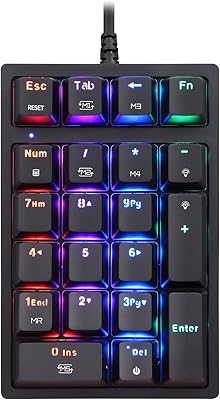
The per-key RGB looks genuinely attractive in low-light environments, and onboard controls let users cycle through effects without installing any software. For buyers who just want a lit numpad that looks good on a desk, the out-of-box experience is satisfying.
The companion software for deep RGB customization is widely criticized as unintuitive and barebones compared to what Razer or Logitech offer at higher price points. Several users report the software crashed or failed to save custom profiles, leaving them relying solely on onboard presets.
Software & Programmability
58%
42%
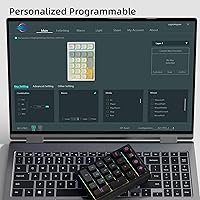
Onboard key remapping is available for basic customization without needing to install anything, which is a reasonable fallback. Users who only want to remap a key or two typically manage this without touching the desktop software at all.
The dedicated software is the most criticized aspect of the K21 across buyer feedback. It lacks polish, the interface is not clearly documented, and Mac users in particular report compatibility problems. For a product marketed as fully programmable, the software experience underwhelms significantly.
Multi-Device Switching
74%
26%
Switching between devices via Bluetooth profiles works reasonably well once everything is set up correctly. Users who pair it to a laptop and a tablet report the switching process is quick enough for a daily workflow, especially when using the dedicated shortcut keys.
The device does not always switch as smoothly as advertised when moving between different operating systems — for example, toggling between a Windows PC and an iPad occasionally requires a full re-pair rather than a clean profile switch. It works, but not effortlessly.
Value for Money
89%
This is arguably where the K21 earns its strongest endorsement. At its price point, the combination of gasket mount, hot-swap sockets, PBT keycaps, and triple wireless modes would be hard to replicate from a competing brand without spending noticeably more. Buyers who have compared it to Epomaker or Nuphy alternatives frequently conclude the K21 offers more structural substance per dollar.
The value equation weakens slightly if you factor in the software frustrations. Buyers who prioritize deep programmability or RGB customization may find that cheaper, simpler alternatives without hot-swap features are a more satisfying overall package for their specific needs.
Portability & Form Factor
83%
At just 12 ounces and a footprint small enough to fit in most laptop bags, the K21 travels well. Remote workers and people who commute between home and an office mention tossing it into a bag daily without it feeling like a burden, which matters for a peripheral people actively carry.
The 21-key layout, while compact, is not a universal preference. Users who rely on a traditional full-size numpad with a dedicated Enter key in the lower-right position sometimes find the compact arrangement requires a short adjustment period before muscle memory catches up.
Compatibility Across Devices
77%
23%
Windows, Mac, Linux, iOS, and Android coverage is broad, and most users connect it successfully across these platforms without drivers. Mac users in particular appreciate that function keys and shortcuts work without complex remapping out of the box in most common workflows.
Edge cases do exist. A small but vocal group of Linux users report needing manual configuration for some key mappings, and certain Android tablet setups produce unexpected input behavior. It is not a dealbreaker for most, but the cross-platform experience is not perfectly frictionless.
Acoustic Profile
76%
24%
The gasket and foam combination produces a sound that buyers frequently describe as muted and satisfying — not a sharp clack, but a softer, more rounded thock that feels appropriate for office environments with moderate ambient noise. Switch choice also lets users tune this further.
Users expecting near-silence will be disappointed. Even with foam dampening, the mechanical switches produce enough noise to be noticeable in a quiet room or on a video call. Anyone in a shared bedroom workspace or recording environment should factor this in carefully before buying.
Ease of Setup
72%
28%
Out of the box, pairing over 2.4GHz via the included dongle is fast and requires zero configuration — plug in the receiver and it works within seconds. For users who just want to get typing quickly, the plug-and-play experience via dongle is genuinely straightforward.
The Bluetooth setup experience is less consistent, particularly on Windows 11, where several users report needing multiple attempts to complete the initial pairing. The manual is sparse, which makes troubleshooting feel like guesswork for buyers who are less technically confident.

Suitable for:

The KEYCOOL K21 Wireless Mechanical Numeric Keypad is a strong fit for anyone who spends serious time on spreadsheets, invoicing, or data entry using a laptop that lacks a dedicated number row. Finance professionals, accountants, and remote workers who have grown tired of cramped virtual keyboards or slow trackpad number input will find that this wireless numpad slots naturally into a clean desk setup without adding bulk. Mechanical keyboard hobbyists who want a compact hot-swappable board to experiment with different switch feels — linears, tactiles, clicky — will appreciate that this is one of the very few numpads in its price range that actually supports that kind of tinkering. Mac and iPad users looking for a reliable Bluetooth numpad that handles multi-device pairing without requiring third-party drivers will also get solid mileage here. If you move regularly between a home office and a coworking space, the lightweight build and wireless flexibility make it genuinely easy to carry along.
Not suitable for:

The KEYCOOL K21 Wireless Mechanical Numeric Keypad is not the right choice if your work environment demands near-total silence — a quiet library, a recording studio, or a shared bedroom workspace where any mechanical key noise is unwelcome. Users who rely on a traditional full 10-key layout with a specific Enter key placement and expect zero adjustment period may find the 21-key arrangement requires more relearning than it is worth. If deep RGB programmability is a priority — custom per-key lighting profiles, macro layers, or animation editors — the underwhelming companion software will frustrate you quickly, and alternatives with more polished software ecosystems exist at comparable prices. Buyers who are not already familiar with Bluetooth peripheral setup on Windows 11 may encounter pairing friction that feels disproportionate to what should be a simple plug-and-play experience. And if you have no interest in switching out the factory switches, the hot-swap feature that partly justifies the purchase becomes a benefit you are simply paying for without using.
Specifications

  • Key Count: The layout includes 21 keys, covering a standard numeric pad arrangement with additional function controls.
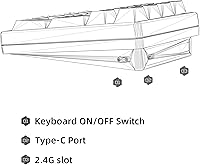
  • Connectivity: Three connection modes are supported: Bluetooth 5.0, a 2.4GHz wireless dongle, and a wired USB-C connection.
  • Battery: A built-in 1500mAh rechargeable battery powers wireless operation and is charged via the USB-C port.
  • Charging Port: USB-C is used for both wired mode and battery charging, eliminating the need for legacy micro-USB cables.
  • Switch Sockets: All switch positions are hot-swappable and accept both 3-pin and 5-pin mechanical switches without soldering.
  • Keycap Material: Keycaps are made from PBT plastic with dye-sublimation printing, which resists shine and legend fading over time.
  • Mount Type: The board uses a gasket-mount structure with PORON foam tape to absorb keystroke impact and soften the sound profile.
  • Lighting: Per-key RGB lighting is included, with effects controllable both onboard and through companion software.
  • Special Controls: A dedicated volume roller is built into the top of the unit for quick media and volume adjustment.
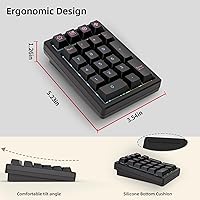
  • Dimensions: The unit measures 6.42 x 4.57 x 1.93 inches, making it compact enough to fit in most laptop bags.
  • Weight: The K21 weighs 12 ounces, light enough for daily portability without feeling flimsy.
  • OS Compatibility: Officially compatible with Windows, macOS, Linux, iOS, and Android without requiring proprietary drivers for basic input.
  • Style: The board carries a retro aesthetic with distinctive keycap legends that differentiate it from generic office peripherals.
  • Housing Material: The outer casing is constructed from plastic with PBT keycaps, balancing weight reduction with reasonable everyday durability.
  • Color Option: Available in black as the standard color variant at launch.
  • Device Compatibility: Designed for use with laptops, desktop PCs, tablets, smartphones, and gaming consoles across supported operating systems.
  • Wireless Standard: The 2.4GHz mode uses a plug-in USB-A dongle receiver for low-latency wireless input on compatible devices.
  • Keycap Profile: The keycaps use a standard profile suited to dye-sublimation printing, compatible with most aftermarket 1u replacement keycaps.

Related Reviews

KZZI K20 Mechanical Wireless Numeric Keypad
80%
83%
Build Quality
88%
Typing Feel
79%
Wireless Connectivity
91%
Hot-Swap Feature
77%
Battery Life
More
MOTOSPEED MSK24 21-Key Mechanical Numpad
78%
88%
Typing Feel
91%
Value for Money
67%
Build Quality
83%
RGB Lighting
54%
Software & Programmability
More
BOYI TD21 Mechanical Numeric Keypad
76%
83%
Wireless Reliability
89%
Hot-Swap Experience
86%
Keycap Quality
72%
Build & Construction
58%
Software & Customization
More
ProtoArc EK04 Wireless Ergonomic Keyboard
74%
83%
Ergonomic Design
61%
Wrist Rest Comfort
78%
Build Quality
81%
Wireless Reliability
87%
Battery Life
More
Merdia Wireless Mechanical Keyboard
83%
90%
Connectivity Options
88%
Typing Experience
86%
RGB Customization
84%
Build Quality
91%
Battery Life
More
LiftMaster KPW250 Wireless Access Control Keypad
76%
88%
Ease of Installation
91%
PIN Management
84%
Wireless Range & Reliability
79%
Build Quality
86%
Backlit Keypad
More
Logitech MX Mechanical
81%
88%
Typing Feel & Switch Quality
91%
Noise Level
86%
Build Quality & Materials
93%
Battery Life
87%
Multi-Device Connectivity
More
Keychron K8
Keychron K8
80%
91%
Typing Feel & Switch Quality
88%
Noise Level
86%
Multi-Device Connectivity
67%
Build Quality & Materials
72%
Battery Life
More
Pauroty 60% Wireless Mechanical Keyboard
86%
88%
Connectivity Options
75%
Battery Life
93%
Portability
84%
Ergonomics
91%
RGB Customization
More
Keychron K2 V2 Wireless Mechanical Keyboard
87%
88%
Overall Performance
85%
Typing Experience
90%
Battery Life
92%
Build Quality
80%
Portability
More

FAQ

Yes, the K21 connects to macOS over Bluetooth or via the 2.4GHz dongle without needing any driver installation. Basic number input and media controls work immediately. Some users remap a couple of keys through the companion software to better match Mac conventions, but it is not required for everyday use.

Hot-swappable means the switch sockets are designed so you can pull out a mechanical switch and push a new one in without soldering anything. You just need a basic switch puller, which is a small inexpensive tool that clips onto the switch and lets you extract it cleanly. It takes about thirty seconds per key once you get the hang of it.

With RGB lighting off or minimal, most users report several days of regular use before needing a charge over Bluetooth. If you run RGB at full brightness continuously, expect that to drop noticeably — some buyers report needing to charge every day or two under those conditions. The 2.4GHz dongle mode has similar drain characteristics to Bluetooth.

The KEYCOOL K21 Wireless Mechanical Numeric Keypad supports multiple Bluetooth profiles, so you can pair it to more than one device and switch between them using dedicated key combinations. The 2.4GHz dongle is locked to whichever device its receiver is plugged into. Switching between a Mac and an iPad, for example, works but can occasionally require a manual re-pair if the devices are on different operating systems.
It is quieter than most mechanical keyboards thanks to the gasket mount and foam dampening, but it is still a mechanical numpad and will be audible in a quiet room. In a typical open-plan office with ambient noise, most users find it acceptable. If your workplace is genuinely silent or you are on video calls frequently, a membrane numpad would be a safer choice for noise levels.

You can use any standard 3-pin or 5-pin mechanical switch from any brand — Gateron, Cherry, Akko, Kailh, and similar manufacturers all work fine. The only requirement is that the switch follows the standard MX footprint, which virtually all mainstream switches do. This is what makes the hot-swap feature genuinely useful for people who already have a switch collection.

The onboard RGB presets cycle and function on any platform without software, so you can use the built-in lighting effects on a Mac just fine. The companion software for creating custom RGB profiles is primarily Windows-oriented, and Mac users have reported limited success getting it to run reliably. For most people the onboard presets are enough, but deep customization is a Windows-first experience.

The roller sits at the top of the numpad and physically scrolls to raise or lower system volume on whatever device it is connected to. It works at the hardware level, so it does not require any software running in the background. It is a small addition but genuinely convenient if you find yourself frequently adjusting audio while working through numbers or spreadsheets.

Over 2.4GHz, input lag is effectively imperceptible and most users report it feels identical to a wired connection. Bluetooth 5.0 is also stable for data entry once paired, though a small number of users note occasional micro-stutters if the device has been idle. For serious spreadsheet work where speed matters, the 2.4GHz dongle mode is the more reliable choice.

A gasket mount means the internal switch plate is suspended inside the housing by a layer of soft foam rather than being screwed rigidly to the case. That small gap lets the plate flex slightly on impact, which absorbs some of the shock from each keystroke. The result is a softer feel underhand and a more muted sound compared to a standard plate-mounted numpad — it is a construction detail normally found in keyboards costing considerably more.