Overview

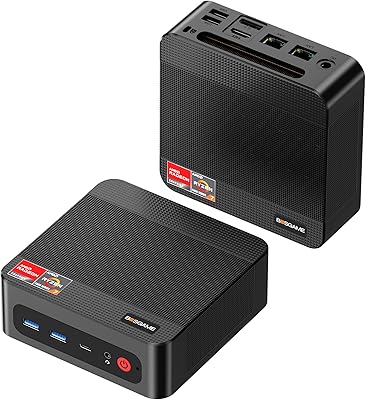
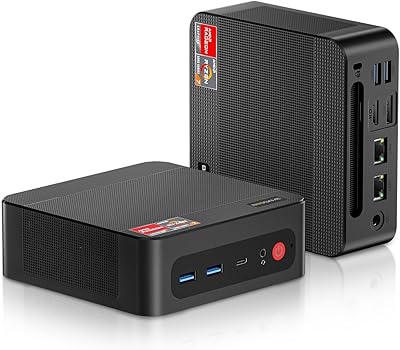
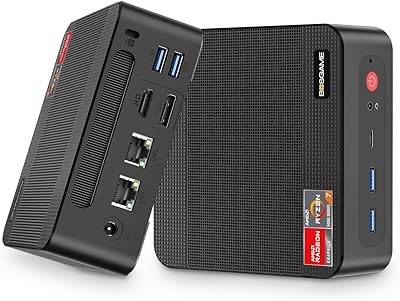
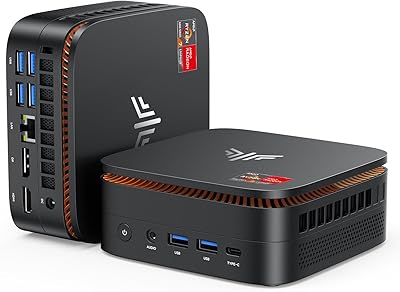
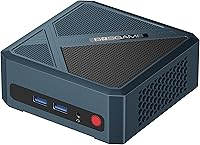
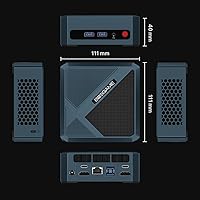
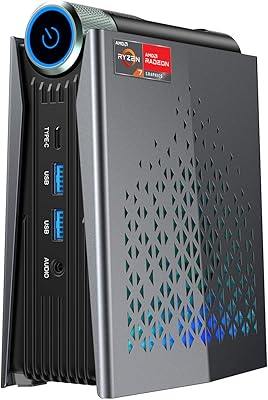
The BOSGAME P5 Ryzen 7 6800H Mini PC enters a crowded market with a chip that genuinely earns its place — the Ryzen 7 6800H is a laptop-class processor normally reserved for machines costing considerably more, bringing real 8-core performance to a box smaller than a paperback book. At roughly 5 by 4.4 by 1.6 inches and just under three pounds, the chassis feels solid and substantial, and the included VESA bracket lets it vanish cleanly behind a monitor. Windows 11 Pro comes pre-loaded, so the initial setup takes minutes. That said, be clear-eyed: this is integrated-graphics territory, built for productivity and light creative work, not a substitute for a tower with a dedicated GPU.

Features & Benefits

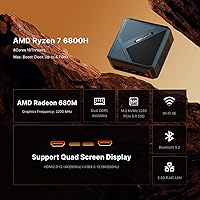
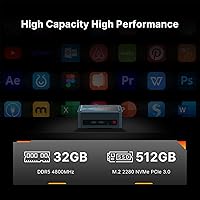
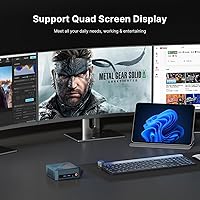
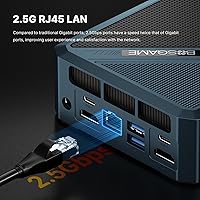
The headline feature for most buyers will be quad 4K display support — two USB4 ports and two HDMI 2.0 outputs let you drive four monitors at once, genuinely uncommon at this price and a real productivity multiplier for anyone juggling spreadsheets, code editors, or video timelines. The 32GB of DDR5 RAM runs at 4800MHz and lives in upgradeable SODIMM slots — a smart choice for a machine you might want to grow into. Storage is the honest weak point: 512GB is workable as an OS drive, but most power users will want a second M.2 within the first month. The Radeon 680M handles 1080p gaming in lighter titles comfortably, though demanding 4K games are out of scope. Connectivity rounds out well, with a 2.5G ethernet port, Wi-Fi 6E, and Bluetooth 5.2.

Best For

This mini PC hits a sweet spot for a few specific types of buyers. Home office workers who need multiple-monitor support without a tower eating up desk space will find it hard to beat at this price. Content creators — think light 4K editing, audio production, or photo work — get a capable machine in a chassis that runs quietly at typical workloads. Developers who want to dual-boot Linux alongside Windows will appreciate the confirmed OS compatibility. It also works well as a living-room media center, where HDMI 4K output and near-silent idle operation are real assets. Anyone wanting near-laptop performance in a stationary, upgradeable form — without paying laptop prices — is squarely in this machine's target audience.

User Feedback

Buyers generally respond positively to everyday performance, noting that the system handles browser-heavy workflows, light coding sessions, and document work without hesitation. Fan noise at idle earns consistent praise — quiet enough to sit on a desk without becoming a distraction. Where feedback turns mixed is under sustained heavy load: some users report temperatures rising noticeably during extended rendering, and a small number observe minor throttling after prolonged stress. QC appears mostly consistent, though a handful of buyers flag cosmetic or packaging issues on arrival. BOSGAME's support team draws cautiously positive remarks — most warranty interactions are described as responsive — though the brand's relative newness means long-term reliability data is still limited.

Pros

  • Quad 4K display support across four simultaneous outputs is genuinely rare at this price point.
  • The Ryzen 7 6800H delivers real multi-core performance well above what typical mini PC chips offer.
  • 32GB of DDR5 RAM handles heavy multitasking comfortably, and the SODIMM slots keep future upgrades straightforward.
  • Wi-Fi 6E, Bluetooth 5.2, and a 2.5G ethernet port put this compact desktop ahead of most similarly priced machines on networking alone.
  • Windows 11 Pro comes pre-installed, so the machine is genuinely ready to use straight out of the box.
  • The VESA-mountable chassis disappears cleanly behind a monitor, reclaiming desk and floor space entirely.
  • Fan noise at idle is consistently reported as low — comfortable for quiet home offices or shared spaces.
  • Confirmed Linux and Ubuntu compatibility makes it a practical pick for developers who need real OS flexibility.
  • USB4 ports deliver fast data transfer and versatile peripheral support that most competitors at this price quietly omit.

Cons

  • The 512GB SSD fills up quickly — media-heavy users will almost certainly need additional storage within weeks of real use.
  • Under sustained heavy workloads, thermal limits inside the compact chassis can cause noticeable CPU throttling.
  • The Radeon 680M cannot handle modern AAA games at high settings, even at 1080p — integrated graphics have a real ceiling here.
  • BOSGAME is a newer brand with a limited long-term reliability track record compared to established desktop manufacturers.
  • No discrete GPU slot or eGPU upgrade path exists, leaving graphics-intensive users with no hardware escape route.
  • The one-year warranty period feels short for a machine that many buyers will use as their primary daily workstation.
  • The PCIe Gen3 SSD interface rather than Gen4 leaves measurable storage throughput on the table for data-intensive workflows.
  • A consistent minority of buyers report inconsistent packaging quality and occasional cosmetic damage arriving from shipment.

Ratings

The scores below were generated by our AI system after analyzing verified buyer reviews for the BOSGAME P5 Ryzen 7 6800H Mini PC sourced from global retail platforms, with automated filtering applied to remove incentivized, bot-generated, and duplicate submissions. Each category reflects both the genuine strengths and the recurring frustrations that real users have documented, with no attempt to soften or conceal the weaknesses. The result is a transparent, data-driven snapshot of where this compact desktop earns its reputation — and where it asks buyers to accept a real trade-off.

Performance
84%
The Ryzen 7 6800H handles the kind of multitasking that chokes cheaper mini PC chips — 20-plus browser tabs, an active video call, and background file transfers running simultaneously without any stutter. Users consistently describe day-to-day responsiveness as punchy and confident, well above what most expect from a machine this size.
Under sustained multi-threaded loads like extended video encoding or heavy compilation runs, the compact chassis limits how long the chip can hold peak clocks before thermal constraints pull it back. It is not a workstation-class experience for prolonged heavy compute tasks, and buyers should calibrate their expectations accordingly.
Value for Money
88%
Landing a Ryzen 7 6800H, 32GB of DDR5 RAM, quad 4K output, Wi-Fi 6E, and a 2.5G ethernet port at this price tier is genuinely difficult to argue with. Comparable specs in either a full-size desktop or a comparably connected laptop typically demand a significantly higher outlay.
The 512GB SSD and the absence of a discrete GPU mean the headline value is partially offset by near-certain additional spending for power users. Buyers who factor in an external drive or second internal NVMe will find the true cost of ownership noticeably higher than the box price suggests.
Multi-Display Support
91%
Four simultaneous 4K outputs — two via HDMI 2.0 and two via USB4 — is the feature buyers talk about first, and in practice it works exactly as advertised. Home office users running three or four monitors report a real shift in workflow organization that they describe as difficult to give up once experienced.
When all four displays are active at high resolution, the integrated GPU carries a heavier workload, which can reduce responsiveness during video scrubbing or browser-based rendering tools. For pure productivity use across four screens the experience holds up well; for creative work at that scale it can feel noticeably strained.
Gaming Capability
57%
43%
The Radeon 680M is the strongest integrated GPU in its class and handles 1080p gaming in older titles, indie games, and lighter competitive games at genuinely playable frame rates. For casual users who game occasionally rather than seriously, it delivers more than most people expect from integrated graphics at this price.
Modern AAA titles at medium or high settings, and anything targeting 4K resolution, will hit the ceiling of integrated graphics fast. Buyers who purchase this machine with serious gaming ambitions will be disappointed — there is no discrete GPU slot, no clear eGPU upgrade path, and no way to meaningfully grow graphical performance over time.
Storage Capacity
52%
48%
The 512GB NVMe SSD is fast and keeps boot times and app launches snappy, which matters for the everyday experience. For users who rely primarily on cloud storage or a NAS for media and large files, the included capacity may honestly be sufficient for light day-to-day use.
Video editors, photographers, and anyone with a meaningful local media library will find 512GB limiting within days of real use rather than weeks. Most power users report needing to add external storage or a second internal drive almost immediately, which adds friction to what is otherwise a genuinely ready-to-go machine.
Connectivity
93%
The port selection rivals machines priced significantly higher — USB4, USB 3.2 Gen 2, 2.5G wired ethernet, Wi-Fi 6E, and Bluetooth 5.2 packed into a chassis smaller than a hardcover book is a standout achievement at this tier. Users who move large files regularly or depend on a stable wired connection for remote work single this out as a consistent highlight.
The USB4 implementation may not support all Thunderbolt 4 accessories at full rated speed, which is a relevant limitation for users with premium docking stations or external GPU enclosures. There is also a single 3.5mm combo audio jack rather than separate headphone and microphone ports, a minor but real inconvenience for users with analog headsets.
Thermal Management
67%
33%
The copper heat pipe and fan setup handles everyday workloads — office tasks, light editing, and media streaming — without the chassis becoming uncomfortably warm or audibly stressed. The cooling architecture is a genuine step above the basic blower designs found in many comparably sized competitors, which users appreciate during moderate all-day use.
Extended rendering sessions, sustained gaming, or continuous high-CPU workloads will push temperatures toward the chip's thermal ceiling, and some users have observed measurable performance dips after 30 or more minutes of heavy continuous load. The compact chassis leaves little headroom for more aggressive thermal solutions, which is a fundamental constraint of the form factor.
Noise Level
81%
19%
At idle and during typical productivity work, the fan is quiet enough that most users forget the machine is running — a detail that matters for shared workspaces, video calls, and anyone recording audio nearby. This compact desktop earns consistent praise for being genuinely unobtrusive during the majority of its working day.
Under heavier workloads the fan spins up and becomes an audible presence, which catches buyers off guard if they expected near-silence across all usage scenarios. It never reaches laptop-fan territory, but users who anticipated library-level quiet during rendering or extended gaming sessions have noted the contrast clearly.
RAM & Upgradeability
86%
Shipping with 32GB of DDR5 at 4800MHz means most buyers will not feel RAM-constrained during everyday use, and having genuine SODIMM slots rather than soldered memory gives the machine a longer useful lifespan than many competing mini PCs. Users running virtual machines, layered browser sessions, and creative tools simultaneously report comfortable headroom.
DDR5 SODIMM kits remain slightly less available and more expensive than DDR4, adding a small premium to future upgrade costs. Some users have also noted the absence of clear documentation on the maximum supported RAM configuration, creating uncertainty for those planning to push the machine to its ceiling.
Software & OS
83%
Windows 11 Pro arriving pre-activated means buyers can be productive within minutes of unboxing, without dealing with license keys, installation media, or initial configuration headaches. The Pro tier specifically unlocks useful professional features like Remote Desktop, BitLocker encryption, and domain join that home office and developer users genuinely rely on.
Like most pre-built Windows machines, this one ships with some manufacturer software that a portion of users prefer to remove before getting started. Initial Windows update cycles on first boot also consume a chunk of the 512GB drive faster than some buyers anticipate, which compounds the already tight storage situation.
Setup & Ease of Use
89%
Connect a monitor, plug in a keyboard and mouse, and the machine is ready — no OS installation, no driver hunting, no technical knowledge required. Users who are not technically inclined consistently describe the setup as one of the most straightforward desktop experiences they have had, including those switching from a full tower for the first time.
Installing the VESA bracket correctly on the first attempt requires a screwdriver and a moment of careful alignment that a handful of users find fiddlier than expected. Several buyers have also noted that the power adapter cable is on the shorter side, which restricts placement flexibility depending on where the nearest outlet sits.
Build Quality
79%
21%
The chassis feels noticeably denser than many similarly sized mini PCs, and the plastic-and-metal construction does not creak or flex under normal handling. The included VESA bracket is solid and well-matched to the chassis, which home office users who mount behind a monitor consistently call out as a thoughtful and reliable inclusion.
The exterior is primarily plastic, and a small but consistent proportion of buyers have reported minor cosmetic blemishes or light scuff marks on the unit at arrival. It does not feel fragile, but it falls short of the premium aluminum finish that established desktop brands offer at comparable performance levels.
Brand & Support
71%
29%
BOSGAME's support interactions draw genuinely positive responses from buyers who have needed assistance — response times are described as prompt by most, and the 30-day return window gives buyers a reasonable safety net for catching defects early. The 24/7 support claim appears to be backed in practice for the most common troubleshooting scenarios.
BOSGAME is a newer brand without the established reliability track record of household desktop names, and long-term durability data simply does not yet exist at meaningful scale. A consistent minority of buyers have also flagged QC inconsistencies on arrival — minor cosmetic damage or accessory discrepancies — suggesting room for improvement in the production and packaging pipeline.
Size & Footprint
87%
At under three pounds and with a footprint smaller than most consumer routers, this compact desktop genuinely disappears into a workspace — VESA-mounted behind a monitor, tucked into a living-room media cabinet, or placed on a cluttered desk without demanding attention. Users switching from full towers consistently remark on the transformative effect on their physical setup.
The external power adapter adds a cable run that some users find inconvenient, particularly in VESA-mounted configurations where the brick has to sit on a nearby surface or shelf. The machine is also not designed for mobility — its compact size is about desk presence, not portability, and buyers expecting laptop-like flexibility will be misreading what it is.

Suitable for:

The BOSGAME P5 Ryzen 7 6800H Mini PC is a strong fit for home office professionals who want a capable, desk-friendly workstation without the footprint of a full tower — especially those who rely on two or more monitors to stay productive. The Ryzen 7 6800H brings genuine 8-core processing power to a very small chassis, making it well above average for video calls, document-heavy multitasking, and moderate creative work like light 4K editing or audio production. Developers and students who need to run Linux or Ubuntu alongside Windows 11 Pro will find the OS flexibility genuinely practical, not just a marketing footnote. It also works well as a living-room media center or secondary workstation, where HDMI 4K output, whisper-quiet idle operation, and the VESA mount option all pull in the same direction. Budget-conscious buyers who want near-laptop responsiveness in a stationary, upgradeable machine — without paying for a discrete GPU they simply do not need — will get strong value from this compact desktop.

Not suitable for:

The BOSGAME P5 Ryzen 7 6800H Mini PC is not the right call for anyone expecting to run graphically demanding games or GPU-intensive workloads — the Radeon 680M is a capable integrated chip, but it has a hard ceiling that modern AAA titles and serious 3D rendering will hit quickly. If gaming at high settings is anywhere near the top of your priority list, a system with a dedicated GPU will serve you far better, even at a higher price. The 512GB SSD, while workable as an OS and apps drive, will feel cramped almost immediately for video editors, photographers, or anyone managing a large local media library, making a storage upgrade a near-certainty for power users. Buyers who need rock-solid thermal stability under sustained heavy compute tasks — long rendering queues, extended compilation runs, or continuous stress workloads — should be realistic about what a compact chassis can handle, as some users have observed performance dips under prolonged load. Those who place significant weight on established brand heritage and years of verified reliability data may also feel less confident here, since BOSGAME is still building that track record.

Specifications

  • Processor: The CPU is an AMD Ryzen 7 6800H with 8 cores and 16 threads, boosting up to 4.7GHz.
  • Graphics: Integrated AMD Radeon 680M GPU is responsible for all display output and graphics processing.
  • RAM: 32GB of DDR5 SODIMM memory runs at 4800MHz and is installed in user-accessible, upgradeable slots.
  • Storage: A 512GB PCIe Gen3 M.2 2280 NVMe SSD serves as the primary system and storage drive.
  • Display Outputs: Two HDMI 2.0 ports and two USB4 ports together support simultaneous output to up to four 4K displays.
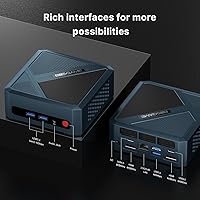
  • USB Ports: Six USB ports are provided in total: 2x USB4, 2x USB 3.2 Gen 2, and 2x USB 2.0.
  • Networking: Wired and wireless connectivity includes a 2.5G LAN port, Wi-Fi 6E (802.11ax), and Bluetooth 5.2.
  • Audio: A single 3.5mm combo audio jack provides headphone output and microphone input on the rear panel.
  • Dimensions: The chassis measures 4.96 x 4.41 x 1.6 inches (L x W x H).
  • Weight: The unit weighs 2.55 pounds, not including the external power adapter.
  • Operating System: Windows 11 Pro comes factory-installed, and the hardware is officially compatible with Ubuntu and other Linux distributions.
  • Cooling System: A copper heat pipe paired with a blower fan and high-grade thermal grease manages CPU heat under load.
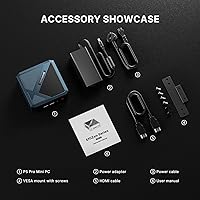
  • VESA Support: A VESA mount bracket is included in the box, allowing the unit to attach directly to the back of a compatible monitor.
  • Warranty: BOSGAME covers the unit with a one-year limited warranty from date of purchase and a 30-day return window.

Related Reviews
GEEKOM A6 Mini PC 32GB/1TB
83%
88%
CPU Performance
67%
Thermal Management
91%
Build Quality
86%
RAM & Memory Performance
89%
Storage Speed
More
BOSGAME P4 Ryzen 7 5700U Mini PC
77%
88%
Value for Money
83%
Processing Performance
93%
Connectivity & Networking
86%
Display Output
51%
Gaming Capability
More
Beelink SER5 MAX (24GB / 500GB)
81%
91%
Everyday Performance
88%
RAM & Memory Headroom
74%
Storage Performance
93%
Multi-Monitor & Display Output
69%
Thermal Management
More
BOSGAME Mini PC P4 Plus (Ryzen 7 5825U, 32GB/1TB)
80%
91%
Value for Money
83%
CPU Performance
61%
Thermal Management
94%
Connectivity & Networking
88%
Multi-Display Support
More
BOSGAME P3 Ryzen 7 7840HS Mini PC
81%
92%
CPU Performance
67%
Gaming Performance
86%
Value for Money
91%
RAM & Storage
89%
Connectivity
More
Beelink EQR6 6800H Mini PC
78%
88%
Processing Performance
84%
Value for Money
47%
RAM Flexibility
91%
Display & Output
61%
Gaming Capability
More
KAMRUI Hyper H1 Mini PC
77%
88%
Value for Money
86%
CPU Performance
61%
Thermal Management
63%
Fan Noise
91%
Multi-Monitor Support
More
ACEMAGICIAN Kron Mini K1 Mini PC
73%
83%
Everyday Performance
54%
Gaming Capability
61%
Thermal Management
89%
Display & Connectivity
78%
Value for Money
More
MINISFORUM UM773 Lite Mini PC
78%
91%
Processing Performance
74%
RAM & Memory
88%
Storage Speed & Capacity
77%
Graphics & Display Output
93%
Connectivity & Ports
More
BOSGAME E2 Mini PC 16GB/512GB
80%
88%
Value for Money
83%
Performance for Everyday Tasks
76%
Build Quality & Design
61%
Thermal Management & Fan Noise
82%
Display Output & Multi-Monitor Support
More

FAQ

It genuinely works — the BOSGAME P5 Ryzen 7 6800H Mini PC uses its two HDMI 2.0 ports and two USB4 ports to power up to four 4K displays simultaneously, and most users find this reliable in everyday productivity setups. That said, running all four screens at high resolution does put more demand on the integrated GPU, so you may notice a slight impact on graphics-intensive tasks when all four outputs are active at once. For office work, browsing, and media across multiple screens, it holds up well.

The RAM is not soldered — it sits in standard SODIMM slots, which means you can upgrade it when your workload demands more. The machine ships with 32GB of DDR5 at 4800MHz, which is a strong starting point, but if you eventually need 64GB, the upgrade path is straightforward. Just confirm that any replacement kit is DDR5 SODIMM compatible before purchasing.

Ubuntu and several other Linux distributions install and run on this hardware without major issues, and BOSGAME officially lists Linux compatibility. Community users have reported successful installs on popular distros, though driver support for peripherals like Wi-Fi can occasionally require a manual step or two depending on the distribution. If you plan to run a niche or highly customized Linux environment, checking community forums before committing is a smart move.

At idle and during light tasks like browsing or document work, the fan is nearly inaudible. When the CPU is pushed harder — sustained video encoding or extended multi-threaded tasks — the fan does spin up and becomes noticeable, though it stays within a range that most home office users describe as tolerable. This is not a passively cooled system, so anyone who needs complete silence should factor that in.

That depends on what you want to play. The Radeon 680M is one of the stronger integrated GPUs available in this class of machine, and it handles less demanding titles, older games, and indie fare at 1080p quite comfortably. Modern AAA games at medium or high settings will struggle, and 4K gaming is simply not in scope for integrated graphics. If gaming is a primary priority rather than an occasional perk, a machine with a dedicated GPU will be a much better fit.

The 512GB is just the starting configuration, not a hard limit. The installed drive uses an M.2 2280 NVMe slot, and some units may have a second M.2 slot available internally — though you should verify this for your specific unit before buying an extra drive. External storage connected via USB4 or USB 3.2 Gen 2 is also a fast and convenient way to expand capacity without opening the case at all.

No keyboard or mouse is included — you will need to supply those yourself. What does come in the box is the power adapter and a VESA mount bracket. Since Windows 11 Pro is pre-installed and ready to go, connecting a display plus your own keyboard and mouse is genuinely all that is needed to get up and running.

For light to moderate editing work — trimming clips, grading in DaVinci Resolve at lower resolutions, or assembling a timeline in Premiere — this compact desktop manages reasonably well under normal conditions. Very long, back-to-back rendering sessions can push temperatures up, and a small number of users have observed minor throttling during sustained stress. For occasional editing combined with everyday productivity tasks, it is a comfortable fit; just do not expect it to behave like a workstation with a large tower cooler.

The unit comes with a one-year limited warranty from the date of purchase and a 30-day return window. BOSGAME also advertises 24/7 lifetime technical support, which sounds ambitious for a smaller brand, and buyer sentiment on support is cautiously positive — most who have reached out describe timely, helpful responses. As with any newer brand, individual experiences can vary, so contacting them promptly if an issue arises tends to produce better results than waiting.

The Ryzen 7 6800H is a meaningful step above the Celeron, Pentium, and older Ryzen 5 processors found in much of the budget mini PC market. Those machines handle basic web browsing and light office work but fall behind quickly when multitasking, running creative software, or managing multiple high-resolution displays. This machine performs closer to a capable mid-range laptop in real-world use, with noticeably better graphics performance thanks to the Radeon 680M — which matters particularly for anyone planning to run more than two monitors or do any kind of media work.