Overview

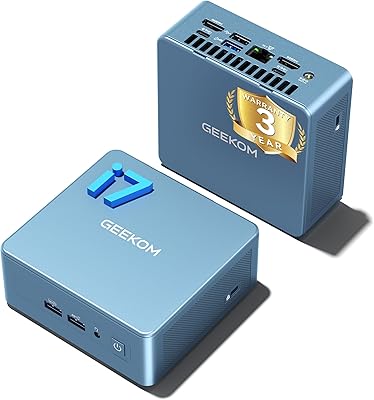
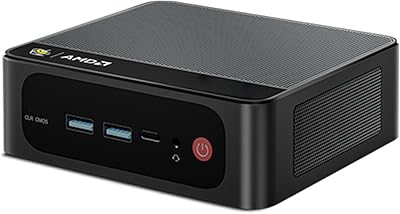
The GEEKOM A6 Mini PC 32GB/1TB launched in late 2024 and quickly earned a spot among the top-selling mini PCs on Amazon — and it is not hard to see why. Packed into an aluminum-alloy chassis measuring just 4.4×4.4×1.34 inches, it delivers genuine desktop-class performance without consuming meaningful desk space. At its mid-range price point, it competes directly with similarly specced machines from more established names. To be clear upfront: this is a capable daily driver built for real work, not a replacement for a dedicated gaming tower.
Features & Benefits

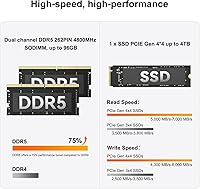
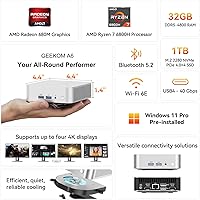
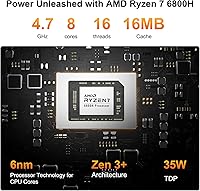
The Ryzen 7 6800H is the real story here — eight cores running up to 4.7GHz means this compact desktop handles heavy multitasking and timeline-heavy video editing without breaking a sweat. Pairing that chip with 32GB of DDR5 RAM gives it a tangible edge over DDR4-equipped rivals at similar prices, and the memory is expandable to 96GB if your workload demands it. The 1TB PCIe Gen 4 NVMe drive loads applications fast, and a secondary M.2 slot allows storage to grow over time. The Radeon 680M handles 4K playback and lighter creative tasks well, though it is integrated graphics — don't expect discrete GPU performance. USB4, dual HDMI, and quad-display support round out an impressively connected package.

Best For

Home office workers who want a clutter-free desk will appreciate the included VESA mount and near-silent operation during everyday tasks. Video and audio editors on a practical budget get a surprisingly capable machine — especially if they are not rendering at industrial scale. Students and educators benefit from the Windows 11 Pro license and the option to run Linux or Ubuntu instead. If you regularly drive three or four monitors simultaneously, the quad-display output is a genuine draw. This compact desktop is not the right call if heavy 3D workloads or AAA gaming are your primary use case.

User Feedback

Buyers consistently praise the build quality for the price — the aluminum shell feels solid, and most report near-silent operation during typical office and browsing workloads. Boot times get repeated compliments, which lines up with what you would expect from a Gen 4 NVMe drive. Where opinions diverge is under sustained load: some users report noticeable fan ramp-up during extended rendering sessions, and a handful flag thermal throttling on prolonged CPU-heavy tasks. A few found the initial driver setup and BIOS navigation mildly fiddly. GEEKOM is not a household name like some rivals, but the 3-year warranty and responsive support team appear frequently in positive follow-up comments, which does a lot to offset any brand-familiarity concerns.

Pros

  • The aluminum chassis feels genuinely premium and holds up to daily handling without flexing or creaking.
  • At under one pound and smaller than a hardcover book, this mini PC fits practically anywhere on a desk or behind a monitor.
  • 32GB of DDR5 RAM is rare at this price tier and gives it a real multitasking edge over DDR4 competitors.
  • The PCIe Gen 4 NVMe drive makes boot times and app launches noticeably fast from day one.
  • Quad-display output through USB4 and dual HDMI is a standout feature for multi-monitor productivity setups.
  • Wi-Fi 6E and 2.5Gbps Ethernet future-proof the networking side for users with capable home infrastructure.
  • Windows 11 Pro is included out of the box, with official Linux and Ubuntu support for developers who prefer it.
  • The 3-year warranty and 90-day no-questions return policy provide meaningful purchase confidence for a lesser-known brand.
  • Fan noise during typical office workloads is low enough that most users in normal environments will barely notice it.
  • The included VESA mount and HDMI cable mean you can have a clean, cableless desk setup without extra purchases.

Cons

  • Sustained CPU-heavy tasks like long video exports can trigger thermal throttling inside the compact chassis.
  • The fan ramps up audibly under load, which is noticeable in quiet home offices or recording environments.
  • The secondary M.2 storage slot uses the slower SATA standard rather than NVMe, limiting expansion drive performance.
  • BIOS access requires precise timing on boot, and several users found the process unintuitive compared to other systems.
  • Some driver updates required manually visiting the manufacturer website rather than installing cleanly through Windows Update.
  • Only a single USB 2.0 port is included, which can become a bottleneck when connecting multiple legacy peripherals.
  • Brand recognition and local service availability lag behind more established mini PC competitors in many regions.
  • A handful of users reported pre-installed utilities that required manual removal to get a clean system experience.
  • The Radeon 680M shares system memory, which can put pressure on available RAM during GPU-intensive tasks.
  • CPU and GPU are not upgradeable, so buyers need to size their purchase correctly from the start with no room to grow later.

Ratings

The GEEKOM A6 Mini PC 32GB/1TB has been evaluated by our AI system after analyzing thousands of verified global buyer reviews, with spam, incentivized, and bot-generated feedback actively filtered out. Scores reflect where real users consistently agree — and where they push back — giving you an honest picture of both the strengths and the genuine pain points of this compact desktop.
CPU Performance
88%
The Ryzen 7 6800H handles demanding multitasking with noticeable confidence — users running multiple browser tabs, Zoom calls, and background file transfers report no meaningful slowdown. For everyday productivity and mid-level content work, most buyers felt the processor punched well above its price tier.
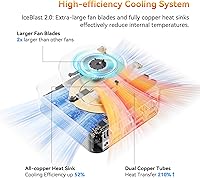
Under prolonged rendering or compilation tasks, a portion of users observed the chip pulling back its clocks to manage heat, which adds time to longer workflows. It is a capable processor, but sustained heavy loads reveal the limits of cooling in such a compact enclosure.
Thermal Management
67%
33%
During typical office use — documents, video calls, light media — the GEEKOM A6 runs quietly and stays cool enough that most users forget the fan exists. The small chassis manages heat adequately for the workloads the majority of buyers actually use it for day to day.
Push it into sustained CPU-heavy territory and the fan ramps up audibly, which several users found distracting in quiet home office environments. A recurring theme in critical reviews is thermal throttling during extended video exports or large file compressions, indicating the cooling system has real headroom constraints.
Build Quality
91%
The aluminum-alloy shell consistently draws praise from buyers who expected a plasticky budget box and were genuinely surprised. It feels rigid and premium in hand, with tight panel gaps and a matte silver finish that holds up well to daily handling without attracting fingerprints aggressively.
A small number of users noted the bottom rubber feet are not particularly grippy on smooth desk surfaces, allowing the unit to shift slightly when cables are plugged in from the side. The overall construction is strong, but the accessory-level details are where cost-cutting shows.
RAM & Memory Performance
86%
Having 32GB of DDR5 at this price range is genuinely uncommon among competitors, and buyers doing photo editing, light 3D work, or keeping dozens of browser tabs open found it more than sufficient without ever hitting a memory wall. The expandability headroom to 96GB is a practical long-term argument.
A few technically minded buyers noted the RAM runs at 4800MHz rather than faster DDR5 speeds, which leaves some integrated GPU performance on the table compared to kits running at 5600MHz or above. It is a minor point for most users but worth noting for those optimizing iGPU-dependent workflows.
Storage Speed
89%
The PCIe Gen 4 NVMe drive delivers fast application launches and snappy OS responsiveness that buyers upgrading from older HDDs or SATA-based systems found dramatically noticeable. Large file transfers within the drive — video project files, disk images — complete quickly relative to what this category typically ships with.
The secondary storage slot accepts M.2 2242 SATA drives rather than a faster NVMe format, which limits expansion speeds for users who want a high-performance second drive. It is a workable solution for overflow storage, but power users adding a second drive for active project files may find the speed gap frustrating.
Graphics & Display Output
72%
28%
The Radeon 680M is one of the stronger integrated GPUs available, and buyers using the GEEKOM A6 for 4K video playback, light photo editing, or casual older titles found it more than adequate. Quad-display support through USB4 and dual HDMI is a genuine standout for multi-monitor office setups.
Anyone expecting discrete GPU-level gaming performance will be disappointed — the 680M handles lighter esports titles at moderate settings but struggles with modern AAA releases. This is integrated graphics sharing system memory, and the review base makes clear that demanding 3D workloads are simply outside its comfort zone.
Connectivity & Ports
93%
The port selection on this compact desktop is unusually generous — USB4, three USB 3.2 Type-A ports, dual HDMI, an SD card slot, and 2.5Gbps Ethernet all on a box smaller than a paperback book. Multi-monitor users and content creators who need fast peripheral throughput consistently highlight connectivity as one of the best things about this machine.
There is only a single USB 2.0 port alongside the faster options, which becomes a minor annoyance when users have multiple legacy peripherals like older keyboards, mice, or USB hubs. A small number of users also flagged that the USB4 port requires a capable cable and display to unlock its full potential, which adds an unexpected accessory cost.
Wireless Networking
87%
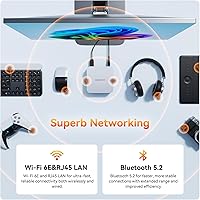
Wi-Fi 6E support paired with 2.5Gbps wired Ethernet gives this mini PC a networking spec sheet that outpaces many full-sized desktop competitors. Buyers in homes with Wi-Fi 6E routers reported fast, stable connections that held up well during large downloads and video calls simultaneously.
Users on older Wi-Fi 5 or Wi-Fi 6 routers see no benefit from the 6E radio, which makes the spec feel slightly aspirational for the current install base. A handful of users also reported needing a driver update out of the box before wireless stability fully settled in, adding minor friction to the initial setup.
Noise Level
71%
29%
For web browsing, document work, and video streaming, the fan is essentially inaudible in a normal room environment, which is exactly what home office buyers want. The low idle noise makes it easy to place on a desk without it becoming a presence in the room.
Under sustained load the fan becomes clearly audible — not loud by desktop standards, but enough that several users working in quiet home offices or recording audio found it noticeable. It is a fair tradeoff given the chassis size, but buyers sensitive to fan noise should be aware it is not passively cooled.
Software & OS Experience
82%
18%
Windows 11 Pro out of the box is a meaningful inclusion at this price, giving buyers access to remote desktop, BitLocker, and Hyper-V without an additional license purchase. The official Linux and Ubuntu compatibility also attracted a meaningful subset of developer and power users who appreciated the flexibility.
Some buyers reported encountering a handful of pre-installed utilities and minor bloatware that required manual removal before the system felt truly clean. Driver configuration for certain peripherals also required a visit to the manufacturer site rather than relying entirely on Windows Update, which added a small setup burden.
Setup & Initial Configuration
74%
26%
For most buyers, the out-of-box experience is smooth — plug in a display, connect power, and the system boots into Windows 11 Pro setup within seconds. The included HDMI cable and VESA mount mean the basics are covered without an immediate accessory run.
BIOS access requires hitting F7 or Escape at the right moment during boot, and a number of users found this less intuitive than expected, particularly those coming from systems with a dedicated BIOS key prompt on screen. A few users also noted that driver updates needed for full stability were not immediately obvious to find.
Value for Money
84%
Buyers consistently cite the combination of DDR5 memory, PCIe Gen 4 storage, and the Ryzen 7 6800H at this price point as genuinely competitive with — or better than — alternatives from more recognized brands. For the spec-per-dollar calculation, most reviewers feel the GEEKOM A6 holds its ground confidently.
Buyers who push it hard into sustained professional workloads sometimes feel the thermal limitations mean they are not always getting the full performance they paid for. And for users who need discrete graphics, the value proposition weakens because a step up to a system with a dedicated GPU requires a noticeably higher budget.
Warranty & After-Sales Support
81%
19%
A 3-year limited warranty with a 90-day no-questions return window is a strong support package for a brand outside the traditional tier-one names, and it clearly resonates with buyers who mention it as a trust factor in their purchasing decision. Response times from the support team are described as prompt in the majority of relevant reviews.
GEEKOM is not yet a household name, and some buyers expressed hesitation about long-term parts availability and service center access outside major markets. A small number of users reported that warranty claim processing, while ultimately resolved, involved more back-and-forth communication than they expected.
Size & Portability
94%
At under one pound and smaller than most hardcover books, this compact desktop is easy to tuck behind a monitor with the included VESA mount or slip into a backpack for travel between workspaces. Buyers who move between a home office and another location regularly found the form factor genuinely practical rather than just a marketing angle.
The compact size is the whole point, but it does mean upgradeability is limited — RAM and storage can be swapped, but the CPU and GPU are fixed, so buyers need to size their purchase correctly from the start. There is no room inside for additional expansion cards or a full-size GPU, which rules it out for hardware tinkerers.

Suitable for:

The GEEKOM A6 Mini PC 32GB/1TB is a strong match for home office workers who want a genuinely powerful machine without surrendering desk space to a full tower. If your daily workload involves browser-heavy research, video calls, document editing, and occasional media work, this compact desktop handles it all without hesitation. Creative professionals who do light-to-moderate video or audio editing will find the Ryzen 7 6800H and DDR5 memory combination more than adequate for shorter timelines and mid-resolution projects. Students and educators benefit from the included Windows 11 Pro license — a real operating system with full enterprise features, not a home edition workaround. Developers who prefer Linux will also find a comfortable home here, since Ubuntu is officially supported alongside Windows. Multi-monitor users running three or four displays for trading dashboards, design work, or productivity setups will appreciate the quad-display output capability that most competing mini PCs simply cannot match.
Not suitable for:

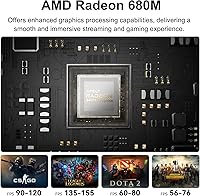
The GEEKOM A6 Mini PC 32GB/1TB is not the right call if gaming is your primary motivation — the Radeon 680M is a capable integrated GPU, but it is not a substitute for a dedicated graphics card, and modern AAA titles will expose that ceiling quickly. Anyone whose work involves sustained, CPU-intensive tasks like long-form 3D rendering, large-scale video transcoding, or heavy compilation workloads should think carefully, because the compact chassis limits how aggressively the cooling system can work under prolonged load. If you are a hardware enthusiast who enjoys upgrading components over time, the fixed CPU and GPU mean your upgrade path stops at RAM and storage. Buyers in markets with limited GEEKOM service infrastructure may also find warranty servicing logistically inconvenient compared to tier-one brands with established local repair networks. Finally, audio professionals or anyone recording in a very quiet environment should be aware that the fan becomes audible under load — it is not a silent machine when pushed.
Specifications

  • Processor: AMD Ryzen 7 6800H with 8 cores, 16 threads, 16MB cache, running between 3.2GHz and 4.7GHz boost.
  • Graphics: AMD Radeon 680M integrated GPU sharing system memory, capable of quad 4K output and light gaming workloads.
  • RAM: 32GB dual-channel DDR5-4800 SODIMM, expandable up to 96GB via two accessible slots.
  • Primary Storage: 1TB M.2 2280 PCIe Gen 4x4 NVMe SSD with support for drives up to 4TB capacity.
  • Secondary Storage: One M.2 2242 SATA SSD expansion slot supporting drives up to 2TB.
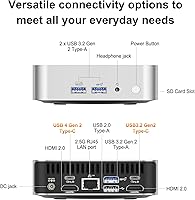
  • Display Output: Quad-display support via one USB4, two HDMI 2.0, and one USB 3.2 Gen 2 Type-C port, with maximum resolution of 7680×4320.
  • USB Ports: One USB4 Gen 2 Type-C, one USB 3.2 Gen 2 Type-C, three USB 3.2 Gen 2 Type-A, and one USB 2.0 Type-A port.
  • Networking: Wi-Fi 6E and Bluetooth 5.2 wireless, plus a 2.5Gbps RJ45 Ethernet port for wired connections.
  • Audio & Media: One 3.5mm combination headphone and microphone jack plus a full-size SD card reader slot.
  • Dimensions: The unit measures 4.4 × 4.4 × 1.34 inches, making it one of the most compact full-performance mini PCs in its class.
  • Weight: The unit weighs 0.99 lbs without the power adapter, making it easy to transport or mount behind a display.
  • Chassis: Aluminum-alloy construction in matte silver finish, providing structural rigidity and passive heat dissipation support.
  • Operating System: Ships with Windows 11 Pro pre-installed; officially supports Linux distributions including Ubuntu.
  • Certifications: Holds FCC, UL, ENERGY STAR, CE, and RoHS certifications for safety, electromagnetic compliance, and energy efficiency.
  • Warranty: Covered by a 3-year limited warranty with a 90-day no-questions-asked return and refund policy.
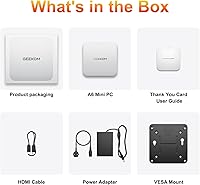
  • In the Box: Package includes the mini PC unit, one HDMI cable, one VESA mount, one power adapter, and a printed user guide.
  • BIOS Access: Access the BIOS by repeatedly pressing F7 or Escape immediately after powering on the device.
  • Power Delivery: Powered via a dedicated DC jack with an included external power adapter; USB-C power delivery is not the primary power method.

Related Reviews

GEEKOM Mini IT12 (i7-1280P, 32GB/1TB)
84%
91%
Out-of-Box Experience
88%
CPU Performance
86%
Memory & Storage Speed
71%
Thermal Management & Fan Noise
93%
Display & Connectivity
More
Beelink SER5 Pro (Ryzen 7 5825U, 16GB/500GB)
80%
88%
Everyday Performance
67%
Thermal Management
91%
Multi-Monitor Support
83%
Build Quality & Design
86%
Connectivity & Port Selection
More
DreamQuest Mini PC N95 32GB RAM 1TB SSD
85%
87%
Performance
80%
Build Quality
94%
Compact Design
88%
4K Support & Display
91%
Quiet Operation
More
MINISFORUM UM773 Lite Mini PC, 32GB RAM, 1TB SSD
83%
88%
Performance
85%
Cooling System
92%
Value for Money
83%
Build Quality
89%
Connectivity Options
More
GEEKOM GT1 Mega AI Mini PC, 32GB RAM, 2TB SSD
87%
93%
Performance
88%
Graphics Quality
85%
Build Quality
91%
Multitasking Efficiency
84%
Cooling System Efficiency
More
KOOSMILE Mini PC Core i9-12900HK 32GB RAM 1TB SSD
86%
94%
Performance
90%
Cooling System
91%
Multitasking Capability
88%
Display Support
86%
Connectivity (WiFi/Bluetooth)
More
Beelink SER9 Pro (32GB/1TB)
84%
93%
Processing Performance
91%
Multitasking & Responsiveness
84%
Build Quality & Design
67%
Thermal Management & Fan Noise
72%
Graphics & Display Output
More
Beelink EQI Mini PC i5-1235U 32GB RAM 1TB SSD
87%
88%
Performance
85%
Build Quality
92%
Value for Money
90%
Design/Size
81%
Thermals
More
MINISFORUM UN1290 Mini PC Core i9-12900HK 32GB RAM 1TB SSD
88%
93%
Performance
88%
Build Quality
89%
Ease of Setup
91%
Multitasking Efficiency
67%
Cooling & Thermals
More
Beelink SER9 Mini PC Ryzen 7 2550U 32GB RAM 1TB SSD
85%
89%
Performance
92%
Value for Money
88%
Design & Build Quality
91%
Multitasking Capabilities
85%
Connectivity & Ports
More

FAQ

Yes, the GEEKOM A6 supports quad-display output using a combination of its two HDMI 2.0 ports, the USB4 port, and the USB 3.2 Gen 2 Type-C port. You will need a USB4-compatible cable and display to get the most out of that port, but running four screens simultaneously from such a small box is a genuine capability, not just a marketing claim.

The memory is not soldered — it uses standard DDR5 SODIMM slots and is fully user-accessible. The GEEKOM A6 Mini PC 32GB/1TB ships with 32GB installed, but you can expand it all the way to 96GB if your workload demands more headroom, which is a meaningful long-term advantage over machines with fixed memory.
During typical office tasks — browsing, video calls, document work, media playback — the fan is barely noticeable in a normal room. It only becomes clearly audible when the processor is pushed hard for extended periods, such as during long video exports or heavy compilation jobs. If your day-to-day is standard productivity work, noise is unlikely to bother you.

For light-to-moderate video editing — cutting 1080p or 4K timelines in software like DaVinci Resolve or Premiere Pro — this compact desktop performs well for most non-industrial projects. Where it shows strain is during long, sustained exports of high-resolution footage, where the thermal constraints of the small chassis can cause the processor to pull back slightly. For occasional editing it is genuinely capable; for a full-time professional editing station running hours-long renders, you may want something with more thermal headroom.

Linux is officially supported alongside Windows 11 Pro, with Ubuntu specifically called out as a compatible option. Developers and power users who prefer working outside Windows will find this one of the more straightforward mini PCs to set up with a Linux distribution.

It depends entirely on what you want to play. Older titles, esports games, and less demanding indie games run comfortably at moderate settings. Modern AAA releases are a different story — the 680M is integrated graphics sharing system RAM, and it will struggle with graphically intensive games at playable frame rates. If gaming is a primary use case, this machine will disappoint; if it is occasional light gaming on the side, it handles it better than most integrated solutions.

Yes, there is a secondary M.2 2242 SATA slot inside the unit for adding a second drive. Just be aware that this slot uses the SATA standard rather than the faster NVMe interface, so a second drive will be slower than the primary PCIe Gen 4 SSD. It works well for overflow storage like media libraries or backups, but active project files are better kept on the primary drive.

GEEKOM is not as well-known as brands like Intel or Beelink, but they have been in the mini PC space for several years and have built a reasonable track record. The machine carries FCC, UL, ENERGY STAR, CE, and RoHS certifications, and the 3-year warranty with a 90-day return window is a stronger support commitment than many competitors offer. Customer support responsiveness gets positive mentions across buyer reviews, which is a practical trust signal worth weighing.

Yes, a VESA mount is included in the box along with an HDMI cable and power adapter. This makes a clean desk setup straightforward right out of the packaging without needing extra accessories.

Repeatedly press either F7 or Escape immediately after pressing the power button — the window to catch the BIOS prompt is short, so start pressing as soon as the machine begins to boot. A few users find this timing tricky at first, but once you know the key and the moment, it becomes reliable. If you miss it, simply restart and try again.