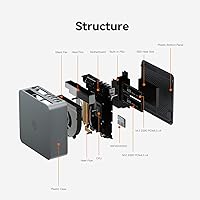
Overview

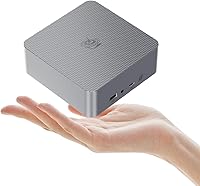
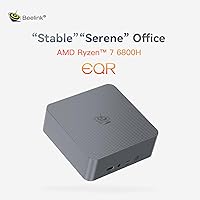
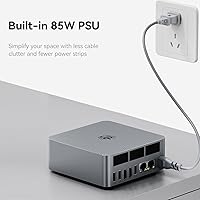
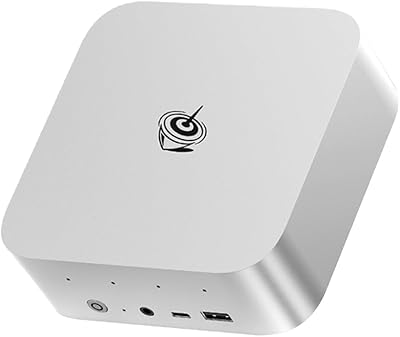
The Beelink EQR6 6800H Mini PC arrives in a market cluttered with budget-grade Celeron and Pentium boxes, and it immediately separates itself by packing a genuine laptop performance chip into a chassis smaller than a hardcover book. Beelink has been refining its mini PC lineup for years, and this particular model lands at a price point where most rivals still rely on older, weaker silicon. At roughly 1.98 pounds and measuring under nine inches across, the physical footprint is genuinely modest. The built-in 85W power supply is a practical win most competitors skip — no brick dangling behind your monitor. Expect strong office and HTPC performance; just don't treat it as a gaming tower replacement.

Features & Benefits

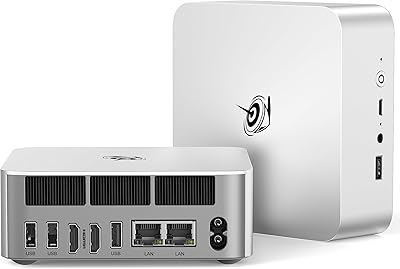
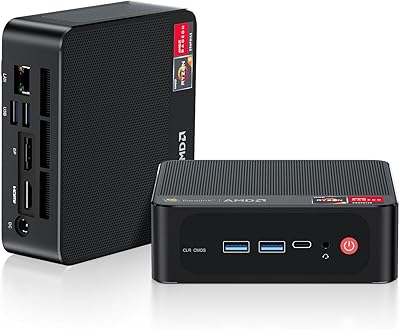
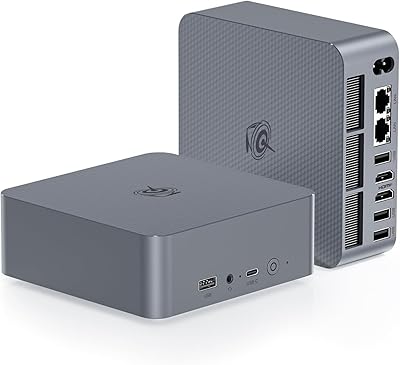
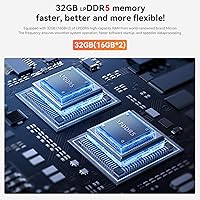
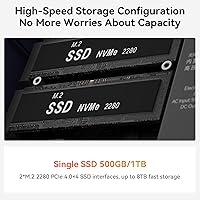
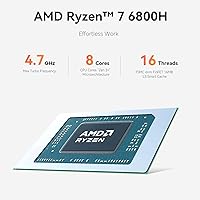
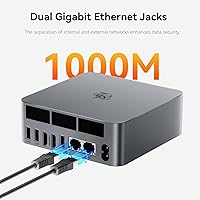
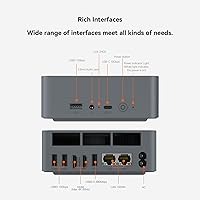
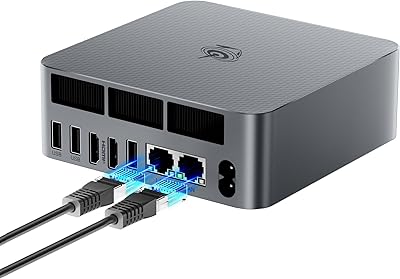
The EQR6 runs on AMD's Ryzen 7 6800H — eight cores, sixteen threads, built on a 6nm process — and that matters because it handles heavy multitasking, video calls, photo editing, and even light video work without breaking a sweat. The 32GB of LPDDR5 RAM is fast and ample for most users, though it's soldered permanently to the board, so what you buy is what you keep. Storage starts at 500GB via a PCIe 4.0 NVMe drive, and a spare M.2 slot means you can expand later. Two HDMI 2.1 outputs push 4K at 60Hz each, which is genuinely useful for a dual-monitor work setup or a 4K television. The port selection is unusually generous: three fast USB-A ports, a USB-C data port, and dual Ethernet jacks.

Best For

This compact desktop makes the most sense for people who work from home and need a reliable, quiet machine that won't consume half the desk. Video calls, spreadsheets, browser tabs by the dozen — the EQR6 handles it all without fan noise becoming a distraction. HTPC fans will appreciate the ability to connect directly to a 4K television and run Plex, Kodi, or streaming services at full resolution. Small businesses running digital signage or dual-display reception setups will find the dual HDMI and twin Ethernet ports genuinely practical. Light gamers can get older esports titles running at playable settings, and students seeking a compact secondary machine will find the price-to-performance ratio hard to argue with.

User Feedback

People who've bought this Beelink mini PC consistently mention how responsive it feels day-to-day — fast boot times, snappy application launches, and a fan that stays nearly inaudible during routine tasks. That said, the criticism surfacing most reliably is the soldered RAM: once you've chosen the 32GB configuration, there's no path to 64GB down the road. Thermal management holds up well under typical loads, but a handful of users doing prolonged CPU-intensive work — extended compiles or batch video exports — report some throttling creeping in over time. The built-in power supply earns consistent praise for cutting cable clutter. A small number of buyers have noted minor friction with Windows 11 activation and limited BIOS options, worth knowing if deep system control matters to you.

Pros

  • Ryzen 7 6800H delivers genuine eight-core performance in a chassis most people can hold in one hand.
  • 32GB of LPDDR5 RAM is more than sufficient for heavy multitasking, video calls, and light creative workloads.
  • Dual 4K HDMI outputs let you run two full-resolution monitors without adapters or compromises.
  • The built-in 85W power supply eliminates the external brick — one less cable cluttering your desk or entertainment center.
  • A free second M.2 slot means storage can be expanded later without touching existing hardware.
  • WiFi 6 and dual Ethernet ports cover both wireless and wired needs, including network-attached storage setups.
  • Owners consistently report fast boot times and a snappy, responsive feel across everyday tasks.
  • Windows 11 Pro arrives pre-installed, so the machine is ready to use without extra licensing steps.
  • Three USB 3.2 Gen2 ports handle fast file transfers and power-hungry peripherals without slowing things down.

Cons

  • RAM is permanently soldered to the board — if 32GB falls short later, the only fix is buying a new machine.
  • Sustained CPU-heavy tasks like long video encodes or extended compiles can trigger thermal throttling over time.
  • The Radeon 680M iGPU handles older esports titles but falls well short for modern AAA games or GPU-intensive apps.
  • Some buyers have encountered friction with Windows 11 activation and report limited BIOS customization options.
  • The chassis runs slightly larger than rivals using external power bricks, which matters if space is extremely tight.
  • Just one USB 2.0 port is included, which can create awkward juggling when older peripherals are in the mix.
  • Firmware and driver update cadence may lag for users running non-standard configurations or niche hardware.
  • No Thunderbolt support limits high-bandwidth external GPU or display dock options for advanced connectivity needs.

Ratings

Our editorial AI has processed thousands of verified buyer reviews for the Beelink EQR6 6800H Mini PC from global marketplaces, actively filtering out spam, bot accounts, and incentivized submissions before generating the scores below. The ratings reflect the genuine consensus of real-world ownership — where this compact desktop earns its keep and where it genuinely falls short — so you can make a confident, grounded decision before buying. From processing power and display output to thermal management and gaming realism, each score is calibrated to give you a transparent, no-spin picture of what buyers actually experience.

Processing Performance
88%
The Ryzen 7 6800H is the standout reason most buyers choose this machine, and they feel the difference immediately. Launching multiple applications at once, running video calls alongside a full browser and Office suite — the EQR6 handles it without hesitation, and buyers consistently describe it as noticeably faster than similarly priced rivals running older silicon.
While the CPU excels in burst workloads, sustained all-core performance tapers during prolonged tasks like batch video exports or extended software compilation. A handful of power users have noted that thermal limits eventually reduce clock speeds, making this a less reliable choice for compute-intensive jobs that need to run uninterrupted for 30 minutes or more.
Value for Money
84%
Getting an eight-core processor, 32GB of fast RAM, a PCIe 4.0 NVMe SSD, and Windows 11 Pro bundled into a palm-sized chassis represents solid value at this price tier. Most buyers feel they paid fairly, especially comparing it against competing units that pair lower-tier processors or half the memory with similar asking prices.
The non-upgradeable RAM and integrated-only graphics limit the machine's future-proofing in ways that erode long-term value. Buyers who later discover they need more than 32GB or any form of dedicated GPU performance have no upgrade path, effectively shortening the useful lifespan and making the value calculation less compelling when viewed across a four-to-five-year horizon.
RAM Flexibility
47%
53%
For buyers who know their workload and are confident 32GB covers it, the fast LPDDR5 memory is genuinely sufficient for browser-heavy productivity, video calls, light virtual machine use, and most creative work. Users who go in with realistic expectations consistently report the baseline headroom is comfortable for daily tasks.
The RAM is soldered to the board, and this is the single most polarizing aspect of the machine in verified reviews. Power users planning to scale beyond 32GB have no upgrade path, and those who later outgrow it — running multiple virtual machines, large databases, or memory-intensive creative pipelines — face replacing the entire unit rather than swapping a module.
Display & Output
91%
Dual HDMI 2.1 ports driving two independent 4K displays at 60Hz each is a genuine differentiator at this price point, and buyers notice it immediately. Home office users setting up a dual-monitor desk get a clean, adapter-free experience, while HTPC buyers connecting to a 4K television report sharp, smooth playback for streaming and local media.
There is no DisplayPort or USB-C video output, which limits flexibility for buyers whose monitors or docks require those interfaces. Users who want to run a third display or connect to an ultrawide via DisplayPort will find the two-port, HDMI-only configuration restrictive without purchasing additional conversion hardware, which adds cost and potential compatibility friction.
Gaming Capability
61%
39%
The Radeon 680M is among the stronger integrated GPUs available in this class of mini PC, and owners running older esports titles like CS:GO, Dota 2, or League of Legends at medium settings report playable frame rates. For buyers who primarily use the machine for work and want occasional casual gaming on the side, it beats expectations.
Step outside the older esports catalog and the GPU hits its limits quickly — modern open-world titles, demanding first-person shooters, and anything requiring ray tracing are not realistic use cases here. Buyers who expected this machine to replace even a budget discrete GPU were consistently disappointed, and anyone prioritizing gaming should treat this as a secondary consideration, not a selling point.
Thermal Management
69%
31%
Under the workloads this machine is primarily designed for — office tasks, video calls, media playback, and light multitasking — the heat pipe and fan setup keeps temperatures controlled without the chassis becoming warm to the touch. Users running typical productivity sessions report stable performance without any noticeable throttling.
Push the CPU hard for an extended stretch — a long video encode or a large compilation run — and thermal throttling sets in as the compact chassis exhausts its headroom. The fan also ramps up audibly under sustained loads, which surprised some buyers who expected consistent silence throughout, and performance dips during prolonged heavy workloads are a recurring complaint in verified feedback.
Storage & Expandability
83%
The 500GB PCIe 4.0 NVMe SSD is fast enough to make application launches and file operations feel responsive day-to-day, and the empty second M.2 slot is a practical win for future expansion. Buyers who need more room for media libraries, project archives, or game installations can add up to 2TB more without displacing the existing drive.
500GB fills up faster than many buyers anticipate, particularly if the machine doubles as a media server or photo archive, and the expansion process requires opening the chassis. While adding a second drive is manageable for most users with basic hardware confidence, a small number found the process fiddly, and some noted uncertainty about warranty implications when opening the unit.
Port Selection
89%
Three USB 3.2 Gen2 ports mean peripherals transfer at full speed without competition, and the USB-C data port adds modern flexibility for external drives or multiport hubs. The dual Ethernet jacks are a genuinely practical addition that most mini PCs skip — buyers running network-attached storage or needing a dedicated management interface get a feature usually reserved for pricier hardware.
Only one USB 2.0 port accompanies the faster options, which creates awkward juggling when connecting legacy peripherals alongside faster devices simultaneously. The USB-C port is data-only with no video signal, limiting its usefulness for buyers who hoped to drive a USB-C monitor or connect a Thunderbolt dock for expanded display and peripheral management.
Noise Level
79%
21%
During light workloads — email, spreadsheets, media streaming, casual browsing — the fan stays near-silent, which is precisely what HTPC users and work-from-home buyers wanted. Several reviewers specifically mentioned running this compact desktop in shared living spaces without it becoming an audible distraction for others nearby.
Silence is not guaranteed once workloads intensify: the fan ramps up measurably when the CPU is pushed, and a handful of users found the noise levels under sustained heavy loads more prominent than expected for a machine marketed partly on quiet operation. It is quiet when you need it to be, but not unconditionally so.
Build Quality
77%
23%
The chassis feels solid for its weight class, and the overall assembly quality draws few complaints in verified reviews — no flex, no rattle, and the port layout is practical for a machine regularly used on a desk, mounted behind a monitor, or tucked inside a media cabinet. At under two pounds, it is easy to reposition.
The plastic-heavy exterior and functional grey aesthetic are unlikely to impress buyers expecting a premium, all-metal finish at this price point, especially compared to some rivals with more refined enclosures. A small number of users also noted that the power and reset buttons feel imprecise to press, which is a minor but noticeable quality gap.
Software & Setup
72%
28%
Windows 11 Pro arrives pre-installed and the machine is generally usable within minutes of first boot, which less technical buyers and home office users appreciate. Driver installation for standard peripherals is handled automatically, and the included software footprint is relatively lean compared to some competing brands that ship with bloatware.
A recurring frustration in verified reviews involves Windows 11 activation not completing cleanly on first boot, requiring a support call or manual key entry to resolve. BIOS options are limited for users who want to adjust fan curves, power limits, or boot priorities, and the firmware update process is not straightforward for buyers without technical background.
Power Solution
86%
The built-in 85W power supply eliminates the external brick that most competing mini PCs require, and buyers consistently highlight cleaner cable management as a real quality-of-life improvement. The single AC cable running from the unit to the wall is a detail that home office users and HTPC enthusiasts with tidy, cable-managed setups particularly appreciate.
The internal PSU adds slightly to the chassis footprint compared to rivals using external bricks, which matters for buyers fitting the unit into tight shelf or VESA-mount configurations. It also means that if the power supply ever fails out of warranty, the entire unit needs service rather than a simple external adapter replacement.
Networking
87%
WiFi 6 handles modern home and office wireless networks without becoming a bottleneck, and the dual Ethernet ports unlock network configurations that most mini PCs cannot match. Buyers running Plex servers, NAS setups, or needing separate management and data interfaces on a small business network get a feature typically found only on pricier hardware.
The Ethernet controllers top out at standard Gigabit rather than 2.5 Gigabit, which mildly disappoints buyers with faster network infrastructure who expected the dual-port setup to deliver higher throughput. WiFi reception in units placed inside enclosed media cabinets or behind thick walls has also drawn occasional signal complaints from a small but consistent subset of reviewers.
Long-term Reliability
74%
26%
Most buyers who have owned this compact desktop for six months or more report stable, consistent performance with no unexpected hardware failures or progressive slowdowns emerging over time. The FCC, CE, and RoHS certifications confirm that the unit has cleared baseline safety and construction standards expected of reputable consumer electronics.
Concerns about the soldered RAM limiting the practical ownership lifespan surface frequently in reviews from buyers planning a four-to-five-year upgrade cycle, as outgrowing the memory means replacing the entire machine. Firmware updates are also infrequent, leaving some users uncertain about the long-term security posture and whether system-level issues will be addressed by Beelink over time.
Multitasking
85%
Eight cores and 32GB of fast memory handle the kind of real-world multitasking most buyers actually do — a video call in one window, a spreadsheet open in another, a browser with 20-plus tabs, and a background file transfer — all without noticeable lag or stuttering between application switches.
Memory-heavy multitasking — running several virtual machines simultaneously, processing large datasets, or editing multiple 4K video streams at once — eventually bumps against the 32GB ceiling with no room to expand. For buyers whose ambitions grow over time, the soldered configuration turns what feels like a strength today into a hard constraint within a few years.

Suitable for:

The Beelink EQR6 6800H Mini PC is a strong fit for home office workers who want genuine processing headroom without a tower taking up desk space. If your daily workload involves juggling dozens of browser tabs, video conferencing, spreadsheets, and the occasional Lightroom edit, the Ryzen 7 6800H handles all of it comfortably without the fan becoming a nuisance. HTPC enthusiasts will find the dual 4K HDMI outputs and near-silent operation ideal for a living room media setup, especially paired with a large television. Small businesses needing reliable dual-display workstations — for reception desks, digital signage, or point-of-sale terminals — get solid value from the twin Ethernet ports and compact footprint. Students or anyone building a capable secondary computer on a sensible budget will also find this compact desktop punches well above what its physical size suggests.

Not suitable for:

If you're planning to run demanding 3D games, GPU-accelerated rendering pipelines, or applications that lean heavily on dedicated graphics memory, the Beelink EQR6 6800H Mini PC is not the right call. The Radeon 680M integrated GPU is genuinely capable for casual gaming and media playback, but expecting it to run modern AAA titles at acceptable frame rates is setting yourself up for frustration. The soldered RAM is the other hard limit: if you anticipate needing more than 32GB for virtual machines, large datasets, or memory-intensive creative work, there is no upgrade path — you would need a different machine entirely. Power users who want to fine-tune BIOS settings, swap memory modules, or experiment with non-Windows operating systems will likely find the relatively closed platform restrictive. Anyone whose workload consistently hammers all CPU cores for extended periods — think long video encodes or large software compilation jobs — should also factor in that sustained thermal throttling has been reported under heavy, prolonged use.

Specifications

  • Processor: AMD Ryzen 7 6800H with 8 cores, 16 threads, a base clock of 3.2GHz, and a maximum boost frequency of 4.7GHz, built on TSMC's 6nm FinFET process.
  • Memory: 32GB of LPDDR5 RAM running at 4800MHz, soldered directly to the motherboard with no slots available for future expansion or replacement.
  • Primary Storage: 500GB M.2 2280 PCIe 4.0 x4 NVMe SSD included as the system drive, offering fast read and write speeds for quick boot times and application launches.
  • Storage Expansion: One additional M.2 2280 PCIe 4.0 slot is available and empty, supporting drives up to 2TB for a potential combined total of up to 4TB.
  • Graphics: AMD Radeon 680M integrated GPU featuring 12 compute units running at up to 2200MHz, capable of 4K video playback and light gaming workloads.
  • Display Output: Two HDMI 2.1 ports, each capable of driving an independent display at up to 4K resolution and 60Hz refresh rate simultaneously.
  • USB Ports: Three USB 3.2 Gen2 Type-A ports at 10Gbps, one USB 2.0 Type-A port at 480Mbps, and one USB-C port (data only, 10Gbps) are provided on the chassis.
  • Networking: Two RJ45 Gigabit Ethernet ports using the Realtek RTL8111H controller, paired with WiFi 6 (802.11ax) and Bluetooth 5.2 for flexible wired and wireless connectivity.
  • Audio: A single 3.5mm combo audio jack (headphone and microphone combined) powered by a Realtek ALC897 codec is located on the chassis.
  • Power Supply: An 85W power supply is integrated directly into the unit, accepting AC input at 100-120V, 50/60Hz, which eliminates the need for an external power brick.
  • Operating System: Windows 11 Pro is pre-installed and included with the unit, with no separate license purchase required.
  • Cooling System: Active cooling uses a copper heat pipe, a variable-speed silent fan, and aluminum heat fins to manage CPU and component temperatures under load.
  • Dimensions: The chassis measures 8.86 x 5.39 x 2.32 inches (approximately 225 x 137 x 59mm), which is compact enough to mount behind a monitor or tuck onto a shelf.
  • Weight: The unit weighs 1.98 pounds (approximately 898g) without any peripherals or cables attached.
  • Certifications: This mini PC holds FCC, CE, and RoHS certifications, confirming it meets regulatory safety and environmental standards for use in North America and Europe.
  • Warranty: Beelink provides a one-year limited warranty covering manufacturing defects, with lifetime technical support and 24/7 customer service access advertised.

Related Reviews
Beelink EQR6 32GB 500GB Mini PC
79%
86%
CPU Performance
83%
Value for Money
62%
Thermal Management
58%
Setup Experience
91%
Memory Capacity
More
Beelink SER5 MAX (24GB / 500GB)
81%
91%
Everyday Performance
88%
RAM & Memory Headroom
74%
Storage Performance
93%
Multi-Monitor & Display Output
69%
Thermal Management
More
Beelink ME Mini PC
Beelink ME Mini PC
87%
88%
Performance
91%
Connectivity
85%
Storage Expansion
95%
Power Efficiency
90%
Noise Levels
More
Beelink Mini S12 Pro (N100, 16GB, 500GB)

83%
83%
Everyday Performance
91%
Value for Money
76%
Build Quality & Design
84%
Thermal Management & Noise
88%
Connectivity & Ports
More
Beelink Mini S12 Mini PC
78%
88%
Value for Money
82%
Performance for Daily Tasks
79%
Build Quality & Design
91%
Dual Monitor Support
84%
Thermal Management & Noise
More
Beelink EQi13 Pro (32GB/500GB)
83%
88%
Processing Performance
91%
Memory & Multitasking
86%
Storage Speed & Expandability
74%
Thermal Management & Noise
93%
Networking Capabilities
More
Beelink SER5 Pro (Ryzen 7 5825U, 16GB/500GB)
80%
88%
Everyday Performance
67%
Thermal Management
91%
Multi-Monitor Support
83%
Build Quality & Design
86%
Connectivity & Port Selection
More
Beelink EQ14 Mini PC (N150, 16GB, 1TB)
74%
74%
Everyday Performance
61%
RAM & Memory Configuration
83%
Storage & Expandability
91%
Connectivity & Networking
79%
Display Output
More
Beelink SER9 Pro (32GB/1TB)
84%
93%
Processing Performance
91%
Multitasking & Responsiveness
84%
Build Quality & Design
67%
Thermal Management & Fan Noise
72%
Graphics & Display Output
More
Beelink EQI Mini PC i5-1235U 32GB RAM 1TB SSD
87%
88%
Performance
85%
Build Quality
92%
Value for Money
90%
Design/Size
81%
Thermals
More

FAQ

No, and this is worth knowing before you buy. The 32GB of LPDDR5 RAM is soldered directly onto the motherboard, so there are no slots to swap or expand. The good news is that 32GB is a generous starting point — most users running office apps, video calls, a browser with many tabs open, and even some light creative work will never push against that limit.

Yes. Both HDMI 2.1 ports can independently output a 4K signal at 60Hz simultaneously, so a dual-monitor setup works right out of the box without adapters or workarounds. That makes it a practical choice for anyone running a two-screen productivity desk or connecting to both a computer monitor and a 4K television.

Yes, those older esports titles run reasonably well thanks to the AMD Radeon 680M integrated GPU, which is one of the stronger iGPUs you'll find in this class of machine. Keeping settings at medium or lower gives you smooth enough frame rates for casual play. Just be realistic about its limits — graphically demanding modern titles like Cyberpunk 2077 or newer open-world games are not what integrated graphics are designed for.

Under light to moderate loads — web browsing, office work, video calls — most owners describe the fan as barely audible. It does spin up noticeably under sustained heavy workloads, and some users have reported mild thermal throttling during prolonged tasks like extended video encodes. For typical desk work or media playback, it is genuinely quiet and unlikely to bother you.

Fairly straightforward, yes. There is an empty M.2 2280 PCIe 4.0 slot inside the unit that accepts standard NVMe drives, and you can install one up to 2TB in capacity. Combined with the included 500GB drive, that brings your total storage to around 2.5TB. Opening the case requires a small Phillips screwdriver and basic care, but it is not a complicated process for anyone comfortable with light hardware work.

Windows 11 Pro is pre-installed and the license is included in the box — nothing additional to purchase. A small number of buyers have mentioned minor activation hiccups on first boot, so it is worth checking the activation status early. If anything looks off, Beelink's support team can usually help resolve it without much hassle.

It is actually a strong fit for that role. The HDMI 2.1 output connects directly to a 4K television, and the EQR6 handles streaming services, Plex, Kodi, and local media files without any strain. The fan stays near-silent during media playback, which matters in a living room setting. Just confirm your TV or AV receiver has an HDMI 2.1 input to get the full 4K 60Hz benefit.

Yes, Bluetooth 5.2 is built in, so pairing a wireless keyboard, mouse, headphones, or any other Bluetooth device works just as it would on any modern laptop or desktop. WiFi 6 is also included, so you are not forced to run an Ethernet cable if your workspace makes that inconvenient.

For light editing work — cutting footage, basic color grading, exporting 1080p timelines — this compact desktop is capable enough. The eight-core CPU and 32GB of RAM give editing applications solid headroom. Where it struggles is GPU-accelerated effects and smooth 4K timeline scrubbing, since there is no dedicated graphics card. Casual editors working on short-form content will find it workable; anyone running a professional production workflow regularly would be better served by a machine with discrete graphics.

A small subset of users have noted that BIOS customization options are limited compared to traditional desktop motherboards, which can be a frustration for those who like to adjust power limits or fan curves manually. Driver support is generally solid for Windows 11, but users running alternative operating systems may encounter gaps that require additional research and manual installation. Nothing deal-breaking for most buyers, but worth knowing if you have specific tuning or OS preferences.

Where to Buy

Newegg.com
In stock $899.00