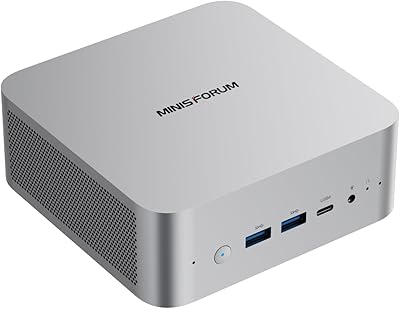
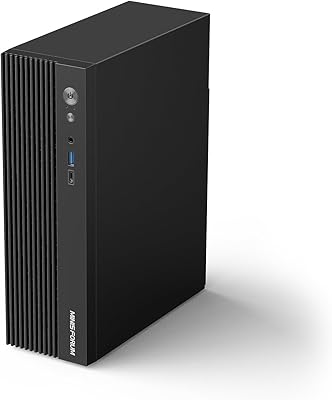
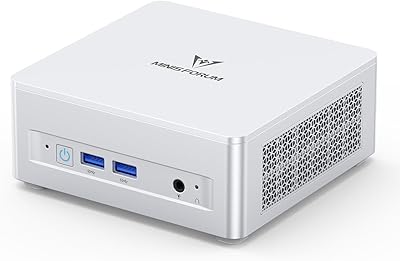
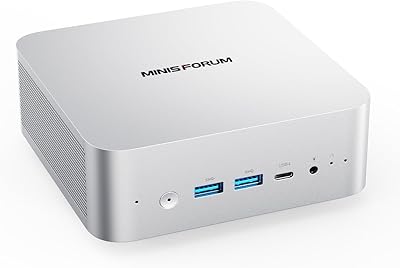
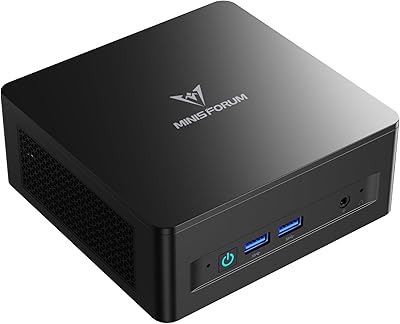
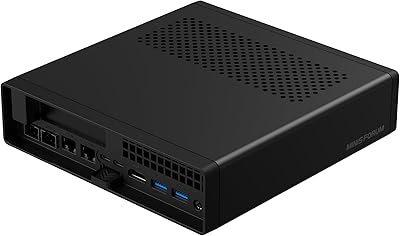
Overview

The MINISFORUM UM773 Lite Mini PC sits in an interesting spot in the compact desktop market — capable enough to handle real work, affordable enough to not feel like a gamble. Powered by AMD's Ryzen 7 7735HS, an eight-core processor that punches well above what you'd expect from a machine you can hold in one hand, this compact desktop delivers genuine productivity performance without the desk footprint of a traditional tower. It's aimed squarely at home office workers, light gamers, and anyone tired of bulky hardware cluttering their space. Just keep expectations calibrated — this is a capable small-form-factor PC, not a workstation substitute.

Features & Benefits

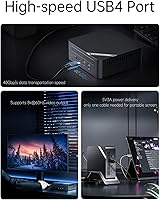
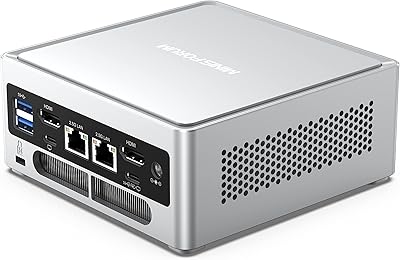
The UM773 Lite's real strength is in the details. Its processor handles demanding multitasking — think browser tabs, video calls, spreadsheets, and background processes — without breaking a sweat. The 32GB of DDR5 RAM is more than most users will ever need today, and with expansion headroom to 64GB, it's built with longevity in mind. The 1TB PCIe 4.0 SSD keeps load times sharp, and a secondary bay lets you add more storage down the line without replacing anything. The AMD Radeon 680M handles 4K video and casual gaming respectably for integrated graphics. Where this mini PC really surprises, though, is connectivity — dual HDMI, a USB4 port capable of driving an external GPU, WiFi 6, and 2.5 Gigabit Ethernet are rare at this price tier.

Best For

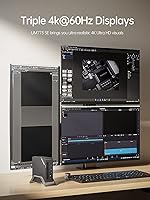
This compact desktop is a natural fit for home office setups where desk space is limited but performance can't be compromised. Remote workers juggling video conferencing, document editing, and cloud-based tools will find it holds up without throttling. Gamers looking to run lighter titles or older games at reasonable settings will get real mileage from the Radeon 680M — just don't expect it to handle the latest AAA releases at high settings. The triple-display output makes it appealing for multi-monitor workflows too. It also works well as a living room media center PC. And for anyone who anticipates needing more storage or RAM in a year or two, the upgrade paths make that a straightforward decision.

User Feedback

Buyers consistently highlight the fast SSD performance and the surprisingly generous port selection as standout positives. The machine runs quietly under light loads, and most users report it working reliably right out of the box. That said, a few things catch people off guard. The RAM configuration is shipped randomly — you might receive a single 32GB stick or two 16GB sticks, which matters because dual-channel memory noticeably improves performance. Under sustained workloads, the fan does ramp up audibly, even with the liquid metal cooling. And critically, no operating system is included — buyers need to factor in the cost and setup time of installing Windows or Linux separately. The power brick is also bulkier than expected for a machine this compact.

Pros

  • The eight-core AMD Ryzen 7 processor handles demanding multitasking with ease for a machine this size.
  • 32GB of DDR5 RAM is generous at this price point and leaves plenty of headroom for heavy browser use or light creative work.
  • PCIe 4.0 SSD storage delivers fast boot times and snappy application launches right out of the box.
  • The USB4 port adds serious long-term value, including external GPU support and ultra-fast file transfers.
  • Dual HDMI plus USB4 display output means you can drive three monitors simultaneously — uncommon in this category.
  • WiFi 6 and 2.5 Gigabit Ethernet together make this one of the best-connected mini PCs available at a mid-range price.
  • RAM is expandable up to 64GB, and a secondary 2.5-inch storage bay adds flexibility without replacing existing hardware.
  • The chassis feels solid and well-built, and the liquid metal cooling compound shows genuine engineering attention.
  • Compact enough to mount behind a monitor or tuck into a living room cabinet without any trouble.
  • AMD Radeon 680M integrated graphics handles 4K video playback and casual gaming better than most integrated solutions.

Cons

  • No operating system is included — budgeting for and installing Windows adds cost and setup time many buyers overlook.
  • RAM configuration is shipped randomly, so you may receive a single 32GB stick instead of a dual-channel 2x16GB setup.
  • Fan noise increases noticeably under sustained workloads, which can be distracting in quiet environments.
  • The power brick is larger than expected given the machine's compact size and adds unwanted desk clutter.
  • Integrated graphics hit a hard ceiling — demanding games or GPU-heavy software will expose its limitations quickly.
  • No pre-configured dual-channel guarantee means memory-sensitive tasks may perform below what the specs suggest.
  • Buyers unfamiliar with OS installation may find the setup process more involved than anticipated.
  • The UM773 Lite has no Thunderbolt certification, which matters for users invested in Thunderbolt-specific accessories.
  • Thermal performance under prolonged heavy loads can cause the system to throttle slightly to manage heat.
  • Limited to integrated audio output — users needing dedicated sound card quality will need an external DAC or audio interface.

Ratings

The scores below reflect our AI-driven analysis of verified global user reviews for the MINISFORUM UM773 Lite Mini PC, with spam, incentivized submissions, and bot activity actively filtered out before any scoring was applied. Each category captures what real buyers consistently praised or complained about — nothing is smoothed over to make the product look better than it is. Both the standout strengths and the genuine friction points are weighted into every number you see here.

Processing Performance
91%
Users running demanding productivity workloads — multiple browser tabs, video calls, spreadsheet-heavy sessions, even light code compilation — consistently report that the processor keeps up without any noticeable lag. The eight-core architecture makes task-switching feel fluid in ways that comparable mini PCs in this price range simply cannot match.
A small subset of buyers doing sustained CPU-heavy tasks like long video exports or extended compiling sessions noticed the processor throttling slightly once thermals built up over time. It is not a dealbreaker for most, but it does confirm this is not a workstation-class chip pushing its absolute ceiling.
RAM & Memory
74%
26%
Thirty-two gigabytes of DDR5 memory is a legitimately strong spec at this price tier, and buyers running memory-hungry applications like virtual machines, large browser sessions, or audio production software appreciate having that headroom. Expansion to 64GB is supported, which adds meaningful longevity for users planning ahead.
The persistent frustration here is the randomized shipping configuration — some buyers receive two matched 16GB sticks running in dual-channel, while others get a single 32GB module, which measurably reduces memory bandwidth. There is no way to guarantee which configuration you will receive, and this inconsistency has irritated a significant portion of buyers who care about squeezing out full performance.
Storage Speed & Capacity
88%
The PCIe 4.0 SSD delivers boot times and application load speeds that genuinely impress buyers coming from older machines or budget mini PCs using slower storage. A full terabyte of primary storage covers most users comfortably, and the secondary 2.5-inch bay is a practical bonus that extends long-term usability without requiring external drives.
A handful of buyers noted that the secondary storage bay only supports SATA speeds, which is a step down from the primary drive, making it better suited for media storage than performance-sensitive applications. There were also occasional reports of the secondary bay being slightly awkward to access during installation.
Graphics & Display Output
77%
23%
The integrated Radeon 680M impressed buyers using this compact desktop as a 4K media center or for casual gaming in older and less demanding titles. Triple-display output — something rare at this price point and form factor — was frequently cited as a decisive feature for home office users building out multi-monitor productivity setups.
Buyers who pushed the graphics into more demanding territory, including recent 3D titles at higher settings or GPU-accelerated creative applications, hit walls quickly. Integrated graphics are integrated graphics — the Radeon 680M is best-in-class for what it is, but it cannot substitute for a discrete card in serious graphical workloads.
Connectivity & Ports
93%
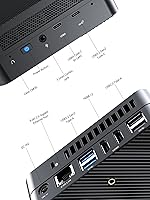
This is the category where the UM773 Lite genuinely stands apart from the competition. WiFi 6, Bluetooth 5.2, 2.5 Gigabit Ethernet, USB4, six USB ports across both Type-A and Type-C — buyers consistently describe the port selection as richer than anything they expected from a machine this size. Power users with complex desk setups rarely needed a hub or adapter.
The USB4 port, while capable, is not Thunderbolt 4 certified, which caused occasional compatibility friction for buyers using specific Thunderbolt-dependent accessories. A small number of users also noted that the single USB 3.2 Type-C port marked as data-only felt like a missed opportunity for added flexibility on the right-hand side.
Thermal Management
71%
29%
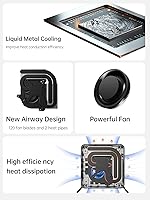
The liquid metal thermal compound applied to the CPU is a genuine engineering choice that most buyers recognized positively — under light to moderate workloads, the machine runs cool and quiet. The dual heat pipe design keeps thermals stable during typical office and browsing sessions without any intervention required.
Under sustained heavy loads — extended gaming, long rendering jobs, or intensive compilation — the fan ramps up to audible levels that can be distracting in quiet rooms. Some buyers also reported brief throttling under prolonged peak demand, suggesting the cooling solution is well-tuned for mixed workloads but not for relentless sustained stress.
Fan & Noise Levels
68%
32%
During everyday productivity tasks, video streaming, and light use, the fan profile is genuinely quiet — most buyers working in typical home office environments say they barely notice it running. The fan design does a reasonable job of staying restrained when the machine is not being pushed.
The fan becomes a real presence during heavier workloads, and some buyers found the transition from quiet to audible fairly abrupt. A few users noted that even medium-intensity gaming sessions caused the fan to spin up more aggressively than expected, which undermines the living room media PC use case for noise-sensitive households.
Build Quality & Design
83%
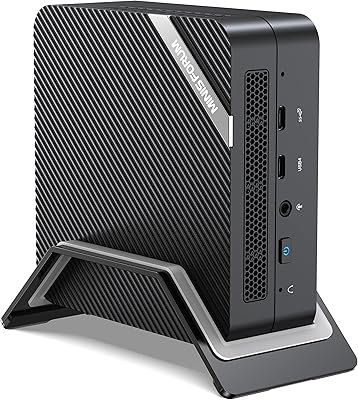
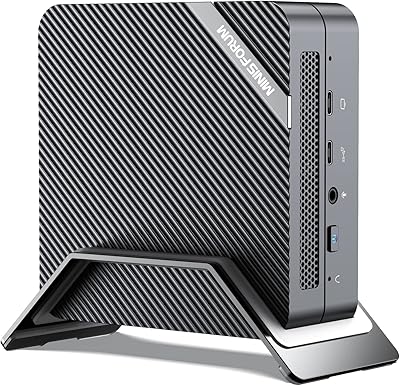
The chassis feels reassuringly solid for a mini PC — buyers describe it as dense and well-assembled, with no flex, rattle, or cheap plastic feel. The compact footprint and clean aesthetic make it easy to position on a desk, mount behind a monitor, or tuck into a living room cabinet without it looking out of place.
The power brick drew consistent criticism for being unexpectedly large relative to the machine it powers, adding desk clutter that undermines the compact setup appeal. A few buyers also noted that accessing internal components for upgrades requires navigating a slightly fiddly disassembly process.
Out-of-Box Setup Experience
58%
42%
Buyers who came prepared — with a Windows license and USB installation media ready — found the hardware setup straightforward and the machine responsive from the first boot. The physical unboxing experience was generally positive, with the unit arriving well-packaged and undamaged.
The lack of a pre-installed operating system caught a meaningful number of buyers off guard, particularly those purchasing their first mini PC. Having to source, create, and install an OS adds friction, cost, and setup time that competitors bundling Windows do not impose, making this a notable gap for less technically experienced buyers.
Value for Money
86%
When buyers benchmark what this compact desktop delivers — the processor tier, DDR5 memory, fast primary storage, USB4, and the connectivity suite — against similarly priced mini PCs, the consensus is that MINISFORUM is offering more than its direct competitors for the same outlay. The upgrade potential extends that value further over a longer ownership window.
The value equation gets murkier once you factor in the Windows license cost for buyers who need it, and the RAM configuration lottery means some units effectively underperform relative to what the spec sheet implies. Buyers who receive a single-channel RAM configuration may feel they paid for performance they are not fully receiving.
Gaming Capability
66%
34%
For casual and retro gaming, indie titles, and older AAA games at modest settings, the UM773 Lite holds up better than most integrated GPU machines buyers have owned previously. Users running emulation, lightweight esports titles, or older gaming libraries reported a satisfying and largely smooth experience.
Buyers hoping to run modern, graphically intensive titles at medium-to-high settings were consistently disappointed — the integrated GPU has real limits, and pushing past them results in dropped frame rates and visual compromises. This is not a machine for anyone whose gaming library trends toward recent releases with demanding graphics requirements.
Upgrade & Expandability
84%
The dual RAM slots, secondary 2.5-inch storage bay, and USB4 eGPU support give this mini PC an unusually long upgrade runway for the category. Buyers who planned around future upgrades described the architecture as genuinely flexible — more so than sealed or limited-slot competitors at the same price.
Accessing the internals for RAM or storage upgrades requires opening the chassis in a way some buyers found slightly unintuitive on first attempt. The secondary storage bay also only supports slower SATA drives, so it functions better as an expansion option for capacity rather than a performance upgrade path.
Software & OS Experience
55%
45%
Buyers who installed their preferred OS — whether Windows 11 or a Linux distribution — generally found driver support solid and the hardware recognition reliable. Linux users in particular appreciated the broad compatibility with the Ryzen platform and the Radeon GPU stack.
Shipping without an OS remains the single most polarizing aspect of the software experience — it is a deliberate cost-saving decision by MINISFORUM, but it imposes real burden on buyers unfamiliar with OS installation. There were also scattered reports of minor BIOS quirks that required a firmware update before certain features behaved as expected.
Multi-Monitor Support
89%
Triple-display support is a standout capability that buyers building out professional or creative workstations specifically called out as a buying reason. Running two HDMI monitors and a USB4-connected display simultaneously worked reliably for buyers using the machine as a multi-screen productivity hub.
A small number of users experienced minor compatibility quirks when mixing display resolutions or refresh rates across three connected monitors simultaneously, requiring some manual configuration to resolve. The USB4 display output also requires a compatible cable or adapter, which is not always included and adds a small additional cost.
Wireless Performance
87%
WiFi 6 delivered noticeably better throughput and stability than the older wireless standards found on competing mini PCs, and buyers in congested apartment environments or homes with many connected devices specifically noted the improvement. Bluetooth 5.2 paired reliably with keyboards, mice, and audio peripherals without dropout complaints.
A small subset of buyers reported that wireless range was slightly shorter than expected in larger homes with the machine placed in a central room, suggesting the compact antenna design has some physical limitations. Wired Ethernet via the 2.5GbE port was consistently recommended for latency-sensitive tasks.

Suitable for:

The MINISFORUM UM773 Lite Mini PC is a strong match for home office workers and remote professionals who want a genuinely fast machine without sacrificing desk space or dealing with loud tower fans during typical workday tasks. If your daily workload revolves around video conferencing, document editing, browser-heavy research, or running multiple apps in parallel, this compact desktop handles all of it without hesitation. People building multi-monitor setups will appreciate the triple-display output — it is rare to find this flexibility in a machine this small. Light gamers who are happy running older titles, indie games, or less demanding releases at moderate settings will also get real value here. It also makes an excellent living room media PC, capable of smooth 4K playback with a tidy, cable-friendly footprint. Buyers who anticipate needing more RAM or additional storage down the line will find the upgrade options practical and straightforward.
Not suitable for:

Anyone expecting to run demanding 3D games, GPU-intensive creative workloads like video rendering or 3D modeling, or heavy machine learning tasks should look elsewhere — the UM773 Lite relies entirely on integrated graphics, and while that GPU punches above average for its class, it has hard limits. Buyers who need a drop-in, ready-to-use computer should also be cautious, since this compact desktop ships without an operating system, meaning you need to purchase, download, and install Windows or set up Linux yourself before it is usable. Users who care about consistent, near-silent operation during sustained workloads may find the fan behavior frustrating — it does spin up and become audible under load, even with the liquid metal thermal solution. Finally, buyers expecting dual-channel memory performance should know that the RAM configuration is not guaranteed — some units ship with a single stick, which reduces memory bandwidth and affects real-world speed in memory-sensitive tasks.

Specifications

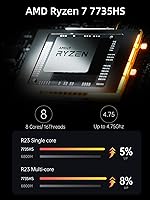
  • Processor: AMD Ryzen 7 7735HS with 8 cores and 16 threads, running from 3.2GHz base up to 4.75GHz boost for demanding multitasking workloads.
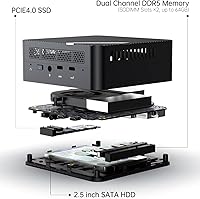
  • RAM: 32GB DDR5 SO-DIMM installed, with support for expansion up to 64GB via the available memory slots.
  • Storage: 1TB M.2 PCIe 4.0 SSD provides fast primary storage, complemented by a secondary 2.5-inch bay for an additional SATA HDD or SSD.
  • Graphics: AMD Radeon 680M integrated GPU based on the RDNA 2 architecture handles 4K media playback and light gaming without a discrete card.
  • Display Output: Two HDMI ports output at 4K@60Hz each, while the USB4 port supports display output up to 8K@60Hz, enabling up to three simultaneous monitors.
  • USB Ports: Six USB ports total: one USB4 Type-C, one USB 3.2 Gen 2 Type-C (data only), and four USB 3.2 Type-A ports for peripherals.
  • USB4 Capability: The USB4 port delivers up to 40Gbps data transfer, supports external GPU enclosures, and can power a 15W portable touch display simultaneously.
  • Networking: WiFi 6 (802.11ax) and Bluetooth 5.2 handle wireless connectivity, while a 2.5 Gigabit Ethernet RJ45 port supports wired high-speed networking.
  • Audio: A 3.5mm combo audio jack handles headphone and microphone connections, and a built-in DMIC port is available for compatible microphone accessories.
  • Cooling System: Cooling relies on a liquid metal thermal compound applied directly to the CPU, a 120-blade fan design, and dual heat pipes to manage sustained loads.
  • Dimensions: The unit measures 7.87 x 7.83 x 4.41 inches, making it compact enough to sit behind a monitor or inside a small cabinet.
  • Weight: The chassis weighs 3.3 pounds without the power brick, keeping it lightweight enough for relocation between rooms or workspaces.
  • Operating System: No operating system is pre-installed; buyers must source, purchase if applicable, and install their preferred OS independently before first use.
  • Memory Speed: The installed DDR5 memory operates at 2200MHz, providing bandwidth improvements over DDR4 for memory-sensitive applications and multitasking.
  • Wireless Standard: WiFi 6 (802.11ax) support ensures faster wireless throughput and better performance in congested network environments compared to older WiFi standards.
  • Expansion Bay: A secondary 2.5-inch internal bay accommodates standard SATA solid-state or hard disk drives for additional bulk storage without external enclosures.
  • Cache: The AMD Ryzen 7 7735HS includes 16MB of L3 cache to help reduce latency in frequently accessed data during intensive compute tasks.
  • Bluetooth: Bluetooth 5.2 provides reliable short-range wireless connectivity for peripherals including keyboards, mice, headphones, and speakers.

Related Reviews

MINISFORUM UM773 Lite Mini PC, 32GB RAM, 1TB SSD
83%
88%
Performance
85%
Cooling System
92%
Value for Money
83%
Build Quality
89%
Connectivity Options
More
MINISFORUM NAB6 Lite Mini PC Core i5-12600H 16GB RAM 500GB SSD
85%
92%
Performance
87%
Value for Money
88%
Build Quality
90%
Network Connectivity
89%
Multi-Display Setup
More
MINISFORUM X1-255 Mini PC
84%
88%
Performance
92%
Value for Money
90%
Size & Portability
85%
Networking & Connectivity
84%
Build Quality
More
MINISFORUM UM870 Slim Mini PC (Barebone)
80%
88%
CPU Performance
74%
Integrated Graphics
91%
Build Quality & Design
93%
Connectivity & I/O
89%
Multi-Monitor Support
More
MINISFORUM 129i7 ITX Mini PC
85%
91%
Performance for Multitasking
78%
Gaming Capability (Light to Medium)
95%
Compactness and Design
89%
Customizability (RAM and Storage)
90%
Setup and Installation
More
MINISFORUM UM560 XT Mini PC
86%
91%
Performance
88%
Build Quality
84%
Connectivity
92%
Portability
60%
Cooling/Heat Management
More
MINISFORUM M1 Pro 125H Mini PC Barebone
79%
88%
Processing Performance
67%
GPU & Graphics Capability
91%
Build Quality & Chassis
93%
Connectivity & I/O
71%
OCuLink eGPU Support
More
MINISFORUM DeskMini UM690L Slim Mini PC
79%
91%
Processing Performance
88%
Multi-Monitor Support
58%
RAM Adequacy & Upgradeability
89%
Storage Speed & Expansion
73%
Integrated Graphics (Radeon 680M)
More
MINISFORUM MS-A2 Ryzen 9 9955HX Barebone
81%
93%
CPU Performance
91%
Expansion & Upgradability
94%
Networking Capability
89%
Storage Flexibility
78%
Thermal Management
More
MINISFORUM 790S7 Mini ITX PC AMD Ryzen 9 7940HX
81%
88%
Overall Performance
65%
Thermals and Cooling
80%
Graphics Flexibility
90%
Build Quality
92%
Value for Money
More

FAQ

No, it does not. The MINISFORUM UM773 Lite Mini PC ships without any operating system pre-installed, so you will need to obtain and install Windows, Linux, or another compatible OS yourself before the machine is usable. Factor in the cost of a Windows license if that is your preferred environment, as it adds to the total purchase cost.

This is worth knowing upfront: the unit ships with either two 16GB DDR5 sticks or a single 32GB stick, and MINISFORUM does not guarantee which configuration you will receive. From a performance standpoint, two sticks running in dual-channel mode is meaningfully faster for memory-bandwidth-sensitive tasks, so it matters. If dual-channel configuration is important to you, it may be worth reaching out to the seller before purchase or checking current buyer reports.

Yes, you can run up to three displays simultaneously using the two HDMI ports and the USB4 port. Each HDMI port supports 4K at 60Hz, and the USB4 connection can handle display output up to 8K resolution, giving you a genuinely flexible multi-monitor setup for a machine this compact.

Not exactly. USB4 and Thunderbolt 4 share many features and are largely compatible, but this compact desktop uses a USB4 implementation rather than Intel's certified Thunderbolt 4. Most USB4 and Thunderbolt accessories will work fine, but if you own specific Thunderbolt-certified devices that require the full Intel specification, it is worth checking compatibility before assuming everything will work.

Yes, the USB4 port supports external GPU enclosures, which means you can attach a discrete graphics card via a compatible eGPU dock. This is a significant upgrade path if you find the integrated Radeon 680M limiting for gaming or GPU-accelerated creative work. Keep in mind that eGPU setups involve additional cost for both the enclosure and the card itself.

During everyday tasks like web browsing, video calls, and document work, the fan is quiet enough that most people will not notice it. Under sustained heavier workloads — extended gaming sessions, large file transfers, or prolonged rendering — the fan does spin up and becomes audible. It is not disruptively loud, but if you work in a very quiet environment and plan to push the machine hard for long periods, expect some background noise.

Yes. The UM773 Lite includes a secondary 2.5-inch internal bay that accepts standard SATA solid-state or hard disk drives. This means you can keep the original 1TB PCIe SSD as your primary drive and add a high-capacity SATA drive for extra storage, which is a practical setup for media libraries, backups, or archiving.

It can work for light to moderate server tasks — things like a personal NAS, a local media server, or a lightweight home automation hub. The 2.5 Gigabit Ethernet is a real advantage here. That said, keep in mind it is designed as a personal computer, not server hardware, so sustained always-on loads may produce more fan noise over time and the lack of ECC memory means it is not suited for data-critical server roles.

Yes. The AMD Radeon 680M integrated graphics are well-suited for 4K video playback across streaming services and local media files. Whether you are watching content on a single 4K display or using it as a living room media center connected to a TV, playback is smooth without any dropped frames under typical conditions.

The RAM slots accept DDR5 SO-DIMM modules, and the machine supports up to 64GB total across its two slots. The upgrade process involves opening the chassis, removing the existing modules, and installing compatible DDR5 SO-DIMMs — a straightforward job for anyone comfortable with basic PC hardware. If you do upgrade, installing two matched sticks of equal capacity will ensure dual-channel operation for the best performance.

Where to Buy