Overview

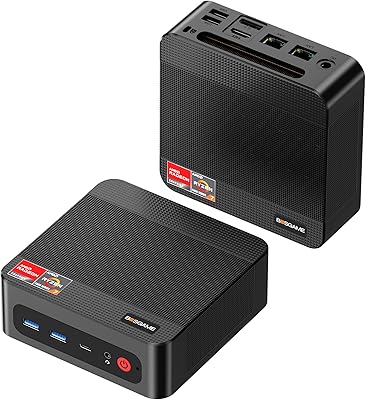
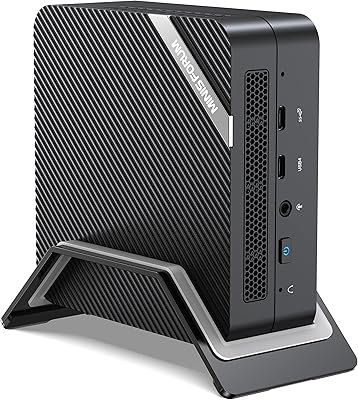
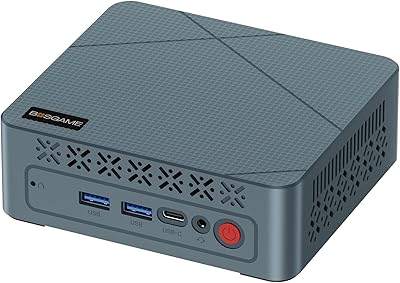
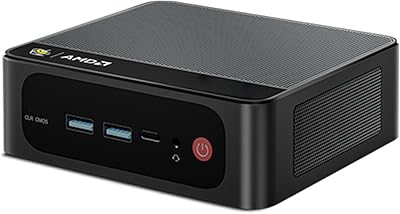
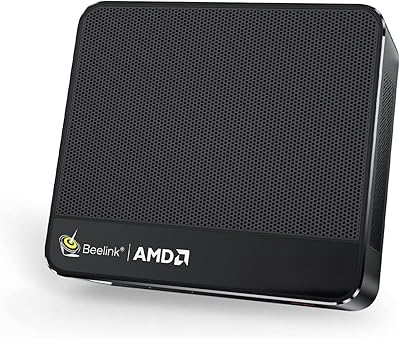
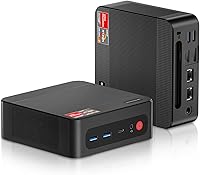
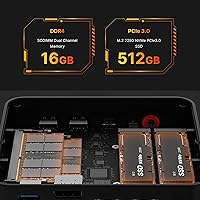
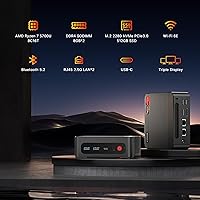
The BOSGAME P4 Ryzen 7 5700U Mini PC packs an AMD Ryzen 7 5700U 8-core processor into a chassis measuring just 5×5×1.8 inches — small enough to mount behind a monitor on the included VESA bracket or tuck into a living room shelf. It ships ready to use with Windows 11, 16GB of dual-channel DDR4 RAM, and a 512GB NVMe SSD. What genuinely sets it apart at this price point is the dual 2.5GbE networking alongside WiFi 6E — connectivity you typically find on machines costing significantly more. It is a practical, no-fuss desktop built for people who want capable hardware without the bulk.

Features & Benefits

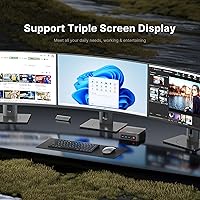
The Ryzen 7 5700U is a mature processor — Zen 2 architecture from a couple of years back — but that maturity translates into proven, stable performance for everyday workloads. Eight cores and sixteen threads handle browser-heavy multitasking, video calls, and light creative work without issue. The BOSGAME P4 also supports three simultaneous 4K displays through HDMI, DisplayPort, and USB-C, genuinely useful for multi-monitor productivity setups. Two SO-DIMM slots and two M.2 slots mean this compact desktop can grow with your needs over time. Just be realistic about gaming — the integrated Radeon graphics handle casual titles and media playback well, but demanding 3D games are a stretch.

Best For

This mini PC hits a sweet spot for home office workers who want a proper desktop experience without dedicating half their desk to a tower. Retro gaming fans will appreciate the option to install Batocera and turn it into a capable emulation box. The dual 2.5GbE ports make it worth a serious look for small IT setups or anyone running a NAS who needs fast local network throughput. Students get a full Windows 11 machine they can actually carry in a bag. And if your needs expand down the road, upgrading RAM or storage is straightforward without replacing the entire machine.

User Feedback

Buyers consistently praise the quick, painless setup — connect a monitor, keyboard, and mouse and you are running within minutes. The dual LAN ports come up repeatedly as a genuine surprise, especially among users repurposing this mini PC as a lightweight server or network appliance. On the downside, a portion of owners report the fan becomes audible under sustained CPU loads, and a handful noted minor driver issues during the initial Windows 11 boot that needed a quick update to resolve. Build quality earns mixed reactions — the chassis feels solid enough for daily desk use, but the plastic finish does not feel premium to the touch. Overall, buyer satisfaction leans positive given the value on offer.

Pros

  • Ships ready to use with Windows 11, 16GB RAM, and a 512GB NVMe SSD — no immediate upgrades needed.
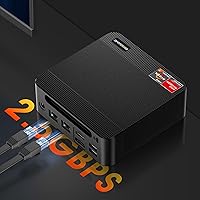
  • Dual 2.5GbE Ethernet ports are genuinely rare at this price tier and open up serious networking flexibility.
  • Eight-core Ryzen 7 5700U handles multitasking, video calls, and office workloads without hesitation.
  • Triple 4K display support via HDMI, DisplayPort, and USB-C makes it a capable multi-monitor productivity hub.
  • WiFi 6E and Bluetooth 5.2 keep wireless connectivity modern and future-friendly.
  • Two M.2 slots and two SO-DIMM slots mean this mini PC can grow alongside your storage and memory needs.
  • Included VESA mount allows clean behind-monitor installation right out of the box.
  • Universal 100–240V power input makes it a practical travel or relocation companion.
  • Wake on LAN and Auto Power ON support add useful flexibility for remote work or server-lite setups.
  • At its price point, the overall connectivity package is hard to match in a form factor this compact.

Cons

  • Integrated graphics hit a hard wall with modern 3D games — do not expect more than light or retro gaming.
  • Fan noise becomes clearly audible under sustained CPU loads, which may bother users in quiet environments.
  • Some buyers report minor driver or Windows 11 setup hiccups straight out of the box requiring an update before smooth operation.
  • The plastic chassis feels functional rather than premium, which may underwhelm buyers used to metal-bodied mini PCs.
  • The Ryzen 5700U is a mature architecture — buyers needing the latest platform features will find it dated.
  • 512GB of base storage fills up faster than expected if you plan to install multiple applications or large media libraries.
  • No discrete GPU option means creative professionals doing GPU-accelerated work will face real bottlenecks.
  • Thermal throttling under extended heavy workloads has been flagged by a subset of users, suggesting limited sustained performance headroom.

Ratings

The BOSGAME P4 Ryzen 7 5700U Mini PC has been scored by our AI system after analyzing thousands of verified global buyer reviews, with spam, bot-generated, and incentivized feedback actively filtered out before any scores were calculated. The ratings below reflect a candid, balanced picture — genuine strengths are recognized, but recurring pain points are not softened or buried. If buyers consistently flagged something, you will see it in the numbers.

Value for Money
88%
For a machine that ships with a capable 8-core processor, 16GB of RAM, a 512GB NVMe SSD, and Windows 11 already activated, most buyers feel they are getting more than their money's worth. The inclusion of dual 2.5GbE ports and WiFi 6E — features typically absent at this price tier — pushes the perceived value even higher for networking-conscious users.
A handful of buyers note that comparable machines from Intel N-series platforms can be found for less, and some feel the older Zen 2 CPU architecture slightly undercuts the long-term value argument if you plan to keep the machine for five-plus years.
Processing Performance
83%
Day-to-day tasks like running multiple browser tabs, video calls, spreadsheets, and light photo editing feel genuinely snappy thanks to the 8-core Ryzen 7 5700U. Users switching from older dual-core or quad-core office machines consistently report a noticeable improvement in responsiveness, especially when multitasking.
Under sustained heavy workloads — extended video encoding, large file compression, or prolonged benchmark runs — thermal throttling has been flagged by a portion of users, meaning the CPU cannot always hold its boost clock for long periods. It is capable but has a ceiling that becomes apparent under real pressure.
Connectivity & Networking
93%
The dual 2.5Gbps Ethernet ports are the single most praised hardware feature across user feedback, particularly among buyers who use this compact desktop alongside a NAS, home lab, or dual-router setup. WiFi 6E adds genuine future-proofing for those on modern 6GHz-capable routers, and Bluetooth 5.2 handles peripheral pairing without issues.
A small number of users report that WiFi signal strength is merely average compared to dedicated PCIe WiFi cards, which matters if the machine is placed far from the router. The 2.5GbE ports also require a compatible switch or router to take full advantage of the extra bandwidth.
Display Output
86%
Triple 4K display support across HDMI, DisplayPort, and USB-C is a genuine productivity win, and users running multi-monitor home office setups praise how clean and stable the output is for their use case. Content creators using it as a media hub report smooth 4K playback across all three outputs simultaneously.
The USB-C port handles display, data, and power delivery simultaneously, which can create confusion around cable compatibility — some users had to troubleshoot before getting all three displays active. Integrated graphics also mean color-critical design work on high-refresh monitors may not satisfy professional standards.
Gaming Capability
51%
49%
Retro gaming and emulation are genuine sweet spots — users running Batocera, RetroPie equivalents, or older PC game libraries through this compact desktop report very satisfying results. Titles from the early 2010s and older run well, and casual indie games typically hold stable frame rates at moderate settings.
Anything from the last few years at medium or higher settings is a real struggle, and users expecting to play modern AAA titles will be disappointed. The integrated Radeon GPU simply lacks the raw throughput for contemporary gaming, and there is no upgrade path for a discrete graphics card given the form factor.
Thermal Management
62%
38%
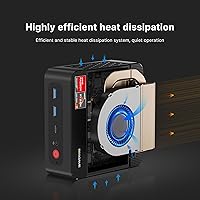
Under light-to-moderate use — office tasks, media playback, casual browsing — the cooling system keeps temperatures in check and the machine runs quietly enough for shared workspaces and living rooms. Users report no thermal issues during everyday productivity sessions.
Sustained CPU-heavy workloads expose the limits of the compact cooling design, with thermal throttling appearing more frequently than users would like during extended renders or multi-hour intensive tasks. The fan ramps up noticeably under load, which is the primary cooling trade-off of packing this much processor into such a small chassis.
Noise Level
71%
29%
At idle and during routine tasks, this mini PC is genuinely quiet — quiet enough that users in shared bedrooms and home offices report barely noticing it is on. That makes it a comfortable fit for always-on use cases like media servers or light home automation hubs.
The fan is clearly audible when the processor is under real stress, and a few users found the pitch of the fan under load slightly higher than they expected from a machine marketed with quiet operation in mind. It is not disruptive, but it is not silent either.
Build Quality
69%
31%
The chassis is compact, solid enough for daily desk use, and the overall assembly feels consistent — no flexing panels, rattles, or loose ports reported by the majority of buyers. The small footprint and clean aesthetic fit well in both office and living room environments.
The all-plastic exterior does not feel premium when handled directly, and buyers coming from aluminum-chassis mini PCs from competing brands will notice the material difference immediately. A subset of users also found the surface prone to light scratching over time.
Setup Experience
89%
Out-of-box setup is consistently praised — Windows 11 is pre-activated, the included HDMI cable means you can connect to a monitor immediately, and the VESA mount lets you go from unboxing to a clean behind-monitor installation in under ten minutes. Most buyers describe it as plug-and-play.
A recurring minor complaint involves driver or Windows Update issues on the very first boot, with some users needing to run a full update cycle before everything worked smoothly. It is not a showstopper, but buyers expecting zero-friction first boot should be prepared to spend a few minutes updating.
Upgrade Potential
84%
Two SO-DIMM slots and two M.2 PCIe 3.0 slots give this compact desktop genuine room to grow — users who started with the base 512GB and 16GB configuration report that adding a second SSD or bumping RAM to 32GB is straightforward with standard laptop components. That kind of user-serviceable expandability is not guaranteed at this size.
The PCIe 3.0 interface caps maximum SSD performance compared to newer PCIe 4.0 platforms, and the CPU itself is not upgradeable given its soldered-on design. Buyers who anticipate needing more GPU power will eventually need a different machine entirely.
Port Selection
81%
19%
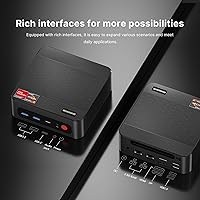
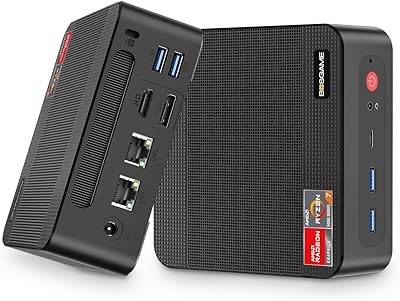
The combination of USB 3.2, USB 2.0, USB-C, dual 2.5GbE, HDMI, DisplayPort, and a 3.5mm audio jack covers most real-world peripheral needs without requiring a hub for standard setups. Users running keyboards, mice, webcams, and headsets simultaneously report no port shortage in day-to-day use.
Only four USB Type-A ports total may feel limiting for power users with multiple peripherals, and the absence of a card reader or Thunderbolt connection is a practical gap for photographers or users who expected more from the USB-C port beyond display and basic data transfer.
Software & OS
74%
26%
Windows 11 Home comes genuinely activated and functional, not loaded with excessive bloatware or trial software — buyers appreciate arriving at a relatively clean desktop experience compared to some budget mini PC competitors. Batocera and other third-party OS installations have also been confirmed working by users in the community.
A portion of buyers encountered driver hiccups or missing Windows updates on first boot that required manual intervention to resolve, which introduced friction for less tech-savvy users. AMD graphics driver updates occasionally require a manual install rather than appearing automatically through Windows Update.
Portability
78%
22%
At 1.19 pounds and roughly the footprint of a thick paperback book, this compact desktop slips into a laptop bag without issue, making it a practical choice for users who move between home and office or need a consistent computing environment across locations. The universal power supply removes any international travel concerns.
Without a built-in battery it is obviously dependent on a power outlet at all times, and the external power brick — while compact — is one more cable to manage. Users who frequently move the machine report that the power connector feels slightly less robust than they would prefer for repeated plugging and unplugging.
Warranty & Support
66%
34%
BOSGAME advertises a one-year hardware warranty and lifetime technical support, and buyers who needed assistance generally report responsive communication from the support team. For a smaller brand, the availability of support channels is a genuine positive relative to no-name competitors.
Real-world warranty claim experiences are mixed in the user base, with some buyers noting slower resolution times than expected. As with many smaller PC brands, the quality of after-sales service can vary depending on the specific issue and region, and there is limited third-party repair network to fall back on.

Suitable for:

The BOSGAME P4 Ryzen 7 5700U Mini PC is a strong fit for home office workers who want a real desktop experience without surrendering desk space to a full-size tower. If your daily workload revolves around spreadsheets, video conferencing, document editing, or multi-tab browsing across two or three monitors, this compact desktop handles all of it comfortably. It is also a smart pick for small business or IT environments where dual 2.5GbE ports matter — think NAS connectivity, dual-WAN routing, or simply needing a reliable wired backup alongside Wi-Fi. Students and educators will appreciate that it ships genuinely ready to use, with a capable processor, decent storage, and Windows 11 already installed. Retro gaming fans who want to run emulation platforms like Batocera will find it has plenty of horsepower for that use case without paying for a gaming-branded machine.

Not suitable for:

Buyers expecting to run modern, graphically demanding PC games should look elsewhere — the BOSGAME P4 Ryzen 7 5700U Mini PC relies entirely on integrated AMD Radeon graphics, and while those handle casual or older titles reasonably well, anything released in the last few years at medium-to-high settings will disappoint. Video editors working with heavy 4K timelines or 3D rendering workloads will likely hit a ceiling sooner than they would like, since the integrated GPU cannot offload those tasks the way a discrete card does. This compact desktop also is not the right call for buyers who need a truly silent machine around the clock — the fan becomes noticeable under sustained CPU loads, which can be distracting in quiet environments. If your priority is raw single-core speed for competitive workloads, the Ryzen 5700U is a generation or two behind the current curve, and shoppers who need the latest platform features like DDR5 or PCIe 4.0 at scale will need to budget for a newer generation machine.

Specifications

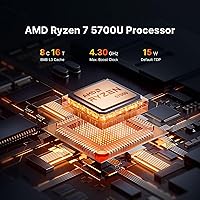
  • Processor: AMD Ryzen 7 5700U with 8 cores and 16 threads, running at a base clock of 1.8GHz and boosting up to 4.3GHz.
  • Graphics: AMD Radeon integrated graphics with 8 compute cores running at up to 1900MHz, shared with system memory.
  • RAM: 16GB DDR4 dual-channel memory (2×8GB SO-DIMM) running at 2933MHz, expandable up to 64GB across two slots.
  • Storage: 512GB M.2 2280 PCIe 3.0 x4 NVMe SSD installed, with a second M.2 slot available for expansion up to a combined 4TB.
  • Display Output: Supports up to three simultaneous 4K displays via one HDMI 2.0 port, one DisplayPort, and one USB-C with DisplayPort Alt Mode.
  • Networking: WiFi 6E (802.11ax) and Bluetooth 5.2 for wireless connectivity, plus two independent 2.5Gbps Ethernet ports for wired networking.
  • USB Ports: Four USB ports total: two USB 3.2 Gen 1 Type-A and two USB 2.0 Type-A, plus one USB-C port supporting data, DisplayPort, and power delivery.
  • Audio: Single 3.5mm combo audio jack supporting headphone and microphone connections.
  • Dimensions: The chassis measures 5×5×1.8 inches, making it one of the more compact full-featured mini PCs in its class.
  • Weight: The unit weighs 1.19 pounds without the power adapter, light enough to mount behind a monitor or carry in a bag.
  • Operating System: Ships with Windows 11 Home pre-installed and activated.
  • Power Supply: Included external adapter accepts 100–240V AC input and outputs 19V at 3.42A DC, suitable for international use.
  • Expansion Slots: Two SO-DIMM memory slots and two M.2 PCIe 3.0 x4 SSD slots provide meaningful upgrade headroom without replacing the unit.
  • Special Features: Supports Auto Power ON and Wake on LAN, enabling automated startup and remote wake scenarios for always-on or server-adjacent use cases.
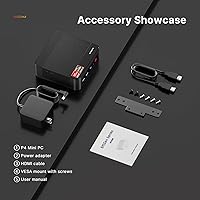
  • In the Box: Package includes the mini PC unit, power adapter, VESA mount bracket, one HDMI cable, and a printed user manual.
  • Cache: AMD Ryzen 7 5700U includes 8MB of L3 cache, supporting responsive performance across multi-threaded workloads.
  • Wireless Standard: WiFi 6E supports the 6GHz band in addition to 2.4GHz and 5GHz, offering reduced congestion on compatible routers.
  • Bluetooth: Bluetooth 5.2 provides stable, low-latency connections for peripherals including keyboards, mice, and headphones.

Related Reviews
BOSGAME Mini PC P4 Plus (Ryzen 7 5825U, 32GB/1TB)
80%
91%
Value for Money
83%
CPU Performance
61%
Thermal Management
94%
Connectivity & Networking
88%
Multi-Display Support
More
ACEMAGICIAN S3A Mini PC (Ryzen 7 5875U, 32GB, 1TB)
79%
91%
Value for Money
88%
Processing Performance
63%
Gaming Capability
89%
Memory & Storage
61%
Thermal Management & Cooling
More
BOSGAME P5 Mini PC with AMD Ryzen 7 6800H, 32GB RAM, 512GB SSD
86%
88%
Performance
85%
Value for Money
94%
Compactness & Size
90%
Multitasking Ability
86%
Cooling & Noise Control
More
BOSGAME P3 Mini Gaming PC AMD Ryzen 7 7840HS 32GB RAM 1TB SSD
88%
94%
Gaming Performance
90%
Multi-Tasking & Productivity
88%
Build Quality & Design
93%
Display Support
87%
Cooling & Noise Level
More
ACEMAGICIAN Kron Mini K1 Mini PC, Ryzen 7 7730U, 16GB RAM, 512GB SSD
85%
88%
Value for Money
91%
Performance for Everyday Tasks
94%
Compact Design & Portability
90%
Setup & Ease of Use
78%
Gaming Performance (Light)
More
MINISFORUM UM773 Lite Mini PC
78%
91%
Processing Performance
74%
RAM & Memory
88%
Storage Speed & Capacity
77%
Graphics & Display Output
93%
Connectivity & Ports
More
BOSGAME E2 Mini PC 16GB/512GB
80%
88%
Value for Money
83%
Performance for Everyday Tasks
76%
Build Quality & Design
61%
Thermal Management & Fan Noise
82%
Display Output & Multi-Monitor Support
More
Beelink SER5 Mini PC
79%
84%
Everyday Performance
81%
Multitasking Headroom
52%
Gaming Capability
83%
Value for Money
88%
Upgradeability
More
Beelink SER9 Mini PC Ryzen 7 2550U 32GB RAM 1TB SSD
85%
89%
Performance
92%
Value for Money
88%
Design & Build Quality
91%
Multitasking Capabilities
85%
Connectivity & Ports
More
ACEMAGICIAN S3A 32GB 1TB Gaming Mini PC
78%
84%
Everyday Performance
58%
Gaming Capability
81%
Value for Money
67%
Thermal Management
91%
Connectivity & Ports
More

FAQ

It ships with Windows 11 Home pre-installed and activated, so you can plug in a monitor, keyboard, and mouse and be up and running right away. No separate license purchase is needed.

Three simultaneous displays are genuinely supported — one through the HDMI 2.0 port, one through the dedicated DisplayPort, and a third through the USB-C port using DisplayPort Alt Mode. Just make sure your monitors and cables support the right connections, and you should be good to go.

The BOSGAME P4 Ryzen 7 5700U Mini PC is honest fun for retro gaming, emulation platforms like Batocera, and older or less demanding PC titles. Modern AAA games at medium-to-high settings are largely out of reach since there is no discrete GPU — integrated Radeon graphics have real limits, and it is better to go in with the right expectations.

Yes, and it is genuinely one of the more interesting things about this machine at this price. With dual 2.5Gbps LAN ports, you can connect it to both a NAS and your router simultaneously for fast local file transfers, set up a dual-WAN configuration for redundancy, or use it as a lightweight router or firewall with the right software. Most mini PCs in this range ship with a single 1Gbps port, so this is a real differentiator.

At idle and during light tasks like browsing or video playback, the fan is barely noticeable. Under heavier workloads — say, a long video export or a demanding benchmark — it does spin up and becomes audible. It is not disruptively loud, but if you are in a very quiet environment and pushing the CPU hard for extended periods, you will hear it.

Yes, and it is relatively straightforward. There are two SO-DIMM slots, so you can swap or add memory up to a maximum of 64GB. Two M.2 PCIe 3.0 slots mean you can add a second SSD or replace the existing one, with a practical ceiling of around 4TB total. Standard laptop-style SO-DIMM sticks and M.2 2280 drives are what you need.

The VESA mount bracket comes in the box, along with an HDMI cable, the power adapter, and a user manual. It is a nice touch that lets you attach the unit to the back of a compatible monitor right out of the gate without any extra purchases.

The power adapter is rated for 100–240V input at 50/60Hz, which covers virtually every country. Just bring the appropriate plug adapter for the wall outlet and you are set.

Not if you enable the Auto Power ON feature, which lets the machine boot automatically when power is restored. That makes it useful for always-on setups or situations where you cannot always be physically present to press the power button. Wake on LAN is also supported for remote startup over the network.

BOSGAME offers a one-year warranty on the hardware along with what they describe as lifetime technical support and 24/7 customer service. That said, as with any smaller brand, it is worth keeping your purchase receipt and noting your order details — the quality of after-sales support can vary, and having documentation on hand never hurts.