Overview

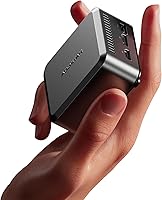
The AOOSTAR N1 Pro N150 Mini PC is one of the more interesting budget compact desktops to arrive in 2025, built around Intel's Twin Lake N150 — a processor that doesn't get as much attention as the N100 but delivers a real, measurable step up in performance. At roughly the size of a large paperback, this mini PC ships with Windows 11 Pro already activated, a choice of SSD configurations, and enough I/O to be genuinely useful straight out of the box. Since it only hit the market in April 2025, long-term durability data is still thin, but the specs-to-price ratio is hard to ignore for anyone hunting a capable, low-power daily machine.

Features & Benefits

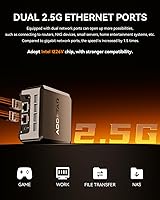
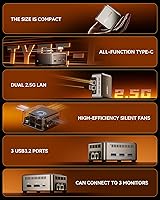
If you've been following the N100 wave, the N150 is essentially the next step — Intel's Twin Lake architecture squeezes out noticeably better CPU and GPU throughput within the same 15W power envelope. Where this compact machine genuinely impresses is connectivity: triple 4K display output across two HDMI ports, a DisplayPort, and a full-featured USB-C is unusual at this price tier, and the dual 2.5G Ethernet via Intel I226-V chips opens the door for homelab routing duties most mini PCs simply can't handle. One thing worth stating plainly: the 12GB LPDDR5 RAM is soldered and single-channel, meaning no upgrades are possible, and the single-channel configuration does cap memory bandwidth compared to dual-channel setups.

Best For

The N150 desktop hits a clear sweet spot for a few specific buyer types. Home and small-business users who spend their day in a browser, spreadsheet, or video call will find it more than capable. Homelab enthusiasts will appreciate the dual-NIC setup — running pfSense or OPNsense on this kind of hardware used to cost considerably more. It also handles Plex media serving reasonably well; the N150's integrated graphics edge ahead of the N100 for hardware transcoding. What it is not is a machine for video editing or 3D rendering. The N150 is an efficiency-core processor built for light sustained workloads, and pushing it hard reveals those limits fairly quickly.

User Feedback

The N150 desktop holds a 3.8 out of 5 rating, though the review pool is still growing given its recent launch — worth keeping in mind before drawing firm conclusions. Early buyers tend to highlight quiet everyday operation and a chassis that feels more solid than the price suggests. The dual-LAN flexibility also draws consistent praise from networking-focused users. On the flip side, the non-upgradeable RAM surfaces repeatedly as a frustration, with some buyers only realizing post-purchase that there is no slot to add more. A few reviewers note fan noise under sustained load as more present than expected. Out-of-box setup is generally described as smooth, with the pre-activated Windows install and included VESA mount landing as welcome practical touches.

Pros

  • The Intel N150 chip delivers a meaningful performance boost over the N100 without increasing the power budget.
  • Dual 2.5G Intel Ethernet ports are rare at this price point and unlock real homelab and routing use cases.
  • Triple 4K display output across three ports is genuinely useful for multi-monitor office setups.
  • The M.2 2242 slot accepts both SATA and NVMe SSDs, so you can upgrade storage to up to 2TB post-purchase.
  • Windows 11 Pro comes pre-installed and pre-activated — no extra license cost or setup headaches.
  • At under 9cm square, this mini PC fits behind a monitor, on a bookshelf, or anywhere space is tight.
  • The included VESA mount is a thoughtful practical touch that many competing units charge extra for.
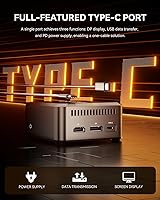
  • USB 3.2 Gen2 ports and a full-featured USB-C cover most peripheral and display needs without a hub.
  • Early buyers consistently describe operation as quiet during typical everyday workloads.
  • The 35W power adapter keeps running costs minimal for an always-on use case like a Plex or home server.

Cons

  • RAM is soldered and non-upgradeable — if 12GB becomes insufficient, the only option is a full replacement.
  • Single-channel memory configuration limits bandwidth and holds back performance in memory-sensitive tasks.
  • WiFi 5 is functional but behind the curve when WiFi 6 is now standard on many competing units.
  • Fan noise reportedly increases under sustained load, which may matter in quiet home office environments.
  • The review pool is still small given the April 2025 launch, making it hard to assess long-term build reliability.
  • The M.2 2242 form factor is less common than 2280, limiting SSD choices and potentially raising upgrade costs.
  • Single storage slot means no room for a second drive without replacing the existing one entirely.
  • No USB 2.0 ports are listed, which may cause compatibility issues with older peripherals.
  • AOOSTAR is a lesser-known brand with limited physical service network, making warranty claims potentially cumbersome.

Ratings

The AOOSTAR N1 Pro N150 Mini PC scores below reflect AI-driven analysis of verified global buyer reviews, with spam, bot activity, and incentivized feedback actively filtered out before scoring. This compact machine earns strong marks in several areas but carries real trade-offs that the ratings transparently surface. Both the genuine highlights and the recurring frustrations are reflected here so you can make a clear-eyed decision.

Performance for Workload
78%
22%
For everyday office tasks — browser-heavy workflows, video calls, spreadsheets, and light multitasking — the N150 handles itself noticeably better than its N100 predecessor. Users coming from older Celeron or Atom-based machines consistently describe the upgrade as feeling substantial in real daily use.
Push it into sustained CPU-intensive tasks like batch file conversion or prolonged background updates and the efficiency-core architecture starts to show limits. It is not a machine that rewards heavy multitasking with demanding applications, and users expecting desktop-class responsiveness will be disappointed.
Value for Money
84%
Dual 2.5G Ethernet, triple 4K display output, and Windows 11 Pro pre-activated at this price tier is a combination that is genuinely hard to match from competing brands. Homelab users in particular feel they are getting professional-grade networking hardware bundled into a budget machine.
The soldered, non-upgradeable RAM undercuts the long-term value proposition — if your workload grows past 12GB, the entire unit needs replacing rather than just a memory module. A few buyers feel the single-channel memory configuration should have been a dual-channel setup given the asking price.
Build Quality
72%
28%
The metal top panel and snug chassis assembly give this compact machine a more premium feel than many rivals at the same price point. Early buyers describe it as solid enough for permanent desk or VESA-mounted use without any flex or rattling concerns.
The base and sides use plastic, which some users note feels less durable than the top panel suggests overall. Given the unit only launched in April 2025, there is simply not enough long-term data yet to confirm whether the build holds up over two or three years of continuous use.
Connectivity & I/O
91%
The dual Intel I226-V 2.5G Ethernet ports alone set this machine apart in its category, and pairing them with three USB 3.2 Gen2 ports and a full-featured USB-C that handles power, data, and video simultaneously is an unusually generous package for the size. Users running soft routers or small home servers specifically call out the NIC quality as a key reason they chose this unit.
The absence of WiFi 6 is a minor but real step behind competing mini PCs shipping in 2025, and some users note the single audio combo jack is limiting for setups that need separate mic and headphone connections simultaneously. There are no USB 2.0 ports, which occasionally causes compatibility friction with older peripherals.
Display Output
88%
Triple 4K display support is rare at this price, and users setting up three-monitor productivity desks genuinely appreciate not needing a dock or external adapter to achieve it. The combination of two HDMI ports, a DisplayPort, and a USB-C with display support covers nearly every monitor type without extra hardware.
Driving all three displays at full 4K resolution while running active applications does put visible pressure on the integrated GPU, and users report occasional micro-stuttering when all three screens are loaded simultaneously. The USB-C display output requires a cable explicitly supporting DisplayPort Alt Mode, which trips up some buyers expecting any USB-C cable to work.
Thermal Management
67%
33%
Under light and moderate workloads — the kind most buyers use this machine for daily — thermals are well-controlled and the fan stays nearly inaudible. The 15W TDP gives the cooling system a manageable task in typical office or server idle conditions.
Under sustained CPU load, fan spin-up is noticeable enough that users in quiet home office environments mention it specifically. A few buyers report the chassis becoming warm to the touch after extended heavy use, which is not alarming for a 15W chip but worth noting for always-on server deployments in enclosed spaces.
RAM Configuration
53%
47%
The LPDDR5 specification at 4400MHz is technically faster per channel than DDR4 3200MHz, and for the light workloads this machine targets, 12GB is genuinely sufficient for most users running productivity software and media serving tasks simultaneously.
The single-channel configuration is the most cited frustration across verified reviews — it measurably reduces memory bandwidth compared to a dual-channel setup of equal capacity, impacting any workload that is memory-bound. Worse, the RAM is soldered, meaning there is no upgrade path if you eventually need more capacity or want to fix the bandwidth limitation.
Storage Flexibility
74%
26%
Support for both NVMe and SATA protocols in the same M.2 slot gives buyers real flexibility when upgrading, and the 2TB ceiling is more than adequate for a home server or office machine. The included SSD options cover most users without requiring an immediate upgrade purchase.
The M.2 2242 form factor is significantly shorter than the standard 2280 length most buyers are familiar with, and the narrower selection of drives at 2242 length can translate to higher per-gigabyte costs or longer sourcing times. There is only one storage slot, so adding a second drive is not an option without replacing the existing one.
Software & Setup
82%
18%
Arriving with a pre-activated Windows 11 Pro licence removes a friction point that plagues many budget mini PCs, and multiple buyers describe the out-of-box experience as requiring minimal effort before the machine is productive. The VESA mount included in the box is a practical touch that avoids a separate purchase for monitor-mounting setups.
A handful of users report pre-installed bloatware and manufacturer utilities that require cleanup before the system feels fully their own. A small number of early buyers also noted inconsistencies in the Windows activation status, suggesting quality control on the software provisioning side could be tighter.
Noise Level
71%
29%
For the core use case of a quiet home office companion or always-on Plex server, the fan profile is well-tuned — idle and light-load noise is genuinely low and unlikely to distract in a typical room environment. Users who run it as a server tucked away in a closet or behind a monitor report essentially forgetting it is on.
Under CPU stress the fan audibly ramps up, which some users describe as more aggressive than expected for a 15W chip. This is not a passive-cooling design, and buyers expecting near-silence during video encoding or heavy update cycles will find the fan behavior disappointing.
Networking Performance
89%
The Intel I226-V chipset is a respected, enterprise-grade NIC that delivers stable throughput and low CPU overhead compared to cheaper Realtek alternatives found in competing units. Users running pfSense, OPNsense, or even just a direct wired connection on both ports report consistent, reliable 2.5G performance without driver headaches.
WiFi 5 is functional but a generation behind the WiFi 6 standard now common in 2025 mini PCs, and users in dense wireless environments may notice the limitation. Bluetooth 5.2 is solid for peripherals but offers no meaningful advantage over the 5.0 found in older machines for typical keyboard and mouse use.
Size & Portability
86%
At under 9cm square and weighing next to nothing, this compact machine is easy to relocate, mount, or stash discreetly — a genuine convenience for users who want a desktop presence without desktop bulk. The VESA mount means it can disappear entirely behind a monitor.
The small footprint does mean the unit can feel unstable on a desk without the VESA mount if the surface is uneven or if cables are pulling from multiple directions at once. Packing it for travel is feasible but the lack of a carry case or protective sleeve in the box is a minor omission.
Long-Term Reliability
61%
39%
Early buyer feedback is largely positive regarding build consistency and out-of-box unit quality, and AOOSTAR has a reasonable track record with previous N-series mini PCs in terms of hardware arriving functional and well-configured.
The April 2025 launch date means there is simply not enough field data to score long-term durability with confidence, and AOOSTAR's warranty support infrastructure is less developed than larger PC brands. Buyers who need guaranteed multi-year support should factor in the brand's limited physical service network before committing.

Suitable for:

The AOOSTAR N1 Pro N150 Mini PC is a strong fit for anyone who needs a capable, low-power desktop that stays out of the way. Home office workers who spend most of their day in a browser, productivity suite, or video conferencing tool will find the N150 processor handles those tasks without breaking a sweat — and the 15W power draw means it costs almost nothing to run. If you've been eyeing the mini PC category for homelab work, the dual 2.5G Ethernet ports make this compact machine a genuinely practical choice for running a software router or lightweight firewall, something most competing units at this price simply can't offer. Plex enthusiasts looking for a quiet, always-on media server will also appreciate the N150's improved hardware transcoding over the older N100 generation. For anyone still running an aging Celeron or Atom-based machine, the performance jump here is substantial enough to feel like a real upgrade without requiring a significant financial commitment.

Not suitable for:

The AOOSTAR N1 Pro N150 Mini PC is not the right call if you anticipate needing more than 12GB of RAM down the road — the memory is soldered directly to the board and cannot be replaced or expanded under any circumstances. Single-channel memory configuration also means real-world bandwidth is noticeably lower than what a dual-channel setup of the same capacity would deliver, which matters in memory-intensive workloads. Anyone hoping to use this compact machine for video editing, 3D rendering, or running multiple demanding applications simultaneously will hit a ceiling fairly fast; the N150 is built for efficiency, not sustained heavy compute. Gamers should look elsewhere entirely — the integrated graphics handle light media tasks but aren't designed for gaming beyond very basic titles. Finally, buyers who need rock-solid long-term reliability data before committing should note that this unit only launched in April 2025, so the track record is still being established.

Specifications

  • Processor: Intel Twin Lake N150 with 4 cores and 4 threads, a base clock of 0.8GHz, and a maximum burst frequency of 3.6GHz.
  • TDP: The N150 operates at a 15W thermal design power, keeping energy consumption and heat output low during typical workloads.
  • RAM: 12GB LPDDR5 at 4400MHz is soldered directly to the motherboard in a single-channel configuration and cannot be upgraded or replaced.
  • Storage Slot: One M.2 2242 slot supports both PCIe 3.0 NVMe and SATA SSDs, with a maximum supported capacity of 2TB.
  • Default Storage: Units ship in either a 256GB or 512GB PCIe 3.0 M.2 2242 SSD configuration depending on the variant selected at purchase.
  • Display Output: Two HDMI ports, one DisplayPort, and one USB-C with DisplayPort Alt Mode support simultaneous triple 4K output at 3840x2160 resolution.
  • Wired Networking: Two Intel I226-V 2.5 Gigabit Ethernet ports via RJ45 provide dual-NIC capability suitable for routing, NAT, and network segmentation tasks.
  • Wireless: WiFi 5 (802.11ac) dual-band wireless and Bluetooth 5.2 are built in via an integrated wireless module.
  • USB Ports: Three USB 3.2 Gen2 Type-A ports and one full-featured USB-C port supporting Power Delivery, DisplayPort, and data transfer are included.
  • Audio: A single 3.5mm combo jack supports both headphone output and microphone input simultaneously.
  • Operating System: Windows 11 Pro comes pre-installed and pre-activated, requiring no additional license purchase out of the box.
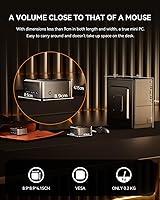
  • Dimensions: The unit measures 8.9 x 8.9 x 4.15 cm, making it one of the more compact dual-NIC mini PCs currently available.
  • Weight: The bare unit weighs approximately 0.2kg, though total shipping weight including accessories is closer to 1.19 pounds.
  • Power Supply: A 35W DC power adapter is included in the box and is sufficient for the N150 under full sustained load.
  • Graphics: Intel integrated graphics are built into the N150 SoC, with no discrete GPU slot or expansion option available.
  • Mounting: A VESA mount with screws is included, allowing the unit to attach to the rear of a compatible monitor or display arm.
  • Box Contents: The package includes the mini PC unit, a 35W power adapter, VESA mount with screws, one HDMI cable, a user manual, and AOOSTAR custom stickers.
  • Availability: The product first became available on Amazon in April 2025, making verified long-term reliability data limited at time of writing.

Related Reviews

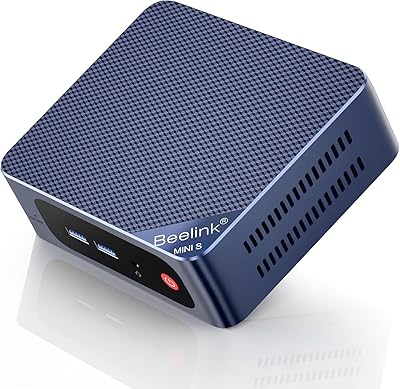
Beelink Mini S12 Pro (N100, 16GB, 500GB)
83%
83%
Everyday Performance
91%
Value for Money
76%
Build Quality & Design
84%
Thermal Management & Noise
88%
Connectivity & Ports
More
GEEKOM AX8 Pro Mini PC
85%
90%
Performance
87%
Value for Money
83%
Build Quality
80%
Cooling System
92%
Portability/Size
More
MINISFORUM M1 Pro 125H Mini PC Barebone
79%
88%
Processing Performance
67%
GPU & Graphics Capability
91%
Build Quality & Chassis
93%
Connectivity & I/O
71%
OCuLink eGPU Support
More
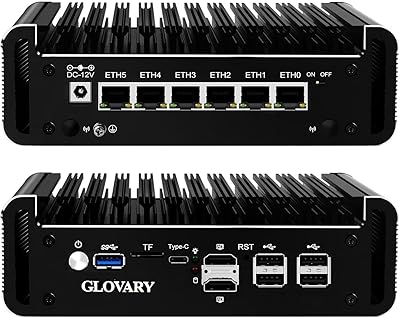
Glovary N150 6L Firewall Mini PC
80%
93%
NIC Performance
88%
Build Quality
71%
Thermal Management
86%
VPN Throughput
82%
Value for Money
More
Beelink Mini S13 Pro N150 16GB/500GB
82%
83%
Everyday Performance
78%
Build Quality & Design
61%
Thermal Management
86%
RAM & Multitasking
74%
Storage Speed & Expandability
More
Beelink SER9 Pro (32GB/1TB)
84%
93%
Processing Performance
91%
Multitasking & Responsiveness
84%
Build Quality & Design
67%
Thermal Management & Fan Noise
72%
Graphics & Display Output
More
KAMRUI Essenx E2 N150 16GB Mini PC
78%
83%
Everyday Performance
79%
Multitasking & RAM
88%
Display & Dual Monitor Support
76%
Build Quality & Design
71%
Thermal Management & Fan Noise
More
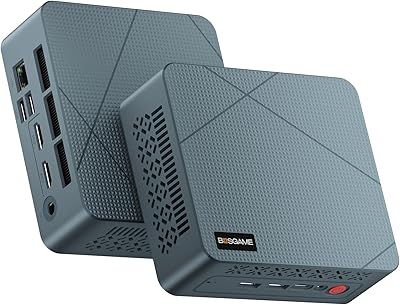
BOSGAME Mini PC E3 (N150, 16GB/512GB)
79%
88%
Value for Money
74%
Processing Performance
91%
Multi-Display Support
89%
Connectivity & Ports
76%
Build Quality & Design
More
KAMRUI Essenx E1 Mini PC 12GB 256GB
77%
82%
Everyday Performance
86%
Value for Money
74%
Build Quality
71%
Thermal Management
83%
Noise Level
More
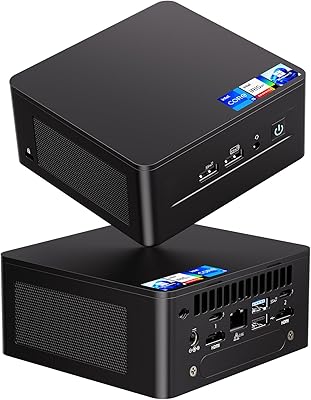
Intel NUC 13 Pro NUC13ANHi5 (16GB RAM, 512GB SSD)
87%
89%
CPU Performance
94%
Port Selection & I/O
91%
Build Quality & Design
86%
Storage Expandability
92%
Networking & Wireless
More

FAQ

No, and this is worth understanding before you buy. The 12GB LPDDR5 is soldered directly onto the motherboard, so there is no slot to add or swap memory. If 12GB turns out to be insufficient for your workload, the only real option is replacing the entire unit.

Yes, it can drive three displays simultaneously — one via each HDMI port, one via DisplayPort, and one via the USB-C port using DisplayPort Alt Mode. All three can output at 4K resolution. You will need a USB-C cable or adapter that explicitly supports DisplayPort Alt Mode for the third screen, not just any USB-C cable.

The N150 is Intel's next-generation Twin Lake architecture, and the improvement over the N100 is real rather than purely a marketing claim. You can expect roughly 30 to 40 percent better CPU throughput in lightly threaded tasks, and the integrated GPU is also meaningfully stronger. For everyday use the difference is noticeable, especially if you are running multiple browser tabs, video calls, and background tasks at once.

It is one of the better options at this price for exactly that use case. The dual Intel I226-V 2.5G Ethernet ports are the same NICs used in many purpose-built router appliances, and they are well-supported by both pfSense and OPNsense. The N150 handles routing, firewall rules, and NAT with headroom to spare, and the 15W power draw makes it cheap to run 24/7.

Yes, and it handles the role reasonably well for a household with a few concurrent streams. The N150's integrated graphics support hardware transcoding, which takes the load off the CPU for compatible video formats. If you are planning to run several simultaneous 4K transcodes, you may hit limits, but for one or two streams — especially with direct play enabled — it performs reliably.

The M.2 slot accepts the 2242 form factor, which is shorter than the more common 2280 drives — so double-check the length before buying a replacement or upgrade drive. Both SATA and NVMe PCIe 3.0 protocols are supported, and the slot can handle capacities up to 2TB. Just note that the 2242 form factor limits your selection compared to standard-length M.2 drives.

During light tasks like web browsing, document editing, or video playback, most users report the fan is barely audible. Under sustained CPU load — such as a long video transcode or a system update running in the background — the fan does spin up and becomes more noticeable. It is not disruptively loud, but if you expect complete silence in all conditions, this is something to factor in.

Yes, Windows 11 Pro comes pre-installed and pre-activated out of the box. You do not need to purchase a separate license or go through a manual activation process. It is ready to use after the standard Windows first-run setup, which takes only a few minutes.

Windows 11 Pro supports domain join and Azure Active Directory, so using this compact machine in a business or managed IT environment is straightforward. The hardware itself is standard x86, so most enterprise management tools that support Windows Pro should work without issue. For very locked-down environments, confirm your IT team's requirements before purchasing.

Early buyer feedback generally describes the chassis as feeling more substantial than the price would suggest, with a metal top panel and a reasonably tight fit and finish. That said, the unit launched in April 2025, so there is not yet a long track record to draw on for multi-year durability. For typical desk or VESA-mounted use — rather than travel or rough handling — it appears to hold up well based on current user reports.