Overview

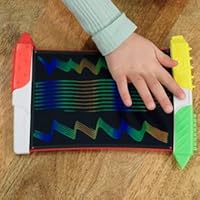
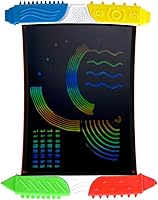
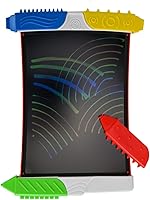
The Boogie Board Scribble n' Play Drawing Board takes a refreshingly simple approach to kids' creative play: a reusable LCD surface that replaces paper and crayons without producing a single drop of mess. Its screen uses ColorBurst technology to display vivid, rainbow-hued lines that genuinely delight young children the moment they make their first mark. Boogie Board has spent years refining this patented LCD writing surface, and it shows in how naturally the screen responds to pressure. Worth noting upfront, though: this is a freeform doodle tool, not an educational program or a digital art tablet. Kids ages 4 and up get a clean slate whenever they want — nothing more, nothing less.
Features & Benefits

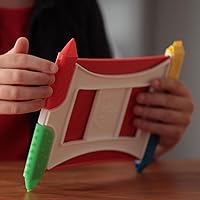
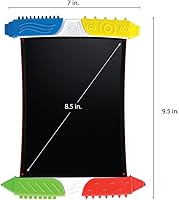
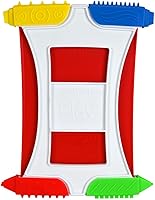
What makes this LCD doodle board worth a closer look is the combination of a few well-executed details. The ColorBurst LCD screen produces lines in multiple colors simultaneously, and since drawing is entirely pressure-based, the battery only activates when a child presses the one-button erase to wipe the screen clean. Four styluses are included, each offering different textured tips and edges that nudge kids to experiment with varied marks rather than just basic lines. They clip directly onto the board, which helps cut down on the chronic lost-stylus problem. Weighing just 7 ounces and not much bigger than a sheet of paper, it slips into a bag with minimal fuss.

Best For

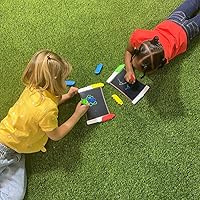
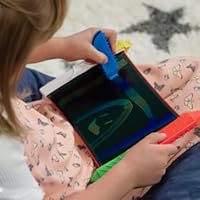
This kids drawing tablet earns its place most clearly as a mess-free travel companion. It works best for children between 4 and 6 who are still developing the fine motor control needed for drawing and early writing — the pressure-sensitive surface gives immediate, satisfying feedback without any coordination barriers. Parents exhausted by the crayon-on-everything phase will appreciate that there is nothing to uncap, spill, or clean up afterward. It also makes a reasonable case as a reusable alternative to paper and crayons for households trying to cut down on disposable art supplies. For gift-givers, it sits in the sweet spot between genuinely fun and practically useful — not a trivial thing to pull off at this price tier.

User Feedback

Across a large pool of verified buyers, the Scribble n' Play earns high marks overall, with most praise focused on how well the colorful screen effect lands with kids — many parents report genuine excitement during first use. Build durability gets strong reviews too; the screen holds up to daily dropping and rough handling that young children reliably deliver. On the flip side, a few honest points deserve mention. The erase button sensitivity is a recurring complaint — small hands can accidentally wipe a drawing they wanted to keep, which is frustrating at that age. Some buyers also note the drawing surface is smaller than photos suggest. Stylus tips do show wear with heavy daily use, though it rarely becomes a dealbreaker.

Pros

  • The ColorBurst LCD screen produces vibrant multicolor lines that visually delight kids on first use.
  • No ink, paint, or paper means zero cleanup — a genuine advantage for parents.
  • The board is durable enough to withstand daily drops and rough handling from young children.
  • Four included styluses clip onto the board, so they stay together and do not wander off.
  • At 7 ounces, this LCD doodle board is light enough to slip into any bag without a second thought.
  • Drawing requires no battery power — the battery only activates for the erase function.
  • The single-button erase is intuitive enough for a four-year-old to operate independently.
  • Sixteen different stylus tip textures encourage kids to vary how they draw, not just what they draw.

Cons

  • The erase button sits on the board face and is easy to press by accident, wiping the screen mid-drawing.
  • The drawing surface is smaller than product photos often imply, which genuinely surprises some buyers.
  • Stylus tips show noticeable wear after months of heavy daily use.
  • There is no way to save a drawing — once erased, the image is gone permanently.
  • Children who grow quickly past the doodling stage may lose interest faster than the price would justify.
  • The board offers no color control — kids cannot choose specific hues, only draw and let the LCD decide.
  • There are no structured activities, letters, or guided prompts — it is purely open-ended freeform drawing.

Ratings

The ratings below for the Boogie Board Scribble n' Play Drawing Board were generated by our AI engine after systematically analyzing thousands of verified buyer reviews from global markets, actively filtering out incentivized, bot-generated, and duplicate submissions. Each score reflects the real distribution of satisfaction across specific categories — not just averaged star counts, but the underlying reasons behind them. Both the genuine strengths and the recurring frustrations surfaced in authentic feedback are transparently represented in every category score and explanation.
Visual Appeal
91%
The ColorBurst LCD effect is the single biggest driver of first impressions — multicolored lines appear instantly and vividly the moment a stylus touches the surface, creating a visual payoff that paper and crayons simply cannot replicate. Parents consistently report that the rainbow output is what keeps kids returning to the board voluntarily, session after session.
The screen colors are not user-controllable — the LCD determines what color appears based on position rather than the child's intent, which can frustrate kids who want to draw something in a specific color. Some children also lose interest in the color effect once the initial novelty fades, particularly those on the older end of the target age range.
Ease of Use
88%
For a 4-year-old, the learning curve here is essentially zero — pick up a stylus, press it to the screen, and something colorful appears immediately. The one-button erase is equally intuitive; children who have never touched the board before typically figure it out within seconds, keeping play sessions moving without adult involvement.
The erase button sits on the front face of the board rather than the back or side, making accidental erasures a consistent real-world problem — particularly for children who grip the board across its face during use. There is no confirmation step, lock mode, or undo option, so a single misplaced finger wipes whatever the child spent the last several minutes drawing.
Build Quality
86%
The housing and LCD panel hold up well to the treatment young children reliably deliver — dropping it on hard floors, cramming it into bags, and pressing the styluses harder than necessary. Multiple reviewers with preschoolers report the screen remaining fully functional after months of daily use with no cracks, dead spots, or image degradation.
The styluses are the weakest link in the durability picture — their textured tips show visible wear after sustained heavy use, and while replacements are available separately, that additional cost frustrates some buyers for a product at this price point. The plastic casing, while solid overall, does accumulate minor scuffing with extended everyday handling.
Portability
93%
At 7 ounces and roughly the footprint of a small hardcover book, this LCD doodle board fits easily into a diaper bag, a restaurant tote, or a child's backpack without adding meaningful weight. Parents consistently name it one of their most-reached-for items during long car rides, flights, and restaurant outings precisely because it requires nothing else to function.
Because it relies on ambient light to display the drawing, the board is harder to use in low-light environments like a darkened car cabin or a dim restaurant — a limitation that does not apply to backlit tablets. There is also no carrying case or protective sleeve included, so the screen surface can accumulate scuffs if not stored with some care.
Value for Money
74%
26%
For families who would otherwise cycle through multiple coloring books, crayon sets, and paper pads over the same period, the reusable design makes the upfront cost easier to justify across time. The build quality is strong enough that the board rarely needs replacing, which strengthens the long-term cost-per-use argument meaningfully.
Some buyers feel the price is steep for what is ultimately a single-function drawing surface with no save capability, no educational programming, and no color selection. The eventual need to purchase replacement styluses adds to the total cost of ownership, which can sting for a product that already sits at the higher end of its category.
Drawing Experience
79%
21%
The pressure-sensitive LCD surface produces immediate, responsive marks that feel more natural than many children's digital drawing tools, with no calibration, app loading, or setup required. Kids who are just developing their grip find the low resistance of the surface encouraging — it takes very little pressure to leave a clear, visible mark.
The drawing experience is fundamentally limited to freeform scribbling, with no layers, no color selection, no ability to save work, and no undo beyond wiping the entire screen at once. Children who develop artistic interests quickly will find the board restrictive within months, as it offers no mechanism to build on, refine, or revisit a drawing.
Stylus Quality
67%
33%
Having four styluses with 16 different textured tips and edges is a genuine differentiator — it gives kids a reason to switch tools mid-session and experiment with varied line effects, which helps prevent play sessions from going stale. The variety is particularly appreciated by children who are drawn to tactile exploration and sensory contrast.
Tip wear is a real concern for families where the board sees daily use — the textured surfaces flatten and lose their distinctiveness faster than the board itself shows any degradation, meaning the variety that makes the styluses appealing gradually disappears. Replacements require a separate purchase, and some parents report this becoming necessary within just a few months.
Erase Function
71%
29%
The single-button wipe is exactly the right design choice for a 4-year-old — no menus, no hold-to-confirm, just one press and a clean slate. Children who fill the screen and want to start fresh can do so instantly, keeping the creative flow uninterrupted when the erase is deliberate and expected.
The button's front-face placement means accidental erasures happen with frustrating regularity, particularly for children who wrap their hand around the board while drawing. There is no lock mode or confirmation prompt, so a single misplaced finger permanently destroys whatever the child had been building for the past several minutes — a recurring pain point in buyer feedback.
Kid Engagement
89%
The visual payoff of multicolored lines appearing on a luminous-looking surface is consistently described by parents as the kind of thing that keeps kids returning voluntarily, without prompting. The Scribble n' Play holds attention well during the 4-to-6 window when children respond most strongly to tactile, immediate creative feedback.
Engagement tends to drop off as kids approach age 7 and beyond, since the limited feature set — no color choice, no saving, no progression or challenge — offers diminishing novelty over time. Parents of children who develop artistic interests quickly may find the board gets set aside sooner than the purchase price would ideally justify.
Mess-Free Factor
96%
No ink, paint, or paper is perhaps the single most reliably praised attribute across all verified buyer feedback — parents who use the board at restaurants describe handing it to a child and not thinking about it again until they are ready to leave. The zero-cleanup promise is delivered completely and without exception in normal use.
There is very little to criticize here from a mess standpoint, as the board genuinely produces no waste, residue, or transfer marks onto surfaces or clothing. The one minor caveat is that the screen surface does attract fingerprints and smudges from handling, though these do not affect drawing performance and wipe away easily with a soft cloth.
Travel Practicality
92%
For parents who need a no-prep, no-cleanup activity that fits in a jacket pocket or purse, this kids drawing tablet is one of the most practical options in its category. There are no charging cables, no app setup, and no Wi-Fi required — it is ready to use the moment it comes out of the bag, anywhere.
The lack of backlighting limits usefulness in low-light travel scenarios — dimmed airplane cabins, evening car rides, and restaurants with mood lighting all reduce screen visibility enough to be a practical problem. The board also produces no sound or audio feedback, which means older or more stimulation-seeking children may find it underwhelming compared to tablet-based entertainment.
Age Appropriateness
83%
The combination of pressure-sensitive drawing, a large erase button, and styluses that attach directly to the board reflects a design that genuinely accounts for how 4-to-6-year-olds interact with objects — they press hard, they lose things, and they want immediate results. The board delivers reliably on all three in ways that more complex creative tools for this age often fail to.
Below age 4, many children lack the fine motor coordination to use the different stylus tips meaningfully, and the accidental erase problem becomes even more disruptive at younger ages. Above 6 or 7, the limited feature set starts to feel underwhelming relative to what older children expect from creative tools, making the effective sweet spot narrower than the broad marketing suggests.
Screen Size
61%
39%
The 7-by-9.5-inch drawing surface is adequate for the type of bold, sweeping marks that preschool-aged children typically make — they are generally not drawing fine-detail work. The screen comfortably accommodates a full scribble session without feeling cramped for the intended age group, and the overall board footprint makes it easy to hold across a child's lap.
Buyer disappointment about screen size is one of the most consistently mentioned issues in feedback, largely because product photos create an impression of a larger drawing area than the actual surface delivers. For children accustomed to drawing on standard letter-size paper, the size difference is immediately noticeable and can make the product feel undersized relative to its price.
Battery Performance
84%
Because the battery only activates during erase events rather than during drawing, it lasts significantly longer than buyers might expect for a battery-powered children's toy. Parents frequently report going weeks or even months of regular daily use before needing a replacement, which is a practical and appreciated detail for a product used heavily on the go.
The lithium metal battery required is not the most common household type, meaning parents who run out at an inconvenient moment may not have a spare immediately on hand. The replacement process itself is straightforward but does require a small screwdriver to open the back panel — not something every family has within easy reach when a child is waiting to draw.

Suitable for:

The Boogie Board Scribble n' Play Drawing Board is a strong fit for parents of children in the 4-to-6 age range who want a creative outlet that produces absolutely no mess and requires no supervision to set up or clean up. It is particularly well-suited to families who travel frequently, dine out regularly, or spend time in waiting rooms — situations where a compact, self-contained activity can keep a young child quietly occupied without pens, paper scraps, or crayon marks ending up somewhere unwelcome. The pressure-sensitive LCD surface supports the kind of freehand mark-making that helps children in this age group build hand control and pencil grip in a low-stakes, low-frustration way. Caregivers tired of buying replacement crayons, markers, or coloring books will also find genuine value in having a single reusable tool that holds up over time. For gift-givers, it occupies a useful niche — novel enough to excite a preschooler, but practical enough that parents are genuinely glad someone bought it.
Not suitable for:

The Boogie Board Scribble n' Play Drawing Board is not the right choice for older children or anyone expecting a structured creative tool — there are no colors to select, no undo function, no save feature, and no guided activities whatsoever. Kids who have grown past the early doodling stage and want more control over their creations will likely find the freeform-only format limiting fairly quickly. It is also a poor match for parents hoping to use it as a structured educational device; the board does not teach letters, numbers, or shapes in any guided way — it simply provides a blank surface to draw on and then erase. Buyers expecting a generous drawing area should note that the screen is roughly 7 by 9.5 inches, which is genuinely compact and may disappoint children accustomed to working on a standard sheet of paper. Finally, if the child in question is prone to pressing every button in sight, the single erase button positioned on the board face will become a recurring source of frustration for everyone involved.

Specifications

  • Brand: Manufactured by Kent Displays Inc. and sold under the Boogie Board brand name.
  • Model: Model designation is Scribble n' Play with the manufacturer part number J3SP10001.
  • Screen Type: Features a ColorBurst LCD surface that produces pressure-sensitive marks in multiple colors simultaneously.
  • Dimensions: Overall product dimensions are 9.8″ x 7.3″ x 0.7″.
  • Drawing Area: The active drawing surface measures approximately 7″ wide by 9.5″ tall.
  • Weight: Total unit weight is 7 oz.
  • Recommended Age: Manufacturer-recommended age range is 4 to 6 years.
  • Styluses: Comes with 4 styluses offering a combined total of 16 distinct textured tips and edges.
  • Erase Function: A single button clears the entire screen at once; there is no partial or selective erase option.
  • Battery: Requires 1 lithium metal battery, which is built in and replaceable, used solely to power the erase button.
  • Power Source: Drawing itself requires no electrical power; only the erase function draws from the battery.
  • Materials: Housing is constructed from plastic, polycarbonate (PC), and polyethylene terephthalate (PET).
  • Drawing Type: Drawing is freeform and pressure-sensitive, with no color selection, layers, or undo capability.
  • Connectivity: Operates entirely without cords, plugs, Bluetooth, or any wireless connectivity.
  • Product Status: The product is currently in active production and has not been discontinued by the manufacturer.

Related Reviews

HUION HS610 Graphics Drawing Tablet
77%
91%
Pen Accuracy & Pressure Sensitivity
83%
Tilt Response
88%
Active Area Size
74%
Build Quality & Durability
86%
Portability
More
VEIKK S640 6x4 Drawing Tablet
80%
91%
Value for Money
86%
Pen Performance
93%
OSU! Gaming Suitability
67%
Build Quality & Durability
89%
Ease of Setup
More
Snug Play+ Kids On-Ear Headphones
84%
94%
Hearing Safety
83%
Build Quality
76%
Comfort & Fit
91%
Volume Limiting Reliability
68%
Cable & Connectivity
More
Ugee S640 Drawing Tablet
79%
91%
Value for Money
84%
Pressure Sensitivity Performance
82%
Stylus Comfort & Usability
72%
Build Quality & Durability
63%
Driver & Software Setup
More
Arduino MKR Zero ABX00012
80%
88%
Processing Performance
91%
Built-in SD Card Integration
79%
Audio Capability
86%
Portability & Power Options
63%
3.3V Logic Compatibility
More
GAOMON PD1161 11.6-inch Pen Display Tablet
76%
88%
Pen Accuracy & Responsiveness
79%
Display Quality
74%
Anti-Glare Film & Screen Feel
83%
Tilt Support
67%
Express Keys & Customization
More
Artisul A1201 Drawing Tablet
81%
91%
Value for Money
88%
Pen Performance
93%
Active Area Size
86%
Pressure Sensitivity
63%
Driver & Software Setup
More
XENCELABS Pen Tablet Small Drawing Tablet
83%
91%
Pen Performance
88%
Portability
89%
Display Mapping
63%
Active Area Size
82%
Value for Money
More
Eversolo Play Standard Edition
81%
91%
Sound Quality
74%
Amplifier Power & Speaker Compatibility
88%
DAC Performance
83%
Touchscreen & Interface
77%
Room Correction Effectiveness
More
Artisul A801 Drawing Tablet
85%
91%
Value for Money
88%
Pen Responsiveness
93%
Portability
85%
Ease of Setup
80%
Build Quality
More

FAQ

Replacing the battery does not affect the image on the screen at all — the LCD surface holds whatever is drawn on it without any power. The battery slot is on the back of the board and requires a small screwdriver to access. Once the fresh battery is in, the erase button works again and nothing else changes.

The screen responds to pressure from almost any blunt object, so fingers, the capped end of a pen, or even a coin will all leave marks. The included styluses just give more variety in line texture because of their different tip shapes and edges. That said, fingertips tend to produce broader, less defined marks compared to the styluses.

This is one of the most consistent real-world complaints from parents, so it is worth being upfront about. The erase button sits on the front face of the board, and young children who like pressing buttons will hit it accidentally with some regularity. It is a minor frustration for most families rather than a dealbreaker, but if your child has a very low tolerance for losing their work mid-drawing, factor that in before buying.

The active drawing surface is approximately 7″ wide by 9.5″ tall, which is closer to a small notepad than a full sheet of paper. A number of buyers mention being surprised by this after seeing the product images, which can make the board look larger than it is. If your child is used to drawing on standard letter-size paper, the size difference will be noticeable.

The board is built specifically for young children, so there are no exposed sharp edges, and all four styluses have rounded, blunt tips. The LCD surface is a fully sealed unit with no accessible liquid or gel inside. Boogie Board uses industry-standard LCD materials for children's writing tablets, and the product meets applicable safety guidelines for the recommended age group.

The styluses are designed to attach directly to the board itself, so they are not just loose pieces that rattle around at the bottom of a bag. The built-in attachment keeps them together between play sessions, which is a practical detail that parents appreciate. That said, if your child removes all four during an active drawing session, make a habit of re-attaching them before packing up.

Yes, stylus wear over extended daily use is a known issue, and Boogie Board does make replacement styluses and tips available. They are not included as extras in the box, so you will need to purchase them separately through Boogie Board's website or major online retailers. If your child uses the board every single day, keeping a spare set on hand is a reasonable precaution.

The screen does not emit any light of its own — it is a reflective LCD surface that needs ambient light to be visible, similar to an e-reader without a backlight. In a darkened car, the drawing will not be easy to see without an external light source nearby. For low-light use, a small clip-on reading light aimed at the board would solve the problem.

The manufacturer sets 4 as the minimum age, primarily because the stylus variety and finer motor demands of the drawing experience suit children who have developed some basic pencil-grip coordination. At 3, many kids can certainly enjoy pressing the erase button and making marks, but the full range of stylus textures will likely be lost on them. If your 3-year-old is developmentally ahead for their age, it can still be fun with adult supervision — just do not expect them to use it the way the product is designed.

The Boogie Board Scribble n' Play Drawing Board uses an LCD surface with ColorBurst technology that produces vivid, multicolored lines, which is a noticeably more exciting visual experience than the flat gray or black marks produced by standard magnetic bead boards. The LCD surface also tends to feel smoother and more paper-like underhand, compared to the slightly raised, bumpy texture of most magnetic boards. Whether the price difference is worth it largely comes down to how much the colorful output engages your specific child, but for kids who respond strongly to bright visuals, the difference is quite tangible.