Overview

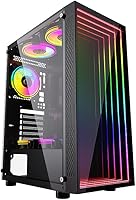
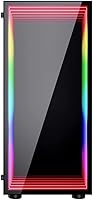
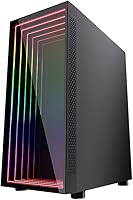
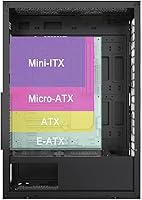
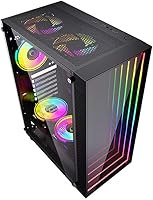
The Bgears b-Optillusion Mid-Tower ATX Case is, at its core, an aesthetic statement masquerading as a budget enclosure. The front panel is what grabs you first — a layered arrangement of glass, mirrors, and ARGB LEDs that creates the impression of infinite depth, like looking into a lit tunnel. It is genuinely surprising in person. The chassis itself is 0.5mm steel, which is honest mid-range territory — not flimsy, but not a vault either. What makes this Bgears case unusual for its price is the motherboard flexibility: E-ATX, ATX, Micro-ATX, and ITX all fit, which is rare at this tier.

Features & Benefits

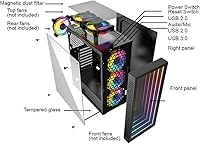
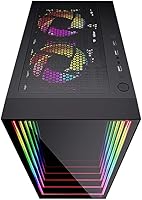
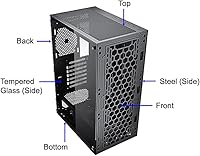
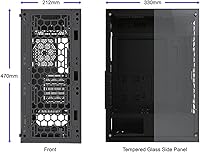
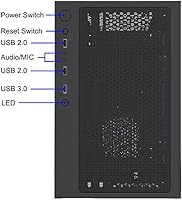
The front panel on the b-Optillusion deserves its own moment. It layers ABS plastic, glass, and mirrored surfaces behind an LED array, and a dedicated button cycles through lighting modes — no software required. The left side is tinted tempered glass held in place by four screws, giving a clear view of your build without being completely transparent. Cooling is where this optical illusion chassis punches above its weight: it can house up to eight fans and supports 360mm radiators up front. A magnetic, washable dust filter sits on top — a small touch that matters long-term. One real limitation worth knowing: there is only one USB 3.0 port on the front I/O.

Best For

This Bgears case makes the most sense for first-time builders who want their setup to look impressive without spending a lot. If you are sitting at a desk where the front panel faces you, the lighting effect becomes a genuine focal point. It works well for standard ATX and Micro-ATX builds — technically E-ATX is supported, but that board size restricts front fan placement, so keep that in mind. Air or liquid cooling both work fine here, given the generous fan and radiator mounting options. Anyone running high-end, large-format hardware should look elsewhere; the 300mm GPU limit and modest cable management room mean this case is built for mid-range systems, not extreme builds.

User Feedback

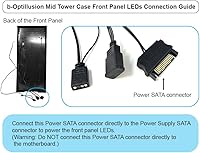
Among buyers, this optical illusion chassis has earned strong marks overall, with the front panel effect consistently described as exceeding expectations — people are genuinely surprised by how convincing the depth illusion looks in a real room. Value for the price is the other recurring theme in positive reviews. On the flip side, some buyers have noted that cable management space is tighter than ideal, and a handful flagged the front panel LED connection process as confusing — the setup guide lives on the brand website rather than in the box. Keep in mind that fans are not included, which catches some buyers off guard. No major structural complaints overall, which is encouraging.

Pros

  • The optical illusion ARGB front panel creates a genuinely striking depth effect that looks far more expensive than the price suggests.
  • Supports E-ATX, ATX, Micro-ATX, and ITX motherboards — unusually broad compatibility for a case in this price range.
  • Cooling potential is strong, with mounts for up to eight fans and front radiators up to 360mm.
  • Tinted tempered glass side panel gives a clean, unobstructed view of the internal build.
  • The magnetic, washable top dust filter is a practical detail that saves time during regular maintenance.
  • A dedicated button controls the front panel lighting independently, with no software or RGB app needed.
  • CPU cooler clearance of 160mm and 300mm GPU support cover the vast majority of mainstream hardware configurations.
  • The 4.6-star average across hundreds of real buyers suggests consistent satisfaction, especially around visual impact and value.
  • Bottom-mounted PSU chamber keeps wiring organized and out of the main build area.

Cons

  • The 0.5mm steel chassis feels noticeably thin during assembly — do not expect the solidity of pricier cases.
  • No fans are included in the box, so budget for at least three to get airflow moving from day one.
  • Only one USB 3.0 port on the front I/O is a real limitation for anyone who plugs in devices frequently.
  • The front panel LED connection guide is only available on the brand website, not included in the packaging.
  • Cable management space behind the motherboard tray is tighter than ideal for builders who like clean routing.
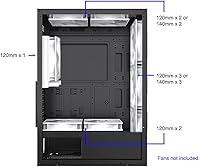
  • E-ATX board support restricts front fan mounting to a single 120mm fan, significantly reducing airflow options.
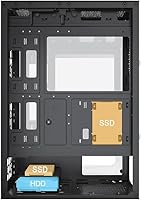
  • Only two SSD drive bays may not be enough for builders with larger storage setups.
  • The right side panel is plain steel with no window, which limits visibility from that angle entirely.

Ratings

The scores below for the Bgears b-Optillusion Mid-Tower ATX Case were generated by AI after analyzing verified global user reviews, with spam, incentivized feedback, and suspected bot activity actively filtered out to reflect what real builders genuinely experienced. Every category score captures both where this case earns its praise and where it asks buyers to accept a real trade-off — nothing has been softened or inflated.

Aesthetic Design
94%
The optical illusion front panel is consistently the first thing buyers mention, and the praise is rarely qualified — most describe it as looking significantly more expensive than the price suggests. In a desk setup where the front faces the room, it generates real reactions from visitors and holds up visually even after the novelty fades.
The illusion effect is most convincing at a direct viewing angle and in dimmer ambient lighting; in a bright room or viewed from the side, the impact is noticeably reduced. The ABS plastic border framing the panel also feels less refined up close than the overall visual effect implies.
RGB Lighting System
88%
The dedicated hardware button for cycling lighting modes means there is no app to install, no driver conflicts, and no syncing headaches — it simply works out of the box. Buyers who have dealt with finicky RGB software on other cases specifically praise this no-fuss approach as a practical relief.
The front panel LED wiring guide is not included in the box; Bgears directs buyers to their website for the connection instructions, which creates an avoidable stumbling block mid-build. A small number of reviewers also noted the LED controller button feeling slightly loose after several months of regular use.
Value for Money
87%
Getting a tempered glass side panel, broad motherboard compatibility, 360mm radiator support, and a genuinely unique front panel in one package at this price is difficult to argue against. Most buyers report feeling they received more visual and functional return than this price tier typically delivers in the mid-tower segment.
The value calculation shifts once you account for fans, which are not included and are necessary for the case to perform as intended — that additional cost catches some buyers off guard. Builders who budget only for the case itself often find the total spend higher than the initial listing suggested.
Cooling Potential
83%
Supporting up to eight fans across front, top, rear, and PSU chamber positions, alongside a 360mm front radiator option, this optical illusion chassis offers thermal headroom that most competitors at this price simply cannot match. Builders running all-in-one liquid coolers report comfortable component temperatures without needing to push fan speeds aggressively.
None of the fan mounting positions ship with fans pre-installed, meaning first-time builders must plan and budget for airflow from scratch before the build even begins. With an E-ATX board installed, the front fan configuration is also restricted to a single 120mm slot, which meaningfully undermines cooling performance in that specific setup.
Build Quality
66%
34%
For the price, the chassis holds together reliably during assembly and there are no significant reports of panels warping or screws stripping under normal use conditions. The tempered glass panel is a genuine bright spot — it sits flush, feels solid, and shows no reported issues with cracking during standard handling.
The 0.5mm steel construction is noticeably thin compared to cases even slightly higher in price, and experienced builders tend to detect the flex during handling almost immediately. This does not cause functional failures in typical builds, but it does affect the tactile sense of quality throughout the assembly process.
Ease of Assembly
74%
26%
The layout follows a logical mid-tower convention and most component installations proceed without surprises, with the bottom PSU chamber keeping major cabling separated from the main motherboard area. Builders with one or two previous builds behind them generally report a smooth and uncomplicated experience overall.
The front panel LED connection is the most frequently cited friction point — the wiring guide lives on the brand website rather than in the box, and the physical connectors alone are not intuitive enough to figure out independently. Cable routing behind the motherboard tray is also tighter than most builders prefer, especially with thicker PSU cables.
Motherboard Compatibility
86%
Accommodating E-ATX, ATX, Micro-ATX, and Mini-ITX in a single mid-tower at this price gives builders real flexibility to reuse this Bgears case across future upgrades without worrying about form factor mismatches. ATX and Micro-ATX builds in particular fit comfortably with no clearance concerns reported.
E-ATX compatibility comes with a significant caveat: the larger board size restricts the front fan mount to a single 120mm position, limiting both airflow and radiator options considerably. This trade-off is not prominently communicated at the point of purchase, and several E-ATX buyers reported being surprised by the restriction after the fact.
Cable Management
57%
43%
The bottom PSU chamber does a reasonable job isolating power supply cables from the main build area, and the seven rear expansion slots leave adequate room for tidy GPU and riser cable routing in standard configurations. For builders with slim cable sets, a presentable result is achievable with some patience.
The space behind the motherboard tray is consistently flagged by builders as too shallow for comfortable cable routing, particularly with thicker PSU cables or large cable management combs. Builders aiming for a fully clean aesthetic will need to invest significantly more time and planning than the case naturally facilitates.
Front I/O Connectivity
52%
48%
The front panel includes two USB 2.0 ports alongside the single USB 3.0 connection, which covers basic peripheral needs like keyboards, mice, and low-speed accessories without requiring users to reach to the back panel. Audio and microphone jacks are reported to function reliably without interference or static issues.
Having only one USB 3.0 port on the front is the most commonly cited functional complaint in user reviews, representing a real constraint for builders who routinely plug in external drives, gaming controllers, or USB headsets simultaneously. The absence of USB-C is also increasingly noticeable as newer peripherals shift toward that standard.
Side Panel Quality
78%
22%
The tinted tempered glass left panel provides an attractive, slightly softened view of the internal build, and the tint itself helps conceal minor cable management imperfections that would be more visible through a fully clear panel. Four thumbscrews hold it firmly, with no rattling reported even at higher fan speeds.
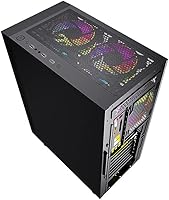
The right panel is plain steel with no window, restricting internal visibility to a single side only — less of an issue in typical desk setups but limiting for open-room or showcase configurations. The thumbscrew attachment, while secure, is slower to remove than the tool-free mechanisms found on competing cases.
Hardware Clearance
79%
21%
The 160mm CPU cooler height limit covers nearly all popular tower air coolers on the market, and 300mm of GPU length accommodates the majority of mid-range and upper-mid graphics cards without modification or forced compromises. Builders using mainstream components rarely encounter clearance problems during installation.
The 300mm GPU limit becomes a genuine constraint for users eyeing flagship graphics cards, a significant portion of which extend beyond that measurement with their triple-fan coolers. There is also no provision for vertical GPU mounting, which limits showcase options for builders who want to display their card through the side panel.
Dust Management
81%
19%
The magnetic top dust filter is the standout maintenance feature — it removes without tools, rinses clean under water, and snaps back in seconds, making routine cleaning genuinely painless. Buyers consistently highlight it as a thoughtful inclusion that holds up well over repeated removal and washing cycles.
Dust filtration coverage is limited to the top panel only, leaving front intake and PSU bottom positions without dedicated filters and requiring more frequent manual cleaning in those areas. For builders in dusty environments or homes with pets, this partial coverage becomes a meaningful long-term maintenance consideration.
Storage Options
62%
38%
Two SSD bays comfortably handle the storage needs of most standard gaming builds, and the single HDD bay covers users who want a larger secondary drive for game libraries alongside a primary solid-state drive. For a straightforward gaming rig, the configuration is adequate without feeling compromised.
Two SSD positions is increasingly limiting as mid-range builders routinely run three or more drives, and the single HDD bay leaves little room for expanding a storage-heavy setup without turning to external solutions. Content creators and media collectors will feel this constraint relatively quickly as their libraries grow.
Noise Dampening
61%
39%
In standard configurations with mid-speed fans, the b-Optillusion performs acceptably for a typical gaming environment where moderate background noise is expected and tolerated, and the steel panels absorb a baseline level of vibration from fan motors running at conservative RPM settings.
There is no acoustic foam or sound-dampening material anywhere in the chassis, which is common at this price but worth noting for noise-sensitive buyers or those running high-speed fans for aggressive cooling. Fan noise and coil whine pass through the thin steel panels without meaningful attenuation under load.

Suitable for:

The Bgears b-Optillusion Mid-Tower ATX Case is a strong pick for first-time PC builders and budget-focused gamers who want their rig to stand out visually without stretching their finances. If the front of your desk faces you while you work or game, the layered ARGB optical illusion panel becomes a genuine centerpiece that draws attention in a way most cases at this price simply cannot match. It accommodates ATX and Micro-ATX boards comfortably, and the cooling headroom — with support for up to eight fans and a 360mm front radiator — means you are not boxed into a weak thermal setup just because the case is affordable. Builders running mainstream air coolers or mid-range liquid cooling loops will find the hardware clearances more than sufficient. Anyone who values aesthetics as a primary purchase driver and is willing to add fans separately will get excellent value here.

Not suitable for:

Builders who prioritize structural rigidity and premium feel over visual impact should think carefully before buying the b-Optillusion, since the 0.5mm steel chassis is a real trade-off that shows up during handling compared to cases at higher price points. Power users planning to run large E-ATX motherboards will find the front fan configuration becomes noticeably restricted with that board size installed, which undermines one of the case's strongest selling points. Anyone relying heavily on front-panel USB connectivity will find a single USB 3.0 port limiting, particularly if they regularly transfer large files or plug in multiple peripherals. Builders working with high-end GPUs longer than 300mm will need to look elsewhere. The front panel LED wiring also requires consulting the brand website for a connection guide rather than following an included manual, which adds a friction point that less experienced builders may find frustrating.

Specifications

  • Form Factor: Mid-Tower chassis designed to accommodate standard desktop builds on a typical desk or floor-level placement.
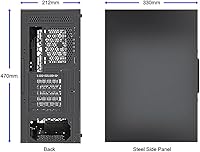
  • Dimensions: Internal space measures 212mm (W) x 330mm (D) x 470mm (H); overall footprint is 212mm (W) x 380mm (D) x 480mm (H).
  • Weight: The assembled case weighs 14.4 pounds before any components are installed.
  • Chassis Material: Main structure is 0.5mm steel with a black interior finish; the front panel assembly uses ABS plastic, glass, and mirrored layers.
  • Motherboard Support: Compatible with E-ATX (max 275mm width), ATX, Micro-ATX, and Mini-ITX form factors.
  • Front Panel: ARGB optical illusion panel built from layered ABS, glass, mirror, and mirror-backed LEDs, controlled by a dedicated button with no software dependency.
  • Side Panels: Left panel is tinted tempered glass secured with four thumbscrews; right panel is steel with no window.
  • Fan Support: Supports up to 8 fans total: front 3x 120mm or 3x 140mm, top 2x 120mm or 2x 140mm, rear 1x 120mm, PSU chamber 2x 120mm; no fans are included.
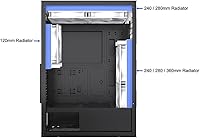
  • Radiator Support: Accepts front-mounted 240mm or 360mm radiators, top-mounted 240mm or 280mm, and a rear 120mm radiator.
  • CPU Clearance: Maximum CPU air cooler height is 160mm, covering the majority of mainstream tower coolers.
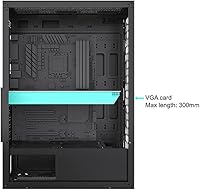
  • GPU Clearance: Maximum discrete graphics card length is 300mm measured from the rear I/O bracket.
  • Drive Bays: Includes one 3.5-inch HDD bay and two 2.5-inch SSD mounting positions.
  • Front I/O: Front connectivity includes one USB 3.0 port, two USB 2.0 ports, a microphone jack, and HD audio output, with cable lengths of 750mm.
  • Expansion Slots: Seven rear expansion slots accommodate multi-slot GPU configurations and add-in cards.
  • PSU Mount: Bottom-mounted PSU chamber accepts standard ATX power supplies; the PSU is not included.
  • Dust Filter: A magnetic, removable, and washable dust filter is mounted on the top panel for easy maintenance.

Related Reviews
Thermaltake Tower 600 Mid-Tower ATX Case
79%
91%
Build Quality
93%
Aesthetic Design
88%
Cable Management
94%
Cooling Capacity
71%
Installation Experience
More
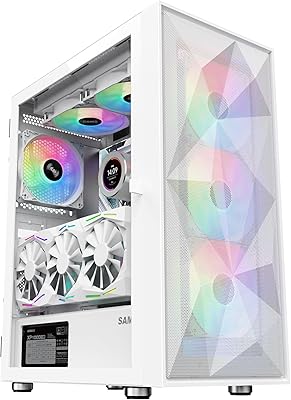
SAMA 3509 ATX Mid Tower PC Case
74%
88%
Value for Money
74%
Build Quality
81%
Airflow & Cooling Performance
67%
Pre-installed Fan Quality
86%
Tempered Glass Panel
More
HYTE Y40 Mid-Tower ATX Gaming Case
76%
94%
Aesthetics & Design
88%
Build Quality
62%
Cooling Performance
83%
Value for Money
81%
Cable Management
More
KEDIERS P6 Mid Tower ATX PC Case

75%
88%
Aesthetic Design
71%
Build Quality
84%
Included Fans & Lighting
78%
Airflow & Thermal Performance
81%
Radiator & Cooling Support
More
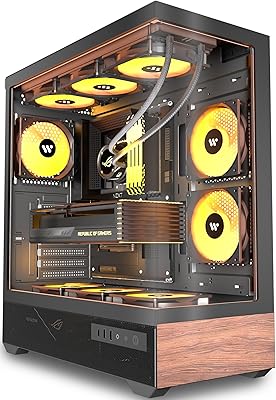
Okinos Cypress 7 Walnut Wood ATX Mid-Tower Case
83%
94%
Aesthetic Design
88%
Build Quality
79%
Cooling Performance
76%
GPU Compatibility
86%
Front I/O
More
Zalman S3 ATX Mid-Tower PC Case
74%
83%
Value for Money
71%
Build Quality
58%
Airflow & Cooling Performance
86%
Ease of Assembly
67%
Acrylic Side Panel
More
KEDIERS K4 ATX Mid Tower PC Case
80%
91%
Value for Money
93%
Aesthetic Design
74%
Build Quality
72%
Cooling Performance
84%
Ease of Assembly
More
Vetroo AL800 Mid Tower ATX PC Case
76%
78%
Build Quality
84%
Tempered Glass Panel
76%
Airflow Performance
61%
Fan Included & Expandability
69%
Cable Management
More
SAMA S40 Mid Tower ATX PC Case
79%
88%
Airflow Performance
83%
Included Fan Quality
79%
Build Quality & Finish
92%
GPU Compatibility
61%
Cable Management
More
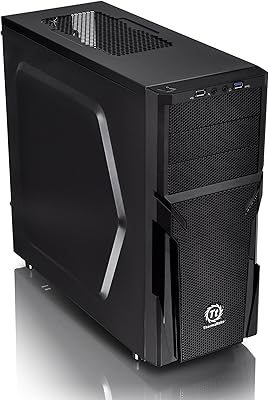
Thermaltake Versa H21 ATX Mid Tower Case

69%
91%
Ease of Assembly
86%
Interior Space
73%
Airflow & Ventilation
58%
Build Quality & Materials
67%
Cable Management
More

FAQ

No, the case ships without fans. You will need to purchase them separately, and the front mount supports up to three 120mm or 140mm fans, so budget accordingly before your build day.

It creates the impression of a tunnel receding into the case — layers of mirrored surfaces and LEDs stack behind each other so the light appears to extend much deeper than the panel physically is. Most buyers say it genuinely looks more impressive in person than in product photos.

Technically yes, but there is a real trade-off: with an E-ATX board installed, the front fan configuration drops to a single 120mm fan due to the extra board width. If cooling is a priority, standard ATX is a better fit for this case.

The front of the Bgears b-Optillusion Mid-Tower ATX Case supports a 360mm radiator, which is quite generous for this price range and opens up most popular all-in-one liquid coolers.

It is held in place with four thumbscrews rather than a tool-free latch system, so removal is straightforward but takes a few extra seconds compared to swing-out designs. The screws are captive, so you will not lose them during assembly.

The wiring guide for the front panel LED connection is not included in the box — you need to visit the Bgears website to download the instructions. This is a known friction point, so look up the guide before you start your build to avoid frustration mid-assembly.

The maximum GPU length is 300mm, which covers a wide range of mid-range cards but excludes some longer flagship models. Check your specific card's length before purchasing — many triple-fan flagships exceed that limit.

The top magnetic dust filter lifts straight off without any tools. Rinse it under warm water, let it dry fully, and snap it back on — every four to six weeks is a reasonable interval depending on your environment.

It is workable but not the case's strongest point. The space behind the motherboard tray is on the tighter side, so if you plan a very clean build with thick cables, give yourself extra time and use cable ties generously.

For most casual builders it is fine, but if you regularly plug in USB drives, headsets, or controllers at the front, it can feel limiting quickly. If front-port access matters a lot to you, it is worth factoring that into your decision before buying.

Where to Buy