Overview

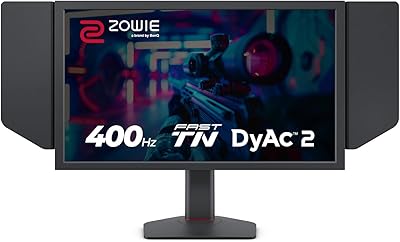
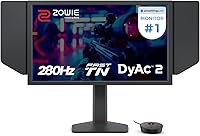
The BenQ Zowie XL2546X+ 24.1-inch Gaming Monitor is built with one type of buyer in mind: the competitive player who wants every possible edge in fast-paced games. BenQ made a deliberate choice here — a Fast TN panel instead of the IPS displays most people default to. Colors are less rich, viewing angles are narrower, and you will notice it immediately if you are used to something else. What you get in return is some of the sharpest motion handling available at this screen size, with a refresh rate that sits at the top of what the 24-inch class currently offers. BenQ Zowie has spent years supplying monitors to professional esports events, and this Zowie monitor reflects that pedigree — though at a price that only makes sense if competition is genuinely your priority.
Features & Benefits

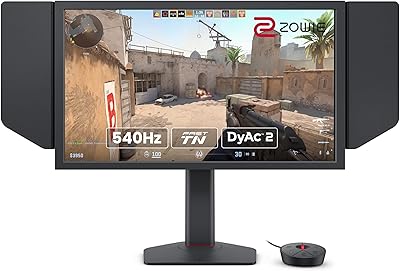
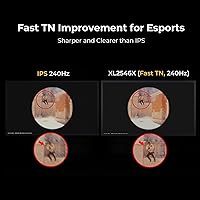
The technology that sets this esports display apart starts with its backlight system, which pulses in a way that reduces the motion blur your brain perceives between frames — without the aggressive strobing that caused headaches on older panels. The Fast TN panel handles overshoot better than previous generations, so moving objects have cleaner edges rather than trailing artifacts. The S Switch controller sits beside your keyboard and lets you dial in settings without touching the monitor, and XL Setting to Share loads a complete profile in seconds — genuinely useful at LAN events. Auto Game Mode adjusts color profiles automatically between titles. The included shielding hood cuts peripheral distractions, and the height adjustment glides more smoothly than most stands on the market, which matters more than it sounds after a long session.

Best For

This Zowie monitor is purpose-built for competitive FPS and battle royale players — people who prioritize raw reaction time far more than whether a game looks cinematic. It is particularly well-suited to LAN tournament competitors who need to reproduce their exact setup at different venues, since the settings-sharing feature makes that nearly effortless. Coaches and players who manage multiple practice stations will appreciate the same feature. If you are upgrading from a 144Hz or 240Hz display, the improvement in motion clarity is real and noticeable in fast-paced gameplay. That said, skip this if your work involves color-sensitive tasks or you watch a lot of video — the TN panel is simply not built for creative or media use and will likely disappoint.

User Feedback

Verified buyers are largely satisfied, but the split runs along predictable lines. Those who came in knowing they were trading color for speed report that the blur reduction improvement is real — not a marketing claim. Build quality gets consistent praise, and many reviewers specifically call out the new height-adjustment mechanism as noticeably smoother than earlier Zowie stands. The S Switch and profile-sharing tools earn genuine appreciation from tournament-going buyers. On the other side, some note frustration that a premium-priced display tops out at 1080p resolution, and a handful who expected IPS-level color were clearly caught off guard. The XL2546X+ is not trying to do everything — buyers who accept that tend to be happy; those who do not, are not.

Pros

  • Motion clarity at this refresh rate is among the best available in any 24-inch monitor currently on the market.
  • Active blur reduction works noticeably better than raw frame rate alone, producing sharper outlines on fast-moving in-game targets.
  • The S Switch controller lets you change display settings mid-session quickly without ever reaching for the monitor itself.
  • XL Setting to Share loads your complete display profile onto any compatible monitor in seconds — a genuine advantage at LAN events.
  • Build quality is consistently praised by verified buyers, with the stand in particular drawing frequent compliments for its solidity.
  • The height adjustment mechanism glides more smoothly than most stands in this class, which matters during long daily sessions.
  • Auto Game Mode handles color profile switching between titles automatically, removing a small but recurring manual step.
  • The included shielding hood meaningfully cuts peripheral distractions for players who want to stay locked onto the screen.
  • BenQ Zowie's track record at professional esports events gives this display a credibility that cheaper alternatives simply cannot match.
  • The matte anti-glare surface manages ambient light well and holds up comfortably during extended gaming sessions.

Cons

  • 1080p resolution feels hard to justify at this price when competing monitors offer 1440p or higher for less.
  • TN panel colors look noticeably washed out compared to IPS or OLED alternatives — a shock for buyers switching panel types.
  • Viewing angles are narrow; anyone sitting even slightly off-center will notice visible color and brightness shift.
  • At just over 20 pounds, this Zowie monitor is heavier than many rivals, which becomes an issue if you move it between setups.
  • Only one USB port is included, which feels sparse on a display positioned at a premium price point.
  • A single DisplayPort input limits multi-source flexibility for streamers or players running more complex desk setups.
  • Many buyers unfamiliar with TN panels report color disappointment upon unboxing — product listings could set clearer expectations upfront.
  • The shielding hood, useful as it is for focus, adds noticeable visual bulk that can feel awkward in compact desk spaces.
  • The price is a genuinely difficult proposition for casual players who will not extract value from the competitive-specific feature set.
  • Connectivity options are limited relative to what buyers might expect at this tier — no USB-C and minimal hub functionality.

Ratings

Our AI scoring engine processed hundreds of verified global reviews for the BenQ Zowie XL2546X+ 24.1-inch Gaming Monitor, actively filtering out incentivized, bot-generated, and duplicate submissions to extract authentic buyer sentiment. The category scores below reflect a balanced synthesis of what real users praised and what genuinely frustrated them — with no score padding and no downplaying of legitimate pain points. Both the competitive strengths that define this esports display and the real-world trade-offs that affect broader audiences are represented transparently in each scorecard.

Motion Clarity
93%
Players switching from 240Hz displays consistently report that the blur reduction system — which strobes the backlight in sync with frame rendering — produces noticeably sharper target outlines during fast-paced FPS sessions. Reviewers describe tracking moving enemies as feeling more deliberate and less visually fatiguing, particularly in titles with chaotic on-screen action.
A small segment of users report increased sensitivity to the backlight strobing during extended sessions, manifesting as mild eye fatigue that does not occur at the same refresh rate without blur reduction active. Turning off the strobing resolves it, but doing so removes much of the panel's core competitive advantage.
Refresh Rate Performance
94%
At 280Hz, the XL2546X+ sits at the top of what the 24-inch esports monitor category currently offers, and the practical difference versus 240Hz is most apparent in titles requiring rapid directional tracking. Competitive players who have used both consistently describe the input-to-display pipeline as feeling exceptionally tight and responsive, particularly with capable low-latency PC setups.
Achieving the full 280Hz requires a DisplayPort 1.2 connection and a sufficiently powerful GPU, which not every buyer's current rig can support at launch. Console users are capped at 120Hz over HDMI, making this headline specification largely irrelevant for that segment and reducing the monitor's primary advantage for those buyers.
Color Accuracy
41%
59%
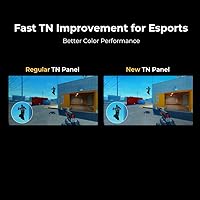
Within the constraints of a Fast TN panel, the redesigned color tuning on this esports display is a measurable improvement over prior generations, with more distinguishable enemy outlines in visually dense game environments. Buyers who intentionally selected a TN panel report color performance as acceptable for competitive use, where exact color fidelity is not the priority.
The TN panel produces noticeably muted, washed-out colors compared to IPS or OLED alternatives — a disparity most jarring for buyers arriving from premium IPS screens. Viewing angles are narrow enough that brightness and color shift visibly even at moderate off-axis positions, making shared viewing or wide desk arrangements consistently frustrating.
Value for Money
62%
38%
For competitive players who actively leverage the full feature set — tournament profile sharing, the S Switch workflow, and the blur reduction system — the pricing aligns with what a purpose-built professional tool reasonably commands. Verified buyers who entered the purchase with clear expectations about the trade-offs consistently rate their satisfaction highly within that competitive context.
A significant share of reviewers flag the 1080p resolution as a difficult concession at this price tier, particularly when competing displays offer 1440p at or below the same cost. Casual and semi-competitive buyers who will not actively use the tournament-focused tools frequently conclude the premium is difficult to justify against more versatile alternatives.
Competitive Feature Set
91%
The S Switch controller and XL Setting to Share together solve a genuinely recurring problem for tournament players — getting your personal display setup working on a venue monitor quickly and accurately. Reviewers who compete regularly describe these tools as legitimate workflow improvements, not marketing additions, with the settings-import process working reliably across compatible hardware.
The S Switch and XL Setting to Share are only fully useful for players who compete across multiple setups or travel to events — buyers who play exclusively from a fixed home station may find the feature set redundant and feel they are paying for tools they will never use. Auto Game Mode's profile switching also works inconsistently across less mainstream game titles.
Build Quality
88%
Reviewers consistently describe the physical construction as dense and premium-feeling, with the monitor body, stand, and base all drawing favorable comparisons to displays at similar or higher price points. The industrial-grade bearing in the height adjustment mechanism stands out particularly — users who have owned multiple Zowie models note it as a tangible improvement over earlier iterations.
At just over 20 pounds assembled, the weight is noticeably heavier than most competing 24-inch displays, which becomes a real consideration for buyers who move their setup regularly between home and LAN venues. A smaller number of reviewers also mention cable management routing as less intuitive than expected for a monitor at this price tier.
Ergonomics
84%
The 155mm height travel range, combined with the smooth bearing mechanism, makes physical positioning quick and precise — something reviewers who sit for five or more hours daily notice in a meaningful way. Full swivel, tilt, and height adjustment means most seated positions are comfortably accommodated without needing an aftermarket monitor arm.
The monitor does not support portrait mode rotation, which limits desk flexibility for buyers who occasionally prefer a vertical orientation for coding or document work. A handful of reviewers also note the shielding hood adds visual bulk that makes the overall footprint feel disproportionately large on smaller desks, despite the screen itself being a compact 24-inch panel.
Anti-Glare Performance
79%
21%
The matte coating handles overhead lighting and side-window glare better than glossy panel alternatives, which reviewers in bright office or bedroom setups appreciate during daytime sessions. Several users specifically call it out as a practical strength for LAN event environments, where lighting conditions are often uncontrolled and overhead.
Some reviewers note the matte coating introduces a subtle graininess on bright static backgrounds — less noticeable during active gameplay but more apparent during web browsing or document reading. Buyers who are particularly sensitive to anti-glare coating texture may find this mildly bothersome during non-gaming use.
Resolution & Sharpness
57%
43%
For competitive gaming at very high frame rates, 1080p remains the effective standard at the professional level, and the pixel density on a 24-inch panel is sufficient for clear in-game rendering without placing excessive demand on GPU resources. Reviewers focused strictly on ranked competitive play rarely flag sharpness as a concern within that specific context.
Outside of gaming, 1080p at this price point is a genuine ongoing frustration — desktop text, browser content, and video playback all look noticeably softer than on 1440p displays buyers can find for less. Reviewers who use this Zowie monitor for general computing alongside gaming frequently cite the resolution as their single biggest recurring disappointment.
Connectivity
71%
29%
Three HDMI 2.0 ports allow multiple devices to remain connected simultaneously without swapping cables — a practical benefit for players running both a gaming PC and a console. DisplayPort 1.2 handles the full-bandwidth connection needed to access the highest refresh rate without compromise or signal degradation.
Only one USB 2.0 port is included, which feels notably sparse for a monitor at this price tier — buyers expecting hub functionality for headsets, keyboards, or charging are consistently disappointed. There is no USB-C input and no DisplayPort 1.4 support, limiting both peripheral flexibility and any reasonable future-proofing argument.
Accessory Quality
82%
18%
The included shielding hood is sturdy and well-fitted — reviewers who use it during competitive play describe a meaningful reduction in peripheral movement distractions, particularly in setups near windows or busy room environments. The S Switch controller has a satisfying tactile feel and holds its desk position without sliding during active use.
Some reviewers find the shielding hood adds an aesthetic awkwardness in smaller desk setups, with a few noting it feels more appropriate for a tournament booth than a home office or bedroom. Cable selection in the box is functional but minimal, and no USB-C cable is included despite its growing prevalence across modern peripherals.
Panel Response & Overshoot
83%
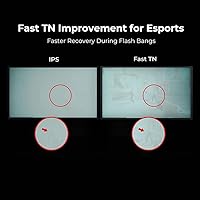
The redesigned Fast TN panel addresses a chronic weakness of earlier high-speed displays — overshoot — which causes a visible halo effect around moving objects at high frame rates. Reviewers who previously used older 240Hz TN panels report that trailing artifacts are substantially reduced on this esports display, producing noticeably cleaner visuals during fast-paced gameplay.
At the highest overdrive settings, some reviewers observe faint reverse ghosting on very high-contrast moving edges, though this is less severe than previous generations and mainly visible to users actively testing rather than playing naturally. Finding the optimal overdrive balance for each game requires some manual calibration effort rather than working correctly out of the box.
Eye Comfort
76%
24%
The softer light output delivered through the updated blur reduction system — compared to older strobing technology — reduces the visual harshness that made prolonged competitive sessions uncomfortable on earlier high-refresh panels. Buyers who game for extended periods in moderate ambient lighting report fewer headache incidents than with older-generation strobing displays.
A notable minority of reviewers report that extended sessions with blur reduction active cause noticeable eye strain or fatigue, which is broadly consistent with the known trade-off of strobing-based blur reduction across all brands. Disabling the feature restores comfort but at the direct cost of the motion clarity advantage that defines this panel's competitive identity.
Setup & Assembly
87%
Most reviewers describe the unboxing and assembly process as quick and tool-free, with stand-to-base attachment completing in minutes and ergonomic positioning feeling intuitive once assembled. The S Switch and shielding hood installation are both straightforward additions that require no external guidance and add minimal time to the initial setup routine.
A small number of buyers report that first-time configuration of the XL Setting to Share feature requires downloading a companion application separately, and the initial profile export process is less self-explanatory than the hardware itself. Cable routing through the stand is functional but not as cleanly executed as some competing monitors at a comparable price.

Suitable for:

The BenQ Zowie XL2546X+ 24.1-inch Gaming Monitor was built for a specific kind of buyer, and if you fit that profile, it is hard to argue against it. Competitive FPS and battle royale players who have already decided that reaction time matters more than visual richness will find the combination of high refresh rate and active blur reduction genuinely impactful in fast-paced matches — this is not a difference you imagine; it shows up in how cleanly moving targets render on screen. Esports athletes who travel to LAN events will appreciate the settings-sharing system most, since loading a personal display profile onto an unfamiliar tournament monitor in seconds solves a real and recurring headache. Coaches or team managers running multiple practice stations benefit from the same feature for consistency across an entire setup. Players upgrading from a 144Hz or 240Hz display who want the most responsive motion clarity currently available in a 24-inch form factor will find this esports display delivers exactly what it promises.

Not suitable for:

The BenQ Zowie XL2546X+ 24.1-inch Gaming Monitor makes significant trade-offs that will frustrate buyers who were not fully prepared for them. The Fast TN panel produces noticeably less vibrant colors and much narrower viewing angles than IPS or OLED alternatives — if you sit even slightly off-center, you will see it immediately, and if color accuracy matters to you for any reason, this display will disappoint. Photo editors, video creators, graphic designers, and anyone who watches a meaningful amount of content at their desk should look elsewhere without hesitation. The 1080p resolution is also a genuine sticking point at this price tier — for a buyer who spends time on productivity tasks or high-resolution media, the limitation becomes harder to overlook. Casual gamers who play a few hours a week and want an enjoyable all-purpose screen will struggle to justify the cost given how narrowly this display is tuned toward elite competitive use.
Specifications

  • Screen Size: The display panel measures 24.1 inches diagonally, a size widely adopted in professional esports for its compact, focused field of view.
  • Panel Type: Uses a Fast TN (Twisted Nematic) panel, engineered specifically for pixel response speed at the expense of color richness and wide viewing angles.
  • Resolution: Native resolution is 1920×1080 (Full HD), the format standard across most competitive esports titles optimized for high frame-rate output.
  • Refresh Rate: Supports a maximum refresh rate of 280Hz, placing it among the fastest panels currently available in the 24-inch monitor category.
  • Blur Reduction: DyAc 2 blur reduction uses a dual-backlight strobing system synchronized with frame rendering to reduce perceived motion blur beyond what refresh rate alone can achieve.
  • Color Gamut: Covers 98% of the sRGB color space, providing adequate gamut coverage for gaming but not suited to professional color-critical work.
  • Video Inputs: Connectivity includes one DisplayPort 1.2 and three HDMI 2.0 ports, allowing multiple source devices to remain connected simultaneously.
  • USB Ports: Includes one USB 2.0 port for basic peripheral connectivity alongside the display.
  • Tilt Range: The stand tilts from -5 degrees forward to 35 degrees backward, covering a wide range of seated viewing positions.
  • Swivel Range: Rotates 45 degrees to the left and 45 degrees to the right from center for flexible desk positioning.
  • Height Adjustment: Stand provides 155mm of vertical travel using an industrial-grade bearing mechanism designed for smoother and more precise height control than standard pneumatic stands.
  • Screen Surface: Matte anti-glare coating reduces reflections from ambient lighting without introducing visible diffusion or cloudiness on the panel surface.
  • Aspect Ratio: Standard 16:9 widescreen format, compatible with all modern gaming resolutions and broadcast content standards.
  • In-Box Extras: Ships with an S Switch external controller and a shielding hood included at no additional cost.
  • Auto Game Mode: Automatically detects game context and cycles through optimized preset color modes to adjust visual performance without manual input.
  • Settings Sharing: XL Setting to Share allows users to export and import complete display configuration profiles via USB for rapid setup replication on compatible monitors.
  • Weight: Monitor with stand weighs approximately 20.2 pounds (around 9.2 kg), which is heavier than many comparable 24-inch gaming displays.
  • Dimensions: Overall assembled dimensions with stand measure approximately 22 × 8.02 × 20 inches (length × width × height).

Related Reviews

BenQ Zowie XL2566X+ 24-inch Gaming Monitor
80%
96%
Motion Clarity
93%
Refresh Rate Performance
91%
Responsiveness & Input Lag
88%
Build Quality & Stand
61%
Color Accuracy
More
BenQ Zowie XL2586X 24.1″ 540Hz Gaming Monitor
88%
96%
Performance
94%
Motion Clarity (DyAc2 Technology)
91%
Build Quality
89%
Ergonomics & Adjustability
92%
Color Accuracy (DCI-P3)
More
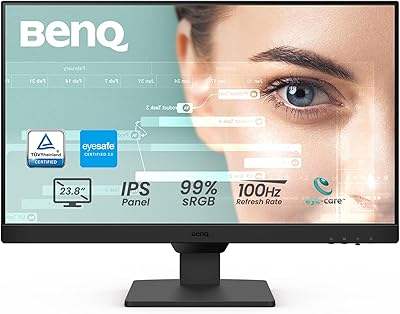
BenQ GW2490 24-inch IPS Monitor
81%
93%
Eye Care Performance
88%
Color Accuracy
82%
Refresh Rate & Motion Clarity
96%
Value for Money
54%
Ergonomics & Stand
More
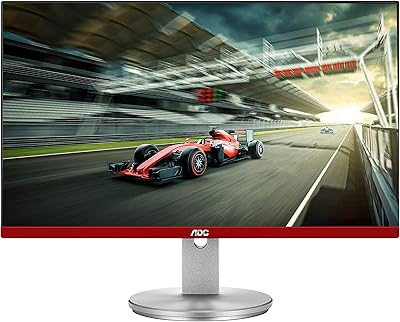
AOC G2490VXS 24″ Gaming Monitor
80%
88%
Gaming Performance
83%
Color Quality
86%
Contrast & Black Levels
91%
Refresh Rate & Smoothness
74%
Build Quality
More
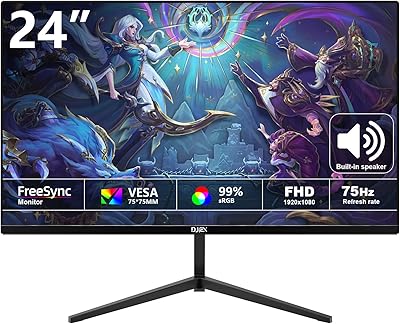
DJiEX Z24B12 24-inch Gaming Monitor
71%
83%
Value for Money
78%
Image Quality
74%
Refresh Rate & Motion
61%
Build Quality
46%
Ergonomics & Adjustability
More
AOC 24G4 24-inch Gaming Monitor
76%
93%
Refresh Rate Performance
78%
IPS Color Quality
84%
Motion Clarity
91%
Value for Money
87%
Adaptive-Sync Implementation
More
ViewSonic XG2431 24-Inch Gaming Monitor
86%
92%
Gaming Performance
88%
Display Quality
93%
Response Time
85%
Ergonomics and Comfort
89%
Visual Clarity
More
Sealan 24-Inch Curved Gaming Monitor
86%
92%
Gaming Performance
88%
Visual Quality
91%
Refresh Rate Smoothness
85%
Design & Build
87%
Eye Care Features
More
KOORUI E2411K 24-inch Gaming Monitor
76%
91%
Value for Money
83%
Gaming Performance
74%
Image & Color Quality
88%
Refresh Rate & Smoothness
81%
Eye Comfort
More
STGAubron LCD2401 24-Inch Gaming Monitor
71%
83%
Value for Money
76%
Image Quality
79%
Color Accuracy
47%
Gaming Performance
43%
Screen Glare & Reflections
More

FAQ

For competitive gaming specifically, it holds up well — most professional esports titles are built around 1080p, and the entire design philosophy here prioritizes frame rate and motion clarity over pixel density. Where it starts to feel limited is outside gaming: browsing, desktop productivity, and video content all look noticeably softer than on a 1440p display. If gaming is your primary use case, it is not a meaningful concern. If you split time between gaming and other tasks, it is worth factoring in before you commit.

Quite noticeable, honestly. TN panels have narrower viewing angles — colors and brightness shift perceptibly when viewed from even a slight angle — and overall saturation is more muted than modern IPS alternatives. The first few hours can feel like a step backward visually if you are used to a high-quality IPS screen. Most competitive players adapt quickly because the motion advantage is real, but if you value an enjoyable picture for everyday use or casual gaming, the trade-off will bother you more than you might expect.

It makes a real and measurable difference, particularly when tracking fast-moving targets across the screen. High refresh rates reduce blur by rendering more frames, but the display backlight remains on continuously between frames, which the eye still perceives as slight smearing. The strobing backlight system cuts the light in synchronized bursts that sharpen the perceived image further. The improvement is most dramatic if you are coming from 144Hz; upgrading from 240Hz makes the gain subtler but still present in demanding fast-paced titles.

The S Switch is a small external dial that sits on your desk near your keyboard and controls monitor settings — switching color modes, adjusting brightness, navigating presets — without you reaching up to press buttons on the display itself. For players who regularly fine-tune settings between different games or practice modes, it becomes a genuine convenience. If you configure your display once and leave it alone, you will rarely touch it, but it does not get in the way either.

You can, but it is not well-suited to it. The TN panel makes desktop productivity and video watching notably less pleasant than an IPS alternative, and 1080p on a 24-inch panel can look soft on text-heavy pages or high-resolution media. This display is built to do one thing exceptionally well, and it makes real compromises everywhere else to achieve that. If you need something that handles both gaming and daily computing comfortably, a quality IPS monitor at a similar or lower price would likely serve you better overall.

Yes, both consoles connect via HDMI 2.0 and will display without issue. The catch is that the maximum 280Hz refresh rate requires DisplayPort 1.2 and a capable gaming PC — current consoles max out at 120Hz over HDMI, so you will not be unlocking the display's full performance with console input. For primarily console use, you are paying a significant premium for a feature set that will not be fully utilized, and a less specialized monitor would likely give you better value.

You dial in your color modes, brightness, black equalization, and other preferences at home, then export that full profile to a USB drive using the companion software. At a tournament venue or a teammate's station, you plug in the drive and your exact settings load onto any compatible Zowie display in seconds. For competitive players who have spent time calibrating a specific visual setup, it eliminates the frustrating process of trying to recreate personal preferences from memory on an unfamiliar monitor before a match.

Yes, it is a simple process that most people complete in under 10 minutes without tools. The stand attaches clearly and securely, and cable management routing is well-designed. The height-adjustment mechanism is noticeably smoother than most competing stands during the initial positioning, which makes setup feel premium rather than fiddly. Attaching the shielding hood and getting the S Switch placed adds a few minutes, but both are self-explanatory.

It depends on your play style and environment. The hood blocks ambient light from the sides and top of the panel, which reduces peripheral visual distractions during intense sessions and can also help cut glare from overhead lighting in brighter rooms. Players who want maximum focus during competitive play tend to keep it on. Casual users and people in darker setups often remove it entirely and prefer the cleaner look of the monitor without it — it is straightforward to take on and off either way.

The BenQ Zowie XL2546X+ 24.1-inch Gaming Monitor occupies a narrow category where it competes primarily on the strength of its motion clarity system and its tournament-grade workflow tools. Rivals at comparable prices often offer IPS panels with better everyday color, and some sacrifice refresh rate or blur reduction quality in exchange. Whether it is worth the premium depends entirely on whether the esports-specific feature set — the settings sharing, the S Switch ecosystem, the proven competitive pedigree — aligns with how you actually play and compete. For a dedicated tournament player, those features justify the cost; for everyone else, more versatile options exist at or below this price.