Overview

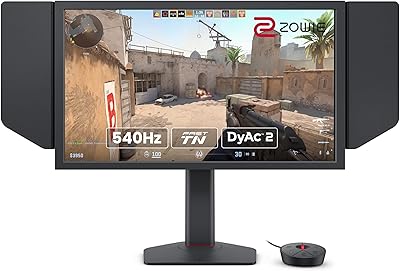
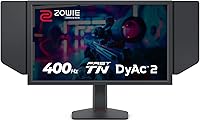
The BenQ Zowie XL2566X+ 24-inch Gaming Monitor occupies a very specific corner of the market — it's built for players who treat their monitor as a competitive tool, not an entertainment centerpiece. At its core, this esports display runs a Fast TN panel at 400Hz, a combination that prioritizes motion clarity above everything else. That trade-off is deliberate. You're not buying this for rich, cinematic colors or wide viewing angles; you're buying it because tracking a moving target at 400 frames per second feels genuinely different from 240Hz. For tournament players, ranked grinders, and anyone chasing milliseconds, the XL2566X+ makes a compelling case — but casual users and content creators should look elsewhere.
Features & Benefits

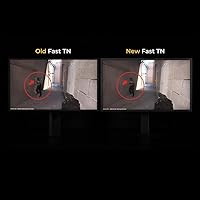
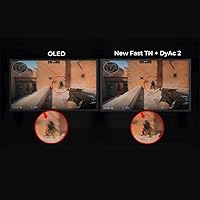
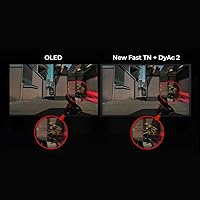
The standout feature of this Zowie monitor is DyAc2, BenQ's dual-backlight strobing system that goes a step beyond the previous DyAc Premium implementation. Rather than simply reducing backlight persistence, DyAc2 also softens light output to reduce eye strain during long sessions — a detail that matters when you're grinding for hours. The 400Hz panel itself is a redesigned Fast TN with improved electrical conductivity, which translates to snappier liquid crystal response and noticeably less overshoot than earlier models. Auto Game Mode automatically shifts color profiles depending on what you're playing, which is a convenient touch. The stand's industrial-grade ball bearing mechanism makes height adjustment unusually smooth, and the shielding hood blocks peripheral distractions — a setup detail pros genuinely care about.

Best For

The XL2566X+ is purpose-built for competitive FPS and battle royale players who want every possible edge — the kind of person who considers 240Hz perfectly fine but wonders what another 160Hz actually feels like in motion. It's a strong fit for aspiring esports pros or anyone trying to mirror tournament-standard setups, where this panel type has real presence. One practical requirement: you need a GPU that can actually sustain high frame rates at 1080p, otherwise the 400Hz advantage doesn't fully materialize. Upgraders coming from a 240Hz or 360Hz monitor will notice the difference most. And if you care about ergonomic precision — exact height, exact tilt, a hood to block out office lighting — this esports display is unusually well-equipped for that.

User Feedback

Owners who game competitively are largely enthusiastic — the smoothness at 400Hz gets specific praise in fast-paced titles, and the updated stand mechanism draws consistent compliments for feeling noticeably more solid than budget monitor stands. Where the feedback gets more nuanced is around color quality. TN panels have never been loved for their color depth or viewing angles, and this esports display is no exception — side-on viewing is clearly a step down from IPS or OLED. Some buyers also question whether DyAc2 is a meaningful upgrade over DyAc Premium or simply a branding refresh. The most persistent concern, though, is value justification: casual players often feel the premium is hard to rationalize, while competitive regulars tend to consider it worthwhile without much debate.

Pros

  • 400Hz refresh rate delivers a tangible competitive edge in fast-paced FPS titles that 240Hz users can genuinely feel.
  • DyAc2 blur reduction keeps fast-moving targets sharper and more readable during high-intensity gameplay moments.
  • The redesigned Fast TN panel significantly reduces overshoot compared to earlier Zowie models.
  • Industrial-grade ball bearing stand makes height adjustment smoother and more reliable than most monitor stands at this tier.
  • Wide ergonomic range — 155mm height travel, 45-degree swivel, and broad tilt — accommodates almost any seating position.
  • Shielding hood and S Switch compatibility give tournament-minded players meaningful setup customization out of the box.
  • Auto Game Mode intelligently shifts color profiles between game genres without requiring manual OSD navigation.
  • Three HDMI 2.0 ports plus DisplayPort 1.4 make multi-device setups practical without additional hardware.
  • VESA compatibility allows clean arm-mounted configurations for players who prefer minimal desk footprint.
  • The matte anti-glare coating handles bright room environments well, reducing reflections without heavy coating texture.

Cons

  • TN panel color depth and accuracy fall noticeably short of IPS and OLED alternatives at comparable price points.
  • Off-axis viewing angles degrade quickly, making the display awkward in any shared or multi-viewer setup.
  • Maximizing the 400Hz advantage requires a high-end GPU that many buyers may not already own.
  • DyAc2 strobing can cause visible flicker discomfort at lower brightness levels for flicker-sensitive users.
  • The monitor's 20-plus-pound weight makes repositioning or transporting it more cumbersome than lighter competitors.
  • Auto Game Mode does not always correctly detect the active application, requiring occasional manual overrides.
  • No USB-C input limits compatibility with newer laptops and streamlined desk setups that rely on that connection.
  • The price premium over capable 360Hz IPS monitors is difficult to justify for players who compete infrequently.
  • Shielding hood assembly instructions are sparse, causing unnecessary confusion during initial setup for some buyers.
  • The large stand footprint can be restrictive on smaller desks where space management is a priority.

Ratings

The BenQ Zowie XL2566X+ 24-inch Gaming Monitor earns its reputation as one of the most focused competitive displays on the market, and these scores reflect exactly that — purpose-built strengths alongside real trade-offs that matter depending on who is buying. Our AI has analyzed verified global user reviews, actively filtering out incentivized, bot-generated, and suspiciously brief submissions to surface what genuine buyers actually experience. The result is an honest picture: outstanding where it counts for esports, and transparently scored where the compromises are real.
Motion Clarity
96%
Players consistently describe tracking fast-moving targets at 400Hz as a noticeably different experience from 360Hz or 240Hz monitors — not just a spec on paper. DyAc2 in particular gets credited for making spray control in tactical shooters feel more readable, with several users noting they could distinguish individual frames during rapid movement that previously blurred together.
A small number of users report that DyAc2 strobing introduces a faint flicker at lower brightness settings, which can be distracting during extended sessions if the room lighting is dim. Those sensitive to backlight strobing in general may need time to find a comfortable configuration.
Refresh Rate Performance
93%
At 400Hz, this esports display delivers what competitive players actually came for — reduced input latency and smoother cursor tracking that becomes especially apparent in high-sensitivity FPS play. Upgraders from 240Hz setups frequently mention that the transition feels more impactful than the jump from 144Hz to 240Hz did.
Realizing the full benefit of 400Hz demands a GPU powerful enough to consistently push that many frames at 1080p, which is a non-trivial hardware requirement. On mid-range rigs, the monitor often runs well below its ceiling, making the premium over a 360Hz alternative harder to justify in practice.
Responsiveness & Input Lag
91%
The redesigned Fast TN panel with improved electrical conductivity translates into pixel response times that competitive players can feel during rapid directional changes and flick shots. Overshoot, a persistent problem on older TN panels, is noticeably reduced here, which keeps fast motion looking clean rather than ghost-ridden.
While overshoot has improved versus prior generations, a handful of technically inclined reviewers using pixel-response testing software still detected faint trailing in specific overdrive modes. It is not a widespread complaint, but buyers expecting perfection in every overdrive setting may need to experiment.
Build Quality & Stand
88%
The industrial-grade ball bearing height adjustment mechanism draws consistent praise — users describe it as unusually smooth and confidence-inspiring compared to the notched, resistance-heavy stands common on competing monitors. The overall chassis feels solid, and the shielding hood adds a purposeful, tournament-ready aesthetic that holds up well physically.
At nearly 21 pounds, the XL2566X+ is a hefty desk presence that some users found inconvenient to reposition frequently. A few buyers also noted that the matte plastic finish, while durable, picks up visible fingerprints and dust in brightly lit rooms.
Color Accuracy
61%
39%
For competitive gaming purposes, the color tuning on this esports display is adequate — enemies stand out against backgrounds in titles like CS2 and Valorant, and the RGBCMY adjustment system gives experienced users enough control to improve out-of-box color balance meaningfully. The Auto Game Mode switching is a convenient shortcut for less technical users.
This is where the TN panel trade-off hits hardest. Color depth and accuracy are noticeably behind IPS and OLED alternatives, and anyone who splits screen time between gaming and photo editing, streaming, or media consumption will find the results underwhelming. The 98% sRGB coverage number looks good on paper but does not tell the whole story about TN color rendering.
Viewing Angles
52%
48%
For solo competitive gaming from a fixed seated position — exactly how this monitor is intended to be used — the viewing angle limitations of the Fast TN panel are largely irrelevant. Most esports players sit directly centered in front of their display, and from that position the image looks sharp and consistent.
Step even slightly off-axis and the color shift is immediate and significant — a well-documented TN weakness that the XL2566X+ does not escape. Anyone in a shared setup where others occasionally glance at the screen, or who tends to lean while playing, will notice the degradation. It is one of the clearest reasons this is not a versatile all-purpose monitor.
Value for Money
67%
33%
For a competitive player who is serious about their craft and already runs a high-end GPU, the XL2566X+ delivers a genuinely differentiated performance package that is difficult to replicate at a lower price point. The combination of 400Hz, DyAc2, and the premium stand puts it ahead of similarly priced alternatives on the axes that matter most to that specific buyer.
Against 360Hz IPS monitors available at similar or lower prices, the value calculation becomes uncomfortably tight for anyone who is not competing regularly. Casual players and those who game across multiple genres frequently conclude the price premium is steep for benefits they cannot fully appreciate or exploit.
Ergonomics & Adjustability
87%
With 155mm of height travel, 45-degree swivel in both directions, and a tilt range from -5 to 35 degrees, the XL2566X+ accommodates an unusually wide range of seating positions and desk heights. The ball bearing stand makes dialing in the exact setup feel effortless rather than a chore, which long-session players genuinely appreciate.
VESA mount compatibility is present for those who want arm mounting, but the monitor's weight makes it a consideration when selecting a compatible arm. Some users also noted the included stand footprint is quite large, which can be limiting on smaller or more cluttered desks.
Eye Comfort & Fatigue
74%
26%
DyAc2's softer light output during blur-reduction mode is a real improvement over older backlight strobing implementations, and several users report being able to play longer sessions with less eye strain than they experienced on earlier Zowie models. The matte anti-glare surface also handles overhead room lighting well.
Flicker-based motion blur reduction technologies are inherently harder on the eyes than standard displays for some users, and DyAc2 is not exempt from this. A small but vocal segment of reviewers find they cannot comfortably use DyAc2 at all, preferring to run the monitor without it — which somewhat undercuts the primary selling point.
Setup & Accessibility
83%
The XL Setting to Share feature is a thoughtful addition that lets users import and export monitor configurations, which is particularly useful for players who use the same settings across practice setups or want to replicate a pro player's exact configuration quickly. The S Switch compatibility further streamlines on-the-fly adjustments without digging into OSD menus.
The OSD menu system, while functional, has a learning curve that newer monitor buyers occasionally find unintuitive. Some users also noted the Auto Game Mode does not always correctly identify the active game, requiring occasional manual overrides that reduce its appeal as a set-and-forget feature.
Connectivity & Ports
79%
21%
Three HDMI 2.0 ports alongside a DisplayPort 1.4 input makes the XL2566X+ practical for users juggling a PC and one or two consoles, covering the most common competitive gaming hardware combinations without needing a separate switch. The port layout is generally accessible and clearly labeled.
The absence of USB-C connectivity is a minor but notable omission compared to some competing monitors at this price tier. Users with newer laptops or streaming setups that lean on USB-C will need adapters, adding small friction to what should otherwise be a clean desk setup.
Anti-Glare Performance
84%
The matte screen surface handles reflections effectively in bright environments, including rooms with windows or overhead lighting — a practical benefit for players who cannot always control ambient light conditions. Most users find it requires no calibration to look clean and non-distracting right out of the box.
A small number of users feel the matte coating introduces a very faint crystalline texture that becomes visible when displaying solid color backgrounds or light UI elements. It is not a significant issue for gaming use, but it is noticeable if you are looking for it.
Packaging & Unboxing
81%
19%
The XL2566X+ arrives well-protected with all accessories — including the shielding hood components — neatly organized. Several buyers noted the packaging communicates a premium product experience from the first interaction, which aligns with the price point and brand positioning.
Assembly of the shielding hood is not immediately intuitive, and the included instructions are sparse. A handful of users reported minor confusion about the correct attachment method, though the process itself is straightforward once understood.

Suitable for:

The BenQ Zowie XL2566X+ 24-inch Gaming Monitor is built for one type of buyer: the competitive player who treats their monitor as performance hardware, not a passive screen. FPS and battle royale players who play at a high level — whether that means grinding ranked queues daily or competing in organized tournaments — will get the most out of what this esports display offers. The 400Hz refresh rate paired with DyAc2 creates a motion clarity advantage that is genuinely felt in fast-paced titles like CS2, Valorant, and Apex Legends, particularly when tracking moving targets or reading spray patterns under pressure. Aspiring esports pros looking to align their practice setup with tournament-standard equipment will find the XL2566X+ a natural fit, as this panel type has real presence on the competitive circuit. The monitor also rewards buyers who already run a powerful GPU capable of sustaining very high frame rates at 1080p — without that hardware foundation, the investment makes considerably less sense. Finally, players who obsess over ergonomic precision and desk setup consistency will appreciate the smooth ball bearing stand and the shielding hood, which are not gimmicks but practical tools serious players actually use.
Not suitable for:

The BenQ Zowie XL2566X+ 24-inch Gaming Monitor is a hard sell for anyone whose needs extend beyond competitive gaming. If you split your screen time between gaming and creative work — photo editing, video production, graphic design — the Fast TN panel's color reproduction and narrow viewing angles will frustrate you quickly; IPS or OLED alternatives simply look better for that kind of work. Casual gamers who play single-player RPGs, story-driven titles, or visually immersive games will likely find that the rich, cinematic experience they are chasing is undermined by the TN panel's limited color depth. The premium price point also becomes difficult to justify if your GPU cannot consistently push 300-plus frames per second at 1080p, because you will spend most of your time running the monitor well below its headline spec. Users sensitive to backlight strobing or prone to eye fatigue from flicker-based technologies should be cautious, as DyAc2 — the primary selling point — uses exactly that mechanism. And if you share your screen occasionally, stream to a nearby viewer, or simply tend to sit at an angle, the off-axis color shift will be a constant annoyance that no amount of calibration fully fixes.
Specifications

  • Panel Type: Uses a Fast TN (Twisted Nematic) panel, optimized for rapid pixel response and high refresh rate performance in competitive gaming environments.
  • Screen Size: The active display area measures 24.1 inches diagonally, a size widely favored in esports for balancing field-of-view coverage with focused visual tracking.
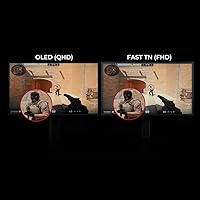
  • Resolution: Native resolution is 1920x1080 (Full HD), delivering sharp pixel density at the frame rates competitive players typically run on high-end gaming hardware.
  • Refresh Rate: Supports a maximum refresh rate of 400Hz, currently among the highest available on a production gaming monitor, requiring DisplayPort 1.4 to achieve.
  • Response Time: The redesigned Fast TN panel features improved electrical conductivity for enhanced liquid crystal responsiveness, reducing overshoot compared to previous-generation TN panels.
  • Motion Blur Tech: DyAc2 (Dynamic Accuracy 2) uses dual-backlight strobing technology to reduce motion blur while maintaining softer light output compared to earlier DyAc implementations.
  • Color Gamut: Covers 98% of the sRGB color space, with Advanced RGBCMY individual channel adjustment available for users who want manual color calibration control.
  • Screen Surface: Matte anti-glare coating reduces reflections from ambient and overhead lighting sources without introducing heavy texture artifacts during normal gaming use.
  • Aspect Ratio: Standard 16:9 widescreen aspect ratio, matching the format used in virtually all competitive esports titles and tournament display setups.
  • Connectivity: Offers one DisplayPort 1.4 and three HDMI 2.0 inputs, supporting multi-device setups including a primary gaming PC and one or two console connections simultaneously.
  • Height Adjustment: Stand provides 155mm of vertical travel powered by an industrial-grade ball bearing mechanism for smoother and more precise height positioning than standard monitor stands.
  • Tilt Range: Screen tilts between -5 and 35 degrees, covering a wide range of ergonomic sitting positions and desk height combinations.
  • Swivel Range: Rotates 45 degrees left and 45 degrees right on the stand base, allowing repositioning without moving the stand itself.
  • VESA Compatibility: Compatible with standard VESA monitor arms and wall mounts, giving users the option to remove the included stand for arm-based desk configurations.
  • Included Accessories: Ships with a shielding hood for blocking peripheral distractions and is compatible with BenQ's S Switch external controller for OSD navigation without touching the monitor.
  • Auto Game Mode: Automatically detects the active application and switches between optimized color profiles for different game genres and general use scenarios without manual input.
  • Weight: Complete unit with stand weighs approximately 20.8 pounds, which is on the heavier side for a 24-inch monitor and is a consideration for desk arm compatibility.
  • Dimensions: Product dimensions measure 13 x 2 x 22 inches (L x W x H), with the stand footprint occupying meaningful desk space that smaller setups should account for.
  • Color: Available in black with a matte plastic chassis finish consistent with BenQ Zowie's understated, tournament-oriented industrial design language.
  • Availability Date: First became available in August 2024, representing the current generation of BenQ Zowie's flagship competitive monitor lineup as of its release.

Related Reviews

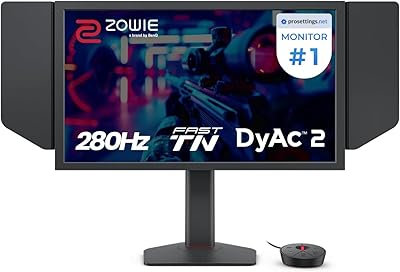
BenQ Zowie XL2546X+ 24.1″ 280Hz Gaming Monitor
84%
92%
Motion Clarity
88%
Ergonomics & Comfort
94%
Refresh Rate Performance
85%
Build Quality & Durability
78%
Color Accuracy
More
BenQ Zowie XL2586X 24.1″ 540Hz Gaming Monitor
88%
96%
Performance
94%
Motion Clarity (DyAc2 Technology)
91%
Build Quality
89%
Ergonomics & Adjustability
92%
Color Accuracy (DCI-P3)
More
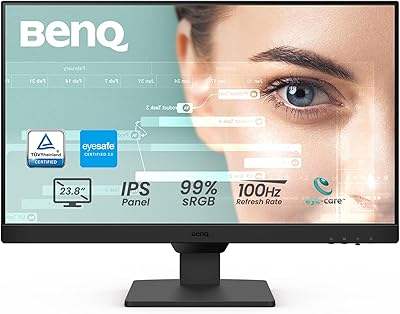
BenQ GW2490 24-inch IPS Monitor
81%
93%
Eye Care Performance
88%
Color Accuracy
82%
Refresh Rate & Motion Clarity
96%
Value for Money
54%
Ergonomics & Stand
More
CRUA CR245ZB 24.5″ Gaming Monitor
78%
83%
Gaming Performance
86%
Refresh Rate & Smoothness
74%
Color Accuracy & Vibrancy
91%
Ergonomics & Adjustability
68%
Build Quality & Materials
More
Viewedge USC2412FDA-P 24-inch FHD 144Hz Gaming Monitor
71%
83%
Value for Money
79%
Gaming Performance
76%
Image Quality
81%
Eye Comfort
63%
Build Quality
More
CUNPU 24-Inch 240Hz VA Gaming Monitor
76%
88%
Value for Money
91%
Refresh Rate Performance
76%
Panel Color Quality
89%
Connectivity
83%
Motion Clarity
More
Sealan 24-Inch Curved Gaming Monitor
86%
92%
Gaming Performance
88%
Visual Quality
91%
Refresh Rate Smoothness
85%
Design & Build
87%
Eye Care Features
More
INFIEVO 24-inch 165Hz FHD Gaming Monitor
72%
88%
Value for Money
84%
Gaming Performance
82%
Response Time
71%
Color Accuracy
41%
HDR Quality
More
INFIEVO 24-inch 180Hz Gaming Monitor
84%
88%
Display Quality
92%
Value for Money
83%
Build Quality
90%
Gaming Performance
85%
Ease of Setup
More
KOORUI E2411K 24-inch Gaming Monitor
76%
91%
Value for Money
83%
Gaming Performance
74%
Image & Color Quality
88%
Refresh Rate & Smoothness
81%
Eye Comfort
More

FAQ

Honestly, it depends on your situation. If you play competitive FPS titles seriously — ranked queues, scrimmages, or tournaments — the difference between 400Hz and 240Hz is noticeable in motion tracking and target clarity, especially with DyAc2 enabled. For casual gaming or mixed-use play, the gap over a good 144Hz or 240Hz monitor is much harder to justify given the price.

You will need a modern high-end GPU to consistently push 400 frames per second at 1080p in demanding titles. Cards like the RTX 4080 or RX 7900 XT are in the right ballpark for achieving those frame rates in games like CS2 or Valorant. On a mid-range GPU, you will likely spend most of your time below 400fps, which means you are not getting full value from the panel's headline spec.

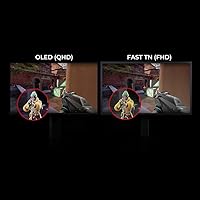
It is a real trade-off, not a dealbreaker — it just depends what you value. TN panels have narrower viewing angles and less color depth than IPS, which matters if you use your monitor for anything beyond gaming or share your screen. For pure competitive play at a fixed seated position, the motion performance advantage of Fast TN at 400Hz is what most buyers here are actually paying for.

DyAc2 builds on the earlier backlight strobing technology by adding a dual-backlight system that maintains softer light output while reducing motion blur — in practice, that means less eye strain during extended use compared to DyAc Premium. Most competitive players who have used both describe it as a meaningful improvement, particularly for long sessions. That said, some users who are sensitive to any kind of backlight strobing may find DyAc2 still introduces faint flicker that is hard to ignore.

Players who game in open-plan rooms or brightly lit spaces tend to find it genuinely useful — it cuts out peripheral distractions and reduces the amount of ambient light reflecting off the screen edges. At a tournament level, where focus and consistency matter, it serves a real purpose. At home in a dim dedicated gaming room, you may find yourself leaving it off entirely.

Yes, the three HDMI 2.0 ports make console connectivity straightforward, and you can have a PC and two consoles connected simultaneously without swapping cables. Keep in mind that current-generation consoles top out at 120Hz output, so you will not benefit from the 400Hz panel when gaming on console — but the display still works cleanly for that use case.

Out of the box, the color balance is acceptable for gaming but not impressive by IPS or OLED standards — it is a TN panel, so expectations should be adjusted accordingly. The RGBCMY adjustment system gives technically inclined users enough control to improve skin tones and contrast meaningfully. For most competitive players, the Auto Game Mode profiles are a reasonable starting point without manual calibration.

The ball bearing stand on the BenQ Zowie XL2566X+ 24-inch Gaming Monitor is genuinely one of the better included stands in this category — smooth to adjust, stable under use, and with enough range to suit most desk and chair height combinations. If you prefer a cleaner desk setup or have a heavier arm that handles 20-plus-pound monitors, VESA compatibility is there. But unlike many monitors where buying an arm immediately feels necessary, the included stand here holds up well.
Auto Game Mode uses software detection to identify the active application and automatically loads a matched color profile — for example, a higher-contrast mode for a dark tactical shooter versus a more neutral setting for a racing game. It can be disabled if you prefer to set a fixed profile manually, which some experienced users prefer for consistency. The detection is not always perfect and occasionally misidentifies apps, so having the option to override is useful.

It functions fine for general desktop use, but it is not optimized for it. The TN panel's color limitations and narrower viewing angles become more apparent in content-heavy tasks like reading, spreadsheets with color coding, or any photo work. If you need a single monitor for both competitive gaming and productive daily work, a 360Hz IPS display would serve you better overall — the XL2566X+ is best treated as a dedicated gaming panel.