
Overview

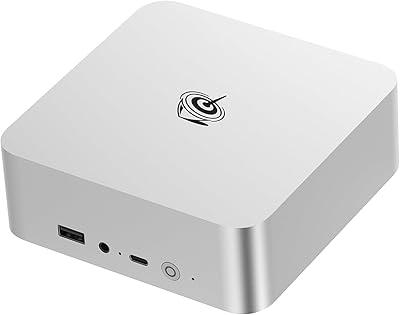
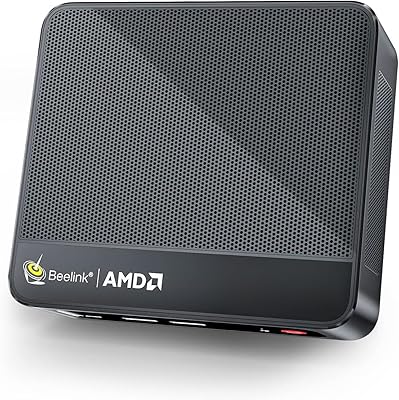
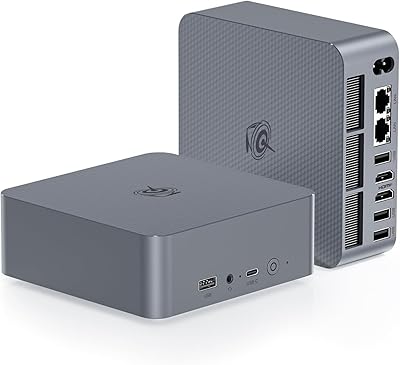
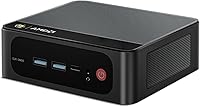
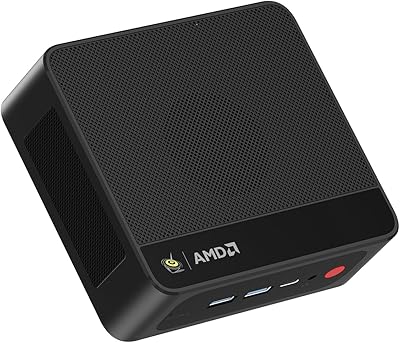
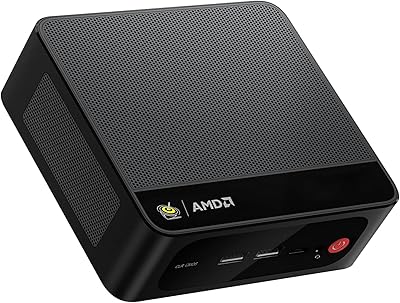
The Beelink SER5 MAX 32GB 500GB Mini PC is built around AMD's Ryzen 7 6800H — a processor more commonly found in mid-range laptops — which gives this compact desktop a meaningful edge over the cheaper N-series boxes that dominate the mini PC space. It sits in an interesting middle ground: more capable than budget options, but far less bulky and power-hungry than a traditional tower. The whole unit is roughly the size of a thick paperback, and while it looks passive from the outside, there is active cooling inside. Windows 11 Pro comes pre-installed, so setup is straightforward. The price is not rock-bottom, but the hardware specs make a reasonable case for the step up.

Features & Benefits

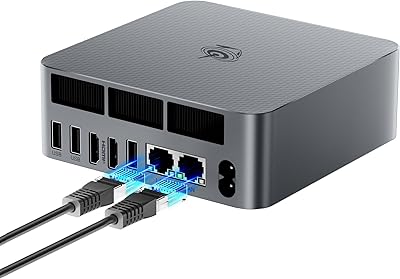
The Ryzen 7 6800H brings 8 cores and 16 threads to a box you can mount behind a monitor, which translates to genuinely responsive multitasking — dozens of browser tabs, a Zoom call, and a Lightroom export running simultaneously without the system choking. The 32GB of LPDDR5 dual-channel RAM keeps things moving in memory-heavy workflows, and the 500GB NVMe SSD handles boot and app load times well. A second M.2 PCIe 4.0 slot sits empty, ready for a multi-terabyte upgrade whenever storage gets tight. The AMD Radeon 680M integrated GPU handles hardware-accelerated video decoding, light Photoshop work, and older or indie games better than Intel Iris Xe in comparable machines. Triple 4K output via HDMI, DisplayPort, and USB-C simultaneously is genuinely unusual at this form factor.

Best For

This mini PC fits a specific kind of buyer well. If you are setting up a home office and do not want a tower eating up desk space, it covers the basics and then some — document work, video calls, web research, all handled without hesitation. Developers and analysts running multiple monitors will appreciate the triple display output. Students in dorms or small apartments get desktop-level performance without the footprint. The SER5 MAX also works well as a quiet secondary workstation for IT professionals, or as a cloud gaming terminal where the Radeon 680M handles lighter titles locally. That said, if you are expecting to run demanding 3D games or heavy video renders natively, this compact desktop will hit its thermal ceiling before long.

User Feedback

Most buyers come away satisfied with day-to-day use — fast boot times, responsive app switching, and a surprisingly quiet fan under typical workloads are the most common points of praise. The triple display setup gets positive mentions from multi-monitor users who did not expect it to work as cleanly as it does. On the other side, sustained workloads — prolonged video exports, extended compilation runs — can cause thermal throttling, a predictable consequence of fitting a 45W chip into a compact chassis. Some users report needing to enter the BIOS to enable XMP/EXPO for RAM to reach its rated speed. Quality control is generally solid, but a small number of buyers have flagged unit-to-unit variance. Beelink's lifetime support claim is appreciated, though actual response times are inconsistent according to some.

Pros

  • The Ryzen 7 6800H handles multitasking smoothly — dozens of browser tabs, video calls, and background tasks run without hesitation.
  • 32GB of dual-channel LPDDR5 RAM is genuinely generous for a machine this size and price tier.
  • Triple 4K display output at 60Hz is a rare feature in small form factor PCs and works reliably.
  • The AMD Radeon 680M integrated GPU outperforms Intel Iris Xe in most light gaming and video workloads.
  • A second empty M.2 PCIe 4.0 slot makes future storage upgrades straightforward and affordable.
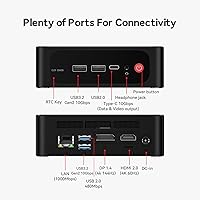
  • 2.5Gbps Ethernet is a thoughtful inclusion for users on fast home networks or NAS setups.
  • The unit runs quietly under typical office loads — fan noise is rarely noticeable during everyday use.
  • Windows 11 Pro comes pre-installed, saving the cost and hassle of a separate license.
  • The compact footprint frees up meaningful desk space without forcing performance compromises for most users.
  • Wi-Fi 6 and Bluetooth 5.2 keep wireless connectivity current and stable.

Cons

  • Sustained heavy CPU workloads trigger thermal throttling — performance can dip noticeably during long renders or compiles.
  • Some units require a manual BIOS adjustment to unlock full LPDDR5 memory speeds out of the box.
  • Stock thermal paste application quality has been inconsistent across units, affecting peak thermal performance.
  • The 500GB base storage fills up faster than expected if you work with large media files regularly.
  • Customer support response times vary — the lifetime support promise does not always translate to fast replies.
  • A small percentage of buyers have reported unit-to-unit quality variance, suggesting occasional production inconsistency.
  • No discrete GPU means this compact desktop cannot grow into a gaming or GPU-compute machine later.

Ratings

The scores below for the Beelink SER5 MAX 32GB 500GB Mini PC were generated by AI after analyzing thousands of verified global buyer reviews, with spam, incentivized, and bot-flagged submissions actively filtered out. Each category reflects the honest distribution of real user sentiment — strengths and frustrations weighted equally — so you get a clear picture of where this compact desktop genuinely delivers and where it falls short.

Everyday Performance
88%
For typical office and home use — browser sessions with 20-plus tabs, video calls, document editing, and light multitasking — users consistently describe the experience as fast and responsive. The Ryzen 7 6800H handles these scenarios with headroom to spare, and boot times on the NVMe SSD are routinely under 15 seconds.
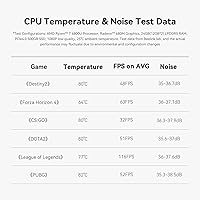
When workloads get heavier and sustained — think long compilation runs or extended video exports — performance noticeably drops as thermal throttling kicks in. The chip is capable, but the small enclosure limits how long it can maintain peak speeds under pressure.
Thermal Management
63%
37%
Under light-to-moderate workloads, the cooling system keeps temperatures in check and the fan stays quiet enough that most users forget it is there. For home office tasks, the thermal situation is genuinely non-intrusive the vast majority of the time.
Sustained heavy workloads expose the core limitation of fitting a 45W laptop chip into a compact chassis — the CPU throttles back after several minutes of continuous high load. Some buyers also note inconsistent thermal paste application from the factory, which exacerbates the issue on affected units.
Display Output
93%
Triple 4K output at 60Hz via HDMI, DisplayPort, and USB-C simultaneously is one of the most praised features in buyer feedback, particularly among traders, developers, and creative professionals running multi-monitor setups. Users report that all three outputs work reliably without needing driver workarounds.
A small number of users have encountered compatibility issues with certain older monitors or cheaper USB-C adapters, occasionally requiring a specific cable type to achieve stable 4K output on the third display. It is not a widespread problem, but worth knowing if your monitor lineup is older.
RAM & Memory Speed
79%
21%
The 32GB dual-channel LPDDR5 configuration is genuinely useful — buyers running virtual machines, editing timelines, or keeping large Photoshop documents open alongside other apps appreciate having the headroom. Real-world responsiveness reflects the dual-channel bandwidth well in most scenarios.
A recurring complaint is that the memory does not always run at its rated speed out of the box, requiring a manual BIOS adjustment to enable the EXPO profile. For non-technical buyers who do not know to look for this, the machine can quietly underperform for weeks before the issue is discovered.
Storage Performance
84%
The 500GB NVMe SSD delivers strong sequential read and write speeds that translate into fast app launches, quick file transfers, and snappy overall system responsiveness. Buyers upgrading from older SATA SSD machines are often surprised by the difference.
Five hundred gigabytes fills up faster than expected for users working with video projects or large photo libraries, and a few buyers report that real-world speeds land slightly below the marketed figures — not dramatically, but measurably in benchmark comparisons.
Integrated Graphics
72%
28%
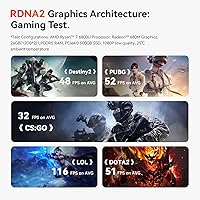
The AMD Radeon 680M is widely acknowledged as one of the strongest integrated GPUs available in a mini PC at this price point, outperforming Intel Iris Xe in most gaming and media workloads. Indie titles, older games, and hardware-accelerated video decoding all run comfortably.
The iGPU shares system memory and has real limits — modern AAA titles are largely unplayable at acceptable frame rates and settings. Buyers who bought this expecting meaningful gaming performance on newer titles have been consistently disappointed, and there is no upgrade path since there is no discrete GPU slot.
Connectivity
91%
The connectivity suite draws consistent praise — the 2.5Gbps Ethernet port is a standout inclusion for users on fast home networks, and Wi-Fi 6 delivers stable, high-throughput wireless in everyday use. USB 3.2 Gen 2 speeds are fast enough to make external SSD transfers genuinely quick.
A couple of buyers note the USB port count could be higher for a machine positioned as a desktop replacement, particularly given that a monitor mount or KVM setup can quickly consume available ports. There is no SD card reader, which content creators in particular find frustrating.
Build Quality
81%
19%
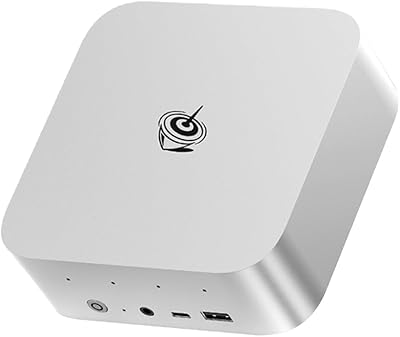
The chassis feels solid for its size and price tier — buyers consistently describe it as well-constructed with no flex, rattles, or cheap-feeling plastics. The compact black aluminum-plastic design looks professional enough to sit on a desk or mount behind a monitor without drawing negative attention.
Unit-to-unit consistency is not perfect — a small but notable segment of buyers have received units with uneven thermal paste application or slightly misaligned internal components. Quality control is generally good, but the variance is real enough to mention.
Setup Experience
86%
The majority of buyers report a genuinely simple out-of-the-box experience — plug in power and display, follow Windows 11 Pro setup, and the machine is ready within minutes. The included VESA bracket and HDMI cable reduce the accessories you need to source separately.
The BIOS adjustment needed for full RAM speed is an unintuitive friction point for less technical users, and a handful of buyers note that driver updates on first boot can take longer than expected. Nothing is broken, but it is not quite as frictionless as a consumer laptop setup.
Noise Level
85%
Under typical office workloads the fan is quiet enough that buyers working in silent home offices rarely mention it as a distraction. Compared to similarly specced mini PCs from competing brands, the SER5 MAX is considered a relatively quiet machine by most owners.
Under sustained heavy loads the fan spins up noticeably, and a few buyers describe the pitch as slightly high-frequency and more irritating than pure volume would suggest. It is not loud by any objective measure, but the tonal quality bothers some users in very quiet environments.
Value for Money
82%
18%
At its price point, the combination of a Ryzen 7 6800H, 32GB LPDDR5, NVMe storage, and triple 4K output is genuinely hard to match in a mini PC form factor. Most buyers who evaluated alternatives at the same budget conclude the SER5 MAX offers the best raw spec-per-dollar ratio in its category.
Buyers who encounter thermal throttling issues or quality control variance understandably feel the value proposition weakens if the machine cannot sustain its advertised performance. A few buyers feel the 500GB base storage is undersized for the price and wish the second M.2 slot came populated.
Software & OS
78%
22%
Windows 11 Pro arriving pre-installed and activated is a genuine value-add that buyers appreciate — it is ready for business use, domain joining, and BitLocker encryption without any extra purchase. The install is reasonably clean with minimal unwanted software pre-loaded.
A small number of users report that the initial Windows installation included some regional bloatware that required manual removal, and a few encountered driver instability on first boot before updates completed. Nothing catastrophic, but not as clean as a fresh Microsoft install.
Warranty & Support
67%
33%
The 30-day return window and lifetime technical support branding give buyers confidence at the point of purchase, and Beelink has a generally positive reputation for actually responding to hardware issues, especially compared to lesser-known mini PC brands.
Real-world support experiences are inconsistent — response times vary significantly depending on region and timing, and some buyers report waiting several days for replies on straightforward warranty questions. The lifetime support promise sounds strong in marketing but is not always matched in execution.

Suitable for:

The Beelink SER5 MAX 32GB 500GB Mini PC is a strong fit for anyone who needs genuine desktop performance without dedicating half their desk to a tower. Home office workers juggling video calls, spreadsheets, and browser-heavy research will find it more than capable, and the triple 4K display output makes it particularly appealing for anyone who relies on a multi-monitor setup — traders, developers, and analysts especially. Content creators doing light work in Premiere Pro or Photoshop will benefit from the fast RAM and hardware-accelerated GPU, as long as their projects stay on the lighter side. Students in tight living spaces get a real productivity machine without the bulk, and IT professionals looking for a quiet, low-power secondary workstation will find it fits that role well. Cloud gamers using GeForce NOW or Xbox Cloud Gaming will also get solid mileage out of this compact desktop, since the streaming does the heavy lifting.

Not suitable for:

The Beelink SER5 MAX 32GB 500GB Mini PC is not the right tool if your workloads are consistently demanding. The Ryzen 7 6800H is a laptop-class processor running inside a small enclosure, which means sustained tasks like long video renders, large compilation jobs, or extended 3D work will push it into thermal throttling territory — performance drops noticeably when the chip cannot shed heat fast enough. Dedicated GPU work is simply off the table here; this is integrated graphics only, so modern AAA gaming, GPU-accelerated machine learning, and serious 3D rendering are not realistic use cases. Buyers expecting plug-and-play RAM speeds at the full rated spec may need to make a BIOS adjustment first, which is a minor but real friction point for non-technical users. If you need a primary workstation for heavy creative production or engineering software, a desktop with a discrete GPU will serve you significantly better.

Specifications

  • Processor: AMD Ryzen 7 6800H with 8 cores and 16 threads, base clock of 2.7GHz boosting up to 4.7GHz under load.
  • RAM: 32GB LPDDR5 dual-channel memory configured as two 16GB modules running at 2000MHz.
  • Storage: 500GB M.2 2280 NVMe SSD handling the primary drive duties with fast PCIe interface speeds.
  • Expansion Slot: A second M.2 slot supports PCIe 4.0 drives up to 4TB, leaving meaningful room for a future storage upgrade.
  • Integrated GPU: AMD Radeon 680M with 12 compute cores running at up to 2200MHz, sharing system memory for graphics output.
  • Display Output: Three simultaneous 4K outputs at 60Hz are supported via one HDMI port, one DisplayPort, and one USB-C port.
  • Wired Network: A 2.5Gbps Ethernet port provides high-speed, low-latency wired connectivity for home networks or NAS access.
  • Wireless: Wi-Fi 6 (802.11ax) supports speeds up to 2.4Gbps on compatible routers, paired with Bluetooth 5.2 for peripherals.
  • USB Ports: The unit includes USB 3.2 Gen 2 ports running at 10Gbps alongside two USB 2.0 ports for legacy peripherals.
  • Operating System: Windows 11 Pro comes pre-installed and activated, ready for both personal and business use out of the box.
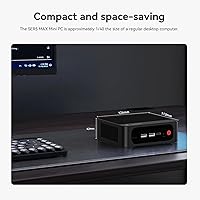
  • Dimensions: The chassis measures 6.26 x 5.71 x 3.82 inches, giving it a footprint similar to a thick hardcover book.
  • Weight: The unit weighs 2.46 pounds, making it easy to mount behind a monitor or relocate between workspaces.
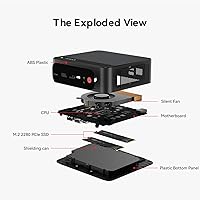
  • Cooling: Active cooling with an internal fan manages thermals, keeping noise low during typical office workloads.
  • Power: The system draws power via an external power brick, which is included in the box.
  • Certifications: The SER5 MAX carries FCC, CE, and RoHS certifications, confirming compliance with US, EU, and environmental standards.
  • Warranty: Beelink covers the unit with a 30-day return window and offers lifetime technical support for registered owners.

Related Reviews
Beelink SER5 MAX (24GB / 500GB)
81%
91%
Everyday Performance
88%
RAM & Memory Headroom
74%
Storage Performance
93%
Multi-Monitor & Display Output
69%
Thermal Management
More
Beelink SER5 MAX Mini PC
78%
83%
Performance
88%
Value for Money
91%
Display Versatility
62%
Thermal Management
86%
RAM & Upgradeability
More
Beelink SEI Mini PC (Ryzen 5500U, 16GB/500GB)
81%
84%
Everyday Performance
61%
RAM Configuration
91%
Display & Multi-Monitor Support
73%
Cooling & Thermal Management
88%
Networking
More
Beelink EQR6 32GB 500GB Mini PC
79%
86%
CPU Performance
83%
Value for Money
62%
Thermal Management
58%
Setup Experience
91%
Memory Capacity
More
Beelink SER5 Pro Mini PC (Ryzen 7 5825U, 32GB RAM, 1TB SSD)
80%
88%
Everyday Performance
61%
Thermal Management
91%
Value for Money
86%
Multi-Monitor Support
79%
Build Quality & Design
More
Beelink EQI13 Pro Mini PC
78%
91%
CPU Performance
83%
Value for Money
74%
Thermal Management
89%
RAM & Multitasking
88%
Port Selection
More
Beelink EQR6 6800H Mini PC
78%
88%
Processing Performance
84%
Value for Money
47%
RAM Flexibility
91%
Display & Output
61%
Gaming Capability
More
Beelink Mini S12 Pro (N100, 16GB, 500GB)
83%
83%
Everyday Performance
91%
Value for Money
76%
Build Quality & Design
84%
Thermal Management & Noise
88%
Connectivity & Ports
More
Beelink SER5 Pro (Ryzen 7 5825U, 16GB/500GB)
80%
88%
Everyday Performance
67%
Thermal Management
91%
Multi-Monitor Support
83%
Build Quality & Design
86%
Connectivity & Port Selection
More
Beelink SER9 Pro (32GB/1TB)
84%
93%
Processing Performance
91%
Multitasking & Responsiveness
84%
Build Quality & Design
67%
Thermal Management & Fan Noise
72%
Graphics & Display Output
More
Beelink EQI Mini PC i5-1235U 32GB RAM 1TB SSD
87%
88%
Performance
85%
Build Quality
92%
Value for Money
90%
Design/Size
81%
Thermals
More

FAQ

It genuinely supports three displays simultaneously — HDMI, DisplayPort, and USB-C all active at once, each capable of 4K at 60Hz. Most users setting up triple-monitor workstations report it working without any special configuration. Just make sure your monitors support the relevant input types or have appropriate adapters.

Sometimes, yes. Some units ship with the memory running below its rated speed by default, and you need to enter the BIOS and enable the EXPO profile to unlock the full LPDDR5 spec. It is a straightforward one-time adjustment, but it is worth knowing about upfront, especially if you notice the RAM reporting slower-than-expected speeds after first boot.

Under typical workloads — web browsing, office apps, video calls — the fan is barely noticeable. It spins up audibly when the CPU is pushed hard, like during a long video export or a game, but it is not disruptively loud. For desk use in a quiet room, most people find it acceptable.

It handles light gaming reasonably well — older titles, indie games, and 2D games all run fine, and the Radeon 680M is one of the stronger integrated GPUs available right now. Cloud gaming via services like GeForce NOW or Xbox Cloud Gaming works great since the GPU barely has to work. For modern AAA titles at high settings, though, you will hit a wall quickly — this is integrated graphics only, and there is no way to add a discrete GPU later.

Yes, and it is pretty straightforward. There is a second M.2 slot inside that supports PCIe 4.0 drives up to 4TB. Opening the unit involves removing a few screws, and Beelink's design is generally user-friendly for this kind of upgrade. No special tools are required beyond a small Phillips screwdriver.

Windows 11 Pro is pre-installed and activated — no separate purchase needed. This is a meaningful inclusion since a standalone Windows 11 Pro license carries a real cost, and having it ready to go saves both money and setup time.

For light-to-moderate editing — cutting together footage, color grading short clips, exporting 1080p or moderate 4K timelines — it performs well. The 32GB of RAM and fast NVMe SSD help a lot here. Where it starts to struggle is with long, complex 4K timelines or heavy effects stacks, where thermal throttling can slow things down during exports. It is a capable creative machine within realistic limits.

For most users, it is not a daily frustration — throttling only kicks in during sustained, heavy CPU loads that push the chip to its limits for extended periods. Normal office work, browsing, and even light creative tasks generally do not trigger it. Where you will notice it is in tasks like rendering a long video or running a CPU-heavy build process for more than a few minutes straight.

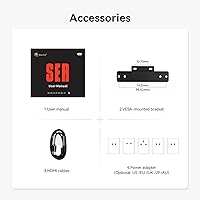
The unit ships with the mini PC itself, a power adapter, an HDMI cable, and a VESA mounting bracket so you can attach it to the back of a compatible monitor. The contents can vary slightly by region, but those are the standard inclusions.

It is a reasonable choice for lightweight home server duties — running a media server, a small NAS companion, or a low-traffic self-hosted app. The 32GB of RAM also gives it enough headroom to run a couple of virtual machines at once without everything grinding to a halt. Just do not expect it to handle a heavily loaded virtualization environment; the thermal ceiling will become a factor under sustained multi-VM workloads.

Where to Buy