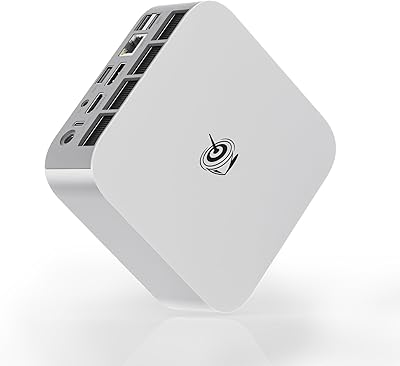
Overview

The Beelink SER9 Pro (32GB/1TB) sits firmly in the premium compact desktop category — this is not a budget curiosity but a legitimate workstation alternative built around AMD's latest high-performance silicon. Fitting genuine 12-core processing power into a chassis you can hold in one hand is the defining tension here, and Beelink pulls it off without obvious compromise. Professionals ditching tower PCs, home office workers reclaiming desk space, and light gamers all have reasons to look closely. The machine ships with a clean Windows 11 install — no crapware, no activation headaches — which matters more than it sounds at this price point. Just keep expectations grounded: the integrated Radeon graphics are capable, not a substitute for a dedicated GPU.
Features & Benefits

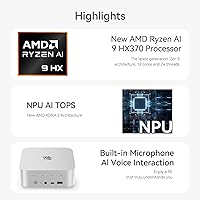
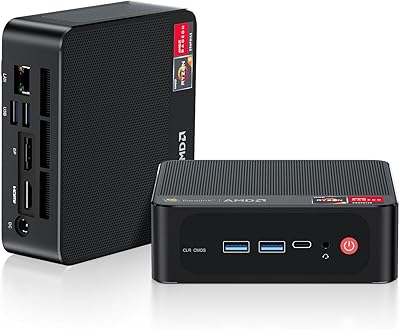
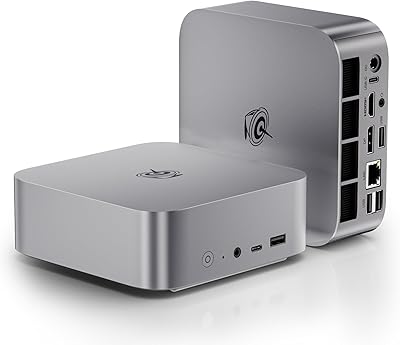
What the SER9 Pro does well starts with its processor — the Ryzen AI 9 HX 370 handles heavy multitasking without hesitation, and running a video export alongside a dozen browser tabs feels comfortable rather than strained. The 32GB LPDDR5X RAM operates in fast quad-channel configuration, which helps considerably, though it is soldered to the board. That is worth stating plainly: you cannot upgrade it later, so 32GB needs to be enough today and a few years out. Storage starts generous at 1TB on a fast PCIe 4.0 drive, with a second M.2 slot available if you need more room. The port selection — including USB4 and 2.5G Ethernet — is unusually complete for a machine this compact, and the built-in power supply keeps cable clutter to a minimum.

Best For

Beelink's compact desktop makes the most sense for people whose work demands real CPU headroom but whose desk — or patience for tower setups — does not. Remote workers managing heavy spreadsheets, video calls, and cloud apps will appreciate the responsiveness day to day. Developers, accountants, and traders who need to run three screens simultaneously are a natural fit given the triple display output built right in. Content creators handling photo editing or light video work will also get reasonable results from the integrated graphics and NPU capabilities. Pure gaming is where expectations need adjusting — older and less demanding titles run fine, but this is not a machine for high-settings AAA titles. Think capable workstation that handles casual gaming on the side.

User Feedback

Buyers who have spent time with the SER9 Pro tend to highlight two things quickly: snappy out-of-box performance and an unusually clean software experience. The no-bloatware setup earns consistent praise, and the generous port variety means most people do not need a hub or dock right away. On the other side, fan noise under sustained CPU load comes up with some regularity — not an issue at idle, but push it hard for extended periods and the cooling becomes audible. A smaller group of buyers flags concerns about soldered RAM aging well as software demands increase over time. Warranty and support feedback appears generally positive, though the review pool remains relatively modest given how recently this model reached the market.

Pros

  • Handles heavy multitasking — video calls, large spreadsheets, and background processes — without breaking a sweat.
  • Triple display output works natively, making three-monitor desk setups straightforward and dock-free.
  • Ships with a clean Windows 11 install and zero pre-loaded bloatware, which is rarer than it should be.
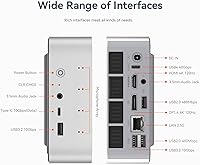
  • The port selection is exceptional for a machine this size — USB4, 2.5G Ethernet, and multiple USB 3.2 ports are all present.
  • Built-in power supply means no external brick cluttering your desk or bag.
  • Fast PCIe 4.0 NVMe storage keeps boot times short and application loads snappy.
  • A second M.2 slot lets you expand storage later without replacing the primary drive.
  • WiFi 6 delivers stable, fast wireless performance that holds up well in congested home network environments.
  • The compact chassis can be VESA-mounted behind a monitor, effectively disappearing from your desk entirely.
  • Lifetime technical support and a one-year warranty provide a reasonable safety net for a relatively new brand.

Cons

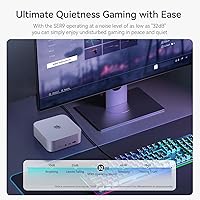
  • Fan noise under sustained CPU load is audible enough to be distracting in quiet home office environments.
  • The 32GB RAM is soldered and cannot be upgraded — what you buy is what you have for the life of the machine.
  • Integrated graphics hit a hard ceiling with modern AAA games; do not buy this expecting a capable gaming rig.
  • Thermal throttling under prolonged worst-case workloads has been flagged by a subset of buyers pushing the hardware hardest.
  • The USB-C data port does not support full Thunderbolt 4, limiting compatibility with certain high-bandwidth docks and enclosures.
  • SSD brand consistency varies between units, leading to some performance differences across the buyer community.
  • The disassembly process for accessing internals is fiddlier than competing designs, complicating even simple storage swaps.
  • Long-term warranty claim experiences are not yet well-documented given how recently this model launched.
  • No upgrade path for the GPU means graphics performance is permanently fixed at integrated Radeon capability.

Ratings

The Beelink SER9 Pro (32GB/1TB) scores below are generated by AI after analyzing verified buyer reviews collected globally, with spam, bot-submitted, and incentivized feedback actively filtered out. The result is an honest cross-section of real ownership experiences — covering everything buyers love about this compact powerhouse to the friction points that show up repeatedly in long-term use. Both the strengths and the frustrations are reflected as-is, without softening either side.
Processing Performance
93%
Buyers running demanding workflows — simultaneous video conferencing, large spreadsheets, and background cloud sync — consistently report that the SER9 Pro handles it all without hesitation. The 12-core architecture means even CPU-heavy tasks like code compilation or batch file processing finish noticeably faster than users expected from a machine this small.
Under prolonged full-load conditions, such as extended rendering jobs or sustained compilation runs, a small number of users observed performance dipping slightly as thermal limits are approached. It is not a dealbreaker for most workloads, but buyers expecting consistent peak output for hours-long CPU-intensive tasks should factor this in.
Multitasking & Responsiveness
91%
Day-to-day snappiness is one of the most praised qualities across buyer reviews — opening applications, switching between multiple browser profiles, and running productivity suites simultaneously all feel immediate. The fast quad-channel RAM plays a meaningful role here, and users upgrading from older systems frequently describe the responsiveness as a notable jump.
A handful of users note that with a very large number of simultaneous applications open — think 30-plus browser tabs alongside heavy editing tools — the system starts to feel the pressure. Given that the RAM cannot be expanded later, this ceiling is fixed, which is a legitimate concern for anyone whose workload tends to grow over time.
Build Quality & Design
84%
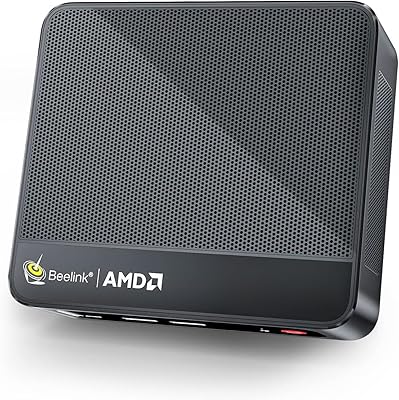
The chassis feels dense and solid for its size, with buyers noting that it does not flex or creak when handled. At just over three pounds, it is light enough to mount behind a monitor or tuck into a bag, yet the material quality reads closer to professional equipment than the plasticky budget mini PCs that dominated this space a few years ago.
Some buyers point out that the matte plastic finish attracts fingerprints and light scratches more readily than expected given the price tier. A few reviewers also wished the internal layout allowed for easier access if they ever needed to swap the SSD, describing the disassembly process as slightly fiddlier than competing designs.
Thermal Management & Fan Noise
67%
33%
During typical office use — web browsing, document editing, video calls — the SER9 Pro runs quietly and stays cool enough that most buyers forget the fan exists. Idle and light-load temperatures are well-managed, and the compact cooling solution is clearly tuned for the common-use cases this machine is marketed toward.
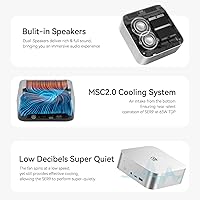
Fan noise under sustained heavy load is the most consistently mentioned criticism across reviews. Users running extended video exports or prolonged compiles describe the fan as noticeably audible, which can be distracting in quiet home office environments. Thermal throttling under worst-case conditions has also been flagged, though it appears to affect only a subset of buyers pushing the machine hardest.
Graphics & Display Output
72%
28%
The integrated Radeon 890M handles triple-monitor setups reliably, which is genuinely impressive for built-in graphics. Buyers using it for productivity across three screens — traders, developers, content monitors — report smooth desktop performance, and 4K output on at least one display works without issue for media consumption and standard applications.
Anyone expecting to run modern AAA games at high settings will be disappointed — the integrated GPU simply cannot compete with a dedicated card, and buyers who purchased with gaming ambitions tend to leave less satisfied reviews. Older and lighter titles run reasonably well, but this is not the machine for demanding 3D gaming, and the marketing language around gaming should be interpreted conservatively.
Memory Configuration
76%
24%
The 32GB LPDDR5X operating in quad-channel mode delivers noticeably higher bandwidth than older DDR4 mini PC configurations, which benefits both the CPU and the integrated GPU simultaneously. For current workloads — including light creative tasks, heavy multitasking, and running virtual machines — buyers find 32GB genuinely comfortable rather than just barely adequate.
The soldered RAM is a real constraint that several buyers flag in longer-term reviews. Unlike competing mini PCs where you can slot in more memory down the line, the SER9 Pro locks you into 32GB permanently. For most users today this is fine, but it introduces a ceiling that could become limiting as software demands increase over a three-to-five-year ownership window.
Storage Performance & Capacity
89%
The 1TB PCIe 4.0 NVMe drive delivers fast sequential read and write speeds that buyers notice in real use — OS boot times are short, large file transfers complete quickly, and application load times are minimal. The second M.2 slot means expanding storage later is straightforward, which gives buyers confidence that the machine will not feel cramped long-term.
A small number of users report that the included SSD brand varies between units, leading to some inconsistency in benchmark results across the community. While all included drives appear to be PCIe 4.0 compatible, buyers who care about specific drive performance characteristics may want to verify or replace the drive after purchase.
Port Selection & Connectivity
92%
This is one of the most praised aspects of the entire machine. Having USB4, multiple USB 3.2 ports, 2.5G Ethernet, and dual audio jacks on a device this small means most buyers never need a hub or dock — a genuine convenience that users upgrading from port-starved competitors appreciate immediately. WiFi 6 performance is consistently described as stable and fast.
A few users note that the USB-C data port does not support full Thunderbolt 4 features, which matters for those hoping to connect high-bandwidth external GPU enclosures or specific professional docking stations. The USB 2.0 ports also feel like legacy inclusions at this tier, though their presence at least ensures compatibility with older peripherals.
Setup Experience
88%
The out-of-box experience earns consistent praise — Windows 11 installs cleanly with no pre-loaded promotional software or trial subscriptions waiting to be dismissed. Buyers describe first boot as refreshingly straightforward, with the machine ready for real use within minutes rather than requiring the usual cleanup session that plagues many OEM systems.
A small subset of buyers encountered driver-related hiccups post-setup, particularly around display configuration when connecting three monitors simultaneously for the first time. These issues were generally resolved with a driver update, but first-time mini PC buyers may find the troubleshooting process slightly intimidating without prior experience.
Form Factor & Desk Footprint
94%
Buyers who switched from a full tower or even a mid-tower desktop consistently express genuine surprise at how little space the SER9 Pro consumes. The ability to mount it behind a monitor using a VESA bracket effectively makes it disappear from the desk entirely, which remote workers and home office users describe as transformative for their workspace.
The compact chassis does impose some trade-offs that buyers occasionally overlook before purchasing — there is no optical drive bay, no space for a full-size GPU, and limited internal upgrade paths beyond storage. For buyers with specific hardware expansion plans, the form factor is a constraint rather than a feature.
Power Efficiency
86%
Users running this machine all day in home office settings report meaningfully lower electricity consumption compared to their previous desktop setups, which adds up noticeably on monthly bills. The built-in power supply also eliminates the external brick found on many competing mini PCs, reducing cable clutter and making desk management cleaner.
Under sustained heavy workloads the power draw increases substantially, and a few technically-oriented buyers note that peak consumption is higher than the idle figures might suggest. This is not unusual for high-performance chips but is worth knowing for buyers in regions with high electricity costs who plan to run intensive tasks regularly.
Warranty & Customer Support
78%
22%
The one-year warranty combined with lifetime technical support is a meaningful commitment for a product in this category, and buyers who have contacted Beelink support generally describe response times as acceptable. The availability of English-language support is frequently called out positively by buyers outside of China who expected more friction.
The review pool for this specific model is still relatively limited given its recent market entry, so long-term warranty claim experiences are not yet widely documented. A handful of buyers mention that resolution timelines for hardware replacement requests can stretch longer than expected, particularly for international shipments.
Value for Money
81%
19%
Buyers who approach the SER9 Pro as a workstation replacement — rather than a gaming rig — generally conclude that the performance-per-dollar holds up well against comparable configurations from larger brands. The inclusion of fast RAM, a generous SSD, modern connectivity, and a bloat-free OS install contributes to a perception of genuine value.
At its asking price, the soldered RAM and integrated-only graphics do give some buyers pause, particularly when comparing against tower builds that offer more upgrade flexibility at similar cost. Buyers expecting desktop-class gaming performance may feel the value equation is less compelling than the specifications sheet initially suggests.

Suitable for:

The Beelink SER9 Pro (32GB/1TB) is built for people who need genuine workstation-class performance without dedicating a corner of their room to a tower PC. Remote workers juggling video calls, cloud applications, and heavy document workflows will find the processing headroom more than adequate for a full day of demanding office use. It is a particularly strong fit for multi-monitor power users — developers, financial analysts, traders, and designers who rely on three screens to stay productive will appreciate that the triple display output works out of the box without needing an adapter or a dock. Content creators handling photo editing, light video cuts, or AI-assisted tasks will also get solid results, especially as the onboard neural processing unit becomes more relevant in newer software. Anyone replacing an aging desktop who wants modern connectivity — fast Wi-Fi, 2.5G wired networking, USB4 — without the bulk or the cable mess of a traditional tower setup will feel right at home here.
Not suitable for:

If your primary motivation is gaming, the Beelink SER9 Pro (32GB/1TB) deserves a candid warning: the integrated Radeon graphics handle older and less demanding titles reasonably well, but modern AAA games at medium-to-high settings will expose the GPU ceiling quickly. Buyers who anticipate their workload growing significantly over the next few years should also pause — the 32GB RAM is soldered to the board and cannot be upgraded, which means you are committing to that ceiling permanently rather than having the option to expand later. Power users who regularly run sustained heavy workloads for hours at a stretch may find the fan noise intrusive in quiet environments, and thermal management under worst-case loads is not as composed as it is during typical daily use. Anyone who needs a dedicated graphics card for professional visualization, 3D rendering, or high-frame-rate gaming should look at a larger form factor that accommodates discrete GPU options.
Specifications

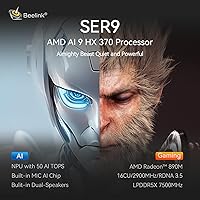
  • Processor: AMD Ryzen AI 9 HX 370 with 12 cores and 24 threads, boosting up to 5.1GHz for demanding multitasking and productivity workloads.
  • RAM: 32GB LPDDR5X operating in quad-channel configuration, soldered directly to the motherboard and not user-upgradable.
  • Storage: 1TB M.2 PCIe 4.0 NVMe SSD (2280 form factor) pre-installed, delivering fast read and write speeds for quick boot times and file transfers.
  • Storage Expansion: Two M.2 PCIe 4.0 slots are available, each supporting up to 4TB, allowing significant internal storage expansion without external drives.
  • Graphics: AMD Radeon 890M integrated graphics with 16 cores running at 2900MHz, capable of 4K output and light creative tasks but not intended for discrete GPU workloads.
  • Display Output: Supports simultaneous triple-display output via one DisplayPort, one HDMI, and one USB4 port.
  • Networking: WiFi 6 (802.11ax) and Bluetooth 5.2 for wireless connectivity, plus a 2.5G RJ45 Ethernet port for high-speed wired networking.
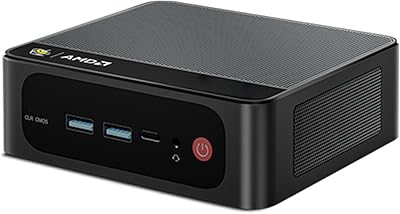
  • Ports: Full port selection includes USB4, two USB 3.2 ports, two USB 2.0 ports, one USB-C data port, and two 3.5mm audio jacks.
  • Operating System: Windows 11 Home pre-installed without third-party bloatware or trial software bundled in the factory image.
  • Power Supply: Power supply unit is built directly into the chassis, eliminating the need for an external power brick.
  • Dimensions: The unit measures 6.69 x 6.57 x 3.94 inches, making it compact enough to mount behind a monitor or fit inside a small shelf compartment.
  • Weight: The machine weighs approximately 3.23 pounds, light enough to transport or mount on a VESA arm without structural concerns.
  • Warranty: Covered by a one-year worry-free warranty alongside lifetime technical support provided directly by Beelink.
  • Bluetooth: Bluetooth 5.2 provides a stable, low-latency connection for peripherals such as wireless keyboards, mice, and headsets.
  • Audio: Two 3.5mm audio jacks are included — one for headphone output and one for microphone input — supporting standard analog audio peripherals.
  • VESA Compatibility: The chassis supports VESA mounting, allowing the unit to be attached directly to the back of a compatible monitor to clear desk space entirely.

Related Reviews

Beelink SER9 Mini PC Ryzen 7 2550U 32GB RAM 1TB SSD
85%
89%
Performance
92%
Value for Money
88%
Design & Build Quality
91%
Multitasking Capabilities
85%
Connectivity & Ports
More
Beelink SER5 Pro Mini PC (Ryzen 7 5825U, 32GB RAM, 1TB SSD)
80%
88%
Everyday Performance
61%
Thermal Management
91%
Value for Money
86%
Multi-Monitor Support
79%
Build Quality & Design
More
HP Pro Tower 290 G9 Desktop (i5-12500, 32GB RAM, 1TB SSD)
81%
96%
Multitasking Capability
91%
Value for Money
88%
Port Selection
84%
Thermal & Acoustic Performance
93%
Boot Speed & Storage
More
Beelink SER5 Pro (Ryzen 7 5825U, 16GB/500GB)
80%
88%
Everyday Performance
67%
Thermal Management
91%
Multi-Monitor Support
83%
Build Quality & Design
86%
Connectivity & Port Selection
More
Beelink EQI Mini PC i5-1235U 32GB RAM 1TB SSD
87%
88%
Performance
85%
Build Quality
92%
Value for Money
90%
Design/Size
81%
Thermals
More
Beelink EQR7 Mini PC, Ryzen 7 7735U, 32GB RAM, 1TB SSD
87%
94%
Performance
88%
Build Quality
91%
Setup and Installation
89%
Display Quality
85%
Wireless Connectivity
More
Beelink SER8 Mini PC, AMD Ryzen 7 8745HS, 32GB RAM, 1TB SSD
88%
91%
Performance
92%
Value for Money
86%
Usability
88%
Build Quality
90%
Cooling & Noise
More
Beelink SER8 Mini PC AMD Ryzen 7 8745HS 32GB RAM 1TB SSD
87%
91%
Performance
88%
Build Quality
84%
Cooling Efficiency
87%
Upgrade Flexibility
82%
Portability
More
Microsoft Surface Pro 9, 13-inch, Intel i7, 32GB RAM, 1TB SSD
87%
91%
Performance
93%
Display Quality
88%
Portability
85%
Battery Life
90%
Build Quality
More
Beelink EQR7 Mini PC, AMD Ryzen 7 7735U, 32GB RAM, 1TB SSD
88%
91%
Performance
89%
Value for Money
87%
Design & Build Quality
92%
Display Support (Dual 4K)
88%
Wireless Connectivity (WiFi 6, Bluetooth 5.2)
More

FAQ

It works exactly as advertised. The SER9 Pro supports three simultaneous displays using the DisplayPort, HDMI, and USB4 ports together. You do not need a dock or adapter — just plug all three monitors in directly and configure them through Windows display settings. Most buyers with triple-monitor setups report it works right out of the box.

You are locked into 32GB permanently — the memory is soldered to the board and cannot be swapped or expanded. For most productivity and office workloads today, 32GB is genuinely comfortable, but it is worth thinking about whether your needs might outgrow that over a three-to-five-year ownership period before committing.

During everyday tasks like browsing, video calls, and document work, the fan is barely noticeable. Under sustained heavy loads — extended video exports or prolonged compiles — it does become audibly louder and can be distracting in a quiet room. If your work involves hours-long CPU-intensive tasks, this is worth factoring into your decision.

Casual and older titles run fine, but the Beelink SER9 Pro (32GB/1TB) is not designed for demanding modern games. The integrated Radeon 890M graphics are capable by integrated standards, but they cannot match a dedicated GPU. If gaming is your primary use case, you will likely find the experience underwhelming at high settings on recent AAA titles.
Yes, there is a second M.2 PCIe 4.0 slot inside the unit that can accept a drive up to 4TB. Adding a second SSD is one of the few meaningful internal upgrades available on this machine, and it is a straightforward process if you are comfortable with basic PC hardware.

Windows 11 Home comes pre-installed and pre-activated — no separate license purchase needed. More importantly, the installation is clean with no bloatware or trial software bundled in, which is a genuine quality-of-life advantage compared to many OEM machines.

Almost certainly not. The port lineup here is unusually generous for this size of machine — USB4, multiple USB 3.2 ports, 2.5G Ethernet, and dual audio jacks cover most professional setups without any additional hardware. The main exception would be if you need Thunderbolt 4-specific features, since the USB-C port does not support full TB4.

A tower build at a similar price point can offer a dedicated GPU and fully upgradable RAM, which are real advantages if gaming or long-term expandability matter to you. Where Beelink's compact desktop wins is in modern connectivity, desk footprint, energy efficiency, and the convenience of a complete, ready-to-run system with no assembly required. It comes down to whether you value flexibility or convenience more.

That is exactly the workload this machine is built for. Running video conferencing alongside a browser with many tabs, a cloud sync client, and productivity apps simultaneously is comfortable territory here. Users in exactly this scenario consistently report smooth, responsive daily performance.

Beelink offers a one-year warranty and claims lifetime technical support, and English-language customer service is available. Buyer experiences with support are generally described as acceptable rather than exceptional — response times are reasonable, but hardware replacement logistics can take longer for international buyers. Given that this is a relatively recently launched model, long-term support track record is still limited.