Overview

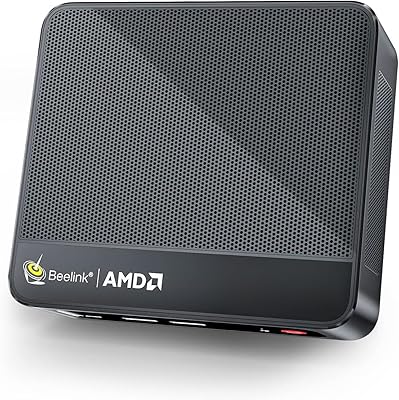
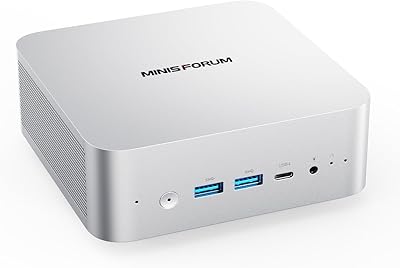
The Beelink EQI13 Pro Mini PC arrived in August 2024 as a genuinely capable palm-sized desktop, built around Intel's 13th-generation H-series silicon rather than the low-power N-series chips that flood this category. That distinction matters. H-series processors are designed for laptops that actually work hard, so dropping one into a box this small gives the EQI13 Pro a meaningful performance edge over most compact competitors. It ships with Windows 11 Pro already licensed and activated, which alone saves small business buyers a separate software purchase. The dual LAN ports and Wake-on-LAN support are genuinely uncommon at this size, making this mini PC worth a serious look for light server or network duties as well.
Features & Benefits

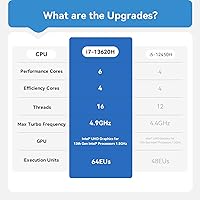
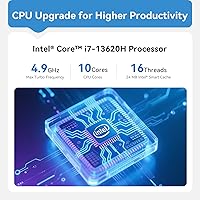
The i7-13620H offers 10-core performance in a chassis that fits under a monitor stand, hitting boost speeds up to 4.9 GHz when the workload demands it. Paired with 32GB of DDR4 RAM running in dual-channel mode, the EQI13 Pro handles browser-heavy workflows, video conferencing, and document processing without breaking a sweat. The PCIe 4.0 SSD keeps boot times short and file transfers quick, and a secondary M.2 slot is there if you need more room. Two HDMI ports push 4K at 60Hz simultaneously, which is genuinely useful for a dual-monitor desk. One caveat worth stating plainly: the integrated graphics are fine for video playback and everyday tasks, but this is not a machine for gaming or GPU-intensive rendering work.

Best For

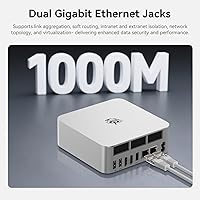
This compact desktop makes the most sense for people who need real processing power in a small space but have no need for a dedicated GPU. Remote workers juggling spreadsheets, video calls, and cloud applications will feel right at home. Home lab users will appreciate the dual Gigabit LAN, PXE boot, and Wake-on-LAN features, which open the door to lightweight server roles, network-attached storage, or pfSense routing. Students running Office, Zoom, and light photo editing should have no complaints either. It is also a reasonable pick for replacing a loud, bulky tower in a shared space, since the near-silent cooling keeps it unobtrusive on a shelf or tucked behind a monitor.

User Feedback

Buyers generally praise the snappy day-to-day performance and generous port selection, with many noting that dual LAN ports at this form factor are genuinely rare. Fan noise at idle is consistently described as almost imperceptible, though some report the fans spin up noticeably under sustained CPU load. A handful of users flagged that the shipped storage or RAM configuration occasionally differed from what the listing described — worth confirming at unboxing. On the support side, Beelink is a Chinese brand with a growing international presence; most buyers report responsive customer service, though the usual caveats about warranty logistics for overseas brands apply. Overall sentiment leans positive, with value-for-money cited most often.

Pros

  • The i7-13620H delivers real H-series CPU performance, not the watered-down N-series experience common in cheap mini PCs.
  • 32GB of dual-channel DDR4 RAM handles heavy multitasking without hesitation and can be expanded up to 96GB.
  • PCIe 4.0 SSD storage keeps boot times short and file operations fast in everyday use.
  • Dual HDMI ports support two 4K monitors at 60Hz simultaneously, a genuine productivity advantage.
  • Dual Gigabit LAN ports make the EQI13 Pro unusually capable for home lab, server, or network routing tasks.
  • Wake-on-LAN and PXE boot support open up lightweight server and remote-access use cases out of the box.
  • Fan noise sits near 32 dB at idle, making it genuinely unobtrusive in quiet rooms or shared workspaces.
  • Windows 11 Pro comes pre-installed and licensed, saving business buyers a separate software cost.
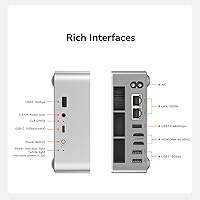
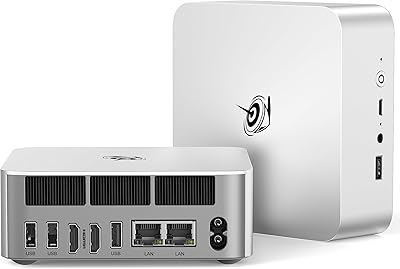
  • The port selection is generous: USB-C at 10 Gbps, three USB 3.0 ports, and a 3.5mm audio jack all included.
  • At roughly 5 inches square, this mini PC fits almost anywhere without dominating the workspace.

Cons

  • Integrated graphics hit a hard ceiling fast; do not expect smooth performance in games or GPU-heavy creative apps.
  • Some buyers have reported receiving units where the actual RAM or storage differed from the listed configuration.
  • Beelink is not well known in Western markets, and warranty service or returns can be slower than domestic brands.
  • Sustained CPU loads cause the fans to spin up noticeably, which may bother users in very quiet environments.
  • The 500GB base SSD fills up quickly for users storing large media libraries or working with video files.
  • There is no Thunderbolt port, which rules out eGPU enclosures or high-bandwidth peripheral connections.
  • The power brick adds external cable clutter that somewhat undercuts the clean, minimal desk setup appeal.
  • No DisplayPort output means users with DP-only monitors will need adapters, adding cost and potential compatibility headaches.

Ratings

Our AI rating engine analyzed verified global user reviews for the Beelink EQI13 Pro Mini PC, actively filtering out incentivized, bot-generated, and duplicate submissions to surface what real buyers actually experience. The scores below reflect a transparent synthesis of genuine praise and recurring frustrations across thousands of documented owner interactions. Both the standout strengths and the honest pain points are represented here without bias.

CPU Performance
91%
Owners consistently report that the i7-13620H punches well above expectations for a box this small, handling multi-tab browsing, video calls, spreadsheet work, and background app activity simultaneously without any perceptible lag. Users upgrading from N-series or older Core i5 mini PCs describe the difference as immediately noticeable in daily use.
Under prolonged heavy workloads — extended video exports or multi-threaded compilation tasks — the processor does throttle somewhat as thermals build up inside the compact chassis. Users expecting sustained peak performance over hours of intensive work may find the results less consistent than a full desktop with open airflow.
Value for Money
83%
Most buyers feel the combination of an H-series processor, 32GB of RAM, a PCIe 4.0 SSD, dual LAN, and a genuine Windows 11 Pro license represents solid value compared to alternatives that compromise on at least one of those areas. Home office users in particular cite the all-in cost as lower than assembling a comparable small-form-factor build themselves.
A portion of buyers feel the price sits at the upper edge of comfortable for a Beelink unit, especially given the brand carries less resale value and perceived reliability assurance than Dell or Lenovo at similar price points. If a unit requires warranty service, the total cost of ownership picture can shift unfavorably.
Thermal Management
74%
26%
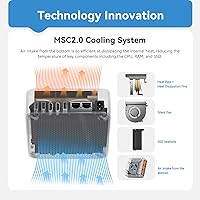
For typical office workloads, the MSC2.0 cooling system keeps the chassis comfortably cool to the touch and fan noise genuinely low — most users in standard home office environments report they forget the machine is running during calls or document work. The thermal solution is clearly engineered with the quiet-workspace buyer in mind.
When the CPU is pushed hard for extended periods, thermal throttling becomes a real factor, and the fan audibly ramps up in ways that can be distracting in very quiet rooms. A few owners have noted the bottom of the unit gets warm enough under sustained load that placement on a solid, ventilated surface matters more than it might seem.
RAM & Multitasking
89%
Thirty-two gigabytes in dual-channel mode gives this compact desktop a multitasking headroom that most competitors in its size class simply cannot match at stock configuration. Users running several virtual desktops, a video call, a browser with many tabs, and background sync tools simultaneously report smooth, responsive behavior throughout.
The DDR4 standard, while perfectly capable, is a generation behind DDR5 now appearing in competing platforms, which matters more for memory-bandwidth-sensitive workloads than general use. A small number of buyers also report that the advertised memory speed was not fully reflected in the BIOS settings on arrival, requiring a manual XMP profile adjustment.
Port Selection
88%
The port layout earns consistent praise from users who have tried other mini PCs and found themselves reaching for hubs immediately. Having USB-C at 10 Gbps, three full-speed USB 3.0 ports, dual LAN, and audio all accessible without adapters makes desk cable management much cleaner than most compact alternatives.
The absence of a Thunderbolt port is a meaningful gap for users who want to connect an eGPU enclosure or high-bandwidth docking station, and there is no DisplayPort output, which forces monitor shoppers to confirm HDMI compatibility before buying. A second USB-C port would also have made the rear I/O feel more future-ready.
Storage Performance
86%
The PCIe 4.0 SSD delivers noticeably quick boot times and responsive application launches, and owners migrating from SATA-based systems consistently remark on how much snappier the overall experience feels. The secondary M.2 slot is a genuinely useful provision for users who quickly outgrow the base 500GB.
Five hundred gigabytes fills up faster than many buyers anticipate, particularly those storing project files, local media, or virtual machine images. Installing a second drive requires opening the chassis, and a small number of users found the internal layout less straightforward to navigate than expected for a first-time upgrade.
Dual Display Support
82%
18%
Running two monitors at full 4K resolution simultaneously works reliably according to the majority of buyers, and productivity-focused users appreciate not needing a dock or splitter to achieve a proper dual-screen setup. Office workers who have moved from a single screen setup describe the dual 4K capability as a meaningful daily upgrade.
Both outputs are HDMI only, so users with DisplayPort monitors need adapters that add clutter and occasionally introduce compatibility quirks. A very small subset of buyers also reported that 4K 60Hz on both outputs simultaneously caused minor graphical stuttering in edge-case configurations, though this appears to be driver or cable related in most instances.
Integrated Graphics
58%
42%
For 4K video playback, streaming, and light photo editing, the integrated Intel graphics handle the job without issue, and users who primarily need a display-connected productivity machine will not feel underserved. Casual users who want to watch high-resolution content or do some light image work report a smooth experience.
Anyone expecting to game, do serious video rendering, or run GPU-accelerated creative software will hit a hard wall here, and the integrated graphics are simply not designed for those tasks regardless of how capable the CPU is. There is also some inconsistency in how the GPU is identified across system tools, which has created confusion among more technically curious buyers.
Noise Level
81%
19%
At idle and during light use, the EQI13 Pro is consistently described as nearly silent, making it a practical choice for bedroom desks, shared offices, or reception areas where a loud PC would be an obvious nuisance. Most users confirm it is far quieter than a conventional tower running equivalent workloads.
During CPU-intensive tasks, the fan ramps up to an audible level that some buyers in very quiet environments find intrusive. A handful of users report that even during moderate workloads — not just peak load — the fan cycling can be erratic, spinning up and down in a pattern that proves more distracting than a steady hum.
Build Quality
76%
24%
The chassis feels solid and purposefully constructed for its size, with a clean matte black finish that looks professional enough for a client-facing desk or open office environment. Most buyers describe the physical unit as better built than the price point would suggest from a lesser-known brand.
The all-plastic enclosure does flex slightly under hand pressure, and a few buyers note that the finish attracts fingerprints more than they would like. Compared to premium mini PCs from more established Western brands, the chassis tolerances and material feel stop short of feeling truly premium.
Setup & Out-of-Box Experience
79%
21%
Having Windows 11 Pro fully activated at first boot removes a frustrating step that buyers of some competing mini PCs have to navigate, and the initial setup process is described by most non-technical buyers as genuinely painless. The included accessories are functional and adequate for getting started immediately.
Some buyers report that BIOS settings on arrival are not fully optimized — RAM XMP profiles disabled, power limits set conservatively — which requires a degree of technical comfort to correct. The included documentation is sparse and not particularly helpful for users who want to configure server features like Wake-on-LAN or PXE boot without prior experience.
Networking & Connectivity
87%
Dual Gigabit LAN is a standout feature that home lab users and small business network administrators genuinely value, particularly since most competing mini PCs offer only a single port. WiFi 6 performance is rated positively by buyers in congested wireless environments, delivering stable throughput for video calls and cloud-based workflows.
A small number of buyers report that one of the two LAN ports showed intermittent connectivity issues out of the box, though this appears to be a minority experience rather than a systematic problem. WiFi antenna placement inside the compact chassis can result in slightly weaker signal in environments where the unit is tucked behind a monitor or inside a cabinet.
Brand Trust & Support
63%
37%
Buyers who have interacted with Beelink customer support generally describe responses as timely and willing to help troubleshoot remotely, and the brand has built a reasonable reputation within the dedicated mini PC enthusiast community over several product generations. Warranty documentation is provided and FCC, CE, and RoHS certifications lend some baseline assurance.
Beelink remains a largely unknown brand to general Western consumers, and the international warranty logistics mean that physical repairs or full unit replacements can take considerably longer than dealing with a domestic manufacturer. A recurring concern is the occasional gap between advertised specifications and what users find on the shipped unit, which erodes confidence at unboxing.
Expandability
78%
22%
The upgradeable SO-DIMM slots and a second M.2 slot give this machine genuine longevity for users willing to invest incrementally, and the ability to scale RAM up to 96GB is meaningful for power users who anticipate growing workloads over the coming years. The PCIe 4.0 secondary slot also future-proofs storage performance for high-speed drives.
Opening the chassis requires care and partially voids any protective stickers, which makes some buyers hesitant to self-upgrade even when they are technically capable. There is no Thunderbolt or external GPU option, so hardware upgrades are strictly limited to internal memory and storage — no path to meaningfully boosting graphics capability exists.
Spec Accuracy
61%
39%
The majority of buyers receive units that broadly match the listed configuration, and core specs like the processor model and RAM capacity are correct in most documented cases. For buyers who verify their system properties at unboxing, any discrepancies are typically caught early and addressed through support channels.
A consistent thread in negative reviews involves units shipped with storage or RAM that does not precisely match what the listing specified, and the product page itself contains internally inconsistent graphics descriptions that create pre-purchase confusion. Buyers should treat the listed specs as a starting point and verify each component on first boot rather than assuming accuracy.

Suitable for:

The Beelink EQI13 Pro Mini PC is a strong fit for anyone who needs genuine desktop-class performance without giving up precious desk space. Remote workers managing multiple browser tabs, video calls, and cloud-based tools will find the i7-13620H and 32GB of dual-channel RAM more than adequate for a full workday without slowdowns. Small business owners who want a tidy, professional-looking workstation, particularly in client-facing spaces like reception desks or shared offices, will appreciate how little room it occupies and how quietly it runs. Home lab enthusiasts are a natural audience too, since the dual Gigabit LAN, Wake-on-LAN, and PXE boot features are rarely bundled together at this size and price tier. Students and educators handling productivity software, video conferencing, and light photo or video work should have no real complaints, especially given that Windows 11 Pro comes pre-installed and ready to go.
Not suitable for:

The Beelink EQI13 Pro Mini PC is the wrong tool for anyone whose workload depends on a discrete GPU. Gaming, 3D rendering, machine learning inference, or serious video encoding will all expose the hard ceiling of integrated Intel graphics, and no amount of RAM or CPU speed will compensate for that missing hardware. Buyers expecting a plug-and-play experience with zero brand-support uncertainty should also think carefully, since Beelink, while reputable within the mini PC space, is less established in Western markets than Dell, HP, or Lenovo, and warranty logistics can be more complicated if something goes wrong. If your storage needs are immediate and substantial, the base 500GB SSD may feel tight right away, and while expansion is possible, it adds cost and effort. Finally, anyone running applications that demand ECC memory, Thunderbolt connectivity, or enterprise-grade remote management tools will find this compact desktop architecturally limited from the start.
Specifications

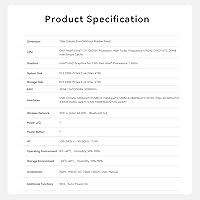
  • Processor: Intel Core i7-13620H, 13th-gen H-series, 10 cores and 16 threads with a boost clock up to 4.9 GHz.
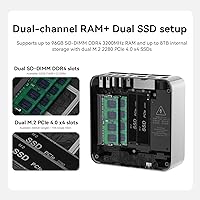
  • RAM: 32GB DDR4-3200 MHz in dual-channel configuration, expandable up to 96GB.
  • Storage: 500GB M.2 2280 PCIe 4.0 SSD included, with a secondary M.2 slot supporting up to 4TB additional storage.
  • Graphics: Intel integrated graphics (Iris Xe / UHD) with no discrete GPU; suitable for 4K video playback and everyday display tasks.
  • Display Output: Two HDMI ports supporting simultaneous 4K output at 60Hz per display.
  • Connectivity: WiFi 6 (802.11ax), Bluetooth 5.2, and two independent Gigabit Ethernet LAN ports.
  • USB Ports: One USB-C at 10 Gbps, three USB 3.0 ports at 10 Gbps each, and one USB 2.0 port at 480 Mbps.
  • Audio: Single 3.5mm combo audio jack for headphones or headset use.
  • Dimensions: 5.04 x 5.04 x 1.79 inches, making it one of the more compact H-series mini PCs available.
  • Weight: 2.31 pounds including the chassis, not accounting for the external power adapter.
  • Operating System: Windows 11 Pro comes pre-installed and fully licensed, ready for professional or business deployment.
  • Cooling System: MSC2.0 active cooling design maintains operating noise at approximately 32 dB under typical workloads.
  • Power Features: Supports Wake-on-LAN, PXE Boot, RTC Wake, and Auto Power On for remote or automated startup scenarios.
  • Certifications: Holds FCC, CE, and RoHS certifications, confirming compliance with major safety and environmental standards.
  • Memory Type: DDR4 SDRAM in SO-DIMM format with two slots, supporting dual-channel operation for improved bandwidth.
  • Chassis Color: Matte black finish with no visible branding on the top surface, giving it a clean, professional appearance.

Related Reviews

Beelink Mini S12 Pro (N100, 16GB, 500GB)
83%
83%
Everyday Performance
91%
Value for Money
76%
Build Quality & Design
84%
Thermal Management & Noise
88%
Connectivity & Ports
More
Beelink SER9 Pro (32GB/1TB)
84%
93%
Processing Performance
91%
Multitasking & Responsiveness
84%
Build Quality & Design
67%
Thermal Management & Fan Noise
72%
Graphics & Display Output
More
Beelink SER5 Pro Mini PC (Ryzen 7 5825U, 32GB RAM, 1TB SSD)

80%
88%
Everyday Performance
61%
Thermal Management
91%
Value for Money
86%
Multi-Monitor Support
79%
Build Quality & Design
More
Beelink ME Mini PC
Beelink ME Mini PC
87%
88%
Performance
91%
Connectivity
85%
Storage Expansion
95%
Power Efficiency
90%
Noise Levels
More
Beelink Mini S12 Mini PC
78%
88%
Value for Money
82%
Performance for Daily Tasks
79%
Build Quality & Design
91%
Dual Monitor Support
84%
Thermal Management & Noise
More
Beelink EQi13 Pro (32GB/500GB)
83%
88%
Processing Performance
91%
Memory & Multitasking
86%
Storage Speed & Expandability
74%
Thermal Management & Noise
93%
Networking Capabilities
More
GEEKOM AX8 Pro Mini PC
85%
90%
Performance
87%
Value for Money
83%
Build Quality
80%
Cooling System
92%
Portability/Size
More
MINISFORUM M1 Pro 125H Mini PC Barebone
79%
88%
Processing Performance
67%
GPU & Graphics Capability
91%
Build Quality & Chassis
93%
Connectivity & I/O
71%
OCuLink eGPU Support
More
Beelink SER5 Pro (Ryzen 7 5825U, 16GB/500GB)
80%
88%
Everyday Performance
67%
Thermal Management
91%
Multi-Monitor Support
83%
Build Quality & Design
86%
Connectivity & Port Selection
More
Beelink EQ14 Mini PC (N150, 16GB, 1TB)
74%
74%
Everyday Performance
61%
RAM & Memory Configuration
83%
Storage & Expandability
91%
Connectivity & Networking
79%
Display Output
More

FAQ

Yes, both HDMI ports support 4K at 60Hz simultaneously, so a proper dual-4K setup works out of the box. Just make sure your monitors have HDMI inputs that support 4K — older HDMI 1.4 displays will cap at 4K 30Hz, so it is worth checking your monitor specs before assuming full 60Hz on both screens.

The RAM is not soldered. The EQI13 Pro uses standard SO-DIMM slots, and with two slots available it can be upgraded up to 96GB total. If you ever find 32GB feeling tight — say, you start running virtual machines or keeping dozens of browser tabs open — swapping in larger sticks is straightforward.

At idle or during light tasks like web browsing and document work, most users describe it as nearly silent. Under sustained CPU load, the fan does spin up and becomes audible, though it stays well short of the kind of jet-engine noise some compact PCs produce. For a quiet bedroom or reception desk it is fine; in a recording environment you might notice it during intensive tasks.

It is genuinely well-suited for that. The dual Gigabit LAN ports, Wake-on-LAN, PXE boot, and RTC Wake support are features you normally have to go out of your way to find in a mini PC this size. Running something like pfSense, a NAS application, or a simple media server is entirely realistic here.

Yes, Windows 11 Pro comes pre-installed and the license is activated from the factory, so you do not need to purchase a separate key or go through any activation steps on first boot.

Light and older titles can run on the integrated Intel graphics, but you should set realistic expectations. Demanding modern games, titles that require a discrete GPU, or anything needing more than around 2GB of dedicated video memory will either run poorly or not at all. This compact desktop is not marketed as a gaming machine and should not be treated as one.

A small number of buyers have reported receiving units where the RAM or storage differed slightly from what was listed on the product page. It is a good habit to check the system properties on first boot and confirm the RAM amount, storage size, and Windows activation status all match what you ordered. If anything is off, contact Beelink support promptly.

Beelink is a Chinese manufacturer with a growing international presence, and most buyers report reasonably responsive email support. That said, if a unit needs physical repair or replacement, the logistics of shipping internationally can add time compared to dealing with a domestic brand. Keeping your purchase receipt and the barcode on the bottom of the unit will speed things up considerably if you ever need assistance.

Yes, there is a second M.2 slot inside the chassis that accepts drives up to 4TB, so doubling your storage is a realistic upgrade. You will need a standard M.2 2280 PCIe SSD and a small screwdriver to open the bottom panel — the process is not complicated, but it does void any seal stickers if present.

Absolutely — this is arguably the sweet spot for this machine. The i7-13620H handles video calls, screen sharing, and multiple open applications without any strain, and the 32GB of RAM means you are unlikely to hit memory pressure during a normal workday. The near-silent fan behavior at typical office workloads is a bonus in open-plan or shared spaces.