Overview

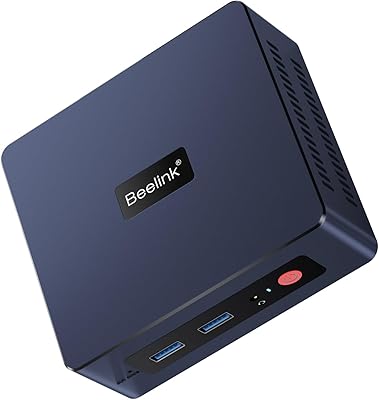
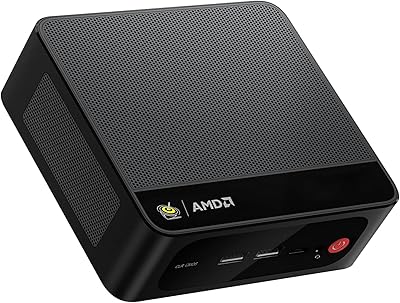
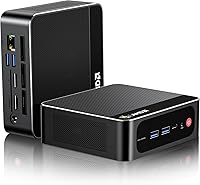
The Beelink SEI Mini PC (Ryzen 5500U, 16GB/500GB) is the kind of machine that makes you question why you ever tolerated a full-size tower eating up half your desk. Beelink has built a solid reputation in the mini PC space, and this model continues that trend — packing a capable mid-range processor into a chassis roughly the size of a thick paperback. At under two pounds, it sits unobtrusively on a desk or mounts behind a monitor without anyone noticing. Just don't mistake the small footprint for compromise: this is a genuine daily driver for productivity, browsing, and light media work — not a gaming machine, and it doesn't pretend to be.
Features & Benefits

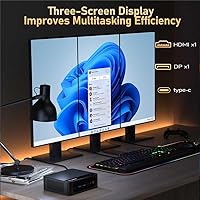
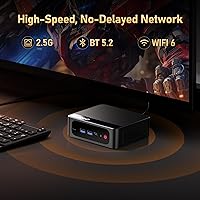
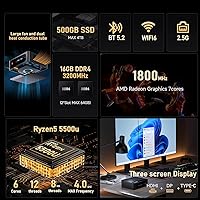
The Ryzen 5500U — six cores, twelve threads, boosting to 4.0GHz — handles the workloads most people actually run: dozens of browser tabs, video calls, spreadsheets, and light photo editing without breaking a sweat. What genuinely stands out is the triple 4K display support across HDMI 2.0, DisplayPort 1.4, and USB-C, which is rare at this price point. Networking is equally well-equipped, with Wi-Fi 6 and a 2.5G Ethernet port for fast wired and wireless connections. The USB ports run at Gen2 speeds, so transferring files to an external drive is actually quick. One honest caveat: the base config ships with RAM in single-channel mode, which noticeably limits integrated graphics performance until you add a second stick.

Best For

This compact desktop hits a sweet spot for a fairly specific type of buyer. Home office workers who want a clean, uncluttered desk without sacrificing real-world performance will find it fits naturally into that role. It also works well as a living room HTPC — quiet enough not to interrupt a film and capable enough for 4K streaming without issue. Students and educators get a solid machine for coursework and video calls at a reasonable outlay. Small businesses running digital signage or kiosk displays will appreciate the low power draw and triple display flexibility. VESA-mount it behind a monitor and you essentially have a hidden all-in-one that keeps the desk spotless.

User Feedback

Across a wide range of buyer reviews, a few consistent themes stand out. On the positive side, people frequently highlight fast boot times, impressively quiet fan noise under everyday use, and genuine appreciation for Windows 11 Pro arriving pre-installed — which many buyers note offsets a real portion of the cost. Setup is described as straightforward, and the included VESA mount gets specific praise. The most repeated criticism, however, is the single-channel RAM out of the box; buyers who upgraded to a matched pair reported noticeable responsiveness gains. A smaller number of users mentioned thermal throttling during sustained heavy workloads, though this appears to be the exception rather than a widespread pattern.

Pros

  • Ryzen 5500U handles everyday multitasking, video calls, and light editing without breaking a sweat.
  • Triple 4K display output at 60Hz is genuinely rare at this price point.
  • Wi-Fi 6 and 2.5G Ethernet give this mini PC networking headroom most competitors skip.
  • Windows 11 Pro arrives pre-activated — a real cost saving buyers consistently appreciate.
  • USB 3.2 Gen2 across most ports means external drive transfers are actually fast.
  • Near-silent fan operation under everyday workloads makes it ideal for quiet rooms.
  • Two SO-DIMM slots and a spare 2.5-inch SATA bay make future upgrades straightforward.
  • VESA mount and HDMI cable included in the box — most buyers are set up within minutes.
  • Compact footprint reclaims significant desk space compared to any traditional tower.
  • Stable long-term reliability reported by the majority of buyers past the six-month mark.

Cons

  • Ships with RAM in single-channel mode by default — a day-one performance limiter for integrated graphics.
  • Thermal throttling has been reported under sustained heavy CPU loads, particularly in warm environments.
  • 500GB fills up faster than expected once Windows, apps, and personal files accumulate.
  • Only one USB 2.0 port; buyers with multiple older peripherals will likely need a hub.
  • Plastic chassis shows light scratches over time with regular repositioning.
  • Pre-installed bloatware requires cleanup before the system feels properly configured.
  • Driving all three displays at 4K simultaneously can make desktop interaction feel sluggish.
  • No upgrade path for discrete graphics or PCIe expansion — hardware ceiling is fixed by design.
  • Fan audibly ramps up under heavy load, which stands out given how quiet it is at idle.
  • Some buyers reported occasional instability after extended heavy use beyond six months.

Ratings

The Beelink SEI Mini PC (Ryzen 5500U, 16GB/500GB) scores below reflect AI-synthesized analysis of verified global buyer reviews, with spam, bot-generated, and incentivized feedback actively filtered out. This compact desktop earned its ratings across real-world use cases — from home office desks to living room media setups — and both its genuine strengths and recurring pain points are represented honestly.
Everyday Performance
84%
For the workflows most buyers actually run — spreadsheets, video calls, web browsing with 20-plus tabs, and light photo editing — the Ryzen 5500U handles things without complaint. Users consistently note how responsive the machine feels compared to older Core i5 desktops it typically replaces.
Push it toward anything compute-intensive and sustained — long video exports, running a local server alongside other apps — and performance softens noticeably. It is not a bottleneck for daily work, but buyers expecting workstation-class output will be disappointed.
RAM Configuration
61%
39%
Sixteen gigabytes is a practical starting point for most office and home use, and having two SO-DIMM slots means upgrading to dual-channel or expanding capacity later is straightforward. Buyers who added a matching stick reported a clear jump in overall snappiness.
The base configuration ships with a single stick, leaving the memory bus running in single-channel mode — a known bottleneck for integrated graphics performance specifically. It is a frustrating default given how cheap RAM is, and several reviewers flagged this as the first thing they changed after unboxing.
Display & Multi-Monitor Support
91%
Triple 4K output at 60Hz from a machine this size is genuinely uncommon at this price tier. Home office users running a dual-monitor setup, and content creators who want a dedicated reference display alongside their main screen, get that flexibility without extra docks or adapters.
Driving all three displays simultaneously at 4K puts real pressure on the integrated GPU, and users report that desktop responsiveness can feel sluggish in that configuration. Most buyers are better served using two displays at 4K and the third at a lower resolution for secondary tasks.
Cooling & Thermal Management
73%
27%
Under typical daily workloads — browsing, streaming, office apps — the cooling system is impressively quiet. Most users running this as an HTPC or office machine report never noticing the fan at all during normal sessions, which matters a lot in a quiet living room or open-plan office.
Sustained heavy loads, like lengthy video encodes or extended gaming sessions, do push the CPU toward thermal throttling. It is not a widespread complaint, but enough buyers noted it under stress conditions that it is worth flagging if your workload regularly maxes out CPU resources for extended periods.
Networking
88%
The combination of Wi-Fi 6 and a 2.5G Ethernet port is a meaningful upgrade over what most mini PCs offer at this price. NAS users and anyone on a multi-gigabit home network will actually be able to use their infrastructure rather than being bottlenecked at the PC end.
A small number of users reported inconsistent Wi-Fi 6 performance in dense wireless environments, though this appears to be an edge case rather than a systematic issue. Ethernet performance was consistently praised with no notable complaints across reviews.
Storage Speed & Expandability
83%
The PCIe 4.0 NVMe SSD delivers fast read and write speeds that make the machine feel snappy from the moment Windows loads. The additional 2.5-inch SATA bay is a practical bonus for buyers who want to add a large secondary drive for media libraries or backups without relying on external storage.
Five hundred gigabytes fills up faster than most buyers anticipate once Windows, applications, and personal files accumulate. Those planning to store large video libraries or game installations locally should factor the cost of an additional drive into their decision from the start.
USB & Port Selection
86%
Running three Type-A ports at USB 3.2 Gen2 speeds means transferring a large file to an external SSD takes seconds, not minutes — a quality-of-life detail that budget machines often skip. The USB-C port handling both data and video output gives meaningful flexibility for modern peripherals and displays.
Only one USB 2.0 port rounds out the selection, and buyers with older peripherals like certain webcams or input devices sometimes find themselves needing a hub. The overall port count is reasonable for a machine this small, but it does require some planning for users with many wired peripherals.
Integrated Graphics
62%
38%
4K video playback is smooth and reliable, and the GPU handles light image editing in tools like Lightroom without painful lag. For an HTPC or a productivity machine that occasionally touches creative tasks, the integrated Radeon graphics does the job adequately.
Anyone expecting to run modern games at playable frame rates will be let down — this is firmly a 2D productivity and media GPU, not a gaming one. 3D rendering, GPU-accelerated workflows in video editing, and anything requiring dedicated VRAM are all firmly outside what this hardware can reasonably deliver.
Build Quality & Design
79%
21%
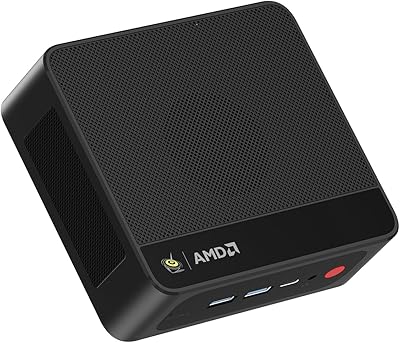
The chassis feels solid and purposeful rather than cheap, with a matte black finish that resists fingerprints and blends into most environments. At under two pounds, it is genuinely portable, and several users noted taking it between home and an office location without any hassle.
The plastic construction, while acceptable, does not feel premium when handled closely. A few buyers noted minor panel flex and reported that the external finish shows light scratches over time with regular repositioning — not a dealbreaker, but noticeable if you are comparing it to aluminum-chassis competitors.
Setup & Out-of-Box Experience
82%
18%
Windows 11 Pro arriving pre-activated is consistently highlighted as a genuine bonus — buyers appreciate not having to source or pay for a separate license. The included VESA mount and HDMI cable mean most users can have the machine up and running behind a monitor within minutes of opening the box.
Some users encountered pre-installed bloatware and a handful of third-party trial applications that needed cleaning up before the system felt fully their own. First-time PC builders occasionally found the BIOS defaults not optimized out of the box for performance, requiring a manual adjustment.
Noise Level
87%
Under light and moderate workloads, the Beelink SEI is close to silent in practical terms. Buyers using it in bedrooms, living rooms, or quiet office settings consistently praise how unobtrusive it is compared to traditional desktop towers or even some laptops under load.
Under heavy sustained loads the fan does ramp up audibly, which stands out precisely because the machine is so quiet the rest of the time. It is not objectively loud, but the contrast makes it more noticeable than you might expect.
Value for Money
85%
When you factor in the included Windows 11 Pro license, VESA mount, HDMI cable, and the genuine capability of the Ryzen 5500U platform, the overall package holds up well against alternatives at similar price points. Buyers routinely describe it as punching above its weight for everyday use cases.
The single-channel RAM default erodes some of that value proposition, since getting the best out of the integrated GPU requires a separate purchase on day one. Buyers who need to immediately add RAM and a larger drive should recalculate the true cost before committing.
Size & Portability
93%
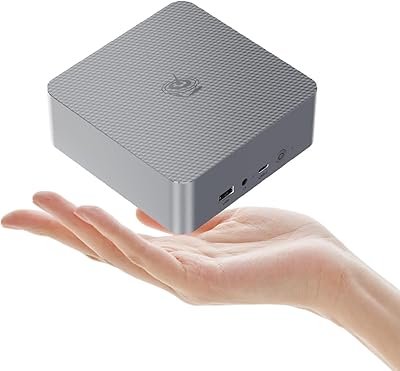
Fitting a functional Windows 11 Pro desktop into a 4.9 x 4.9 x 1.8-inch box is the whole point, and it genuinely delivers on that promise. Users who moved from a mid-tower to this compact desktop frequently describe the desk reclamation as a meaningful lifestyle upgrade.
The small footprint means internal upgrades beyond RAM and storage are simply not possible — no room for a discrete GPU, a second NVMe drive, or any expansion cards. Buyers who anticipate wanting more hardware flexibility down the line are better served by a larger form-factor machine.
Long-Term Reliability
74%
26%
Beelink has accumulated enough of a track record in the mini PC category that buyers are not purchasing from an unknown entity, and most user reports beyond the six-month mark describe consistent, stable operation without hardware degradation.
The thermal throttling behavior under sustained loads raises mild questions about long-term CPU health in warmer environments or poorly ventilated spaces. A small but notable number of longer-term reviewers reported occasional instability after six-plus months of heavy daily use, though this was far from the majority experience.

Suitable for:

The Beelink SEI Mini PC (Ryzen 5500U, 16GB/500GB) is a strong fit for anyone who needs a capable, quiet, space-saving desktop and whose daily workload stays within the bounds of productivity, communication, and light media. Home office workers tired of bulky towers cluttering their desks will find this compact desktop slots neatly into any workspace — and with VESA mounting, it can disappear behind a monitor entirely. Students and educators get a surprisingly well-equipped machine for coursework, video conferencing, and casual content creation without paying for hardware they will never use. HTPC enthusiasts who want smooth 4K streaming in the living room at near-silent noise levels will appreciate how unobtrusive the Beelink SEI is compared to a traditional PC. Small businesses running digital signage, point-of-sale terminals, or kiosk displays will value the low power draw, triple display flexibility, and the included Windows 11 Pro license that ships pre-activated. If your needs are grounded in real-world daily use rather than raw benchmark performance, this machine earns its place on the shortlist.
Not suitable for:

Buyers expecting any meaningful gaming capability should look elsewhere — the integrated AMD Radeon GPU handles 4K video and light creative tasks, but modern games at playable settings are firmly outside what this hardware can deliver. The same applies to GPU-accelerated creative workflows: if you regularly work with 3D rendering, heavy video encoding, or tools that lean on dedicated VRAM, the Beelink SEI Mini PC (Ryzen 5500U, 16GB/500GB) will frustrate you quickly. The base RAM configuration ships in single-channel mode, which measurably limits integrated graphics performance, so buyers who do not want to immediately open the machine and add a second stick are accepting a compromise that costs real-world responsiveness. Those who anticipate wanting to expand the hardware beyond RAM and storage — adding a discrete GPU or PCIe expansion — will find the form factor simply does not allow it. Power users running sustained, CPU-heavy workloads for hours at a stretch should also be aware of reported thermal throttling under those conditions. If your use case sits in any of these categories, a larger form-factor machine or a more powerful mini PC platform will serve you better.
Specifications

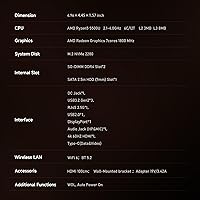
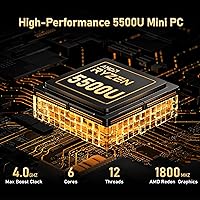
  • Processor: AMD Ryzen 5 5500U, 6-core/12-thread architecture, base clock 2.1GHz with boost up to 4.0GHz, built on a 7nm process node.
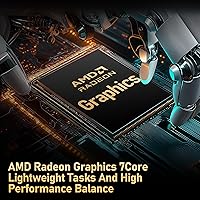
  • Graphics: AMD Radeon integrated graphics with 7 compute cores running at up to 1800MHz, supporting 4K output and light GPU-accelerated tasks.
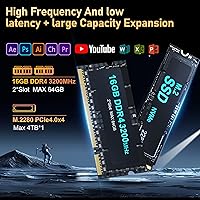
  • RAM: 16GB DDR4-3200MHz across one populated SO-DIMM slot, with a second slot available for expansion up to a maximum of 64GB.
  • Storage: 500GB M.2 2280 PCIe 4.0 x4 NVMe SSD for primary storage, with an additional internal 2.5-inch SATA bay supporting drives up to 7mm thickness.
  • Display Output: Three simultaneous 4K outputs via HDMI 2.0 (4K@60Hz), DisplayPort 1.4 (4K@60Hz), and USB-C (4K@60Hz).
  • Networking: 2.5G RJ45 Ethernet port, Wi-Fi 6 (802.11ax) with speeds up to 2400Mbps, and Bluetooth 5.2 for wireless peripherals.
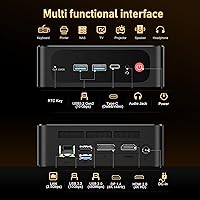
  • USB Ports: Three USB 3.2 Gen2 Type-A ports (10Gbps), one USB 3.2 Gen2 Type-C port (10Gbps, data and video), and one USB 2.0 Type-A port.
  • Audio: One 3.5mm combo jack supporting both headphone output and microphone input simultaneously.
  • Cooling System: Dual heat-pipe thermal design paired with a large-diameter low-speed fan to manage CPU and GPU thermals under sustained workloads.
  • Operating System: Windows 11 Pro (64-bit) arrives pre-installed and pre-activated, requiring no separate license purchase.
  • Dimensions: Approximately 4.9 x 4.9 x 1.8 inches (124 x 113 x 46mm), making it comparable in footprint to a thick hardcover book.
  • Weight: Approximately 1.94 pounds (880g) without peripherals or mounting hardware.
  • Power Input: Powered via a dedicated DC jack using the included US power adapter; exact wattage is not officially published but typical draw is under 65W at full load.
  • Cache: AMD Ryzen 5 5500U features 3MB of L2 cache and 8MB of L3 cache to support fast data access across multi-threaded workloads.
  • Wireless Standard: Wi-Fi 6 (802.11ax) operates on both 2.4GHz and 5GHz bands, providing improved performance in congested wireless environments compared to Wi-Fi 5.
  • VESA Compatibility: A VESA mount bracket with screws is included in the box, allowing the unit to be attached to the rear of compatible monitors or displays.
  • RAM Compatibility: Both SO-DIMM slots support DDR4 memory, with the populated slot running at 3200MHz; the system is compatible with DDR3L modules in the secondary slot if needed.
  • In the Box: Package includes the mini PC unit, VESA mount with screws, one 100cm HDMI cable, a US power adapter, and a printed user manual.
  • CMOS Reset: A dedicated CLR CMOS reset button is accessible on the rear panel for recovering BIOS settings without disassembling the unit.
  • Color & Finish: Matte black plastic chassis with a smooth finish designed to minimize visible fingerprints during everyday handling.

Related Reviews

Beelink SER3 Mini PC, AMD Ryzen 3 3200U, 16GB RAM, 500GB SSD
84%
85%
Performance
92%
Value for Money
88%
Build Quality
94%
Compact Design
90%
Ease of Setup
More
Beelink Mini S12 Pro (N100, 16GB, 500GB)
83%
83%
Everyday Performance
91%
Value for Money
76%
Build Quality & Design
84%
Thermal Management & Noise
88%
Connectivity & Ports
More
Beelink EQR6 Mini PC, AMD Ryzen 5 6600U, 32GB RAM, 500GB SSD
85%
88%
Performance
91%
Build Quality
92%
Value for Money
85%
Connectivity
73%
Ease of Setup
More
Beelink EQi12 Mini PC (i5-1235U, 16GB, 500GB)
80%
83%
Processing Performance
67%
Thermal Management
79%
RAM & Expandability
86%
Storage Speed & Flexibility
88%
Display Output
More
Beelink EQI12 Mini PC (i3-1220P, 16GB/500GB)
81%
84%
Everyday Performance
89%
Boot & Load Speed
71%
Thermal Management & Cooling
86%
Display & Dual Monitor Support
82%
Build Quality & Design
More
Beelink EQR6 Ai Mini PC, AMD Ryzen 7 6800H, 32GB RAM, 500GB SSD
86%
91%
Performance
89%
Value for Money
94%
Multitasking Capability
78%
Cooling System
96%
Compactness/Size
More
Beelink SER5 MAX (24GB / 500GB)
81%
91%
Everyday Performance
88%
RAM & Memory Headroom
74%
Storage Performance
93%
Multi-Monitor & Display Output
69%
Thermal Management
More
Beelink SER5 MAX Mini PC, AMD Ryzen 7 6800U, 24GB RAM, 500GB SSD
87%
91%
Performance
87%
Connectivity
89%
Value for Money
84%
Build Quality
88%
Cooling System
More
ACEMAGICIAN Kron Mini K1 Mini PC, Ryzen 7 7730U, 16GB RAM, 512GB SSD
85%
88%
Value for Money
91%
Performance for Everyday Tasks
94%
Compact Design & Portability
90%
Setup & Ease of Use
78%
Gaming Performance (Light)
More
Beelink EQ14 Mini PC (N150, 16GB, 1TB)
74%
74%
Everyday Performance
61%
RAM & Memory Configuration
83%
Storage & Expandability
91%
Connectivity & Networking
79%
Display Output
More

FAQ

The Beelink SEI Mini PC (Ryzen 5500U, 16GB/500GB) ships with Windows 11 Pro pre-installed and pre-activated, so you do not need to purchase or enter a separate product key. You can log in with a Microsoft account on first boot and get started right away.
Yes, all three display outputs — HDMI 2.0, DisplayPort 1.4, and USB-C — can drive separate screens simultaneously, each at up to 4K@60Hz. An HDMI cable is included in the box, but you will need to source a DisplayPort cable and a USB-C to DisplayPort or USB-C to HDMI adapter for the third screen depending on your monitor inputs.

That is correct and worth knowing before you buy. The unit ships with a single 16GB stick installed in one of the two SO-DIMM slots, which means the memory runs in single-channel mode. This is fine for general productivity but measurably limits integrated graphics performance. Adding a matching 16GB DDR4-3200 stick to the empty slot enables dual-channel mode and provides a noticeable boost, particularly for GPU-dependent tasks.

For most everyday workloads — browsing, video calls, office apps, and streaming — the fan is essentially inaudible. It only becomes noticeable when the CPU is pushed hard for an extended period, like a long video encode or running multiple demanding applications simultaneously. Most buyers using it as a home office machine or HTPC report never being bothered by fan noise during normal sessions.

Yes, there are two expansion options. The existing M.2 NVMe slot supports drives up to 4TB if you want to swap or supplement the included SSD. There is also a spare 2.5-inch SATA bay inside the chassis that accepts standard 7mm laptop hard drives or SSDs, which is a convenient way to add a large secondary drive for media or backups without replacing anything.

Honestly, not for modern titles. The integrated AMD Radeon GPU handles 4K video playback and light creative work well, but it lacks the horsepower for contemporary 3D games at playable frame rates. Older or less demanding games, indie titles, and emulation of older consoles are more realistic expectations. If gaming is a priority, a dedicated GPU in a larger machine is a better investment.

A VESA mount bracket and the necessary screws are included in the box, so no separate purchase is needed for standard monitor mounting. The bracket attaches to the rear of any VESA-compatible monitor or display and holds the unit securely. It is a clean way to keep your desk completely clear, and several buyers describe this as one of their favorite features.

The USB-C port on the Beelink SEI is specified for data transfer at 10Gbps and video output, but it is not a Power Delivery output port — meaning you cannot use it to charge a phone or power a laptop from this machine. It does support USB-C displays and external drives without issue.

It is genuinely well-suited for this role. The machine handles 4K streaming from services like Netflix and YouTube smoothly, the fan is quiet enough not to interrupt viewing, and the small footprint lets it sit discreetly on a media shelf or mount behind the TV with the included VESA bracket. Just note that a VESA TV mount typically requires a separate adapter, as TV hole patterns vary.

There is a dedicated CLR CMOS reset button on the rear panel of this compact desktop, which resets the BIOS to factory defaults without requiring you to open the unit or remove the CMOS battery. It is a straightforward fix for most firmware-related boot issues and a thoughtful inclusion on a machine aimed at non-technical buyers.